Short Examples
Here we look at a few short examples before later using libraries we develop and longer application style example programs with Ollama to solve more difficult problems.
Using The Ollama Python SDK with Image and Text Prompts
We saw an example of image processing in the last chapter using Ollama command line mode. Here we do the same thing using a short Python script that you can find in the file short_programs/Ollama_sdk_image_example.py:
 1 import ollama
 2 import base64
 3
 4 def analyze_image(image_path: str, prompt: str) -> str:
 5     # Read and encode the image
 6     with open(image_path, 'rb') as img_file:
 7         image_data = base64.b64encode(img_file.read()).decode('utf-8')
 8
 9     try:
10         # Create a stream of responses using the Ollama SDK
11         stream = ollama.generate(
12             model='llava:7b',
13             prompt=prompt,
14             images=[image_data],
15             stream=True
16         )
17
18         # Accumulate the response
19         full_response = ""
20         for chunk in stream:
21             if 'response' in chunk:
22                 full_response += chunk['response']
23
24         return full_response
25
26     except Exception as e:
27         return f"Error processing image: {str(e)}"
28
29 def main():
30     image_path = "data/sample.jpg"
31     prompt = "Please describe this image in detail, focusing on the actions of people in the picture."
32
33     result = analyze_image(image_path, prompt)
34     print("Analysis Result:")
35     print(result)
36
37 if __name__ == "__main__":
38     main()
The output may look like the following when you run this example:
1 Analysis Result:
2  The image appears to be a photograph taken inside a room that serves as a meeting or gaming space and capturing an indoor scene where five individuals are engaged in playing a tabletop card game. In the foreground, there is a table with a green surface and multiple items on it, including what looks like playing cards spread out in front of the people seated around it.
3
4 The room has a comfortable and homely feel, with elements like a potted plant in the background on the left, which suggests that this might be a living room or a similar space repurposed for a group activity.
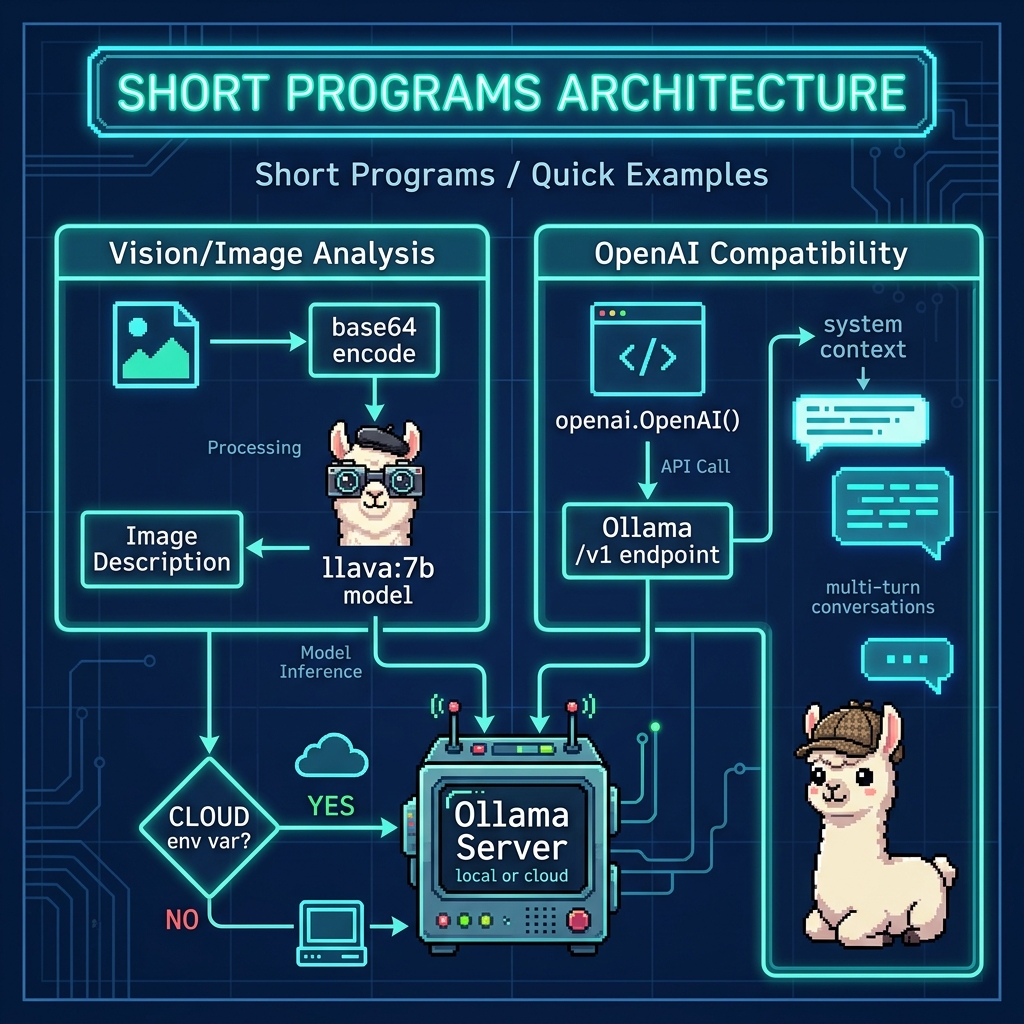
Using the OpenAI Compatibility APIs with Local Models Running on Ollama
If you frequently use the OpenAI APIs for either your own LLM projects or work projects, you might want to simply use the same SDK library from OpenAI but specify a local Ollama REST endpoint:
 1 import openai
 2 from typing import List, Dict
 3
 4 class OllamaClient:
 5     def __init__(self, base_url: str = "http://localhost:11434/v1"):
 6         self.client = openai.OpenAI(
 7             base_url=base_url,
 8             api_key="fake-key"  # Ollama doesn't require authentication locally
 9         )
10
11     def chat_with_context(
12         self,
13         system_context: str,
14         user_prompt: str,
15         model: str = "llama3.2:latest",
16         temperature: float = 0.7
17     ) -> str:
18         try:
19             messages = [
20                 {"role": "system", "content": system_context},
21                 {"role": "user", "content": user_prompt}
22             ]
23
24             response = self.client.chat.completions.create(
25                 model=model,
26                 messages=messages,
27                 temperature=temperature,
28                 stream=False
29             )
30
31             return response.choices[0].message.content
32
33         except Exception as e:
34             return f"Error: {str(e)}"
35
36     def chat_conversation(
37         self,
38         messages: List[Dict[str, str]],
39         model: str = "llama2"
40     ) -> str:
41         try:
42             response = self.client.chat.completions.create(
43                 model=model,
44                 messages=messages,
45                 stream=False
46             )
47
48             return response.choices[0].message.content
49
50         except Exception as e:
51             return f"Error: {str(e)}"
52
53 def main():
54     # Initialize the client
55     client = OllamaClient()
56
57     # Example 1: Single interaction with context
58     system_context = """You are a helpful AI assistant with expertise in
59     programming and technology. Provide clear, concise answers."""
60
61     user_prompt = "Explain the concept of recursion in programming."
62
63     response = client.chat_with_context(
64         system_context=system_context,
65         user_prompt=user_prompt,
66         model="llama3.2:latest",
67         temperature=0.7
68     )
69
70     print("Response with context:")
71     print(response)
72     print("\n" + "="*50 + "\n")
73
74     # Example 2: Multi-turn conversation
75     conversation = [
76         {"role": "system", "content": "You are a helpful AI assistant."},
77         {"role": "user", "content": "What is machine learning?"},
78         {"role": "assistant", "content": "Machine learning is a subset of AI that enables systems to learn from data."},
79         {"role": "user", "content": "Can you give me a simple example?"}
80     ]
81
82     response = client.chat_conversation(
83         messages=conversation,
84         model="llama3.2:latest"
85     )
86
87     print("Conversation response:")
88     print(response)
89
90 if __name__ == "__main__":
91     main()
The output might look like (following listing is edited for brevity):
 1 Response with context:
 2 Recursion is a fundamental concept in programming that allows a function or method to call itself repeatedly until it reaches a base case that stops the recursion.
 3
 4 **What is Recursion?**
 5
 6 In simple terms, recursion is a programming technique where a function invokes itself as a sub-procedure, repeating the same steps until it solves a problem ...
 7
 8 **Key Characteristics of Recursion:**
 9
10 1. **Base case**: A trivial case that stops the recursion.
11 2. **Recursive call**: The function calls itself with new input or parameters.
12 3. **Termination condition**: When the base case is reached, the recursion terminates.
13
14 **How Recursion Works:**
15
16 Here's an example to illustrate recursion:
17
18 Imagine you have a recursive function `factorial(n)` that calculates the factorial of a number `n`. The function works as follows:
19
20 1. If `n` is 0 or 1 (base case), return 1.
21 2. Otherwise, call itself with `n-1` as input and multiply the result by `n`.
22 3. Repeat step 2 until `n` reaches 0 or 1.
23
24 Here's a simple recursive implementation in Python ...
25
26 **Benefits of Recursion:**
27
28 Recursion offers several advantages:
29
30 * **Divide and Conquer**: Break down complex problems into smaller, more manageable sub-problems.
31 * **Elegant Code**: Recursive solutions can be concise and easy to understand.
32 * **Efficient**: Recursion can avoid explicit loops and reduce memory usage.
33 ...
34
35 In summary, recursion is a powerful technique that allows functions to call themselves repeatedly until they solve a problem. By understanding the basics of recursion and its applications, you can write more efficient and elegant code for complex problems.
36
37 ==================================================
38
39 Conversation response:
40 A simple example of machine learning is a spam filter.
41
42 Imagine we have a system that scans emails and identifies whether they are spam or not. The system learns to classify these emails as spam or not based on the following steps:
43
44 1. Initially, it receives a large number of labeled data points (e.g., 1000 emails), where some emails are marked as "spam" and others as "not spam".
45 2. The system analyzes these examples to identify patterns and features that distinguish spam emails from non-spam messages.
46 3. Once the patterns are identified, the system can use them to classify new, unseen email data (e.g., a new email) as either spam or not spam.
47
48 Over time, the system becomes increasingly accurate in its classification because it has learned from the examples and improvements have been made. This is essentially an example of supervised machine learning, where the system learns by being trained on labeled data.
In the next chapter we start developing tools that can be used for “function calling” with Ollama.
Optional Practice Problems
Streaming Image Descriptions to the Console. The
analyze_imagefunction inOllama_sdk_image_example.pyaccumulates the entire response before printing it. Modify the script so that each chunk is printed to the console as it arrives (i.e., token-by-token streaming output). Hint: replace the accumulation loop with a call toprint(..., end="", flush=True)inside thefor chunk in streamloop. Verify the behavior difference by running the modified script against a large image and observing the real-time output.Adding Streaming Support to the OpenAI Compatibility Client. The
OllamaClientclass inOpenAI_compatibility_example.pyalways setsstream=False. Add a new method calledchat_with_context_streamthat setsstream=Trueand yields each token as it arrives so the caller can iterate over partial results. Write a shortmainblock that calls your new method and prints tokens in real time, similar to howollama.generatestreams in the image example.Conversation History Manager. The multi-turn conversation example hard-codes the conversation list. Create a new class called
ConversationManagerthat wrapsOllamaClientand providesadd_user_message(text)andget_response()methods. Each call toget_response()should append the assistant’s reply to the internal message history so the next user message has full context. Test your manager by conducting a three-turn conversation about a topic of your choice and printing the entire history at the end.Temperature Experiment Report. Write a script that sends the same prompt to the
OllamaClient.chat_with_contextmethod five times, each time with a differenttemperaturevalue (for example 0.0, 0.25, 0.5, 0.75, and 1.0). Collect the responses and print them side-by-side (or sequentially with clear labels). In a comment at the top of your script, write two to three sentences describing how temperature affected the creativity and consistency of the outputs you observed.