Pydantic AI Experiments
In this chapter, we pivot from basic prompt engineering to the construction of autonomous, tool-augmented systems using the Pydantic AI library. Dear reader, you likely recognize the recurring challenge in software engineering: how to bridge the gap between non-deterministic, probabilistic outputs (LLMs) and deterministic, typed logic (Python functions). Pydantic AI addresses this head-on by treating the LLM not just as a text generator, but as a central reasoning engine capable of understanding structured metadata and making operational decisions. We will explore how to transform standard Python functions into discoverable “tools” using Pydantic’s powerful validation layer, ensuring that when an agent decides to interact with the real world—whether by checking the weather in Flagstaff or querying the DuckDuckGo API—it does so with strict type safety and predictable parameter extraction. By the end of these experiments, you will see how to build a unified workflow that remains infrastructure-agnostic, allowing you to toggle seamlessly between local Ollama instances and cloud-hosted OpenAI-compatible endpoints without refactoring your core agentic logic.
The examples for this chapter are in the directory PydanticToolUse.
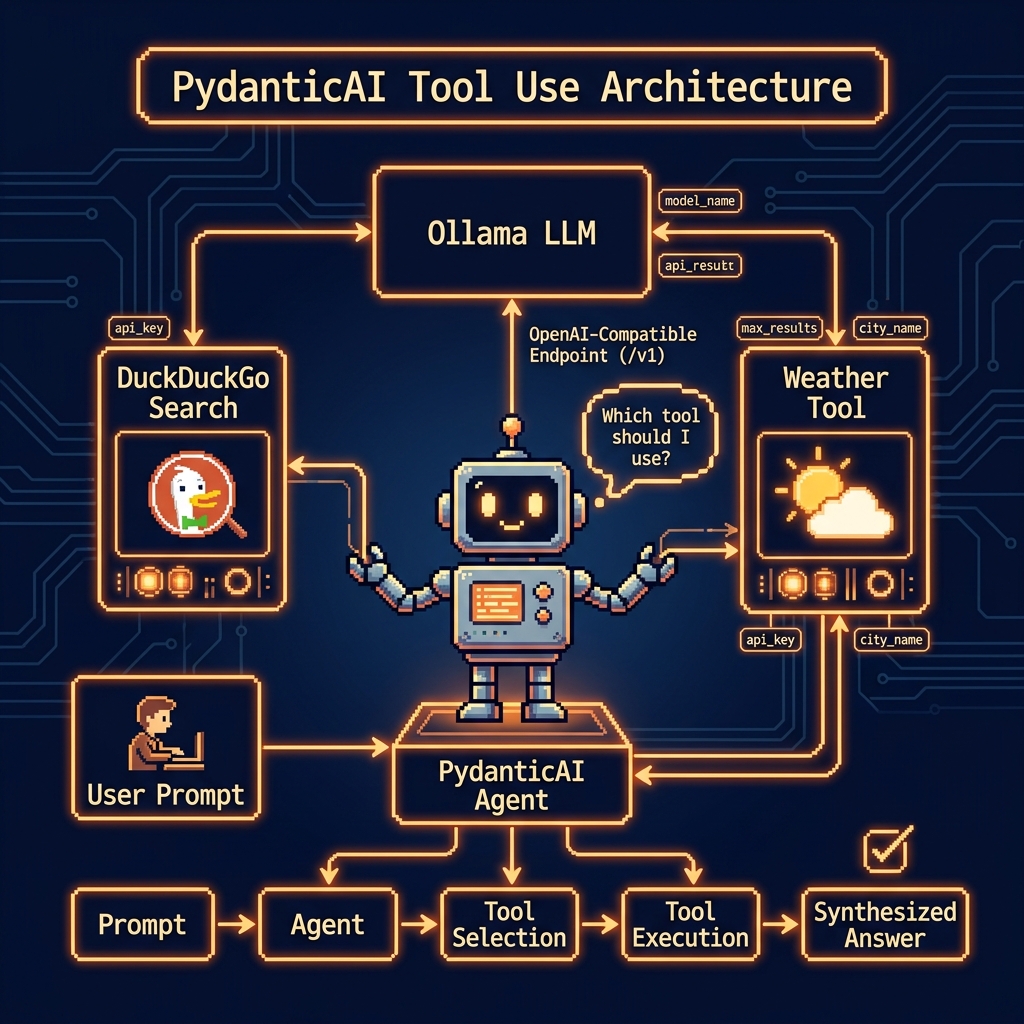
Weather Lookup Tool Use Example
This script demonstrates the integration of Pydantic AI with local or cloud-hosted Ollama models to create an extensible, tool-augmented agent. By leveraging the pydantic-ai library, the code establishes a structured workflow where a Python function, get_weather, is converted into a tool that the agent can autonomously decide to invoke based on user natural language queries. The implementation highlights a robust configuration pattern, utilizing environment variables to toggle between a local Ollama instance and a cloud-based OpenAI-compatible endpoint. This approach ensures that the agent remains agnostic to the underlying infrastructure while maintaining strict data validation and type safety through Pydantic’s BaseModel and Field definitions, ultimately providing a seamless bridge between unstructured LLM outputs and deterministic Python logic.
 1 import os
 2 import sys
 3 from pathlib import Path
 4 from pydantic import BaseModel, Field
 5 from pydantic_ai import Agent, ModelSettings
 6 from pydantic_ai.models.openai import OpenAIChatModel
 7 from pydantic_ai.providers.openai import OpenAIProvider
 8
 9 from typing import Literal
10
11 ROOT = Path(__file__).resolve().parents[1]
12 if str(ROOT) not in sys.path:
13     sys.path.insert(0, str(ROOT))
14
15 from ollama_config import get_model
16
17 # --- 1. Define the Tool ---
18 def get_weather(
19     location: str = Field(..., description="The city and state, e.g., San Francisco, CA"),
20     unit: Literal["celsius",
21                   "fahrenheit"] = Field("fahrenheit",
22                                         description="The unit of temperature"),
23 ) -> str:
24     """
25     Get the current weather for a specified location.
26     This is a stubbed function and will return a fixed value for demonstration.
27     """
28     print(f"--- Tool 'get_weather' called with location: '{location}' and unit: '{unit}' ---")
29     return f"The weather in {location} is 72 degrees {unit} and sunny."
30
31 # --- 2. Configure the AI Model (Ollama or Ollama Cloud) ---
32 if os.environ.get("CLOUD"):
33     # Use Ollama Cloud via OpenAI-compatible endpoint
34     api_key = os.environ.get("OLLAMA_API_KEY", "")
35     os.environ["OPENAI_API_KEY"] = api_key
36     ollama_provider = OpenAIProvider(base_url="https://ollama.com/v1")
37 else:
38     os.environ["OPENAI_API_KEY"] = "ollama"
39     ollama_provider = OpenAIProvider(base_url="http://localhost:11434/v1")
40
41 ollama_model = OpenAIChatModel(
42     get_model(),
43     provider=ollama_provider,
44     settings=ModelSettings(temperature=0.1)
45 )
46
47 # --- 3. Create the Agent ---
48 tools = [get_weather]
49 agent = Agent(ollama_model, tools=tools)
50
51 # --- 4. Run the Agent and Invoke the Tool ---
52 print("Querying the agent to get the weather in Flagstaff...\n")
53
54 response = agent.run_sync("What's the weather like in Flagstaff, AZ?")
55
56 print("\n--- Final Agent Response ---")
57 print(response)
58
59 # Example of using a different unit
60 print("\n\nQuerying the agent to get the weather in celsius...\n")
61 response_celsius = agent.run_sync("What is the weather in Paris in celsius?")
62
63 print("\n--- Final Agent Response (Celsius) ---")
64 print(response_celsius)
The core logic of this listing centers on the Agent class and its ability to perform function calling. By wrapping the get_weather function with specific parameter descriptions and type hints such as the Literal constraint for temperature units—the agent receives clear metadata that guides its decision-making process. When a user asks about the weather in a specific city, the agent identifies the matching tool, extracts the necessary arguments from the prompt, and executes the Python code. This “tool-use” loop is handled synchronously here via agent.run_sync, showing how LLMs can be transformed from simple text generators into active participants in a larger software ecosystem.
Beyond the tool definitions, the script illustrates a flexible model configuration strategy. It dynamically constructs an OpenAIChatModel using an OpenAIProvider, which redirects traffic to an Ollama compatible base URL. This allows developers to swap out heavy proprietary models for lightweight, local alternatives without changing the fundamental structure of their agentic logic. The use of ModelSettings to fix the temperature at 0.1 further ensures that the agent’s output remains consistent and predictable, which is essential when the goal is to trigger specific API calls or internal functions reliably across different execution environments.
Sample output looks like this:
 1 $ uv run tool_use_weather.py
 2 Querying the agent to get the weather in Flagstaff...
 3
 4 --- Tool 'get_weather' called with location: 'Flagstaff, AZ' and unit: 'fahrenheit' ---
 5
 6 --- Final Agent Response ---
 7 AgentRunResult(output='The weather in Flagstaff, AZ is currently **72°F** and **sunny**. Perfect weather for exploring the area! 🌞')
 8
 9
10 Querying the agent to get the weather in celsius...
11
12 --- Tool 'get_weather' called with location: 'Paris' and unit: 'celsius' ---
13
14 --- Final Agent Response (Celsius) ---
15 AgentRunResult(output='The current weather in Paris is **72 degrees Celsius** with sunny conditions. Let me know if you need further details! ☀️')
DuckDuckGo Search Summary Tool Example
This implementation demonstrates the creation of a functional AI agent using the Pydantic AI framework, specifically designed to bridge the gap between a Large Language Model and real-time external data. The script begins by establishing a robust environment, configuring pathing to incorporate local utilities like ollama_config and setting up a tool calling mechanism via the DuckDuckGo Instant Answer API. By defining a search_web function with clear type hints and docstrings, we provide the LLM with the metadata it needs to understand when and how to perform a web search. The configuration logic allows for seamless switching between a local Ollama instance and a cloud-based provider, ensuring that the OpenAIChatModel remains flexible across different deployment environments. Ultimately, the code initializes a pydantic_ai.Agent that can autonomously decide to fetch live data—in this case, the population of San Diego to supplement its internal training data with fresh, verified information.
 1 import os
 2 import sys
 3 from pathlib import Path
 4 import requests
 5 from pydantic import Field
 6 from pydantic_ai import Agent, ModelSettings
 7 from pydantic_ai.models.openai import OpenAIChatModel
 8 from pydantic_ai.providers.openai import OpenAIProvider
 9
10 ROOT = Path(__file__).resolve().parents[1]
11 if str(ROOT) not in sys.path:
12     sys.path.insert(0, str(ROOT))
13
14 from ollama_config import get_model
15
16 # --- 1. Define the Web Search Tool ---
17 # This tool uses the DuckDuckGo Instant Answer API to get a summary for a query.
18 # The docstring is crucial because it tells the LLM what the tool's capabilities are.
19 # The LLM will decide to use this tool when it needs information it doesn't have.
20
21 def search_web(query: str = Field(..., description="The search query to look up on the web.")):
22     """
23     Performs a DuckDuckGo search and returns a summary of the top result.
24     This tool is useful for finding real-time information like news, facts, or weather.
25     """
26     print(f"--- Tool 'search_web' called with query: '{query}' ---")
27     try:
28         url = "https://api.duckduckgo.com/"
29         params = {
30             "q": query,
31             "format": "json",
32             "no_html": 1,
33             "skip_disambig": 1,
34         }
35         response = requests.get(url, params=params)
36         response.raise_for_status()  # Raise an exception for bad status codes
37         data = response.json()
38
39         # The Instant Answer API returns different types of results.
40         # We'll prioritize the 'AbstractText' or 'Answer' fields.
41         summary = data.get("AbstractText") or data.get("Answer")
42
43         if summary:
44             summary = summary.replace('<b>', '').replace('</b>', '').replace('<i>', '').replace('</i>', '')
45             print(f"--- Search successful. Summary found. ---")
46             return summary
47         else:
48             print(f"--- Search completed, but no direct summary was found. ---")
49             return "No summary found for that query."
50
51     except requests.RequestException as e:
52         print(f"--- Error during web search: {e} ---")
53         return f"An error occurred while trying to search: {e}"
54
55
56 # --- 2. Configure the AI Model (Ollama or Ollama Cloud) ---
57 if os.environ.get("CLOUD"):
58     # Use Ollama Cloud via OpenAI-compatible endpoint
59     api_key = os.environ.get("OLLAMA_API_KEY", "")
60     os.environ["OPENAI_API_KEY"] = api_key
61     ollama_provider = OpenAIProvider(base_url="https://ollama.com/v1")
62 else:
63     os.environ["OPENAI_API_KEY"] = "ollama"  # Dummy key required by the provider interface
64     ollama_provider = OpenAIProvider(base_url="http://localhost:11434/v1")
65
66 ollama_model = OpenAIChatModel(
67     get_model(),
68     provider=ollama_provider,
69     settings=ModelSettings(temperature=0.1),  # Lower temperature for more reliable tool use
70 )
71
72
73 # --- 3. Create the Agent ---
74 agent = Agent(ollama_model, tools=[search_web])
75
76
77 # --- 4. Run the Agent to Find the Weather ---
78 prompt = "What is the population of San Diego?"
79 print(f"Querying the agent with prompt: '{prompt}'\n")
80
81 response = agent.run_sync(prompt)
82
83 print("\n--- Final Agent Response ---")
84 print(response)
The core strength of this script lies in its “tool-augmented” architecture. By passing the search_web function into the Agent constructor, the model is granted the agency to perform external HTTP requests when its internal knowledge is insufficient or potentially outdated. The use of ModelSettings with a low temperature of 0.1 is a deliberate choice to ensure high reliability and consistency in tool invocation, reducing the likelihood of the model “hallucinating” search parameters or failing to parse the API response correctly.
From a structural standpoint, the code highlights the portability of modern AI workflows through its environment-aware configuration. By checking for a CLOUD environment variable, the script dynamically adjusts its API keys and base URLs, allowing you, dear reader, to test locally with a self-hosted Ollama server or develop with the Ollama Cloud endpoint. The integration of Pydantic’s Field for parameter description ensures that the interface between the Python code and the LLM’s reasoning engine is strictly typed and self-documenting, which is a best practice for building maintainable AI agents.
Sample output looks like:
 1 $ uv run tool_duckduckgo_search.py
 2 Querying the agent with prompt: 'What is the population of San Diego?'
 3
 4 --- Tool 'search_web' called with query: 'population of San Diego' ---
 5 --- Search completed, but no direct summary was found. ---
 6 --- Tool 'search_web' called with query: 'population of San Diego 2023' ---
 7 --- Search completed, but no direct summary was found. ---
 8
 9 --- Final Agent Response ---
10 AgentRunResult(output='The population of San Diego is approximately 1.4 million as of the latest estimates. For the most accurate and up-to-date figure, I recommend checking official sources like the U.S. Census Bureau or city government statistics.')
Wrap Up for Pandantic AI Library
The experiments conducted in this chapter illustrate a significant shift in AI development: the move toward “Agentic Type Safety.” By leveraging the Pydantic AI library, we have successfully demonstrated that the inherent “fuzziness” of Large Language Models can be tamed and integrated into robust software architectures. Through the Weather Lookup and DuckDuckGo Search examples we saw how the library uses Python type hints and docstrings as a functional schema, allowing models to perform precise tool calls and handle real-time data retrieval with minimal friction. This marriage of Pydantic’s validation functionality with the reasoning capabilities of models, like those we run via Ollama, creates a developer experience that feels less like “prompting” and more like traditional API orchestration. As you move forward, the patterns established here like dynamic model configuration, environment-aware providers, and low-temperature settings for reliability will serve as a good basis for building production grade agents that are both extensible and maintainable within modern DevOps and production ecosystems.
Optional Practice Problems
Multi-City Weather Comparison. Extend the weather lookup example (
tool_use_weather.py) so that the agent can accept a list of multiple cities. Define a Pydantic response schemaWeatherComparisonthat contains a list of individual city forecasts and a field summarizing which city is the warmest or coldest.Web Search fallback. In
tool_duckduckgo_search.py, when a DuckDuckGo search completes but returns no direct summary (e.g. returns a list of result links), modify the search tool to fetch the actual web page content of the first result and return it to the agent so it can answer more accurately.Agentic Structured Entity Extraction. Create a script that uses Pydantic AI to parse unstructured text (such as news snippets or event descriptions) and return a structured Pydantic model containing a list of
Entityobjects, where each entity has aname,category(e.g., Person, Organization, Location), and a briefcontextstring.Dynamic Context Injection. Implement a Pydantic AI agent that utilizes the
RunContextfeature. Write a tool that accesses a mock user profile database, retrieving the user’s location or temperature unit preferences based on a user ID passed in via the run context, and use that preference to customize the agent’s output format automatically.