Chapter 8: Working with forms
Working with request parameters, view parameters and forms can be a real challenge for novices. Certain limitations are not very clear and usually they end up in total confusion that gives birth to bad practices and roundabout code. Some quick highlights of JSF forms in respect to request/view parameters are listed below:
- At initial request, the query string (the URL part after “?”) is parsed and the request parameters from the query string are stored in the request parameters map.
- At postbacks, these request parameters donʹt arrive in the request parameters map anymore since the query string, by default, does not participate in postbacks.
- View parameters can be a workaround to avoid losing the request parameter values that come via query strings (GET requests).
- For this, view parameters are initialized via query string using the
<f:viewParam/>tag nested in the<f:metadata/>tag and using the same parameter names. - A view parameter name matches a request parameter name from the query string, and this tells JSF that the view parameter value should be equal to that of the request parameter (this is the initialization of the view parameter).
- Further, the value of the view parameter can be converted, validated and passed in a managed bean property. Moreover, it is stored in state, which makes it available over postbacks and since view parameters are stateful – they need to be initialized only once.
- Nevertheless, do not conclude that view parameters can be initialized only via the query string.
- In fact, the main goal of view parameters is to provide support for creating bookmarkable URLs.
- View parameters can be included in the query string via the
includeViewParams="true"attribute in<p:link/>and<p:button/>and via theincludeViewParams=truerequest parameter in any URL. - Forms are the “stars” of JSF. They “shine” in JSF applications and everything “orbits” around them. Basically, they encapsulate POST requests meant to “transport” data from the client side to the server side and expect a response.
- These POST requests can use forward or redirect mechanisms.
- The parameters submitted via a POST request (user inputs/form parameters) are available programmatically via
getRequestParameterMap(), but most of the time we are referring to the managed beans properties that wrap these parameterʹs values. Moreover, this map may contain some extra request parameters that donʹt fit the managed bean properties. - Think of request parameters map as a temporary storage for the goodies (parameters) that HTTP brought during the current request. HTTP is stateless, so JSF needs to transfer the request content into managed beans and store/update managed beans instances in their scopes (e.g. request, session, application scope).
- The values of the parameters that donʹt fit the managed beans properties (“automatically” or programmatically) will be lost when the request parameter map is emptied (e.g. at each request).
Introducing OmniFaces Form component
OmniFaces provides a component named Form (exposed in page via the <o:form/> tag). This is an extension of JSF UIForm and provides additional attributes for attaching the request parameters, view parameters or the entire original request URI to the action
URL. In order to use <o:form/> simply add the OmniFaces namespace and replace the h from <h:form/> with o prefix.
Preserving query string over postbacks
JSF doesnʹt provide any support for preserving the query string over postbacks. But, the OmniFaces Form supports an attribute named includeRequestParams. This is a flag attribute indicating if the request parameters (all GET parameters) will be added in the action URL that will be rendered on the form. This will override the includeViewParams presented later. In order to see an example, let’s suppose that we have the following page that contains a link with three request parameters (index.xhtml):
<h:body>
 <p:link value="Ping Me!" outcome="ping.xhtml">
  <f:param name="phone" value="0732845714"/>
  <f:param name="payment" value="MASTERCARD"/>
  <f:param name="reversecharge" value="YES"/>
 </p:link>
</h:body>
When we press the Ping Me! link, we will fire a GET request that will load the ping.xhtml page:
&payment=MASTERCARD&reversecharge=YES
The ping.xhtml page is pretty simple and intuitive:
<p:panelGrid>
 Ping #{param.phone} for #{dataBean.name} #{dataBean.surname}!
 Payment: #{param.payment}
 Reverse Charge: #{param.reversecharge}

 <o:form id="pingFormId" includeRequestParams="true">
  <p:outputLabel for="nameId" value="Name:"/>
  <p:inputText id="nameId" value="#{dataBean.name}" />
  <p:outputLabel for="surnameId" value="Surname:"/>
  <p:inputText id="surnameId" value="#{dataBean.surname}" />

  <p:commandButton id="buttonPingId" value="Ping!" ajax="false"/>
 </o:form>
</p:panelGrid>
Notice the presence of <o:form/>. Each time you press the Ping! command button, you can see that the query string (?phone=0732845714&payment=MASTERCARD&reversecharge=YES) is preserved in the URL. By default, the JSF <h:form/> will loose the query string at first postback! This is not always desirable (see below the effect of a postback with <o:form/> and with <h:form/>):
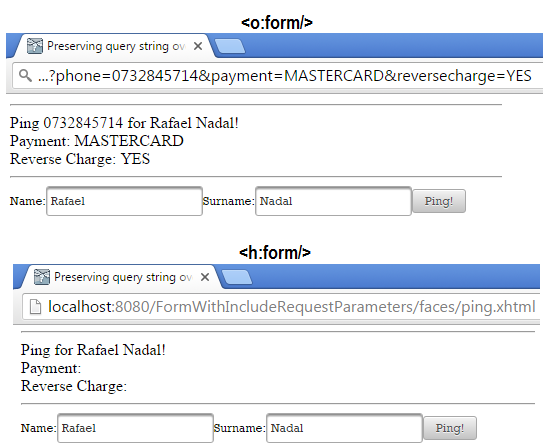
The complete application is named, FormWithIncludeRequestParameters.
Preserving view parameters over postbacks
JSF doesnʹt provide any support for preserving view parameters over postbacks via the forward mechanism (only for the redirect mechanism).
But, the OmniFaces Form supports an attribute named includeViewParams. This is a flag attribute indicating if the view parameters should be added to the action URL that will be rendered on the form. This is similar to how, the attribute of the same name can be used on the <p:link/> and <p:button/> components. In order to see an example, let’s suppose that we have the same index.xhtml page listed in the previous section. When we press the Ping Me! link, we fire a GET request that will load the ping.xhtml page: http://.../ping.xhtml?phone=0732845714&payment=MASTERCARD&reversecharge=YES. Only this time, we modify the ping.xhtml to support two view parameters, as below:
<f:metadata>
 <f:viewParam name="phone" value="#{dataBean.phone}"/>
 <f:viewParam name="prefix" value="005"/>
</f:metadata>
<h:body>
 <p:panelGrid>
  Ping #{param.phone} for #{dataBean.name} #{dataBean.surname}!
  Payment: #{param.payment}
  Reverse Charge: #{param.reversecharge}

  <o:form id="pingFormId" includeViewParams="true">
   <p:outputLabel for="nameId" value="Name:"/>
   <p:inputText id="nameId" value="#{dataBean.name}" />
   <p:outputLabel for="surnameId" value="Surname:"/>
   <p:inputText id="surnameId" value="#{dataBean.surname}" />

   <p:commandButton id="buttonPingId" value="Ping!" ajax="false"/>
  </o:form>
 </p:panelGrid>
</h:body>
Notice the presence of <o:form/> again. Each time you press the Ping! command button, you see the view parameters visible as request parameters in the query string (?phone=0732845714&prefix=005). So, the view parameters are preserved in the query string of the current request URL (postback). The request parameters that are not view parameters will be lost at first postback (e.g. payment and reversecharge).
By default, the JSF <h:form/> will lose the view parameters from the query string at first postback!
The complete application is named, FormWithIncludeViewParameters.
Quick look at useRequestURI attribute
The OmniFaces Form also supports an attribute named, useRequestURI. When this is set to true the entire original
request URI, including the URL (GET) parameters will be used. This will override the includeViewParams and includeRequestParams. This is particularly helpful when using URL rewriting with, for example, a custom rewrite filter or FacesViews. A good example is zeef.com, all subject pages are forwarded to /index.xhtml with the subject and curator name as special parameters, where the bean and template pick up from further. Using the default <h:form/>, it would still generate /index.xhtml as the action URL instead of the current request URI, which is particularly troublesome in non‐AJAX forms. The useRequestURI="true" is used all over the place in zeef.com (via a <z:form/> template).
Ignoring validation failures in <o:form/>
When we are using <o:form/>, we can also attach a tag handler that allows us to tell JSF to ignore validation failures when executing an UICommand action (e.g. <p:commandButton/>, <p:commandLink/>). This tag handler is named IgnoreValidationFailed and must be placed inside of an UICommand component (e.g. nested in <p:commandButton/>, <p:commandLink/>) via <o:ignoreValidationFailed/> tag. The parent of this UICommand must be <o:form/>; do not try to use it with <h:form/>!
The data model values will be updated only for components which have actually passed the validation. Also the validation messages will still be displayed. This tag handler practically suppresses the effect of the FacesContext#validationFailed() and the FacesContext#renderResponse() methods.
Below you can see a test case (you can have a non-AJAX request and also use custom validators):
<o:form id="formId">
 <h:panelGrid id="gridId" columns="1" cellpadding="2">

  <p:outputLabel for="nameId" value="Name:" />
  <p:inputText id="nameId" value="#{userBean.name}" required="true" />
  <p:message for="nameId"/>

  <p:outputLabel for="emailId" value="E-mail:" />
  <p:inputText id="emailId" value="#{userBean.email}" required="true" />
  <p:message for="emailId"/>

  <p:outputLabel for="phoneId" value="Phone:" />
  <p:inputText id="phoneId" value="#{userBean.phone}" required="true" />
  <p:message for="phoneId"/>

  Name: #{userBean.name} | E-mail: #{userBean.email} | Phone: #{userBean.phone}
 </h:panelGrid>

 <p:commandButton id="submitButtonId" value="Register" update="gridId">
  <o:ignoreValidationFailed />
 </p:commandButton>
</o:form>
Notice in the picture below that the name and e-mail were successfully passed into the data model even if the phone field caused a validation error. The validation error message is displayed, but the validation phase was successfully “passed” even if the validation failed:
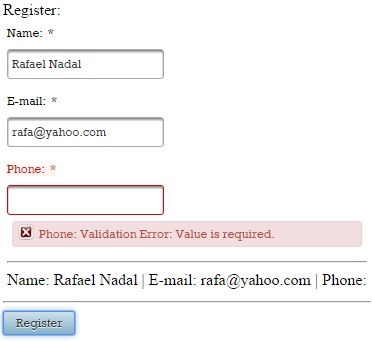
The complete application is named, PFWithIgnoreValidationFailed.