Chapter 10: Let’s convert data with PrimeFaces and OmniFaces
In this chapter, we will explore the facilities provided by PrimeFaces and OmniFaces for converting data. We start with a section about how to use Java enums in UISelectMany components, and continue with how to work with <f:selectitems/> conversion of the submitted strings to their values, how to convert selection components which work directly via a List, how to work with a converter in an iterating component (e.g. <p:dataTable/>) and how to pass through conversion only the modified values. Moreover, we will discuss converters dependency injection and introduce a bunch of built-in PrimeFaces converters and OmniFaces converter functions.
Using Java enums in UISelectMany components
In this chapter we will discuss using Java enums in PrimeFaces UISelectMany components like <p:selectManyCheckbox/>, <p:multiSelectListbox/>,
<p:selectManyButton/>, etc.Using an enum in UISelectMany components is not a usual day to day task, but it may be useful to have some basic knowledge about it. For example, letʹs say that you have an enum named, PlayerEnum, and you want to use it in an <p:selectManyCheckbox/>. If you bind the <p:selectManyCheckbox/> value to an array of PlayerEnum (PlayerEnum[]) then everything will work as expected, but if you bind it to a List of PlayerEnum (List<PlayerEnum>) then you may have some problems. Mainly, JSF/EL is not aware of the parameterized type of the List and will default to String. So, at some moment, it is very possible to try to operate over a String believing that it is actually a PlayerEnum, which will lead to ClassCastException. If you cannot simply rely on PlayerEnum[], then you must find a workaround to this, and you will most probably find out about JSF built‐in EnumConverter.
The EnumConverter can help you in such cases if you are willing to extend it and to specify the enum type during runtime. This will solve the problem, but if you have a “bunch” of enums then you need to write a new converter for each of them. Well, this is definitely not a good approach, and the idea of developing a generic converter should be the next plan. OmniFaces - has already resolved this, and the result is named GenericEnumConverter. This is a generic custom and it is available by converter ID, omnifaces.GenericEnumConverter. Just specify it in the converter attribute of the multi‐selection component holding <f:selectItems/>. So, we have an enum named, PlayerEnum and we use it in a <p:selectManyCheckbox/>, as below:
public enum PlayerEnum {

 FIRST, SECOND, THIRD;

 public Integer getRank() {
  switch (name()) {
   case "FIRST":
    return 1;
   case "SECOND":
    return 2;
   case "THIRD":
    return 3;
   default:
    return 0;
  }
 }
}
In order to use an enum, we first need to import it in to our page. This can be accomplish via OmniFaces <o:importConstants/> or via PrimeFaces Extensions, <pe:importEnum/>. More details about this topic are available in chapter Import constants, interfaces, enums and public static methods. So, you have to choose between:
<o:importConstants type="beans.PlayerEnum" />
// PrimeFaces Extensions
<pe:importEnum type="beans.PlayerEnum"
var="enumpf" allSuffix="ALL_ENUM_VALUES" />
Based on what you choose, you accordingly need to adjust the <f:selectItems/> value:
<h:form>
 <p:selectManyCheckbox value="#{playerBean.players}"
                       converter="omnifaces.GenericEnumConverter">
  <!-- for PrimeFaces Extensions usage -->
  <f:selectItems value="#{enumpf.ALL_ENUM_VALUES}" />
  <!-- for OmniFaces usage -->
  <f:selectItems value="#{PlayerEnum}" />
  <p:ajax update="selectedPlayers" />
 </p:selectManyCheckbox>
 <p>
  Selected:
  <p:panel id="selectedPlayers" style="width: 400px;">
   <ui:repeat value="#{playerBean.players}" var="item" varStatus="loop">
    #{item} (#{item['class'].simpleName})#{loop.last ? '' : ','}
   </ui:repeat>
  </p:panel>
 </p>
</h:form>
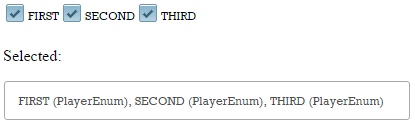
As you can see in the below figure the selected items are of type PlayerEnum as expected:
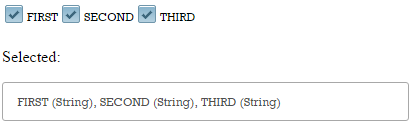
If you remove the omnifaces.GenericEnumConverter converter then you will see that items are considered of type String:
The complete application is named, GenericEnumConverter.
The <f:selectitems/> and the conversion of the submitted strings to their values
Usually, the <f:selectItems/> (or UISelectItems) is used in conjunction with the selection components (UISelectMany or UISelectOne), like <p:selectOneMenu/>, <p:selectManyListbox/>, <p:selectOneRadio/>, etc., to “populate” them with the list of selectable items (SelectItem instances). Typically, the value attribute of the <f:selectItems/> points to an array, a Collection or a map that “feeds” the selectable items with values (objects), which can directly, be instances of SelectItem or any other Java object (e.g. complex Java model objects (entities)), that will be encapsulated by JSF in SelectItem instances. In order to render each selectable item, JSF uses a string representation of the selectable item value (e.g. it may invoke the toString() method of the value (object)). Ideally, at postback, the selected/submitted strings should automatically be converted to the corresponding values.
While the rendering process of the selectable items works smoothly, the conversion of the submitted strings to their corresponding values can be accomplished only if we indicate a custom converter which may need to do the job based on possibly expensive service/DAO operations. This problem is resolved by OmniFaces, which provides a general custom converter capable of automatically converting the submitted strings to corresponding values based on the toString() implementation of those values. Moreover, OmniFaces provides an alternative to this approach, which will convert based, on the position of the submitted string (index) in the list of values (each value has an associated index, which is actually its position in the list). Both of them will be
presented in this section. First we need the base object (value), which can be the one listed below (Player):
public class Player implements Serializable {

 private static final long serialVersionUID = 1L;

 private Long id;
 private String name;
 private String residence;
 private int age;

 public Player(Long id, String name, String residence, int age) {
  this.id = id;
  this.name = name;
  this.residence = residence;
  this.age = age;
 }

 // getters and setters

 @Override
 public int hashCode() {
  // ...
 }

 @Override
 public boolean equals(Object obj) {
  // ...
 }

 @Override
 public String toString() {
  return id + "," + name + "," + residence + "," + age;
 }
}
Further, a managed bean contains a List<Player> (the Player instances from this List will “feed” the selectable items with values that the user will see as readable strings, as labels):
@Named
@ViewScoped
public class PlayerBean implements Serializable {

 private static final long serialVersionUID = 1L;

 private Player selected;
 // you can also use List<SelectItem> or SelectItem[]
 private List<Player> topfive;

 @PostConstruct
 public void init() {
  topfive = new ArrayList<>();
  topfive.add(new Player(1L, "NOVAK DJOKOVIC", "Monte-Carlo", 27));
  topfive.add(new Player(2L, "ROGER FEDERER", "Bottmingen", 33));
  topfive.add(new Player(3L, "ANDY MURRAY", "London", 27));
  topfive.add(new Player(4L, "MILOS RAONIC", "Monte Carlo", 24));
  topfive.add(new Player(5L, "TOMAS BERDYCH", "Monte Carlo", 29));
 }

 // getters and setters
}
Finally, we expose to the user the List<Player> via a selection component (e.g. <p:selectOneMenu/>):
<h:form>
 <p:messages id="msgs"/>
 <p:panelGrid columns="3">
  <p:outputLabel for="atpId" value="Players: " />
  <p:selectOneMenu id="atpId" value="#{playerBean.selected}">
   <f:selectItem itemLabel="Choose player" noSelectionOption="true" />
   <f:selectItems value="#{playerBean.topfive}" var="t"
                  itemLabel="#{t.name},#{t.age}" itemValue="#{t}" />
  </p:selectOneMenu>
  <p:commandButton value="Select" update="msgs :selectedId"/>
 </p:panelGrid>
</h:form>
Selected: <h:outputText id="selectedId"
                        value="#{playerBean.selected.name},
                               #{playerBean.selected.age}"/>
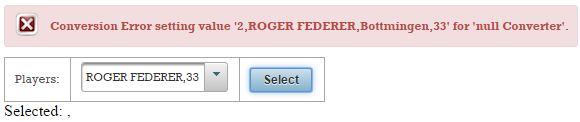
This will be rendered as expected but, if we select and submit a Player string representation, then an error will occur. This is a conversion error indicating that JSF cannot automatically convert the submitted string into the selected Player:
In order to fix this problem, we can write a custom converter. But, this means that for another type of entity (e.g. Coach) we will need another converter and so on. A more convenient approach consists of using the generic OmniFaces SelectItemsConverter. This converter is capable of automatically converting the submitted strings into the corresponding values (objects) based on the toString() implementation of these values (objects). As OmniFaces reveals, this converter can be used for different forms of the defining data to which SelectItems can bind, like List<ObjectInstances>, List<SelectItem>, SelectItem[], etc.
In order to use it, you have to keep in mind the following steps:
- This converter is available by converter ID
omnifaces.SelectItemsConverter. Just specify it in theconverterattribute of the selection component holding<f:selectItems/>. - Make sure you provide a good
toString()implementation. - Moreover provide a good implementation for
hashCode()andequals()methods.
We already have the Player entity witch has toString(), hashCode() and equals(), so all we need to do is to add the SelectItemsConverter in page:
<h:form>
 ...
 <p:selectOneMenu id="atpId" value="#{playerBean.selected}"
                  converter="omnifaces.SelectItemsConverter">
  <f:selectItem itemLabel="Choose player" noSelectionOption="true" />
  <f:selectItems value="#{playerBean.topfive}" var="t"
                 itemLabel="#{t.name},#{t.age}" itemValue="#{t}" />
 </p:selectOneMenu>
 ...
</h:form>
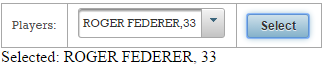
Now, instead of an error we will get something like in figure below:
The complete application is named, SelectItemsConvertertoString.
If you cannot provide an implementation of the toString() method (or you just donʹt need/want one), then extend the SelectItemsConverter and
override only the getAsString() method wherein the desired implementation is provided (you do not need to override the getAsObject() method). For example:
@FacesConverter("mySelectItemsConverter")
public class FooItemsConverter extends SelectItemsConverter {
 @Override
 public String getAsString(FacesContext context,
                                        UIComponent component, Object value){
  Long id = (value instanceof FooEntity) ? ((FooEntity) value).getId() : null;
  return (id != null) ? String.valueOf(id) : null;
 }
}
Of course the above snippet of code is just a skeleton that should be adjusted accordingly. For example, we can provide the below implementation in our case:
@FacesConverter("playerSelectItemsConverter")
public class PlayerSelectItemsConverter extends SelectItemsConverter {

 @Override
 public String getAsString(FacesContext context,
                                        UIComponent component, Object value) {
  if (value instanceof Player) {
      Long id = ((Player) value).getId();
      if (id != null) {
          String name = ((Player) value).getName();
          String residence = ((Player) value).getResidence();
          int age = ((Player) value).getAge();
          return id + "," + name + "," + residence + "," + age;
      }
  }
  return null;
 }
}
Furthermore, we need to add in page the playerSelectItemsConverter:
<h:form>
 ...
 <p:selectOneMenu id="atpId" value="#{playerBean.selected}"
                  converter="playerSelectItemsConverter">
  <f:selectItem itemLabel="Choose player" noSelectionOption="true" />
  <f:selectItems value="#{playerBean.topfive}" var="t"
                 itemLabel="#{t.name},#{t.age}" itemValue="#{t}" />
 </p:selectOneMenu>
 ...
</h:form>
The result will be the same as in the figure above and the complete application is named, SelectItemsConverterByExtension.
An alternative to SelectItemsConverter
An alternative to SelectItemsConverter is to switch to SelectItemsIndexConverter, which will convert based on the selected index (position) in the list of values instead of the Object#toString(). This can be used under the following circumstances:
- This converter is available via the converter ID,
omnifaces.SelectItemsIndexConverter. Just specify it in theconverterattribute of the selection component holding<f:selectItems/>. - There is no need to rely on
Object#toString()method of the object. - No need to extend the
SelectItemsConverterwhen theObject#toString()method of the object cannot be used. - There is no need to expose the objectʹs unique key in its
Object#toString().
So, we can quickly adjust our case as below:
<h:form>
 ...
 <p:selectOneMenu id="atpId" value="#{playerBean.selected}"
                  converter="omnifaces.SelectItemsIndexConverter">
  <f:selectItem itemLabel="Choose player" noSelectionOption="true" />
  <f:selectItems value="#{playerBean.topfive}" var="t"
                 itemLabel="#{t.name},#{t.age}" itemValue="#{t}" />
 </p:selectOneMenu>
 ...
</h:form>
The complete application is named, OFSelectItemsIndexConverter.
Converting selection components which work directly via a List
The SelectItemsConverter/SelectItemsIndexConverter presented earlier in this chapter are useful in conjunction with selection components which use SelectItems as the source for their selectable items. But, there are also selection components which work directly via a List of entities, like the PrimeFaces, <p:pickList/> and <p:autoComplete/>. For these kind of selection components, OmniFaces especially provides ListConverter and ListIndexConverter. Both of them can be used via <o:converter/> with converter ID omnifaces.ListConverter, respectively, omnifaces.ListIndexConverter.
Let’s see how things work, but before do that let’s point out the fact that the ListConverter automatically converts based on the Object#toString() of the selected item (so ensure that you provide a good implementation of toString()), while the ListIndexConverter converts based on the position (index) of the selected item in the list instead of the Object#toString() of the selected item. In both cases it is recommended to provide a good implementation for hashCode() and equals(). Remember from the above section that this is a JSF requirement and it is not specific to ListConverter/ListIndexConverter.
So, first we need the base object (value), which can be the one listed below (Player):
public class Player implements Serializable {

 private static final long serialVersionUID = 1L;

 private int rank;
 private String name;

 public Player(int rank, String name) {
  this.rank = rank;
  this.name = name;
 }

 // getters and setters

 @Override
 public int hashCode() {
  // ...
 }

 @Override
 public boolean equals(Object obj) {
  // ...
 }

 @Override
 public String toString() {
  return "Player{" + "rank=" + rank + ", name=" + name + '}';
 }
}
Further, a managed bean contains a List<Player> (the Player instances from this List will “feed” the selectable items with values that the user will see as readable strings, as labels):
@Named
@ViewScoped
public class PlayerBean implements Serializable {

 private static final long serialVersionUID = 1L;

 private List<Player> players;
 private DualListModel<Player> model;

 @PostConstruct
 public void init() {
  players = asList(
   new Player(8, "Tomas Berdych"),
   new Player(20, "Jurgen Melzer"),
   ...
  );

  model = new DualListModel<>(
          new ArrayList<>(players),
          new ArrayList<Player>()
  );
 }

 public List<Player> getPlayers() {
  return players;
 }

 public DualListModel<Player> getModel() {
  return model;
 }

 public void setModel(DualListModel<Player> model) {
  this.model = model;
 }
}
Finally, we expose to the user the List<Player> via a selection component that uses List (e.g. <p:pickList/>):
<h:form>
 <p:messages id="msgs"/>
 <p:pickList id="playersList" value="#{playerBean.model}" var="t"
             itemLabel="#{t.rank}.#{t.name}" itemValue="#{t}">
 </p:pickList>
 <p:commandButton value="Submit"
                  update="msgs :selectedPlayersId" style="margin-top:5px" />
</h:form>
<p:panel id="selectedPlayersId" style="width: 435px; margin-top: 5px;">
 <strong>Selected players:</strong><br/>
 <ui:repeat value="#{playerBean.model.target}" var="item">
  <h:outputText value="#{item.rank}.#{item.name}" style="margin-right:5px" />
  <br/>
 </ui:repeat>
</p:panel>
This will be rendered as expected, but, if we select and submit a Player string representation, then an error will occur. In this case, the error will be Caused by: javax.el.PropertyNotFoundException: The class 'java.lang.String' does not have the property 'rank'. This reveals the fact that the submitted string is still a string … which is not desirable!
In order to fix this problem, we can write a custom converter. But, this means that for another type of entity (e.g. Coach) we will need another converter and so on. An easy approach consists of using the OmniFaces ListConverter via <o:converter/> as below:
<p:pickList id="playersList" value="#{playerBean.model}" var="t"
itemLabel="#{t.rank}.#{t.name}" itemValue="#{t}">
<o:converter converterId="omnifaces.ListConverter"
list="#{playerBean.players}" />
</p:pickList>
...
Or, if you don’t want/need to provide a good implementation to toString() method then you can rely on the ListIndexConverter as below:
<p:pickList id="playersList" value="#{playerBean.model}" var="t"
itemLabel="#{t.rank}.#{t.name}" itemValue="#{t}">
<o:converter converterId="omnifaces.ListIndexConverter"
list="#{playerBean.players}" />
</p:pickList>
...
In both cases, a possible result will look like in the figure below:
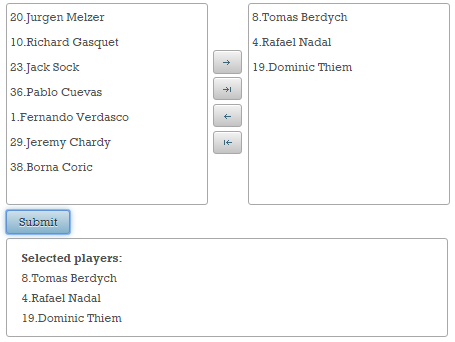
The complete applications are named OFListConveter, respectively OFListIndexConverter.
Working with a converter in an iterating component (e.g. <p:dataTable/>)
Since <f:convertXxx>/<f:converter> are tag handlers, they are evaluated during construction/restoration of the component tree (in the Restore View phase). This means that the attributes of tag handlers are evaluated during view build time. On the other hand, UIComponents are executed during view render time (in the Render Response phase). This means that the attributes of UIComponents are evaluated during view render time. So, JSF converters and UIComponents do run at the same time, and their attributes are not evaluated at the same time, at least not the ones we want to discuss in this section (e.g. the id and binding attributes of UIComponents are evaluated during view build time, but are not relevant here).
But, letʹs suppose that we are using a JSF converter inside an iterating component (e.g. <p:pickList/>, <p:dataTable/>, <h:dataTable/>, <ui:repeat/>). You may expect that, on every iteration, the converter is re‐evaluated and its attributes are getting new values, specific to the iteration step. For example, if the converter is used in a data table, you may expect that the converterʹs attributes are set every time a data table row is rendered. But, if you read carefully the above subsection, you will notice that this is not true. The expected behavior should be based on the fact that JSF will create only one converter instance per UIComponent (in the Restore View phase), and it will not re‐create or reset the converterʹs attributes each time the row is rendered. So, if we are using deferred value expressions for converterʹs attributes values, we will obtain undesirable behaviors or even exceptions.The solution consists of an artifact that will provide render time evaluation of converters attributes. So, instead of an
evaluation on a per view build time basis, we want an evaluation on every access, like the UIComponents and bean properties. Another issue, specific to converters, implies the case when multiple <f:converter/> are used for the same input, because the converterMessage attribute of the parent input component applies to all converters. Even if each converter has certain tasks, they will produce the same error message.
Furthermore, letʹs see an example that uses a converter in an iterating component. The aim is to apply a different currency symbol for the same amount each iteration; and for this we have used the built‐in <f:convertNumber /> converter with a ValueExpression for the currencySymbol attribute:
@Named
@RequestScoped
public class CurrencyBean implements Serializable {

 private static final long serialVersionUID = 1L;

 private int amount;
 private List<String> currencies;

 @PostConstruct
 public void init() {
  currencies = new ArrayList<>();

  currencies.add("$");
  currencies.add("£");
  currencies.add("€");

  amount=3000;
 }

 public List<String> getCurrencies() {
  return currencies;
 }

 public int getAmount() {
  return amount;
 }
}
Now, let’s apply the <f:convertNumber/> as below:
<p:dataTable value="#{currencyBean.currencies}" var="t" style="width:80px;">
 <p:column headerText="Value">
  <h:outputText value="#{currencyBean.amount}">
   <f:convertNumber type="currency" currencySymbol="#{t}" />
  </h:outputText>
 </p:column>
</p:dataTable>
This will not work as expected because the <f:convertNumber/> will not be evaluated per iteration basis. Now, letʹs see the OmniFaces approach for solving these problems/issues. In order to support deferred value expressions in all attributes of converters, OmniFaces has extended the built‐in <f:converter/> with a tag handler that can be evaluated on a per‐iteration basis inside an iterating component. The <o:converter/> extends <f:converter/> with support for deferred value expressions in all attributes of converters. In order to use it, simply follow these steps:
- Replace your converter with
<o:converter>. - Use the
converterIdattribute to indicate theCONVERTER_ID(e.g.javax.faces.DateTime,javax.faces.Number,javax.faces.Float,javax.faces.Enum, etc). For standard converters, you can find theCONVERTER_IDin the official documentation. - Place deferred value expressions in the desired attributes.
<p:dataTable value="#{currencyBean.currencies}" var="t" style="width:80px;">
 <p:column headerText="Value">
  <h:outputText value="#{currencyBean.amount}">
   <o:converter converterId="javax.faces.Number"
                type="currency" currencySymbol="#{t}" />
  </h:outputText>
 </p:column>
</p:dataTable>
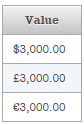
The complete application is named, OFConverter.
Passing through conversion only the modified values
Before validating, if the EditableValueHolder has also attached a custom converter, then the getAsObject() method is invoked right before validating. Actually, the value returned by getAsObject() is the one that gets validated. The problem is that JSF will execute this step on each request without checking if the submitted value is really changed (as you will see in the next chapter, this is also true for validation). So, how do we pass only the modified values through conversion?
Well, OmniFaces provides a custom converter that can be used as a template over regular JSF custom converters. Its name is ValueChangeConverter, and in order to understand its use, letʹs assume we have the following JSF custom converter skeleton:
public class FooConverter implements Converter {
 @Override
 public Object getAsObject(FacesContext context,
                                        UIComponent component, String value){
  // ...
 }

 @Override
 public String getAsString(FacesContext context,
                                        UIComponent component, Object value){
  // ...
 }
}
Next, we will replace the implements Converter with extends ValueChangeConverter and rename the method from getAsObject() to getAsChangedObject().The getAsString() method of your converter remains unchanged:
public class FooConverter extends ValueChangeConverter {
 @Override
 public Object getAsChangedObject(FacesContext context,
                                  UIComponent component, String submittedValue) {
  // ...
 }

 @Override
 public String getAsString(FacesContext context,
                           UIComponent component, Object value){
  // ...
 }
}
Done! Now, in the getAsChangedObject() method rewrite the exact same code that you have written in the getAsObject() method. The difference consists of the fact that the getAsChangedObject() method will be invoked by OmniFaces only when the submitted value is not equal to the model value passed through getAsString() method. In your page, attach your converter, FooConverter, to any EditableValueHolder component.
Let’s have an example based on a simple <p:inputText/>. The user provides a player name and submits the form multiple times:
<h:form>
 <p:messages id="msgs"/>
 <p:panelGrid columns="3">
  <p:outputLabel for="nameId" value="Player Name:"/>
  <p:inputText id="nameId" value="#{playerBean.name}"
                           converter="playerConverter"/>
  <p:commandButton value="Send" action="#{playerBean.nameAction()}"
                                update="@form"/>
 </p:panelGrid>
</h:form>
The PlayerConverter simply converts the submitted name in upper case (via getAsChangedObject()), and the model value in lower case (via getAsString()). This converter was written in respect to the OmniFaces instructions, so it looks like below:
@FacesConverter("playerConverter")
public class PlayerConverter extends ValueChangeConverter {

 @Override
 public Object getAsChangedObject(FacesContext fc,
                                  UIComponent uic, String string) {

  // using OmniFaces shortcut
  Messages.addGlobalInfo("Current value must be converted ...");

  return string.toUpperCase();
 }

 @Override
 public String getAsString(FacesContext context,
                           UIComponent component, Object value) {
  return String.valueOf(value).toLowerCase();
 }
}
The converted value will reach the data model represented here by the PlayerBean class:
@Named
@SessionScoped
public class PlayerBean implements Serializable {

 private static final long serialVersionUID = 1L;

 private String name;

 // getter and setter

 public void nameAction() {
  // or using OmniFaces shortcut
  Messages.addGlobalInfo("Submitted value was successfully saved in bean ...");
 }
}
Notice that we have signaled the moment when the flow passes through getAsChangedObject() via the faces message; Current value must be converted .... Moreover, when the flow reaches the PlayerBean#nameAction(), we will signal it via the faces message; Submitted value was successfully saved in bean .... Now, let’s see what happens in our case. We run the application and we type Rafael Nadal as the player name. After we submit the form for the first time, we see something like in the figure below:
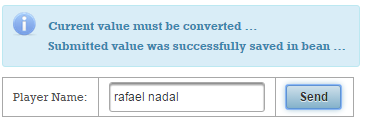
The faces messages shows us that the submitted value has passed through the converter and reached the model. Now, submit the form again with the same value (don’t modify the name, keep it in lowercase) - and check the result:
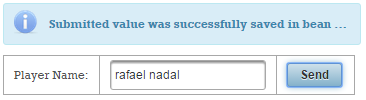
It is obvious that this time the submitted value (rafael nadal) is equal to the model’s value passed through getAsString() method so the conversion (getAsChangedObject()) is skipped. This happens each time until we submit a different value. So, we practically skip the conversion of unmodified values.
The complete application is named, ValueChangeConverter.
Discussing converters dependency injection
JSF 2.0 provides very modest support for injection in JSF artifacts. In JSF 2.1 very few JSF artifacts were injection targets. Starting with JSF 2.2, injection is possible in many more artifacts (check Mastering JavaServer Faces 2.2), but as the specification says, converters, validators and behaviors are still not injection targets. It seems that this will be available from JSF 2.3. Until JSF 2.3 comes out, there are a few tricks to obtain converters eligible for injection. First approach, is to present the converter as a managed bean as in the below skeleton:
// Until JSF 2.3 - custom converter eligible for @Inject

@Named(value="fooConverter")
@RequestScoped
public class FooConverter implements Converter {

 @Inject
 // artifact

 @Override
 public Object getAsObject(FacesContext context,
                           UIComponent component, String value) {
  ...
  // use the injected artifact
  ...
 }

 @Override
 public String getAsString(FacesContext context,
                           UIComponent component, Object value) {
  ...
  // use the injected artifact
  ...
 }
}
Usage example:
<p:inputText value="#{bean_property}" converter="#{fooConverter}" />
Another approach consists of relying on OmniFaces support. This approach brings @Inject and @EJB into custom converters (@FacesConverter) as it has been there forever. There is nothing to configure, no additional annotations, no need to modify your exiting converters. By simply using OmniFaces you get the bonus of having your custom converters eligible for injection. For example, the below code represents a typical JSF custom converter. Since OmniFaces is around, this custom converter supports @Inject and @EJB:
@FacesConverter("fooConverter")
public class FooConverter implements Converter {

 @EJB
 private FooEJB fooejb;

 @Inject
 private fooCDI foocdi;

 @Override
 public Object getAsObject(FacesContext context,
                           UIComponent component, String value) {
  ...
  // work here with fooejb and foocdi
  ...
 }

 @Override
 public String getAsString(FacesContext context,
                           UIComponent component, Object value) {
  ...
  // work here with fooejb and foocdi
  ...
 }
}
Nevertheless, if you are using JSF 2.3 then you don’t need the above two approaches or any other workaround because JSF 2.3 comes with this feature out of the box. In order to test this facility you need to:
- specify a new attribute called
managedon the corresponding annotations; - add in the
WEB-INFfolder thefaces-config.xmlwith the JSF 2.3 XSD;
So, in JSF 2.3 we have:
@FacesConverter(value = "fooConverter", managed = true)
public class FooConverter implements Converter {

 @Inject
 // artifact

 @Override
 public Object getAsObject(FacesContext context,
                           UIComponent component, String value) {
  ...
  // use the injected artifact
  ...
 }

 @Override
 public String getAsString(FacesContext context,
                           UIComponent component, Object value) {
  ...
  // use the injected artifact
  ...
 }
}
Further details are available here.
Do you want more built-in converters?
While PrimeFaces comes with JsonConverter, LocaleConverter and ConvertTimelineEvents via PrimeFaces Extensions, OmniFaces provides a collection of EL functions for data conversion. Here we have functions for:
-
Convert a
Set<E>to aList<E> -
Convert a
Map<K, V>to aList<Map.Entry<K, V>> -
Convert a
Iterable<E>to aList<E> -
Convert an
Iterable<E>to aDataModel<E> - Join all elements of an array into a single string, separated by the a separator
- Join all elements of a collection into a single string, separated by the given separator
- Join all elements of the given map into a single string, separated by the given key-value pair separator and entry separator
- Split the given array into an array of subarrays of the given fragment size
- Split the given list into a list of sublists of the given fragment size
- Encode given object as JSON
- Print the stack trace of the given exception
These artifacts can be exploited together in many scenarios. For example, let’s suppose that we have the following Player entity:
public class Player implements Serializable {

 private static final long serialVersionUID = 1L;

 private Long id;
 private String name;
 private String residence;
 private int age;

 public Player(Long id, String name, String residence, int age) {
  this.id = id;
  this.name = name;
  this.residence = residence;
  this.age = age;
 }
 ...
 // getters and setters
 ...
}
Furthermore, we have a simple managed bean that contains a List of players, as below:
@Named
@ViewScoped
public class PlayerBean implements Serializable {

 private static final long serialVersionUID = 1L;

 private Player selected;
 private List<Player> topfive;

 @PostConstruct
 public void init() {
  topfive = new ArrayList<>();
  topfive.add(new Player(1L, "NOVAK DJOKOVIC", "Monte-Carlo", 27));
  ...
 }
 ...
 // getters and setters
 ...
}
Now, we want to display our list as JSON strings in a selection component. For this, we cannot use the PrimeFaces <pe:convertJson/> because this tag needs a parent of type ValueHolder. In order to obtain the JSON representation of each item from the list we can use the OmniFaces, of:toJson() function as below (this has the advantage that can be used in attributes like itemLabel):
<p:selectOneListbox value="#{playerBean.selected}" style="width: 450px;">
 <f:selectItems value="#{playerBean.topfive}" var="t"
                itemLabel="#{of:toJson(t)}" itemValue="#{t}"/>
</p:selectOneListbox>
The problem is that if we submit a selected player then we will get an error of type Conversion Error setting value 'beans.Player@409037b' for 'null Converter'. You should be familiar with this kind of error from The <f:selectitems/> and the conversion of the submitted strings to their values section above. The solution can be the generic OmniFaces omnifaces.SelectItemsConverter:
<p:selectOneListbox value="#{playerBean.selected}" style="width: 450px;"
                    converter="omnifaces.SelectItemsConverter">
 <f:selectItems value="#{playerBean.topfive}" var="t"
                itemLabel="#{of:toJson(t)}" itemValue="#{t}"/>
</p:selectOneListbox>
Or, the dedicated PrimeFaces Extensions <pe:convertJson/> converter:
<p:selectOneListbox value="#{playerBean.selected}" style="width: 450px;">
 <f:selectItems value="#{playerBean.topfive}" var="t"
                itemLabel="#{of:toJson(t)}" itemValue="#{t}"/>
 <pe:convertJson />
</p:selectOneListbox>
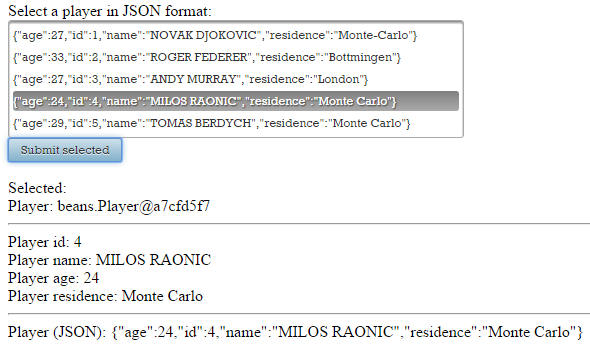
The result will look like in the figure below:
The complete application is named, PFOFJsonConversion.