Chapter 3: Working with JavaScript/CSS resources
Working in JSF with JavaScript resources seems to be a pretty simple task. Starting with JSF 2.0, all the web resources, such as CSS, JavaScript, and images are loaded from a folder named resources, present under the root of your web application or from /META-INF/resources in JAR files. A folder under the resources folder is known as a library or theme, which is like a collection of client artifacts (e.g. your company name). After we build the resources folder structure and add the JavaScript resources, we simply plug in the <h:outputScript/> tag into the XHTML page.
In this chapter we will “dissect” this topic a little bit more. Among other things, we will discuss how to execute a snippet of JavaScript after each request (AJAX/non-AJAX), how to encapsulate AJAX requests in JavaScript functions placed in the JavaScript global scope in such way that we can simply call them by name, how to load resources from CDN URLs, how to combine JavaScript resources for achieving optimal performance, how to obtain unmapped resources and how to deffer JavaScript resources loading after the page has been completely loaded.
Executing a JavaScript snippet after each AJAX/non-AJAX request
Let’s suppose that we want to execute a piece of JavaScript code after each request in a page (AJAX, non-AJAX). Requests are typically fired via command buttons (<p:commandButton/>) and command links (<p:commandLink/>). By default, these commands fire AJAX requests (the default value of the ajax attribute is true), so let’s take a look at this first case:
Executing a JavaScript snippet after each AJAX request
PrimeFaces commands provide an attribute named, oncomplete. The value of this attribute represents the client side callback to be executed when the AJAX request is completed. We can practically do this:
<h:body>
 <h:form>
  <p:commandButton value="Generate Random"
     oncomplete="document.getElementById('panelId').innerHTML=Math.random();"/>
 </h:form>

 <h:panelGroup id="panelId"/>
</h:body>
Or, we can wrap the JavaScript code into a function, as below:
<h:head>
 <script type='text/javascript'>
  function generateRandom(){
   document.getElementById('panelId').innerHTML=Math.random();
  }
 </script>
</h:head>

<h:body>
 <h:form>
  <p:commandButton value="Generate Random" oncomplete="generateRandom();"/>
 </h:form>

 <h:panelGroup id="panelId"/>
</h:body>
Notice that in both cases the execution of the JavaScript code is tied up in the command button. For example, if we have more command buttons/links in this page and each of them causes the execution of this snippet of JavaScript code then we would need to duplicate the JavaScript code or the JavaScript method invocation in the oncomplete attribute. We can however, provide other custom approaches such as using the update attribute to point to a component that contains the JavaScript code. On a separate note we could also exploit the jsf.ajax.addOnEvent but this is another subject. The following example causes the execution of the JavaScript only at initial request (at POST−AJAX, the JavaScript code will not be executed!):
<h:body>
 <h:form>
  <p:commandButton value="Generate Random"/>
 </h:form>

 <h:panelGroup id="panelId"/>

 <script type='text/javascript'>
  document.getElementById('panelId').innerHTML = Math.random();
 </script>
</h:body>
Executing a JavaScript snippet after each non-AJAX request
In the case of a non-AJAX requests, the view is re-rendered, so the JavaScript code is executed after each non-AJAX request. The only thing we have to keep in mind is to place the JavaScript code at the end of the </body>. This is needed to ensure that the entire DOM tree of the page is populated and safe to be referenced from the JavaScript code. For example, the case below will not work (upon the firing of each request, it will cause an error like: TypeError: document.getElementById(...) is null; this occurs because when the JavaScript code is executed the DOM tree doesn’t contain the HTML code corresponding to the panelId ID):
<head>
 <script type='text/javascript'>
  document.getElementById('panelId').innerHTML = Math.random();
 </script>
</h:head>

<h:body>
 <h:form>
  <p:commandButton value="Generate Random" ajax="false"/>
 </h:form>

 <h:panelGroup id="panelId"/>
</h:body>
But, this will have the desired effect:
<h:body>
 <h:form>
  <p:commandButton value="Generate Random" ajax="false"/>
 </h:form>

 <h:panelGroup id="panelId"/>
 <script type='text/javascript'>
  document.getElementById('panelId').innerHTML = Math.random();
 </script>
</h:body>
Using the OmniFaces OnloadScript component
A quick and general approach consists of using the OmniFaces OnloadScript component. This component is exposed to JSF page authors via <o:onloadScript/> tag. Basically, you nest the JavaScript code that should be executed in the <o:onloadScript/> tag and OmniFaces will take care of the rest. It doesn’t matter where in page you place the <o:onloadScript/>, because OmniFaces will take care of rendering and executing it at the end of the </body> after each AJAX/non-AJAX request. For example, both commands below (AJAX and non-AJAX) will cause the execution of the JavaScript code nested in <o:onloadScript/>, while the JavaScript placed in the oncomplete attribute of the AJAX based command is executed only at the end of such request:
<h:head>
 <o:onloadScript>
  document.getElementById('panelId').innerHTML = Math.random();
 </o:onloadScript>
</h:head>

<h:body>
 <h:form>
  <p:commandButton value="Generate Random (non-AJAX)" ajax="false"/>
 </h:form>

 <h:form>
  <p:commandButton value="Generate Random (AJAX)"
                   oncomplete="alert('AJAX request complete!');"/>
 </h:form>

 <h:panelGroup id="panelId"/>
</h:body>
The complete application is named, ExecuteScriptAfterEachRequest.
Fire AJAX requests from plain JavaScript functions
Most JSF developers are familiar with JSF‐AJAX combination exposed via the <p:ajax/> and <f:ajax/> tags. There are many articles about using JSF and AJAX, AJAX based components (e.g. PrimeFaces components), fine‐grained AJAX controls, AJAX callbacks, AJAX trackers etc. The AJAX mechanism used by JSF is encapsulated in a JavaScript file named jsf.js while PrimeFaces uses the jQuery AJAX mechanism.
When we using the <f:ajax/>, JSF (e.g. Mojarra), may generate a JavaScript call like this:
On the other hand, PrimeFaces may generate something such as below via its <p:ajax/>:
In both cases of (JSF and PrimeFaces), the AJAX request was encapsulated in a “hidden” JavaScript function, whose call is generated and attached by JSF (or explicitly written) to a JavaScript event, like onclick, onchange, etc. Sometimes, however, it may be useful to encapsulate the AJAX requests in JavaScript functions placed in the JavaScript global scope in a such way that we can simply call them by name and without arguments, or with arguments that represent the data that should be passed to the server‐side via the encapsulated AJAX request. Obviously the jsf.ajax.request(), mojarra.ab() and PrimeFaces.ab() functions donʹt allow us to accomplish this, but as you will see, OmniFaces provides a component that nests the jsf.ajax.request() call in a JavaScript global scoped function that can be easily called by its name. Whereas PrimeFaces provides a component that nests the PrimeFaces.ab() call for accomplishing the same goal.
OmniFaces fills this JSF-AJAX gap with a powerful component named CommandScript, which can be used by the page authors via the <o:commandScript/> tag. PrimeFaces also provides a powerful component named RemoteCommand which can be used via <p:remoteCommand/> tag. Both components extend the UICommand (<h:commandXxx/>) which means that they inherit the major features of JSF commands such as action, actionListener, immediate, <f:actionListener/> etc. Nevertheless, you have to know that CommandScript also supports nested <f:param/>/<o:param/> and <f:setPropertyActionListener/>, while RemoteCommand doesn’t.
Fire AJAX requests from plain JS functions without arguments
Let’s have some examples! Basically, let’s see how we can use both approaches for encapsulating the AJAX requests in JavaScript functions in such a way that we can simply call them by name without arguments. For both, we will use the below simple managed bean:
@Named
@RequestScoped
public class HelloBean {

 public void hello() {
  // JSF approach
  FacesContext.getCurrentInstance().addMessage(null,
   new FacesMessage(FacesMessage.SEVERITY_INFO, "Hello! How are you ?", null));

  // or use the OmniFaces API shortcut
  Messages.addGlobalInfo("Hello! How are you ?");
 }
}
So, the idea is pretty simple. We need a JavaScript function that wraps an AJAX request capable of invoking the hello() action method. This JavaScript method will be called by its name when we press a button of type button. The PrimeFaces approach involves the code below:
<h5>AJAX request fired from plain JS (PrimeFaces - jQuery AJAX API)</h5>
<h:form>
 <p:remoteCommand name="hello_pf" update="msgs"
                  onstart="alert('I will fire an AJAX request via PrimeFaces!')"
                  oncomplete="alert('AJAX request via PrimeFaces complete!')"
                  actionListener="#{helloBean.hello}" />

 <p:growl id="msgs" />
 <p:commandButton type="button" onclick="hello_pf();"
                  value="Hello PrimeFaces!" icon="ui-icon-refresh" />
</h:form>
When we click on the Hello PrimeFaces! button (notice that this is not a command button!) the AJAX request nested in the JavaScript hello_pf() function will be fired. Before the AJAX request is fired, you will see the effect of onstart attribute; after the AJAX request completes (successfully or not!), you will see the effect of oncomplete attribute. These attributes are optional, and in our example they just point to JavaScript alerts, but you can use them to accomplish different kinds of tasks before/after the AJAX request. Finally, you will see PrimeFaces’ Growl that contains the faces message attached via the hello() action method.

The JavaScript code rendered by the PrimeFaces RemoteCommand can be seen in the page source code and can be something like this:
<script type="text/javascript">hello_pf = function() {PrimeFaces.ab({s:"j_idt6:j
_idt7",f:"j_idt6",u:"j_idt6:msgs",onst:function(cfg){alert('I will fire an AJAX
request via PrimeFaces!');},onco:function(xhr,status,args){alert('AJAX request v
ia PrimeFaces complete!');},pa:arguments[0]});}</script>
Now, from OmniFaces perspective we have the following code with similar result as RemoteCommand:
<h5>AJAX request fired from plain JS (OmniFaces - standard JSF AJAX API)</h5>
<h:form>
 <o:commandScript name="hello_of" execute="@form"
                  onbegin="alert('I will fire an AJAX request via OmniFaces!')"
                  oncomplete="alert('AJAX request via OmniFaces complete!')"
                  render="msgs" action="#{helloBean.hello}" />
 <p:growl id="msgs" />
 <p:commandButton type="button" onclick="hello_of();"
                  value="Hello OmniFaces!" icon="ui-icon-refresh" />
</h:form>
The JavaScript code rendered by the OmniFaces CommandScript can be seen in the page source code and can be something like this:
<script type="text/javascript">var hello_of=function(o){var o=(typeof o==='objec
t')&&o?o:{};o['javax.faces.behavior.event']='action';o.execute='@form';o.render=
'j_idt10:msgs';o.onevent=function(data){if(data.status=='begin'){alert('I will f
ire an AJAX request via OmniFaces!')}if(data.status=='success'){alert('AJAX requ
est via OmniFaces complete!')}};jsf.ajax.request('j_idt10:j_idt11',null,o)}</scr
ipt>
The complete application is named, AJAXFiredFromPlainJS.
Fire AJAX requests from plain JS functions with arguments
This time let’s complicate things a little. So far, the hello() method returns a simple message, Hello! How are you ?. Furthermore, we want to return a customized message such as Hello PrimeFaces! How are you Cagatay Civici ?. Moreover, the PrimeFaces and Cagatay Civici will be parameters sent via JavaScript function and received in a managed bean via a request parameter map. For this, we will use the below adapted managed beans:
@Named
@RequestScoped
public class HelloBean {

 public void hello() {
  // JSF approach
  Map<String, String> params = FacesContext.getCurrentInstance().
                      getExternalContext().getRequestParameterMap();
  FacesContext.getCurrentInstance().addMessage(null,
   new FacesMessage(FacesMessage.SEVERITY_INFO, "Hello, " +
    params.get("product") +"! How are you " +
    params.get("contact") + "?", null));

  // or use the OmniFaces API shortcuts
  String HELLO_MSG = "Hello {0}! How are you {1} ?";
  Messages.addGlobalInfo(HELLO_MSG, Faces.getRequestParameter("product"),
                         Faces.getRequestParameter("contact"));
 }
}
So, the PrimeFaces code will be:
<h5>AJAX request fired from plain JS (PrimeFaces - jQuery AJAX API)</h5>
<h:form>
 <p:remoteCommand name="hello_pf" update="msgs"
                  onstart="alert('I will fire an AJAX request via PrimeFaces!')"
                  oncomplete="alert('AJAX request via PrimeFaces complete!')"
                  actionListener="#{helloBean.hello}" />

 <p:growl id="msgs" />
 <p:commandButton type="button"
                  onclick="hello_pf([{name: 'product', value: 'PrimeFaces'},
                                  {name: 'contact', value: 'Cagatay Civici'}]);"
                  value="Hello PrimeFaces!" icon="ui-icon-refresh" />
</h:form>
The Growl will reveal the below imagine:

The OmniFaces approach requires to wrap the JavaScript call into a global JavaScript function, as below:
<h5>AJAX request fired from plain JS (OmniFaces - standard JSF AJAX API)</h5>
<h:outputScript>
 function hello_of_wrapper() {
  hello_of({product: 'OmniFaces',
            contact: 'Bauke Scholtz and Arjan Tijms'});
 }
</h:outputScript>

<h:form>
 <o:commandScript name="hello_of" execute="@form"
                  onbegin="alert('I will fire an AJAX request via OmniFaces!')"
                  oncomplete="alert('AJAX request via OmniFaces complete!')"
                  render="msgs" action="#{helloBean.hello}" />
 <p:growl id="msgs" />
 <p:commandButton type="button" onclick="hello_of_wrapper();"
                  value="Hello OmniFaces!" icon="ui-icon-refresh" />
</h:form>
This time the Growl will reveal the below imagine:

The complete application is named, AJAXFiredFromPlainJSWithAdditionalParams.
Fire AJAX requests from plain JS functions on page load (autorun)
Both RemoteCommand and CommandScript allow us to defer loading and rendering to a window onload event (auto invoke the global scoped JavaScript function). In both cases, we have a flag attribute (default false). For RemoteCommand this is named autoRun and in CommandScript it is named autorun.
<p:remoteCommand name="hello_pf" autoRun="true" update="msgs"
                 actionListener="#{helloBean.hello}" />
<o:commandScript name="hello_of" autorun="true" execute="@form"
                 render="msgs" action="#{helloBean.hello}" />
Some differences between PrimeFaces and OmniFaces approaches
Since PrimeFaces and OmniFaces supports this feature, you may ask when to use one or the other? Well, in this section you will experience several differences between these two that will help you choose according to your needs.
The RemoteCommand supports a bunch of attributes not available in CommandScript
The RemoteCommand support onsuccess (allows us to indicate a JavaScript handler to execute when AJAX request succeeds), onerror (allows us to indicate a JavaScript handler to execute when AJAX request fails), async (allows us to indicate that AJAX requests shouldn’t be queued), delay (execute AJAX requests with delay), form (point the form to serialize for an AJAX request), global (AJAX requests are listened by ajaxStatus component), ignoreAutoUpdate (components which autoUpdate="true" will not be updated for this request), partialSubmit, partialSubmitFilter, timeout, process and resetValues.
The CommandScript supports nested <f:param/> and <o:param/>
The CommandScript supports nesting of <f:param/>/<o:param/>, while RemoteCommand doesn’t. We can practically re-write the above example to pass the parameters as seen below:
<o:commandScript name="hello_of" execute="@form"
                 onbegin="alert('I will fire an AJAX request via OmniFaces!')"
                 oncomplete="alert('AJAX request via OmniFaces complete!')"
                 render="msgs" action="#{helloBean.hello}">
 <f:param name="product" value="OmniFaces"/>
 <f:param name="contact" value="Bauke Scholtz and Arjan Tijms"/>
</o:commandScript>
<p:growl id="msgs" />
<p:commandButton type="button" onclick="hello_of();"
                 value="Hello OmniFaces!" icon="ui-icon-refresh" />
The complete application is named, CommandScriptAndfparam.
The CommandScript supports <f:setPropertyActionListener/>
As you probably know, The <f:setPropertyActionListener/> tag uses an action listener (created by the framework) to directly set a value into a managed bean property; it is placed within a component derived from the ActionSource class. The target attribute indicates the managed bean property, while the value attribute indicates the value of the property. This is supported only by CommandScript as in the below example:
<h:form>
 <o:commandScript name="hello_of" execute="@form"
                  onbegin="alert('I will fire an AJAX request via OmniFaces!')"
                  oncomplete="alert('AJAX request via OmniFaces complete!')"
                  render="msgs" action="#{helloBean.hello}">
  <f:setPropertyActionListener target="#{helloBean.product}" value="OmniFaces"/>
  <f:setPropertyActionListener target="#{helloBean.contact}"
                               value="Bauke Scholtz and Arjan Tijms"/>
 </o:commandScript>

 <p:growl id="msgs" />
 <p:commandButton type="button" onclick="hello_of();"
                  value="Hello OmniFaces!" icon="ui-icon-refresh" />
</h:form>
Of course the HelloBean was modified accordingly as you can see in the complete application named, CommandScriptAndfsetPropertyActionListener.
Combining PrimeFaces resources in a single resource
The CombinedResourceHandler claims to considerably improve page loading. This is achieved implementing the following:
- Removing all the separate script and stylesheet resources which have the
targetattribute set toheadfrom theUIViewRoot. - Creating a combined one for all scripts and another combined one for all stylesheets. So, instead of firing a
GETrequest per resource, the browser will fire a singleGETrequest for all scripts, and another one for all stylesheets. Furthermore, theCombinedResourceHandleris responsible for sequentially returning all the resources combined in these requests. Visually speaking, something like below (let’s suppose that our PrimeFaces page requires the following CSS and JavaScript resources):
<!-- stylesheets -->
<h:outputStylesheet name="css/style.css" />
<h:outputStylesheet name="css/page.css" />
<h:outputStylesheet name="css/custom.css" />

<!-- scripts -->
<h:outputScript library="default" name="js/my_js.js" target="head"/>
<h:outputScript library="custom" name="js/custom1.js" target="head"/>
<h:outputScript library="custom" name="js/custom2.js" target="head"/>
<h:outputScript library="custom" name="js/custom3.js" target="head"/>

<!-- deferred scripts (presented later in this chapter) -->
<o:deferredScript library="custom" name="js/custom2.js"/>
<o:deferredScript library="default" name="js/js2.js"/>
will become,
<!-- stylesheets -->
<link type="text/css" rel="stylesheet"
href="/MyApp/faces/javax.faces.resource/eNpLLi7WLy6pzEnVSy4urgFi_dxKEBMAdq
IJcg.css?ln=omnifaces.combined&v=1433659201062" />
<!-- scripts -->
<script type="text/javascript"
src="/MyApp/faces/javax.faces.resource/eNrLz83LTEtMTi22yoex9LKKa1JS0xJLc0
qssor1s4oNgSIARRYPcA.js?ln=omnifaces.combined&v=1433659204389"/>
<!-- deferred scripts -->
<script type="text/javascript">
OmniFaces.DeferredScript.add('/MyApp/faces/javax.faces.resource/eNpLSU1LLM0pscoq1
s8qNtLLKgYAOn0GRg.js?ln=omnifaces.combined&v=1433659201450');
</script>
Configuring CombinedResourceHandler
In order to use the CombinedResourceHandler, you need to keep in mind that:
- In case of the
<h:outputScript/>, always specify thetarget="head". - In the below context, the “resource identifier” represents the unique combination of library name and resource name, separated by a colon; not the
RESOURCE_IDENTIFIER. If you want them to appear after any auto‐included resources of standard JSF implementation or JSF component libraries, then move the declarations to top of the</h:body>. -
org.omnifaces.COMBINED_RESOURCE_HANDLER_CACHE_TTL‐ You can optionally activate server side caching of the combined resource content by specifying this context parameter while the JSF project’s stage is not set toDevelopmentas perFaces#isDevelopment()utility method (based onApplication#getProjectStage()). This should be set to a value greater than0(default is0, means no cache). -
org.omnifaces.COMBINED_RESOURCE_HANDLER_EXCLUDED_RESOURCES‐ If you need to exclude resources in the<h:head/>from being combined, then provide a comma separated string of their “resource identifiers” via this context parameter (e.g.<param-value>default:my_js.js, javax.faces:jsf.js, css/page.css</param-value>). -
org.omnifaces.COMBINED_RESOURCE_HANDLER_SUPPRESSED_RESOURCES‐ If you need to suppress and remove the resources in the<h:head/>from being combined, then provide a comma separated string of their “resource identifiers” via this context parameter. -
org.omnifaces.COMBINED_RESOURCE_HANDLER_INLINE_CSS‐ Set totrueif you want to render the combined CSS resources inline (embedded in HTML) instead of as a resource. -
org.omnifaces.COMBINED_RESOURCE_HANDLER_INLINE_JS‐ Set totrueif you want to render the combined JS resources inline (embedded in HTML) instead of as a resource. -
org.omnifaces.COMBINED_RESOURCE_HANDLER_DISABLED‐ Use this context parameter if you want to conditionally disable the combined resource handler (supports EL expressions). - If youʹre also using the
CDNResourceHandleror, at least, have configured its context parameterorg.omnifaces.CDN_RESOURCE_HANDLER_URLS, then those CDN resources will automatically be added to the set of excluded resources. - To get it to run, this handler needs to be registered in
faces-config.xmlas follows:
<application>
 <resource-handler>
  org.omnifaces.resourcehandler.CombinedResourceHandler
 </resource-handler>
</application>
More details and examples on these features are in OmniFaces Showcase.
Combining PrimeFaces resources
Let’s suppose that we have a PrimeFaces page that implicitly requires the below CSS (theme.css, primefaces.css and colorpicker.css) and JavaScript resources (jquery.js, jquery-plugins.js, primefaces.js, touchswipe.js and colorpicker.js). You can also see these in the source page:
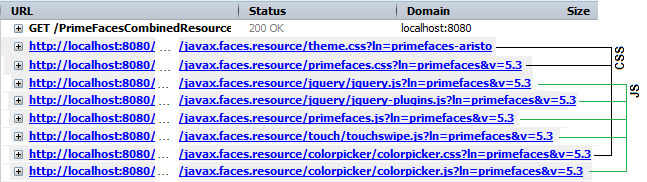
Notice that for each CSS and JavaScript resource there is a GET request. Furthermore, we can combine all CSS resources in a single GET request and all JavaScript resources in another single GET request. To achieve this, simply register the CombinedResourceHandler in faces-config.xml. Now, instead of the above figure we obtain this:

The complete application is named, PrimeFacesCombinedResources.
Combining PrimeFaces themes
You have probably already noticed from the above figure that theme.css wasn’t automatically combined with the rest of CSS resources. In order to combine the PrimeFaces theme you need to follow two simple steps. First, prevent loading the theme by setting the primefaces.THEME context parameter to none in web.xml:
<context-param>
 <param-name>primefaces.THEME</param-name>
 <param-value>none</param-value>
</context-param>
Second, add the theme explicitly in the page via <h:outputStylesheet/>:
<h:outputStylesheet library="primefaces-aristo" name="theme.css"/>
This time the theme.css is also combined:

The complete application is named, PrimeFacesCombinedTheme.
Providing external (CDN) URLs instead of the default local URLs for JSF resources
The OmniFaces CDNResourceHandler was primarily designed to move auto‐included JSF resources to a CDN host (e.g. jsf.js or PrimeFaces jquery.js, etc). For local resources this is unnecessary and can just be done via a “plain HTML” <script/> tag. The CDNResourceHandler allows the developer to provide CDN URLs instead of the default local URLs for JSF resources as provided by <h:outputScript/>, <h:outputStylesheet/>, <o:deferredScript/> (presented later in this chapter) and <p|o|h:graphicImage/>. As you know, by default, these artifacts do not allow CDN URLs (e.g. Google Hosted Libraries). The only approach is to download the resource and store it locally, or to use the <script/>, <link/> or <img/> instead of JSF artifacts.
Let’s start with a didactic example meant to understand CDNResourceHandler features. Let’s say that you need to load jQuery and jQuery UI resources from a CDN. They are available in Google Hosted Libraries under the following URLs:
https://ajax.googleapis.com/ajax/libs/jquery/1.11.3/jquery.min.jshttps://ajax.googleapis.com/ajax/libs/jqueryui/1.11.4/jquery-ui.min.jshttps://ajax.googleapis.com/ajax/libs/jqueryui/1.11.4/themes/smoothness/jquery-ui.css
In order to use the CDNResourceHandler, you need to accomplish several steps:
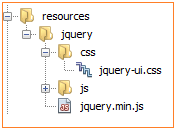
1.Since this is a didactic example, it was especially designed to expose all CDNResourceHandler features. The only drawback consists of the fact that we must “fool” the JSF default resource handler that the resources that being loaded from CDN repository are available locally in the /resources folder. We avoid the imminent RES_NOT_FOUND error by providing empty resources with the same names as the resources from CDN. As you will see later in a real example, this step is not necessary. But, for this example, we have shaped the folder’s structure from the figure below (the JavaScript and CSS files are empty - you can even consider this example as a bad practice of using CDNResourceHandler, because normally, you can rely on “plain HTML” <script/> tag instead of CDNResourceHandler):
2.Configure the CDNResourceHandler in your faces-config.xml - this is needed to tell JSF to use this resource handler:
<application>
 <resource-handler>
  org.omnifaces.resourcehandler.CDNResourceHandler
 </resource-handler>
</application>
3.Add the resources names (and libraries) with their corresponding CDN URLs in web.xml (or web-fragment.xml) via org.omnifaces.CDN_RESOURCE_HANDLER_URLS context parameter. Notice how we specify the resources libraries, names and CDN URLs:
<context-param>
 <param-name>
  org.omnifaces.CDN_RESOURCE_HANDLER_URLS
 </param-name>
 <param-value>
  jquery:jquery.min.js=https://ajax.googleapis.com/ajax/libs/
         jquery/1.11.3/jquery.min.js,
  jquery:js/jquery-ui.min.js=https://ajax.googleapis.com/ajax/libs/
         jqueryui/1.11.4/jquery-ui.min.js,
  jquery:css/jquery-ui.css=https://ajax.googleapis.com/ajax/libs/
         jqueryui/1.11.4/themes/smoothness/jquery-ui.css
 </param-value>
</context-param>
4.Add the resources in the JSF page via <h:outputStylesheet/> and <h:outputScript/>:
<h:outputStylesheet library="jquery" name="css/jquery-ui.css"/>
<h:outputScript library="jquery" name="jquery.min.js" />
<h:outputScript library="jquery" name="js/jquery-ui.min.js" />
The complete application is named, CDNResourceHandlerDidacticExample.
After you run this application, you notice in the page source code the following <script/> and <link/> tags:
<link type="text/css" rel="stylesheet"
                      href="https://ajax.googleapis.com/ajax/libs/
                      jqueryui/1.11.4/themes/smoothness/jquery-ui.css" />
<script type="text/javascript" src="https://ajax.googleapis.com/ajax/libs/
                      jquery/1.11.3/jquery.min.js" />
<script type="text/javascript" src="https://ajax.googleapis.com/ajax/libs/
                      jqueryui/1.11.4/jquery-ui.min.js" />
Wildcard configuration
The CDNResourceHandler supports the * wildcard that can be used to map every single resource of a specific library to a common CDN URL. For example, we have three resources in the same library, jqueryand for each of them we have a key=value configuration where the value has the same CDN URL root, https://ajax.googleapis.com/ajax/libs/. Using the * wildcard we can re-write this configuration like below:
<context-param>
 <param-name>
  org.omnifaces.CDN_RESOURCE_HANDLER_URLS
 </param-name>
 <param-value>
  jquery:*=https://ajax.googleapis.com/ajax/libs/*
 </param-value>
</context-param>
Furthermore, refer to the resource accordingly:
<h:outputStylesheet library="jquery"
                    name="jqueryui/1.11.4/themes/smoothness/jquery-ui.css"/>
<h:outputScript library="jquery" name="jquery/1.11.3/jquery.min.js" />
<h:outputScript library="jquery" name="jqueryui/1.11.4/jquery-ui.min.js" />
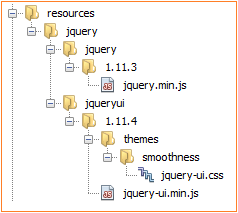
Again, since this is not a real case, you have to avoid the RES_NOT_FOUND error by reflecting the libraries and names of resources locally as in figure below (empty resources):
The complete application is named, CDNResourceHandlerWildcardConfig.
EL expessions in the CDN URL
The CDN resource handler supports evaluating EL expessions (on a per-request basis) in the CDN URL. For example, we can provide the CDN URL root like below:
<context-param>
 <param-name>
  org.omnifaces.CDN_RESOURCE_HANDLER_URLS
 </param-name>
 <param-value>
  jquery:*=#{myCDNBean.urlRoot}/*
 </param-value>
</context-param>
The MyCDNBean is very simple in this case:
@Named
@RequestScoped
public class MyCDNBean {

 private final String urlRoot = "https://ajax.googleapis.com/ajax/libs";

 public String getUrlRoot() {
  return urlRoot;
 }
}
The complete application is named, CDNResourceHandlerEL.
<context-param>
 <param-name>
  org.omnifaces.CDN_RESOURCE_HANDLER_DISABLED
 </param-name>
 <param-value>
  #{facesContext.application.projectStage eq 'Development'}
 </param-value>
</context-param>
Real case - delegate PrimeFaces jQuery to CDN
As you probably know, PrimeFaces internally uses jQuery library. This means that PrimeFaces requires jQuery as a resource. You can easily see this by checking the scripts loaded in an application that uses PrimeFaces. Among other JavaScript resource, you will notice something like this:
<script type="text/javascript" src="/.../javax.faces.resource/jquery/jquery.js?
ln=primefaces&v=5.3">
Or, via a specialized tool like Firebug:

In order to configure a CDN for a resource, you need to correctly identify the resource library, path and name (you can in a similar way push your static resources to CDN). This can be achieved easily by visually inspecting the path (typically this is a path built with respect to the JSF standard resource handler - details here). The value of the ln request parameter points to the library of the resource (e.g. primefaces) and the substring between the resource identifier (JSF identify a resource by the presence in path of the javax.faces.resource string) and the query string delimitator, ?, points to the resource path and name (e.g. jquery/jquery.js). Once you know the library and the resource path and name, you can easily compose the key=value pair and pass it to CDNResourceHandler via the org.omnifaces.CDN_RESOURCE_HANDLER_URLS context parameter:
<context-param>
 <param-name>
  org.omnifaces.CDN_RESOURCE_HANDLER_URLS
 </param-name>
 <param-value>
  primefaces:jquery/jquery.js=https://ajax.googleapis.com/ajax/libs/
  jquery/1.11.3/jquery.min.js
 </param-value>
</context-param>
The complete application is named, DelegatePrimeFacesjQuerytoCDN.
JSF resource lookup issues
When you are delegating PrimeFaces static resources to CDN you may notice that the JSF resource lookup (via #{resource[]}) may not work properly. Actually, this is true for any static resource that uses JSF resource lookup (not necessarily from PrimeFaces), below you can see three examples extracted from primefaces.css:
So, if you put the primefaces.css to a CDN, then the JSF resource lookup will not act as expected because the resources pointed to via #{resource[]} will not be loaded. The solution consists of replacing all #{resource[]} with simple CSS paths, as below:
Of course, there are many such modifications needed. Fortunately, they are already available for download for PrimeFaces 5.1, 5.2 and 5.3. Read further details here.
Defer loading and parsing of JavaScript resources
There was a time when JavaScript snippets were very small and nobody cared that the scripts were fetched and executed immediately, before the browser continues parsing the page. Well, many things have changed since then. Today deferring JavaScript has become a priority and an important criterion for optimization of web applications. By “deferring”, we mean that an approach delays the loading of JavaScript code, or more precisely, allows a web page to fully load first. Accomplishing this task, however, is one of those issues on the web that give us real headaches.
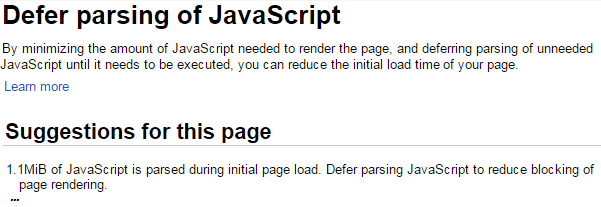
Many developers have learned about deferred scripts after they pass their web application through the Google PageSpeed Tools or notice how Bootstrap places its resources at the end of the </body>. A message like the ones shown in the figures below has a big impact on self‐confidence. You probably have never seen these messages before, but sooner or later, you will! If you are a JSF developer and you have loaded your JavaScript resources via <h:outputScript/> then this kind of message will place you in an unpleasant situation. If the <h:outputScript/> has the target set to body, and you still see the above messages, then you are in trouble!

<h:body>
 <h3>After 5 seconds you will see a cool message ...</h3>
 <a id="msgId" href="https://jsf-showcase.zeef.com/anghel.leonard"></a>

 <h:outputScript library="default" name="js/sample.js"/>
</h:body>
And the sample.js is a simple JavaScript code that “sleeps” for 5 seconds before it pushes a cool message in the <a/> tag:
function sleep(ms) {
 var dt = new Date();
 dt.setTime(dt.getTime() + ms);
 while (new Date().getTime() < dt.getTime())
       ;
}

sleep(5000);

document.getElementById('msgId').innerHTML = "OmniFaces and PrimeFaces Rocks!";
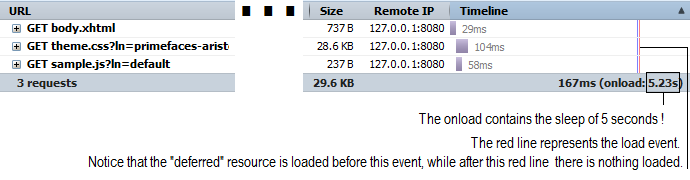
This doesnʹt actually mean that the script is deferred until after the entire page is fully loaded. For example,the Firebug tool will reveal this in the Timeline section ‐ the magical 5 seconds of sleep should not be there, not in the page loading time! Just check out the figure below:
Dig further, and you will discover the defer and async flag attributes. Of course, you can use these attributes only if you switch from the <h:outputScript/> to the <script/> tag. The effort involved in this switch is not justified, as the magical 5 seconds will still be present in the page loading time. Inline JavaScript will reveal the same thing. A pure working JavaScript solution comes from Google and is presented in the complete application named, FakeDeferredScript. The effect of it can be seen in the image below:
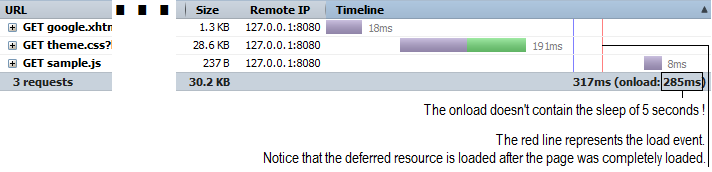
So the myth of placing the code before the </body>, inline in the JavaScript code, using defer and async is busted. The Google recommendation really defers the code! It is time to see how PrimeFaces and OmniFaces defers JavaScript code loading.
Defer loading and parsing of JavaScript resources via PrimeFaces
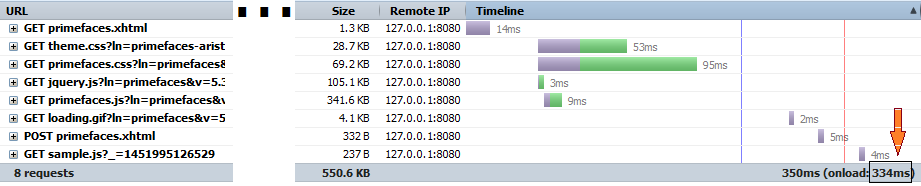
When we talk about deferring something (NOT only JavaScript resources) in PrimeFaces we need to focus on the <p:outputPanel/> component. As its name suggests, the <p:outputPanel/> component is a panel component that can be rendered as a <div/> or <span/> HTML component.The <p:outputPanel/> component supports deferred loading, where the content of the panel is loaded after the page is loaded. The panel renders a loading animation while loading its contents. For example, we can defer the loading of sample.js like this:
<h:body>
 <h3>After 5 seconds you will see a cool message ...</h3>
 <a id="msgId" href="https://jsf-showcase.zeef.com/anghel.leonard"></a>

 <p:outputPanel deferred="true">
  <script src="resources/default/js/sample.js"></script>
 </p:outputPanel>
</h:body>
A possible result is in the figure below:
The complete application is named, PrimeFacesDeferredScript.
Defer loading and parsing of JavaScript resources via OmniFaces
While PrimeFaces comes with <p:outputPanel/> component OmniFaces comes with a dedicated custom component for deferring JavaScript resources. The given script resource is only loaded when the window has completely finished loading. This component is named DeferredScript and can be used in page via the <o:deferredScript/> tag. For example, letʹs focus on loading our sample.js in a deferred manner via <o:deferredScript/>. It is “embarrassingly” simple to use this!
<h:head>
 <o:deferredScript library="default" name="js/sample.js"/>
</h:head>
<h:body>
 <h3>After 5 seconds you will see a cool message ...</h3>
 <a id="msgId" href="https://jsf-showcase.zeef.com/anghel.leonard"></a>
</h:body>
A possible result is in the figure below:

The complete application is named, OmniFacesDeferredScript.
Defer loading and parsing of PrimeFaces resources via OmniFaces
If you have ever checked the source code of a page that uses PrimeFaces, then you would have noticed several JavaScript resources loaded especially for PrimeFaces. The number of these resources varies depending on the type of PrimeFaces artifacts present in the page. For example, let’s suppose that we have the below snippet of dummy code:
<h:form>
 <h:panelGrid columns="3">
  <h:outputText value="Keyup: " />
  <p:inputText id="counter">
   <p:ajax event="keyup" update="out"/>
  </p:inputText>
  <h:outputText id="out"/>
 </h:panelGrid>
</h:form>
In order to work, this code will need the following JavaScript resources (these are basically the most common JavaScript resources in a PrimeFaces application):
<script type="text/javascript"
src="/.../javax.faces.resource/jquery/jquery.js?ln=primefaces&v=5.3"/>
<script type="text/javascript"
src="/.../javax.faces.resource/primefaces.js?ln=primefaces&v=5.3">
<script type="text/javascript"
src="/.../javax.faces.resource/jquery/jquery-plugins.js?
ln=primefaces&v=5.3">
Or, shortly we need the libraries and the names:
- Library:
primefaces; Name:jquery/jquery.js - Library:
primefaces; Name:primefaces.js - Library:
primefaces; Name:jquery/jquery-plugins.js
Other resources may consist of (not needed here):
- Library:
primefaces; Name:layout/layout.js - Library:
primefaces; Name:fileupload/fileupload.js - …
Well, you may think that the above three resources can be deferred like this:
<o:deferredScript library="primefaces" name="jquery/jquery.js" />
<o:deferredScript library="primefaces" name="primefaces.js" />
<o:deferredScript library="primefaces" name="jquery/jquery-plugins.js" />
Actually, things are a little bit more complicated because PrimeFaces uses several inline scripts that will cause errors in the above approach. In order to solve these issues, we need to adopt the following two bullets:
- write a helper script capable of deferring the
PrimeFaces.xxx()calls (e.g.PrimeFaces.ab(),PrimeFaces.cw(),PrimeFaces.focus(), etc) - don’t defer
jquery.js(this can be loaded via CDN as you saw earlier in this chapter)
Writing the helper script in not an easy task, but fortunately BalusC has already done this for the community, so here it’s the BalusC helper script (of course, you can use a minified version of it):
/* BalusC script for deferring PrimeFaces inline scripts (ab(), cw(), focus()) */
DeferredPrimeFaces = function() {
 var deferredPrimeFaces = {};
 var calls = [];
 var primeFacesLoaded = !!window.PrimeFaces;

 function defer(name, args) {
  calls.push({ name: name, args: args });
 }

 deferredPrimeFaces.begin = function() {
  if (!primeFacesLoaded) {
      delete window.PrimeFaces;
  }
 };

 deferredPrimeFaces.apply = function() {
  if (window.PrimeFaces) {
      for (var i = 0; i < calls.length; i++) {
           window.PrimeFaces[calls[i].name].
            apply(window.PrimeFaces, calls[i].args);
      }
  }

  delete window.DeferredPrimeFaces;
 };

 if (!primeFacesLoaded) {
     window.PrimeFaces = {
      ab: function() { defer("ab", arguments); },
      cw: function() { defer("cw", arguments); },
      focus: function() { defer("focus", arguments); }
     };
 }

 return deferredPrimeFaces;
}();
You can place this script in the /resources folder (e.g. /resources/app/scripts/primefaces.deferred.js). Further, load this script in page via <h:outputScript/> (not deferred).
So, we can finally glue this information and obtain the below code:
<h:head>
 <h:outputScript library="app" name="scripts/primefaces.deferred.js"
                 target="head" />
 <o:deferredScript library="primefaces" name="primefaces.js"
                   onbegin="DeferredPrimeFaces.begin()"/>
 <o:deferredScript library="primefaces" name="jquery/jquery-plugins.js"
                   onsuccess="DeferredPrimeFaces.apply()" />
</h:head>
The complete application is named, DeferringPrimeFacesScript.
Or, another hypothetical example:
<h:outputScript library="app" name="scripts/primefaces.deferred.js"
                target="head" />
<o:deferredScript library="primefaces" name="primefaces.js"
                  onbegin="DeferredPrimeFaces.begin()"/>
<o:deferredScript library="primefaces" name="jquery/jquery-plugins.js" />
<o:deferredScript library="primefaces" name="layout/layout.js" />
<o:deferredScript library="primefaces" name="fileupload/fileupload.js"
                  onsuccess="DeferredPrimeFaces.apply()" />
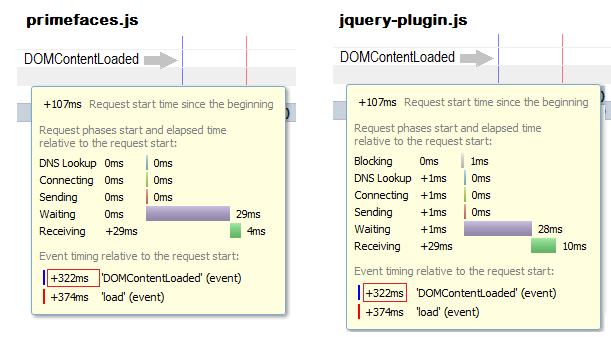
Having a quick test will reveal the performances obtained via deferring PrimeFaces specific JavaScript resources. Also try to compare the numbers that speak for themselves.
Without deferring:
With deferring:
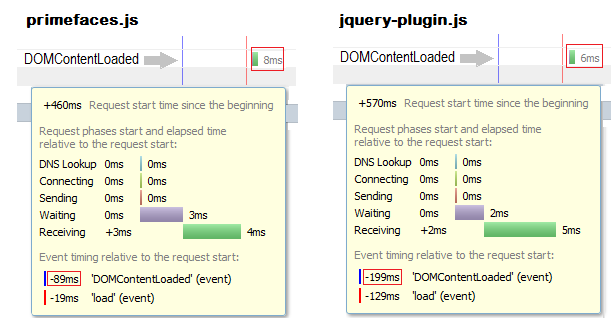
This is helpful for mobile devices that render HTML relatively slow and touch events that are fully blocked until the DOM content is loaded.
Read further here.
Using CombinedResourceHandler with <o:deferredScript/>
Earlier in this chapter we talked about CombinedResourceHandler, so there is no need to introduce it again. The topic of this section is focused on using CombinedResourceHandler with <o:deferredScript/>. The CombinedResourceHandler will transparently recognize and combine the deferred script resources into a single resource as well. So once you set up the CombinedResourceHandler in your faces-config.xml the OmniFaces will do the rest. For example, let’s consider our deferred scripts from the previous section:
<h:head>
 <h:outputScript library="app" name="scripts/primefaces.deferred.js"
                 target="head" />
 <o:deferredScript library="primefaces" name="primefaces.js"
                   onbegin="DeferredPrimeFaces.begin()"/>
 <o:deferredScript library="primefaces" name="jquery/jquery-plugins.js"
                   onsuccess="DeferredPrimeFaces.apply()" />
</h:head>
Now, the effect of the CombinedResourceHandler can be seen in the figure below (you can compare this figure with the above one):
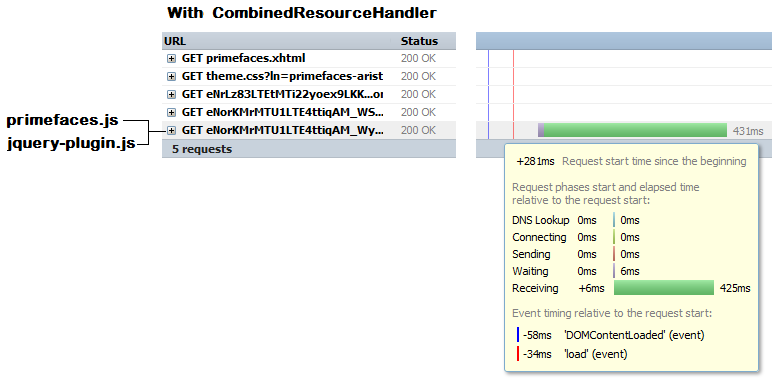
The complete application is named, OmniFacesCombinedDeferredScript.
<!-- three deferred scripts will be combined in a single resource -->
<o:deferredScript group="foo" ... />
<o:deferredScript group="foo" ... />
<o:deferredScript group="foo" ... />
...
<!-- two deferred scripts will be combined in another single resource -->
<o:deferredScript group="buzz" ... />
<o:deferredScript group="buzz" ... />
Testimonial of BalusC about combining deferred scripts on StackOverflow:
As a live example, check the bottom of </body> of the ZEEF site. All essential PrimeFaces-related scripts and some site-specific scripts are combined in the first deferred script and all non-essential social media related scripts are combined in the second deferred script. As to performance improvement of ZEEF, on a test JBoss EAP server on modern hardware, the time to DOMContentLoaded went from ~3s to ~1s.
Using CDNResourceHandler with <o:deferredScript/>
Supposing that you are already familiar with CDNResourceHandler and the following mapping from CDNResourceHandlerDidacticExample application:
<context-param>
 <param-name>
  org.omnifaces.CDN_RESOURCE_HANDLER_URLS
 </param-name>
 <param-value>
  jquery:jquery.min.js=https://ajax.googleapis.com/ajax/libs/
  jquery/1.11.3/jquery.min.js,
  jquery:js/jquery-ui.min.js=https://ajax.googleapis.com/ajax/libs/
  jqueryui/1.11.4/jquery-ui.min.js,
  jquery:css/jquery-ui.css=https://ajax.googleapis.com/ajax/libs/
  jqueryui/1.11.4/themes/smoothness/jquery-ui.css
 </param-value>
</context-param>
Now, we can combine CDNResourceHandler with <o:deferredScript/> in order to defer jquery-ui.min.js like this (notice that the jquery.min.js is not deferred):
<h:outputStylesheet library="jquery" name="css/jquery-ui.css"/>
<h:outputScript library="jquery" name="jquery.min.js" />
<o:deferredScript library="jquery" name="js/jquery-ui.min.js" />

So, you can use the CDNResourceHandler to defer resources loaded from CDN repositories. The complete application is named, CDNResourceHandlerAndDeferredScript.
Reference relative URLs to images in CSS files without #{resource}
The main goal of the OmniFaces UnmappedResourceHandler is to allow developers to reference relative URLs to images in CSS files without using the #{resource}. Letʹs assume that we want to apply some global CSS to a PrimeFaces page (e.g. smaller font/components and a background image). This CSS can look like below:
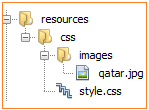
This CSS file is named style.css and is loaded in page via <h:outputStylesheet/>:
<h:outputStylesheet name="css/style.css" />
As you can see, the qatar.jpg background image is loaded via #{resource}. In certain situations, you may need to load it via relative URL, like this:
Well, this is not working in native JSF. In order to obtain this functionality you can use the OmniFaces UnmappedResourceHandler. First, the UnmappedResourceHandler must be configured in faces-config.xml, like this:
<application>
 <resource-handler>
  org.omnifaces.resourcehandler.UnmappedResourceHandler
 </resource-handler>
</application>
Second, the FacesServlet needs to have an additional mapping /javax.faces.resource/* in web.xml. For example, assuming that you already have a mapping on *.xhtml:
<servlet-mapping>
 <servlet-name>Faces Servlet</servlet-name>
 <url-pattern>*.xhtml</url-pattern>
 <url-pattern>/javax.faces.resource/*</url-pattern>
</servlet-mapping>
The complete application is named, UnmappedResourceHandlerExample.