Chapter 13: Caching aspects in PrimeFaces and OmniFaces
In this chapter, we will discuss caching from JSF’s perspective. We start with a brief overview of JSF’s client-side caching mechanism. Furthermore, we will talk about server-side caching using PrimeFaces and OmniFaces. You will see how to cache HTML markup and EL expressions.
JSF cient-side caching aspects
Web cache (or caching) is one of the mechanisms used for tuning web sites performance. It is especially focused on increasing the speed of feeding the browser with HTML code, images, etc. This decreases bandwidth usage, server load, and perceived lag. The idea behind basic caching consists of temporarily storing copies of data (pages, documents, images) and, at subsequent requests, serve this data from this location instead of hitting the application business logic that initially provided the data. Some significant cases consist of static data that comes from a database, large images, data used by multiple users, keyword searching, auto-completion, etc.
Speaking from JSF angle of view, caching is handled by the resource handler (ResourceHandler). By using the JSF tags, like <h:outputStylesheet/> instead of <link/>, <h:outputScript/> instead of <script/> and <h:graphicImage/> instead of <img/>, you allow ResourceHandler to use its default caching mechanism (e.g. images will be cached from 1 week - 604800 seconds). Now, it is important to notice that we are speaking about the browser cache, not the server-side cache. The default caching period can be altered via context parameters. For example, in Mojarra implementation this can be accomplished like below:
<context-param>
 <param-name>com.sun.faces.defaultResourceMaxAge</param-name>
 <param-value>time in seconds</param-value>
</context-param>
Another context parameter specific to Mojarra, named com.sun.faces.resourceUpdateCheckPeriod (default 5 minutes), allows us to indicate the frequency of checking for changes in web application artifacts that contain resources. If a change is detected, the cache will be cleared and rebuilt. If the value of this option is -1, the cache will never be cleared and new resources will not be picked up.
On the other hand, MyFaces implementation supports several cache zones as follows:
Expression Language (EL) Cache
From version 2.0.8, MyFaces implementation allows a cache mechanism for EL expressions. This can be configured using the below context parameter:
<context-param>
 <param-name>org.apache.myfaces.CACHE_EL_EXPRESSIONS</param-name>
 <param-value>one of the below value</param-value>
</context-param>
The supported values are (the below snippet is copied from MyFaces official documentation):
-
always: Only does not cache when expressions are inside user tags or the expression contains a variable resolved usingVariableMapper -
allowCset: Like always, but does not allow cache when<ui:param/>is used on the current template context -
strict: LikeallowCset, but does not allow cache when<c:set/>withvarandvalueproperties, it is only used on the current page context -
noCache: All expression is created each time the view is built
Resources Cache
From version 2.0.2, MyFaces provides org.apache.myfaces.RESOURCE_HANDLER_CACHE_ENABLED, which enables or disables the cache used to “remember” if a resource handled by the default ResourceHandler exists or not (default true), and org.apache.myfaces.RESOURCE_HANDLER_CACHE_SIZE, which controls the size of the cache used to check if a resource exists or not (default 500).
View Handling Cache
From version 2.0.2, MyFaces enables/disables cache via org.apache.myfaces.CHECKED_VIEWID_CACHE_ENABLED context parameter flag (default true), and set the size of this cache via the context parameter org.apache.myfaces.CHECKED_VIEWID_CACHE_SIZE (default 500). This cache is used to “remember” if a view exists or not and reduce the impact of successive calls to ExternalContext#getResource() method.
In addition, from version 2.0.13, MyFaces enable or disable a cache used to “remember” the generated facelets unique ids and reduce the impact over memory usage via org.apache.myfaces.VIEW_UNIQUE_IDS_CACHE_ENABLED (default false). MyFaces allows us to configure the size of cache used to store strings generated using SectionUniqueIdCounter for component ids, via the context parameter org.apache.myfaces.COMPONENT_UNIQUE_IDS_CACHE_SIZE(default 100).
State Saving (state) Cache
From older versions of MyFaces (1.1), we have org.apache.myfaces.SECRET.CACHE context parameter - if set to false, the secret key used for the encryption algorithm is not cached - and, org.apache.myfaces.MAC_SECRET.CACHE - if set to false, the secret key used for MAC algorithm is not cached. Of course, let’s not forget the org.apache.myfaces.CACHE_OLD_VIEWS_IN_SESSION_MODE context parameter. It defines the method of handling old view references (views removed from session), making it possible to store it in a cache; So the state manager first tries to get the view from the session. By default, is off and supports the following values: off, no, hard-soft, soft, soft-weak, weak.
Beside these context parameters, browsers provide internal wizards, add-ons, plug-ins etc that can be used to control how the cache is done. HTML meta-tags, like CACHE-CONTROL, PRAGMA NO-CACHE, EXPIRES and LAST-MODIFIED are also useful. The JSF resource handler sets the EXPIRES and LAST-MODIFIED, and usually all we have to set is the CACHE-CONTROL.
As a final note, do not forget about the JSF versioning system, which is based on the resources folder and libraries. By respecting JSF conventions, you can instruct JSF to load your latest resources very easily.
PrimeFaces and OmniFaces server-side caching aspects
But, what about caching a fragment of rendered markup (e.g. HTML markup)? Well, there is no JSF default configuration or context parameter for this. In this chapter, we will see how to cache HTML markup via PrimeFaces and OmniFaces approaches. PrimeFaces and OmniFaces support cache at rendering time. Basically, on the initial request, PrimeFaces and OmniFaces will cache the HTML markup that corresponds to the content delimited by <p:cache/> tag (in PrimeFaces) or by <o:cache/> tag (in OmniFaces). This means that the initial request doesn’t take advantage of caching. Furthermore, it will take longer than usual since at this moment PrimeFaces/OmniFaces caches the corresponding markup. But, at postbacks the cache will serve the cached HTML instead of rendering it again via specific renderers. This reduces the time for loading pages at postbacks.
Caching HTML markup via PrimeFaces and EHCache
PrimeFaces supports two different providers of cache implementation; EHCache and Hazelcast. First, we take a look at the EHCache provider.
Let’s suppose that we have a static table that lists tennis players from ATP. See figure below (this table is produced via a simple usage of the <p:dataTable/> tag):
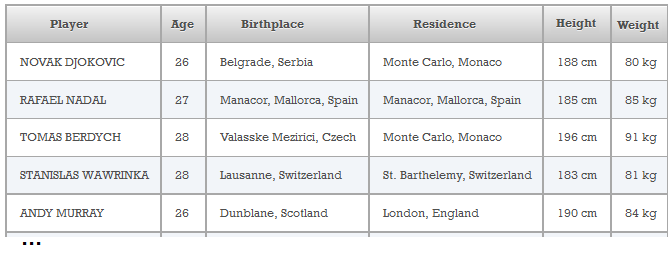
Rendering a table (<p:dataTable/>) is a time-consuming task, especially if the table contains many rows. So instead of re-rendering this static table, we are better off cache it. In order to accomplish this via PrimeFaces and EHCache, we need to follow these steps:
Configure the pom.xml to contain the needed dependencies as below
<dependencies>
 <dependency>
  <groupId>org.primefaces</groupId>
  <artifactId>primefaces</artifactId>
  <version>5.3</version>
 </dependency>
 <dependency>
  <groupId>org.ehcache</groupId>
  <artifactId>ehcache</artifactId>
  <version>3.0.0</version>
 </dependency>
 <dependency>
  <groupId>net.sf.ehcache</groupId>
  <artifactId>ehcache</artifactId>
  <version>2.10.1</version>
 </dependency>
 ...
</dependencies>
Configure the cache provider in web.xml via the primefaces.CACHE_PROVIDER context param
<context-param>
 <param-name>primefaces.CACHE_PROVIDER</param-name>
 <param-value>org.primefaces.cache.EHCacheProvider</param-value>
</context-param>
Configure EHCache
There are multiple ways to accomplish this. One of these consists of providing the ehcache.xml file in /src/main/resources folder of your application. The content of this file calibrates cache as you want (more details are available here):
<?xml version="1.0" encoding="UTF-8"?>
<ehcache xmlns:xsi="http://www.w3.org/2001/XMLSchema-instance"
 xsi:noNamespaceSchemaLocation="ehcache.xsd" updateCheck="true"
 monitoring="autodetect" dynamicConfig="true">

 <!-- By default, Ehcache stored the cached files in temp folder. -->
 <!-- <diskStore path="java.io.tmpdir" /> -->

 <!-- Ask Ehcache to store cache in this path -->
 <diskStore path="D:\\cache" />

 <!-- Sample cache named myCache
      This cache contains a maximum in memory of 10000 elements, and will expire
      an element if it is idle for more than 5 minutes and lives for more than
      10 minutes. If there are more than 10000 elements it will overflow to the
      disk cache -->
 <cache name="myCache"
        statistics="true"
        maxEntriesLocalHeap="10000"
        maxEntriesLocalDisk="1000"
        eternal="false"
        diskSpoolBufferSizeMB="20"
        timeToIdleSeconds="300" timeToLiveSeconds="600"
        memoryStoreEvictionPolicy="LFU"
        transactionalMode="off">
         <persistence strategy="localTempSwap" />
 </cache>
</ehcache>
Use the <p:cache/> tag to point out the content that should be cached
As you can see in the official documentation, this tag supports a bunch of optional attributes. We are especially interested in the region attribute which allows us to point to the cache region that we want to use, which is myCache in our case. Of course, this means that we can use <p:cache/> with different regions. Since, by default, the region defaults to view id (if you want to use it like this simply add a <defaultCache/> region), we need to explicitly set it as below:
<p:cache region="myCache">
 <p:dataTable var="t" value="#{playersBean.data}">
  <p:column headerText="Player">
   <h:panelGroup id="playerId">#{t.player}</h:panelGroup>
  </p:column>

  <p:column headerText="Age">
   <h:panelGroup id="ageId">#{t.age}</h:panelGroup>
  </p:column>

  <p:column headerText="Birthplace">
   <h:panelGroup id="birthplaceId">#{t.birthplace}</h:panelGroup>
  </p:column>

  <p:column headerText="Residence">
   <h:panelGroup id="residenceId">#{t.residence}</h:panelGroup>
  </p:column>

  <p:column headerText="Height">
   <h:panelGroup id="heightId">#{t.height} cm</h:panelGroup>
  </p:column>

  <p:column headerText="Weight">
   <h:panelGroup id="weightId">#{t.weight} kg</h:panelGroup>
  </p:column>
 </p:dataTable>
</p:cache>
Done! If you run the application at this point then everything should work as expected. You will notice that the initial request takes some time to load, while postbacks will work very fast. This is a sign that, on postbacks, the table markup comes from cache.
Register MBeans in JConsole via OmniFaces @Eager
But, how can we be sure that this is working? Well, EHCache provides management and monitoring using JMX. A simple approach consists off registering the cache statistics in the JDK platform MBeanServer, which works with the JConsole management agent. The needed code is listed below:
CacheManager manager = CacheManager.create();
MBeanServer mBeanServer = ManagementFactory.getPlatformMBeanServer();
ManagementService.registerMBeans(manager, mBeanServer, true, true, true, true);
We can easily slip this code in an application scoped bean that is eagerly loaded via OmniFaces @Eager.
@Eager
@ApplicationScoped
public class CacheStatisticsBean {

 private static final Logger LOG =
  Logger.getLogger(CacheStatisticsBean.class.getName());
 private static final String CACHE_MANAGER =
  "net.sf.ehcache:type=CacheManager,name=__DEFAULT__";
 private static final String CACHE =
  "net.sf.ehcache:type=Cache,CacheManager=__DEFAULT__,name=myCache";
 private static final String CACHE_STATISTICS =
  "net.sf.ehcache:type=CacheStatistics,CacheManager=__DEFAULT__,name=myCache";
 private static final String CACHE_CONFIGURATION =
  "net.sf.ehcache:type=CacheConfiguration,CacheManager=__DEFAULT__,name=myCache";
 private static final ArrayList<ObjectName> objectNames =
                             new ArrayList<ObjectName>() {
  {
  try {
      add(new ObjectName(CACHE_MANAGER));
      add(new ObjectName(CACHE));
      add(new ObjectName(CACHE_STATISTICS));
      add(new ObjectName(CACHE_CONFIGURATION));
  } catch (MalformedObjectNameException ex) {
                Logger.getLogger(CacheStatisticsBean.class.getName()).
                 log(Level.SEVERE, null, ex);
  }
 }
 };

 @PostConstruct
 public void init() {
  try {
      LOG.info("------------ Configure JConsole MBeans ------------");
      MBeanServer mBeanServer = ManagementFactory.getPlatformMBeanServer();
      LOG.info("----------------- Unregister MBeans ---------------");
      for (ObjectName name : objectNames) {
           if (mBeanServer.isRegistered(name)) {
               mBeanServer.unregisterMBean(name);
           }
      }

      LOG.info("------------------ Register MBeans ----------------");
      CacheManager manager = CacheManager.create();
      ManagementService.
       registerMBeans(manager, mBeanServer, true, true, true, true);

      LOG.info("------------ ------------------------  ------------");
  } catch (NullPointerException | InstanceNotFoundException |
           MBeanRegistrationException ex) {
    Logger.getLogger(CacheStatisticsBean.class.getName()).
           log(Level.SEVERE, null, ex);
  }
 }
}
Now we can perform a quick test to see if cache is working. For this, we have to run the application on the Payara application server. The steps of the test are:
- Delete the content of
D:\\cachefolder and ensure that Payara is not running. - Start the application server. For Payara simply, start it via
asadmin start-domainform the/binfolder. - Start JConsole. Simply navigate to your Java home and double-click on
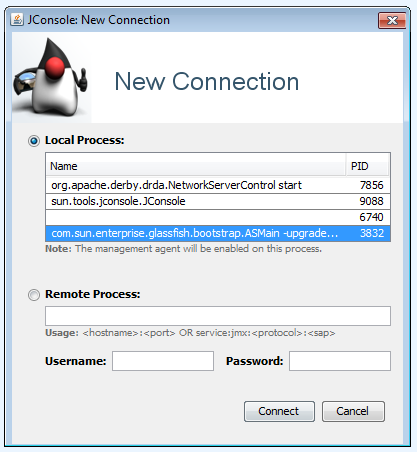
jconsole.exein the/binfolder. - Connect to Payara domain as in the figure below:
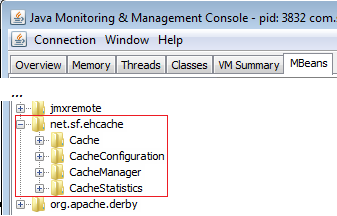
- After the connection is successfully accomplished navigate to the
MBeanstab. Notice the entry namednet.sf.ehcache. This entry was added via theCacheStatisticsBeanfrom above and is what we are looking for.
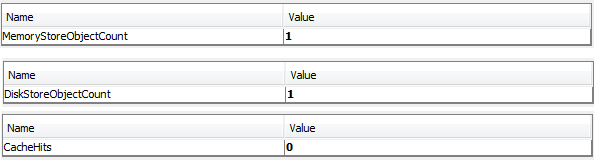
At this moment, there is nothing in the cache. For checking this, simply expose some attributes under CacheStatistics as DiskStoreObjectCount, MemoryStoreObjectCount, CacheHits, etc:
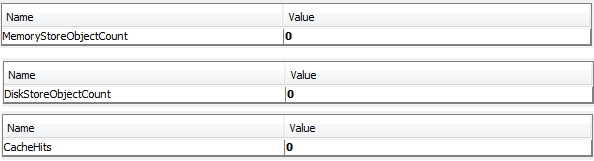
- Now, deploy and run the application. After the application starts, let’s point out that at this moment we have 1 object stored in memory and on disk; nothing was read from cache yet:
- Now, refresh the browser a few times or open the application in multiple tabs or even other browsers:
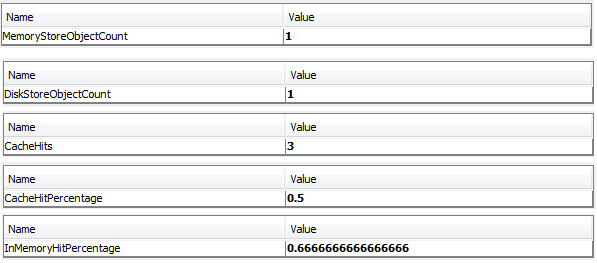
Well, now it is obvious that our cache is working fine.
Programmatically, you can clean cache content like this:
RequestContext.getCurrentInstance().
 getApplicationContext().getCacheProvider().clear();
The complete application is named PFAndECache.
Caching HTML markup via PrimeFaces and Hazelcast
As mentioned earlier, PrimeFaces supports two different providers of cache implementation: EHCache and Hazelcast. Furthermore, we take a look at the Hazelcast provider based on the same scenario described above. So, instead of re-rendering this static table, we are better off caching it. In order to accomplish this via PrimeFaces and Hazelcast, we need to follow these steps:
Configure the cache provider in web.xml via the primefaces.CACHE_PROVIDER context param
<context-param>
 <param-name>primefaces.CACHE_PROVIDER</param-name>
 <param-value>org.primefaces.cache.HazelcastCacheProvider</param-value>
</context-param>
Use the <p:cache/> tag to point out the content that should be cached
As you can see in the official documentation this tag supports a bunch of optional attributes. We are especially interested in the region and key attributes. The region attribute allows us to point to the cache region that we want to use, which is myCache in our case. The key attribute represents a unique id of the cache entry in regions and defaults to client id of the component. We set it as myTable. Of course, this means that we can use <p:cache/> with different regions and keys:
<p:cache region="myCache" key="myTable">
 <p:dataTable var="t" value="#{playersBean.data}">
  <p:column headerText="Player">
   <h:panelGroup id="playerId">#{t.player}</h:panelGroup>
  </p:column>

  ...

  <p:column headerText="Residence">
   <h:panelGroup id="residenceId">#{t.residence}</h:panelGroup>
  </p:column>

  <p:column headerText="Height">
   <h:panelGroup id="heightId">#{t.height} cm</h:panelGroup>
  </p:column>

  <p:column headerText="Weight">
   <h:panelGroup id="weightId">#{t.weight} kg</h:panelGroup>
  </p:column>
 </p:dataTable>
</p:cache>
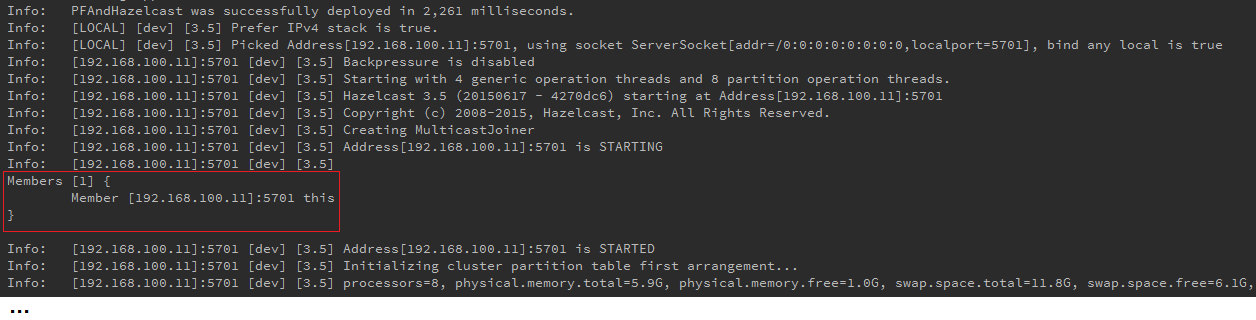
Done! If you run the application at this point then everything should work as expected. You will notice that the initial request takes some time to load, while postbacks work very fast. This is a sign that, on postbacks, the table markup comes from cache. Moreover, you can see that Hazelcast is at work:
But, let’s add some code to check the cache content. First, let’s display the cache content in the page:
<hr/>
<p>
<code>
#{playersBean.showCache()}
</code>
</p>
<hr/>
public Object showCache() {
 HazelcastCacheProvider cacheProvider = (HazelcastCacheProvider)
  RequestContext.getCurrentInstance().getApplicationContext().getCacheProvider();
 return cacheProvider.get("myCache", "myTable");
}
We also may want to programmatically remove our entry from cache. For this we can simply use an action method as below:
public void clearCache() {
 HazelcastCacheProvider cacheProvider = (HazelcastCacheProvider)
  RequestContext.getCurrentInstance().getApplicationContext().getCacheProvider();
 cacheProvider.remove("myCache", "myTable");
}
On the initial request there is nothing in the cache:
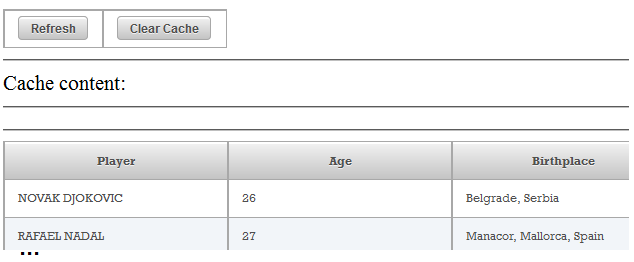
On postback (click the Refresh button) the cache content shows the HTML markup corresponding to our data table:
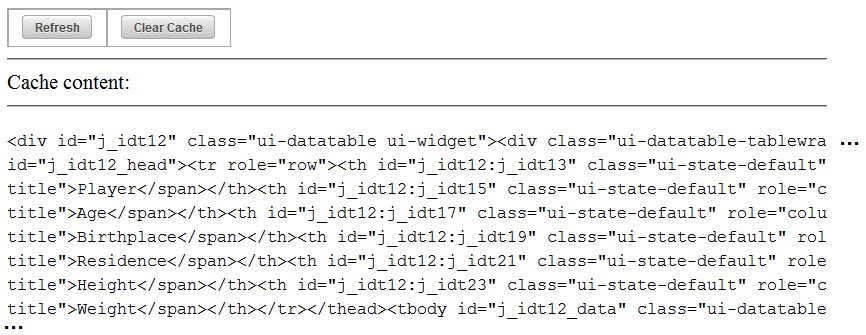
Furthermore, if you click the Clear Cache button, the cache entry will be removed.
The complete application is named PFAndHazelcast.
Caching HTML markup via OmniFaces
In this section we will discuss caching HTML markup via OmniFaces Cache component. The OmniFaces cache allows us to control the re‐caching interval individually per fragment, cache value expressions, reset caching programmatically or via an attribute, cache a number of limited elements(items), cache post‐processing code and disable caching for only one request and more. Caching can take place in application scope or in session scope.
In this section, you will see several examples that use the OmniFaces Cache component. We will cache tables, forms, panels, etc. You will see how to take advantage of the Cache attributes, depending on the goal of the application and on the content type that will be cached. The Cache component is exposed to page authors via the <o:cache/> tag.
The simplest cache can be achieved by using the <o:cache/> without attributes (fixed cache). In this case, its attributes rely on the default values: key (no value), scope (session), time (no value), useBuffer (false), reset (false), disabled (false). Below you can see how to cache a markup for a <p:dataTable/>:
<o:cache>
 <p:dataTable var="t" value="#{playersBean.data}">
  <p:column headerText="Player">
   <h:panelGroup id="playerId">#{t.player}</h:panelGroup>
  </p:column>
  ...
 </p:dataTable>
</o:cache>
Simple caching
On initial request, the Cache component will add in cache (represented by a special Map) an entry composed of a generated key (used for identifying this entry) and the rendered markup, as a value. So each cached snippet is an entry in this Map. On postbacks the <p:dataTable/> markup will be supplied from the cache using the corresponding key.
The complete application is named OFSimpleCache.
When no key is indicated, OmniFaces will generate one of type viewId+"_"+clientId. But, you can indicate a custom key via the key attribute, like this:
<o:cache key="myTable">
 ...
</o:cache>
Reset caching
The reset attribute is a flag that defaults to false. When it is set to true, the corresponding entry is removed from cache and the latest rendered markup is added in the cache under the same key. OmniFaces also supports cached value expressions via <o:cachevalue/>. These will be explained in more detail below, but for now it suffices to say they will be re‐evaluated when next referenced. Below, we remove players from table one by one and we reset the cache each time the size of data is even.
<!-- Each time we press this button a player is remove from table -->
<h:form>
 <p:commandButton value="Remove player (#{playersBean.data.size()})"
                  action="#{playersBean.removePlayer()}" ajax="false"/>
</h:form>
This time the <o:cache/> is used as below:
<o:cache reset="#{playersBean.data.size() % 2 eq 0}">
 <p:dataTable var="t" value="#{playersBean.data}">
  <p:column headerText="Player">
   <h:panelGroup id="playerId">#{t.player}</h:panelGroup>
  </p:column>
  ...
 </p:dataTable>
</o:cache>
On initial request the table is cached and contains 10 players:
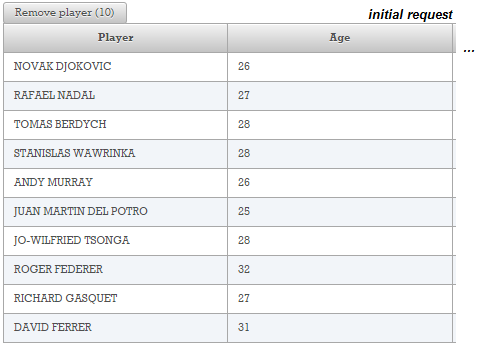
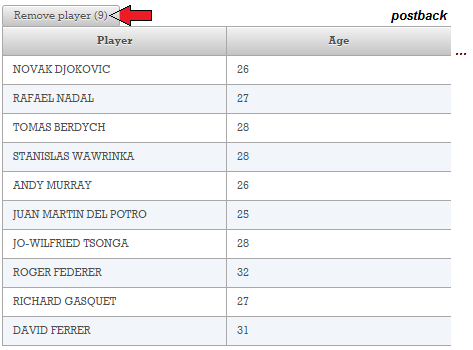
If we press the Remove Player once, we can not see any changes reflected in the table content because this content is provided from cache (but, we have 9 players in data now):
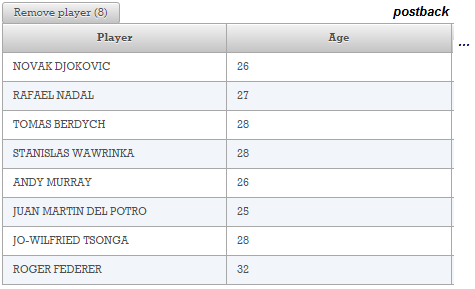
Furthermore, if we press the Remove Player button one more time then one more player will be removed from the data. Since this time the size of data is 8 (an even number) the cache will be reset and re-cached. This action is not visually reflected by the table content:
This test can continue until there are no more players in the data. This is useful when you want to synchronize the cache content with the current content.
For example, when a data table reflects a database content, you may want to cache the table content instead of “hitting” the database, again. But when new records are inserted/deleted/updated in the database, you may want to reset the cache and “hit” the database for the new updates, which will be cached again under the same key.
The complete application is named OFResetCache.
The above example is a reset via component attribute, but you can also reset it programmatically (the second argument of the getCache() method represents the scope of the cache, and, for the default provider (presented later), this can be session or application):
public void resetProgrammaticFromSessionScope() {
 CacheFactory.getCache(getContext(), "session").remove("foo_key");
}
For a key generated automatically by OmniFaces, you can also use the below approaches (practically build a key exactly as OmniFaces does):
FacesContext context = FacesContext.getCurrentInstance();
CacheFactory.getCache(getContext(), cacheComponent.getScope()).
remove("viewId" + "_" + "clientId");
// or
remove(context.getViewRoot().getViewId()+ "_" +
 cacheComponent.getClientId(context));
Or, if you have access to the Cache component itself:
org.omnifaces.component.output.cache.Cache cacheComponent;
...
public void resetProgrammaticFromSessionScope() {
 CacheFactory.getCache(getContext(), cacheComponent.getScope()).
  remove(cacheComponent.getKey());
}
Caching post processing
Going further, the Cache component comes with an attribute named useBuffer that defaults to false. This attribute is needed when you want to cache markup that contains a post‐processing part (cache <h:form/> ‐ nothing else does post‐processing; forms write (client) state after view is rendered). This is for advanced users who really understand the implications of caching forms. For now, letʹs say that we need to place our table in a <h:form/> and we donʹt use buffering:
<o:cache>
 <h:form>
  <p:dataTable var="t" value="#{playersBean.data}">
   <p:column headerText="Player">
    <h:panelGroup id="playerId">#{t.player}</h:panelGroup>
   </p:column>
   ...
  </p:dataTable>
  <p:commandButton value="Submit" ajax="false"/>
 </h:form>
</o:cache>
Now the entire form is cached, except the post‐processing part, which in the case of a form is represented by a markup similar to this – it is easy to see that this part is not coming from cache if you compare the value of the javax.faces.ViewState at multiple requests. For example, at initial request you may see something like this:
<input type="hidden" name="javax.faces.ViewState"
       id="j_id1:javax.faces.ViewState:0"
       value="-7261722298707610536:-3405156646486980264"
       autocomplete="off" />
At postback, instead of the above code, you will see this:
<o:cache useBuffer="true">
 <h:form>
  <p:dataTable var="t" value="#{playersBean.data}">
   <p:column headerText="Player">
    <h:panelGroup id="playerId">#{t.player}</h:panelGroup>
   </p:column>
   ...
  </p:dataTable>
  <p:commandButton value="Submit" ajax="false"/>
 </h:form>
</o:cache>
This time the post-processing part is cached, and you will see the same result at each postback.
When this attribute is set to true, OmniFaces needs a special filter that will be capable of buffering the Faces Servlet response. This filter is named org.omnifaces.filter.OnDemandResponseBufferFilter, and you can configure it in web.xml descriptor, like this:
Use the org.omnifaces.CACHE_INSTALL_BUFFER_FILTER context parameter:
<context-param>
 <param-name>org.omnifaces.CACHE_INSTALL_BUFFER_FILTER</param-name>
 <param-value>true</param-value>
</context-param>
Use the classic style, add <filter/> tag:
<filter>
 <filter-name>bufferFilter</filter-name>
 <filter-class>org.omnifaces.filter.OnDemandResponseBufferFilter</filter-class>
</filter>
<filter-mapping>
 <filter-name>bufferFilter</filter-name>
 <url-pattern>/faces/*</url-pattern>
</filter-mapping>
In a real case scenario, you may want to use *.xhtml or filter the FacesServlet itself. The *.xhtml is better because it prevents a security issue (source code exposure), while if all views are enabled, filtering on the FacesServlet is better since then the filter doesnʹt have the knowledge off the actual mapping. The power of manually mapping filters is that it can be done for specific pages.
The complete application is named OFCacheBuffer.
Cache scope
For the default cache provider, OmniFaces can store the cache in session or in application. If the scope attribute is not specified, then the cache is stored in session. Below, we have stored the same markup in session and in application ‐ for testing this example, use two different browsers:
<o:cache scope="session">
 <p:dataTable var="t" value="#{playersBean.data}">
  <p:column headerText="Player">
   <h:panelGroup id="playerId">#{t.player}</h:panelGroup>
  </p:column>
  ...
 </p:dataTable>
</o:cache>

<o:cache scope="application">
 <p:dataTable var="t" value="#{playersBean.data}">
  <p:column headerText="Player">
   <h:panelGroup id="playerId">#{t.player}</h:panelGroup>
  </p:column>
  ...
 </p:dataTable>
</o:cache>
The complete application is named OFCacheScope.
Disabling cache
The OmniFaces cache can be disabled per request by using the disabled attribute (default false). If the cache is disabled then the cache children will be directly rendered without influencing the cached data. When cache is enabled again, you will see the content that was cached before disabling it. The content rendered between disabled="true" and disabled="false" doesnʹt interact with cache. For example, we can control the disable of caching by using a simple button and a ValueExpression as below:
<h:form>
 <p:commandButton value="Remove player"
                 action="#{playersBean.removePlayer()}" ajax="false"/>
 <!-- cache enable/disable switch -->
 <p:commandButton value="Enabled/Disable Cache (status:
                         #{playersBean.disabled ?
                        'disabled' : 'enabled'})"
                  action="#{playersBean.cacheOnOff()}" ajax="false"/>
</h:form>

<o:cache disabled="#{playersBean.disabled}">
 <p:dataTable var="t" value="#{playersBean.data}">
  <p:column headerText="Player">
   <h:panelGroup id="playerId">#{t.player}</h:panelGroup>
  </p:column>
  ...
 </p:dataTable>
</o:cache>
The complete application is named OFCacheDisabled.
Control the cache size
By default, the OmniFaces cache doesnʹt have a pre‐defined limit, but if you want to control the size of this cache then you can set it in the web.xml a maximum capacity via the org.omnifaces.CACHE_SETTING_SESSION_MAX_CAPACITY context parameter. The value of this parameters indicates the maximum number of elements (items) that can be stored in the cache. You can think of an element (item) as a single <o:cache/>. So, if you define a maximum size of 3, then you can use three <o:cache/> tags. The fourth <o:cache/> will cause the OmniFaces to remove one element and add this one instead of it. The one that will be removed is calculated using the LRU (Least Recently Used) algorithm.
<context-param>
 <param-name>org.omnifaces.CACHE_SETTING_SESSION_MAX_CAPACITY</param-name>
 <param-value>3</param-value>
</context-param>
Caching a fragment of render markup for a limited period of time
OmniFaces allows us to use cache for a fixed period of time specified in seconds (known as TTL ‐ Time To Live. This can be done at the element level, using the time attribute (allows individual times) or globally, in the web.xml, via the context parameters: org.omnifaces.CACHE_SETTING_SESSION_TTL and org.omnifaces.CACHE_SETTING_APPLICATION_TTL. The time attribute will override these context parameters. Notice that, when the time has elapsed, the default cache implementation will NOT automatically refresh the cache. New content will only be inserted into the cache following a page request. Without a request, even if time has elapsed, the viewed content (and the cached content) remains the same. Moreover, note that this component does not support a cache loader and locking mechanism ‐ the locking is mostly a feature of the cache provider, and the default provider indeed does not support locking. A Cache loader would be difficult, since it means you need to have a way of rendering markup outside a JSF request. For the moment, this means that after content times out, several simultaneous page requests may render the same content. Furthermore, itʹs
undetermined which of those will end up being cached.
Plug in a cache provider
In order to provide a more powerful cache implementation, OmniFaces allows you to plug‐in a cache provider in web.xml as below:
<context-param>
 <param-name>org.omnifaces.CACHE_PROVIDER</param-name>
 <param-value>com.example.MyProvider</param-value>
</context-param>
Caching EL
OmniFaces provides a special TagHandler for caching EL. It is exposed via <o:cacheValue/> tag, and it is important to know that:
- The direct parent of this component MUST be
Cacheor a potential subclass of the associatedUIComponent. Itʹs an error to have any other kind of parent. - If the parent
Cachecomponent clears its cache (e.g. because of time to live expiration), the value cached by this value expression will be automatically cleared as well.
In order to use <o:cacheValue/> you have to indicate two required attributes:
-
name‐ Indicates the name under which the value expression will be made available to EL, scoped to the Facelet in which this tag occurs. -
value‐ Indicates the value expression for which its value will be cached on demand and made available as a new value expression.
Remember our table of players? Well, letʹs adjust it a little:
<h:form>
 Selected player: #{playersBean.selectedPlayer}
 <o:cache>
  <p:dataTable value="#{playersBean.data}" var="t">
   <p:column headerText="Player (with fixed cache)">
    #{t}
   </p:column>
   <p:column>
    <p:commandButton value="Select"
                     action="#{playersBean.selectPlayer(t)}" update="@form" />
   </p:column>
  </p:dataTable>
 </o:cache>
</h:form>
Now, you may think that everything will work smoothly: the table content is cached and by pressing a button labeled Select, a player will be selected and you will see the selected player displayed above the table. This is only apparently correct, because as the OmniFaces Showcase explains, JSF doesnʹt send the actual row data alone, but merely a row number. Because the backing bean is request scoped and the expression #{playersBean.data} is freshly evaluated after each postback, you will see the new selection each time. You can visually achieve this by shuffling the players list on each request. When you do that, you will see this “strange” behavior (notice that the selected player doesn’t match the player listed in the table):
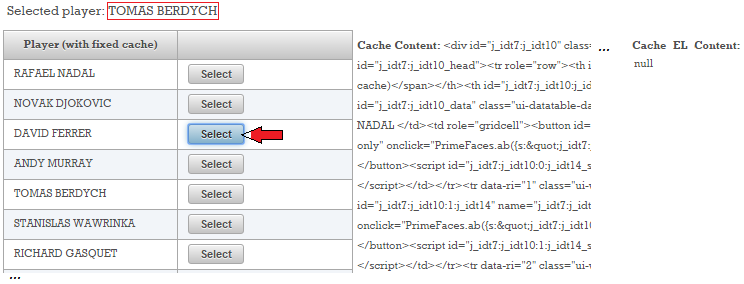
We did multiple selections until the above screenshot was taken. The Cache Content doesnʹt change (even if we shuffle the collection that feeds the table, its markup comes from cache), the Cache EL Content is null (since we didnʹt use <o:cacheValue/>) and the current selection (indicated by the red arrow) doesnʹt match the selected player! Obviously, this is not correct. Now let’s adjust the code to cache the #{playersBean.data} expression:
<h:form>
 Selected player: #{playersBean.selectedPlayer}
 <o:cacheValue name="data" value="#{playersBean.data}"/>
  <p:dataTable value="#{data}" var="t" style="width:350px;">
   <p:column headerText="Player (with fixed cache)">
    #{t}
   </p:column>
   <p:column>
    <p:commandButton value="Select"
                     action="#{playersBean.selectPlayer(t)}" update="@form" />
   </p:column>
  </p:dataTable>
 </o:cache>
</h:form>
This time things go as we expected:
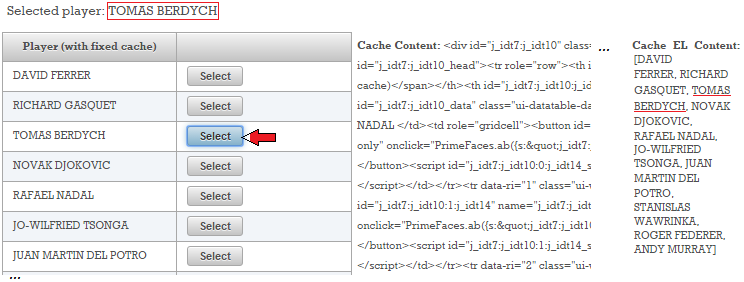
The complete application is named OFCachingEL. As a bonus, in this application, you will also see a test that reveals how <o:cacheValue/> acts if we disable the <o:cache/>.You should notice that, in this case, we can cache the expression instead of the table and not in addition of the table. To see the cache content and cache EL content for a specific key (and name), you can use these two methods:
public String getCacheContent(String key) {
 String cacheContent = CacheFactory.getCache(getContext(),
                       "session/application").get(key);
 return cacheContent == null ? "null" : cacheContent;
}

public String getCacheELContent(String key, String name) {
 Object cacheELContent = CacheFactory.getCache(getContext(),
                         "session/application").getAttribute(key, name);
 return cacheELContent == null ? "null" : cacheELContent.toString();
}
The <o:cache/> resume
- Cache component is exposed to JSF page authors via
<o:cache/>tag. - Cache encapsulates a server-side caching mechanism for the markup produced by the Render Response phase.
- Cache takes action in Render Response phase.
- The cached markup is stored under a key generated by OmniFaces or indicated via the optional
keyattribute of<o:cache/>. - Caching can be disabled per request via the optional
disabledflag attribute of<o:cache/>. - A cached entry can be re-cached via
resetflag attribute of the<o:cache/>. - By default, cached data is stored in session scope (application scope is also supported).
Add a header with given a name and value to the HTTP response
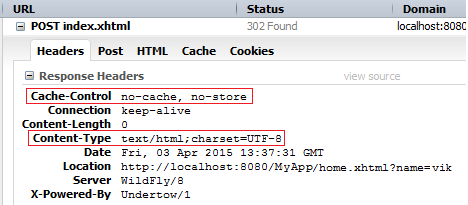
The OmniFaces addResponseHeader() method adds a header with a given name and value to the HTTP response. For example, you can add cache specific headers like below:
import org.omnifaces.util.Faces;
...
// set 'Content-Type' response header
Faces.addResponseHeader("Content-Type", "text/html; charset=UTF-8");
// set 'Cache-Control' response header
Faces.addResponseHeader("Cache-Control", "no-cache, no-store");
Facelets default non-hot reload in production
JSF has the ability to cache Facelets. In order to update the cache, JSF performs periodic checks of Facelets views changes. In the development stage, you may need to perform this check much often than in production. For this, you can set the javax.faces.FACELETS_REFRESH_PERIOD context parameter as shown in the following example (the value represents the number of seconds between two consecutive checks).
<context-param>
<param-name>javax.faces.FACELETS_REFRESH_PERIOD</param-name>
<param-value>5</param-value>
</context-param>
There are two special values:
-1 means no refresh (cache indefinitely)
0 means no caching at all (always hot reload)
Starting with JSF 2.3, when the project stage is Production (default) the Facelets refresh period is -1 (no refresh).
Further readings
Programmatically caching PrimeFaces charts via OmniFaces Cache component