Chapter 2: Working with links and request parameters
In this chapter, we will discuss about several gaps of UIParameter. This component is exposed to JSF page authors via the <f:param/> tag, and it is usually used for attaching extra request parameters to links (<p:link/>), external URLs (<h:outputLink/>), command buttons/links (<p:commandButton/> and <p:commandLink/>) and formatted output (<h:outputFormat/>). Among others, we will focus on passing object into generated links and creating complex labels.
Use <p:link/> and <o:param/> to pass objects into generated link
In order to generate a link (HTML <a href>), PrimeFaces comes with <p:link/>. If you check the PrimeFaces Showcase, you can see a simple example (listed below):
<p:link outcome="productDetail" value="Bookmark">
 <f:param name="productId" value="10" />
</p:link>
As you can see, the generated link contains a request parameter also. The productId request parameter is “attached” to the generated link via the <f:param> tag.
For example, let’s suppose that we collect from the end user a 10 digit phone number, as below:
<p:outputLabel for="phone" value="Phone Number: " />
<p:inputText id="phone" required="true" value="#{dataBean.number}" />
Let’s assume that a 10 digit phone number is composed as follows:
- the first three numbers are the area code, called the national destination code (NDC)
- the following three numbers known as the exchange
- the last four numbers at the end of a 10 digits number are the subscriber number
Knowing this, we will now create a POJO class to represent these phone number parts (notice the toString()):
public class PhoneNumber implements Serializable {

 private static final long serialVersionUID = 1L;

 private String areacode;
 private String exchange;
 private String subscriber;

 public PhoneNumber(String areacode, String exchange, String subscriber) {
  this.areacode = areacode;
  this.exchange = exchange;
  this.subscriber = subscriber;
 }

 // getters and setters

 // equals() and hashCode()

 @Override
 public String toString() {
  return "PhoneNumber{" + "areacode=" + areacode + ", exchange="
                        + exchange + ", subscriber=" + subscriber + "}";
 }
}
Instances of this POJO are used via a simple bean named, DataBean (for brevity, we skip its source code). The property that stores the instance is named, number (e.g. #{dataBean.number}).
In order to split the provided phone number and represent it as an instance of the PhoneNumber class, we need to attach a converter (for brevity, we skip the converter source code):
<p:inputText id="phone" required="true"
             value="#{dataBean.number}"
             converter="phoneNumberConverter"/>
After the user submits the 10 digits phone number, we want to display a link of type: Dial Phone Number. The HTML behind this link is an <a> tag (of course, the number request parameter should reflect the provided phone number):
<a href="/.../dial.xhtml?number=0727890877">
 Dial Phone Number
</a>
In the browser address bar it will appear as:
So, this link should be created like below:
<p:link value="Dial Phone Number" outcome="dial">
 <f:param name="number" value="#{dataBean.number}"/>
</p:link>
But, this will generate the following link (notice the effect of invoking toString()):
Well, this link is definitely not the desired one! In order to obtain the desired link, we can write a proper toString() implementation or to break down the DRY principle. But, even better is to use the OmniFaces <o:param/>. This component allows us to pass an object as a request parameter into a link. Practically, <o:param> allows us to indicate the needed converter via the converter attribute, as below:
<p:link value="Dial Phone Number" outcome="dial">
 <o:param name="number" value="#{dataBean.number}"
          converter="phoneNumberConverter"/>
</p:link>
You can see the result in the below figure:
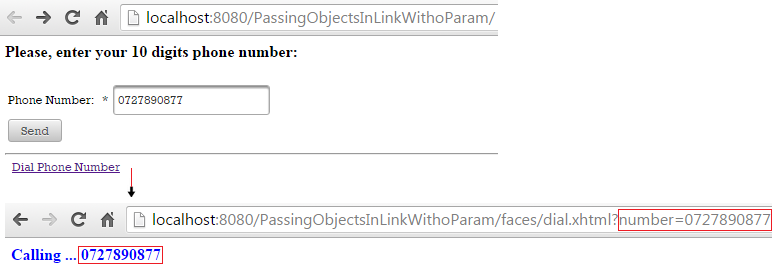
The complete application is named, PassingObjectsInLinkWithoParam.
Use <p:commandButton/Link/> and <o:param/> to pass objects into managed beans
Commonly, the <f:param/> tag is used inside the <p:commandButton/> and <p:commandLink/> tags for sending request parameters to a managed bean. When the passed parameter is an object (e.g. PhoneNumber) we fall into the similar trappings such as the one mentioned in the above section. In order to avoid such cases, we can simply use <o:param/> with the necessary converter. For example, we can pass our PhoneNumber stored in a DataBean to another bean named, AgendaBean as below:
<p:commandButton value="Add Phone Number In Your Agenda"
                 action="#{agendaBean.addInAgenda()}"
                 update=":agendaId">
 <o:param name="number" value="#{dataBean.number}"
          converter="phoneNumberConverter"/>
</p:commandButton>

<h:panelGroup id="agendaId">
 Agenda: #{agendaBean.agenda}
</h:panelGroup>
And the AgendaBean source code is:
@Named
@ViewScoped
public class AgendaBean implements Serializable {

 private static final long serialVersionUID = 1L;

 private List<String> agenda;

 public AgendaBean() {
  agenda = new ArrayList();
 }

 public List<String> getAgenda() {
  return agenda;
 }

 public void setAgenda(List<String> agenda) {
  this.agenda = agenda;
 }

 public void addInAgenda() {
  // native JSF API
  FacesContext fc = FacesContext.getCurrentInstance();
  Map<String, String> params = fc.getExternalContext().getRequestParameterMap();
  agenda.add(params.get("number"));

  // or using OmniFaces shortcut
  agenda.add(Faces.getRequestParameter("number"));
 }
}
The complete application is named, PassingObjectsInMBWithoParam.
Create complex labels
The <f:param/> cannot supply JSF/HTML in parameterized messages (<h:outputFormat/>). Let’s suppose that we want to use a link as a parameter of an un−escaped <h:outputFormat/>, which is nested in a <p:outputLabel/>, as below:
<h:form>
 <h:panelGrid columns="4">
  <p:outputLabel for="zipCodeId">
   <h:outputFormat value="#{msg['ZIPCODE']} ({0}):" escape="false">
    <f:param>
     <p:link value="see samples"
             outcome="#{view.locale eq 'en' ? 'sample_en':'sample_fr'}">
      <f:param name="locale" value="#{view.locale}" />
     </p:link>
    </f:param>
   </h:outputFormat>
  </p:outputLabel>
  <p:inputText id="zipCodeId" required="true" />
  <p:message for="zipCodeId" />
  <p:commandButton value="Dial"/>
 </h:panelGrid>
</h:form>
So we have a label that contains a simple text and a link. The link gets modified (points different outcomes) depending on the selected language (English or French). The above code will produce the following output (left side - English, right side - French):
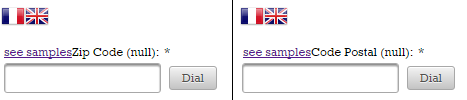
The problem can be solved by replacing the <f:param/> with OmniFaces’ <o:param>. The <o:param/> allows the use of JSF and HTML as parameter values.
<h:form>
 <h:panelGrid columns="4">
  <p:outputLabel for="zipCodeId">
   <h:outputFormat value="#{msg['ZIPCODE']} ({0}):" escape="false">
    <o:param>
     <p:link value="see samples"
             outcome="#{view.locale eq 'en' ? 'sample_en':'sample_fr'}">
      <o:param name="locale" value="#{view.locale}" />
     </p:link>
    </o:param>
   </h:outputFormat>
  </p:outputLabel>
  <p:inputText id="zipCodeId" required="true" />
  <p:message for="zipCodeId" />
  <p:commandButton value="Dial"/>
 </h:panelGrid>
</h:form>
This time the result will be like this (everything looks fine for both, English and French):
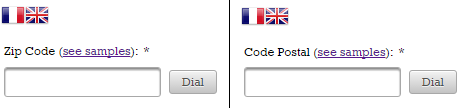
The complete application is named, ComplexLabelsWithOutputFormat.
Using <h:outputFormat/> output as input parameter
Let’s suppose that we want to use the output of <h:outputFormat/> as a tooltip for multiple commands (command links and buttons).
In other words, you cannot write something like this:
<p:commandLink ... title="<h:outputFormat value="...">
                           <f:param value="..."/>
                          </h:outputFormat>"
/>
It is practically pretty hard to obtain the desired result. However, OmniFaces provides an extension to<h:outputFormat/> that is capable of accomplishing such tasks. This component is exposed to JSF page authors via <o:outputFormat/> tag. More precisely, this component has the ability to capture the <h:outputFormat> output and expose it in the request scope under a variable specified as the value of the var attribute. Let’s see how to use <h:outputFormat/> output as an input/parameter:
<h:form>
 <o:outputFormat value="#{msg['ZIPCODE']}, {0}" var="_zip">
  <f:param value="#{view.locale eq 'en' ? 'UK':'France'}" />
 </o:outputFormat>
 <p:commandLink value="#{msg['ZIPCODE']}" title="#{_zip}" />
 <p:commandButton value="#{msg['ZIPCODE']}" title="#{_zip}" />
</h:form>
Notice that the variable name is prefixed with underscore character (_). This is an OmniFaces recommendation for avoiding possible conflicts with other variables in the page. Below you can see the output of this case:
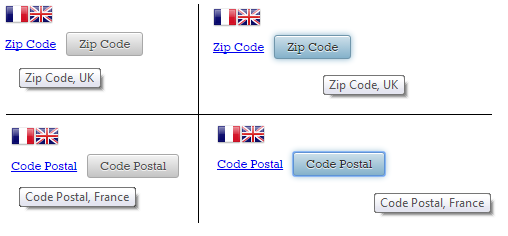
The complete application is named, OutputFormatAsInputParameter.