Chapter 12: Boost <f:event/> and <f:viewAction/>
In this chapter, we will discuss about two tags that are usually used together (not mandatory): <f:event/> and <f:viewAction/>. First, you will see how OmniFaces adds two more events to <f:event/>, afterwards you will see how if attribute of <f:viewAction/> can evaluate a condition based on converterd/validated data instead of state data.
The <f:event/> and preInvokeAction/postInvokeAction event types
If you are not familiar with <f:event/> tag handler then you should know that its main goal is to allow page authors to install ComponentSystemEventListener instances on a component in a page. The required type attribute represents the name of the event for which to install a listener and it can be one of: preRenderComponent, preRenderView, postAddToView, preValidate, postValidate or the fully qualified class name of any java class that extends javax.faces.event.ComponentSystemEvent. Commonly, <f:event/> is used for calling actions in GET/POST requests via preRenderView, as below:
<f:event type="preRenderView" listener="fooBean.fooInit"/>
But, in some specific cases, the preRenderView event might be too late, while the postValidate might be to earlier or useless. For example, we may need to perform initialization only if validation was successfully passed. Unfortunately, preRenderView event will cause the initialization to take place even when validation failed.
For a better understanding let’s have a simple example. Basically, we will use <f:viewParam/> to bring in the current view an e-mail address via a context parameter. This address will go through a custom validator, and if it is valid, it will be used to initialize a message of type Welcome, foo-email!. A typical approach will look like this:
<p:link outcome="subscribe?email=leoprivacy@yahoo.com" value="Click Me!"/>
<f:metadata>
<f:viewParam name="email" value="#{emailBean.email}"
validator="emailValidator" />
<f:event type="preRenderView" listener="#{emailBean.preRender}" />
</f:metadata>
@FacesValidator(value = "emailValidator")
public class EmailValidator implements Validator {

 @Override
 public void validate(FacesContext context, UIComponent component,
                           Object value) throws ValidatorException {

  String email = value.toString();

  if (!isValidEmail(email)) {
      FacesMessage message = Messages.
       createError("The provided address is not a valid e-mail.");
      throw new ValidatorException(message);
  }
 }
 ...
}
@Named
@RequestScoped
public class EmailBean implements Serializable {

 private String email;

 public String getEmail() {
  return email;
 }

 public void setEmail(String email) {
  this.email = email;
 }

 public void preRender() {
  Messages.addGlobalInfo("Welcome, " + email);
 }
}
So, the first stop will happen in the EmailValidator. If the e-mail is valid then the process will advance in the Update Model Values phase, otherwise it will queue an error faces message and will advance in the Render Response phase. Independent of this action, the preRenderView will instruct JSF to invoke the preRender() method, which queues another faces messages based on the passed e-mail. This means that when the e-mail is valid, we will something like in figure below:

And, when the e-mail is invalid (e.g. leoprivacyyahoo.com) we will see something like in figure below:
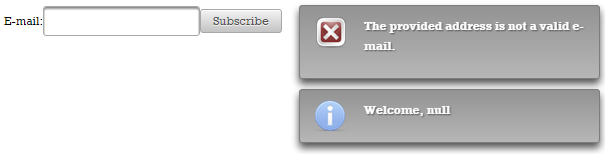
Well, is obvious that this is not the expected or desired result. A quick approach consists in having a check inside preRender() method of type if (!Faces.isValidationFailed()) ... (see OmniFaces shortcut Faces#isValidationFailed()). This will fix the issue, but it means that preRender() method is still invoked! Basically, the same effect will take place in case of postValidate event.
Since we are using OmniFaces, there is no need for this workaround. Once OmniFaces is added in the project, we have access out-of-the-box to the preInvokeAction/postInvokeAction event types. Basically, the InvokeActionEventListener will add support for new <f:event/> types preInvokeAction and postInvokeAction. Those events are published before, respectively after, the Invoke Application phase. So, these events can be attached to <f:event/>, and in our case we can use the preInvokeAction as below:
<f:metadata>
<f:viewParam name="email" value="#{emailBean.email}"
validator="emailValidator" />
<f:event type="preInvokeAction" listener="#{emailBean.preInvoke}" />
</f:metadata>
// EmailBean
public void preInvoke() {
 Messages.addGlobalInfo("Welcome, " + email);
}
This time, when the validation fails, the flow will go in Render Response phase, which means that it “jumps” over the Invoke Application phase and the preInvoke() method will not be invoked. So, for an invalid e-mail we will see something like in figure below:

In case that you want to invoke a listener at the end of Invoke Applicaation phase too, then simply add a new <f:event/> as below:
<f:metadata>
 ...
 <f:event type="preInvokeAction" listener="#{fooBean.fooPreInvoke}" />
 <f:event type="postInvokeAction" listener="#{fooBean.fooPostInvoke}" />
</f:metadata>
The complete application is named, ViewParamAndPrePostIA.
Furthermore, let’s suppose that we want to invoke multiple action listeners in an UIComponent. You have to know that the OmniFaces InvokeActionEventListener is supported on any UIComponent (e.g. UIViewRoot, UIForm, UIInput, UICommand, etc). Practically, you can invoke multiple action listeners on a single UIInput and UICommand component on an easy manner. For example, let’s suppose that when we click on an UICommand (e.g. <h:commandButton/>) we want to submit a form and obtain the following sequence of messages: a) Welcome, foo-email! - message produced by a method invoked during before Invoke Application phase (preInvoke()), b) Your foo-email was successfully registered! - message produced by an action method (registerEmail()), and c) Bye, foo-email! - message produced by a method during after Invoke Application phase (postInvoke()).
In order to accomplish this task, we can write the following form - notice how we have attached the desired listeners to the UICommand:
<h:form>
 <p:growl id="msgs"/>
 <p:outputLabel for="emailId" value="E-mail:"/>
 <p:inputText id="emailId" value="#{emailBean.email}"
              validator="emailValidator"/>
 <p:commandButton value="Subscribe"
                  action="#{emailBean.registerEmail()}"
                  update="msgs">
  <f:event type="preInvokeAction" listener="#{emailBean.preInvoke}" />
  <f:event type="postInvokeAction" listener="#{emailBean.postInvoke}" />
 </p:commandButton>
</h:form>
The relevant part from EmailBean is:
public void preInvoke() {
 Messages.addGlobalInfo("Welcome, " + email);
}

public void registerEmail() {
 Messages.addGlobalInfo("Your " + email + " was successfully registered!");
}

public void postInvoke() {
 Messages.addGlobalInfo("Bye, " + email);
}
If the provided e-mail is not valid, then you will see the error messages produces by the e-mail validator. Otherwise, you will see the sequence of messages from the below figure:

The complete application is named, UICommandAndPrePostIA.
Or, you may want to invoke multiple action listeners on a single UIInput when the keyup event occur. For example:
<h:form>
 <p:growl id="msgs"/>
 <p:outputLabel for="emailId" value="E-mail:"/>
 <p:inputText id="emailId" value="#{emailBean.email}" validator="emailValidator">
  <p:ajax event="keyup" listener="#{emailBean.registerEmail()}" update="msgs" />
  <f:event type="preInvokeAction" listener="#{emailBean.preInvoke}" />
  <f:event type="postInvokeAction" listener="#{emailBean.postInvoke}" />
 </p:inputText>
</h:form>
The complete application is named, InputAndPrePostIA.
Boost <f:viewAction/> via <o:viewAction/>
Starting with JSF 2.2, we can deal with calling actions on GET/POST requests by using the new generic view action feature (well-known in Seam 2 and 3). This new feature is materialized in the <f:viewAction/> tag, which is declared as a child of the metadata facet, <f:metadata/>. This allows the view action to be part of the JSF life cycle for faces/non-faces requests. The main attribute is named action, and its value is a MethodExpression. The expression must evaluate to a public method that takes no parameters, and returns void or an outcome.
<f:metadata>
 ...
 <f:viewAction action="#{fooBean.fooAction()}"/>
 ...
</f:metadata>
We can also place an outcome directly in action:
<f:metadata>
 ...
 <f:viewAction action="foopage"/>
 ...
</f:metadata>
The problem identified and fixed by OmniFaces is related to the if attribute of the <f:viewAction/> tag. Practically, via this attribute we can decide when the specified action (indicated via the action attribute) should be executed or not.
<f:metadata>
 ...
 <f:viewAction if="#{foo_condition}" action="#{fooBean.fooAction()}"/>
 ...
</f:metadata>
The value of the if attribute is evaluated in the Apply Request Values phase, which means that this value wasn’t converted, validated and, obviously, set in the model yet (if there is a converter/validator specified and/or a proper model). Conversion and validation will take place in the Process Validation phase and the model will be updated in the Update Model Values phase; both of these phases are after the Apply Request Values phase. Let’s suppose that the if value is evaluated to true against a non-null data check, and a custom converter will convert the checked data to null without causing any exception. This means that the pointed action (method) will be invoked (by default, in Invoke Application phase), but the data in the model is actually null (JSF doesn’t check this again before calling the action(method)). This is at least a “strange” behavior, because we may think that the checked data is not null and try to use it for further tasks. Moreover, the invoked action (method) may causes unexpected behaviors.
Let’s begin with an example. Check out the below code (do not conclude that <f:viewAction/> cannot be used without <f:viewParam/>):
<p:link outcome="ping?numberParam=0721-9348334">Ping 0721-9348334</p:link>
<p:link outcome="ping?numberParam=0743-9348334">Ping 0743-9348334</p:link>
// ping.xhtml
<f:metadata>
<f:viewParam name="numberParam" value="#{pingBean.number}"
converter="phoneNumberConverter"/>
<f:viewAction if="#{pingBean.number ne null}"
action="#{pingBean.ping()}"/>
</f:metadata>
// custom converter
@FacesConverter(value = "phoneNumberConverter")
public class PhoneNumberConverter implements Converter {

 @Override
 public Object getAsObject(FacesContext context,
             UIComponent component, String value) {
  if (value.startsWith("0721")) {
      return "343-" + value;
  }
  return null;
 }

 @Override
 public String getAsString(FacesContext context,
             UIComponent component, Object value) {
  return (String) value;
 }
}
// PingBean.java
@Named
@RequestScoped
public class PingBean {

 private String number;
 private String ping;

 public PingBean() {
  number = "0000-000000";
  ping = "Nothing to ping!";
 }

 public void ping() {
  ping = "Ping number: " + number + "!";
 }

 public String getNumber() {
  return number;
 }

 public void setNumber(String number) {
  this.number = number;
 }

 public String getPing() {
  return ping;
 }
}
The code is very simple to understand - just check it line by line and pay attention to the highlighted parts. Basically, our converter “accepts” only phone numbers starting with 0721 prefix. For those numbers it adds one more local prefix, 343. For numbers that start with other prefixes (e.g. 0743) our converter returns null (!it doesn’t throw an exception).
Test 1: If you press on the first link, Ping 0721-9348334, you will see the expected result of calling the ping() method:
Ping number: 343-0721-9348334!
Test 2: If you press on the second link, Ping 0743-9348334, you will see an un-expected result (you may be surprised by the fact that ping() was invoked, and you don’t see anything on the screen to ping!). This is happening because the if doesn’t evaluate the value returned by the PhoneNumberConverter, which is null (!the converter was not even called). The flow is in the Apply Request Values phase and it evaluates the #{pingBean.number} against the state, which doesn’t confirm the null value!
Ping number: null!
A simple approach to solve this issue is to add an explicit null check condition in the ping(), like this:
public void ping() {
 if (number != null) {
     ping = "Ping number: " + number + "!";
 }
}
This will solve the issue, but it has at least two drawbacks: the ping() method is still invoked and this works only for this specific case.
It is time to see how OmniFaces solves this issue! The OmniFaces solution is named ViewAction and it is focused on postponing the moment of if value evaluation. The OmniFaces implementation practically, postpones the if evaluation until the Invoke Application phase. Since the if attribute’s value will be evaluated during the Invoke Application phase instead of the Apply Request Values phase, the evaluated value is converted/validated (if this is required) and set in the model (if there is the need). In order to use the OmniFaces implementation just replace the f with o, and add OmniFaces namespace, http://omnifaces.org/ui, as below:
<f:metadata>
 <f:viewParam name="numberParam"
              value="#{pingBean.number}"
              converter="phoneNumberConverter"/>
 <o:viewAction if="#{pingBean.number ne null}" action="#{pingBean.ping()}"/>
</f:metadata>
Test 1: If you press on the first link, Ping 0721-9348334, you will see the expected result of calling the ping() method:
Ping number: 343-0721-9348334!
Test 2: If you press on the second link, Ping 0743-9348334, you will see the expected result also:
Nothing to ping!
The complete application is named, OFViewAction.