Chapter 14: Handling exceptions
In this chapter, we will discuss handling exceptions (especially AJAX exceptions) in JSF applications via PrimeFaces and OmniFaces solutions. In addition, we will discuss OmniFaces approach of adding every exception as a global FATAL faces message.
Handling AJAX exceptions
Exception handling is an important aspect of any application that needs to work in the production field. As you probably know the exceptions that occur in JSF applications during AJAX requests are not treated as exceptions that occur during non‐AJAX requests. By default, most of them are invisible to the client. Since the user doesnʹt receive feedback about AJAX request success, he/she may get confused, restart the application, or resend the request, etc.
Working with OmniFaces exception handler
For example, let’s suppose the below managed bean which acts as an exceptions, gets triggered via several action methods:
@Named
@RequestScoped
public class ExceptionBean {

 public void throwNullPointerException() {
  throw new NullPointerException("A NullPointerException!");
 }

 public void throwWrappedIllegalStateException() {
  Throwable t = new IllegalStateException("A wrapped IllegalStateException!");
  throw new FacesException(t);
 }

 public void throwMyCoolException() throws MyCoolException {
  throw new MyCoolException("A NullPointerException!");
 }
}

public class MyCoolException extends Exception {

 private static final long serialVersionUID = 1997753363232807009L;

 public MyCoolException() {
  // NOPE
 }

 MyCoolException(String msg) {
  super(msg);
 }
}
Furthermore, we add a command button per action method. Each of these buttons will fire an AJAX request:
<h:form>
 <p:commandButton value="Throw NullPointerException"
                  action="#{exceptionBean.throwNullPointerException()}"/>
 <p:commandButton value="Throw Wrapped IllegalStateException"
                  action="#{exceptionBean.throwWrappedIllegalStateException()}"/>
 <p:commandButton value="Throw MyCoolException"
                  action="#{exceptionBean.throwMyCoolException()}"/>
</h:form>
Let’s suppose that we run this application and we press the button Throw NullPointerException:

Well, if we check the server log then we will see a java.lang.NullPointerException reported, but on the client side (in the browser) nothing happens. Nevertheless, if we use a browser debugging tool such as Firebug we find this exception in the partial response as in the figure below:
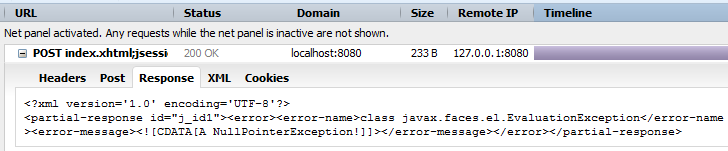
It would be nice to be informed about this exception in a more suggestive way. So, let’s see how we can deal with this issue via OmniFaces and PrimeFaces. From a JSF lifecycle’s perspective, we need to handle different kinds of exceptions in different phases of the application. Starting with JSF 2, we have a generic API that allows us to write a global exception handler. This is very helpful, especially when we need to signal the “silent” exceptions that are not reported to the user or otherwise are reported in a very discreet manner. In order to write a global exception handler, we need to do the following:
- Extend the
ExceptionHandlerFactory, which is a factory object that is capable of creating and returning a newExceptionHandlerinstance, and override thegetExceptionHandler()method. - Extend the
ExceptionHandlerWrapper, which is a simple implementation ofExceptionHandler, and override thehandle()method. - Configure the custom exception handler in
faces-config.xml.
Based on these steps, OmniFaces has implemented an ExceptionHandler named FullAjaxExceptionHandler and PrimeFaces has another one named PrimeExceptionHandler.
The OmniFaces exception handler allows developers to handle exceptions that occur during AJAX requests via error pages configured in web.xml (or web-fragment.xml). In order to exploit the FullAjaxExceptionHandler, we need to explicitly configure the FullAjaxExceptionHandlerFactory in the faces-config.xml. This is not implicitly configured, so we need to do it like this:
<factory>
 <exception-handler-factory>
   org.omnifaces.exceptionhandler.FullAjaxExceptionHandlerFactory
 </exception-handler-factory>
</factory>
If we run the application again and press the Throw NullPointerException button, Firebug will reveal the following exception (this also happens for the other two buttons also):
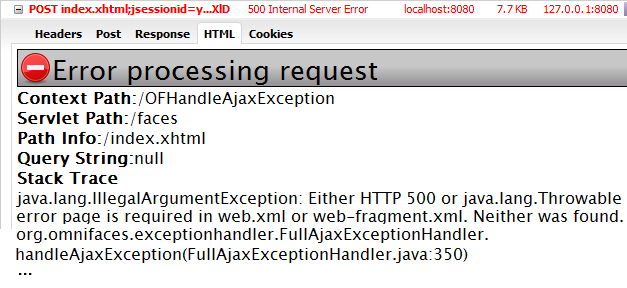
This exception is fired by OmniFaces and signals that we didn’t configure an error page for this exception. So, after we configure the FullAjaxExceptionHandler, we need to add the error pages in the web.xml (or web-fragment.xml) via <error-page/> tag. These configurations should fit the exceptions that we want to report. For example, in our case, we may want to have an error page for the java.lang.NullPointerException exception and another page for the wrapped IllegalStateException exception. We can easily configure these pages in the web.xml like this:
<error-page>
 <exception-type>java.lang.NullPointerException</exception-type>
 <location>/WEB-INF/errors/NullPointerException.xhtml</location>
</error-page>
<error-page>
 <exception-type>java.lang.IllegalStateException</exception-type>
 <location>/WEB-INF/errors/IllegalStateException.xhtml</location>
</error-page>
Now, if we press the Throw NullPointerException button, we obtain something like in the figure below (this is the code of the /WEB-INF/errors/NullPointerException.xhtml page):

But, most of the time we cannot anticipate all the exceptions that may occur. This is why it is a good practice to provide at least a fall back error page whenever thereʹs no match to any of the declared specific exceptions. When we have error pages for specific exception types, then we’d better use the 500 status code as a fallback error page:
<error-page>
 <error-code>500</error-code>
 <location>/WEB-INF/errors/500.xhtml</location>
</error-page>
In order to see this at work, we can press the Throw MyCoolException button (notice that for this exception type we did not intentionally set an entry in the web.xml file). This will reveal the /WEB-INF/errors/500.xhtml which looks like the below (fall back error page):

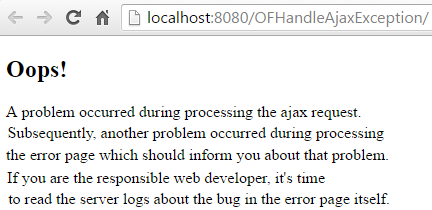
Done! The complete application is named OFHandleAjaxException.
Displaying details of exceptions
Typically, the error page contains more than a simple message as we did above. For example, we may want to see some details about the thrown exception such as the HTTP error status code, the error type, the user IP and so on. Well, in the case of FullAjaxExceptionHandler the details are available in the request scope and they are the standard Servlet error request attributes like in any error page response. So, we have the following details available:
- date/time when the exception occurred,
#{of:formatDate(now, 'yyyy-MM-dd HH:mm:ss')}; - user agent,
#{header['user-agent']}; - user IP,
#{request.remoteAddr}; - request URI,
#{requestScope['javax.servlet.error.request_uri']}; - Ajax request,
#{facesContext.partialViewContext.ajaxRequest ? 'Yes' : 'No'; - status code,
#{requestScope['javax.servlet.error.status_code']}; - exception type,
#{requestScope['javax.servlet.error.exception_type']}; - exception message,
#{requestScope['javax.servlet.error.message']}; - stack trace,
#{of:printStackTrace(requestScope['javax.servlet.error.exception'])};
Most probably, you will want to present the above information in a list or styled with some CSS as in the figure below:
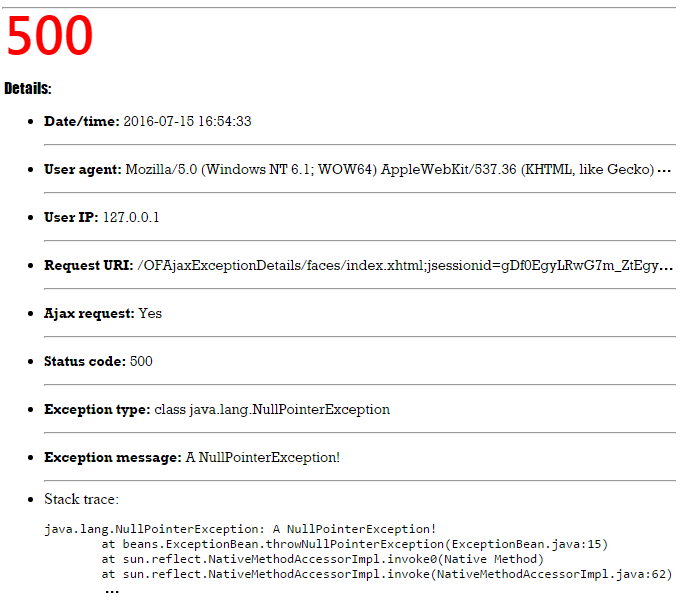
As you can see, we can use this information to write custom error pages per exception or to use a single fall back styled error page.
<error-page>
 <error-code>500</error-code>
 <location>/WEB-INF/errors/500.xhtml</location>
</error-page>
The complete application is named, OFAjaxExceptionDetails.
Unwrapping the AJAX exceptions
Earlier, in the OFHandleAjaxException application we triggered an exception of type IllegalStateException wrapped in a FacesException. Even if the
IllegalStateException is wrapped the application reports it correctly as in the figure below:

Well, we obtain this behavior because, by default, the FacesException and ELException are unwrapped. But, let’s suppose that we trigger the same IllegalStateException wrapped in an SQLException:
@Named
@RequestScoped
public class ExceptionBean {

 public void throwWrappedIllegalStateException() throws SQLException {
  Throwable t = new IllegalStateException("A wrapped IllegalStateException!");
  throw new SQLException(t);
 }
}
And, in the web.xml we have the following error page set:
<error-page>
 <exception-type>java.lang.IllegalStateException</exception-type>
 <location>/WEB-INF/errors/IllegalStateException.xhtml</location>
</error-page>
Since the SQLException is not unwrapped by default, the above scenario will not work as expected. Actually, no error will be reported! In order to fix this issue we have at least three possibilities:
- Modify the exception type in the
web.xmlto correspond to thejava.sql.SQLException:
<error-page>
 <exception-type>java.sql.SQLException</exception-type>
 <location>/WEB-INF/errors/IllegalStateException.xhtml</location>
</error-page>
This case will lead to the following report:
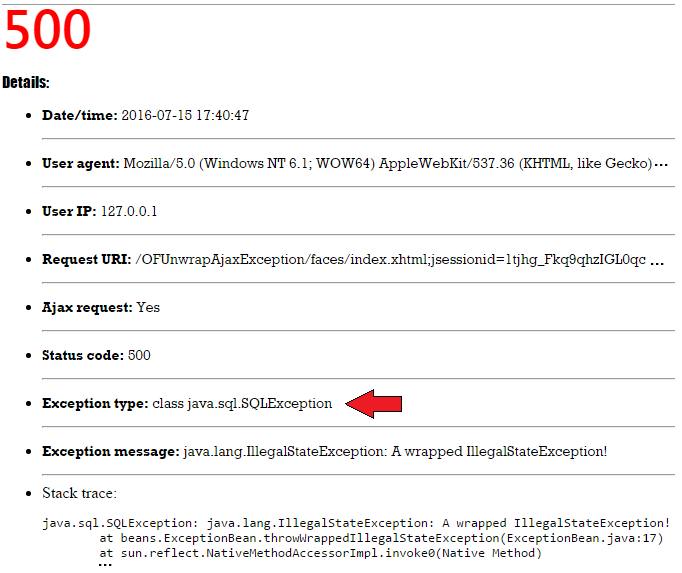
- Keep the exception type that corresponds to the
IllegalStateExceptionand supply the context parameterorg.omnifaces.EXCEPTION_TYPES_TO_UNWRAPto specify additional exception types to unwrap:
 <context-param>
  <param-name>org.omnifaces.EXCEPTION_TYPES_TO_UNWRAP</param-name>
  <param-value>java.sql.SQLException</param-value>
 </context-param>
This case will lead to the following report:
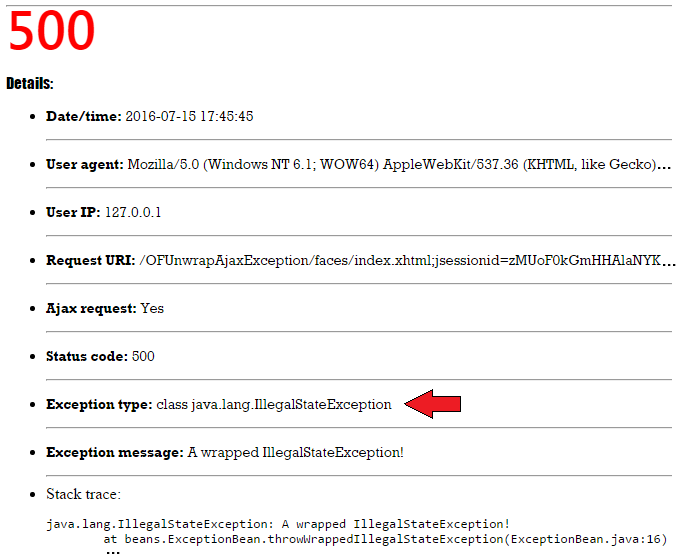
Use a fall back error page whenever thereʹs no match to any of the declared specific exceptions:
<error-page>
 <error-code>500</error-code>
 <location>/WEB-INF/errors/500.xhtml</location>
</error-page>
The complete application is named OFUnwrapAjaxException.
Customizing FullAjaxExceptionHandler
In order to obtain more control over the behavior of FullAjaxExceptionHandler, the OmniFaces team allows us to override the following methods (their names are very suggestive, but you can also check the documentation):
findExceptionRootCause(FacesContext, Throwable)shouldHandleExceptionRootCause(FacesContext, Throwable)findErrorPageLocation(FacesContext, Throwable)logException(FacesContext, Throwable, String, LogReason)logException(FacesContext, Throwable, String, String, Object...)
Now, when we decide to override any of these methods, we need to follow the next steps:
- extend the
FullAjaxExceptionHandler; - override the desired methods;
- create a custom
ExceptionHandlerFactory; - register the custom
ExceptionHandlerFactoryinfaces-config.xml;
Ok, as a proof of concept we have followed the above code and we have obtained a skeleton that you can further use for a real implementation. First, we extend the FullAjaxExceptionHandler as below:
public class MyAjaxExceptionHandler extends FullAjaxExceptionHandler {

 private static final Logger LOG =
  Logger.getLogger(MyAjaxExceptionHandler.class.getName());

 public MyAjaxExceptionHandler(ExceptionHandler wrapped) {
  super(wrapped);
 }

 @Override
 protected Throwable findExceptionRootCause(FacesContext context,
                                             Throwable exception) {
  LOG.info("MyAjaxExceptionHandler#findExceptionRootCause()");
  return super.findExceptionRootCause(context, exception);
 }

 @Override
 protected boolean shouldHandleExceptionRootCause(FacesContext context,
                                                   Throwable exception) {
  LOG.info("MyAjaxExceptionHandler#shouldHandleExceptionRootCause()");
  return super.shouldHandleExceptionRootCause(context, exception);
 }

 @Override
 protected String findErrorPageLocation(FacesContext context,
                                         Throwable exception) {
  LOG.info("MyAjaxExceptionHandler#findErrorPageLocation()");
  return super.findErrorPageLocation(context, exception);
 }

 @Override
 protected void logException(FacesContext context, Throwable exception,
                 String location, String message, Object... parameters) {
  LOG.info("MyAjaxExceptionHandler#logException()");
  super.logException(context, exception, location, message, parameters);
 }

 @Override
 protected void logException(FacesContext context, Throwable exception,
                             String location, LogReason reason) {
  LOG.info("MyAjaxExceptionHandler#logException()");
  super.logException(context, exception, location, reason);
 }
}
Furthermore, we create a custom ExceptionHandlerFactory as follows:
public class MyExceptionHandlerFactory extends ExceptionHandlerFactory {

 private ExceptionHandlerFactory exceptionHandlerFactory;

 public MyExceptionHandlerFactory(){
 }

 public MyExceptionHandlerFactory(ExceptionHandlerFactory
                                  exceptionHandlerFactory) {
  this.exceptionHandlerFactory = exceptionHandlerFactory;
 }

 @Override
 public ExceptionHandler getExceptionHandler() {
  ExceptionHandler handler = new MyAjaxExceptionHandler(exceptionHandlerFactory.
                                                         getExceptionHandler());

  return handler;
 }
}
Finally, we register the MyExceptionHandlerFactory in the faces-config.xml:
<factory>
 <exception-handler-factory>
  exceptionhandler.MyExceptionHandlerFactory
 </exception-handler-factory>
</factory>
In order to test it, we just trigger a NullPointerException exception. In the server log we obtain the output from the below figure:

The complete application is named OFCustomAjaxExceptionHandler.
Working with PrimeFaces exception handler
Furthermore, let’s talk about the PrimeFaces exception handler. This is named PrimeExceptionHandler and it is available in org.primefaces.application.exceptionhandler package. The PrimeFaces exception handler can be used for AJAX and non-AJAX requests, but let’s see a suite of examples that only treats the AJAX exceptions (for non-AJAX things are pretty much the same).
The first thing to accomplish consists of configuring/activating the exception handler in faces-config.xml as below (basically, the PrimeFaces exception handler is “served” by a dedicated factory named PrimeExceptionHandlerFactory):
<factory>
 <exception-handler-factory>
  org.primefaces.application.exceptionhandler.PrimeExceptionHandlerFactory
 </exception-handler-factory>
</factory>
Furthermore, in the web.xml (or web-fragment.xml) file of our application, we configure the following error pages (notice the 500.xhtml page which is our fall back error page; exactly like in the case of OmniFaces, this page is shown when thereʹs no match to any of the declared specific exceptions):
<error-page>
 <exception-type>java.lang.NullPointerException</exception-type>
 <location>/faces/pages/errors/NullPointerException.xhtml</location>
</error-page>
<error-page>
 <exception-type>java.lang.IllegalStateException</exception-type>
 <location>/faces/pages/errors/IllegalStateException.xhtml</location>
</error-page>
<error-page>
 <error-code>500</error-code>
 <location>/faces/pages/errors/500.xhtml</location>
</error-page>
In order to create a scenario, we will use a simple bean capable of throwing several exceptions:
Named
@RequestScoped
public class ExceptionBean {

 public void throwNullPointerException() {
  throw new NullPointerException("A NullPointerException!");
 }

 public void throwWrappedIllegalStateException() {
  Throwable t = new IllegalStateException("A wrapped IllegalStateException!");
  throw new FacesException(t);
 }

 public void throwMyCoolException() throws MyCoolException {
  throw new MyCoolException("A MyCoolException!");
 }
}
And, we trigger these exceptions via three command buttons:
<h:form>
 <p:commandButton ajax="false" value="Throw NullPointerException"
                  action="#{exceptionBean.throwNullPointerException()}"/>
 <p:commandButton value="Throw Wrapped IllegalStateException"
                  action="#{exceptionBean.throwWrappedIllegalStateException()}"/>
 <p:commandButton value="Throw MyCoolException"
                  action="#{exceptionBean.throwMyCoolException()}"/>
</h:form>
That’s all! We just finished our example, and if we arbitrarily choose to press a button then the application will return the error page that corresponds to the thrown exception.
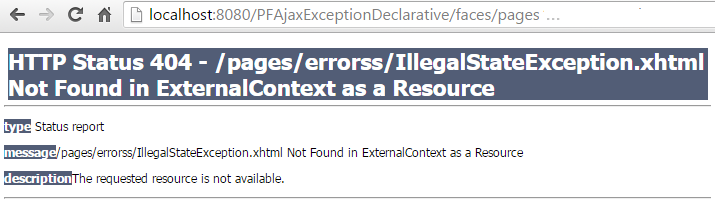
The complete application is named PFAjaxExceptionDeclarative.
Displaying details of exceptions
In order to display details about an exception, we need to add one more configuration in our faces-config.xml. Basically, PrimeFaces provides access to several details about the exception via a custom EL resolver, named PrimeExceptionHandlerELResolver. This is available in org.primefaces. application.exceptionhandler. This can be configured next to the PrimeExceptionHandlerFactory as follows:
<application>
 <el-resolver>
  org.primefaces.application.exceptionhandler.PrimeExceptionHandlerELResolver
 </el-resolver>
</application>
Once we’ve done this configuration, we can use the EL name pfExceptionHandler to render the following details of an exception:
- exception,
#{pfExceptionHandler.exception}; - type of the exception,
#{pfExceptionHandler.type}; - exception message,
#{pfExceptionHandler.message}’ - an array of
java.lang.StackTraceElementinstances,#{pfExceptionHandler.stackTrace}; - stack trace as presentable string,
#{pfExceptionHandler.formattedStackTrace}; - timestamp as date,
#{pfExceptionHandler.timestamp}; - timestamp as presentable string,
#{pfExceptionHandler.formattedTimestamp};
Most probably, you will want to present the above information in a list or styled with some CSS as in the figure below:
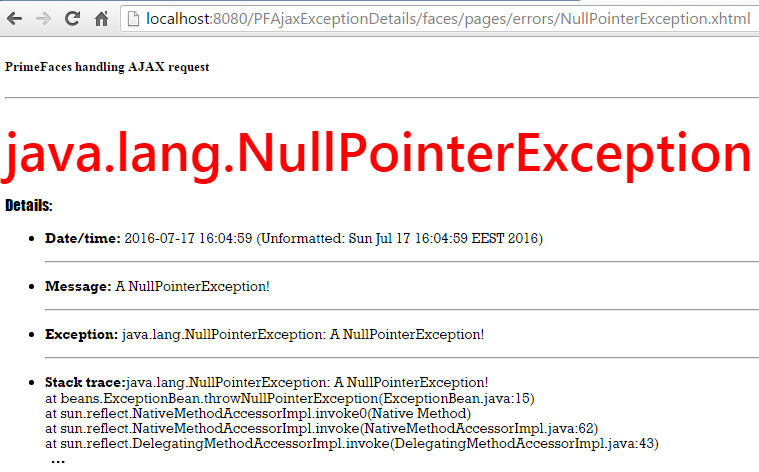
As you can see, we can use this information to write custom error pages per exception or to use a single fall back styled error page.
<error-page>
 <error-code>500</error-code>
 <location>/faces/pages/errors/500.xhtml</location>
</error-page>
The complete application is named, PFAjaxExceptionDetails.
Unwrapping the AJAX exceptions
Earlier, in the PFAjaxExceptionDeclarative application we triggered an exception of type IllegalStateException wrapped in a FacesException, even if the IllegalStateException is wrapped the application still reports it correctly. Well, we obtain this behavior because, by default, the FacesException and ELException are unwrapped by the PrimeFaces exception handler. But, let’s suppose that we trigger the same IllegalStateException wrapped in an SQLException:
@Named
@RequestScoped
public class ExceptionBean {

 public void throwWrappedIllegalStateExceptionInSQLException()
                                          throws SQLException {
  Throwable t = new IllegalStateException("An IllegalStateException
                                              wrapped in SQLException");
  throw new SQLException(t);
 }

 public void throwWrappedIllegalStateExceptionInFacesException() {
  Throwable t = new IllegalStateException("An IllegalStateException
                                              wrapped in FacesException");
  throw new FacesException(t);
 }

 public void throwWrappedIllegalStateExceptionInELException() {
  Throwable t = new IllegalStateException("An IllegalStateException
                                              wrapped in ELException");
  throw new ELException(t);
 }
}
Since the SQLException is not unwrapped by default, the above scenario will not work as expected. Actually, no error will be reported! In order to fix this issue we have at least two possibilities:
- Modify the exception type in
web.xmlto correspond to thejava.sql.SQLException:
<error-page>
 <exception-type>java.sql.SQLException</exception-type>
 <location>/faces/pages/errors/IllegalStateException.xhtml</location>
</error-page>
This case will lead to the following report:

Use a fall back error page whenever thereʹs no match with any of the declared specific exceptions:
<error-page>
 <error-code>500</error-code>
 <location>/faces/pages/errors/500.xhtml</location>
</error-page>
The complete application is named, PFUnwrapAjaxException.
Well, the problem is that none of these two approaches solves the issue. Basically, they are more like workarounds because we didn’t unwrap really the exception. In order to unwrap the exception we should try to override the PrimeExceptionHandler#getRootCause() which currently looks like this; as you can see only exceptions of type FacesException and ELException are unwrapped:
 @Override
 public Throwable getRootCause(Throwable throwable) {
  while ((ELException.class.isInstance(throwable) ||
          FacesException.class.isInstance(throwable))
          && throwable.getCause() != null) {
           throwable = throwable.getCause();
  }

  return throwable;
}
So, we can extend the PrimeExceptionHandler and provide the code necessary to unwrap the exception in getRootCause() method. At this point, OmniFaces can help us via its Exceptions#unwrap() utility method. This method unwraps the nested causes of given exception as long as until it is not an instance of the given type and then return it.
For example, let’s suppose that we want to adjust our ExceptionBean bean to throw the following wrapped exceptions:
@Named
@RequestScoped
public class ExceptionBean {

 // IllegalStateException wrapped in SQLException
 public void throwWrappedIllegalStateExceptionInSQLException()
                                           throws SQLException {
  Throwable t = new IllegalStateException("An IllegalStateException
                                              wrapped in a SQLException");
  throw new SQLException(t);
 }

 // IllegalStateException wrapped in SQLException
 // wrapped further in RuntimeException
 public void throwWrappedIllegalStateExceptionInRuntimeException() {
  Throwable t = new IllegalStateException("An IllegalStateException
            wrapped in a SQLException wrapped further in a RuntimeException");
  throw new RuntimeException(new SQLException(t));
 }

 // FileNotFoundException wrapped in IOException
 public void throwFileNotFoundExceptioninIOException() throws IOException {
  Throwable t = new FileNotFoundException("An FileNotFoundException
                                         wrapped in a IOException");
  throw new IOException(t);
 }
}
This means that in the web.xml we will have the following error pages and we expect it to work properly:
<error-page>
 <exception-type>java.lang.IllegalStateException</exception-type>
 <location>/faces/pages/errors/IllegalStateException.xhtml</location>
</error-page>
<error-page>
 <exception-type>java.io.FileNotFoundException</exception-type>
 <location>/faces/pages/errors/FileNotFoundException.xhtml</location>
</error-page>
So, first we want to unwrap an IllegalStateException wrapped in a SQLException, second an IllegalStateException wrapped in a SQLException and wrapped again in a RuntimeException, and finally a FileNotFoundException wrapped in a IOException. This means that we can override the getRootCause() like below:
@Override
public Throwable getRootCause(Throwable e) {
 Throwable realRootCause = Exceptions.unwrap(e,
           javax.faces.FacesException.class,
           RuntimeException.class,
           java.io.IOException.class,
           java.sql.SQLException.class);
 return realRootCause;
}
Of course, depending on your (exceptions) cases, you have to adjust this method accordingly.
Now, we just need to extend the PrimeExceptionHandler, loop over the unhandled exceptions, and replace each exception with its unwrapped version. We can accomplish this in the PrimeExceptionHandler#handle() method as below:
public class MyAjaxExceptionHandler extends PrimeExceptionHandler {

 private static final Logger LOG = Logger.
  getLogger(MyAjaxExceptionHandler.class.getName());

 public MyAjaxExceptionHandler(ExceptionHandler wrapped) {
  super(wrapped);
 }

 @Override
 public void handle() throws FacesException {

  FacesContext fc = FacesContext.getCurrentInstance();

  Iterable<ExceptionQueuedEvent> exceptionQueuedEvents =
                      getUnhandledExceptionQueuedEvents();
  if (exceptionQueuedEvents != null &&
      exceptionQueuedEvents.iterator() != null) {
      Iterator<ExceptionQueuedEvent> unhandledExceptionQueuedEvents =
                        getUnhandledExceptionQueuedEvents().iterator();

      if (unhandledExceptionQueuedEvents.hasNext()) {

          ExceptionQueuedEventContext eventContext =
           unhandledExceptionQueuedEvents.next().getContext();
          Throwable throwable = eventContext.getException();

          LOG.info("----------------------------------------");
          LOG.log(Level.INFO, "Unwrapping:{0}", throwable);
          Throwable rootCause = getRootCause(throwable);
          LOG.log(Level.INFO, "Root cause:{0}", rootCause);
          LOG.info("----------------------------------------");

          unhandledExceptionQueuedEvents.remove();
          fc.getApplication().publishEvent(fc, ExceptionQueuedEvent.class,
             new ExceptionQueuedEventContext(fc, rootCause,
              eventContext.getComponent(), eventContext.getPhaseId()));
      }
  }

  super.handle();
  }

 @Override
 public Throwable getRootCause(Throwable e) {
  Throwable realRootCause = Exceptions.unwrap(e,
            javax.faces.FacesException.class,
            RuntimeException.class,
            java.io.IOException.class,
            java.sql.SQLException.class);
  return realRootCause;
 }
}
Well, just two more steps and we are done! At this point, the application will not consider MyAjaxExceptionHandler and will still use the default PrimeExceptionHandler. This is happening because we have configured in faces-config.xml the PrimeExceptionHandlerFactory which is responsible of “serving” instances of PrimeExceptionHandler. In order to set MyAjaxExceptionHandler as the default we need to write a custom ExceptionHandlerFactory as fallows:
public class MyExceptionHandlerFactory extends ExceptionHandlerFactory {

 private ExceptionHandlerFactory exceptionHandlerFactory;

 public MyExceptionHandlerFactory(){
 }

 public MyExceptionHandlerFactory(ExceptionHandlerFactory
                                  exceptionHandlerFactory) {
  this.exceptionHandlerFactory = exceptionHandlerFactory;
 }

 @Override
 public ExceptionHandler getExceptionHandler() {
  ExceptionHandler handler = new MyAjaxExceptionHandler(exceptionHandlerFactory.
                                                          getExceptionHandler());

  return handler;
 }
}
And, finally, we need to configure this exception handler factory in faces-config.xml in place of PrimeExceptionHandlerFactory:
<factory>
 <exception-handler-factory>
  exceptionhandler.MyExceptionHandlerFactory
 </exception-handler-factory>
</factory>
Done! Now if we run the application and we arbitrarily press one of the three available buttons,
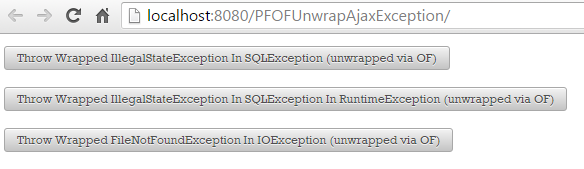
we will obtain something like in the figure below (for the FileNotFoundException wrapped in a IOException):

Or, if we consult the server log we will see something like in the figure below:

If we suppose the case of an IllegalStateException wrapped in a SQLException wrapped further in a RuntimeException then the server log will reveal something like in the figure below:

In order to better understand what we have done check out the below image:
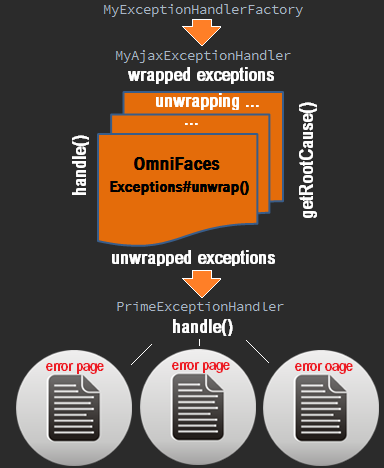
The complete application is named PFOFUnwrapAjaxException.
Showing the exceptions in a dialog on the same page
One of the greatest feature provided by PrimeFaces for dealing with exceptions that occurs during AJAX requests consists of the possibility to treat the exceptions in the same page. We can execute callbacks on the client side and update other components on the same page. This is possible via the <p:ajaxExceptionHandler/> tag. For example, let’s suppose that we prepared the following dialog with details about the exceptions:
<p:dialog id="exceptionDialog"
          header="Exception '#{pfExceptionHandler.type}' occured!"
          widgetVar="exceptionDialog" height="500px" width="600px">
 Message: #{pfExceptionHandler.message} <br/>
 StackTrace: <h:outputText value="#{pfExceptionHandler.formattedStackTrace}"
                           escape="false" />
</p:dialog>
Now, our ExceptionBean was adjusted to trigger the following exceptions via three action methods:
@Named
@RequestScoped
public class ExceptionBean {

 public void throwNullPointerException() {
  throw new NullPointerException("A NullPointerException!");
 }

 public void throwWrappedIllegalStateException() {
  Throwable t = new IllegalStateException("A wrapped IllegalStateException!");
  throw new FacesException(t);
 }

 public void throwMyCoolException() throws MyCoolException {
  throw new MyCoolException("A MyCoolException!");
 }
}
The idea is pretty simple … we trigger one of these exceptions and we want the corresponding details to appear in our dialog on the same page. Obviously, this means that we cannot use the separate error pages, and we must rely on the missing pieces form this puzzle, on the <p:ajaxExceptionHandler/> tag. We define a <p:ajaxExceptionHandler/> for each of these exceptions, as follows:
<!-- for the NullPointerException -->
<p:ajaxExceptionHandler type="java.lang.NullPointerException"
                        update="exceptionDialog"
                        onexception="PF('exceptionDialog').show();" />

<!-- for the IllegalStateException -->
<p:ajaxExceptionHandler type="java.lang.IllegalStateException"
                        update="exceptionDialog"
                        onexception="PF('exceptionDialog').show();" />

<!-- for the MyCoolException -->
<p:ajaxExceptionHandler type="beans.MyCoolException"
                        update="exceptionDialog"
                        onexception="PF('exceptionDialog').show();" />
Now, if we run the application and we fire an exception (e.g. NullPointerException) we will obtain something like in the figure below:
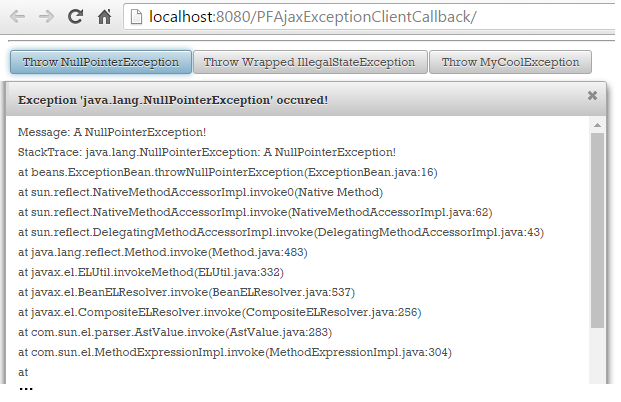
The complete application is named PFAjaxExceptionClientCallback.
Showing the exceptions in a dialog on the same page using PrimeFaces and unwrapping the exceptions using OmniFaces
The section title is pretty suggestive. Basically, PrimeFaces can treat AJAX exceptions in the same page via <p:ajaxExceptionHandler/> without using separate error pages while OmniFaces cannot do that. On the other hand, OmniFaces can unwrap exceptions via org.omnifaces.EXCEPTION_TYPES_TO_UNWRAP context parameter while PrimeFaces cannot unwrap other exceptions apart of FacesException and ELException. So, we can easily combine the above application, PFAjaxExceptionClientCallback, with the PFOFUnwrapAjaxException application presented earlier in the Unwrapping the AJAX exceptions section and obtain an application that shows the exceptions in a dialog on the same page using PrimeFaces and unwraps the exceptions using OmniFaces. This application is available with this book and it is named OFUnwrapPFDisplayAjaxException.
Handling non-AJAX exceptions
Now, speaking of non-AJAX exceptions thing are pretty straightforward. While OmniFaces doesn’t treat non-AJAX exceptions, PrimeFaces does very well and pretty similar to AJAX exceptions. That’s all folks!
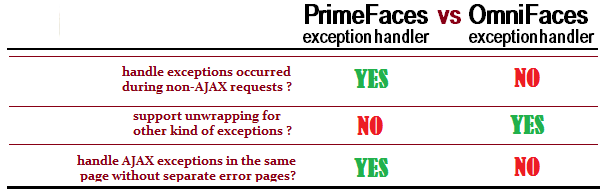
PrimeFaces vs OmniFaces exception handlers
In the figure below we have synthesized the three main differences between PrimeFaces and OmniFaces exception handlers:
Report exceptions as global FATAL faces messages
OmniFaces provides one more exception handler named FacesMessageExceptionHandler. This exception handler is capable of adding every exception as a global FATAL faces message. In order to use it, you just need to configure the factory that “serves” FacesMessageExceptionHandler instances in the web.xml as below:
<factory>
 <exception-handler-factory>
  org.omnifaces.exceptionhandler.FacesMessageExceptionHandlerFactory
 </exception-handler-factory>
</factory>
Furthermore, in the page we must ensure the presence of a component capable of displaying messages, such as <p:growl/> or <p:messages/>.
If we want to customize the FATAL error messages then we extend the FacesMessageExceptionHandler and override the createFatalMessage() method. For example, let’s suppose that we have the following bean that triggers some exceptions:
@Named
@RequestScoped
public class ExceptionBean {

 public void throwNullPointerException() {
  throw new NullPointerException("A NullPointerException!");
 }

 public void throwWrappedIllegalStateException() {
  Throwable t = new IllegalStateException("A wrapped IllegalStateException!");
  throw new FacesException(t);
 }

 public void throwMyCoolException() throws MyCoolException {
  throw new MyCoolException("A MyCoolException!");
 }
}
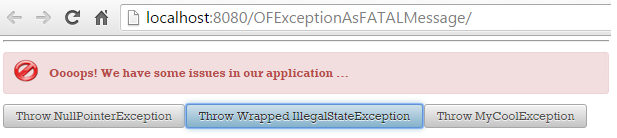
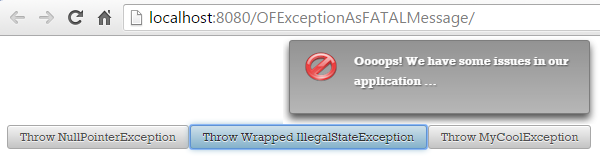
And, for any of these exceptions (and others) we want to return the FATAL error message, Oooops! We have some issues in our application .... For this, we can write the following custom error handler:
public class MyFacesMessageExceptionHandler
       extends FacesMessageExceptionHandler {

 public MyFacesMessageExceptionHandler(ExceptionHandler wrapped) {
  super(wrapped);
 }

 @Override
 protected String createFatalMessage(Throwable exception) {
  return "Oooops! We have some issues in our application ...";
 }
}
And we replace the OmniFaces factory with the following one:
public class MyExceptionHandlerFactory extends ExceptionHandlerFactory {

 private ExceptionHandlerFactory exceptionHandlerFactory;

 public MyExceptionHandlerFactory(){
 }

 public MyExceptionHandlerFactory(ExceptionHandlerFactory
                                 exceptionHandlerFactory) {
  this.exceptionHandlerFactory = exceptionHandlerFactory;
 }

 @Override
 public ExceptionHandler getExceptionHandler() {
  ExceptionHandler handler = new MyFacesMessageExceptionHandler(
                  exceptionHandlerFactory.getExceptionHandler());

  return handler;
 }
}
Now, a JSF page can provide three buttons for testing this use case:
<h:form>
 <p:messages/>
 <p:growl/>
 <p:commandButton value="Throw NullPointerException"
                 action="#{exceptionBean.throwNullPointerException()}"
                 update="@form" />
 <p:commandButton value="Throw Wrapped IllegalStateException"
                  action="#{exceptionBean.throwWrappedIllegalStateException()}"
                  update="@form" />
 <p:commandButton value="Throw MyCoolException"
                  action="#{exceptionBean.throwMyCoolException()}"
                  update="@form" />
</h:form>
No matter which button we click on the result will always be the one from the figures below:
The complete application is named OFExceptionFATALMessage.