Chapter 6: Working with media content
In this chapter, we will discuss including media content in JSF pages (e.g. images, videos, documents, etc). We start by loading and displaying images via native JSF (e.g. <h:graphicImage/>), PrimeFaces (e.g. <p:graphicImage/>) and OmniFaces (e.g. <o:graphicImage/>). Furthermore, we will deal with other kinds of media files, like video and documents. From there on, we will introduce PrimeFaces Media component and the well known OmniFaces BalusC FileServlet. Here we will talk about loading media files that reside outside the web application.
Typically, we store and load images from the /resource folder, but this is not always useful. For example, the images might be “served” as data URI, byte arrays (byte[]) or InputStreams by different kinds of services (e.g. web sockets, web services, Servlets, etc). Moreover, the image formats vary from PNG, JPEG to BMP, SVG, etc. As you will further see, there is no “universal” component capable of loading images independent of all these aspects.
We finish this chapter with OmniFaces approach for checking if the current request is a PrimeFaces dynamic resource request.
Working with images
In native JSF, we can load images via <h:graphicImage/> tag. Basically, this tag is useful when images are stored in /resources folder and we point to them via name and/or library. We can also point to context-relative URL to retrieve the resource associated with this component via value and url attributes. In addition, images will take advantage of the native JSF caching mechanism for resources (more details about caching in JSF are available here). When images are provided as InputStream or byte[] we need more than native JSF support. For example, we may need the PrimeFaces <p:graphicImage/> tag, which is capable of wrapping an InputStream (or a byte[] converted to InputStream) into a DefaultStreamedContent object (this class is specific to the PrimeFaces API). The PrimeFaces component also supports context-relative URLs via value and url attributes. Moreover, PrimeFaces provides a dedicated attribute for controlling images caching; mainly, this is a flag attribute (cache) that defaults to true (enables/disables browsers from caching the image). Or, if you want to avoid the byte[] to InputStream conversion and/or the PrimeFaces API (e.g. DefaultStreamedContent), then you can try the OmniFaces <o:graphicImage/>. This component was especially designed with support for referencing an InputStream or byte[] property in the value attribute (optionally as a data URI). In addition it supports name and library attributes. The GraphicImage component can be used to display SVG images (including SVG view modes via the fragment attribute). Other supported formats are: JPEG, PNG, GIF, ICO, SVG, BMP and TIFF. If OmniFaces cannot auto-detect content header or if the image is rendered as a regular image source, then the content type (obtained via, Faces.getMimeType(String)) will default to image without any sub-type. However, for newer images or older browsers, you can explicitly specify the image type via the type attribute which must represent a valid file extension. You can add unrecognized ones as <mime-mapping/> in web.xml:
<mime-mapping>
 <extension>svg</extension>
 <mime-type>image/svg+xml</mime-type>
</mime-mapping>
OmniFaces provides cache control via a dedicated attribute named lastModified. You can supply the “last modified” property (e.g. via image entity) which will be used in the ETag and Last-Modified headers and in If-Modified-Since checks, hereby improving browser caching. The lastModified attribute supports both Date and Long as timestamp in milliseconds. As restrictions, you need to know that, InputStream or byte[] not rendered as data URI must point to a stateless @ApplicationScoped bean (both JSF and CDI scopes are supported). The property will namely be evaluated at the moment the browser requests the image content based on the URL as specified in HTML <img src>, which is usually a different request than the one which rendered the JSF page. Also, just like <h:graphicImage/>, the value attribute is ignored when the name attribute is specified (for JSF resources). And, the value attribute of <o:graphicImage/> does not support URLs anymore. For that, just keep using native JSF <h:graphicImage/>, PrimeFaces <p:graphicImage/> or even plain HTML <img/>.
So let’s have a quick overview:
Native JSF (<h:graphicImage/>)
- supports
nameandlibrary - supports relative-context URL via
valueandurl - provides JSF default caching mechanism for resources (nothing dedicated to images)
- doesn’t support binary data (e.g.
byte[]orInputStream) - doesn’t support data URI
- doesn’t support SVG and SVG view modes
PrimeFaces (<p:graphicImage/>)
- supports
nameandlibrary - supports relative-context URL via
valueandurl - supports enabling/disabling caching images in browser via
cacheflag attribute - supports binary data (e.g.
InputStream) wrapped via specific API,DefaultStreamedContent - doesn’t support data URI
- doesn’t support SVG and SVG view modes
OmniFaces (<o:graphicImage/>)
- supports
nameandlibrary - supports control for caching images in browser via
lastModifiedattribute - supports binary data directly (e.g.
byte[]andInputStream) - supports data URI
- supports SVG and SVG view modes
- doesn’t support relative-context URL via
valueandurl
Loading images from /resources folder
The images used in the examples are stored in /resources folder under the structure from figure below:
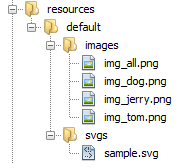
Now, let’s see several examples for loading these images into a JSF application:
An image provided from /resources (without library) - can be displayed just by using the name attribute. This is supported in native JSF, in PrimeFaces and OmniFaces:
<p|o|h:graphicImage name="default/images/img_dog.png"/>
An image provided from /resources (with library) - can be displayed using the library and name attributes. This is supported in native JSF, in PrimeFaces and OmniFaces:
<p|o|h:graphicImage library="default" name="images/img_tom.png"/>
A random image provided from /resources (with library). This is supported in native JSF, in PrimeFaces and OmniFaces:
<p|o|h:graphicImage library="default"
                    name="images/img_#{imageIdsBean.id()}.png" />
A list of images provided from /resources. This is supported in native JSF, in PrimeFaces and OmniFaces:
<ui:repeat value="#{imageIdsBean.ids}" var="id">
 <p|o|h:graphicImage library="default" name="images/img_#{id}.png" />
</ui:repeat>
An image provided from /resources as data URI. This is supported only in OmniFaces via dataURI="true" flag attribute:
<o:graphicImage library="default" name="images/img_tom.png" dataURI="true"/>
An image provided from /resources with browser cache control. This is supported by PrimeFaces and OmniFaces via dedicated attributes and by native JSF via native caching mechanism (can be altered as here). PrimeFaces supports cache control via cache flag attribute (default true), while
OmniFaces supports cache control via lastModified attribute (below we are using the server’s startup time provided by the OmniFaces Startup managed bean):
<p:graphicImage library="default" name="images/img_tom.png" cache="false"/>
<o:graphicImage library="default" name="images/img_tom.png"
                                  lastModified="#{startup.time}"/>
A SVG image provided from /resources. This is supported in native JSF, in PrimeFaces and OmniFaces:
<p|o|h:graphicImage library="default" name="svgs/sample.svg"/>
A SVG image portion provided from /resources. This is supported only in OmniFaces via fragment attribute:
<o:graphicImage library="default" name="svgs/sample.svg"
                fragment="svgView(viewBox(0,50,200,200))"/>
A SVG image provided from /resources as data URI. This is supported only in OmniFaces via dataURI="true":
<o:graphicImage library="default" name="svgs/sample.svg" dataURI="true"/>
The complete application is named, PFOFLoadingImagesResources.
Loading images provided as byte array, byte[], or InputStream
Generally speaking, an image provided as a byte[] is supported directly by OmniFaces and indirectly (convert byte[] into InputStream and wrap it in DefaultStreamedContent ) by PrimeFaces. An image provided as an InputStream is also supported directly by OmniFaces and indirectly (wrap the InputStream in DefaultStreamedContent) by PrimeFaces.
An image provided as a byte[]/InputStream via a managed bean from a Servlet (this can be any other service, e.g. a web service). This is supported directly by OmniFaces:
<o:graphicImage value="#{binaryImageBean.imageAsByteArrayFromServlet()}"/>
<o:graphicImage value="#{binaryImageBean.imageAsInputStreamFromServlet()}"/>
If the Servlet has a context-relative URL, in PrimeFaces and native JSF, then we can use the url/value attributes:
<p|h:graphicImage url="/ByteServlet"/>
A random image provided as a byte[]/InputStream via a managed bean from a Servlet (this can be any other service, e.g. a database). This is supported directly by OmniFaces:
<o:graphicImage value="#{binaryImageBean.
                         imageAsByteArrayFromServletRnd(imageIdsBean.id())}" />
<o:graphicImage value="#{binaryImageBean.
                         imageAsInputStreamFromServletRnd(imageIdsBean.id())}" />
If the Servlet has a context-relative URL, in PrimeFaces and native JSF, then we can use the url/value attributes:
<p|h:graphicImage url="/ByteServlet?id=tom"/>
A list of images provided as byte[]/InputStream via a managed bean from a Servlet. (this can be any other service). It is supported directly by OmniFaces:
<ui:repeat value="#{imageIdsBean.ids}" var="id">
 <o:graphicImage value="#{binaryImageBean.
                          imageAsByteArrayFromServletRnd(id)}" />
</ui:repeat>
<ui:repeat value="#{imageIdsBean.ids}" var="id">
 <o:graphicImage value="#{binaryImageBean.
                          imageAsInputStreamFromServletRnd(id)}" />
</ui:repeat>
If the Servlet has a context-relative URL, in PrimeFaces and native JSF, then we can use the url/value attributes:
<ui:repeat value="#{imageIdsBean.ids}" var="id">
 <p|h:graphicImage url="/ByteServlet?id=#{id}" />
</ui:repeat>
An image provided as a byte[]/InputStream via a managed bean from a Servlet using data URI. This is supported only in OmniFaces via dataURI flag attribute:
<o:graphicImage value="#{binaryImageBean.imageAsByteArrayFromServlet()}"
                dataURI="true"/>
<o:graphicImage value="#{binaryImageBean.imageAsInputStreamFromServlet()}"
                dataURI="true"/>
Cache control for an image provided as byte[]/InputStream via a managed bean from a Servlet. This is supported directly by OmniFaces via lastModified attribute:
<o:graphicImage value="#{binaryImageBean.imageAsByteArrayFromServlet()}"
                lastModified="#{imageIdsBean.timestamp}"/>
<o:graphicImage value="#{binaryImageBean.imageAsInputStreamFromServlet()}"
                lastModified="#{imageIdsBean.timestamp}"/>
If the Servlet has a context-relative URL, in PrimeFaces and native JSF, then we can use the url/value attributes. Furthermore, only in PrimeFaces, we can use the cache flag attribute (default true). Native JSF will use native caching mechanism.
<p:graphicImage url="/ByteServlet" cache="false"/>
Aside from the above examples sited in the complete applications (PFOFLoadingImagesByteArray for byte[] and PFOFLoadingImagesInputStream for InputStream), you will see use cases for images provided as byte[]/InputStream via a managed bean from a folder (we used the /resources folder to store the provided images, but it can be any other folder).
Loading external media content
Basically, in this section we will focus on loading media files that reside outside the web application. For example, if you have an image stored on the server outside the web application (e.g. D:\media\cartoon.png) then you cannot simply load this image via <p:graphicImage/> as below:
<p:graphicImage url="D:\\media\\cartoon.png"/>
In addition, if we have a video, a PDF document, etc in the same D:\media\ we cannot simply use the PrimeFaces Media component, as below:
<p:media value="D:\\media\\movie.mp4" width="400">
 <f:param name="autoplay" value="false" />
</p:media>
In order to obtain the desired behavior we need to provide a server-side artifact capable of serving media content from outside the web application. This artifact should provide several features such as:
- fast NIO stuff instead of legacy
RandomAccessFile; - properly dealing with
ETag,If-None-MatchandIf-Modified-Sincecaching requests; - properly dealing with
RangeandIf-Rangeranging requests (RFC7233), which is required by most media players and by web browsers - properly streaming audio/video
- a proper resume of a paused download
- download accelerators to enable requests to smaller parts simultaneously
You have to admit that such an artifact requires some knowledge and work. Fortunately we have the BalusC FileServlet. If you have never heard of the BalusC FileServlet then it is time to find out! Starting with OmniFaces 2.2, the FileServlet was slightly refactored rewritten and modernized to support the features listed above.
This servlet is ideal for large files such as media files placed outside the web application and you can’t use the default servlet.
You can easily exploit FileServlet by extending this class and overriding the getFile(HttpServletRequest) method to return the desired file. Below you can see a simple implementation:
@WebServlet("/media/*")
public class MediaFileServlet extends FileServlet {

 private File folder;

 @Override
 public void init() throws ServletException {
  folder = new File("D:\\media\\");
 }

 @Override
 protected File getFile(HttpServletRequest request)
                            throws IllegalArgumentException {

  String pathInfo = request.getPathInfo();

  if (pathInfo == null || pathInfo.isEmpty() || "/".equals(pathInfo)) {
      throw new IllegalArgumentException();
  }

  return new File(folder, pathInfo);
 }
}
If you want to trigger a HTTP 400 "Bad Request" error, simply throw IllegalArgumentException. If you want to trigger a HTTP 404 "Not Found" error, simply return null, or a non-existent file. Moreover, you can shape this Servlet behavior by overriding the following methods:
-
long getExpireTime(HttpServletRequest, File)- By default, the resource may be cached by the client before it expires for 30 days (in seconds). Through this method you can alter this value. Pass the involved request and file and return the desired number of seconds. -
String getContentType(HttpServletRequest request, File file)- The default implementation delegatesFile#getName()toServletContext#getMimeType(String)with a fallback default value ofapplication/octet-stream. If you want to alter this behavior, pass the involved request and file and return the desired content type (e.g. for PNG, add return"image/png";). -
boolean isAttachment(HttpServletRequest request, String contentType)- By default, it returnstrueif the content type does not start withtextorimage, and theAcceptrequest header is eithernullor does not match the given content type. If you want to alter this behavior pass the involved request and content type and return the desired value. For example, some browsers tend to download a video instead of playing it (e.g. Google Chrome). In order to prevent this, you can override this method to returnfalse(this will causeFileServletto add in response headers theContent-Dispositionasinlineinstead ofattachment:
@Override
protected boolean isAttachment(HttpServletRequest request, String contentType) {
 return false;
}
Example of loading external images/videos/PDF
Let’s suppose that we have several images/videos and PDF documents in a folder named media under D: disk. So the path for an image named, cartoon.png will be D:\media\cartoon.png. We want to load these resources in a web application via pure HTML and JSF tags. Our application uses the /faces/* prefix mapping for faces servlet.
Example of loading images
Load the image, D:\media\cartoon.png (notice that <o:graphicImage/> cannot be used!):
HTML:
<img src="#{request.contextPath}/faces/media/cartoon.png"/>
NativeJSF:
<h:graphicImage url="faces/media/cartoon.png"/>
<h:graphicImage value="faces/media/cartoon.png"/>
PrimeFaces:
<p:graphicImage url="faces/media/cartoon.png"/>
<p:graphicImage value="faces/media/cartoon.png"/>
The complete application is named BalusCFileServletImagesExample.
Example of loading videos
Load the video, D:\media\movie.mp4:
HTML:
<video width="400" controls="controls">
 <source src="#{request.contextPath}/faces/media/movie.mp4" type="video/mp4"/>
 <source src="#{request.contextPath}/faces/media/movie.ogg" type="video/ogg"/>
 Your browser does not support HTML5 video.
</video>
PrimeFaces:
<p:media value="faces/media/movie.mp4" width="400">
 <f:param name="autoplay" value="false" />
</p:media>
The complete application is named BalusCFileServletVideosExample.
Example of loading PDF
Load the video, D:\media\sample.pdf:
HTML:
<object width="400" height="500" type="application/pdf"
        data="#{request.contextPath}/faces/media/sample.pdf">
 <p>Insert your error message here, if the PDF cannot be displayed.</p>
</object>
PrimeFaces:
<p:media value="faces/media/sample.pdf" width="400" height="500" />
The complete application is named BalusCFileServletPDFExample.
Check if the current request is a PrimeFaces dynamic resource request
For example, PrimeFaces generates dynamic resource requests when we try to load images from a StreamedContent via <p:graphicImage/>.
Such a request may look like in the figure below (you can obtain this image by running the PFLoadingInputStreamImage application under Mozilla Firefox with Firebug extension activated):

These request parameters are specific to PrimeFaces and are extracted from a URL like this:
&v=5.3&pfdrid=r1L3mNOT6k3TlqCfC7jLDuk
DhwJ8o6plkjq%2BF53gi4o%3D&pfdrt=sc&pfdrid_c=true
Furthermore, OmniFaces has used these parameters to implement a utility method capable to programmatically detect if the current request is a PrimeFaces dynamic resource request. This utility method returns a boolean value and is named, isPrimeFacesDynamicResourceRequest(). This method can be found in Hacks class, and can easily be used as below:
boolean is = Hacks.isPrimeFacesDynamicResourceRequest
                     (FacesContext.getCurrentInstance());
if(is){
   // is
} else {
   //is not
}
If you write a custom resource handler, it will be useful to distinguish such cases.