

- Chapter 1: Your First Web Page
- What is HTML?
- HTML, CSS and JavaScript: the hero team
- How a web page reaches your screen
- A very short history
- Setting up your tools
- Your first web page
- Peek behind the mask: developer tools
- Chapter 2: The Anatomy of HTML
- Elements and tags
- Attributes: extra information
- Nesting elements
- Void elements
- The page template, line by line
- Comments
- Whitespace
- When things go wrong
- Chapter 3: Writing Text Content
- Headings: the outline of your page
- Paragraphs
- Strong, emphasis and friends
- Lists
- Quotations
- Code, keyboard keys and preformatted text
- Special characters (entities)
- Dividers and line breaks
- Chapter 4: Links and Navigation
- The anchor element
- Absolute and relative paths
- Linking to a section of a page
- Email and phone links
- Opening links in a new tab
- Download links
- Writing good link text
- Building a navigation menu
- Chapter 5: Images and Media
- Adding an image
- Writing great alt text
- Choosing an image format
- Width, height and lazy loading
- Figures and captions
- Responsive images (a quick look)
- Video and audio
- Embedding content with iframes
- Chapter 6: Semantic Page Structure
- What does “semantic” mean?
- The main structural elements
- Section or article?
- <div> and <span>: the generic containers
- Other meaningful elements
- Skip links
- Putting it all together
- Chapter 7: Tables
- When to use a table
- Your first table
- Captions
- Grouping rows: thead, tbody, tfoot
- Making tables accessible with scope
- Merging cells
- Chapter 8: Forms
- How forms work
- Labels and inputs: the core pair
- Input types
- Checkboxes and radio buttons
- Grouping fields: fieldset and legend
- Text areas, menus and buttons
- Built-in validation
- Autocomplete: help people fill in forms faster
- The complete contact form
- Chapter 9: Interactive HTML
- Expanding sections: details and summary
- Pop-ups with the popover attribute
- Modal windows: the dialog element
- Progress and meter
- Chapter 10: Accessibility, Search and Sharing
- Accessibility is for everyone
- The accessibility checklist
- Search engine optimization (SEO) basics
- Favicons
- Social sharing previews
- The complete head
- Free quality tools
- Chapter 11: Publishing Your Site
- Before you launch
- Hosting and domains in plain English
- Option 1: Netlify Drop (the fastest way)
- Option 2: GitHub Pages (the professional’s choice)
- Other free hosts
- Your own domain name
- What’s next?
HTML Hero
A Beginner's Guide to HTML (2nd Edition)

This book is 100% completeLast updated on 2026-11-05
Build and publish your first real website from scratch, one tag at a time, and understand every line of it. No experience needed.
Minimum price
$14.00
$14.00
You pay
Author earns
PDF
About
About the Book
Every website you've ever visited is built on HTML. HTML Hero teaches it from the very first step: no experience, no special software, no computer science degree. If you can create a folder and save a file, you can learn HTML.
Who it's for- Complete beginners who have never written a line of code
- Students who want a clear, structured introduction to web development
- Creators, marketers and small business owners who want to understand their own website
- Career changers taking their first step into tech
- 97 pages, 11 chapters: text, links and navigation, images and media, semantic page structure, tables, forms, interactive HTML (details, popovers, dialogs), accessibility and SEO, and publishing your site
- A hands-on mission, a recap card and a quick quiz in every chapter, with all the answers
- An HTML cheat sheet and a glossary
- "Modern HTML" boxes that cover features older tutorials miss
- The finished project files (ZIP), to check your work
A three-page personal website: a Home page with an introduction, skills and an FAQ; a Projects page with image cards and a table; and a Contact page with a complete, accessible form. In the last chapter you publish it online for free with Netlify Drop or GitHub Pages.
FAQ- Do I need any experience? No. Chapter 1 explains what HTML is and walks you through setting up a free code editor.
- What do I need? A computer (Windows, Mac, Linux or ChromeOS), an up-to-date browser and Visual Studio Code, which is free.
- What's new in the 2nd edition? It was fully revised in November 2026. It now covers modern features such as popovers and the dialog element, plus an accessibility checklist, SEO and social sharing basics, and a publishing chapter.
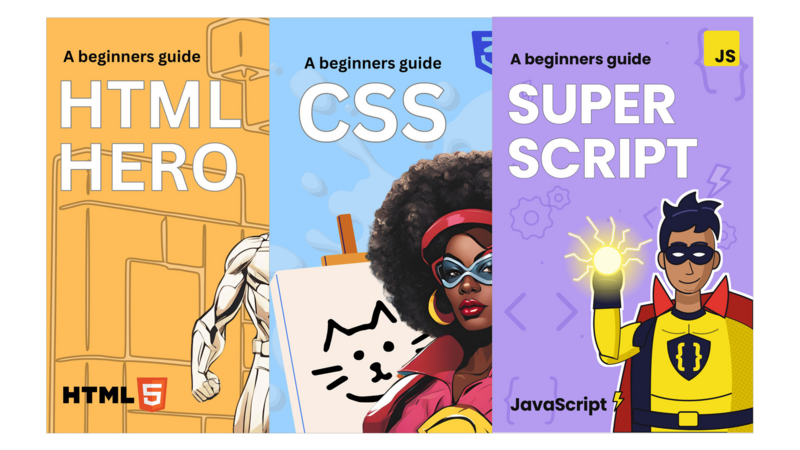
- What comes next? Captain CSS takes the exact site you build here and makes it beautiful. Super Script then adds JavaScript.
- What format is it? A PDF you can read on any device, plus a ZIP of project files.
- Questions? Email support.olliecode@gmail.com.
Bundle
Bundles that include this book
- Pricing
$34.00
Minimum priceBought separately$42.00Suggested price$34.00
Author
About the Author
Contents
Table of Contents
Get the free sample chapters
Click the buttons to get the free sample in PDF or EPUB, or read the sample online here
The Leanpub 60 Day 100% Happiness Guarantee
Within 60 days of purchase you can get a 100% refund on any Leanpub purchase, in two clicks.
See full terms...
Earn $8 on a $10 Purchase, and $16 on a $20 Purchase
We pay 80% royalties on purchases of $7.99 or more, and 80% royalties minus a 50 cent flat fee on purchases between $0.99 and $7.98. You earn $8 on a $10 sale, and $16 on a $20 sale. So, if we sell 5000 non-refunded copies of your book for $20, you'll earn $80,000.
(Yes, some authors have already earned much more than that on Leanpub.)
Learn more about writing on Leanpub
Free Updates. DRM Free.
If you buy a Leanpub book, you get free updates for as long as the author updates the book! Many authors use Leanpub to publish their books in-progress, while they are writing them. All readers get free updates, regardless of when they bought the book or how much they paid (including free).
Most Leanpub books are available in PDF (for computers) and EPUB (for phones, tablets and Kindle). The formats that a book includes are shown at the top right corner of this page.
Finally, Leanpub books don't have any DRM copy-protection nonsense, so you can easily read them on any supported device.
Learn more about Leanpub's ebook formats and where to read them
Write and Publish on Leanpub
You can use Leanpub to easily write, publish and sell in-progress and completed ebooks and online courses!
Leanpub is a powerful platform for serious authors, combining a simple, elegant writing and publishing workflow with a store focused on selling in-progress ebooks.
Leanpub is a magical typewriter for authors: just write in plain text, and to publish your ebook, just click a button. (Or, if you are producing your ebook your own way, you can even upload your own PDF and/or EPUB files and then publish with one click!) It really is that easy.