
- Preface
- About This Book
- Conventions Used in This Book
- Technical Requirements
- Chapter 1. What Houdini Is
- 1.1 Following a Page Through the Browser
- 1.2 Meeting the Worklet
- 1.3 Meeting the Five APIs
- 1.4 Deciding What You Can Ship Today
- 1.5 Getting Gauge Running
- 1.6 Reading the Version Stamps
- Chapter 2. The @property Rule
- 2.1 Understanding Why Custom Properties Don't Animate
- 2.2 Registering a Property with @property
- 2.3 Choosing the Right Type
- 2.4 Animating a Gradient
- 2.5 Registering from JavaScript
- 2.6 Spotting a Registration That Failed
- 2.7 Registering Gauge's Theme Tokens
- Chapter 3. The Typed OM
- 3.1 Understanding the Problem with Strings
- 3.2 Creating Values That Know Their Unit
- 3.3 Reading Styles as Typed Values
- 3.4 Doing Arithmetic Without Parsing
- 3.5 Checking for the Typed OM
- 3.6 Building a Layout Readout for Gauge
- Chapter 4. Worklets
- 4.1 Loading Your First Worklet
- 4.2 Understanding What a Worklet Can't See
- 4.3 Sending the Worklet Data from CSS
- 4.4 Writing Gauge's First Painter
- 4.5 Keeping Worklets Away from the Bundler
- 4.6 Loading the Painter Only Where It Works
- Chapter 5. The Paint API
- 5.1 Using paint() as an Image
- 5.2 Drawing with the Canvas Commands
- 5.3 Feeding a Painter from CSS
- 5.4 Choosing a Transparent or Opaque Surface
- 5.5 Planning for Browsers Without the Paint API
- 5.6 Drawing a Chart from Data
- 5.7 Understanding When the Browser Repaints
- Chapter 6. Advanced Painting
- 6.1 Choosing How to Give the Ring Its Settings
- 6.2 Animating the Ring by Animating Its Input
- 6.3 Comparing a Painter with Plain CSS
- 6.4 Keeping the Ring Sharp on High-DPI Screens
- 6.5 Understanding What a Painter Can't Draw
- 6.6 Giving the Ring a Real Fallback
- 6.7 Debugging a Painter That Draws Nothing
- Chapter 7. The Layout API
- 7.1 Understanding What Custom Layout Would Do
- 7.2 Learning the Shape of a Layout Worklet
- 7.3 Building a Masonry Worklet
- 7.4 Getting the Masonry Shape Today with Columns
- 7.5 Understanding Why It Never Shipped
- 7.6 Switching to the Native Answer, display: grid-lanes
- Chapter 8. Animation Worklet
- 8.1 Understanding What Animation Worklet Promised
- 8.2 Learning the Shape of an Animator
- 8.3 Trying a Scroll-Linked Effect as a Worklet
- 8.4 Building the Same Effect with scroll() and view()
- 8.5 Finding the One Gap CSS Leaves
- 8.6 Choosing What to Ship
- Chapter 9. Going to Production
- 9.1 Putting Every Feature Check in One Place
- 9.2 Checking in CSS with @supports
- 9.3 Deciding Against the Paint API Polyfill
- 9.4 Planning for Browsers Without @property
- 9.5 Configuring Your Build for Worklets
- 9.6 Showing What This Browser Supports
- 9.7 Respecting High Contrast and Reduced Motion
- Chapter 10. Recipes with @property
- 10.1 Making a Number Count Up
- 10.2 Making a Gradient Move
- 10.3 Building a Ring with No Worklet
- 10.4 Giving Design Tokens Rules
- 10.5 Giving a Component a Setting
- 10.6 Knowing What Can't Be Registered
- Chapter 11. A Paint Worklet Cookbook
- 11.1 Writing a Painter That Behaves
- 11.2 Drawing Random Tiles That Survive a Resize
- 11.3 Drawing What a Gradient Can't
- 11.4 Making a Ripple from One Number
- 11.5 Checking What CSS Now Draws by Itself
- 11.6 Deciding When to Draw
- Chapter 12. Measuring What Houdini Costs
- 12.1 Knowing What You're Measuring: The Frame Budget
- 12.2 Recording What the Browser Does
- 12.3 Finding the Properties That Stay off the Main Thread
- 12.4 Trying to Time a Painter
- 12.5 Finding Where the Count Starts to Matter
- 12.6 Finding and Fixing the Unpainted Window
- 12.7 Reading the Numbers Honestly
- Chapter 13. Testing and Debugging
- 13.1 Testing a Painter by Reading Its Pixels
- 13.2 Testing the Fallback
- 13.3 Running the Tests in Three Engines
- 13.4 Proving the Tests Can Fail
- 13.5 Diagnosing Silent Failures
- 13.6 Guarding Every @property Rule with a Test
- Chapter 14. Houdini in Real Projects
- 14.1 Registering Tokens in One Place
- 14.2 Registering Properties for a Web Component
- 14.3 Sending the Fallback from the Server
- 14.4 Getting a Worklet Past a Content Security Policy
- 14.5 Making Sure Visitors Get Your New Worklet
- 14.6 Printing Gauge, and Fixing What Vanishes
- Chapter 15. Rolling It Out
- 15.1 Giving a Feature to a Few Visitors First
- 15.2 Finding Out What Visitors' Browsers Support
- 15.3 Adding Off Switches and Safe Defaults
- 15.4 Reporting Worklet Errors
- 15.5 Noticing When the Platform Changes
- 15.6 Writing the Decision Down
- Chapter 16. What's Next
- 16.1 Settled: @property. Two-Thirds There: The Typed OM
- 16.2 Shippable with Care: The Paint API
- 16.3 Not Yet: Layout, Animation, Parser, Font Metrics
- 16.4 What Native CSS Is Absorbing
- 16.5 Nearby, but Not Houdini
- 16.6 What to Do Now
- Appendix A. API Reference (September 2026)
- Appendix B. The Gauge App
- Appendix C. Exercise Answers
- Glossary
- Index
CSS Houdini in Practice
A tested guide to the browser's own drawing and styling APIs

This book is 100% completeLast updated on 2026-09-28
Build a real app step by step and learn which parts of CSS Houdini to use today, which to use with care, and what native CSS replaced.
Minimum price
$9.00
$12.00
You pay
Author earns
Buying multiple copies for your team? See below for a discount!
PDF
EPUB
About
About the Book
CSS Houdini promised to let developers extend the browser's own styling engine. Ten years on, its five APIs have had five very different fates. @property works in every browser and is one of the most useful additions to CSS in years. The Typed OM works everywhere except Firefox. The Paint API runs only in Chrome and Edge. The Layout API and Animation Worklet never shipped, and native CSS now covers most of what people wanted them for.
In this practical book, Sandeep Kumar Patel shows you which parts of Houdini to build on today, which to use with care, and what to use instead. You learn by building: every chapter hands you a copy of the same small app, Gauge, an analytics panel with stat cards, sparklines, ring meters and a theme switch, exactly as the previous chapter left it, and you add that chapter's feature a few lines at a time, checking each step in the browser. Where the obvious code goes wrong, you write it, watch it fail, and fix it.
With this book, you'll:
- Animate custom properties, gradients and whole themes with
@property - Read and write CSS values as typed numbers with the Typed OM, with a fallback for Firefox
- Write paint worklets that draw grids, charts, rings and patterns, each with a plain-CSS fallback
- Build a masonry layout and a scroll effect as worklets, then replace them with
display: grid-lanesandanimation-timeline: scroll() - Measure what Houdini costs, test it in three browser engines, and roll it out with kill switches
- Handle the real-world traps: shadow DOM, server rendering, Content Security Policy, caching, printing, high contrast and reduced motion
Every step of every chapter is a real file, run automatically in Chrome, Firefox and Safari's engine to confirm it does what the page says, and every browser-support claim is dated and traced to its source. You need only the basics of HTML, CSS and JavaScript. The complete code, including a starting copy of the app for every chapter, is a free download.
Team Discounts
Team Discounts
Get a team discount on this book!
Up to 3 members
- Minimum price
- $47.00
- Suggested price
- $72.00
Up to 5 members
- Minimum price
- $76.00
- Suggested price
- $116
Up to 10 members
- Minimum price
- $133
- Suggested price
- $203
Up to 15 members
- Minimum price
- $190
- Suggested price
- $290
Up to 25 members
- Minimum price
- $285
- Suggested price
- $435
Bundle
Bundles that include this book
Advance CSS
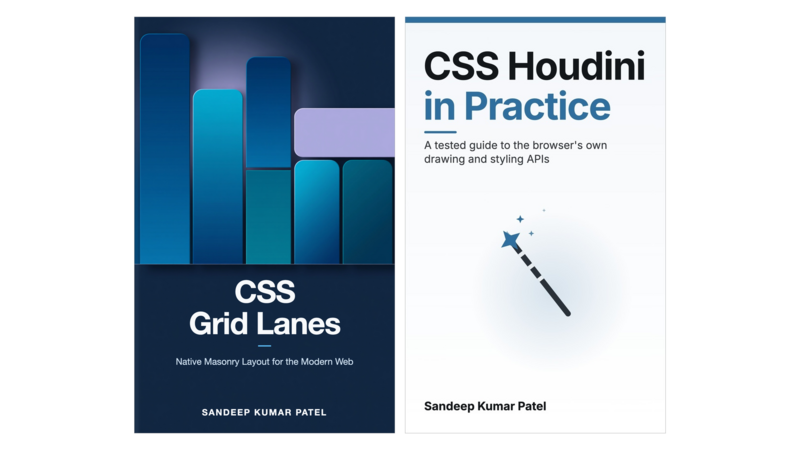
2 Books
- Pricing
$13.00
Minimum priceBought separately$21.00Suggested price$13.00
Author
About the Author

Sandeep Kumar Patel
Sandeep Kumar Patel is a senior web developer and founder of www.tutorialsavvy.com, a widely- read programming blog since 2012. He has more than six years of experience in object-oriented JavaScript and JSON-based web applications development. He is GATE-2005 Information Technology (IT) qualified and has a Masters degree from VIT University, Vellore
Contents
Table of Contents
Get the free sample chapters
Click the buttons to get the free sample in PDF or EPUB, or read the sample online here
The Leanpub 60 Day 100% Happiness Guarantee
Within 60 days of purchase you can get a 100% refund on any Leanpub purchase, in two clicks.
See full terms...
Earn $8 on a $10 Purchase, and $16 on a $20 Purchase
We pay 80% royalties on purchases of $7.99 or more, and 80% royalties minus a 50 cent flat fee on purchases between $0.99 and $7.98. You earn $8 on a $10 sale, and $16 on a $20 sale. So, if we sell 5000 non-refunded copies of your book for $20, you'll earn $80,000.
(Yes, some authors have already earned much more than that on Leanpub.)
Learn more about writing on Leanpub
Free Updates. DRM Free.
If you buy a Leanpub book, you get free updates for as long as the author updates the book! Many authors use Leanpub to publish their books in-progress, while they are writing them. All readers get free updates, regardless of when they bought the book or how much they paid (including free).
Most Leanpub books are available in PDF (for computers) and EPUB (for phones, tablets and Kindle). The formats that a book includes are shown at the top right corner of this page.
Finally, Leanpub books don't have any DRM copy-protection nonsense, so you can easily read them on any supported device.
Learn more about Leanpub's ebook formats and where to read them
Write and Publish on Leanpub
You can use Leanpub to easily write, publish and sell in-progress and completed ebooks and online courses!
Leanpub is a powerful platform for serious authors, combining a simple, elegant writing and publishing workflow with a store focused on selling in-progress ebooks.
Leanpub is a magical typewriter for authors: just write in plain text, and to publish your ebook, just click a button. (Or, if you are producing your ebook your own way, you can even upload your own PDF and/or EPUB files and then publish with one click!) It really is that easy.