
The Leanpub 60 Day 100% Happiness Guarantee
Within 60 days of purchase you can get a 100% refund on any Leanpub purchase, in two clicks.
See full terms...
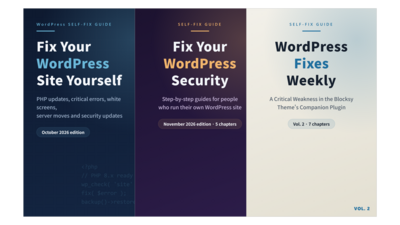
Three step-by-step WordPress guides in one bundle: everyday fixes, security, and plugin and theme troubles. For people who run their own site.
Bought separately
$32.97
Minimum price
$17.99
$19.99
About the Bundle
Three step-by-step WordPress guides in one bundle, for people who run their own site and want to fix common problems themselves.
Fix Your WordPress Site Yourself: PHP updates, critical errors, white screens, database errors, missing form emails, server moves, and security notices.
Fix Your WordPress Site Yourself: Security (November 2026 edition): what to check and what to do when a security notice or a suspected hack shows up.
WordPress Fixes Weekly, Vol. 2: seven fixes for problems with popular plugins and themes.
Each guide shows where to look, how to judge what you see, and how to roll back safely. The bundle costs less than buying the three books one by one.
Written with the help of AI tools and reviewed by the author.
About the Books

A step-by-step guide for people who run their own WordPress site — for a shop, a school, an office, or a small business — and want to fix common problems themselves. (8 chapters, information as of October 2026.)
Each chapter explains where to look, how to judge what you see, and how to roll back if something doesn't work:
Chapter 1. 10 Checks to Do Before Updating PHP
Chapter 2. How to Fix "There Has Been a Critical Error on This Website"
Chapter 3. How to Fix a Blank White Screen
Chapter 4. How to Fix "Error Establishing a Database Connection"
Chapter 5. When Contact Form Emails Don't Arrive
Chapter 6. Preparing for a Server Move Yourself
Chapter 7. What to Do When You See a "Vulnerability" or "Security Update" Notice
Chapter 8. What to Do First When Your Site May Have Been Hacked
Every chapter ends with "signs that fixing it yourself is too hard", so you know when to stop and ask for help. These steps won't fix every site; sites with a lot of custom code may need a professional.
Written with the help of AI tools and reviewed by the author.

This book collects the step-by-step guides on security for WordPress site owners. 5 chapters. It covers what to do when you get a vulnerability or security update notice, how to respond to a critical PHP vulnerability, and how to check for the Duplicator, Click to Chat and Beaver Builder issues. Each chapter shows where to look, how to judge what you see, and how to roll back. Not every site can be fixed by following these steps; each chapter ends with signs that it is time to ask a professional. Written with the help of AI tools.

This book collects the step-by-step WordPress fix guides written in the week of November 2, 2026. 7 chapters, PDF + EPUB.
Contents:
Chapter 1: A Critical Weakness in the Blocksy Theme's Companion Plugin
Chapter 2: Popups Moved to the Trash? Six Checks for Sites on Popup Builder 4.4.5 or Earlier
Chapter 3: A Critical Weakness in the LatePoint Booking Plugin
Chapter 4: For Online Shops Using LiteSpeed Cache
Chapter 5: The Duplicator Vulnerability: Read This Before You Migrate or Restore
Chapter 6: The Beaver Builder Vulnerability
Chapter 7: A Vulnerability in the ProfilePress Membership Plugin: Check in This Order
Each chapter shows where to look, how to judge what you see, and how to roll back. Not every site can be fixed by following these steps; each chapter ends with signs that it is time to ask a professional.
Written with the help of AI tools.
Within 60 days of purchase you can get a 100% refund on any Leanpub purchase, in two clicks.
See full terms...
We pay 80% royalties on purchases of $7.99 or more, and 80% royalties minus a 50 cent flat fee on purchases between $0.99 and $7.98. You earn $8 on a $10 sale, and $16 on a $20 sale. So, if we sell 5000 non-refunded copies of your book for $20, you'll earn $80,000.
(Yes, some authors have already earned much more than that on Leanpub.)
Learn more about writing on Leanpub
If you buy a Leanpub book, you get free updates for as long as the author updates the book! Many authors use Leanpub to publish their books in-progress, while they are writing them. All readers get free updates, regardless of when they bought the book or how much they paid (including free).
Most Leanpub books are available in PDF (for computers) and EPUB (for phones, tablets and Kindle). The formats that a book includes are shown at the top right corner of this page.
Finally, Leanpub books don't have any DRM copy-protection nonsense, so you can easily read them on any supported device.
Learn more about Leanpub's ebook formats and where to read them
You can use Leanpub to easily write, publish and sell in-progress and completed ebooks and online courses!
Leanpub is a powerful platform for serious authors, combining a simple, elegant writing and publishing workflow with a store focused on selling in-progress ebooks.
Leanpub is a magical typewriter for authors: just write in plain text, and to publish your ebook, just click a button. (Or, if you are producing your ebook your own way, you can even upload your own PDF and/or EPUB files and then publish with one click!) It really is that easy.