Natural Language Processing Using Deep Learning
I spent several years in the 1980s using symbolic AI approaches to Natural Language Processing (NLP) like augmented transition networks and conceptual dependency theory with mixed results. For small vocabularies and small domains of discourse these techniques yielded modestly successful results. I now only use Deep Learning approaches to NLP in my work.
Deep Learning in NLP is a branch of machine learning that utilizes deep neural networks to understand, interpret and generate human language. It has revolutionized the field of NLP by improving the accuracy of various NLP tasks such as text classification, language translation, sentiment analysis, and natural language generation (e.g., ChatGPT).
Deep learning models such as Recurrent Neural Networks (RNNs), Convolutional Neural Networks (CNNs), and Transformer models have been used to achieve state-of-the-art performance on various NLP tasks. These models have been trained on large amounts of text data, which has allowed them to learn complex patterns in human language and improve their understanding of the context and meaning of words.
The use of pre-trained models, such as BERT and GPT-4, has also become popular in NLP and I use both frequently for my work. These models have been pre-trained on a large corpus of text data, and can be fine-tuned for a specific task, which significantly reduces the amount of data and computing resources required to train a derived model.
Deep learning in NLP has been applied in various industries such as chatbots, automated customer service, and language translation services. It has also been used in research areas such as natural language understanding, question answering, and text summarization.
In the last decade deep learning techniques have solved most NLP problems, at least in a “good enough” engineering sense. In this chapter we will experiment with a few useful pre-trained models that you can run locally on your laptop using the Hugging Face Transformers.js library.
Hugging Face and the Transformers.js Library
Hugging Face provides an extensive library of pre-trained models and the @huggingface/transformers library (formerly known as Xenova/transformers) allows TypeScript and JavaScript developers to run transformer models directly in Node.js without Python. The models run via ONNX Runtime, which provides efficient CPU inference.
The requirements for the examples in this chapter are:
1 npm install @huggingface/transformers
The examples for this chapter are in the directory source-code/deep_learning_nlp.
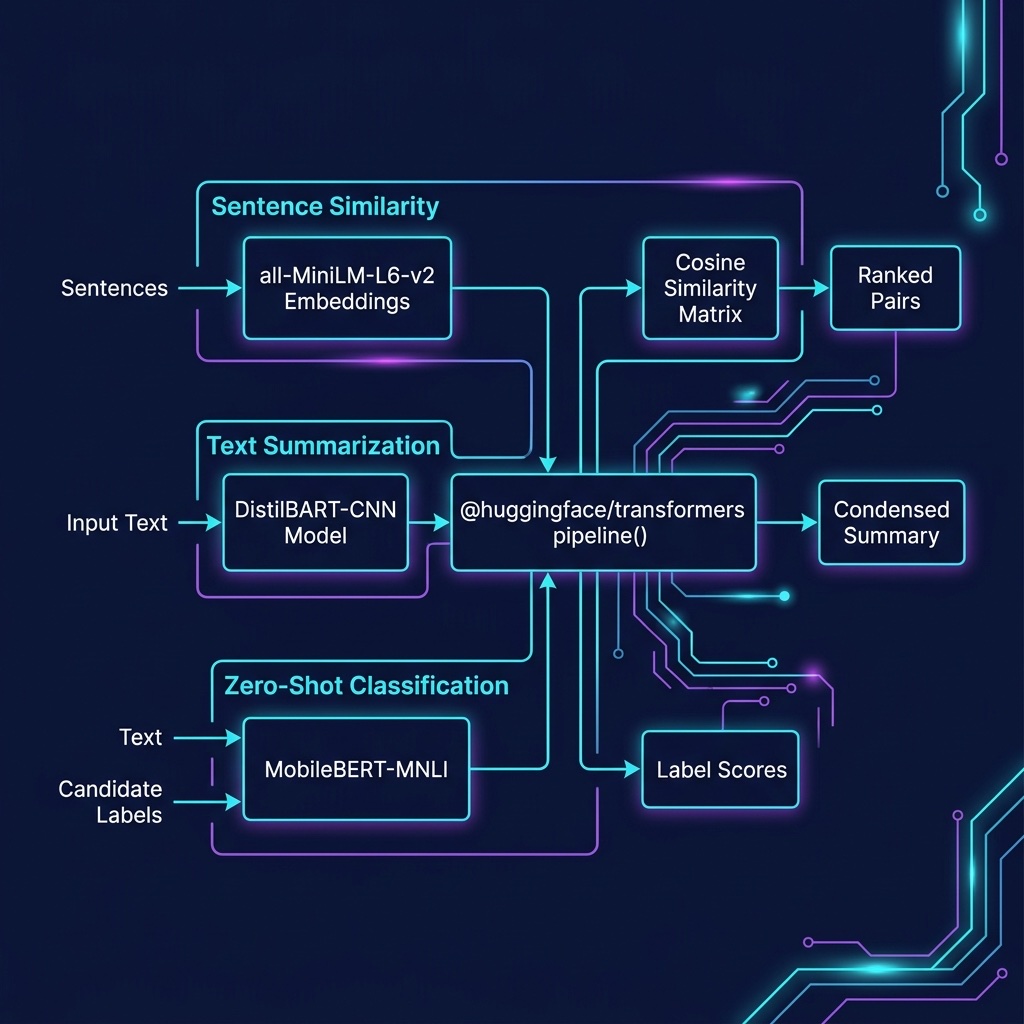
All models will be downloaded automatically to ~/.cache/huggingface the first time you run each script. Subsequent runs will use the cached models without re-downloading.
Summarizing Text Using a Pre-trained Model on Your Laptop
We use a text summarization model for generating concise summaries. This model runs locally on your laptop, no API keys or cloud services needed:
 1 // summarization.ts - Text summarization with a local model
 2
 3 import { pipeline } from "@huggingface/transformers";
 4
 5 console.log("Loading summarization model...");
 6 const summarizer = await pipeline("summarization", "Xenova/distilbart-cnn-6-6");
 7
 8 const text =
 9   "The President sent a request for changing the debt ceiling to " +
10   "Congress. The president might call a press conference. The Congress " +
11   "was not oblivious of what the Supreme Court's majority had ruled on " +
12   "budget matters. Even four Justices had found nothing to criticize in " +
13   "the President's requirement that the Federal Government's four-year " +
14   "spending plan. It is unclear whether or not the President and " +
15   "Congress can come to an agreement before Congress recesses for a " +
16   "holiday. There is major disagreement between the Democratic and " +
17   "Republican parties on spending.";
18
19 console.log(`\nOriginal text (${text.split(" ").length} words):`);
20 console.log(text.slice(0, 70) + "...\n");
21
22 const result = await summarizer(text, { max_length: 60, num_beams: 4 });
23 console.log("Summary:");
24 console.log((result as any)[0].summary_text);
Here is the output from running summarization.ts:
 1 $ tsx summarization.ts
 2 Loading summarization model...
 3
 4 Original text (87 words):
 5 The President sent a request for changing the debt ceiling to...
 6
 7 Summary:
 8 The President sent a request for changing the debt ceiling to
 9 Congress. The Congress was not oblivious of what the Supreme
10 Court's majority had ruled on budget matters.
Zero Shot Classification Using a Local Model
Zero shot classification models work by specifying which classification labels you want to assign to input texts, no pre-training on labeled examples is required:
 1 // zero_shot_classification.ts
 2
 3 import { pipeline } from "@huggingface/transformers";
 4
 5 console.log("Loading zero-shot classification model...");
 6 const classifier = await pipeline("zero-shot-classification", "Xenova/mobilebert-uncased-mnli");
 7
 8 const text = "Hi, I recently bought a device from your company but it is not " +
 9   "working as advertised and I would like to get reimbursed!";
10 const candidateLabels = ["refund", "faq", "legal"];
11
12 console.log(`\nInput text: ${text}`);
13 console.log(`Candidate labels: ${JSON.stringify(candidateLabels)}\n`);
14
15 const result = await classifier(text, candidateLabels) as any;
16 console.log("Results:");
17 result.labels.forEach((label: string, i: number) =>
18   console.log(`  ${label}: ${result.scores[i].toFixed(4)}`)
19 );
Here is the output:
 1 $ tsx zero_shot_classification.ts
 2 Loading zero-shot classification model...
 3
 4 Input text: Hi, I recently bought a device from your company but
 5 it is not working as advertised and I would like to get reimbursed!
 6 Candidate labels: ["refund","faq","legal"]
 7
 8 Results:
 9   refund: 0.9839
10   legal: 0.0155
11   faq: 0.0006
The model correctly classifies the customer message as a “refund” request with 98.4% confidence. This approach is powerful because you can define any set of labels at runtime without training a custom model.
Comparing Sentences for Similarity Using Transformer Models
The @huggingface/transformers library supports computing sentence embeddings for semantic similarity comparisons. We use a small, efficient model:
 1 // sentence_similarity.ts
 2
 3 import { pipeline } from "@huggingface/transformers";
 4
 5 function cosineSimilarity(a: number[], b: number[]): number {
 6   let dot = 0, nA = 0, nB = 0;
 7   for (let i = 0; i < a.length; i++) { dot += a[i] * b[i]; nA += a[i] ** 2; nB += b[i] ** 2; }
 8   return dot / (Math.sqrt(nA) * Math.sqrt(nB));
 9 }
10
11 console.log("Loading sentence-transformers model...");
12 const extractor = await pipeline("feature-extraction", "Xenova/all-MiniLM-L6-v2");
13
14 const sentences = [
15   "The IRS has new tax laws.",
16   "Congress debating the economy.",
17   "The politician fled to South America.",
18   "Canada and the US will be in the playoffs.",
19   "The cat ran up the tree.",
20   "The meal tasted good but was expensive.",
21 ];
22
23 const embeddings = await Promise.all(
24   sentences.map(async s => Array.from((await extractor(s, { pooling: "mean", normalize: true })).data as Float32Array)),
25 );
26
27 const pairs = sentences.flatMap((_, i) =>
28   sentences.slice(i + 1).map((_, j) => ({
29     score: cosineSimilarity(embeddings[i], embeddings[i + j + 1]),
30     i, j: i + j + 1,
31   })),
32 ).sort((a, b) => b.score - a.score);
33
34 console.log("\nTop-8 most similar pairs:");
35 for (const { score, i, j } of pairs.slice(0, 8)) {
36   console.log(`  ${score.toFixed(4)}  ${sentences[i]}`);
37   console.log(`          ${sentences[j]}\n`);
38 }
The results make intuitive sense: sentences about government and economics cluster together, while unrelated sentences about cats and meals have very low similarity scores.
A common use case is a customer service chatbot where we match the user’s question with all recorded questions that have accepted “canned answers.” The runtime to get the best match is O(N) where N is the number of previously recorded user questions. The cosine similarity calculation, given two embedding vectors, is very fast.
Deep Learning Natural Language Processing Wrap-up
In this chapter we have seen examples of how effective deep learning is for NLP using the Hugging Face Transformers.js library in TypeScript. All three examples, summarization, zero-shot classification, and sentence similarity, run locally on your laptop without requiring API keys or cloud services.
I worked on other methods of NLP over a 25-year period and I ask you, dear reader, to take my word on this: deep learning has revolutionized NLP and for almost all practical NLP applications, deep learning libraries and pre-trained models from organizations like Hugging Face should be the first thing that you consider using.
Optional Practice Problems
Here are a few optional practice problems to help you apply the concepts covered in this chapter:
- Semantic FAQ Matcher: Build a simple command-line semantic search tool. Define a map of common FAQ questions to their respective answers (e.g.,
"What is your return policy?" => "You can return any product within 30 days."). Write a script that takes a user query (e.g.,"How do I get a refund?"), generates its embedding, computes the cosine similarity against the embeddings of all the FAQ questions, and returns the answer of the most similar question. - Multi-Length Text Summarization: Extend the text summarization example to generate summaries of three different lengths (short, medium, and long). Modify the input text to be a longer passage (e.g., a news article of 300–400 words) and experiment with parameters like
max_length,min_length, andnum_beamsto compare how the generated summaries differ in structure and detail. - Sentiment Analysis via Zero-Shot Classification: Zero-shot classification models can be used for sentiment detection without training a dedicated sentiment analysis model. Write a script that takes a list of short customer reviews (both positive and negative) and classifies them using the candidate labels
["positive", "negative", "neutral"]. Print the predicted sentiment and the confidence score for each review. - Multi-Label Article Tagging: Build an automatic tagger for news headlines using the zero-shot classifier. Given a headline (e.g.,
"Tech giants announce new AI chips amidst rising global trade tensions"), evaluate it against a set of topic labels such as["technology", "finance", "politics", "sports", "entertainment"]. Filter the results to output all labels that exceed a confidence threshold of0.3, allowing a headline to be associated with multiple tags simultaneously.