LLMs with Public APIs
The fastest way to use large language models is through cloud APIs. Google, OpenAI, and Anthropic all offer APIs that give you access to their most capable models with just a few lines of TypeScript code. You don’t need a GPU, you don’t need to download model weights, and you can start building applications in minutes.
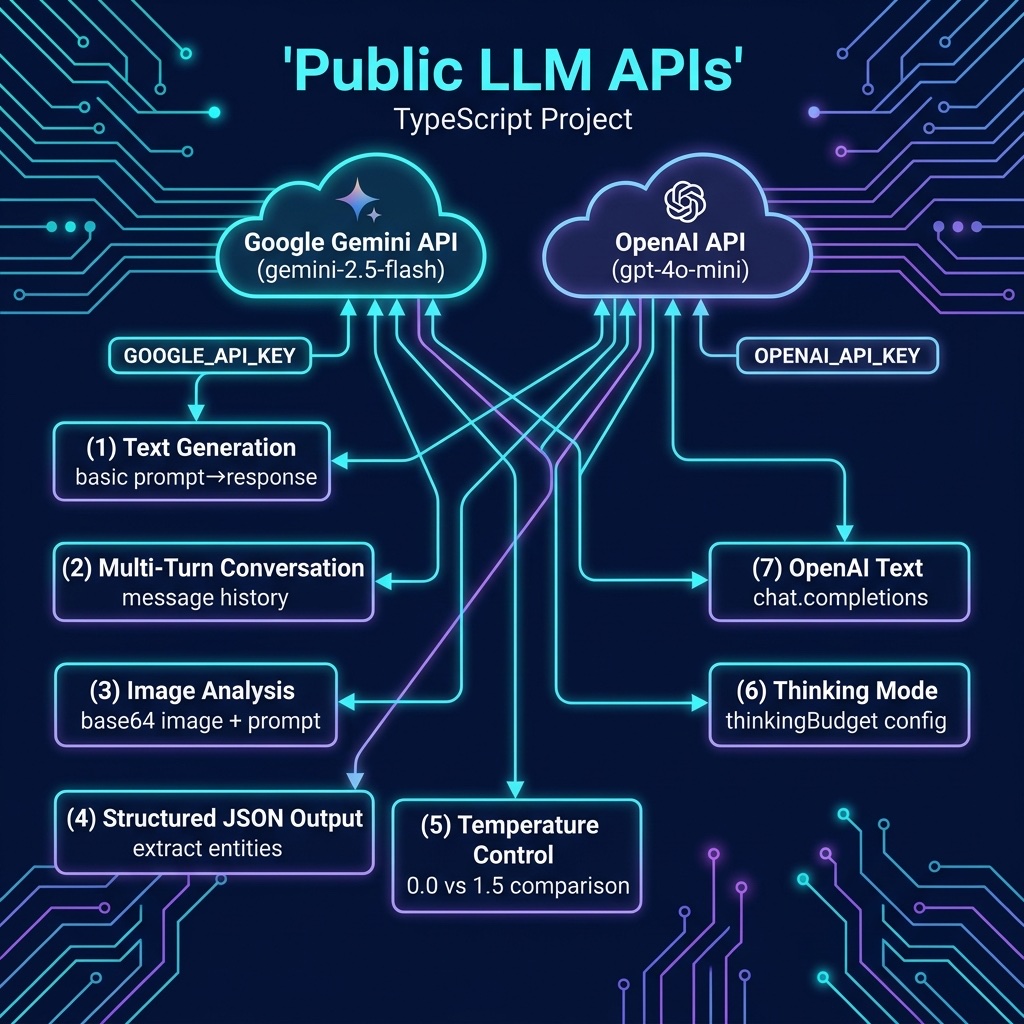
In this chapter we work through practical examples using the Google Gemini API and the OpenAI API. Both provide TypeScript/JavaScript client libraries that handle authentication, request formatting, and response parsing. The patterns you learn here apply to other API providers as well, the core concepts of sending prompts, receiving completions, and managing conversations are the same across providers.
The examples for this chapter are in the directory source-code/llm_public_apis.
Setup and Authentication
Google Gemini
Google’s Gemini models are accessed through the Google AI API using the @google/genai TypeScript SDK. You need a free API key from Google AI Studio.
Install the SDK:
1 npm install @google/genai
Store your API key in an environment variable:
1 export GOOGLE_API_KEY="your-api-key-here"
Here is the simplest possible example, send a prompt to Gemini and print the response:
 1 // gemini_text.ts - Basic text generation with Google Gemini
 2
 3 import { GoogleGenAI } from "@google/genai";
 4
 5 const ai = new GoogleGenAI({ apiKey: process.env.GOOGLE_API_KEY! });
 6
 7 const response = await ai.models.generateContent({
 8   model: "gemini-2.5-flash",
 9   contents: "Briefly explain what a transformer model is in AI.",
10 });
11
12 console.log(response.text);
The output will be a concise explanation of transformer models. Each call to generateContent sends a request to Google’s servers, which run the model and return the generated text.
OpenAI
OpenAI’s GPT models are accessed through the openai TypeScript SDK. You need an API key from OpenAI’s platform.
Install the SDK:
1 npm install openai
Store your API key:
1 export OPENAI_API_KEY="your-api-key-here"
Here is the equivalent example using OpenAI:
 1 // openai_text.ts - Basic text generation with OpenAI
 2
 3 import OpenAI from "openai";
 4
 5 const client = new OpenAI(); // reads OPENAI_API_KEY from environment
 6
 7 const response = await client.chat.completions.create({
 8   model: "gpt-4o-mini",
 9   messages: [
10     { role: "user", content: "Briefly explain what a transformer model is in AI." },
11   ],
12 });
13
14 console.log(response.choices[0].message.content);
Both APIs follow the same pattern: create a client, send a prompt, and extract the generated text from the response.
Text Generation
Text generation is the most fundamental LLM capability. You provide a prompt and the model generates a continuation or response.
Controlling Output with Temperature
The temperature parameter controls how creative or deterministic the output is. A temperature of 0 produces the most predictable output. Higher temperatures (up to 1.0 or 2.0) produce more varied and creative output.
 1 // gemini_temperature.ts - Effect of temperature on text generation
 2
 3 import { GoogleGenAI } from "@google/genai";
 4
 5 const apiKey = process.env.GOOGLE_API_KEY;
 6 if (!apiKey) { console.error("Set GOOGLE_API_KEY"); process.exit(1); }
 7
 8 const ai = new GoogleGenAI({ apiKey });
 9 const prompt = "Write a one-sentence tagline for a coffee shop.";
10
11 for (const temp of [0.0, 1.5]) {
12   const r = await ai.models.generateContent({
13     model: "gemini-2.5-flash", contents: prompt, config: { temperature: temp },
14   });
15   console.log(`Temperature ${temp}: ${r.text}`);
16 }
For most practical applications, code generation, data extraction, question answering, use a low temperature (0.0 to 0.3). For creative writing and brainstorming, higher temperatures (0.7 to 1.5) produce more interesting results.
Thinking Models
Some models can engage in extended internal reasoning before producing a response. Google’s Gemini 2.5 Flash supports a thinking budget that controls how much computation the model devotes to reasoning through the problem before answering.
 1 // gemini_thinking.ts - Using Gemini's thinking mode
 2
 3 import { GoogleGenAI } from "@google/genai";
 4
 5 const ai = new GoogleGenAI({ apiKey: process.env.GOOGLE_API_KEY! });
 6
 7 const prompt = `
 8 A farmer has a fox, a chicken, and a bag of grain. He needs to cross
 9 a river in a boat that can only carry him and one item at a time.
10 If left alone, the fox will eat the chicken, and the chicken will eat
11 the grain. How does the farmer get everything across safely?
12 `;
13
14 const response = await ai.models.generateContent({
15   model: "gemini-2.5-flash",
16   contents: prompt,
17   config: {
18     thinkingConfig: {
19       thinkingBudget: 1000,
20     },
21   },
22 });
23
24 console.log(response.text);
The thinking budget is specified in tokens. A budget of 0 disables thinking entirely (useful for simple tasks where speed matters). Higher budgets allow the model to reason through more complex problems but increase latency and cost.
Multi-Turn Conversations
Real applications often involve multi-turn conversations where the model needs to remember previous exchanges. Both APIs support this by passing conversation history with each request.
 1 // gemini_conversation.ts - Multi-turn conversation with Gemini
 2
 3 import { GoogleGenAI } from "@google/genai";
 4
 5 const apiKey = process.env.GOOGLE_API_KEY;
 6 if (!apiKey) { console.error("Set GOOGLE_API_KEY"); process.exit(1); }
 7
 8 const ai = new GoogleGenAI({ apiKey });
 9 const conversation: { role: "user" | "model"; parts: { text: string }[] }[] = [];
10
11 async function chat(userMessage: string): Promise<string> {
12   conversation.push({ role: "user", parts: [{ text: userMessage }] });
13   const reply = (await ai.models.generateContent({
14     model: "gemini-2.5-flash", contents: conversation,
15   })).text ?? "";
16   conversation.push({ role: "model", parts: [{ text: reply }] });
17   return reply;
18 }
19
20 for (const q of [
21   "What is the capital of France?",
22   "What is its population?",
23   "What are the top 3 tourist attractions there?",
24 ]) {
25   console.log(`Q: ${q}`);
26   console.log("A:", await chat(q));
27   console.log();
28 }
Notice that the second and third messages use pronouns (“its”, “there”) that only make sense given the conversation history. The model resolves these references correctly because it sees the full conversation with each request.
Multimodal Input: Analyzing Images
Modern LLMs can process images alongside text. This enables applications like image description, document analysis, chart reading, and visual question answering.
 1 // gemini_image.ts - Analyzing an image with Gemini
 2
 3 import { GoogleGenAI } from "@google/genai";
 4 import { readFileSync } from "node:fs";
 5
 6 const ai = new GoogleGenAI({ apiKey: process.env.GOOGLE_API_KEY! });
 7
 8 // Load an image from disk as base64
 9 const imageBuffer = readFileSync("photo.jpg");
10 const base64Image = imageBuffer.toString("base64");
11
12 const response = await ai.models.generateContent({
13   model: "gemini-2.5-flash",
14   contents: [
15     {
16       role: "user",
17       parts: [
18         { text: "Describe what you see in this image." },
19         {
20           inlineData: {
21             mimeType: "image/jpeg",
22             data: base64Image,
23           },
24         },
25       ],
26     },
27   ],
28 });
29
30 console.log(response.text);
Structured Output
For many applications you need the model to return data in a specific format, JSON, CSV, or a particular schema. LLMs can be instructed to produce structured output through careful prompting.
 1 // gemini_structured.ts - Getting structured JSON output from Gemini
 2
 3 import { GoogleGenAI } from "@google/genai";
 4
 5 const ai = new GoogleGenAI({ apiKey: process.env.GOOGLE_API_KEY! });
 6
 7 const prompt = `Extract the following information from the text below and return
 8 it as a JSON object with keys: "name", "company", "role", "years_experience".
 9
10 Text: "Jane Smith has been working as a Senior Data Scientist at Acme Corp
11 for the past 7 years. She specializes in NLP and recommendation systems."
12 `;
13
14 const response = await ai.models.generateContent({
15   model: "gemini-2.5-flash",
16   contents: prompt,
17   config: { temperature: 0.0 },
18 });
19
20 const text = response.text ?? "";
21 const jsonStr = text.replace(/```json\n?/g, "").replace(/```\n?/g, "").trim();
22 const result = JSON.parse(jsonStr);
23 console.log(JSON.stringify(result, null, 2));
Using temperature 0.0 is important for structured output, you want the model to be deterministic and precise rather than creative.
Tool Use (Function Calling)
A limitation of plain text generation is that the model can only produce text, it cannot interact with the outside world. Function calling (also called tool use) bridges this gap. You provide the model with descriptions of available functions, and when the model determines that a function would help answer the user’s question, it returns a structured function call instead of (or alongside) text. Your code executes the function and passes the result back to the model, which then incorporates it into its final response.
This pattern enables LLMs to look up real-time data, interact with databases, control external systems, and perform actions beyond text generation. Both Gemini and OpenAI support this capability.
Gemini: Directory and File Tools
The Gemini example defines two tools: list_directory to list files in the current working directory, and read_file to read a file’s contents. The model is asked to explore the project directory and summarize what it finds.
 1 // gemini_tools.ts - Gemini function calling with directory tools
 2
 3 import { GoogleGenAI } from "@google/genai";
 4 import { readdir, readFile } from "node:fs/promises";
 5
 6 const ai = new GoogleGenAI({ apiKey: process.env.GOOGLE_API_KEY! });
 7
 8 const tools = [
 9   {
10     functionDeclarations: [
11       {
12         name: "list_directory",
13         description: "List all files in the current working directory.",
14       },
15       {
16         name: "read_file",
17         description: "Read the contents of a file by name.",
18         parameters: {
19           type: "object",
20           properties: {
21             filename: { type: "string", description: "Name of the file to read" },
22           },
23           required: ["filename"],
24         },
25       },
26     ],
27   },
28 ];
29
30 const prompt = `Use the available tools to:
31 1. List the files in this directory.
32 2. Read the package.json file.
33 Then summarize what you find.`;
34
35 const response = await ai.models.generateContent({
36   model: "gemini-2.5-flash",
37   contents: prompt,
38   config: { tools },
39 });
40
41 for (const part of response.candidates?.[0]?.content?.parts ?? []) {
42   if (part.text) {
43     console.log(part.text);
44   } else if (part.functionCall) {
45     const { name, args } = part.functionCall;
46     let result: string;
47     if (name === "list_directory") {
48       result = (await readdir(".")).join("\n");
49     } else if (name === "read_file") {
50       result = await readFile(args.filename as string, "utf-8");
51     } else {
52       result = "Unknown function";
53     }
54
55     const followUp = await ai.models.generateContent({
56       model: "gemini-2.5-flash",
57       contents: [
58         { role: "user", parts: [{ text: prompt }] },
59         { role: "model", parts: [{ functionCall: { name, args } }] },
60         { role: "user", parts: [{ functionResponse: { name, response: { result } } }] },
61       ],
62     });
63     console.log(followUp.text);
64   }
65 }
With the Gemini SDK, tools are declared in the config.tools array using functionDeclarations. Each declaration specifies the function name, description, and optional parameter schema. The model does not execute the functions, it simply returns a functionCall part when it wants to invoke one. Your code is responsible for executing the function and sending the result back as a functionResponse.
Here is example output:
 1 [Tool call: list_directory({})]
 2
 3
 4 [Tool call: read_file({"filename":"package.json"})]
 5
 6 The directory contains several files, mostly TypeScript files related to `gemini` and `openai` APIs, along with `node_modules`, `package-lock.json`, and `package.json`.
 7
 8 The `package.json` file reveals the following:
 9 *   **Name:** `llm-public-apis`
10 *   **Version:** `1.0.0`
11 *   **Type:** `module`
12 *   **Scripts:** It defines various scripts for running different tasks, including:
13     *   `gemini`
14     *   `openai`
15     *   `temperature`
16     *   `thinking`
17     *   `conversation`
18     *   `image`
19     *   `structured`
20     *   `gemini-tools`
21     *   `openai-tools`
22 *   **Dependencies:**
23     *   `@google/genai`: `^1.0.0`
24     *   `openai`: `^4.77.0`
25 *   **Dev Dependencies:**
26     *   `typescript`: `^5.7.0`
27     *   `@types/node`: `^22.0.0`
28     *   `tsx`: `^4.19.0`
29
30 In summary, this project is an LLM public APIs example project, version 1.0.0, utilizing both Google's Generative AI and OpenAI APIs, and built with TypeScript.
OpenAI: Stubbed Weather API
The OpenAI example demonstrates the same pattern using a stubbed get_weather function. Rather than calling a real weather service, we return mock data, the focus is on the function calling mechanics.
 1 // openai_tools.ts - OpenAI function calling with stubbed weather API
 2
 3 import OpenAI from "openai";
 4
 5 const client = new OpenAI(); // reads OPENAI_API_KEY from environment
 6
 7 const tools: OpenAI.Chat.Completions.ChatCompletionTool[] = [
 8   {
 9     type: "function",
10     function: {
11       name: "get_weather",
12       description: "Get current weather conditions for a city.",
13       parameters: {
14         type: "object",
15         properties: {
16           city: { type: "string", description: "City name" },
17           units: {
18             type: "string",
19             enum: ["celsius", "fahrenheit"],
20             description: "Temperature units",
21           },
22         },
23         required: ["city"],
24       },
25     },
26   },
27 ];
28
29 const messages: OpenAI.Chat.Completions.ChatCompletionMessageParam[] = [
30   { role: "user", content: "What's the weather in Paris? Also check London in fahrenheit." },
31 ];
32
33 const response = await client.chat.completions.create({
34   model: "gpt-4o-mini",
35   messages,
36   tools,
37 });
38
39 const toolCalls = response.choices[0].message.tool_calls ?? [];
40 for (const call of toolCalls) {
41   const args = JSON.parse(call.function.arguments);
42
43   // Stubbed weather data
44   const weather = {
45     city: args.city,
46     temperature: args.units === "fahrenheit" ? 72 : 22,
47     conditions: "partly cloudy",
48     humidity: "65%",
49   };
50
51   messages.push(response.choices[0].message);
52   messages.push({
53     role: "tool",
54     tool_call_id: call.id,
55     content: JSON.stringify(weather),
56   });
57 }
58
59 if (toolCalls.length > 0) {
60   const followUp = await client.chat.completions.create({
61     model: "gpt-4o-mini",
62     messages,
63   });
64   console.log(followUp.choices[0].message.content);
65 }
With the OpenAI SDK, tools are passed as ChatCompletionTool objects with the type: "function" discriminator. The model’s response may contain tool_calls, which you process and follow up with role: "tool" messages carrying the results. The second call to chat.completions.create gives the model the tool outputs so it can produce its final answer.
The core loop is the same across both providers: describe the tools, let the model decide when to call them, execute the call, and feed the result back. For production applications, wrap this in a loop allowing the model to make multiple sequential function calls before producing its final response to the user.
Here is example output:
 1 $ npx tsx openai_tools.ts
 2 [Tool call: get_weather({"city":"Paris","units":"celsius"})]
 3 {
 4   "city": "Paris",
 5   "temperature": 22,
 6   "conditions": "partly cloudy",
 7   "humidity": "65%"
 8 }
 9 [Tool call: get_weather({"city":"London","units":"fahrenheit"})]
10 {
11   "city": "London",
12   "temperature": 72,
13   "conditions": "partly cloudy",
14   "humidity": "65%"
15 }
16
17 The weather in Paris is partly cloudy with a temperature of 22°C and a humidity level of 65%. In London, it is also partly cloudy with a temperature of 72°F and the same humidity level of 65%.
Practical Considerations
Cost
API calls are billed per token. Input tokens (your prompt) and output tokens (the model’s response) are priced separately, with output tokens typically costing 2-4x more. For most applications, start with a fast, inexpensive model and only upgrade to a frontier model for tasks that require it.
Rate Limits
All API providers enforce rate limits. If you’re building a production application, you’ll need to implement retry logic with exponential backoff:
 1 async function generateWithRetry(
 2   ai: GoogleGenAI,
 3   prompt: string,
 4   maxRetries: number = 3
 5 ): Promise<string> {
 6   for (let attempt = 0; attempt < maxRetries; attempt++) {
 7     try {
 8       const response = await ai.models.generateContent({
 9         model: "gemini-2.5-flash",
10         contents: prompt,
11       });
12       return response.text ?? "";
13     } catch (error) {
14       if (attempt < maxRetries - 1) {
15         const wait = 2 ** attempt * 1000;
16         console.log(`Attempt ${attempt + 1} failed. Retrying in ${wait}ms...`);
17         await new Promise(resolve => setTimeout(resolve, wait));
18       } else {
19         throw error;
20       }
21     }
22   }
23   throw new Error("Should not reach here");
24 }
Privacy
Any data you send to an API is transmitted to the provider’s servers. For sensitive data, review the provider’s data usage policies carefully. For maximum privacy, consider using local models instead, as covered in the next chapter.
Summary
Using LLMs through public APIs is the fastest path from idea to working application. The core pattern is simple across all providers: create a client, send a prompt, process the response. The richness comes from features like multi-turn conversations, multimodal input, web search, structured output, tool use, and thinking modes.
TypeScript is an excellent language for LLM API integration, the official SDKs from Google and OpenAI provide full type definitions, making it easy to discover capabilities and catch errors at compile time.
In the next chapter we cover the alternative approach: running open-weights models locally on your own hardware, which offers privacy, no per-token cost, and offline operation at the expense of model capability and the need for suitable hardware.
Optional Practice Problems
Here are some exercises to help you practice integrating public LLM APIs into your TypeScript applications:
- Adaptive Temperature Sandbox: Write a CLI tool (e.g.,
compare_temp.ts) that takes a single user prompt and generates three responses using different temperatures:0.2(focused),0.7(balanced), and1.2(creative). Compare and print the outputs, analyzing how the temperature level influences style, detail, and predictability. - Robust JSON Validator and Auto-Retry: Modify
gemini_structured.tsto define a strict TypeScript interface for the expected JSON structure. Implement a parser wrapper that validates the parsed object. If the JSON structure is invalid or keys are missing, automatically retry the API request by appending the previous invalid output and a correction message to the history. - Multimodal Image Inspector: Create a CLI script that takes an image file and a specific question about the image (e.g.,
"Count the number of items of type X"or"Is there any text in this image?"). Run the request using Gemini’s multimodal capabilities, and print a structured summary of the findings. - Conversational Math Tutor with Reasoning: Combine the concepts of multi-turn conversations (
gemini_conversation.ts) and thinking mode (gemini_thinking.ts). Build a chat loop where the user presents a mathematical or logic puzzle. Configure the model to use thinking mode to solve the problem step-by-step internally, but instruct the model to only give the user a helpful hint rather than the final answer. - CLI Shell Copilot via Tool Calling: Build upon
gemini_tools.tsoropenai_tools.tsby introducing a tool calledexecute_safe_command(which runs a shell command and returns its output, restricted to safe commands likegit status,npm run build, ornpm test). Ask the model to fix a linting error or run a compilation command and report the output, executing a recursive tool-calling loop until the command passes.