Getting Setup To Use Graph and Relational Databases
I use several types of data stores in my work but for the purposes of this book we can explore knowledge representation using two key platforms:
- SQLite for relational knowledge representation using the SQL query language via the better-sqlite3 npm package.
The next chapter covers RDF and the SPARQL query language in more detail.
The examples for this chapter are in the directory source-code/knowledge_representation.
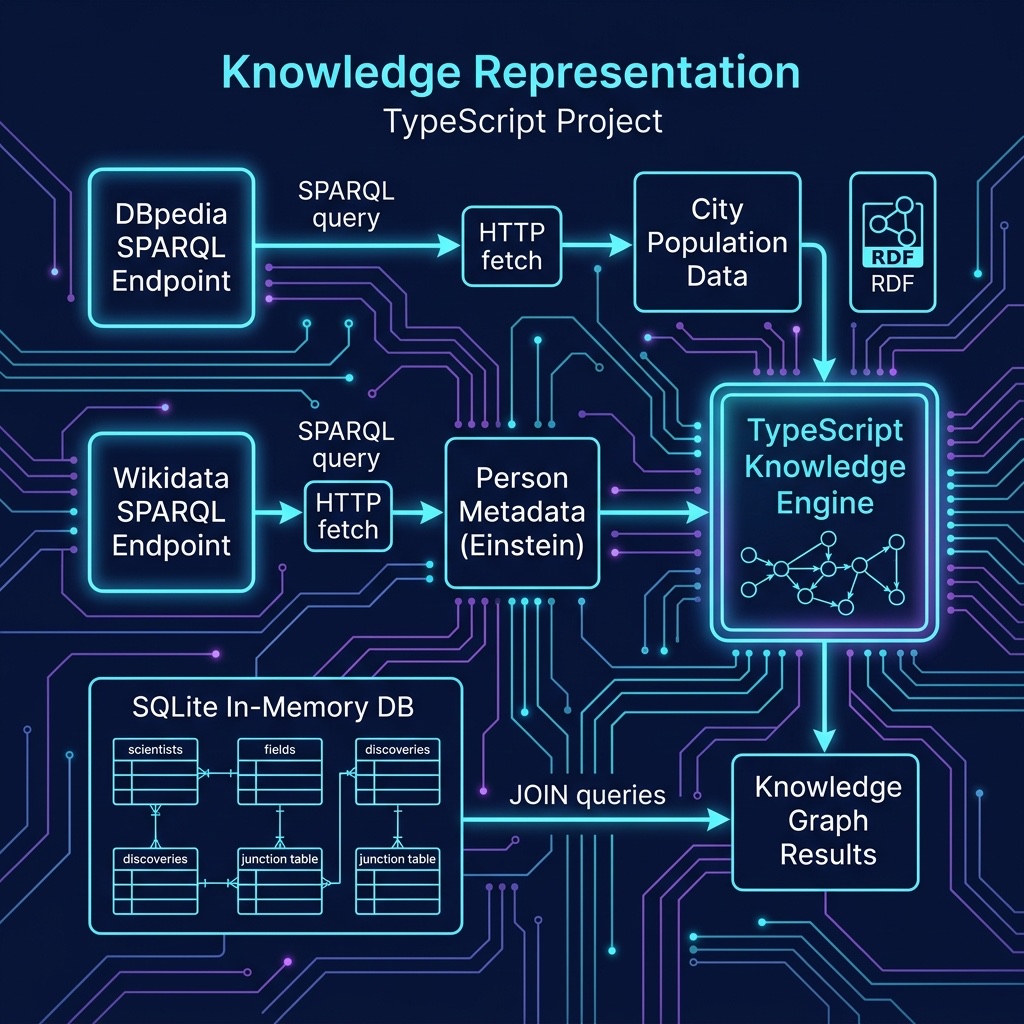
In technical terms, knowledge representation using graph and relational databases involves the use of graph structures and relational data models to represent and organize knowledge in a structured, computationally efficient, and easily accessible way.
A graph structure is a collection of nodes (also known as vertices) and edges (also known as arcs) that connect the nodes. Each node and edge in a graph can have properties, such as labels and attributes which provide information about the entities they represent. Graphs can be used to represent knowledge in a variety of ways, such as through semantic networks and using ontologies to define terms, classes, types, etc.
Relational databases, on the other hand, use a tabular data model to represent knowledge. The basic building block of a relational database is the table, which is a collection of rows and columns. Each row represents an instance of an entity, and the columns provide information about the properties of that entity. Relationships between entities can also be represented by foreign keys, which link one table to another.
Querying Wikidata with SPARQL and TypeScript
Wikidata is a free, open knowledge base maintained by the Wikimedia Foundation. It contains structured data about millions of entities, people, places, organizations, scientific concepts, and more, all accessible through a public SPARQL endpoint.
In TypeScript, we use the built-in fetch API to query SPARQL endpoints directly, no additional libraries needed:
Finding Information About a Person
Let’s query Wikidata for information about a specific person:
 1 // wikidata_person.ts - Query Wikidata for information about a person
 2
 3 async function sparqlQuery(endpoint: string, query: string) {
 4   const resp = await fetch(`${endpoint}?query=${encodeURIComponent(query)}`, {
 5     headers: { Accept: "application/sparql-results+json", "User-Agent": "TypeScriptAIBook/1.0" },
 6   });
 7   if (!resp.ok) throw new Error(`SPARQL query failed: ${resp.status}`);
 8   return resp.json();
 9 }
10
11 const results = await sparqlQuery("https://query.wikidata.org/sparql", `
12   SELECT ?personLabel ?birthPlaceLabel ?birthDate ?occupationLabel WHERE {
13     ?person wdt:P31 wd:Q5 .
14     ?person rdfs:label "Albert Einstein"@en .
15     OPTIONAL { ?person wdt:P19 ?birthPlace . }
16     OPTIONAL { ?person wdt:P569 ?birthDate . }
17     OPTIONAL { ?person wdt:P106 ?occupation . }
18     SERVICE wikibase:label { bd:serviceParam wikibase:language "en" . }
19   } LIMIT 10
20 `);
21
22 for (const r of results.results.bindings) {
23   console.log(`  Name: ${r.personLabel.value}`);
24   if (r.birthPlaceLabel) console.log(`  Born: ${r.birthPlaceLabel.value}`);
25   if (r.birthDate) console.log(`  Date: ${r.birthDate.value.slice(0, 10)}`);
26   if (r.occupationLabel) console.log(`  Occupation: ${r.occupationLabel.value}`);
27   console.log();
28 }
The output shows Wikidata returning multiple results, one per occupation, for the same person:
 1 $ tsx wikidata_person.ts
 2   Name: Albert Einstein
 3   Born: Ulm
 4   Date: 1879-03-14
 5   Occupation: scientist
 6
 7   Name: Albert Einstein
 8   Born: Ulm
 9   Date: 1879-03-14
10   Occupation: physicist
11
12   Name: Albert Einstein
13   Born: Ulm
14   Date: 1879-03-14
15   Occupation: mathematician
16   ...
Key things to notice about Wikidata’s SPARQL:
- wdt: properties represent direct claims (e.g., wdt:P19 is “place of birth”)
- wd: entities are Wikidata items (e.g., wd:Q5 is “human”)
- The SERVICE wikibase:label clause automatically resolves entity IDs to human-readable labels
- OPTIONAL prevents the query from failing when a property is missing
Querying Cities and Their Properties from DBPedia
DBPedia mirrors much of Wikipedia’s structured content as RDF triples. Here we query for cities and their populations:
 1 // dbpedia_cities.ts - Query DBPedia for city data
 2
 3 const query = `
 4 SELECT ?city_uri ?dbpedia_label ?population ?country_label WHERE {
 5   ?city_uri <http://dbpedia.org/ontology/type> <http://dbpedia.org/resource/City> .
 6   ?city_uri <http://dbpedia.org/property/populationEst> ?population .
 7   ?city_uri <http://www.w3.org/2000/01/rdf-schema#label> ?dbpedia_label
 8     FILTER (lang(?dbpedia_label) = 'en') .
 9   OPTIONAL {
10     ?city_uri <http://dbpedia.org/ontology/country> ?country .
11     ?country <http://www.w3.org/2000/01/rdf-schema#label> ?country_label
12       FILTER (lang(?country_label) = 'en') .
13   }
14 } ORDER BY DESC(?population) LIMIT 10`;
15
16 try {
17   const resp = await fetch(`http://dbpedia.org/sparql?query=${encodeURIComponent(query)}`, {
18     headers: { Accept: "application/sparql-results+json" },
19   });
20   if (!resp.ok) throw new Error(`DBPedia query failed: ${resp.status}`);
21   const results = await resp.json();
22
23   for (const r of results.results.bindings) {
24     const city = r.dbpedia_label.value;
25     const pop = parseInt(r.population.value).toLocaleString();
26     console.log(`  ${city} (${r.country_label?.value ?? "unknown"}): population ${pop}`);
27   }
28 } catch (err) {
29   console.error("Error querying DBPedia:", err);
30 }
Notice that TypeScript’s built-in fetch is all we need to query any SPARQL endpoint, no special library required. The SPARQL results come back as JSON which TypeScript handles natively.
The SQLite Relational Database for Knowledge Representation
For local relational data, we use the better-sqlite3 package which provides a synchronous, fast SQLite interface for Node.js:
1 npm install better-sqlite3
2 npm install -D @types/better-sqlite3
Modeling a Knowledge Graph in SQLite
Relational databases become knowledge representation tools when we design tables to capture entities, their types, their attributes, and the relationships between them:
 1 // sqlite_knowledge.ts - Knowledge representation with SQLite
 2
 3 import Database from "better-sqlite3";
 4
 5 function buildKnowledgeBase(): Database.Database {
 6   const db = new Database(":memory:");
 7
 8   db.exec(`
 9     CREATE TABLE scientists (id INTEGER PRIMARY KEY, name TEXT NOT NULL, birth_year INTEGER, nationality TEXT);
10     CREATE TABLE fields (id INTEGER PRIMARY KEY, name TEXT NOT NULL, description TEXT);
11     CREATE TABLE discoveries (id INTEGER PRIMARY KEY, name TEXT NOT NULL, year INTEGER, description TEXT);
12     CREATE TABLE scientist_field (scientist_id INTEGER REFERENCES scientists(id), field_id INTEGER REFERENCES fields(id), PRIMARY KEY (scientist_id, field_id));
13     CREATE TABLE scientist_discovery (scientist_id INTEGER REFERENCES scientists(id), discovery_id INTEGER REFERENCES discoveries(id), PRIMARY KEY (scientist_id, discovery_id));
14   `);
15
16   const ins = (tbl: string, cols: number) =>
17     db.prepare(`INSERT INTO ${tbl} VALUES (${Array(cols).fill("?").join(",")})`);
18
19   const [iS, iF, iD, iSF, iSD] = [
20     ins("scientists", 4), ins("fields", 3), ins("discoveries", 4),
21     ins("scientist_field", 2), ins("scientist_discovery", 2),
22   ];
23
24   iS.run(1, "Albert Einstein", 1879, "German");
25   iS.run(2, "Marie Curie", 1867, "Polish");
26   iS.run(3, "Richard Feynman", 1918, "American");
27
28   iF.run(1, "Physics", "Study of matter, energy, and their interactions");
29   iF.run(2, "Chemistry", "Study of composition and properties of matter");
30   iF.run(3, "Quantum Mechanics", "Physics of atomic and subatomic systems");
31
32   iD.run(1, "Special Relativity", 1905, "Time and space are relative");
33   iD.run(2, "Radioactivity", 1898, "Discovery of radium and polonium");
34   iD.run(3, "Quantum Electrodynamics", 1948, "Quantum theory of light and matter");
35
36   iSF.run(1, 1); iSF.run(1, 3); iSF.run(2, 1); iSF.run(2, 2); iSF.run(3, 1); iSF.run(3, 3);
37   iSD.run(1, 1); iSD.run(2, 2); iSD.run(3, 3);
38
39   return db;
40 }
41
42 function queryKnowledgeBase(db: Database.Database) {
43   console.log("Scientists in Quantum Mechanics:");
44   for (const r of db.prepare(`
45     SELECT s.name, s.nationality FROM scientists s
46     JOIN scientist_field sf ON s.id = sf.scientist_id
47     JOIN fields f ON sf.field_id = f.id
48     WHERE f.name = 'Quantum Mechanics'
49   `).all() as any[]) console.log(`  ${r.name} (${r.nationality})`);
50
51   console.log("\nDiscoveries by scientist:");
52   for (const r of db.prepare(`
53     SELECT s.name, d.name AS discovery, d.year, d.description FROM scientists s
54     JOIN scientist_discovery sd ON s.id = sd.scientist_id
55     JOIN discoveries d ON sd.discovery_id = d.id ORDER BY d.year
56   `).all() as any[]) console.log(`  ${r.name}: ${r.discovery} (${r.year}), ${r.description}`);
57
58   console.log("\nScientists who share a field:");
59   for (const r of db.prepare(`
60     SELECT s1.name AS name1, s2.name AS name2, f.name AS field FROM scientist_field sf1
61     JOIN scientist_field sf2 ON sf1.field_id = sf2.field_id AND sf1.scientist_id < sf2.scientist_id
62     JOIN scientists s1 ON sf1.scientist_id = s1.id
63     JOIN scientists s2 ON sf2.scientist_id = s2.id
64     JOIN fields f ON sf1.field_id = f.id
65   `).all() as any[]) console.log(`  ${r.name1} & ${r.name2}: ${r.field}`);
66 }
67
68 const db = buildKnowledgeBase();
69 queryKnowledgeBase(db);
70 db.close();
The output shows how SQL JOIN queries traverse the relationships between entities:
 1 Scientists in Quantum Mechanics:
 2   Albert Einstein (German)
 3   Richard Feynman (American)
 4
 5 Discoveries by scientist:
 6   Marie Curie: Radioactivity (1898), Discovery of radium and polonium
 7   Albert Einstein: Special Relativity (1905), Time and space are relative
 8   Richard Feynman: Quantum Electrodynamics (1948), Quantum theory of light and matter
 9
10 Scientists who share a field:
11   Albert Einstein & Marie Curie: Physics
12   Albert Einstein & Richard Feynman: Physics
13   Albert Einstein & Richard Feynman: Quantum Mechanics
14   Marie Curie & Richard Feynman: Physics
The key insight is that the relationship tables (scientist_field, scientist_discovery) transform a flat relational database into a knowledge representation. Each relationship table captures a specific type of connection between entity types, and SQL JOINs let you traverse these connections to answer knowledge queries.
We will combine the use of SQLite, RDF, SPARQL, and deep learning NLP libraries later in the book.
If you want to deepen your understanding of the standards behind the SPARQL queries we used in this chapter, the next chapter provides optional reference material on RDF data formats, RDFS sub-property hierarchies, the SPARQL query language in detail, and OWL reasoning.
Optional Practice Problems
Extending the Wikidata Query Modify
wikidata_person.tsto query for another prominent scientist or historical figure (e.g., “Ada Lovelace” or “Alan Turing”). Update the SPARQL query to retrieve their date of death (wdt:P570) and their doctoral advisor (wdt:P184), making sure to useOPTIONALclauses and resolving the labels to English.Filtering DBpedia Cities Modify the SPARQL query in
dbpedia_cities.tsto retrieve only cities belonging to a specific country (e.g., Japan or the United States) by specifying a value constraint on thecountryproperty. Additionally, filter the results to only include cities with a population greater than 1,000,000.Extending the Relational Schema Extend the database schema in
sqlite_knowledge.tsto include a new table forinstitutions(representing universities or research labs, such as “Caltech” or “Sorbonne University”). Create a junction table (e.g.,scientist_institution) to represent where scientists worked. Insert relevant records for the existing scientists, and write a query to list all scientists associated with a specific institution.Indirect Relationships in SQLite Write a query in
sqlite_knowledge.tsto find “indirect connections” between scientists. Specifically, find pairs of scientists who do not share any fields directly, but are connected because they both share a field with a mutual colleague.