Automated Testing with RSpec
In this chapter, we will cover the basics of automated testing with RSpec.
Overview to Automated Testing
In traditional software companies, employees are separated into silos according to their purpose: analysts design the system which they pass to developers. The developers code the programs and pass them to QA. The testers test the programs then pass the final working system to Operations.
When a developer from this “assembly-line” encounters the terms “Test Driven Development” or “Automated Testing”, they often ask the same question:
“We already have testers, and we even do developer testing before passing our programs to QA. Why should we spend time programming tests for our programs?”
The answer here always boils down to “immediate feedback”.
Say for example you have a simple table maintenance program. A competent developer can program that in an hour and spend maybe 5 minutes to fully developer test the program before passing it to QA. In this case, coding test for the program feels like a waste of time.
But what if this maintenance program has is slightly more complicated than usual? Maybe there’s special handling when the record is saved, or maybe some the flow changes depending on some factors, or maybe the page displays different data on some other factors. Here the combined testing time for the developer and tester might take 30 minutes.
Now what if the modules of that program are used and modified by a new program? In addition to testing the new program, you will have to do some regression testing on the old program, maybe pulling the total testing time up to an hour.
As the system becomes larger and larger, and the modules become more and more interconnected, full regression tests are no longer done except on major releases: no project manager on their right mind would ask the QA team to do a full regression test consisting of a total of over 1,000 test cases for every minor change in the system.
The end result here is always the same: bugs creep into the system and they’re reported weeks or months after the change that caused them was applied to the main build.
Automated tests do not guarantee that bugs won’t creep into the system. However, they allow the team to detect more bugs and detect them much earlier than manual testing would have.
What would happen if those over 1,000 test cases were automated?
In the developer side, maintenance is no longer like struggling out of quicksand or a tar pit. When maintaining fairly complicated programs, fixing 1 bug produces 2 more bugs somewhere else. Without automated tests to tell you what program you broke because of your fix, those bugs might go undetected for weeks, decreasing the overall stability of the system.
With automated tests, you could immediately know the side effects of your change and act accordingly: either you fix your change or fix the tests that failed because of the new behavior.
In the QA side, the testers are now free from doing trivial and mechanical testing tasks. Instead of testing if the name field is mandatory for the 100th time, they could spend their time doing exploratory testing, looking for obscure test cases which aren’t handled by the current test suite.
In the end, it’s all about the return on investment. Your developers are going to spend more time programming because of the tests, but as every software engineer knows, most of the effort is in the bug fixing and maintenance. In large and complicated systems, the return on investment in terms of time and effort is so high that teams who have experienced using automated testing for their projects would never think about going back to full manual testing.
RSpec
Rails has a built in testing framework based on Test::Unit. For this course, we’re going to be using a different framework, RSpec.
RSpec is a Behavior Driven Development (BDD) framework. For this lesson, however, we will be using it as a Test Driven Development (TDD) tool. We will discuss the difference between BDD and TDD at the end of this chapter, but we can point out some of the differences between the Test::Unit and RSpec right now:
- “Assertions” are now “expectations”, “test methods” are “code examples”, and “test cases” become “example groups”. This change in semantics reduce the confusion between developer and QA ideas on testing, as “expectations” and “examples” imply that we are also doing design and documentation work, while tests simply imply that there is a function in the system that needs to be tested.
- Specs (files containing one or more example groups) in RSpec are much more human-readable than Test::Unit tests. Well written specs can even be forwarded to your analysts (or even users) for them to verify if the specifications are correct.
Note that we will be using RSpec-2 for this course so many online tutorials and documentation may not be applicable. Please refer to the official docs for the up to date information. Also note that RSpec-3 is just around the corner and some of the syntax here may not be applicable by the time you read this manual.
Installing RSpec
To install RSpec, just add rspec-rails under a :development and :test group in Gemfile and let Bundler find and install the necessary dependencies. Here are the lines you need to add to the Gemfile:
group :development, :test do
  gem 'rspec-rails', '~> 2.14.1'
  gem 'webrat', '~> 0.7.3'
end
Note that we also added Webrat, an integration testing tool which we will use over Test::Unit for testing views.
Run bundle install to install rspec-rails, webrat and their dependencies. As with many Rails plugins, we also need to run a script to install RSpec to your application:
$ bundle install
...
Your bundle is complete!
Use `bundle show [gemname]` to see where a bundled gem is installed.
$ rails generate rspec:install
      create  .rspec
      create  spec
      create  spec/spec_helper.rb
As with all Rails test frameworks, tests are executed in the “test” environment as opposed to the default “development” environment. This makes sense because you might want to create specs like “delete all records from table xxxx” and you don’t want to let your development test data to be deleted every time you run your tests.
To modify your test environment database settings, go to config/database.yml and edit the settings under test.
You might have noticed that in the Gemfile we placed rspec-rails inside a group declaration. Unlike jquery-rails, we only use RSpec in development (when we run the generator scripts) and test (when we perform the actual tests). In all other cases, like production and staging environments, RSpec is not necessary. By specifying the correct environment for the gems, we prevent those gems from being installed by Bundler or used by Rails in other environments.
RSpec Generator Scripts
Once rspec-rails is added to your application, the generator scripts for scaffold, model and controller are already modified to generate RSpec files instead of the default Test::Unit files.
Let’s try creating a new program now with the updated scaffold script (you can create a new Rails application for this, we will not be referencing the other programs in this chapter, just don’t forget to do the steps in the previous section):
$ rails generate scaffold customer name:string active:boolean --webrat
      invoke  active_record
      create    db/migrate/2014xxxxxxxxxx_create_customers.rb
      create    app/models/customer.rb
      invoke    rspec
      create      spec/models/customer_spec.rb
      invoke  resource_route
       route    resources :customers
      invoke  scaffold_controller
      create    app/controllers/customers_controller.rb
      invoke    erb
      create      app/views/customers
      create      app/views/customers/index.html.erb
      create      app/views/customers/edit.html.erb
      create      app/views/customers/show.html.erb
      create      app/views/customers/new.html.erb
      create      app/views/customers/_form.html.erb
      invoke    rspec
      create      spec/controllers/customers_controller_spec.rb
      create      spec/views/customers/edit.html.erb_spec.rb
      create      spec/views/customers/index.html.erb_spec.rb
      create      spec/views/customers/new.html.erb_spec.rb
      create      spec/views/customers/show.html.erb_spec.rb
      invoke      helper
      create        spec/helpers/customers_helper_spec.rb
      create      spec/routing/customers_routing_spec.rb
      invoke      rspec
      create        spec/requests/customers_spec.rb
      invoke    helper
      create      app/helpers/customers_helper.rb
      invoke      rspec
      create        spec/helpers/customers_helper_spec.rb
      invoke    jbuilder
      create      app/views/customers/index.json.jbuilder
      create      app/views/customers/show.json.jbuilder
      invoke  assets
      invoke    coffee
      create      app/assets/javascripts/customers.js.coffee
      invoke    scss
      create      app/assets/stylesheets/customers.css.scss
      invoke  scss
  identical    app/assets/stylesheets/scaffolds.css.scss
Note that we added the --webrat option in order to generate Webrat expectations inside the generated views.
Now to update the database schema:
$ rake db:migrate
If you’re using databases like MySQL, you might have to create the databases first:
$ rake db:create
$ rake db:create RAILS_ENV=test
$ rake db:migrate
Now you can run the server with rails server, or you can just run the specs that were generated along with the entire program with:
$ rake spec
You should see something like:
.........**..................

Pending:
  CustomersHelper add some examples to (or delete) /home/ubuntu/alingnena-app/spec/...
    # No reason given
    # ./spec/helpers/customers_helper_spec.rb:14
  Customer add some examples to (or delete) /home/ubuntu/alingnena-app/spec/models/...
    # No reason given
    # ./spec/models/customer_spec.rb:4

Finished in 1.97 seconds
30 examples, 0 failures, 2 pending
Analysis of the Generated Specs
Let’s look at the generated code per Rails module and introduce various RSpec and testing concepts along the way.
Model Specs
Model specs are located at spec/models folder and are named [model_name]_spec.rb. Here’s the contents of spec/models/customer_spec.rb:
require 'spec_helper'

describe Customer do
  pending "add some examples to (or delete) #{__FILE__}"
end
The require 'spec_helper' call refers to spec/spec_helper.rb which provides the libraries for the spec to work and configuration options. Here’s the default generated spec/spec_helper.rb file:
# This file is copied to spec/ when you run 'rails generate rspec:install'
ENV["RAILS_ENV"] ||= 'test'
require File.expand_path("../../config/environment", __FILE__)
require 'rspec/rails'
require 'rspec/autorun'

# Requires supporting ruby files with custom matchers and macros, etc,
# in spec/support/ and its subdirectories.
Dir[Rails.root.join("spec/support/**/*.rb")].each { |f| require f }

# Checks for pending migrations before tests are run.
# If you are not using ActiveRecord, you can remove this line.
ActiveRecord::Migration.check_pending! if defined?(ActiveRecord::Migration)

RSpec.configure do |config|
  # ## Mock Framework
  #
  # If you prefer to use mocha, flexmock or RR, uncomment the appropriate line:
  #
  # config.mock_with :mocha
  # config.mock_with :flexmock
  # config.mock_with :rr

  # Remove this line if you're not using ActiveRecord or ActiveRecord fixtures
  config.fixture_path = "#{::Rails.root}/spec/fixtures"

  # If you're not using ActiveRecord, or you'd prefer not to run each of your
  # examples within a transaction, remove the following line or assign false
  # instead of true.
  config.use_transactional_fixtures = true

  # If true, the base class of anonymous controllers will be inferred
  # automatically. This will be the default behavior in future versions of
  # rspec-rails.
  config.infer_base_class_for_anonymous_controllers = false

  # Run specs in random order to surface order dependencies. If you find an
  # order dependency and want to debug it, you can fix the order by providing
  # the seed, which is printed after each run.
  #     --seed 1234
  config.order = "random"
end
Example Groups
The next part is the example group which is declared by the describe method. Following the describe are the examples declared by the it method. For example, let’s remove the pending declaration and add a valid case:
require 'spec_helper'
describe Customer do
  it "should create a new instance given valid attributes" do
    Customer.create!(name: 'John', active: false)   # will throw error on failure
  end
end
One good way of looking at the example group would be to imagine a conversation between you and the user. Therefore:
describe Customer do
...
  it "should create a new instance given valid attributes" do
...
  end
end
becomes:
You: Describe [the] Customer [model].
User: It should create a new instance given valid attributes.
For this spec, our example does not have an explicit expectation. All it does is try to save a record with valid attributes; the example would fail if thecreate! method throws an error. We will look more into expectations when we go into the controller spec.
Set Up and Tear Down
Thebefore method contains statements that would be executed before the examples in the group. In testing terms, this would be the “set up” method. The option used here is :each which means that the block would be executed for every example. Another possible option is :all which runs the block only once before all the examples are executed.
If you need to do things after every example (e.g. delete records created by the example), you could use the after method. It has the same options as before, but it executes the block after the examples. In testing terms, this would be the “tear down” method.
Controller Specs
Controller specs are located at spec/controllers/ and are named [controller_class]_spec.rb. Here’s spec/controllers/customers_controller_spec.rb , a far more complicated spec than our model spec (removed some examples to shorten the code snippet):
require 'spec_helper'

describe CustomersController do

  let(:valid_attributes) { { "name" => "MyString" } }

  let(:valid_session) { {} }

  describe "GET index" do
    it "assigns all customers as @customers" do
      customer = Customer.create! valid_attributes
      get :index, {}, valid_session
      assigns(:customers).should eq([customer])
    end
  end

  describe "GET show" do
    it "assigns the requested customer as @customer" do
      customer = Customer.create! valid_attributes
      get :show, {:id => customer.to_param}, valid_session
      assigns(:customer).should eq(customer)
    end
  end

...

  describe "POST create" do
    describe "with valid params" do
      it "creates a new Customer" do
        expect {
          post :create, {:customer => valid_attributes}, valid_session
        }.to change(Customer, :count).by(1)
      end

      it "assigns a newly created customer as @customer" do
        post :create, {:customer => valid_attributes}, valid_session
        assigns(:customer).should be_a(Customer)
        assigns(:customer).should be_persisted
      end

      it "redirects to the created customer" do
        post :create, {:customer => valid_attributes}, valid_session
        response.should redirect_to(Customer.last)
      end
    end

    describe "with invalid params" do
      it "assigns a newly created but unsaved customer as @customer" do
        # Trigger the behavior that occurs when invalid params are submitted
        Customer.any_instance.stub(:save).and_return(false)
        post :create, {:customer => { "name" => "invalid value" }}, valid_session
        assigns(:customer).should be_a_new(Customer)
      end

      it "re-renders the 'new' template" do
        # Trigger the behavior that occurs when invalid params are submitted
        Customer.any_instance.stub(:save).and_return(false)
        post :create, {:customer => { "name" => "invalid value" }}, valid_session
        response.should render_template("new")
      end
    end
  end

...
end
Unlike in the model where the first describe was just there to say that we are testing the Customer class, the first describe method here defines the Action Controller class that we test on in this spec. If we put another controller class there instead of CustomersController, this spec would test the examples on that controller instead.
Also, since we do not test the class directly like in the model, we must simulate requests from the user. To do that, we can use the get, post, put/patch, and delete methods inherited from Action Controller’s testing methods. These methods accept an action to test and optional hashes for parameters, session, and flash. For example:
describe "GET show" do
  it "assigns the requested customer as @customer" do
    customer = Customer.create! valid_attributes
    get :show, {:id => customer.to_param}, valid_session
    assigns(:customer).should eq(customer)
  end
end
This spec introduces the concept of nested example groups. You can nest example groups to group similar example groups for maintainability and readability (like in this spec) or if you want to group examples so that thebefore andafter method calls would only apply to them.
The “conversation” technique still works with nested examples:
You: Describe CustomersController [when you send] POST create with valid params.

User: It assigns a newly created customer as @customer [and]
      it redirects to the created customer.
Mocks and Stubs
Database transactions are often the main bottlenecks in web applications. If all of our examples access the database, running specs may take too much time to be practical.
To avoid this penalty, we test our modules in isolation. In other words, the model specs only test the models, the controller specs, the controllers, and the view specs, the views. However, there still lies a problem: our controller and view code uses models, so how to we remove the models from them in our tests?
The answer lies in mocks and stubs.
Mocks are fake objects with the same method signature as the original objects. Because of this, they can be used in place of the object anywhere in our tests. Here’s a possible helper method from older versions of RSpec that creates a mock customer object:
def mock_customer(stubs={})
  @mock_customer ||= mock_model(Customer, stubs).as_null_object
end
Stubs, on the other hand, are fake methods that return a predefined result. For instance, calling mock_customer(:save => true) will create a stub in the mock object for save() which will return true always.
When you have stubs, there’s also the concept of “stubbing” wherein you replace the functionality of a method with a stub. We see this in the POST create example:
describe "with invalid params" do
  it "assigns a newly created but unsaved customer as @customer" do
    # Trigger the behavior that occurs when invalid params are submitted
    Customer.any_instance.stub(:save).and_return(false)
    post :create, {:customer => { "name" => "invalid value" }}, valid_session
    assigns(:customer).should be_a_new(Customer)
  end
end
Here the save() method of Customer class is stubbed out with a stub that returns false (i.e. the passed block). By faking the behavior of the model, we can test if the controller is behaving properly without having to access the database.
Accessing Controller Data
You can use the following methods in the examples:
-
assigns(:key)– a hash containing the instance variables of the controller. -
flash[:key],session[:key]– the flash and session hashes of the controller
Expectations
Expectations replace assertions in RSpec; instead of using assert(some expression) we add the call the should method. For example:
describe "GET index" do
  it "assigns all customers as @customers" do
    customer = Customer.create! valid_attributes
    get :index, {}, valid_session
    assigns(:customers).should eq([customer])
  end
end
Here RSpec verifies if the @customers instance variable contains the array of mock_customer after the index action is processed. If it does, it passes, otherwise the example fails. This would be the output if we replace [customer] with []:
.*...............F.........

Pending:
  CustomersHelper add some examples to (or delete) /home/ubuntu/alingnena-
app/spec/helpers/customers_helper_spec.rb
    # No reason given
    # ./spec/helpers/customers_helper_spec.rb:14

Failures:

  1) CustomersController GET index assigns all customers as @customers
     Failure/Error: assigns(:customers).should eq([])

       expected: []
            got: #<ActiveRecord::Relation [#<Customer id: 1, ...

       (compared using ==)

       Diff:
       @@ -1,2 +1,2 @@
       -[]
       +[#<Customer id: 1, name: "MyString", ...

     # ./spec/controllers/customers_controller_spec.rb:37:in `block (3 levels)
     in <top (required)>'

Finished in 0.74895 seconds
30 examples, 1 failure, 1 pending
RSpec provides methods for other cases. For example, we could use thebe method to check for an object’s identity (e.g. internal representation) if they are the same object:
describe "GET show" do
  it "assigns the requested customer as @customer" do
    customer = Customer.create! valid_attributes
    get :show, {:id => customer.to_param}, valid_session
    assigns(:customer).should eq(customer)
  end
end
One of the key features of should is that it allows us to make our expectations more human-readable than traditional assert calls. For instance, we can further make the expectation above human-readable by removing the parenthesis:
assigns(:customer).should eq(customer)
Here’s a list of some other expectations:
target.should satisfy {|arg| ...}
target.should_not satisfy {|arg| ...}
target.should not_equal <value>
target.should be_close <value>, <tolerance>
target.should_not be_close <value>, <tolerance>
target.should be <value>
target.should_not be <value>
target.should be < 6
target.should_not eq 'Samantha'
target.should match <regex>
target.should_not match <regex>
target.should be_an_instance_of <class>
target.should_not be_an_instance_of <class>
target.should be_a_kind_of <class>
target.should_not be_a_kind_of <class>
target.should respond_to <symbol>
target.should_not respond_to <symbol>
A good practice for writing expectations is to write only one expectation per example. This allows you to pinpoint exactly where the problem is when your specs fail.
Isolation and Integration with Views
By default, RSpec will run your controller actions in isolation from their related views. This allows you to spec your controllers before the views even exist, and will keep the specs from failing when there are errors in your views.
If you prefer to integrate views, you can do so by calling integrate_views.
describe CustomersController do
  integrate_views
...
end
When you integrate views in the controller specs, you can use any of the expectations that are specific to views as well.
Response Expectations
There are expectations you can use with the response:
response.should be_success
Passes if a status of 200 was returned. Note that in isolation mode, this will always return true, so it’s not that useful – but at least your specs won’t break.
response.should be_redirect
Passes if a status of 300-399 was returned.
get 'some_action'
response.should render_template("path/to/template/for/action")
Passes if the expected template is rendered.
get 'some_action'
response.should have_text("expected text")
Passes if the response contains the expected text
get 'some_action'
response.should redirect_to(:action => 'other_action')
Passes if the response redirects to the expected action or path. The following forms are supported:
response.should redirect_to(:action => 'other_action')
response.should redirect_to('path/to/local/redirect')
response.should redirect_to('http://test.host/some_controller/some_action')
response.should redirect_to('http://some.other.domain.com'
View Specs
View specs are located at spec/views/[controller_name]/ and are named like the views with an additional_spec.rb suffix. Here’s the contents of spec/views/customers/index.html.erb_spec.rb:
require 'spec_helper'

describe "customers/index" do
  before(:each) do
    assign(:customers, [
      stub_model(Customer,
        :name => "Name",
        :active => false
      ),
      stub_model(Customer,
        :name => "Name",
        :active => false
      )
    ])
  end

  it "renders a list of customers" do
    render
    rendered.should have_selector("tr>td", :content => "Name".to_s, :count => 2)
    rendered.should have_selector("tr>td", :content => false.to_s, :count => 2)
  end
end
Like the controller specs, you define the view to be rendered in the describe of the first example group.
In this example, we used assign() to create fake instance variable containing an array of mock objects. By using mocks, we isolate the view from the model.
Along with the assign, you can also use the session and flash hash that we use in the controller spec. Unlike in the controller spec where we could assign the params through the get, post, put or delete calls, the params is available in the view specs for modification.
rendered.should have_selector
You can test the contents of the response by using Webrat’s have_selector method. It checks the existence of elements matching the specified CSS selector. It also accepts :content and :count options to add additional constraints to the pattern search. In our example:
  it "renders a list of customers" do
    render
    rendered.should have_selector("tr>td", :content => "Name".to_s, :count => 2)
    rendered.should have_selector("tr>td", :content => false.to_s, :count => 2)
  end
The first have_selector verifies if there are 2 “Name” inside a <tr><td> element in the response, while the second tests if there are 2 “false”.
Note that as mentioned in the Controller Specs above, have_selector is available to the controller spec if you use the spec in integration mode.
Mocking and stubbing helpers
You need to manually include all the helpers used by the view because it doesn’t use the ApplicationController where the helper :all call resides.
If you wish to isolate the view from the helpers by creating mock/stubbed helper methods, you should use the view object. For example, to stub the display_purchase(invoice) helper we made back in Associations:
view.should_receive(:display_purchase) { ("(no Purchase set)") }
Helper Specs
Helper specs are much simpler than the other three spec types so let’s just include them under view.
You place helper specs at the spec/helpers folder. The naming convention and defining the helper to be tested is the same. For example, the spec for the InvoicesHelper we created in the Associations lesson would be spec/helpers/invoices_helper_spec.rb and look like:
require 'spec_helper'

describe InvoicesHelper do
  describe "display_purchase" do
    it "should display description of the purchase of the invoice" do
      mock_purchase = stub_model(Purchase, :description => "a description")
      mock_invoice = stub_model(Invoice, :purchase => mock_purchase)
      helper.display_purchase(mock_invoice).should include "a description"
    end

    it "should display a default message if there is no purchase" do
      mock_invoice = stub_model(Invoice, :purchase => nil)
      helper.display_purchase(mock_invoice).should == "(no Purchase set)"
    end
  end
end
The helper object was created by RSpec to include the contents of the class (InvoicesHelper) we specified.
(You may want to remove the pending declaration in CustomerHelper in preparation for the next section.)
Test Driven Development with RSpec
Let’s demonstrate TDD by adding a few simple features to our Customers program:
- When you create a Customer, it should be set to Active (active = true)
- When you delete a Customer, it should not be deleted from the database. Instead it should be set to Inactive (active = false)
- When you view the list of all Customers, only Active Customers shall be displayed
- When you try to view the details of an inactive record, you should be redirected back to the list of Customers
- The Active field should not be displayed at the list of Customers
The first two features are all model based, the next two are for controller, and the last is for the view.
First thing to do is to create pending examples so that we don’t have to rely on an external task list. You can do this by defining an example without a block:
# spec/models/customer_spec.rb
require 'spec_helper'
describe Customer do
  it "should create a new instance given valid attributes" do
    Customer.create!(:name => 'John', active: false)
  end

  pending "should set the record as active on create"

  describe "when destroyed" do
    pending "should not delete the record from the database"
    pending "should set the customer as inactive"
  end
end
# spec/controllers/customers_controller_spec.rb
...
let(:valid_attributes) { { "name" => "MyString", "active" => true } }

...

  describe "GET index" do
    it "assigns all customers as @customers" do
      customer = Customer.create! valid_attributes
      get :index, {}, valid_session
      assigns(:customers).should eq([customer])
    end

    pending "should only retrieve active customers"
  end
  describe "GET show" do
    describe "when the record is active" do
      it "assigns the requested customer as @customer" do
        customer = Customer.create! valid_attributes
        get :show, {:id => customer.to_param}, valid_session
        assigns(:customer).should eq(customer)
      end
    end

    describe "when the record is inactive" do
      pending "redirects to the list"
      pending "displays a message"
    end
  end
...
# spec/views/customers/index.html.erb_spec.rb
...
  it "renders a list of customers" do
    render
    response.should have_selector("tr>td", :content => "Name".to_s, :count => 2)
    response.should have_selector("tr>td", :content => false.to_s, :count => 2)
  end

  pending "does not display the Active field"
end
Running rake spec would produce:
.*..**........................***..*..

Pending:
  CustomersController GET index should only retrieve active customers
    # No reason given
    # ./spec/controllers/customers_controller_spec.rb:40
  CustomersController GET show when the record is inactive redirects to the list
    # No reason given
    # ./spec/controllers/customers_controller_spec.rb:52
  CustomersController GET show when the record is inactive displays a message
    # No reason given
    # ./spec/controllers/customers_controller_spec.rb:53
  Customer should set the record as active on create
    # No reason given
    # ./spec/models/customer_spec.rb:8
  Customer when destroyed should not delete the record from the database
    # No reason given
    # ./spec/models/customer_spec.rb:11
  Customer when destroyed should set the customer as inactive
    # No reason given
    # ./spec/models/customer_spec.rb:12
  customers/index does not display the Active field
    # No reason given
    # ./spec/views/customers/index.html.erb_spec.rb:23

Finished in 0.35098 seconds
38 examples, 0 failures, 7 pending
Red – Green – Refactor
The most basic of ideas in TDD is the concept of “Red – Green – Refactor”. When performing TDD, you will have go through continuous cycles of these three stages.
Red is the first stage, wherein you write a failing test. This is important: your test must first fail before your could proceed to the next stage. If it doesn’t fail, it means it isn’t testing anything and, as such, a useless test.
Green is the second stage, wherein you write the minimum amount of code that would make the test pass. This lets you focus on the feature you are writing and preventing you from “gold-plating” your code with unnecessary features. Whenever you’re tempted to add code because you think that you are going to need it in the future, just rememberi YAGNI: you ain’t gonna need it.
Third stage is refactor, wherein you clean up your code if needed. Refactoring is a lot safer here thanks to the tests in place. After refactoring, you proceed to the next feature and do Red – Green – Refactor all over again.
Let’s do this in our first feature, setting the default value of active to true. First let’s add a failing test:
it "should set the record as active on create" do
  customer = Customer.create(name: "name", active: false)
  customer.reload
  customer.active.should eq true
end
After running rake spec, we now get our “red”:
......*.F**.*.**.....................
…
Failures:
  1) Customer should set the record as active on create
     Failure/Error: customer.active.should eq true
       expected true
            got false
       (compared using ==)
     # ./spec/models/customer_spec.rb:11:in `block (2 levels) in <top (required)>'
Finished in 0.88928 seconds
37 examples, 1 failure, 6 pending
Predicates
Before we proceed with coding the correct code, note that RSpec provides a special method when testing boolean methods: the predicate matchers. For example:
customer.should be_active
would perform the same checking, but with a much human-readable syntax and error message:
1) Customer should set the record as active on create
     Failure/Error: customer.should be_active
       expected active? to return true, got false
     # ./spec/models/customer_spec.rb:11:in `block (2 levels) in <top (required)>'
With predicate matchers, all boolean methods can be tested using be_[method] with method being a boolean method that ends with “?”. More information on predicates can be found at the API docs under Matchers.
Going to Green
Back to the TDD walkthrough, turning the red into green should be easy with callbacks:
class Customer < ActiveRecord::Base
  before_create :activate
  private
    def activate
      self.active = true
    end
end
Running rake spec should now give us green (and yellow):
......*..**.*.**.....................
…
Finished in 0.329416 seconds
37 examples, 0 failures, 6 pending
Now to the next feature:
describe "when destroyed" do
  fixtures :customers

  it "should not delete the record from the database" do
    customer = customers(:active)
    customer.destroy
    customer.should_not be_destroyed
  end

  pending "should set the customer as inactive"
end
Fixtures
Before we can get the spec to work, we must first understand what fixtures are.
Fixtures are basically test data stored in a file. In the case of RSpec, these are YAML files stored in the spec/fixtures/ folder. By calling fixtures :customers, we tell RSpec to load the fixtures in the spec/fixtures/customers.yml file into the test database. Then we can access these records via the customers(:key) call, where :key is the identifier for the record in the YAML file.
Create the file spec/fixtures/customers.yml with:
active:
  name: Active Customer
  active: true
inactive:
  name: Inactive Customer
  active: false
This loads two records in the database, one can be referred as customers(:active), the other customers(:inactive).
However, RSpec loads all fixtures in all examples by default. Since this will affect many of our other tests, let’s disable that in spec_helper.rb for this tutorial:
RSpec.configure do |config|
  ...
  config.order = "random"
  config.global_fixtures = []
end
Back to our example, we retrieved the customer record, called destroy, and expected it not to be destroyed. As expected, this would make the specs fail:
  1) Customer when destroyed should not delete the record from the database
     Failure/Error: customer.should_not be_destroyed
       expected destroyed? to return false, got true
     # ./spec/models/customer_spec.rb:20:in `block (3 levels) in <top (required)>'

Finished in 0.91271 seconds
37 examples, 1 failure, 5 pending
Minimum Code
Here’s what we need to add to the model to make the spec pass:
class Customer < ActiveRecord::Base
  before_create :activate

  def destroy
  end

  private
    def activate
      self.active = true
    end
end
Yes, simply overriding the destroy method without doing anything else looks weird. But recall what we said before: write the minimum amount of code that would make the test pass. This is the correct approach for the failing example, leaving the “proper” code to the other pending example.
Running rake spec will give us:
Failures:

  1) CustomersController DELETE destroy destroys the requested customer
     Failure/Error: expect {
       count should have been changed by -1, but was changed by 0
     # ./spec/controllers/customers_controller_spec.rb:156:in `block (3 levels) in <top\
 (required)>'

Finished in 0.44933 seconds
38 examples, 1 failure, 5 pending
The change produced an error in our controller test for DELETE which expected the number of results to go down by one. We’ll fix this problem later; for now we’ll work on the rest of the model specs and code:
    it "should set the customer as inactive" do
      customer = customers(:active)
      customer.destroy
      customer.should_not be_active
    end
rake spec (red):
Failures:

  1) CustomersController DELETE destroy destroys the requested customer
     Failure/Error: expect {
       count should have been changed by -1, but was changed by 0
     # ./spec/controllers/customers_controller_spec.rb:156:in `block (3 levels) in <top\
 (required)>'

  2) Customer when destroyed should set the customer as inactive
     Failure/Error: customer.should_not be_active
       expected active? to return false, got true
     # ./spec/models/customer_spec.rb:25:in `block (3 levels) in <top (required)>'

Finished in 0.39228 seconds
38 examples, 2 failures, 4 pending
class Customer < ActiveRecord::Base
  before_create :activate

  def destroy
    self.active = false
    self.save
  end

  private
    def activate
      self.active = true
    end
end
rake spec (green):
Failures:

  1) CustomersController DELETE destroy destroys the requested customer
     Failure/Error: expect {
       count should have been changed by -1, but was changed by 0
     # ./spec/controllers/customers_controller_spec.rb:156:in `block (3 levels) in <top\
 (required)>'

Finished in 0.36941 seconds
38 examples, 1 failure, 4 pending
At this point, we can do some refactoring. Not on our code, though, but on our examples:
describe "when destroyed" do
  fixtures :customers
  before(:each) do
    @customer = customers(:active)
    @customer.destroy
  end

  it "should not delete the record from the database" do
    @customer.should_not be_destroyed
  end

  it "should set the customer as inactive" do
    @customer.should_not be_active
  end
end
We refactored the retrieve and destroy to the setup method. Running rake spec here would still produce green.
Quick Walkthrough of the Rest of the Features
We won’t be introducing anything new so the next pages will just be a walkthrough of the remaining features to be coded.
Spec:
    it "should only retrieve active customers" do
      customer = Customer.create! valid_attributes
      customer.destroy
      get :index, {}, valid_session
      assigns(:customers).should eq([])
    end
rake spec (red):
Finished in 0.42289 seconds
38 examples, 2 failures, 3 pending
class Customer < ActiveRecord::Base
  default_scope { where(active: true) }
  before_create :activate
...
rake spec (finally green for all):
Pending:
  CustomersController GET show when the record is inactive redirects to the list
    # No reason given
    # ./spec/controllers/customers_controller_spec.rb:57
  CustomersController GET show when the record is inactive displays a message
    # No reason given
    # ./spec/controllers/customers_controller_spec.rb:58
  customers/index does not display the Active field
    # No reason given
    # ./spec/views/customers/index.html.erb_spec.rb:23

Finished in 0.42319 seconds
38 examples, 0 failures, 3 pending
describe "when the record is inactive" do
  it "redirects to the list" do
    customer = Customer.create! valid_attributes
    customer.destroy
    get :show, {:id => customer.to_param}, valid_session
    response.should redirect_to(customers_url)
  end
  pending "displays a message"
end
rake spec (red):
1) CustomersController GET show when the record is inactive redirects to the list
   Failure/Error: get :show, {:id => customer.to_param}, valid_session
   ActiveRecord::RecordNotFound:
     Couldn't find Customer with id=1 [WHERE "customers"."active" = 't']
   # ./app/controllers/customers_controller.rb:67:in `set_customer'
   # ./spec/controllers/customers_controller_spec.rb:60:in `block (4 levels) in
<top (required)>'

Finished in 0.96183 seconds
37 examples, 1 failure, 2 pending
def show
  if @customer.active?
    respond_to do |format|
      format.html
      format.json
    end
  else
    respond_to do |format|
      format.html { redirect_to customers_url }
      format.json { render status: :not_found }
    end
  end
end

...

  def set_customer
    @customer = Customer.unscoped.find(params[:id])
  end
rake spec (green):
......*........*.....................

Finished in 0.348318 seconds
38 examples, 0 failures, 2 pending
Spec:
  it "displays a message" do
    customer = Customer.create! valid_attributes
    customer.destroy
    get :show, {:id => customer.to_param}, valid_session
    flash[:notice].should eq "Record does not exist"
  end
rake spec (red):
  1) CustomersController GET show when the record is inactive displays a message
     Failure/Error: flash[:notice].should eq "Record does not exist"

       expected "Record does not exist"
            got nil

       (compared using ==)
     # ./spec/controllers/customers_controller_spec.rb:44:in `block (4 levels) in <top
(required)>'

Finished in 0.95122 seconds
38 examples, 1 failure, 1 pending
  def show
...
    else
      respond_to do |format|
        format.html { redirect_to customers_url, notice: "Record does not exist" }
        format.json { render status: :not_found }
      end
    end
  end
rake spec (green):
......*..............................

Pending:
  customers/index.html.erb does not display the Active field
    # no reason given
    # ./spec/views/customers/index.html.erb_spec.rb:23

Finished in 0.96966 seconds
38 examples, 0 failures, 1 pending
it "does not display the Active field" do
  render
  rendered.should_not have_selector("tr>th", :content => "Active")
  rendered.should_not have_selector("tr>td", :content => false.to_s, :count => 2)
end
rake spec (red):
  1) customers/index.html.erb does not display the Active field
     Failure/Error: rendered.should_not have_selector("tr>th", :content => "Active")
       expected following output to omit a <tr>th>Active</tr>th>:
...
     # ./spec/views/customers/index.html.erb_spec.rb:25:in `block (2 levels) in <top
(required)>'

Finished in 0.969 seconds
38 examples, 1 failure
Actual code (remove the active related lines):
<table>
  <tr>
    <th>Name</th>
    <th>Active</th>
  </tr>
<% @customers.each do |customer| %>
  <tr>
    <td><%= customer.name %></td>
    <td><%= customer.active %></td>
    <td><%= link_to 'Show', customer %></td>
rake spec (still red):
  1) customers/index.html.erb renders a list of customers
     Failure/Error: rendered.should have_selector("tr>td", :content => false.to_s,
:count => 2)
       expected following output to contain a <tr>td>false</tr>td> tag:
…
     # ./spec/views/customers/index.html.erb_spec.rb:20:in `block (2 levels) in <top
(required)>'

Finished in 0.98027 seconds
37 examples, 1 failure
Fixing the broken spec:
  it "renders a list of customers" do
    render
    rendered.should have_tag("tr>td", "Name".to_s,  :count => 2)
    rendered.should have_tag("tr>td", false.to_s, :count => 2)
  end
rake spec (green):
.....................................

Finished in 0.46764 seconds
38 examples, 0 failures
The Last Step
One of the biggest advantages of doing TDD is that you don’t need to use the browser when testing your program. One of the biggest disadvantages of doing TDD is that you don’t use the browser when testing your program.
As has been stated at the beginning of this chapter, automated testing is not meant to replace manual testing. You must still somehow test your program after you code it; maybe you’ll discover incorrect test cases, or maybe you’ll find out that you missed some test cases. Putting too much trust on your unit tests can be a recipe for disaster.
As a “homework” for the reader, there is at least 1 critical bug in the code above. It is up to you to find it then create the necessary specs before fixing it.
More about Automated Testing
We’ve only scratched the surface of the large and complicated world of automated testing. Here are some topics that could answer the question “where should I go next?”
Integration Testing
Yet another term that puts developers at odds with the QA people, “integration testing”, in the context of automated testing, simply means a full end-to-end testing of a feature, with the model, view, and controller working together as they should in the real world.
There are different ways of performing integration testing. The first would be through simulating the browser. The de facto BDD integration testing tool for Rails, Cucumber, uses this approach with the help of the Webrat library.
Another approach would be to have a tool that records actions from a browser, and then replays the actions again later to test if it produces the expected behavior. Selenium, another testing framework, uses this approach.
Integration tests allow you to automate the testing of features at the User Story level. The drawback here is that integration tests are far slower than their “unit” testing counterparts. Because of this, integration tests are often paired with unit tests; developers run the unit tests while going through the red – green – refactor phase, then they run the integration tests only when they push their changes to the build.
TDD vs BDD
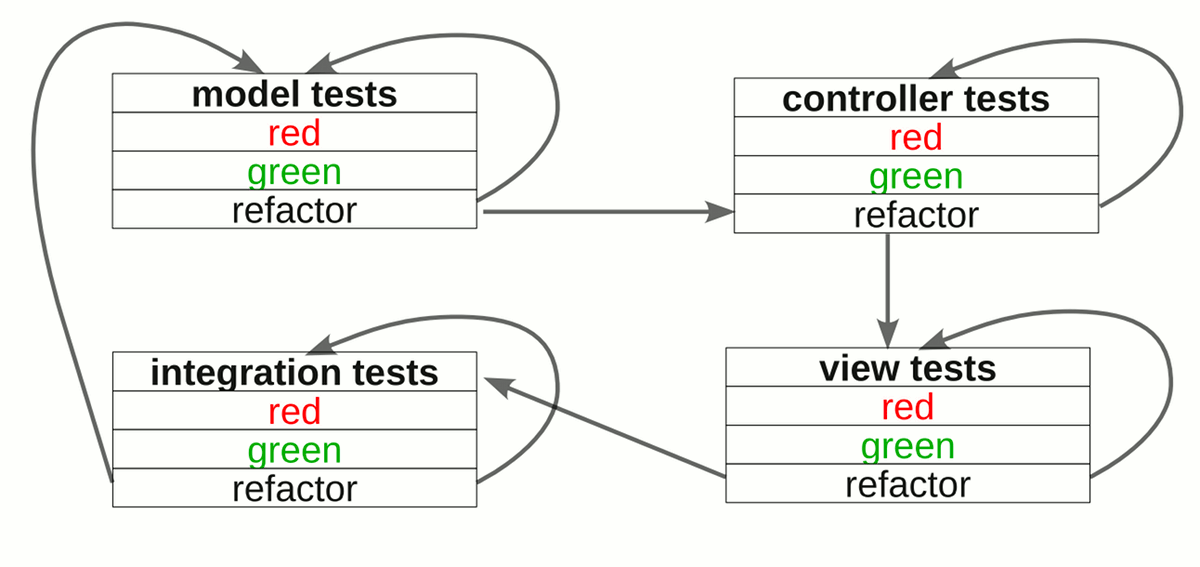
Test Driven Development is a bottom-up approach to development. Before we code a method, we write a test for it. From there we build up our program, writing tests along the way. The flow goes something like this:
Behavior Driven Development, on the other hand, is a top-down approach. We start by translating the user requirements as an integration test, then we go down to the view to translate the UI requirements to view specs, and so on. This way, we have the user requirements at the forefront of the specs instead of the program’s low-level implementation details.
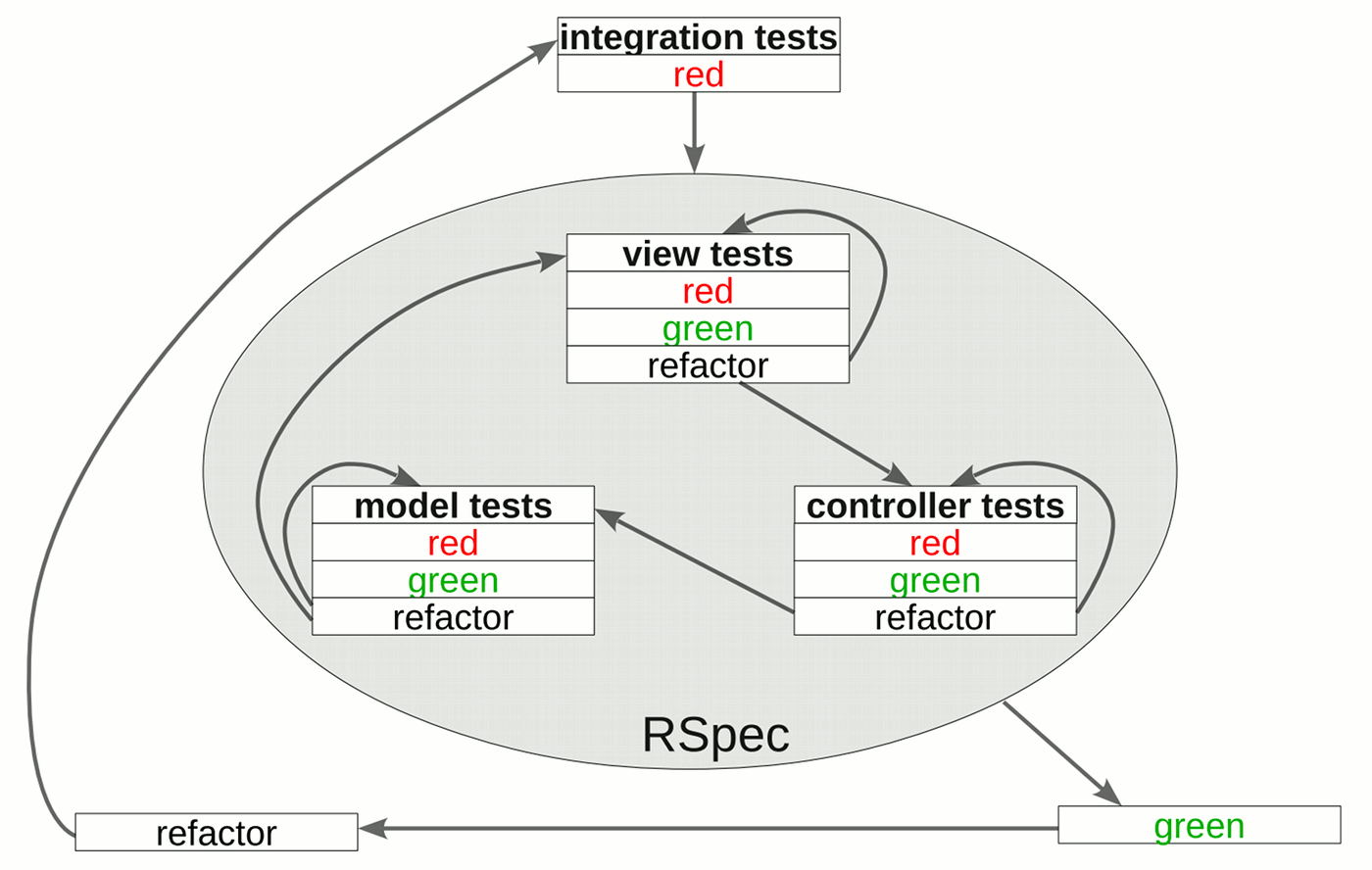
As for which is better, BDD is certainly more pragmatic than TDD. However, being the predecessor, TDD is more widely used than BDD.
Then there’s the question of whether to do as the purists do and test everything, or be even more pragmatic and just code what’s needed. People in the latter camp mostly use integration tests and only code the most complicated controller and model specs.
Regardless of what camp you fall in, TDD or BDD, full test coverage or just testing features, one thing is clear: any (proper) automated testing is better than no testing at all.