Associations
When you’re working with RDBMSs, you’re bound to encounter cases where you have to handle relationships between tables. One-to-many relationships are common, though you might see many-to-many and one-to-one relationships from time to time.
Does Rails support these relationships?
No and yes.
Rails does not support the various relationship implementations between database vendors. You will have to tweak your migrations to call specific DDL commands in order to set them up (this is outside the scope of this training course).
Rails, however, has its own database-agnostic way of handling entity relationships. In this chapter, we will discuss how to these various relationships are coded in Rails.
Migrations for Associations
If you would recall in our previous lesson, by default all tables in a Rails application use “id”, an auto-incrementing integer field, as their primary key. In the context of associations, Rails uses this convention to link tables in a system.
When generating the migration for a foreign key reference field, you can specify the field normally e.g.
$ rails generate migration Employee name:string department_id:integer
Or you can make the abstraction clearer by using the :references data type:
$ rails generate migration Employee name:string department:references
This migration will still generate the same field as the previous migration. Note the lack of _id in the :references argument.
Defining Associations in Models
Had you used rails generate scaffold or rails generate model instead of migration, you will notice that the model generated has a belongs_to call:
class Employee < ActiveRecord::Base
  belongs_to :department
end
Again, another human-readable declaration in Rails: it simply tells Active Record that each Employee record belongs to a Department record.
belongs_to
For every belongs_to call inside the model, Active Record generates some instance methods for the class. In the Employee-Department case, these methods are
-
employee.department– returns the Department object associated to the Employee. This is cached so if you want to reload the list, just passtrue to the method. Can also be used to assign a Department to the Employee e.g.employee.department = some_department -
employee.build_department(attribute_hash)– basically a shorthand foremployee.department = Department.new(attribute_hash). Also returns the newly created Department. -
employee.create_department(attribute_hash)– same asbuild_department, the only difference is the new object is saved (assuming it passes validations, of course).
Even with these methods, using the department_id for defining associations is still valid. The following will work:
department = Department.find_by_name("Accounting")
employee.department_id = department.id
but it’s still better to use an approach with a clearer abstraction:
employee.department = Department.find_by_name("Accounting")
not to mention coding the build_xxxx and create_xxxx methods manually will take at least 2 more lines of code than just calling those methods.
One-to-One Relationships
With the belong_to declaration in one model, we can define the nature of the association in the target table. Let’s start with the one-to-one association.
For this tutorial, we’re going to expand Aling Nena’s system by adding a Purchase entity whose records refer to a single purchase of items from a supplier. We’re going to have an Invoice record for each Purchase, and this one-to-one relationship will be the basis of this tutorial.
First, let’s setup the Purchase and Invoice entities with scaffold scripts:
$ rails generate scaffold purchase description:text delivered_at:date
$ rails generate scaffold invoice purchase:references reference_number:string
$ rake db:migrate
This should make working maintenance programs for each entity. When you look at the new and edit views of the Invoice program, however, you will see that it uses a text_field for the purchase. This is inappropriate: not only does it force the user to know the Purchase while editing the field, it also won’t work because the data types don’t match (text_field is String, while the purchase field requires a Purchase).
Drop Down List
A better approach would be to provide a drop-down field containing a list of available Purchases. The form helper for drop-down lists is collection_select
collection_select(object, field_name, collection, value_method, text_method, options = \
{},
                  html_options = {})
# or the form_for shortcut
f.collection_select(field_name, collection, value_method, text_method, options = {},
                    html_options = {})
The object, field_name, and options field are just the same as in our basic input field text_field, with the options separated from the html_options.
The collection is a list of items where the value and the text are derived from, while the value_method and text_method determines the names of the methods to call for the value and text. For example, we have the following list of Purchases:
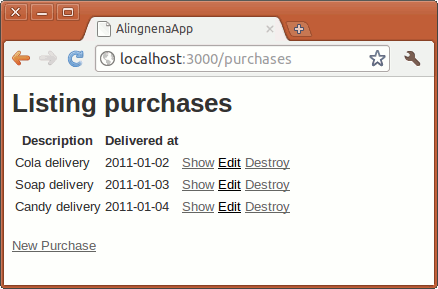
Replacing the purchase field in app/views/invoices/_form.html.erb to
...
    </div>
  <% end %>
  <div class="field">
    <%= f.label :purchase_id %><br>
    <%= f.text_field :purchase_id %>
    <%= f.label :purchase_id, "Purchase" %><br>
    <%= f.collection_select :purchase_id, Purchase.all, :id, :description %>
  </div>
  <div class="field">
    <%= f.label :reference_number %><br>
    <%= f.text_field :reference_number %>
  </div>
...
will result in the following HTML code:
...
  <div class="field">
    <label for="invoice_purchase_id">Purchase</label><br />
    <select id="invoice_purchase_id" name="invoice[purchase_id]">
      <option value="1">Cola delivery</option>
      <option value="2">Soap delivery</option>
      <option value="3">Candy delivery</option>
    </select>
  </div>
...
There are three available options in collection_select:
-
:include_blank– adds a blank entry at the top of the list. Can be the text of the entry (e.g. “none”) ortrue(which will just put a blank entry). -
:prompt– just likeinclude_blank, but has a different purpose: to prompt the user to select one item in the list. When set totrue, the text used is “Please select”. Setting this option will not add validation for checking if the user chose a value from the list. Setting this option along with:include_blankwill add 2 blank list entries in the list, one for each call with the prompt on top. -
:disabled– contains a list of items fromcollectionthat should be disabled from the list. In the case ofcollection_select, we can use a Proc to determine which should be disabled. For example, to disable all Purchases that would be delivered in the future, we can set:
<%= f.collection_select :purchase_id, Purchase.all, :id, :description, :prompt => true,
  :disabled => lambda { |purchase| purchase.delivered_at > Date.today } %>
Custom Helpers
After creating the Invoice for the “Cola delivery”, we see a problem in the Show Invoice page:
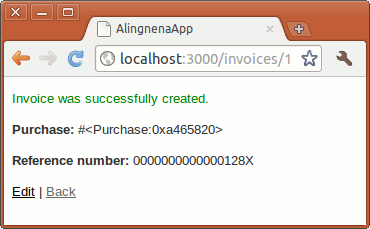
What is displayed is the internal representation of the Purchase object. Sure, we can remedy this by replacing the code with:
<p>
<strong>Purchase:</strong>
<%= @invoice.purchase %> <%= @invoice.purchase.description %></p>
But what if we had created an Invoice without a Purchase?
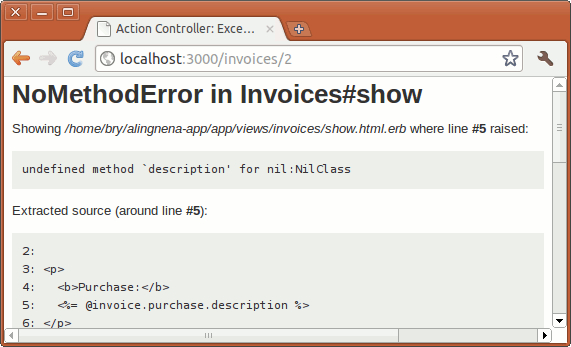
We get Ruby’s equivalent to a Null Pointer Exception.
There are some ways to remedy this problem. The most obvious would be to make the field mandatory through validations. But for entities that allow that foreign key field to be empty, we need to directly address the problem.
One way would be to add a special method inside the model. For example:
class Invoice < ActiveRecord::Base
  belongs_to :purchase

  def display_purchase
    return purchase.description unless purchase.nil?
    "(no Purchase set)"
  end
end
Then just call @invoice.display_purchase from the view. This approach is legal and is actually the preferred approach For educational purposes, however, let’s move the logic to the view instead:
<p>
<strong>Purchase:</strong>
<% unless @invoice.purchase.nil? %> <%= @invoice.purchase.description %> <% else %> (no Purchase set)
<% end %></p>
Our problem this time is that we’re adding 5 lines of processing code to our view for a simple task. If we do this a lot, our view would look cluttered and may bring back bad memories of old JSP, ASP, PHP code from older developers. We can take out this code from our views through the helper files.
The helper files are located at the app/helpers folder. These are modules where you can add methods that you would use in your views. One helper is created per controller if you generated them throughrails generate controller or scaffold. We can move our logic from the view into the helper by adding the following lines to app/helpers/invoices_helper.rb:
module InvoicesHelper
  def display_purchase(invoice)
    unless invoice.purchase.nil?
      invoice.purchase.description
    else
      "(no Purchase set)"
    end
  end
end
and just call the helper in our view:
<p>
<strong>Purchase:</strong>
<%= display_purchase(@invoice) %></p>
All helper methods from all helpers are available to all views. The file scheme used is just for developers to classify the helpers according to the program they are used.
Helpers are usually used for generating markups. For instance, we want to have the Purchase field to have a link to the original purchase, we can use:
module InvoicesHelper
  def display_purchase(invoice)
    unless invoice.purchase.nil?
      link_to invoice.purchase.description, invoice.purchase
    else
      "(no Purchase set)"
    end
  end
end
You can’t do this inside the model, and this gives helpers an advantage over the model approach.
has_one
We’ve already associated Invoice with Purchase but not the other way around. In order for us to be able to call methods like @purchase.invoice, we must first declare the association in the Purchase model. Given that we’re using a one-to-one relationship, the association declaration will be:
class Purchase < ActiveRecord::Base
  has_one :invoice
end
With the has_one method declared, we can now call the following methods in Purchase:
-
purchase.invoice,purchase.invoice= -
purchase.build_invoice,purchase.create_invoice
Yes, these are the same methods as the ones in the belong_to model.
You can provide options in the :has_one declaration. Here are a few:
-
:dependent– provides the behavior when this model is deleted i.e. cascading delete options. Setting it to:nullifysimply sets the foreign key reference in the other entity toNULL. Using:destroywill call the:destroyof the other entity, while using:deletewill simply delete the related record via SQL. -
:validate– when set totrue, validates the associated object upon save of this object. By default this isfalse.
Nested Routes and Singular Resources
One problem with our current Purchase-Invoice scheme is that you could assign one Purchase to two Invoices.
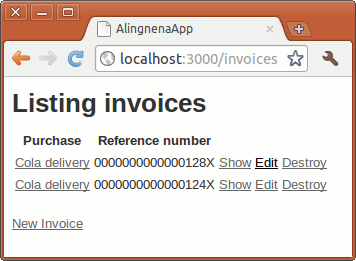
Calling @purchase.invoice on this will return only the first related Invoice.
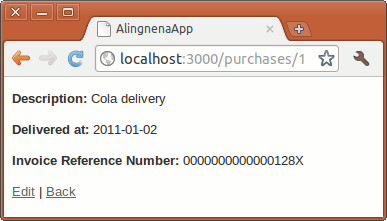
The root cause of this problem is that we’re creating Invoices outside the context of the Purchase. Wouldn’t it make more sense to be able to go to http://localhost:3000/purchases/1/invoice/new to create the invoice for the first Purchase that what we’re currently doing right now?
We can do this with the help of 2 new routing concepts: the singular resource and nested resources.
The singular resource just like our typicalresources call, but instead of dealing with multiple records, it deals with only one object. For example, adding the singular resource route:
resource :platform
assumes that we only have one Platform entity for the entire system (note we used resource instead of resources). The generated routes in this instance is:
| helper | HTTP verb | URL | controller | action | use |
|---|---|---|---|---|---|
platform_url, platform_path
|
GET | /platform |
Platforms |
show |
Display the platform |
new_platform_url, new_platform_path
|
GET | /platform/new |
Platforms |
new |
Return a form for creating the new platform |
| POST | /platform |
Platforms |
create |
Create the new platform | |
edit_platform_url, edit_platform_path
|
GET | /platform/edit |
Platforms |
edit |
Return a form for editing the platform |
| PUT | /platform |
Platforms |
update |
Update the platform | |
| DELETE | /platform |
Platforms |
destroy |
Delete the platform |
To use this in the Purchase-Invoice relationship, we’ll have to set the Invoice as a singleton child of each Purchase entity by nesting aresource call under the resources call:
AlingnenaApp::Application.routes.draw do
  resources :purchases do
    resource :invoice
  end

  resources :debts

  resources :products do
    collection do
      get 'search'
    end
  end
end
This will create the following additional routes:
| helper | HTTP verb | URL | controller | action |
purchase_invoice_url, purchase_invoice_path
|
GET | /purchases/:purchase_id/invoice |
Invoices |
show |
new_purchase_invoice_url, new_purchase_invoice_path
|
GET | /purchases/:purchase_id/invoice/new |
Invoices |
new |
| POST | /purchases/:purchase_id/invoice |
Invoices |
create |
|
edit_purchase_invoice_url, edit_purchase_invoice_path
|
GET | /purchases/:purchase_id/invoice/edit |
Invoices |
edit |
| PUT | /purchases/:purchase_id/invoice |
Invoices |
update |
|
| DELETE | /purchases/:purchase_id/invoice |
Invoices |
destroy |
We have to change the logic of our Invoice program to handle these changes. First, the controller:
class InvoicesController < ApplicationController
  before_action :set_invoice, only: [:edit, :update, :destroy]

  def show
    # we'll integrate the Invoice details in the Show Purchase screen
    redirect_to purchase_path(params[:purchase_id])
  end

  def new
    @purchase = Purchase.find(params[:purchase_id])
    @invoice = @purchase.build_invoice
  end

  def edit
  end

  def create
    @purchase = Purchase.find(params[:purchase_id])
    @invoice = @purchase.build_invoice(invoice_params)
    if @invoice.save
      redirect_to @purchase, notice: 'Invoice was successfully created.'
    else
      render action: "new"
    end
  end

  def update
    if @invoice.update_attributes(invoice_params)
      redirect_to @purchase, notice: 'Invoice was successfully updated.'
    else
      render action: "edit"
    end
  end

  def destroy
    @invoice.destroy
    redirect_to @purchase, notice: 'Invoice was successfully deleted.'
  end


  private
    # Use callbacks to share common setup or constraints between actions.
    def set_invoice
      @purchase = Purchase.find(params[:purchase_id])
      @invoice = @purchase.invoice
    end

    # Never trust parameters from the scary internet, only allow the white list through.
    def invoice_params
      params.require(:invoice).permit(:reference_number)
    end
end
In case you’ve forgotten how routes work, the :purchase_id parameter is derived from the URL.
Here’s the changes we’ll need for the views. Let’s modify Invoice’s views:
# app/views/invoices/new.html.erb
<h1>New Invoice</h1>
<%= render 'form', purchase: @purchase, invoice: @invoice %><%= link_to 'Back', invoices_path %># app/views/invoices/edit.html.erb
<h1>Editing Invoice</h1>
<%= render 'form', purchase: @purchase, invoice: @invoice %><%= link_to 'Show', @invoice %> |
<%= link_to 'Back', invoices_path %># app/views/invoices/_form.html.erb
<%= form_for invoice, url: purchase_invoice_path(purchase) do |f| %> <% if invoice.errors.any? %> <div id="error_explanation">
<h2><%= pluralize(invoice.errors.count, "error") %> prohibited this invoice
from being saved:</h2>
<ul>
<% invoice.errors.full_messages.each do |msg| %> <li><%= msg %></li>
<% end %> </ul>
</div>
<% end %> <p>
<label>Purchase</label><br>
<%= purchase.description %> </p>
<p>
<%= f.label :reference_number %><br>
<%= f.text_field :reference_number %> </p>
<p>
<%= f.submit %> </p>
<% end %><%= link_to 'Back', purchase %>Here’s Purchase’s app/views/purchases/show.html.erb:
<h1>Purchase Details</h1>
<p>
<strong>Description:</strong>
<%= @purchase.description %></p>
<p>
<strong>Delivered at:</strong>
<%= @purchase.delivered_at %></p>
<% display_invoice @purchase %><%= link_to 'Edit', edit_purchase_path(@purchase) %> |
<%= link_to 'Back', purchases_path %>We used a scriptlet instead of an expression so that we could use theconcat method (similar to PHP’s print or Servlets’ out.println) in our helper to add multiple elements in the view. Here’s the helper method:
# app/helpers/purchases_helper.rb
module PurchasesHelper
  def display_invoice(purchase)
    unless purchase.invoice.nil?
      concat(raw "<p><strong>Invoice Reference Number:</strong>\n")
      concat(link_to @purchase.invoice.reference_number,
               edit_purchase_invoice_path(@purchase))
      concat(raw "</p>")
      concat(raw "<p>")
      concat(link_to "Delete Invoice", purchase_invoice_path(@purchase),
              :confirm => "Are you sure?", :method => :delete)
      concat(raw "</p>")
    else
      concat(raw "<p>")
      concat(link_to "Create Invoice", new_purchase_invoice_path(@purchase))
      concat(raw "</p>")
    end
  end
end
Our new Purchase-Invoice program should work properly now:
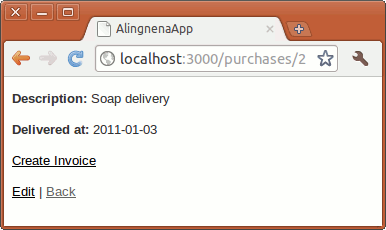
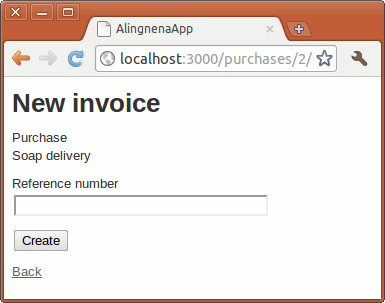
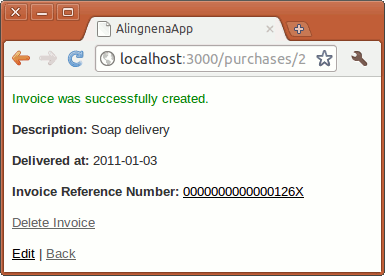
On second thought, using concat was an ugly approach. Change the display_invoice call to an expression (i.e. change <% display_invoice... at show.html.erb to <%= display_invoice...) and change the helper to the following:
module PurchasesHelper
  def display_invoice(purchase)
    unless purchase.invoice.nil?
      render 'invoice', purchase: @purchase
    else
      render 'no_invoice', purchase: @purchase
    end
  end
end
Then create the following partials:
# app/views/purchases/_no_invoice.html.erb
<p>
  <%= link_to "Create Invoice", new_purchase_invoice_path(@purchase) %>
</p>
# app/views/purchases/_invoice.html.erb
<p>
  <b>Invoice Reference Number:</b>
  <%= link_to @purchase.invoice.reference_number,
        edit_purchase_invoice_path(@purchase) %>
</p>
<p>
  <%= link_to "Delete Invoice", purchase_invoice_path(@purchase),
        data: { confirm: "Are you sure?" }, method: :delete %>
</p>
One-to-Many Relationships
Once you know how to create a one-to-one relationship, one-to-many associations should be simple. Let’s create a Supplier-Purchase one-to-many association, that is, Aling Nena could make multiple purchases from a single supplier.
Here’s the script for the basic setup:
$ rails generate scaffold supplier name:string contact_number:string
$ rails generate migration AddSupplierToPurchase supplier_id:integer
$ rake db:migrate
Note that we didn’t use :references in the migration because it doesn’t work with add_column.
Modify the models like so:
class Purchase < ActiveRecord::Base
  has_one :invoice
  belongs_to :supplier

  def display_supplier
    return supplier.name unless supplier.nil?
  end

end
class Supplier < ActiveRecord::Base
  has_many :purchases
end
The argument :purchases should be plural according to convention.
As for the purchase screen, collection_select is appropriate for the Supplier-Purchase association:
...
    <%= f.date_select :delivered_at %>
  </div>
  <div class="field">
    <%= f.label :supplier_id, "Supplier" %><br>
    <%= f.collection_select :supplier_id, Supplier.all, :id, :name, prompt: true %>
  </div>
  <div class="actions">
    <%= f.submit %>
  </div>
...
We also need to modify our Purchases controller to allow this new field:
  def purchase_params
    params.require(:purchase).permit(:description, :delivered_at, :supplier_id)
  end
If you want to modify the Show Purchase screen to show the Supplier, just use the display_supplier method from the model.
Before we can proceed with displaying the list of Purchases under the Supplier, we must first understand what the has_many declaration does to a model.
has_many
The following instance methods are added to Supplier after we added the has_many :purchases in the model class:
-
supplier.purchases– returns a list of Purchase objects associated with the Supplier. This is also cached so if you want to reload the list, just passtrue to the method. -
supplier.purchases <<new_purchase– adds a Purchase to the list of Purchases associated with the Supplier. -
supplier.delete(*purchase)– removes the association to the object or objects specified. When an association is removed, the action done to the object depends on the:dependentoption i.e. it will either nullify the field or delete the record. -
supplier.purchases =list_of_purchases– assigns a list of Purchase objects to the Supplier, removing associations as appropriate. -
supplier.purchase_ids,supplier.purchase_ids =list_of_purchase_ids– just like.purchases, but instead of dealing with a list of Purchase objects, this just uses a list ofidsof those objects. -
supplier.purchases.clear– removes all associations to Purchase objects. -
supplier.purchases.empty?– returns true if there are no associated Purchases -
supplier.purchases.size– returns the number of associated Purchases -
supplier.purchases.find(),supplier.purchases.exist?()– basically justActiveRecord.findandActiveRecord.exist?but only uses the Purchase records associated with the Supplier -
supplier.purchases.build(),supplier.purchases.create()- just like thebuild_xxxxandcreate_xxxxfromhas_one
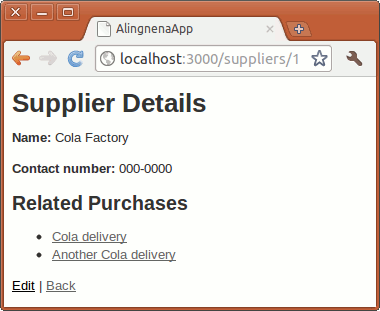
With this knowledge, we can now add the list of Purchases in the Show Supplier screen:
<h1>Supplier Details</h1>
<p>
<strong>Name:</strong>
<%= @supplier.name %></p>
<p>
<strong>Contact number:</strong>
<%= @supplier.contact_number %></p>
<h2>Related Purchases</h2>
<ul>
<% @supplier.purchases.each do |purchase| %> <li><%= link_to purchase.description, purchase %></li>
<% end %></ul>
...
The resulting page is:
Many-to-many Relationships
We can use Purchase and Product to demonstrate how many-to-many associations are done in Rails. A Purchase can consist of many Products, while a Product can be part of many Purchases. There are two ways declaring this many-to-many relationship in Rails, and both require a join table.
has_and_belongs_to_many
We can declare has_and_belongs_to_many in our models to specify that the models have a many-to-many relationship with each other. For this to work, there must first be an existing join table that satisfies the following conditions:
- It must be named according to the tables involved in the relationship, separated by underscore and arranged alphabetically. In the Product-Purchase case, the table should be
products_purchases. - It must only contain references to each table. It should not have any other fields e.g. primary key.
Let’s setup the product_purchase table with a migration:
$ rails generate migration CreateProductsPurchases
Edit the generated migration:
class CreateProductsPurchases < ActiveRecord::Migration
  def change
    create_table :products_purchases, id: false do |t|
      t.integer :product_id
      t.integer :purchase_id
    end
  end
end
The id: false option removes the default primary key field from the table.
Then add the has_and_belongs_to_many declaration in the model:
# app/models/product.rb
class Product < ActiveRecord::Base
  validates :name, presence: true
  validates :description, presence: true
  has_and_belongs_to_many :purchases
...

# app/models/purchase.rb
class Purchase < ActiveRecord::Base
  has_one :invoice
  belongs_to :supplier
  has_and_belongs_to_many :products
...
At this point, you can already perform has_many methods on both sides. For example:
some_product.purchases << new_purchase

some_product.purchases   # this will return a list containing new_purchase
new_purchase.products    # this will return a list containing some_product
The has_and_belongs_to_many declaration is suited for simple many-to-many relationships. One possible scenario is a Book-liking module where Users can “like” Books. In turn, a Book can have many Users that “like” it.
For more complex relationships that would have other details, we would need another approach. For example, the relationship between Purchase and Product may also require us to specify the quantity of the Product in that Purchase. We can’t store that in our join table because of the limitations of that table.
The has_many :through declaration provides the other approach to many-to-many relationships.
More on One-to-Many
The has_many :through declaration works because it uses two one-to-many associations linked together by one join table:
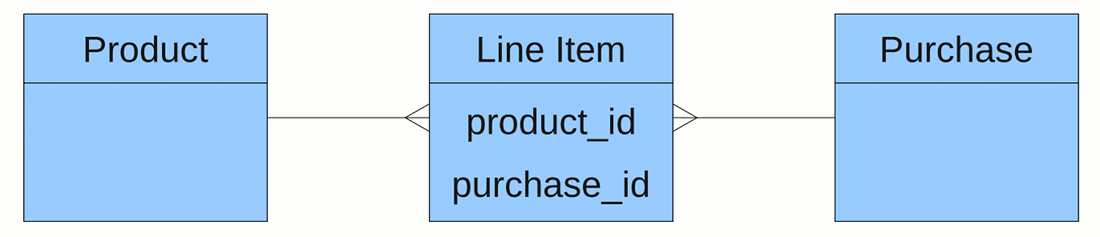
Once declared, this association works just like has_and_belongs_to_many wherein you could call methods like some_product.purchases. It’s not that complicated, so let’s take this time to explore one-to-many again instead.
Our join table for Product-Purchase would be Line Items, child records of Purchase that would represent lines in the Invoice. This is where Aling Nena would input the quantity, cost, and (most importantly) the Product involved.
Setting up the Line Items program should be easy with rails generate scaffold:
$ rails generate scaffold line_item purchase:references product:references \
quantity:integer cost:decimal
Taking a cue from Invoice, we’ll make Line Item a child resource for Purchase to make maintenance easier.
Nested Resources
We’ve previously discussed what routes are generated when a singular resource is assigned as a child to a resource route. Now we’ll assign a normal resource under a resource route:
AlingnenaApp::Application.routes.draw do
  resources :suppliers

  resources :purchases do
    resource :invoice
    resources :line_items
  end

  resources :debts
  resources :products do
    collection do
      get 'search'
    end
  end
end
This generates the following routes:
| helper | HTTP verb | URL | controller | action |
|---|---|---|---|---|
purchase_line_item_url purchase_line_item_path
|
GET | /purchases/:purchase_id/line_items |
LineItems |
index |
new_purchase_line_item_url new_purchase_line_item_path
|
GET | /purchases/:purchase_id/line_items/new |
LineItems |
new |
| POST | /purchases/:purchase_id/line_items |
LineItems |
create |
|
| GET | /purchases/:purchase_id/line_items/:id |
LineItems |
show |
|
edit_purchase_line_item_url edit_purchase_line_item_path
|
GET | /purchases/:purchase_id/line_items/:id/edit |
LineItems |
edit |
| PUT / PATCH | /purchases/:purchase_id/line_items/:id |
LineItems |
update |
|
| DELETE | /purchases/:purchase_id/line_items/:id |
LineItems |
destroy |
With routes set, we proceed with some model changes:
class Purchase < ActiveRecord::Base
  has_one :invoice
  belongs_to :supplier
  has_many :line_items
...
class Product < ActiveRecord::Base
  validates :description, presence: true
  has_many :line_items
...
After the model comes the controller rewrite of app/controller/line_items_controller.rb:
class LineItemsController < ApplicationController
  before_action :set_line_item, only: [:edit, :update, :destroy]

  def index
    # integrate with show purchase
    redirect_to Purchase.find(params[:purchase_id])
  end

  def show
    # integrate with show purchase
    redirect_to Purchase.find(params[:purchase_id])
  end

  def new
    @purchase = Purchase.find(params[:purchase_id])
    @line_item = @purchase.line_items.build
  end

  def edit
  end

  def create
    @purchase = Purchase.find(params[:purchase_id])
    @line_item = @purchase.line_items.build(line_item_params)
    if @line_item.save
      redirect_to @purchase, notice: 'Line Item was successfully created.'
    else
      render action: "new"
    end
  end

  def update
    if @line_item.update_attributes(line_item_params)
      redirect_to @purchase, notice: 'Line Item was successfully updated.'
    else
      render action: "edit"
    end
  end

  def destroy
    @line_item.destroy
    redirect_to @purchase, notice: 'Line Item was successfully deleted.'
  end

  private
    # Use callbacks to share common setup or constraints between actions.
    def set_line_item
      @purchase = Purchase.find(params[:purchase_id])
      @line_item = @purchase.line_items.find(params[:id])
    end

    # Never trust parameters from the scary internet, only allow the white list through.
    def line_item_params
      params.require(:line_item).permit(:product_id, :quantity, :cost)
    end
end
And the views (null handling not implemented):
# app/views/purchases/show.html.erb
...
<%= display_invoice @purchase %><h2>Line Items</h2>
<table>
<thead>
<tr>
<th>Product</th>
<th>Quantity</th>
<th>Cost</th>
</tr>
</thead>
<tbody>
<% @purchase.line_items.each do |item| %> <tr>
<td><%= item.product.name %></td>
<td><%= item.quantity %></td>
<td><%= number_to_currency item.cost, unit: "PhP" %></td>
<td><%= link_to "Edit", edit_purchase_line_item_path(@purchase, item) %></td>
<td>
<%= link_to "Destroy", purchase_line_item_path(@purchase, item),
data: { confirm: "Are you sure?" }, method: :delete %> </td>
</tr>
<% end %> </tbody>
</table>
<p><%= link_to "New Line Item", new_purchase_line_item_path(@purchase) %></p>
<%= link_to 'Edit', edit_purchase_path(@purchase) %> |
...
# app/views/line_items/new.html.erb
<h1>New Line Item</h1>

<%= render 'form', purchase: @purchase, line_item: @line_item %>
# app/views/line_items/edit.html.erb
<h1>Editing Line Item</h1>

<%= render 'form', purchase: @purchase, line_item: @line_item %>
# app/views/line_items/_form.html.erb
<%= form_for([purchase, line_item]) do |f| %> <% if line_item.errors.any? %> <div id="error_explanation">
<h2><%= pluralize(line_item.errors.count, "error") %> prohibited this Line Item
from being saved:</h2>
<ul>
<% line_item.errors.full_messages.each do |msg| %> <li><%= msg %></li>
<% end %> </ul>
</div>
<% end %> <div class="field">
<label>Purchase</label><br>
<%= purchase.description %> </div>
<div class="field">
<%= f.label :product_id, "Product" %><br>
<%= f.collection_select :product_id, Product.all, :id, :name, prompt: true %> </div>
<div class="field">
<%= f.label :quantity %><br>
<%= f.text_field :quantity %> </div>
<div class="field">
<%= f.label :cost %><br>
<%= f.text_field :cost %> </div>
<div class="actions">
<%= f.submit %> </div>
<% end %><%= link_to 'Back', purchase %>Here’s the program in action:
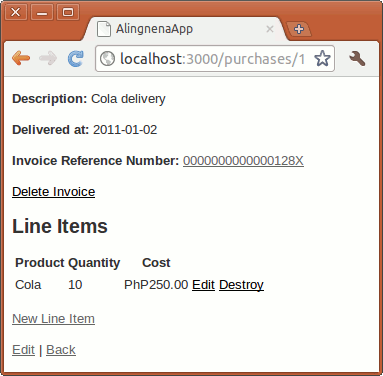
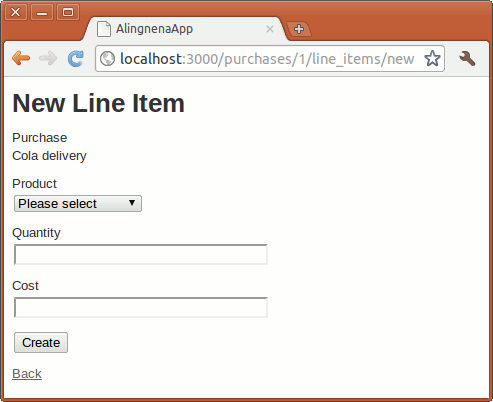
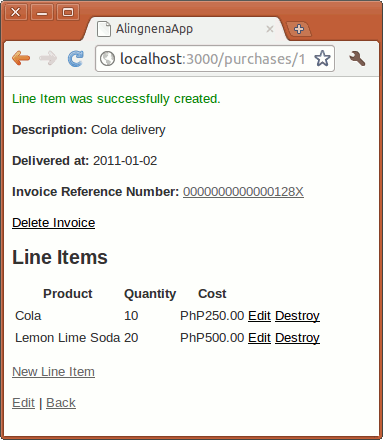
Nothing really new here. Sharp eyed readers might notice the strange usage of form_for in Invoice and Line Items. In Invoice, the form_for is written as:
<% form_for(invoice, :url => purchase_invoice_path(purchase)) do |f| %>The :url option overrides the expected URL helper, invoice_path(purchase), with purchase_invoice_path(purchase). Since this is a singleton resource, both create and update URLs are the same so the partial works for both cases.
In Line Items, the form_for is written as:
<% form_for([purchase, line_item]) do |f| %>Instead of a single object, we pass an array of objects. Based on this array of objects, Rails knows what URL to use according to the convention. If the line_item object was new, the path it will use will be purchase_line_items_path(purchase). If it’s already existing, the path will be purchase_line_item_path(purchase, line_item).
has_many :through
Now that we could create Line Items, it’s time to show how we can use the many-to-many relationship in the Products side. For this, we need to add the has_many :through declaration:
  validates :description, presence: true
  has_many :line_items
  has_many :purchases, through: :line_items
...
The :through specifies the join table used for the relationship. This join table must also be declared as the target table in a has_many declaration.
We can now access the list of Purchases involving the Product throughproduct.purchases. Here’s one way of doing it at app/views/products/show.html.erb:
...
<p>
<strong>Stock:</strong>
<%= @product.stock %></p>
<h2>Related Purchases</h2>
<ul>
<% @product.purchases.each do |purchase| %> <li><%= link_to purchase.description, purchase %></li>
<% end %></ul>
<%= link_to 'Edit this record', edit_product_path(@product) %> <br />
...
And the result:
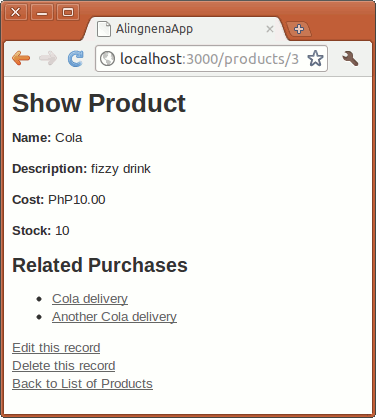
Just to show that the many-to-many goes both ways, let’s do the same for Purchase (even though it will look redundant):
class Purchase < ActiveRecord::Base
  has_one :invoice
  belongs_to :supplier
  has_many :line_items
  has_many :products, through: :line_items

  def display_supplier
    return supplier.name unless supplier.nil?
  end
end
# app/views/purchases/show.html.erb
...
<p><%= link_to "New Line Item", new_purchase_line_item_path(@purchase) %></p>
<h2>Related Products</h2>
<ul>
<% @purchase.products.each do |product| %> <li><%= link_to product.name, product %></li>
<% end %></ul>
<%= link_to 'Edit', edit_purchase_path(@purchase) %> |
...
Here’s the updated page:
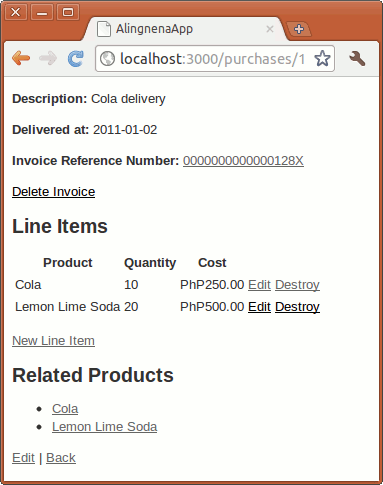
The whole thing looks ok, but what if you add another “Cola” Line Item to “Cola delivery”?
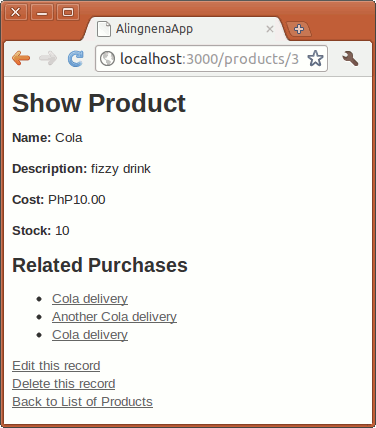
Cola delivery is listed twice since there are two references to Cola in Line Items. To eliminate the redundant results, we can add the uniq scope:
class Purchase < ActiveRecord::Base
  has_one :invoice
  belongs_to :supplier
  has_many :line_items
  has_many :products, through: :line_items
  has_many :products, -> { uniq }, through: :line_items
  def display_supplier
    return supplier.name unless supplier.nil?
  end
end
class Product < ActiveRecord::Base
  validates :name, presence: true
  validates :description, presence: true
  has_many :line_items
  has_many :purchases, through: :line_items
  has_many :purchases, -> { uniq }, through: :line_items
  def before_validation
    if description.blank?
      self.description = name
    end
  end
end
Trying the two pages produces:
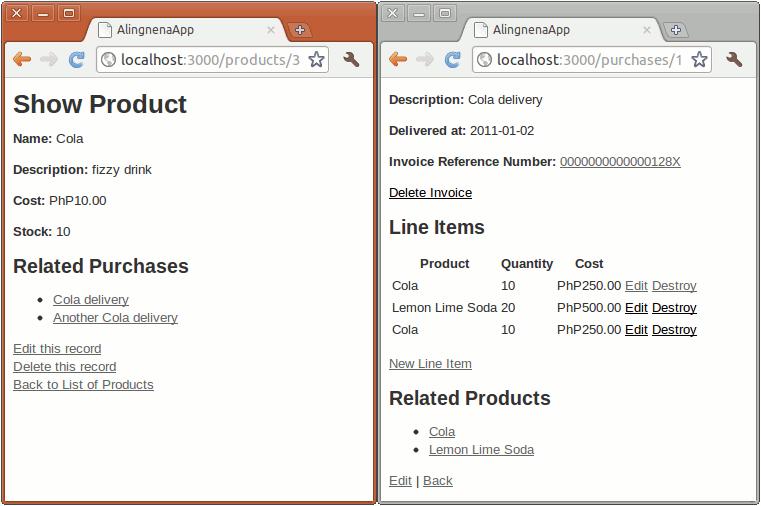
Another problem is the amount of queries are performed in our Purchase page:
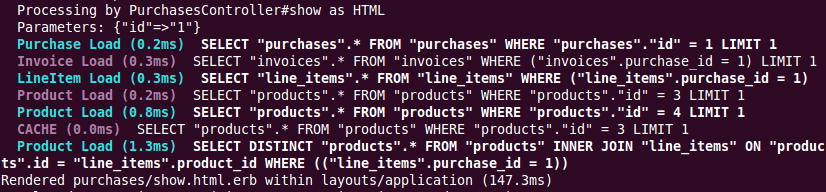
A query is made for every Product record that needs to be displayed in the page. To reduce this to fewer queries, we can chain the includes() method after the find method for show:
def set_purchase
  @purchase = Purchase.includes(line_items: :product).find(params[:id])
...
This will tell Rails to “eager-load” the line items association (and its child association, product) as opposed to the default “lazy-load” approach where the records are retrieved only when needed (e.g. a product.name call).

The action is now reduced to 5 queries from its original 7.
The includes() call isn’t limited to a single relationship hierarchy. You can pass arrays and hashes in the includes() call to eager-load any relationship you want. For example, the following is not practical, but will not throw an error:
@purchase = Purchase.includes([:invoice, {line_items: [:product, :purchase]},
                               :supplier])
                    .find(params[:id])
As you might have guessed, arrays denotes the “sibling” relationship under a current model (e.g. :invoice, :line_item, and :supplier are all under the Purchase model) while a hash would denote moving to a different model (e.g. :product and :purchase are under the LineItem model).