Chapter 9 - Curriculum Connections
“You cannot think about thinking, without thinking about thinking about something.”
–Seymour Papert
A Model for Maker Education
The projects you have seen in previous chapters could be thought as “one-offs”. Although you may find ways to incorporate them into a project-based learning (PBL) unit, the intention was to show some quick, engaging projects you and your students can use to get started straight away.
In the introduction I briefly discussed constructionism, its relationship to the maker movement, and how the Raspberry Pi fits in accordingly. In this chapter, I would like to highlight how this model of learning can be applied in your classroom using the Raspberry Pi computer. Building, thinking, and creating projects with the Raspberry Pi is constructionism in action. To provide more context, let’s briefly look at constructionism in a little more detail.
Constructionism
Constructionism is a theory of learning developed by Seymour Papert. Constructionism states we “learn by doing”, actively creating knowledge from first hand experiences through the use of play, experimentation, and exploration.22 Optimal learning takes place not when the instructor is dictating the knowledge to the learner, i.e. lecture, rather when the learner actively develops content knowledge as she completes a project or active task. Constructionism also emphasizes student choice and self-determination. As educators we know this is how most students learn best. We know students want to feel engaged and invested in their learning. If they feel they are simply doing the work for someone else, namely their teacher, they tend to either just do it because they have to in order to get the grade they ultimately desire, or they simply choose not to do it at all. Papert believed learning takes place best in context, is relevant to the learner, and is optimally obtained when working within a community of other learners engaged in the same mental and physical activities. Papert believed technology can be used to facilitate this type of learning in the classroom.23 When students are building a project with the Raspberry Pi they are actively creating and thinking about how to solve a problem, answer a question, or fill a need. In short, they are engaged in constructionist learning.
From Theory to Practice
When this context in mind, let’s explore some examples of where the Raspberry Pi can connect to curriculum. The Raspberry Pi was designed as a cross-curricular instructional tool. The Raspberry Pi really shines when students find ways to incorporate it into interdisciplinary projects. There is tremendous value in having students use physical tools, like the Raspberry Pi, to discover the interdependence of knowledge from various disciplines. Students begin to see the world as something they can change and manipulate. Encourage your students to adopt a DIT (“Do-It-Together”) work ethic when working with the Raspberry Pi - where one student becomes the designer, one the engineer, one the programmer, one the project lead, and one the evaluator. The Raspberry Pi provides a platform for this type of exploration, from science and engineering to the humanities and creative expression. I think you will find connections between what you teach and this tool once you put it in the hands of your students and let them build, think, and create. Most importantly, do not be afraid to experiment with the Raspberry Pi and ask your students how they see small-scale computers, like the Raspberry Pi, playing a role in their future lives. From smart phones and smart cars to nanotechnology and the “quantified-self”, small-scale, embedded computing will most likely play a significant role in many of their future careers - see Internet of Things (IoT) projects in the next chapter for more on this.
Instructional Design Philosophy
When designing learning experiences for my students I try to keep these three broad instructional design philosophies in mind:
- Provide students with tools and technologies to empower them to build and discover a digital space of their own
- Provide students with curricular opportunities to use technology in meaningful and impactful ways
- Push students to understand how technology works and how it (and more importantly will) impact their lives
That said, the projects listed below may not fulfill all these requirements with your students. These are simply examples of projects that I - or other educators - have found to be impactful with students. Your experiences my vary. I encourage you to contribute to the Raspberry Pi Foundation Education Forum with your own projects.
Classroom Projects
Infrared Bird Box - Students build a bird box, setup a camera, and observe the nesting/breeding habits of local bird population.
Students will learn:
- How to set up up a Raspberry Pi with an infrared camera module
- How to connect an infrared LED to a Raspberry Pi
- How to control the camera and LED to see what is happening inside the bird box
- Nesting habits of local bird population
- Light spectrum
- Basic electronics
- Computational thinking
- Technical and/or narrative writing through student-generated written (or video) tutorials
Raspberry Pi Weather Station - Students build a weather station, collect data using various simple sensors, and analyze the data through the use of a spreadsheet application.
Students will learn:
- How to connect and use sensors with the Raspberry Pi
- Data collection
- Data analysis
- Spreadsheet skills
- Basic electronics
- Computational thinking
- Technical and/or narrative writing through student-generated written (or video) tutorials
Astro Pi Flight Analysis - Students explore data collected from two Raspberry Pis located on the International Space Station.
Students will learn:
- Data analysis
- Data anomaly detection
- Computational thinking (abstraction, pattern recognition)
- Spreadsheet skills
- Technical and/or narrative writing through student-generated written (or video) tutorials
Sensing Science - Students will investigate various concepts from Physics, Chemistry and Biology, using a Raspberry Pi and a Sense HAT.
Students will learn:
- How to collect reaction times to calculate rates of reactions
- How concentration and temperature affect the rate of chemical reaction
- That heat can be transferred by hot objects emitting IR radiation
- That the transfer of heat can be stopped by an insulator
- What the products of aerobic respiration are
- That the stopping distance of a car is affected by both the thinking distance and braking distance
- Technical and/or narrative writing through student-generated written (or video) tutorials
- … and much more!
Code with a Free Sense HAT in Your Browser - As mentioned previously, the Sense HAT is a must-have for the classroom. When paired with the Raspberry Pi and an easy-to-use Python library, the Sense HAT is a great way for students to learn about data collection, data analysis, and computer programming. If you want to try the Sense HAT before you have purchased one, you can practice using this online simulation thanks to the great folks at the Raspberry Pi Foundation and Trinket. A variety of engaging projects are provided including “Rock, Paper, Pi” and “Flappy Pi”.
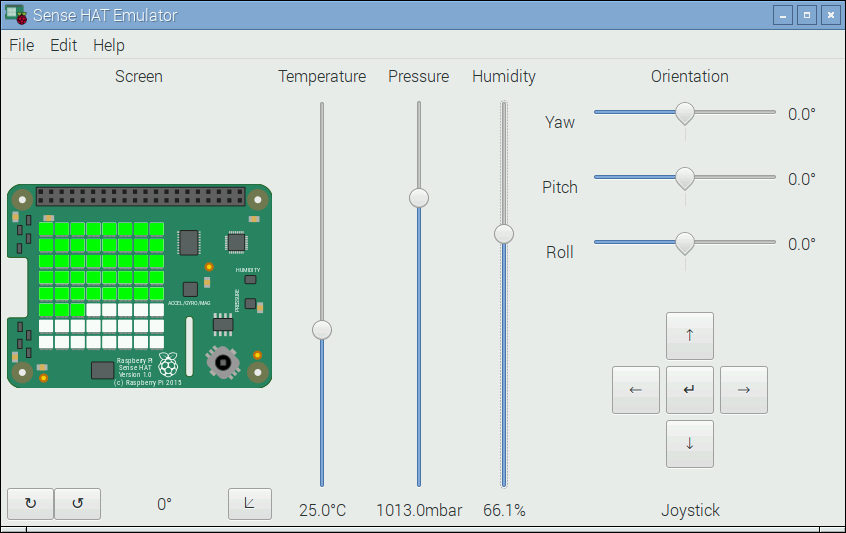
Even better, you can use a virtual Sense Hat on your actual Raspberry Pi. This Sense HAT emulator is designed to run natively on your Raspberry Pi desktop, instead of inside a browser. Developed by Dave Jones, it’s intended for people who own a Raspberry Pi but not a Sense HAT. In the picture below, the sliders are used to change the values reported by the sensors while your code is running. Learn more - http://www.raspberrypi.org/blog/desktop-sense-hat-emulator/
Students will learn:
- Computational thinking
- Computer programming
- Solving multi-step problems
- Technical and/or narrative writing through student-generated written (or video) tutorials
Mathematica - Mathematica is a computer program for doing mathematics, technical computing, science and engineering. It is often used for instruction, homework, research, and academic writing. Mathematica is extraordinary well-rounded. It is usually very expensive to purchase and hard to install on many computers. The Raspberry Pi comes with a a free version of Mathematica pre-installed! With Mathematica on the Raspberry Pi, students can upload and analyze sensor data for a classroom project or use Mathematica like you would on a laptop. Students studying algebra, calculus, statistics, or applied mathematics will find great value in Mathematica. If is widely used in many institutions of higher learning. Students that learn Mathematica on the Raspberry Pi will be well prepared for more advanced mathematics courses and/or more attractive to college admission departments.
Students will learn:
- Computational thinking
- Intermediate/advanced mathematics
- Statistical modeling and analysis
- Problem-solving and problem modeling
RACHEL-Pi - The RACHEL Project is an amazingly cool project to provide free copies of educational websites for download without the use of the internet. This is a great project to provide rich, curated educational content free of charge to areas of the world where internet access is not possible or unstable.
RACHEL servers include copies of educational websites as they existed in the recent past. By storing copies of websites directly on RACHEL devices, no internet is required and there are no monthly subscription costs.
When a RACHEL server is turned on, a RACHEL server emits a wireless signal that only provides access to the copies of websites stored directly on the RACHEL device. Any device with a web browser (a laptop, desktop, tablet, or smartphone) can connect to RACHEL’s wireless signal.
Students will setup a Raspberry Pi with a SD-card preloaded with the educational content. They learn how to implement a local area network (LAN) using a cheap, off-the-shelf router to broadcast the content. Users then use a computer, tablet, or smartphone to access the free educational content via a web-browser, without any internet access needed.
Students will learn:
- Computer system administration
- Computer networking
- Global cultural studies
- Civics and Economics
- Technical and/or narrative writing through student-generated written (or video) tutorials
Non-traditional uses
Integrating technology into the English/Language-arts classroom is a topic so vast it deserves a separate book. One way to use the Raspberry Pi to encourage writing is through the use of student-generated tutorials and/or instruction manuals. I will often have my students bring a technical guide as part of their culminating activity for a project. The English Language Arts Common Core State Standards place special emphasis on technical or non-fiction reading and writing across all grade levels. Often activities designed around these standards are simply not engaging for students. The Raspberry Pi computer can be a tool you use to get your students excited about writing again!
I am particularly interested in how the Raspberry Pi can be used as part of digital storytelling or non-linear storytelling. One educator who is engaged in interesting work with literature and the Raspberry Pi is Sarah Roman.
Some sample projects in Sarah’s high school language arts classroom:
Creating book-based video games using the Raspberry Pi and Scratch
Zork Meets King Lear: A Classic 80s Shakespearean Text Adventure
Learn more about Sarah’s work on Twitter @A_BildungSROMAN or www.abildungsroman.com