Using OpenAI GPT
I frequently use the OpenAI APIs in my work. In this chapter we use the GPT-5 API since it works well for our examples.
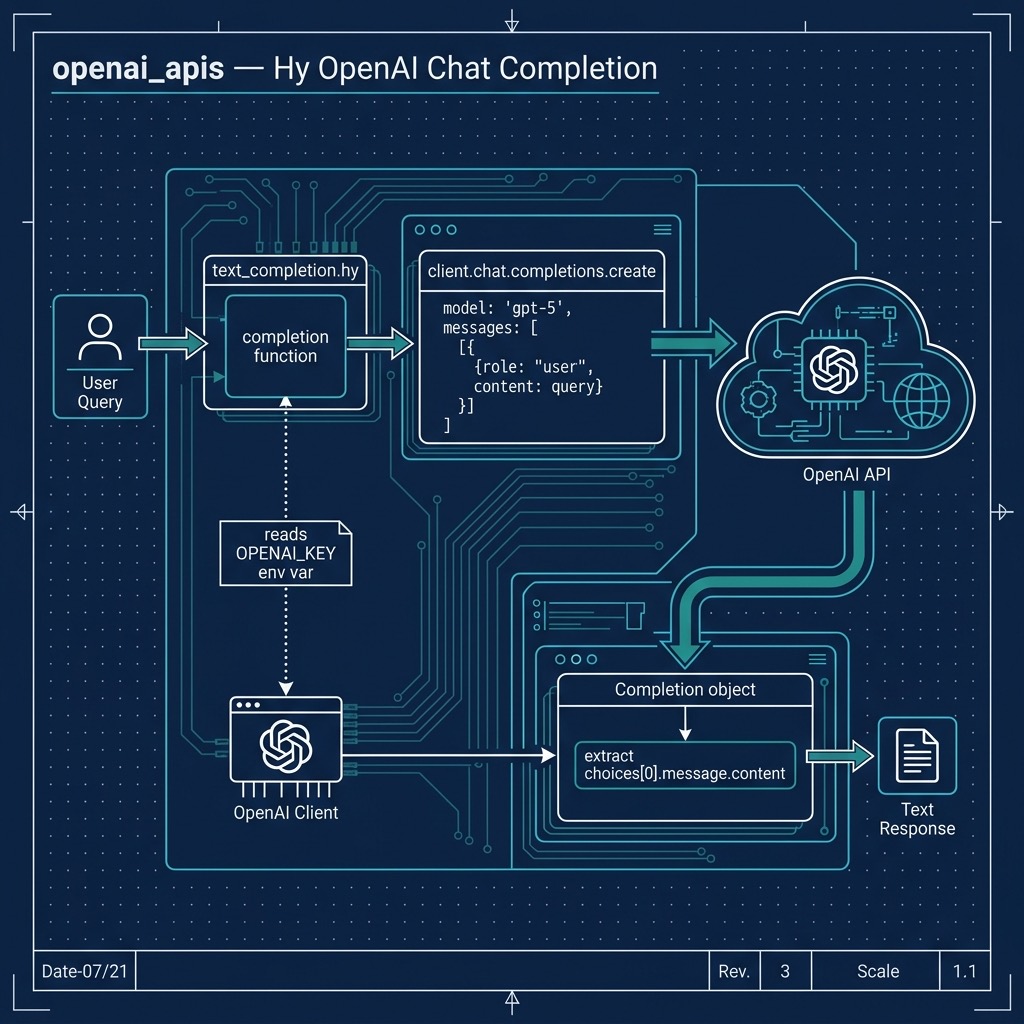
OpenAI Text Completion API
OpenAI GPT (Generative Pre-trained Transformer) models like gpt-5 and the smaller and less expensive gpt-5-mini and gpt-5-nano are advanced language processing models developed by OpenAI. OpenAI’s APIs also cover image generation, speech, embeddings, and more, but in this chapter we only use text generation.
GPT-5 is capable of generating human-like text, completing tasks such as language translation, summarization, and question answering, and much more.
Overall, the OpenAI APIs provide a powerful and easy-to-use tool for developers to integrate advanced language processing capabilities into their applications, and can be a game changer for developers looking to add natural language processing capabilities to their projects.
The following examples are derived from the official set of cookbook examples at https://github.com/openai/openai-cookbook. The example uses the OpenAI Python library to call the Chat Completions API with a question, and prints the model’s answer.
You will need an API key from https://platform.openai.com, set in the environment variable OPENAI_API_KEY; the openai.OpenAI client reads it automatically. Here is a listing of the source file openai_apis/text_completion.hy:
 1 (import os)
 2 (import openai)
 3
 4 ;; openai.OpenAI reads your API key from the OPENAI_API_KEY environment variable.
 5 (setv client (openai.OpenAI))
 6
 7 ;; Set OPENAI_MODEL to try a different model without editing the code.
 8 (setv model (os.environ.get "OPENAI_MODEL" "gpt-5"))
 9
10 (defn completion [query]
11   "Send QUERY to the chat completions API and return the first choice."
12   (setv response (client.chat.completions.create
13                    :model model
14                    :messages [{"role" "user" "content" query}]))
15   (get response.choices 0))
16
17 (when (= __name__ "__main__")
18   (setv choice (completion "how to fix leaky faucet?"))
19   (print choice.message.content))
The model name is read from the environment variable OPENAI_MODEL, defaulting to gpt-5. For inexpensive experiments try OPENAI_MODEL=gpt-5-nano uv run hy text_completion.hy. The response object has a list of choices; we return the first one, and its message.content is the generated text. The tests in test_text_completion.hy replace the client with a fake so they run without an API key.
Every time you run this example you get different output. Here is one example run (output truncated for brevity):
 1 Fixing a leaky faucet can be a straightforward process, and you can often do it yourself with some basic tools. Here’s a step-by-step guide:
 2
 3 ### Tools and Materials Needed:
 4 - Adjustable wrench
 5 - Screwdriver (flathead or Phillips, depending on your faucet)
 6 - Replacement parts (O-rings, washers, or cartridge, depending on your faucet type)
 7 - Plumber's grease
 8 - Towel or rag
 9
10 ### Steps to Fix a Leaky Faucet:
11
12 1. **Turn Off the Water Supply**:
13    - Look for shut-off valves under the sink and turn them clockwise to close. If there are no shut-off valves, you may need to turn off the main water supply to your home.
14
15 2. **Drain the Faucet**:
16    - Open the faucet to let any remaining water drain out.
17
18 etc.
Optional Practice Problems
- System Persona: Modify text_completion.hy to accept a system prompt instructing the model to adopt a specific persona (for example, a Lisp developer explaining Python code). You will need to add a message dictionary with the
"role" "system"at the beginning of the:messageslist in thecompletionfunction. - Configurable Parameters: Update the
completionfunction signature to support optional keyword arguments likemax-completion-tokensandreasoning-effort(for example"low"), and pass them to the underlying call toclient.chat.completions.create. (GPT-5 models are reasoning models: they reject the oldermax_tokensparameter and only support the defaulttemperature.) - Interactive Chat Loop: Implement an interactive loop in text_completion.hy using
whileandinputso that the user can ask questions iteratively from the terminal until they type “exit” or “quit”.