Using LangChain to Chain Together Large Language Models
Harrison Chase started the LangChain project in October 2022. The GitHub repository for LangChain https://github.com/langchain-ai/langchain now has thousands of contributors.
Note: this chapter and its examples were last updated in November 2026 for LangChain 1.x.
The material in this chapter is a very small subset of material in my recent Python book LangChain and LlamaIndex Projects Lab Book: Hooking Large Language Models Up to the Real World. Using GPT-5, ChatGPT, and Hugging Face Models in Applications. that you can read for free online by using the link Free To Read Online.
LangChain is a framework for building applications with large language models (LLMs) through chaining different components together. Some of the applications of LangChain are chatbots, generative question-answering, summarization, data-augmented generation and more. LangChain can save time in building chatbots and other systems by providing a standard interface for chains, agents and memory, as well as integrations with other tools and end-to-end examples. We refer to “chains” as sequences of calls (to an LLMs and a different program utilities, cloud services, etc.) that go beyond just one LLM API call. LangChain provides a standard interface for chains, many integrations with other tools, and end-to-end chains for common applications. Often you will find existing chains already written that meet the requirements for your applications.
For example, one can create a chain that takes user input, formats it using a PromptTemplate, and then passes the formatted response to a Large Language Model (LLM) for processing.
While LLMs are very general in nature which means that while they can perform many tasks effectively, they often can not directly provide specific answers to questions or tasks that require deep domain knowledge or expertise. LangChain provides a standard interface for agents, a library of agents to choose from, and examples of end-to-end agents.
LangChain Memory is the concept of persisting state between calls of a chain or agent. LangChain provides a standard interface for memory, a collection of memory implementations, and examples of chains/agents that use memory². LangChain provides a large collection of common utils to use in your application. Chains go beyond just a single LLM call, and are sequences of calls (whether to an LLM or a different utility). LangChain provides a standard interface for chains, lots of integrations with other tools, and end-to-end chains for common applications.
LangChain can be integrated with one or more model providers, data stores, APIs, etc.
Installing Necessary Packages
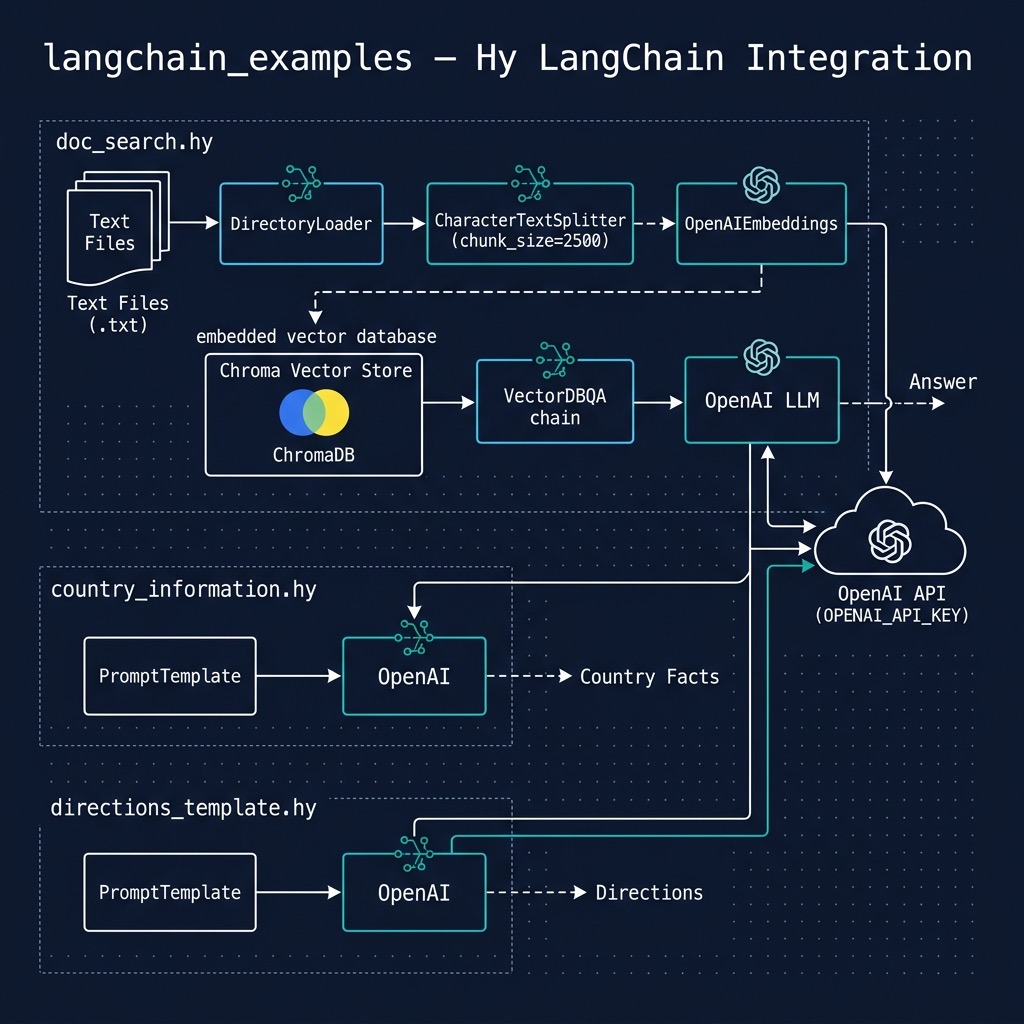
We are using uv as a package manager and to run the examples. The pyproject.toml file only needs a few small packages: langchain-core (prompts, chains, documents, and an in-memory vector store), langchain-openai (OpenAI chat models and embeddings), and langchain-text-splitters. Run the examples using:
1 $ cd hy-lisp-python-book/source_code_for_examples/langchain_examples
2 $ uv sync
3 $ uv run hy country_information.hy
4 $ uv run hy directions_template.hy
5 $ uv run hy doc_search.hy
LangChain changed a lot between its early versions and version 1.0. If you find older LangChain examples that import from langchain.chains or langchain.llms, or that call classes like VectorDBQA, they were written for APIs that have since been removed. The examples here use the current APIs.
Basic Usage and Examples
While I try to make the material in this book independent, something you can enjoy with no external references, you should also take advantage of the high quality LangChain documentation and the individual detailed guides for prompts, chat, document loading, indexes, etc.
As we work through some examples please keep in mind what it is like to use the ChatGPT web application: you enter text and get responses. The way you prompt ChatGPT is obviously important if you want to get useful responses. In code examples we automate and formalize this manual process.
You need to choose a LLM to use. We will use OpenAI’s inexpensive gpt-5-mini model through LangChain’s ChatOpenAI class (set the environment variable OPENAI_MODEL to use a different model). You will need to sign up for an API key and set it as an environment variable:
1 export OPENAI_API_KEY="YOUR KEY GOES HERE"
Both the libraries openai and langchain-openai will look for this environment variable and use it. Let’s start in a Hy REPL by sending a message directly to a chat model:
1 $ uv run hy
2 => (import langchain_openai [ChatOpenAI])
3 => (setv llm (ChatOpenAI :model "gpt-5-mini"))
4 => (setv message (.invoke llm "Complete this sentence: John got into his new sports car, and he drove it"))
5 => message.content
6 'John got into his new sports car, and he drove it out of the dealership, feeling the engine purr as the city blurred past.'
7 =>
A chat model returns a message object; its content attribute holds the generated text.
Our next example is in the source file directions_template.hy and uses the PromptTemplate class. A prompt template is a reproducible way to generate a prompt. It contains a text string (“the template”) that can take in a set of parameters from the end user and generate a prompt. The from-template method finds the variables in curly braces in the template text for us:
 1 (import os)
 2 (import langchain_core.prompts [PromptTemplate])
 3 (import langchain_core.output_parsers [StrOutputParser])
 4 (import langchain_openai [ChatOpenAI])
 5
 6 ;; ChatOpenAI reads the OPENAI_API_KEY environment variable
 7 (setv llm (ChatOpenAI :model (os.environ.get "OPENAI_MODEL" "gpt-5-mini")))
 8
 9 (setv prompt (PromptTemplate.from-template "How do I {thing_to_do}?"))
10
11 (defn get-directions [thing-to-do]
12   ;; The | operator chains components: the filled-in prompt is sent to the
13   ;; model, and the model's chat message is converted to a plain string.
14   (setv chain (| prompt llm (StrOutputParser)))
15   ;; Print out the generated prompt when you are getting started:
16   (print "\n" (.format prompt :thing_to_do thing-to-do) ":")
17   (.invoke chain {"thing_to_do" thing-to-do}))
18
19 (when (= __name__ "__main__")
20   (print (get-directions "get to the store"))
21   (print (get-directions "hang a picture on the wall")))
The expression (| prompt llm (StrOutputParser)) builds a chain using the LangChain Expression Language (LCEL). LangChain overloads Python’s | operator so that the output of each component becomes the input to the next: invoking the chain with a dictionary of template values fills in the prompt, sends it to the chat model, and the StrOutputParser turns the model’s message into a plain string. In Hy, | is an ordinary function call form, so a three-step chain is written as a single expression.
You could just write Hy string manipulation code to create a prompt but using the utility class PromptTemplate is more legible and works with any number of prompt input variables. In this example, the prompt template is really simple. For more complex prompts, such as few-shot prompts that include examples, see the LangChain documentation.
The next example in the file country_information.hy is derived from an example in the LangChain documentation. In this example we use PromptTemplate that contains the pattern we would like the LLM to use when returning a response.
 1 (import os)
 2 (import langchain_core.prompts [PromptTemplate])
 3 (import langchain_core.output_parsers [StrOutputParser])
 4 (import langchain_openai [ChatOpenAI])
 5
 6 (setv llm (ChatOpenAI :model (os.environ.get "OPENAI_MODEL" "gpt-5-mini")))
 7
 8 (setv prompt
 9   (PromptTemplate.from-template
10     "Predict the capital and population of a country.\n\nCountry: {country_name}\nCapital:\nPopulation:\n"))
11
12 (defn get-country-information [country-name]
13   (print "Processing " country-name ":")
14   ;; Print out the generated prompt when you are getting started:
15   (print "\n" (.format prompt :country_name country-name) ":")
16   (.invoke (| prompt llm (StrOutputParser)) {"country_name" country-name}))
17
18 (when (= __name__ "__main__")
19   (print (get-country-information "Germany")))
You can use the ChatGPT web interface to experiment with prompts. When you find a pattern that works well then write a Hy script like the last example, changing the data you supply in the PromptTemplate instance.
Here is an example of this code for getting information about Canada:
 1 $ uv run hy
 2 => (import country-information [get-country-information])
 3 => (print (get-country-information "Canada"))
 4 Processing  Canada :
 5
 6  Predict the capital and population of a country.
 7
 8 Country: Canada
 9 Capital:
10 Population:
11  :
12 Capital: Ottawa
13
14 Population: about 40 million people (roughly 40.0 million as of mid‑2023; official population estimates are published annually by Statistics Canada—tell me if you want a more recent figure or a source).
15 =>
We print the generated prompt and you can try copying this text into the ChatGPT web app:
1 Predict the capital and population of a country.
2
3 Country: Canada
4 Capital:
5 Population:
So there is no magic here. We are simply generating prompts that contain context data.
Creating Embeddings
An embedding is a vector of numbers that represents the meaning of a piece of text: texts with similar meanings have vectors that point in similar directions. We can use a Hy REPL to see what text to vector space embeddings look like:
 1 $ uv run hy
 2 => (import langchain_openai [OpenAIEmbeddings])
 3 => (setv embeddings (OpenAIEmbeddings :model "text-embedding-3-small"))
 4 => (setv text "Mary has blond hair and John has brown hair. Mary lives in town and John lives in the country.")
 5 => (setv doc-embeddings (embeddings.embed-documents [text]))
 6 => (len doc-embeddings)
 7 1
 8 => (len (get doc-embeddings 0))
 9 1536
10 => (cut (get doc-embeddings 0) 4)
11 [-0.0233001708984375, 0.0386962890625, 0.0211181640625, 0.031494140625]
12 => (setv query-embedding (embeddings.embed-query "Does John live in the city?"))
13 => (cut query-embedding 3)
14 [-0.02130126953125, 0.0157928466796875, 0.02606201171875]
Notice that doc-embeddings is a list where each list element is the embedding for one input text document. The query-embedding is a single embedding. Each embedding from the text-embedding-3-small model has 1536 numbers.
We will use a vector store to store calculated embeddings for the next example.
Using LangChain Vector Stores to Query Documents
The next document query example is contained in the script doc_search.hy. In this example we read the text files in the directory data, split them into chunks, calculate an embedding for each chunk, and store the embeddings in an in-memory vector store. To answer a question we find the chunks whose embeddings are most similar to the question’s embedding and ask the LLM to answer using only those chunks. This technique is called Retrieval Augmented Generation (RAG); we will see more RAG examples in later chapters.
 1 ;; Question answering over a directory of text files (Retrieval Augmented
 2 ;; Generation): split documents into chunks, embed the chunks, find the
 3 ;; chunks most similar to a question, and ask the LLM to answer using them.
 4
 5 (import os)
 6 (import pathlib [Path])
 7 (import langchain_core.documents [Document])
 8 (import langchain_core.vectorstores [InMemoryVectorStore])
 9 (import langchain_core.prompts [ChatPromptTemplate])
10 (import langchain_core.output_parsers [StrOutputParser])
11 (import langchain_openai [ChatOpenAI OpenAIEmbeddings])
12 (import langchain_text_splitters [RecursiveCharacterTextSplitter])
13
14 (defn load-documents [data-dir]
15   "Load every .txt file in DATA-DIR as a LangChain Document."
16   (lfor path (sorted (.glob (Path data-dir) "*.txt"))
17         (Document :page-content (.read-text path :encoding "utf-8")
18                   :metadata {"source" path.name})))
19
20 (defn build-vector-store [documents embeddings]
21   "Split DOCUMENTS into overlapping chunks and index their embeddings."
22   (setv splitter (RecursiveCharacterTextSplitter :chunk-size 1000 :chunk-overlap 100))
23   (InMemoryVectorStore.from-documents (.split-documents splitter documents)
24                                       embeddings))
25
26 (setv prompt
27   (ChatPromptTemplate.from-template
28     "Answer the question using only the following context. If the context does not contain the answer, say so.\n\nContext:\n{context}\n\nQuestion: {question}"))
29
30 (defn answer [question store llm [k 3]]
31   "Retrieve the K chunks most similar to QUESTION and have LLM answer from them."
32   (setv chunks (.similarity-search store question :k k))
33   (setv context (.join "\n\n---\n\n" (gfor chunk chunks chunk.page-content)))
34   (.invoke (| prompt llm (StrOutputParser))
35            {"context" context "question" question}))
36
37 (defn main []
38   (setv store (build-vector-store (load-documents "data")
39                                   (OpenAIEmbeddings :model "text-embedding-3-small")))
40   (setv llm (ChatOpenAI :model (os.environ.get "OPENAI_MODEL" "gpt-5-mini")))
41   (for [q ["What kinds of equipment are in a chemistry laboratory?"
42            "What is Austrian School of Economics?"
43            "Why do people engage in sports?"
44            "What is the effect of body chemistry on exercise?"]]
45     (print "Query:" q)
46     (print "Answer:" (answer q store llm) "\n")))
47
48 (when (= __name__ "__main__")
49   (main))
The RecursiveCharacterTextSplitter splits text at paragraph breaks, then at line breaks, then between words, so chunks of at most 1000 characters usually end at natural boundaries. The 100 character overlap means that a sentence cut at a chunk boundary still appears whole in one of the chunks. The function answer retrieves the k most similar chunks with similarity-search, joins their text into a context string, and runs a chain like the ones we saw earlier. The prompt tells the model to say so if the context does not contain the answer, which reduces made-up answers.
The output is:
 1 $ uv run hy doc_search.hy
 2 Query: What kinds of equipment are in a chemistry laboratory?
 3 Answer: Various forms of laboratory glassware (the stereotypical equipment, though glassware is not central to chemistry).
 4
 5 Query: What is Austrian School of Economics?
 6 Answer: The Austrian School (also called the Vienna School or the Psychological School) is a school of economic thought that emphasizes the spontaneous organizing power of the price mechanism. Austrians argue that the complexity of subjective human choices makes mathematical modeling of markets extremely difficult and therefore advocate a laissez-faire approach, strict enforcement of voluntary contractual agreements between economic agents, and hold that commercial transactions should be subject to the smallest possible imposition of forces they consider to be coercive.
 7
 8 Query: Why do people engage in sports?
 9 Answer: According to the provided context, people engage in sports as a form of leisure — because they find it amusing or entertaining — and to take part in physical activity or exercise, often simply for fun.
10
11 Query: What is the effect of body chemistry on exercise?
12 Answer: The provided context does not say what effect body chemistry has on exercise.
Notice the last answer: the retrieved chunks did not answer the question, and the model said so instead of inventing an answer.
The tests in test_langchain_examples.hy use fake chat models and a fake embedding class, so they run without an API key. If you use this example to index a large number of documents you will want to store the index for future use instead of recomputing the embeddings every time; LangChain supports many persistent vector stores (for example Chroma, pgvector, and FAISS). In the chapter RAG Using zvec Vector Datastore and Local Model we build a RAG system that runs entirely on a local machine.
LangChain Wrap Up
I wrote a Python book that goes into greater detail on both LangChain as well as the library LlamaIndex that are often used together. You can buy my book LangChain and LlamaIndex Projects Lab Book: Hooking Large Language Models Up to the Real World or read it free online using the Free To Read Online Link.
Optional Practice Problems
- Expand prompt template variables: In directions_template.hy, modify
get-directionsto take an additional input variable such asaudience(e.g., “beginner” or “expert”). Change the template structure (for example,"How do I {thing_to_do} for a {audience}?") and update the function to format and pass both variables. - Add custom fields to the template: Modify country_information.hy and its
get-country-informationfunction to predict not only the capital and population of a country, but also its primary language and currency. Update the template string and verify the generated output. - Index and query custom documents: Add a new text document of your choice (for example, containing facts about a programming language or an encyclopedia entry) to the data directory. Then, add a corresponding query to the bottom of doc_search.hy to verify that the vector database query matches information from the new document.