Agents Using the Agno Agent Framework Running On a Local Ollama Model
The example in this chapter uses a local LLM running on Ollama. The examples for this chapter are found in the directory agents_agno. If you skipped reading the previous chapter, please review the opening material for running the Ollama service.
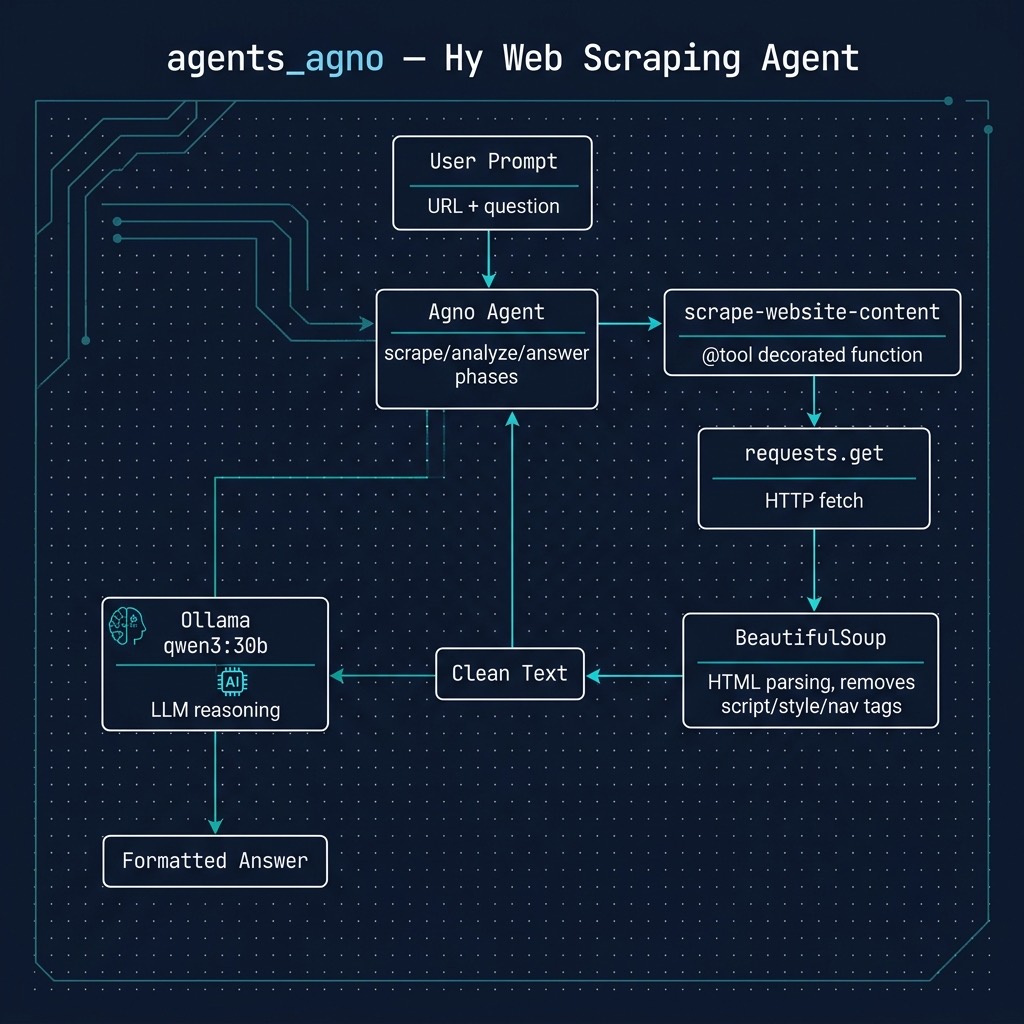
An Agent For Answering Questions About A Specific Web Site
Here we construct a sophisticated web scraping agent using the agno library. This program defines a specialized tool, scrape-website-content which leverages the requests and BeautifulSoup libraries to fetch and parse the textual content from any given URL, stripping away common non-content elements like navigation bars and scripts. This tool is then integrated into an Agent powered by a local Ollama model. The agent is configured with a detailed description, a step-by-step instruction set, and a defined output format, guiding it to first scrape a user-provided URL and then answer a specific question based only on the extracted information, ensuring a focused and verifiable response.
 1 (import textwrap [dedent])
 2 (import os)
 3 (import requests)
 4 (import bs4 [BeautifulSoup])
 5 (import agno.agent [Agent])
 6 (import agno.models.ollama [Ollama])
 7 (import agno.tools [tool])
 8
 9 ;; (defn [tool] ...) is Hy's decorator syntax: like @tool in Python, it
10 ;; wraps the function so agno registers it as a tool for the agent
11 (setv max-chars 20000)   ; keep scraped text small enough for a local model's context
12
13 (defn [tool] scrape-website-content [url]
14   "Fetches and extracts the clean, textual content from a given webpage URL.
15   Use this tool when you need to read the contents of a specific web page to
16   answer a question.
17
18   Args:
19       url (str): The full, valid URL of the webpage to be scraped
20       (e.g., 'https://example.com').
21
22   Returns:
23       str: The extracted text content of the webpage, or an error message.
24   "
25   (try
26     (setv response (requests.get url
27                                  :headers {"User-Agent" "HyLangBook-Agent/1.0"}
28                                  :timeout 10))
29     (.raise-for-status response)
30     (except [e requests.RequestException]
31       ;; Tell the model what went wrong instead of crashing the agent
32       (return f"Error: could not fetch {url}: {e}")))
33   (setv soup (BeautifulSoup response.text "html.parser"))
34   ;; Remove tags that rarely contain useful page content
35   (for [tag (soup ["script" "style" "nav" "footer" "aside"])]
36     (.decompose tag))
37   (setv text (.get-text soup :separator "\n" :strip True))
38   (cond
39     (not text) f"Connected to {url}, but no text content could be extracted."
40     (> (len text) max-chars)
41       f"Successfully scraped content from {url} (truncated):\n\n{(cut text max-chars)}"
42     True f"Successfully scraped content from {url}:\n\n{text}"))
43
44 ;; Initialize the web scraping and analysis agent
45 (setv scraper-agent (Agent
46   ;; Set AGNO_MODEL to use a smaller local model, e.g. qwen3.5:4b. We give
47   ;; the local host explicitly: otherwise agno sends requests to Ollama's
48   ;; cloud service whenever the OLLAMA_API_KEY environment variable is set.
49   :model (Ollama :id (os.environ.get "AGNO_MODEL" "qwen3:30b")
50                  :host "http://localhost:11434")
51   :tools [scrape-website-content]
52   :description (dedent
53     "You are an expert web scraping and analysis agent. You follow a strict process:
54
55     - Given a URL in a prompt, you will first use the appropriate tool to scrape
56       its content.
57     - You will then carefully read the scraped content to understand it thoroughly.
58     - Finally, you will answer the user's question based *only* on the information
59       contained within that specific URL's content.")
60
61   ;; The instructions are refined to provide a clear, step-by-step reasoning process.
62   :instructions (dedent
63     "1. Scrape Phase 🕸️
64        - Analyze the user's prompt to identify the target URL.
65        - Invoke the `scrape_website_content` tool with the identified URL.
66
67     2. Analysis Phase 📊
68        - Carefully read the entire content returned by the tool.
69        - Systematically extract the specific information required to answer the
70          user's question.
71
72     3. Answering Phase ✍️
73        - Formulate a concise and accurate answer based exclusively on the scraped
74          information.
75        - If the information is not present, state that clearly.
76
77     4. Quality Control ✓
78        - Reread the original query and your answer to ensure it is accurate
79          and relevant.")
80
81   :expected_output (dedent
82     "# {Answer based on website content}
83
84     **Source:** {URL provided by the user}")
85
86   :markdown True
87   :add_datetime_to_context True))
88
89 ;; Main execution block
90 (when (= __name__ "__main__")
91   (setv prompt "Using the web site https://markwatson.com Consultant Mark Watson has written Common Lisp, semantic web, Clojure, Java, and AI books. What musical instruments does he play?")
92
93   (.print-response scraper-agent
94     prompt
95     :stream True))
This code is divided into two main parts: the tool definition and the agent configuration.
Notice how the tool handles failure. If the page cannot be fetched (a network error, a timeout, or an HTTP error status), the except clause returns an error message instead of raising an exception. A tool’s return value is shown to the model, so the agent can then tell the user that it could not read the page instead of the whole program crashing. The tool also truncates very long pages to max-chars characters so the text fits in the context window of a small local model.
There is one Agno detail to watch for when using a local model: if the environment variable OLLAMA_API_KEY is set and no host is given, Agno’s Ollama model class sends requests to Ollama’s cloud service instead of to your local Ollama server. We pass :host “http://localhost:11434” so this example always uses the local server. Set the environment variable AGNO_MODEL to choose a different local model.
The first part is the definition of the scrape-website-content function, which acts as the agent’s primary capability. The form (defn [tool] scrape-website-content [url] …) uses Hy’s decorator syntax: the list of decorators goes in square brackets right after defn, so this is equivalent to writing @tool above a Python function definition. The tool decorator wraps the function in an agno Function object, using the function’s name and docstring to describe the tool to the model. It takes a URL, uses the requests library to perform an HTTP GET request (with a descriptive User-Agent header and a timeout), and then processes the resulting HTML with BeautifulSoup. Critically, it removes tags like , , , and that typically contain boilerplate or non-essential content. This cleaning step is vital as it provides the language model with a concise and relevant block of text, free from the noise of web page structure and styling, allowing it to focus on the core information needed to answer the user’s query.
The second part initializes the Agent from the agno library. This is where the AI’s behavior is defined. It’s configured to use a specific Ollama model and is given access to the scrape-website-content tool we defined. The description and instructions parameters are crucial; they act as a system prompt that programs the agent’s workflow, forcing it into a strict sequence of scraping, analyzing, and then answering. By specifying expected_output, we enforce a consistent structure on the agent’s final response. The main execution block demonstrates a practical example, asking the agent to find information about musical instruments from a specific website, which triggers the entire scrape-and-answer process.
Note: The Agno framework prints beautiful colored bounding boxes around blocks of output text. In the following listing these bounding boxes, represented by four specific Unicode characters, just show up here as tiny box-characters.
 1 $ uv run hy web_site_qa.hy
 2 ┏━ Message ━━━━━━━━━━━━━━━━━━━━━━━━━━━━━━━━━━━━━━━━━━━━━━━━━━━━━━━━━━━━━━━━━━━━━┓
 3 ┃                                                                               ┃
 4 ┃ Using the web site https://markwatson.com Consultant Mark Watson has written  ┃
 5 ┃ Common Lisp, semantic web, Clojure, Java, and AI books. What musical          ┃
 6 ┃ instruments does he play?                                                     ┃
 7 ┃                                                                               ┃
 8 ┗━━━━━━━━━━━━━━━━━━━━━━━━━━━━━━━━━━━━━━━━━━━━━━━━━━━━━━━━━━━━━━━━━━━━━━━━━━━━━━━┛
 9 ┏━ Tool Calls ━━━━━━━━━━━━━━━━━━━━━━━━━━━━━━━━━━━━━━━━━━━━━━━━━━━━━━━━━━━━━━━━━━┓
10 ┃                                                                               ┃
11 ┃ • scrape_website_content(url=https://markwatson.com)                          ┃
12 ┃                                                                               ┃
13 ┗━━━━━━━━━━━━━━━━━━━━━━━━━━━━━━━━━━━━━━━━━━━━━━━━━━━━━━━━━━━━━━━━━━━━━━━━━━━━━━━┛
14 ┏━ Response (11.8s) ━━━━━━━━━━━━━━━━━━━━━━━━━━━━━━━━━━━━━━━━━━━━━━━━━━━━━━━━━━━━┓
15 ┃                                                                               ┃
16 ┃ Mark Watson plays the guitar, didgeridoo, and American Indian flute.          ┃
17 ┃                                                                               ┃
18 ┃ Source: https://markwatson.com                                                ┃
19 ┃                                                                               ┃
20 ┗━━━━━━━━━━━━━━━━━━━━━━━━━━━━━━━━━━━━━━━━━━━━━━━━━━━━━━━━━━━━━━━━━━━━━━━━━━━━━━━┛
Wrap Up for Agno Agent Example
The Python source code repository for Agno is found here: https://github.com/agno-agi/agno.
Documentation is found here: https://docs.agno.com/introduction.
There were a few Hy-specific nuances for using Agno with the Hy language. Hopefully, dear reader, the example here serves as a good example for writing your own agent in the Hy language.
Optional Practice Problems
- Adjust the Scraper’s Filtering: The current implementation of
scrape-website-contentremoves<aside>,<nav>, and<footer>tags to save context window tokens. Modify the list of decomposed tags in web_site_qa.hy to preserve sidebars (<aside>), or add custom code to strip out cookie banner containers (often identified by class names containing “cookie” or “consent”). Run the code on a popular news site or blog and verify if the scraper correctly captures or filters out this content. - Experiment with Model Performance: The agent is configured to use the
qwen3:30bOllama model. If this model runs too slowly or fails to load on your local machine, set the environment variableAGNO_MODELto a smaller model such asqwen3.5:4borllama3.2:3b(for exampleAGNO_MODEL=qwen3.5:4b uv run hy web_site_qa.hy). Observe and compare the speed (tokens per second) and accuracy of the answers. - Extend to Multi-Source Verification: Enhance the script to accept a list of URLs instead of a single prompt URL. Update
scrape-website-content(or create a new tool) to loop over multiple pages and aggregate information from them to answer a query. For instance, ask the agent to compare developer bios or product pricing across two different URLs.