Responsible Web Scraping
I put the word “Responsible” in the chapter title to remind you that just because it is easy (as we will soon see) to pull data from web sites, it is important to respect the property rights of web site owners and abide by their terms and conditions for use. This Wikipedia article on Fair Use provides a good overview of using copyright material.
The web scraping code we develop here uses the Python BeautifulSoup library and the standard library modules urllib.request and urllib.robotparser. Besides respecting terms of use, a responsible scraper identifies itself with a descriptive user agent, honors the site’s robots.txt file, uses timeouts, and avoids re-fetching the same pages repeatedly.
For my work and research, I have been most interested in using web scraping to collect text data for natural language processing but other common applications include writing AI news collection and summarization assistants, trying to predict stock prices based on comments in social media which is what we did at Webmind Corporation in 2000 and 2001, etc.
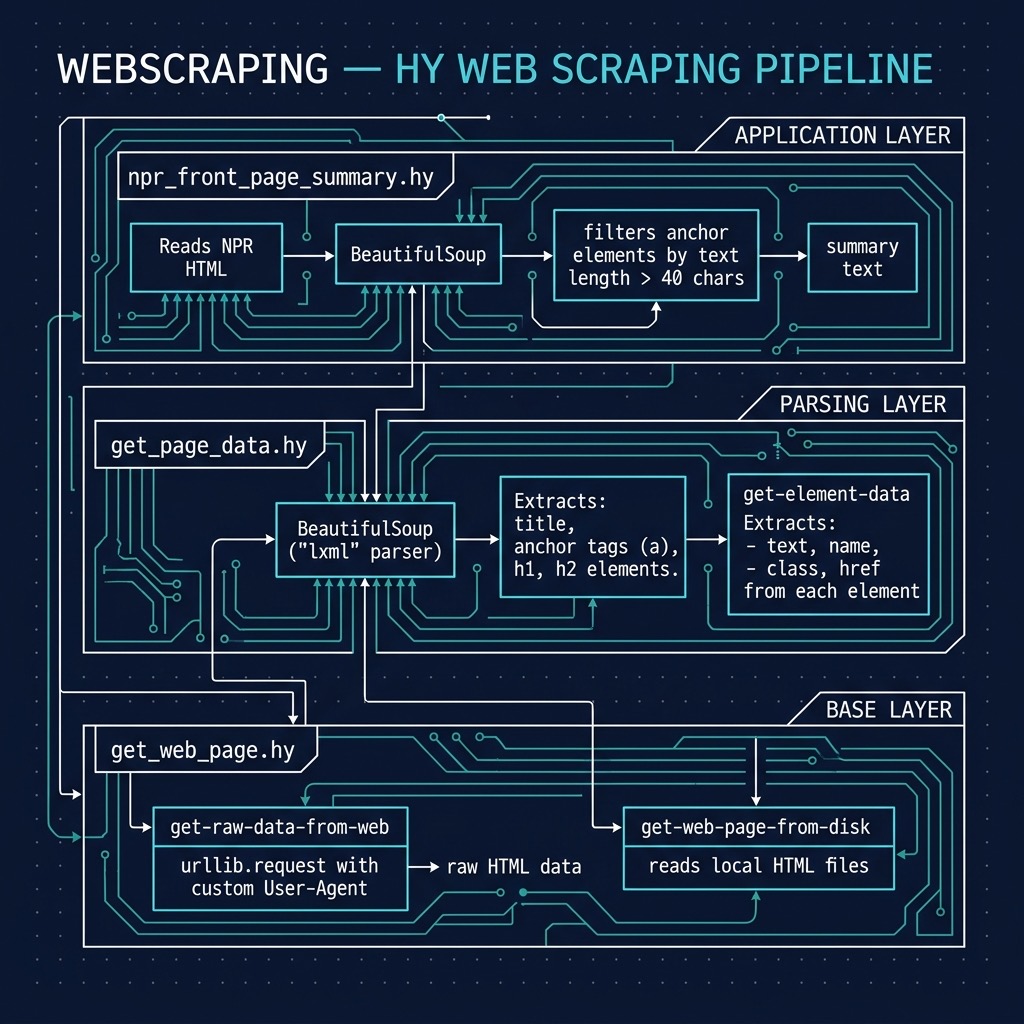
Using the Python BeautifulSoup Library in the Hy Language
There are many good libraries for parsing HTML text and extracting both structure (headings, what is in bold font, etc.) and embedded raw text. I particularly like the Python Beautiful Soup library and we will use it here. The uv project in source_code_for_examples/webscraping already lists beautifulsoup4 and the fast lxml parser as dependencies, so there is nothing extra to install.
The following listing of file get_web_page.hy contains the low-level utilities that the rest of this chapter builds on. I set the user agent to the descriptive string “HyLangBook/1.0” so site owners can see who is fetching their pages. Being responsible is built into the code in two ways:
- Every request has a timeout so a slow server cannot hang our program.
- Before fetching a page, get-raw-data-from-web asks robots-allowed? whether the site’s robots.txt file permits our user agent to fetch that URI, and raises a PermissionError if it does not. The parsed robots.txt for each site is cached with the lru-cache decorator so we only download it once per site. Note that we download robots.txt ourselves instead of calling RobotFileParser.read: some sites reject Python’s default user agent, and RobotFileParser.read treats a 401 or 403 response as “disallow everything”.
 1 (import functools [lru-cache])
 2 (import urllib.parse [urlsplit])
 3 (import urllib.request [Request urlopen])
 4 (import urllib.robotparser [RobotFileParser])
 5
 6 (setv user-agent "HyLangBook/1.0")
 7
 8 (defn [(lru-cache)] robots-parser-for [site [agent user-agent]]
 9   "Fetch and parse SITE/robots.txt once per site (results are cached).
10   We fetch the file ourselves so the request carries our User-Agent: some
11   sites reject Python's default agent, and RobotFileParser.read treats a
12   401 or 403 response as 'disallow everything'."
13   (setv parser (RobotFileParser f"{site}/robots.txt"))
14   (try
15     (with [response (urlopen (Request f"{site}/robots.txt"
16                                       :headers {"User-Agent" agent})
17                              :timeout 10)]
18       (.parse parser (.splitlines (.decode (.read response) "utf-8" "replace"))))
19     (except [OSError]
20       ;; no robots.txt (404) or the site is unreachable: nothing is disallowed
21       (.parse parser [])))
22   parser)
23
24 (defn robots-allowed? [uri [agent user-agent]]
25   "True if the site's robots.txt allows AGENT to fetch URI."
26   (setv parts (urlsplit uri))
27   (.can-fetch (robots-parser-for f"{parts.scheme}://{parts.netloc}" agent) agent uri))
28
29 (defn get-raw-data-from-web [uri [headers {"User-Agent" user-agent}]
30                              [timeout 10] [respect-robots True]]
31   "Fetch URI and return the raw response body as bytes. Raises PermissionError
32   if the site's robots.txt disallows fetching URI."
33   (when (and respect-robots
34              (not (robots-allowed? uri (.get headers "User-Agent" "*"))))
35     (raise (PermissionError f"robots.txt disallows fetching {uri}")))
36   (with [response (urlopen (Request uri :headers headers) :timeout timeout)]
37     (.read response)))
38
39 (defn get-web-page-from-disk [file-path]
40   "Return the contents of a locally cached HTML file as a string."
41   (with [f (open file-path "r" :encoding "utf-8")]
42     (.read f)))
43
44 (when (= __name__ "__main__")
45   (print (cut (get-raw-data-from-web "https://markwatson.com") 200)))
The function get-raw-data-from-web returns the entire contents of a web page as a byte string. Let’s test these functions in a REPL:
1 $ cd hy-lisp-python-book/source_code_for_examples/webscraping
2 $ uv run hy
3 Hy 1.3.1 (Eyes in the Sky) using CPython(main) 3.14.7 on Darwin
4 => (import get-web-page [get-raw-data-from-web robots-allowed?])
5 => (robots-allowed? "https://markwatson.com/")
6 True
7 => (cut (get-raw-data-from-web "https://markwatson.com") 0 60)
8 b'<!DOCTYPE html>\n<html lang="en">\n<head>\n <meta charset="utf'
9 => (import get-page-data [get-page-html-elements])
10 => (get (get-page-html-elements "https://markwatson.com") "title")
11 [<title>Mark Watson: Systems Thinker & Generalist AI Expert</title>]
12 =>
In lines 9-10 we use a function get-page-html-elements to find all elements of a few types in a web page. This function is defined in the next listing of file get_page_data.hy, which uses the Beautiful Soup library to parse the HTML. The function get-page-html-elements returns a dictionary mapping each of the tag names title, a, h1, and h2 to the list of matching elements, built with a dfor dictionary comprehension:
 1 (import get-web-page [get-raw-data-from-web])
 2 (import bs4 [BeautifulSoup])
 3
 4 (defn get-element-data [element]
 5   {"text" (.get-text element)
 6    "name" element.name
 7    "class" (.get element "class")
 8    "href" (.get element "href")})
 9
10 (defn get-page-html-elements [uri]
11   (setv soup (BeautifulSoup (get-raw-data-from-web uri) "lxml"))
12   (dfor tag ["title" "a" "h1" "h2"]
13         tag (.find-all soup tag)))
14
15 (when (= __name__ "__main__")
16   (setv elements (get-page-html-elements "https://markwatson.com"))
17   (for [a (get elements "a")]
18     (print (get-element-data a))))
The function get-element-data defined in lines 4-8 accepts as an argument an HTML element object (as defined in the Beautiful Soup library) and extracts data, if available, for text, name, class, and href values. Notice that element.name reads an attribute of a Python object and that Hy lets us write the Beautiful Soup methods get_text and find_all as .get-text and .find-all. The function get-page-html-elements defined in lines 10-13 accepts as an argument a string containing a URI and returns a dictionary (or map, or hash table) containing lists of all a, h1, h2, and title elements in the web page pointed to by the input URI. You can add additional HTML element types to the list on line 12 as needed. Lines 15-18 run only when the file is used as a script.
Here is the output of uv run hy get_page_data.hy (with many lines removed for brevity):
1 {'text': '\nMark Watson\n', 'name': 'a', 'class': ['nav-brand'], 'href': '#'}
2 {'text': 'Systems Thinking', 'name': 'a', 'class': None, 'href': '#systems'}
3 {'text': 'Books', 'name': 'a', 'class': None, 'href': '#books'}
4 {'text': 'Connect', 'name': 'a', 'class': None, 'href': '#connect'}
5 {'text': 'Flagstaff Arizona', 'name': 'a', 'class': None, 'href': '/flagstaff.html'}
6 {'text': 'Blogspot', 'name': 'a', 'class': None, 'href': 'https://mark-watson.blogspot.com/'}
7 {'text': 'Substack', 'name': 'a', 'class': None, 'href': 'https://marklwatson.substack.com'}
Getting HTML Links from the DemocracyNow.org News Web Site
I financially support and rely on both NPR.org and DemocracyNow.org news as my main sources of news so I will use their news sites for examples here and in the next section. Web sites differ so much in format that it is often necessary to build highly customized web scrapers for individual web sites and to maintain the web scraping code as the format of the site changes in time.
Because these examples parse the same pages over and over while we develop them, it is both faster and more polite to fetch each page once and work from a local copy. Before working through this example and/or the example in the next section use the file Makefile to fetch data (it runs curl with our “HyLangBook/1.0” user agent):
1 make data
This should copy the home pages for both web sites to the files:
- democracynow_home_page.html (used here)
- npr_home_page.html (used for the example in the next section)
The following listing shows democracynow_front_page.hy
 1 (import get-web-page [get-web-page-from-disk])
 2 (import bs4 [BeautifulSoup])
 3
 4 ;; you need to run 'make data' to fetch sample HTML data for dev and testing
 5
 6 (defn get-democracy-now-links []
 7   (setv test-html (get-web-page-from-disk "democracynow_home_page.html"))
 8   (setv bs (BeautifulSoup test-html :features "lxml"))
 9   (setv all-anchor-elements (.find-all bs "a"))
10   (lfor e all-anchor-elements
11         :if (> (len (.get-text e)) 0)
12         #((.get e "href") (.get-text e))))
13
14 (when (= __name__ "__main__")
15   (for [[uri text] (get-democracy-now-links)]
16     (print uri ":" (.strip text))))
This simply prints URIs and text (separated with the string “:”) for each link on the home page. On line 11 we discard any anchor elements that do not contain text. On line 12 the #(…) syntax constructs a Python tuple. Lines 14-16 define a main block that is used when running this file at the command line. This is similar to how main blocks can be defined in Python to allow a library file to also be run as a command line tool. Here are the first few lines of output from uv run hy democracynow_front_page.hy:
1 /about : About
2 /subscribe : Daily Digest
3 /events : Events
4 /stations : Stations
5 /donate?campaign=web-nav : Donate
6 /shows : Daily Shows
7 /shows/2026/11/20 : Friday,November 20, 2026
A few lines of output from today’s front page is:
1 /2020/1/7/the_great_hack_cambridge_analytica : Meet Brittany Kaiser, Cambridge Analytica Whistleblower Releasing Troves of New Files from Data Firm
2 /2019/11/8/remembering_orangeburg_massacre_1968_south_carolina : Remembering the 1968 Orangeburg Massacre When Police Shot Dead Three Unarmed Black Students
3 /2020/1/15/democratic_debate_higher_education_universal_programs : Democrats Debate Wealth Tax, Free Public College & Student Debt Relief as Part of New Economic Plan
4 /2020/1/14/dahlia_lithwick_impeachment : GOP Debate on Impeachment Witnesses Intensifies as Pelosi Prepares to Send Articles to Senate
5 /2020/1/14/oakland_california_moms_4_housing : Moms 4 Housing: Meet the Oakland Mothers Facing Eviction After Two Months Occupying Vacant House
6 /2020/1/14/luis_garden_acosta_martin_espada : “Morir Soñando”: Martín Espada Reads Poem About Luis Garden Acosta, Young Lord & Community Activist
The URIs are relative to the root URI https://www.democracynow.org/.
Getting Summaries of Front Page from the NPR.org News Web Site
This example is similar to the example in the last section except that text from home page links is formatted to provide a daily news summary. I am assuming that you ran the example in the last section so the web site home pages have been copied to local files.
The following listing shows npr_front_page_summary.hy
 1 (import get-web-page [get-web-page-from-disk])
 2 (import bs4 [BeautifulSoup])
 3
 4 ;; you need to run 'make data' to fetch sample HTML data for dev and testing
 5
 6 (defn get-npr-links []
 7   (setv test-html (get-web-page-from-disk "npr_home_page.html"))
 8   (setv bs (BeautifulSoup test-html :features "lxml"))
 9   (setv all-anchor-elements (.find-all bs "a"))
10   (setv filtered-a
11     (lfor e all-anchor-elements
12           :if (> (len (.get-text e)) 0)
13           #((.get e "href") (.get-text e))))
14   filtered-a)
15
16 (defn create-npr-summary []
17   (setv links (get-npr-links))
18   (setv filtered-links (lfor [uri text] links :if (> (len (.strip text)) 40) (.strip text)))
19   (.join "\n\n" filtered-links))
20
21 (when (= __name__ "__main__")
22   (print (create-npr-summary)))
In lines 10-13 we are filtering out (or removing) all anchor HTML elements that do not contain text, and in line 18 we keep only link text longer than 40 characters, which on NPR’s site is mostly headlines and story teasers. The following shows a few lines of the generated output for data collected when I updated this chapter:
1 S&P 500 sinks 3.7% and the Nasdaq composite goes negative for the year
2
3 November 20, 2026 • AI stocks have hefty market values and have a much bigger impact on the market's direction. They were responsible for Wall Street's big gains this year and are now behind the big slide for the market.
4
5 You Can Seize Everything (The U.S. is reviving pirate law)
6
7 November 20, 2026 • The U.S. is working on bringing back the ancient maritime practice of prize law — which allowed for privateers, or more recently, navies, to seize enemy-linked ships, and quickly sell them off.
The examples seen here are simple but should be sufficient to get you started gathering text data from the web.
Optional Practice Problems
Here are a few optional practice problems to help you build confidence modifying the web scraping code:
-
Extract Image Meta-Data: Modify the function
get-page-html-elementsinget_page_data.hyto also extract all<img>tags. Extendget-element-datato handle image elements by extracting thesrcandaltattributes.Hint: In Hy, you can add key-value pairs to the returned dictionary for
<img>tags. For example, your updatedget-element-datamight look like:1 (defn get-element-data [element] 2 {"text" (.get-text element) 3 "name" element.name 4 "class" (.get element "class") 5 "href" (.get element "href") 6 "src" (.get element "src") 7 "alt" (.get element "alt")})
-
Normalize Relative Links: In
democracynow_front_page.hy, many extracted links are relative paths (e.g.,/shows/2026/11/20). Modify the list comprehension (lfor) inget-democracy-now-linksto normalize these links. If a link starts with/, prependhttps://www.democracynow.orgto it.Hint: Use a helper function or an inline
ifexpression to check if the URI starts with/. In Hy, that might look like:1 (defn normalize-url [url base-url] 2 (if (.startswith url "/") 3 (+ base-url url) 4 url))
-
Keyword Filtering for Summaries: Modify
create-npr-summaryinnpr_front_page_summary.hyso that it filters the headlines based on a set of target keywords (e.g., “Election”, “Climate”, “AI”). The function should only include items where the text contains one of the user-specified keywords (case-insensitively).Hint: You can write a helper function
contains-any-keyword?usinganyand a list comprehension:1 (defn contains-any-keyword? [text keywords] 2 (any (lfor kw keywords (in (.lower kw) (.lower text)))))
Rate Limiting: Add a module-level dictionary in
get_web_page.hythat records the time of the last request to each host, and makeget-raw-data-from-websleep (withtime.sleep) so that it never fetches from the same host more than once per second. Manyrobots.txtfiles also specify aCrawl-delay;RobotFileParserexposes it with(.crawl-delay parser agent).