Linked Data, the Semantic Web, and Knowledge Graphs
Tim Berners Lee, James Hendler, and Ora Lassila wrote in 2001 an article for Scientific American where they introduced the term Semantic Web. Here I do not capitalize semantic web and use the similar term linked data somewhat interchangeably with semantic web. Most work using these technologies now is building corporate Knowledge Graphs. I worked at Google with their Knowledge Graph in 2013 and I worked with the Knowledge Graph team at Olive AI during 2020-2021.
In this chapter we will use the Hy REPL and the short example program foaf_example.hy in the directory hy-lisp-python-book/source_code_for_examples/rdf:
1 $ cd hy-lisp-python-book/source_code_for_examples/rdf
2 $ uv sync
3 $ uv run hy
4 Hy 1.3.1 (Eyes in the Sky) using CPython(main) 3.14.7 on Darwin
5 =>
In the same way that the web allows links between related web pages, linked data supports linking associated data on the web together. I view linked data as a relatively simple way to specify relationships between data sources on the web while the semantic web has a much larger vision: the semantic web has the potential to be the entirety of human knowledge represented as data on the web in a form that software agents can work with to answer questions, perform research, and to infer new data from existing data.
While the “web” describes information for human readers, the semantic web is meant to provide structured data for ingestion by software agents. This distinction will be clear as we compare WikiPedia, made for human readers, with DBPedia which uses the info boxes on WikiPedia topics to automatically extract RDF data describing WikiPedia topics. Let’s look at the WikiPedia topic for the town I live in, Sedona Arizona, and show how the info box on the English version of the WikiPedia topic page for Sedona https://en.wikipedia.org/wiki/Sedona,_Arizona maps to the DBPedia page http://dbpedia.org/page/Sedona,_Arizona. Please open both of these WikiPedia and DBPedia URIs in two browser tabs and keep them open for reference.
I assume that the format of the WikiPedia page is familiar so let’s look at the DBPedia page for Sedona that in human readable form shows the RDF statements with Sedona Arizona as the subject. RDF is used to model and represent data. RDF is defined by three values so an instance of an RDF statement is called a triple with three parts:
- subject: a URI (also referred to as a “Resource”)
- property: a URI (also referred to as a “Resource”)
- value: a URI (also referred to as a “Resource”) or a literal value (like a string)
The subject for each Sedona related triple is the above URI for the DBPedia human readable page. The subject and property references in an RDF triple will almost always be a URI that can ground an entity to information on the web. The human readable page for Sedona lists several properties and the values of these properties. One of the properties is “dbo:areaCode” where “dbo” is a name space reference (in this case for a DatatypeProperty).
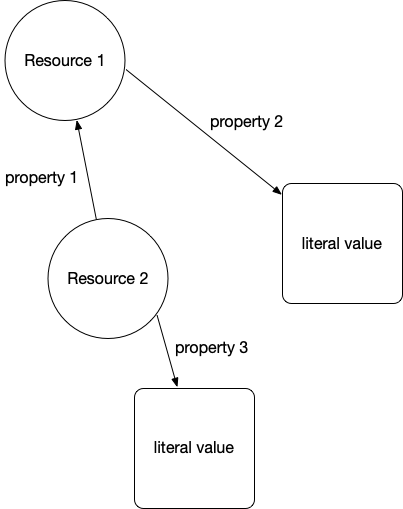
The following two figures show an abstract representation of linked data and then a sample of linked data with actual web URIs for resources and properties:
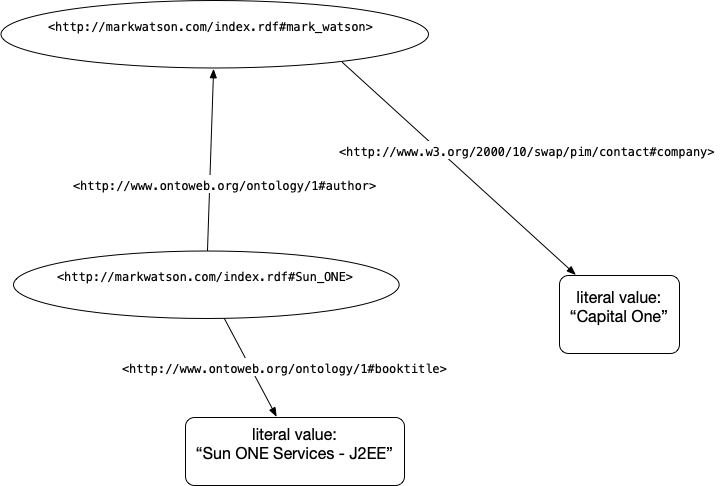
We saw a SPARQL Query (SPARQL for RDF data is similar to SQL for relational database queries) in the last chapter. Let’s look at another example using the RDF in the last figure:
1     select ?v where {  <http://markwatson.com/index.rdf#Sun_ONE>
2                        <http://www.ontoweb.org/ontology/1#booktitle>
3                        ?v }
This query should return the result “Sun ONE Services - J2EE”. If you wanted to query for all URI resources that are books with the literal value of their titles, then you can use:
1     select ?s ?v where {  ?s
2                           <http://www.ontoweb.org/ontology/1#booktitle>
3                           ?v }
Note that ?s and ?v are arbitrary query variable names, here standing for “subject” and “value”. You can use more descriptive variable names like:
1     select ?bookURI ?bookTitle where
2         { ?bookURI
3           <http://www.ontoweb.org/ontology/1#booktitle>
4           ?bookTitle }
In the next chapter we implement a small RDF datastore and SPARQL engine ourselves, and in the chapter Knowledge Graph Creator we write a tool for generating RDF data from raw text input. For now I want you to understand the idea of RDF statements represented as triples, that web URIs represent things, properties, and sometimes values, and that URIs can be followed manually (often called “dereferencing”) to see what they reference in human readable form.
Understanding the Resource Description Framework (RDF)
Text data on the web has some structure in the form of HTML elements like headers, page titles, anchor links, etc. but this structure is too imprecise for general use by software agents. RDF is a method for encoding structured data in a more precise way.
We used a small RDF file from the W3C in the last chapter to introduce the “plumbing” of using the rdflib Python library to access, manipulate, and query RDF data.
Resource Namespaces Provided in rdflib
The following standard namespaces are predefined in rdflib:
- DCTERMS http://purl.org/dc/terms/
Let’s look into the Friend of a Friend (FOAF) namespace. Click on the above link for FOAF http://xmlns.com/foaf/0.1/ and find the definitions for the FOAF Core:
 1     Agent
 2     Person
 3     name
 4     title
 5     img
 6     depiction (depicts)
 7     familyName
 8     givenName
 9     knows
10     based_near
11     age
12     made (maker)
13     primaryTopic (primaryTopicOf)
14     Project
15     Organization
16     Group
17     member
18     Document
19     Image
and for the Social Web:
 1 nick
 2 mbox
 3 homepage
 4 weblog
 5 openid
 6 jabberID
 7 mbox_sha1sum
 8 interest
 9 topic_interest
10 topic (page)
11 workplaceHomepage
12 workInfoHomepage
13 schoolHomepage
14 publications
15 currentProject
16 pastProject
17 account
18 OnlineAccount
19 accountName
20 accountServiceHomepage
21 PersonalProfileDocument
22 tipjar
23 sha1
24 thumbnail
25 logo
You now have seen a few common Schemas for RDF data. Another Schema that is widely used for annotating web sites, that we won’t need for our examples here, is schema.org. Let’s now use a Hy REPL session to explore namespaces and programmatically create RDF using rdflib:
 1 $ uv run hy
 2 Hy 1.3.1 (Eyes in the Sky) using CPython(main) 3.14.7 on Darwin
 3 => (import rdflib.namespace [FOAF])
 4 => FOAF.name
 5 rdflib.term.URIRef('http://xmlns.com/foaf/0.1/name')
 6 => FOAF.title
 7 rdflib.term.URIRef('http://xmlns.com/foaf/0.1/title')
 8 => (import rdflib)
 9 => (setv graph (rdflib.Graph))
10 => (setv mark (rdflib.BNode))
11 => (graph.bind "foaf" FOAF)
12 => (import rdflib [RDF])
13 => (graph.add [mark RDF.type FOAF.Person])
14 <Graph identifier=N60f1f96557924c709da48e80f9b7dd75 (<class 'rdflib.graph.Graph'>)>
15 => (graph.add [mark FOAF.nick (rdflib.Literal "Mark" :lang "en")])
16 <Graph identifier=N60f1f96557924c709da48e80f9b7dd75 (<class 'rdflib.graph.Graph'>)>
17 => (graph.add [mark FOAF.name (rdflib.Literal "Mark Watson" :lang "en")])
18 <Graph identifier=N60f1f96557924c709da48e80f9b7dd75 (<class 'rdflib.graph.Graph'>)>
19 => (for [triple graph] (print triple))
20 (rdflib.term.BNode('Nf730724168b446558c3bd1186e013cb3'), rdflib.term.URIRef('http://xmlns.com/foaf/0.1/nick'), rdflib.term.Literal('Mark', lang='en'))
21 (rdflib.term.BNode('Nf730724168b446558c3bd1186e013cb3'), rdflib.term.URIRef('http://www.w3.org/1999/02/22-rdf-syntax-ns#type'), rdflib.term.URIRef('http://xmlns.com/foaf/0.1/Person'))
22 (rdflib.term.BNode('Nf730724168b446558c3bd1186e013cb3'), rdflib.term.URIRef('http://xmlns.com/foaf/0.1/name'), rdflib.term.Literal('Mark Watson', lang='en'))
23 => (print (graph.serialize :format "pretty-xml"))
24 <?xml version="1.0" encoding="utf-8"?>
25 <rdf:RDF
26   xmlns:rdf="http://www.w3.org/1999/02/22-rdf-syntax-ns#"
27   xmlns:foaf="http://xmlns.com/foaf/0.1/"
28 >
29   <foaf:Person rdf:nodeID="Nf730724168b446558c3bd1186e013cb3">
30     <foaf:nick xml:lang="en">Mark</foaf:nick>
31     <foaf:name xml:lang="en">Mark Watson</foaf:name>
32   </foaf:Person>
33 </rdf:RDF>
34
35 => (print (graph.serialize :format "turtle"))
36 @prefix foaf: <http://xmlns.com/foaf/0.1/> .
37
38 [] a foaf:Person ;
39     foaf:name "Mark Watson"@en ;
40     foaf:nick "Mark"@en .
41
42 => (print (graph.serialize :format "nt"))
43 _:Nf730724168b446558c3bd1186e013cb3 <http://xmlns.com/foaf/0.1/nick> "Mark"@en .
44 _:Nf730724168b446558c3bd1186e013cb3 <http://www.w3.org/1999/02/22-rdf-syntax-ns#type> <http://xmlns.com/foaf/0.1/Person> .
45 _:Nf730724168b446558c3bd1186e013cb3 <http://xmlns.com/foaf/0.1/name> "Mark Watson"@en .
46
47 =>
Here mark is a blank node, a resource with no URI of its own, so rdflib makes up a random identifier for it. Each call to graph.add returns the graph, which is why the REPL prints it. Notice that serialize returns a string, which we print to see the line breaks. Turtle shows a blank node as [], and a is Turtle shorthand for rdf:type.
Putting it Together: Building and Querying a FOAF Graph
The REPL session is a good way to explore, but let’s capture what we learned in a short program. The file foaf_example.hy builds a FOAF graph for two people who are linked with the foaf:knows property. This time each person is identified by a URI instead of a blank node, so other data sources can refer to the same people:
 1 ;; Build a small FOAF (Friend of a Friend) RDF graph with rdflib, serialize
 2 ;; it in several formats, and query it with SPARQL.
 3
 4 (import rdflib [Graph Literal URIRef])
 5 (import rdflib.namespace [FOAF RDF])
 6
 7 (setv mark (URIRef "https://markwatson.com/#me"))
 8 (setv carol (URIRef "https://example.com/people/carol"))
 9
10 (defn make-foaf-graph []
11   (setv graph (Graph))
12   (.bind graph "foaf" FOAF)
13   (for [[person name nick] [[mark "Mark Watson" "Mark"]
14                             [carol "Carol Watson" "Carol"]]]
15     (.add graph #(person RDF.type FOAF.Person))
16     (.add graph #(person FOAF.name (Literal name :lang "en")))
17     (.add graph #(person FOAF.nick (Literal nick :lang "en"))))
18   (.add graph #(mark FOAF.knows carol))
19   (.add graph #(mark FOAF.homepage (URIRef "https://markwatson.com")))
20   graph)
21
22 (setv who-knows-whom
23   "PREFIX foaf: <http://xmlns.com/foaf/0.1/>
24    SELECT ?name ?friendName WHERE {
25      ?person foaf:knows ?friend .
26      ?person foaf:name ?name .
27      ?friend foaf:name ?friendName .
28    }")
29
30 (defn friends [graph]
31   "Return [name friend-name] pairs for every foaf:knows link in GRAPH."
32   (lfor row (.query graph who-knows-whom)
33         [(str row.name) (str row.friendName)]))
34
35 (defn main []
36   (setv graph (make-foaf-graph))
37   (print "Number of triples:" (len graph))
38   (print (.serialize graph :format "turtle"))
39   (for [[name friend] (friends graph)]
40     (print name "knows" friend)))
41
42 (when (= __name__ "__main__")
43   (main))
Notice in lines 4-5 that rdflib.namespace predefines both the RDF and FOAF namespaces. In lines 13-17 we use a for loop with destructuring to add three triples for each person; #(…) creates the tuple of subject, predicate, and object that graph.add expects.
The SPARQL query in lines 22-28 is a pattern of three triples that share variables: it finds every ?person who knows a ?friend and returns both of their names. The PREFIX line lets us write foaf:knows instead of the full URI. In the function friends each result row has attributes named after the query variables, so we can write row.name and row.friendName. Here is the output of uv run hy foaf_example.hy:
 1 Number of triples: 8
 2 @prefix foaf: <http://xmlns.com/foaf/0.1/> .
 3
 4 <https://markwatson.com/#me> a foaf:Person ;
 5     foaf:homepage <https://markwatson.com> ;
 6     foaf:knows <https://example.com/people/carol> ;
 7     foaf:name "Mark Watson"@en ;
 8     foaf:nick "Mark"@en .
 9
10 <https://example.com/people/carol> a foaf:Person ;
11     foaf:name "Carol Watson"@en ;
12     foaf:nick "Carol"@en .
13
14
15 Mark Watson knows Carol Watson
The tests in test_foaf_example.hy check the graph, the SPARQL query, and that serializing the graph to Turtle and parsing it back produces an equivalent graph. Run them with uv run pytest.
Understanding the SPARQL Query Language
For the purposes of the material in this book, the sample SPARQL queries here and in the last chapter are sufficient for you to get started using rdflib with arbitrary RDF data sources and simple queries. In the next chapter we will see how SPARQL queries are matched against triples by implementing a small SPARQL engine ourselves.
The Apache Foundation has a good introduction to SPARQL that I refer you to for more information.
Wrap-up
I hope that I have provided you with enough motivation to explore RDF data sources and consider the use of linked data/semantic web technologies for your projects.
If I depend on a library, regardless of the programming language, I like to keep an up-to-date copy of the source code ready at hand. There is sometimes no substitute for having library code available to read.
Optional Practice Problems
- Extend the FOAF Graph with Relationships: In your interactive REPL session, create two different people (using either
rdflib.BNodeorrdflib.URIRef) and link them using theFOAF.knowsproperty. Add additional properties to each person such asFOAF.mbox(email) orFOAF.homepage, and then serialize the graph to Turtle format to see how relationships are represented. - Querying a Local Graph with SPARQL: Use
rdflib’squerymethod to run a SPARQL query on the local graph you constructed in the first problem. Write a query to find and print the names of all individuals who are connected via theFOAF.knowsproperty. - Parse and Analyze an External RDF Source: Write a short Hy script that parses a public RDF or Turtle file (such as a public web page’s RDF markup or a remote ontology file) using
graph.parse. Print the total number of triples in the graph, and write a loop to print all subjects that are of typefoaf:Person.