Prototyping The Game
Warming up was really important, but let’s combine everything we learned, add some new challenges, and build a small prototype with following features:
- Camera loosely follows tank.
- Camera zooms automatically depending on tank speed.
- You can temporarily override automatic camera zoom using keyboard.
- Music and sound effects.
- Randomly generated map.
- Two modes: menu and gameplay.
- Tank movement with WADS keys.
- Tank aiming and shooting with mouse.
- Collision detection (tanks don’t swim).
- Explosions, visible bullet trajectories.
- Bullet range limiting.
Sounds fun? Hell yes! However, before we start, we should plan ahead a little and think how our game architecture will look like. We will also structure our code a little, so it will not be smashed into one ruby class, as we did in earlier examples. Books should show good manners!
Switching Between Game States
First, let’s think how to hook into
Gosu::Window. Since we will have two game
states, State pattern naturally comes to mind.
So, our GameWindow class could look like this:
03-prototype/game_window.rb
 1 class GameWindow < Gosu::Window
 2
 3   attr_accessor :state
 4
 5   def initialize
 6     super(800, 600, false)
 7   end
 8
 9   def update
10     @state.update
11   end
12
13   def draw
14     @state.draw
15   end
16
17   def needs_redraw?
18     @state.needs_redraw?
19   end
20
21   def button_down(id)
22     @state.button_down(id)
23   end
24
25 end
It has current @state, and all usual main loop actions are executed on that state instance.
We will add base class that all game states will extend. Let’s name it GameState:
03-prototype/states/game_state.rb
 1 class GameState
 2
 3   def self.switch(new_state)
 4     $window.state && $window.state.leave
 5     $window.state = new_state
 6     new_state.enter
 7   end
 8
 9   def enter
10   end
11
12   def leave
13   end
14
15   def draw
16   end
17
18   def update
19   end
20
21   def needs_redraw?
22     true
23   end
24
25   def button_down(id)
26   end
27 end
This class provides GameState.switch, that will change the state for our Gosu::Window, and all
enter and leave methods when appropriate. These methods will be useful for things like
switching music.
Notice that Gosu::Window is accessed using global $window variable, which will be considered an
anti-pattern by most good programmers, but there is some logic behind this:
- There will be only one
Gosu::Windowinstance. - It lives as long as the game runs.
- It is used in some way by nearly all other classes, so we would have to pass it around all the time.
- Accessing it using Singleton or static utility class would not give any clear benefits, just add more complexity.
Chingu, another game framework built on top of Gosu, also uses
global $window, so it’s probably not the worst idea ever.
We will also need an entry point that would fire up the game and enter the first game state - the menu.
03-prototype/main.rb
 1 require 'gosu'
 2 require_relative 'states/game_state'
 3 require_relative 'states/menu_state'
 4 require_relative 'states/play_state'
 5 require_relative 'game_window'
 6
 7 module Game
 8   def self.media_path(file)
 9     File.join(File.dirname(File.dirname(
10       __FILE__)), 'media', file)
11   end
12 end
13
14 $window = GameWindow.new
15 GameState.switch(MenuState.instance)
16 $window.show
In our entry point we also have a small helper which will help loading images and sounds using
Game.media_path.
The rest is obvious: we create GameWindow instance and store it in $window variable, as
discussed before. Then we use GameState.switch) to load MenuState, and show the game window.
Implementing Menu State
This is how simple MenuState implementation looks like:
03-prototype/states/menu_state.rb
 1 require 'singleton'
 2 class MenuState < GameState
 3   include Singleton
 4   attr_accessor :play_state
 5
 6   def initialize
 7     @message = Gosu::Image.from_text(
 8       $window, "Tanks Prototype",
 9       Gosu.default_font_name, 100)
10   end
11
12   def enter
13     music.play(true)
14     music.volume = 1
15   end
16
17   def leave
18     music.volume = 0
19     music.stop
20   end
21
22   def music
23     @@music ||= Gosu::Song.new(
24       $window, Game.media_path('menu_music.mp3'))
25   end
26
27   def update
28     continue_text = @play_state ? "C = Continue, " : ""
29     @info = Gosu::Image.from_text(
30       $window, "Q = Quit, #{continue_text}N = New Game",
31       Gosu.default_font_name, 30)
32   end
33
34   def draw
35     @message.draw(
36       $window.width / 2 - @message.width / 2,
37       $window.height / 2 - @message.height / 2,
38       10)
39     @info.draw(
40       $window.width / 2 - @info.width / 2,
41       $window.height / 2 - @info.height / 2 + 200,
42       10)
43   end
44
45   def button_down(id)
46     $window.close if id == Gosu::KbQ
47     if id == Gosu::KbC && @play_state
48       GameState.switch(@play_state)
49     end
50     if id == Gosu::KbN
51       @play_state = PlayState.new
52       GameState.switch(@play_state)
53     end
54   end
55 end
It’s a Singleton, so
we can always get it with MenuState.instance.
It starts playing menu_music.mp3 when you enter the menu, and stop the music when you leave it.
Instance of Gosu::Song is cached in @@music class
variable to save resources.
We have to know if play is already in progress, so we can add a possibility to go back to the
game. That’s why MenuState has @play_state variable, and either allows creating new PlayState
when N key is pressed, or switches to existing @play_state if C key is pressed.
Here comes the interesting part, implementing the play state.
Implementing Play State
Before we start implementing actual gameplay, we need to think what game entities we will be
building. We will need a Map that will hold our tiles and provide world coordinate system. We
will also need a Camera that will know how to float around and zoom. There will be Bullets
flying around, and each bullet will eventually cause an Explosion.
Having all that taken care of, PlayState should look pretty simple:
03-prototype/states/play_state.rb
 1 require_relative '../entities/map'
 2 require_relative '../entities/tank'
 3 require_relative '../entities/camera'
 4 require_relative '../entities/bullet'
 5 require_relative '../entities/explosion'
 6 class PlayState < GameState
 7
 8   def initialize
 9     @map = Map.new
10     @tank = Tank.new(@map)
11     @camera = Camera.new(@tank)
12     @bullets = []
13     @explosions = []
14   end
15
16   def update
17     bullet = @tank.update(@camera)
18     @bullets << bullet if bullet
19     @bullets.map(&:update)
20     @bullets.reject!(&:done?)
21     @camera.update
22     $window.caption = 'Tanks Prototype. ' <<
23       "[FPS: #{Gosu.fps}. Tank @ #{@tank.x.round}:#{@tank.y.round}]"
24   end
25
26   def draw
27     cam_x = @camera.x
28     cam_y = @camera.y
29     off_x =  $window.width / 2 - cam_x
30     off_y =  $window.height / 2 - cam_y
31     $window.translate(off_x, off_y) do
32       zoom = @camera.zoom
33       $window.scale(zoom, zoom, cam_x, cam_y) do
34         @map.draw(@camera)
35         @tank.draw
36         @bullets.map(&:draw)
37       end
38     end
39     @camera.draw_crosshair
40   end
41
42   def button_down(id)
43     if id == Gosu::MsLeft
44       bullet = @tank.shoot(*@camera.mouse_coords)
45       @bullets << bullet if bullet
46     end
47     $window.close if id == Gosu::KbQ
48     if id == Gosu::KbEscape
49       GameState.switch(MenuState.instance)
50     end
51   end
52
53 end
Update and draw calls are passed to the underlying game entities, so they can handle them the way they want it to. Such encapsulation reduces complexity of the code and allows doing every piece of logic where it belongs, while keeping it short and simple.
There are a few interesting parts in this code. Both @tank.update and @tank.shoot may produce a
new bullet, if your tank’s fire rate is not exceeded, and if left mouse button is kept down, hence
the update. If bullet is produced, it is added to @bullets array, and they live their own
little lifecycle, until they explode and are no longer used. @bullets.reject!(&:done?) cleans up
the garbage.
PlayState#draw deserves extra explanation. @camera.x and @camera.y points to game
coordinates where Camera is currently looking at.
Gosu::Window#translate
creates a block within which all Gosu::Image draw
operations are translated by given offset.
Gosu::Window#scale does the
same with Camera zoom.
Crosshair is drawn without translating and scaling it, because it’s relative to screen, not to world map.
Basically, this draw method is the place that takes care drawing only what @camera can see.
If it’s hard to understand how this works, get back to “Game Coordinate System” chapter and let it sink in.
Implementing World Map
We will start analyzing game entities with Map.
03-prototype/entities/map.rb
 1 require 'perlin_noise'
 2 require 'gosu_texture_packer'
 3
 4 class Map
 5   MAP_WIDTH = 100
 6   MAP_HEIGHT = 100
 7   TILE_SIZE = 128
 8
 9   def initialize
10     load_tiles
11     @map = generate_map
12   end
13
14   def find_spawn_point
15     while true
16       x = rand(0..MAP_WIDTH * TILE_SIZE)
17       y = rand(0..MAP_HEIGHT * TILE_SIZE)
18       if can_move_to?(x, y)
19         return [x, y]
20       else
21         puts "Invalid spawn point: #{[x, y]}"
22       end
23     end
24   end
25
26   def can_move_to?(x, y)
27     tile = tile_at(x, y)
28     tile && tile != @water
29   end
30
31   def draw(camera)
32     @map.each do |x, row|
33       row.each do |y, val|
34         tile = @map[x][y]
35         map_x = x * TILE_SIZE
36         map_y = y * TILE_SIZE
37         if camera.can_view?(map_x, map_y, tile)
38           tile.draw(map_x, map_y, 0)
39         end
40       end
41     end
42   end
43
44   private
45
46   def tile_at(x, y)
47     t_x = ((x / TILE_SIZE) % TILE_SIZE).floor
48     t_y = ((y / TILE_SIZE) % TILE_SIZE).floor
49     row = @map[t_x]
50     row[t_y] if row
51   end
52
53   def load_tiles
54     tiles = Gosu::Image.load_tiles(
55       $window, Game.media_path('ground.png'),
56       128, 128, true)
57     @sand = tiles[0]
58     @grass = tiles[8]
59     @water = Gosu::Image.new(
60       $window, Game.media_path('water.png'), true)
61   end
62
63   def generate_map
64     noises = Perlin::Noise.new(2)
65     contrast = Perlin::Curve.contrast(
66       Perlin::Curve::CUBIC, 2)
67     map = {}
68     MAP_WIDTH.times do |x|
69       map[x] = {}
70       MAP_HEIGHT.times do |y|
71         n = noises[x * 0.1, y * 0.1]
72         n = contrast.call(n)
73         map[x][y] = choose_tile(n)
74       end
75     end
76     map
77   end
78
79   def choose_tile(val)
80     case val
81     when 0.0..0.3 # 30% chance
82       @water
83     when 0.3..0.45 # 15% chance, water edges
84       @sand
85     else # 55% chance
86       @grass
87     end
88   end
89 end
This implementation is very similar to the Map we had built in “Generating Random Map With
Perlin Noise”, with some extra additions. can_move_to? verifies if tile under given coordinates
is not water. Pretty simple, but it’s enough for our prototype.
Also, when we draw the map we have to make sure if tiles we are drawing are currently visible by
our camera, otherwise we will end up drawing off screen. camera.can_view? handles it. Current
implementation will probably be causing a bottleneck, since it brute forces through all the map
rather than cherry-picking the visible region. We will probably have to get back and change it
later.
find_spawn_point is one more addition. It keeps picking a random point on map and verifies if
it’s not water using can_move_to?. When solid tile is found, it returns the coordinates, so our
Tank will be able to spawn there.
Implementing Floating Camera
If you played the original Grand Theft Auto or GTA 2, you should remember how fascinating the camera was. It backed away when you were driving at high speeds, closed in when you were walking on foot, and floated around as if a smart drone was following your protagonist from above.
The following Camera implementation is far inferior to the one GTA had nearly two decades ago,
but it’s a start:
03-prototype/entities/camera.rb
 1 class Camera
 2   attr_accessor :x, :y, :zoom
 3
 4   def initialize(target)
 5     @target = target
 6     @x, @y = target.x, target.y
 7     @zoom = 1
 8   end
 9
10   def can_view?(x, y, obj)
11     x0, x1, y0, y1 = viewport
12     (x0 - obj.width..x1).include?(x) &&
13       (y0 - obj.height..y1).include?(y)
14   end
15
16   def mouse_coords
17     x, y = target_delta_on_screen
18     mouse_x_on_map = @target.x +
19       (x + $window.mouse_x - ($window.width / 2)) / @zoom
20     mouse_y_on_map = @target.y +
21       (y + $window.mouse_y - ($window.height / 2)) / @zoom
22     [mouse_x_on_map, mouse_y_on_map].map(&:round)
23   end
24
25   def update
26     @x += @target.speed if @x < @target.x - $window.width / 4
27     @x -= @target.speed if @x > @target.x + $window.width / 4
28     @y += @target.speed if @y < @target.y - $window.height / 4
29     @y -= @target.speed if @y > @target.y + $window.height / 4
30
31     zoom_delta = @zoom > 0 ? 0.01 : 1.0
32     if $window.button_down?(Gosu::KbUp)
33       @zoom -= zoom_delta unless @zoom < 0.7
34     elsif $window.button_down?(Gosu::KbDown)
35       @zoom += zoom_delta unless @zoom > 10
36     else
37       target_zoom = @target.speed > 1.1 ? 0.85 : 1.0
38       if @zoom <= (target_zoom - 0.01)
39         @zoom += zoom_delta / 3
40       elsif @zoom > (target_zoom + 0.01)
41         @zoom -= zoom_delta / 3
42       end
43     end
44   end
45
46   def to_s
47     "FPS: #{Gosu.fps}. " <<
48       "#{@x}:#{@y} @ #{'%.2f' % @zoom}. " <<
49       'WASD to move, arrows to zoom.'
50   end
51
52   def target_delta_on_screen
53     [(@x - @target.x) * @zoom, (@y - @target.y) * @zoom]
54   end
55
56   def draw_crosshair
57     x = $window.mouse_x
58     y = $window.mouse_y
59     $window.draw_line(
60       x - 10, y, Gosu::Color::RED,
61       x + 10, y, Gosu::Color::RED, 100)
62     $window.draw_line(
63       x, y - 10, Gosu::Color::RED,
64       x, y + 10, Gosu::Color::RED, 100)
65   end
66
67   private
68
69   def viewport
70     x0 = @x - ($window.width / 2)  / @zoom
71     x1 = @x + ($window.width / 2)  / @zoom
72     y0 = @y - ($window.height / 2) / @zoom
73     y1 = @y + ($window.height / 2) / @zoom
74     [x0, x1, y0, y1]
75   end
76 end
Our Camera has @target that it tries to follow, @x and @y that it
currently is looking at, and @zoom level.
All the magic happens in update method. It keeps track of the distance between @target and
adjust itself to stay nearby. And when @target.speed shows some movement momentum, camera slowly
backs away.
Camera also tels if you can_view? an object at some
coordinates, so when other entities draw themselves, they can check if there is a need for that.
Another noteworthy method is mouse_coords. It translates mouse position on screen to mouse
position on map, so the game will know where you are targeting your guns.
Implementing The Tank
Most of our tank code will be taken from “Player Movement With Keyboard And Mouse”:
03-prototype/entities/camera.rb
 1 class Camera
 2   attr_accessor :x, :y, :zoom
 3
 4   def initialize(target)
 5     @target = target
 6     @x, @y = target.x, target.y
 7     @zoom = 1
 8   end
 9
10   def can_view?(x, y, obj)
11     x0, x1, y0, y1 = viewport
12     (x0 - obj.width..x1).include?(x) &&
13       (y0 - obj.height..y1).include?(y)
14   end
15
16   def mouse_coords
17     x, y = target_delta_on_screen
18     mouse_x_on_map = @target.x +
19       (x + $window.mouse_x - ($window.width / 2)) / @zoom
20     mouse_y_on_map = @target.y +
21       (y + $window.mouse_y - ($window.height / 2)) / @zoom
22     [mouse_x_on_map, mouse_y_on_map].map(&:round)
23   end
24
25   def update
26     @x += @target.speed if @x < @target.x - $window.width / 4
27     @x -= @target.speed if @x > @target.x + $window.width / 4
28     @y += @target.speed if @y < @target.y - $window.height / 4
29     @y -= @target.speed if @y > @target.y + $window.height / 4
30
31     zoom_delta = @zoom > 0 ? 0.01 : 1.0
32     if $window.button_down?(Gosu::KbUp)
33       @zoom -= zoom_delta unless @zoom < 0.7
34     elsif $window.button_down?(Gosu::KbDown)
35       @zoom += zoom_delta unless @zoom > 10
36     else
37       target_zoom = @target.speed > 1.1 ? 0.85 : 1.0
38       if @zoom <= (target_zoom - 0.01)
39         @zoom += zoom_delta / 3
40       elsif @zoom > (target_zoom + 0.01)
41         @zoom -= zoom_delta / 3
42       end
43     end
44   end
45
46   def to_s
47     "FPS: #{Gosu.fps}. " <<
48       "#{@x}:#{@y} @ #{'%.2f' % @zoom}. " <<
49       'WASD to move, arrows to zoom.'
50   end
51
52   def target_delta_on_screen
53     [(@x - @target.x) * @zoom, (@y - @target.y) * @zoom]
54   end
55
56   def draw_crosshair
57     x = $window.mouse_x
58     y = $window.mouse_y
59     $window.draw_line(
60       x - 10, y, Gosu::Color::RED,
61       x + 10, y, Gosu::Color::RED, 100)
62     $window.draw_line(
63       x, y - 10, Gosu::Color::RED,
64       x, y + 10, Gosu::Color::RED, 100)
65   end
66
67   private
68
69   def viewport
70     x0 = @x - ($window.width / 2)  / @zoom
71     x1 = @x + ($window.width / 2)  / @zoom
72     y0 = @y - ($window.height / 2) / @zoom
73     y1 = @y + ($window.height / 2) / @zoom
74     [x0, x1, y0, y1]
75   end
76 end
Tank has to be aware of the Map to check where it’s moving, and it uses Camera to find out
where to aim the guns. When it shoots, it produces instances of Bullet, that are simply
returned to the caller. Tank won’t keep track of them, it’s “fire and forget”.
Implementing Bullets And Explosions
Bullets will require some simple vector math. You have a point that moves along the vector with some speed. It also needs to limit the maximum vector length, so if you try to aim too far, the bullet will only go as far as it can reach.
03-prototype/entities/bullet.rb
 1 class Bullet
 2   COLOR = Gosu::Color::BLACK
 3   MAX_DIST = 300
 4   START_DIST = 20
 5
 6   def initialize(source_x, source_y, target_x, target_y)
 7     @x, @y = source_x, source_y
 8     @target_x, @target_y = target_x, target_y
 9     @x, @y = point_at_distance(START_DIST)
10     if trajectory_length > MAX_DIST
11       @target_x, @target_y = point_at_distance(MAX_DIST)
12     end
13     sound.play
14   end
15
16   def draw
17     unless arrived?
18       $window.draw_quad(@x - 2, @y - 2, COLOR,
19                         @x + 2, @y - 2, COLOR,
20                         @x - 2, @y + 2, COLOR,
21                         @x + 2, @y + 2, COLOR,
22                         1)
23     else
24       @explosion ||= Explosion.new(@x, @y)
25       @explosion.draw
26     end
27   end
28
29   def update
30     fly_distance = (Gosu.milliseconds - @fired_at) * 0.001 * @speed
31     @x, @y = point_at_distance(fly_distance)
32     @explosion && @explosion.update
33   end
34
35   def arrived?
36     @x == @target_x && @y == @target_y
37   end
38
39   def done?
40      exploaded?
41   end
42
43   def exploaded?
44     @explosion && @explosion.done?
45   end
46
47   def fire(speed)
48     @speed = speed
49     @fired_at = Gosu.milliseconds
50     self
51   end
52
53   private
54
55   def sound
56     @@sound ||= Gosu::Sample.new(
57       $window, Game.media_path('fire.mp3'))
58   end
59
60   def trajectory_length
61     d_x = @target_x - @x
62     d_y = @target_y - @y
63     Math.sqrt(d_x * d_x + d_y * d_y)
64   end
65
66   def point_at_distance(distance)
67     return [@target_x, @target_y] if distance > trajectory_length
68     distance_factor = distance.to_f / trajectory_length
69     p_x = @x + (@target_x - @x) * distance_factor
70     p_y = @y + (@target_y - @y) * distance_factor
71     [p_x, p_y]
72   end
73 end
Possibly the most interesting part of Bullet implementation is point_at_distance method. It
returns coordinates of point that is between bullet source, which is point that bullet was fired
from, and it’s target, which is the destination point. The returned point is as far away from
source point as distance tells it to.
After bullet has done flying, it explodes with fanfare. In our prototype Explosion is a part of
Bullet, because it’s the only thing that triggers it. Therefore Bullet has two stages of it’s
lifecycle. First it flies towards the target, then it’s exploding. That brings us to Explosion:
03-prototype/entities/explosion.rb
 1 class Explosion
 2   FRAME_DELAY = 10 # ms
 3
 4   def animation
 5     @@animation ||=
 6     Gosu::Image.load_tiles(
 7       $window, Game.media_path('explosion.png'), 128, 128, false)
 8   end
 9
10   def sound
11     @@sound ||= Gosu::Sample.new(
12       $window, Game.media_path('explosion.mp3'))
13   end
14
15   def initialize(x, y)
16     sound.play
17     @x, @y = x, y
18     @current_frame = 0
19   end
20
21   def update
22     @current_frame += 1 if frame_expired?
23   end
24
25   def draw
26     return if done?
27     image = current_frame
28     image.draw(
29       @x - image.width / 2 + 3,
30       @y - image.height / 2 - 35,
31       20)
32   end
33
34   def done?
35     @done ||= @current_frame == animation.size
36   end
37
38   private
39
40   def current_frame
41     animation[@current_frame % animation.size]
42   end
43
44   def frame_expired?
45     now = Gosu.milliseconds
46     @last_frame ||= now
47     if (now - @last_frame) > FRAME_DELAY
48       @last_frame = now
49     end
50   end
51 end
There is nothing fancy about this implementation. Most of it is taken from “Images And Animation” chapter.
Running The Prototype
We have walked through all the code. You can get it at GitHub.
Now it’s time to give it a spin. There is a video of me playing
it available on YouTube, but it’s always best to
experience it firsthand. Run main.rb to start the game:
$ ruby 03-prototype/main.rb
Hit N to start new game.
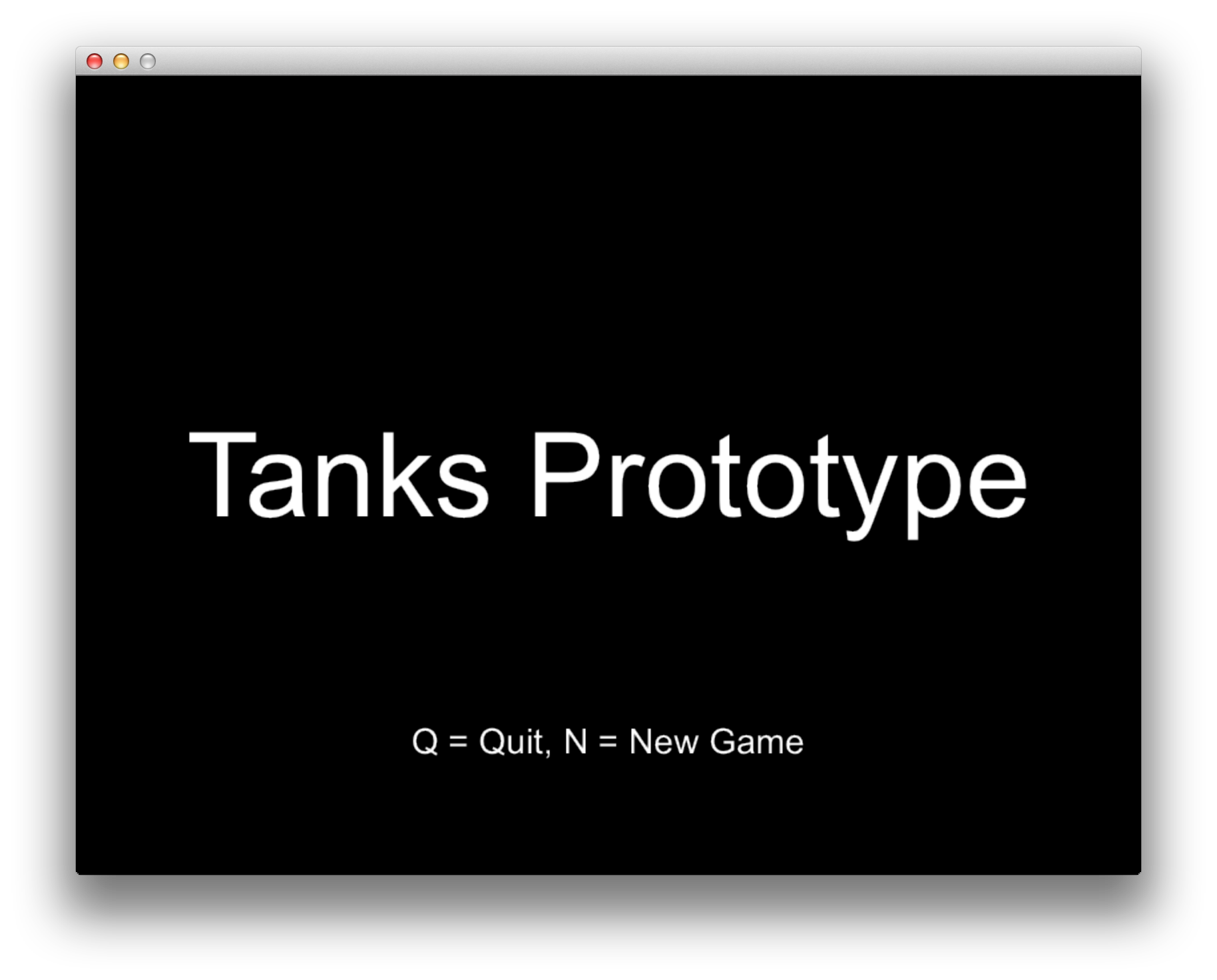
Tanks Prototype menu
Time to go crazy!
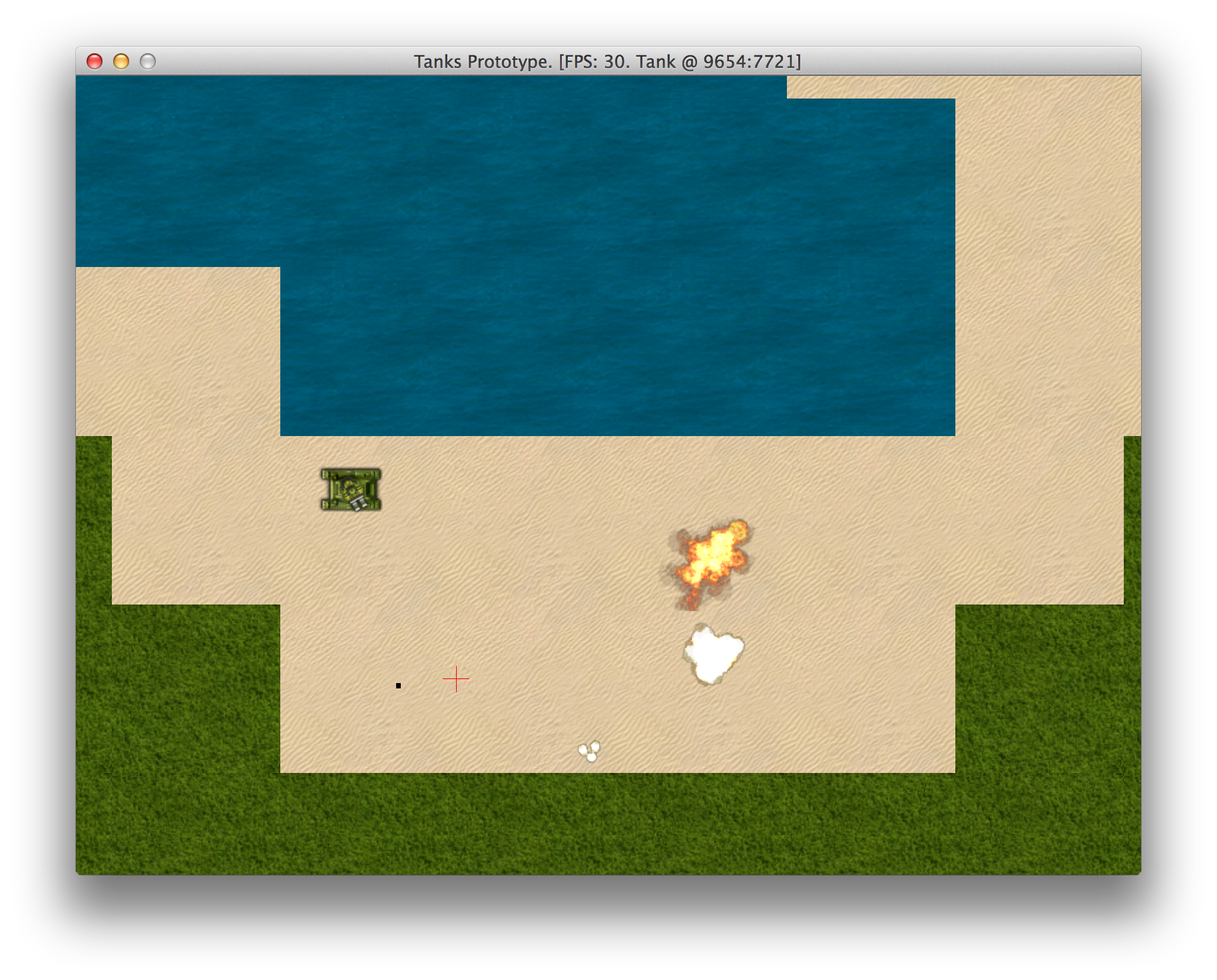
Tanks Prototype gameplay
One thing should be bugging you at this point. FPS shows only 30, rather than 60. That means our prototype is slow. We will put it back to 60 FPS in next chapter.