Making The Prototype Playable
Right now we have a somewhat playable, but boring prototype without any scores or winning conditions. You can just run around and shoot other tanks. Nobody would play a game like this, hence we need to to add the missing parts. There is a crazy amount of them. It is time to give it a thorough play through and write down all the ideas and pain points about the prototype.
Here is my list:
- Enemy tanks do not respawn.
- Enemy tanks shoot at my current location, not at where I will be when bullet hits me.
- Enemy tanks don’t avoid collisions.
- Random maps are boring and lack detail, could use more tiles or random environment objects.
- Bullets are hard to see on green surface.
- Hard to tell where enemies are coming from, radar would help.
- Sounds play at full volume even when something happens across the whole map.
- My tank should respawn after it’s dead.
- Motion and firing mechanics seem clumsy.
- Map boundaries are visible when you come to the edge.
- Enemy tank movement patterns need polishing and improvement.
- Both my tank and enemies don’t have any identity. Sometimes hard to distinguish who is who.
- No idea who has most kills. HUD with score and some state that displays score details would help.
- Would be great to have random powerups like health, extra damage.
- Explosions don’t leave a trace.
- Tanks could leave trails.
- Dead tanks keep piling up and cluttering the map.
- Camera should be scouting ahead of you when you move, not dragging behind.
- Bullets seem to accelerate.
This will keep us busy for a while, but in the end we will probably have something that will hopefully be able to entertain people for more than 3 minutes.
Some items on this list are easy fixes. After playing around with Pixelmator for 15 minutes, I ended up with a bullet that is visible on both light and dark backgrounds:
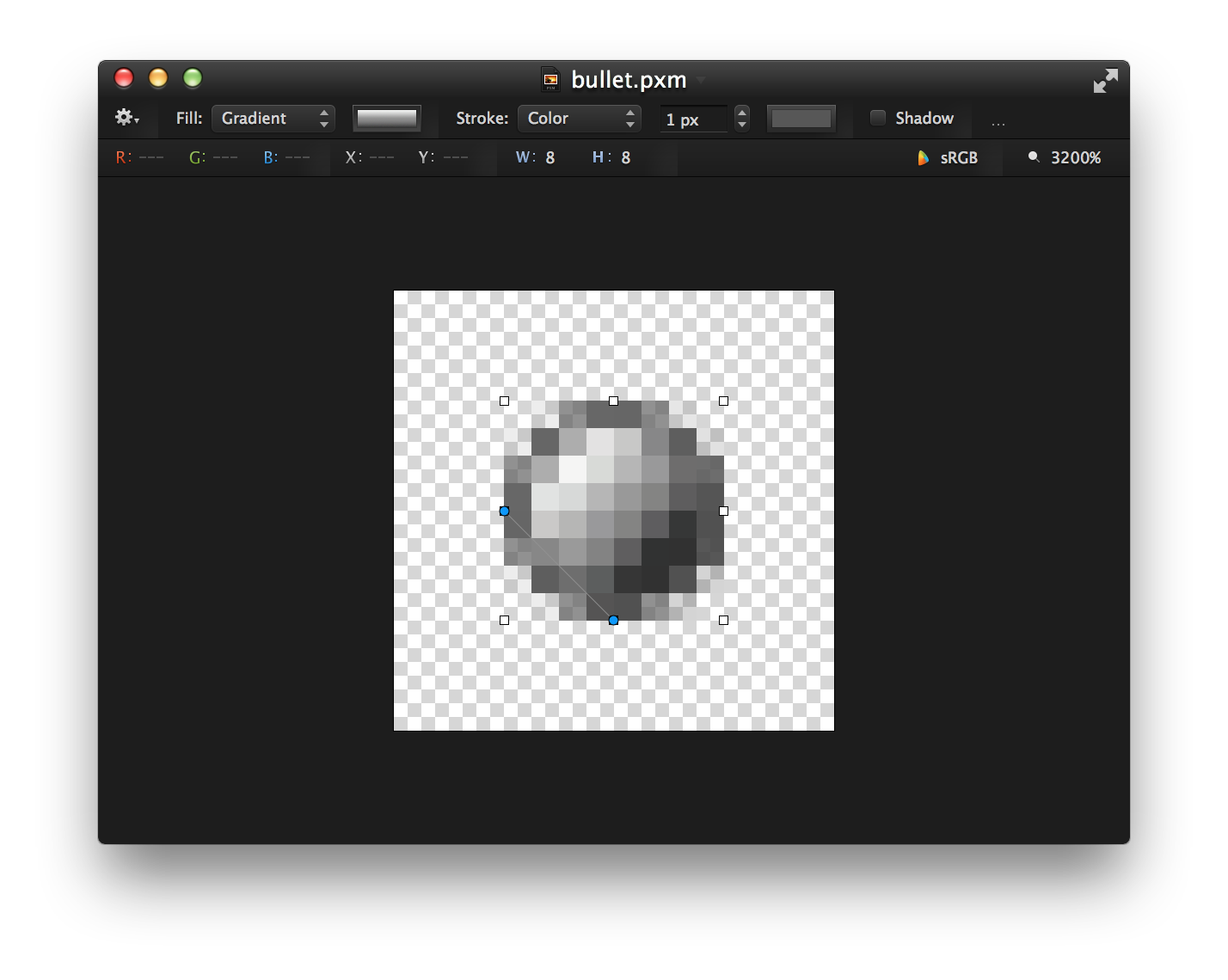
Highly visible bullet
Motion and firing mechanics will either have to be tuned setting by setting, or rewritten from scratch. Implementing score system, powerups and improving enemy AI deserve to have chapters of their own. The rest can be taken care of right away.
Drawing Water Beyond Map Boundaries
We don’t want to see darkness when we come to the edge of game world. Luckily, it is a trivial fix.
In Map#draw we check if tile exists in map before drawing it. When tile does not exist, we can
draw water instead. And we can always fallback to water tile in Map#tile_at:
class Map
  # ...
  def draw(viewport)
    viewport.map! { |p| p / TILE_SIZE }
    x0, x1, y0, y1 = viewport.map(&:to_i)
    (x0..x1).each do |x|
      (y0..y1).each do |y|
        row = @map[x]
        map_x = x * TILE_SIZE
        map_y = y * TILE_SIZE
        if row
          tile = @map[x][y]
          if tile
            tile.draw(map_x, map_y, 0)
          else
            @water.draw(map_x, map_y, 0)
          end
        else
          @water.draw(map_x, map_y, 0)
        end
      end
    end
  end
  # ...
  private
  # ...
  def tile_at(x, y)
    t_x = ((x / TILE_SIZE) % TILE_SIZE).floor
    t_y = ((y / TILE_SIZE) % TILE_SIZE).floor
    row = @map[t_x]
    row ? row[t_y] : @water
  end
  # ...
end
Now the edge looks much better:
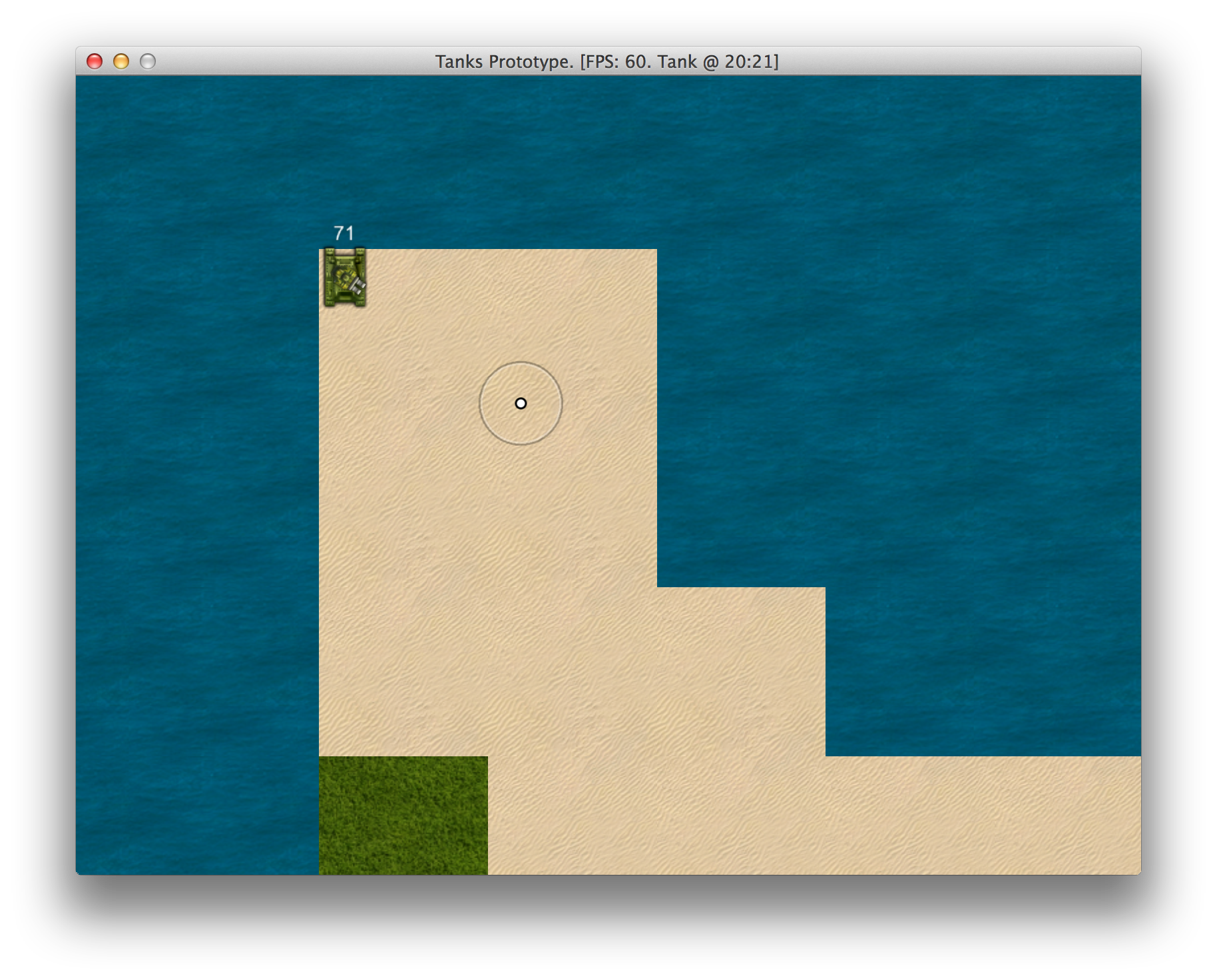
Map edge
Generating Tree Clusters
To make the map more fun to play at, we will generate some trees. Let’s start with Tree class:
09-polishing/entities/tree.rb
 1 class Tree < GameObject
 2   attr_reader :x, :y, :health, :graphics
 3
 4   def initialize(object_pool, x, y, seed)
 5     super(object_pool)
 6     @x, @y = x, y
 7     @graphics = TreeGraphics.new(self, seed)
 8     @health = Health.new(self, object_pool, 30, false)
 9     @angle = rand(-15..15)
10   end
11
12   def on_collision(object)
13     @graphics.shake(object.direction)
14   end
15
16   def box
17     [x, y]
18   end
19 end
Nothing fancy here, we want it to shake on collision, and it has graphics and health. seed will
used to generate clusters of similar trees. Let’s take a look at TreeGraphics:
09-polishing/entities/components/tree_graphics.rb
 1 class TreeGraphics < Component
 2   SHAKE_TIME = 100
 3   SHAKE_COOLDOWN = 200
 4   SHAKE_DISTANCE = [2, 1, 0, -1, -2, -1, 0, 1, 0, -1, 0]
 5   def initialize(object, seed)
 6     super(object)
 7     load_sprite(seed)
 8   end
 9
10   def shake(direction)
11     now = Gosu.milliseconds
12     return if @shake_start &&
13       now - @shake_start < SHAKE_TIME + SHAKE_COOLDOWN
14     @shake_start = now
15     @shake_direction = direction
16     @shaking = true
17   end
18
19   def adjust_shake(x, y, shaking_for)
20     elapsed = [shaking_for, SHAKE_TIME].min / SHAKE_TIME.to_f
21     frame = ((SHAKE_DISTANCE.length - 1) * elapsed).floor
22     distance = SHAKE_DISTANCE[frame]
23     Utils.point_at_distance(x, y, @shake_direction, distance)
24   end
25
26   def draw(viewport)
27     if @shaking
28       shaking_for = Gosu.milliseconds - @shake_start
29       shaking_x, shaking_y = adjust_shake(
30         center_x, center_y, shaking_for)
31       @tree.draw(shaking_x, shaking_y, 5)
32       if shaking_for >= SHAKE_TIME
33         @shaking = false
34       end
35     else
36       @tree.draw(center_x, center_y, 5)
37     end
38     Utils.mark_corners(object.box) if $debug
39   end
40
41   def height
42     @tree.height
43   end
44
45   def width
46     @tree.width
47   end
48
49   private
50
51   def load_sprite(seed)
52     frame_list = trees.frame_list
53     frame = frame_list[(frame_list.size * seed).round]
54     @tree = trees.frame(frame)
55   end
56
57   def center_x
58     @center_x ||= x - @tree.width / 2
59   end
60
61   def center_y
62     @center_y ||= y - @tree.height / 2
63   end
64
65   def trees
66     @@trees ||= Gosu::TexturePacker.load_json($window,
67       Utils.media_path('trees_packed.json'))
68   end
69 end
Shaking is probably the most interesting part here. When shake is called, graphics will start
drawing tree shifted in given direction by amount defined in SHAKE_DISTANCE array. draw will be
stepping through SHAKE_DISTANCE depending on SHAKE_TIME, and it will not be shaken again for
SHAKE_COOLDOWN period, to avoid infinite shaking while driving into it.
We also need some adjustments to TankPhysics and Tank to be able to hit trees. First, we want
to create an empty on_collision(object) method in GameObject class, so all game objects will
be able to collide.
Then, TankPhysics starts calling Tank#on_collision when collision is detected:
class Tank < GameObject
  # ...
  def on_collision(object)
    return unless object
    # Avoid recursion
    if object.class == Tank
      # Inform AI about hit
      object.input.on_collision(object)
    else
      # Call only on non-tanks to avoid recursion
      object.on_collision(self)
    end
    # Bullets should not slow Tanks down
    if object.class != Bullet
      @sounds.collide if @physics.speed > 1
    end
  end
  # ...
end
The final ingredient to our Tree is Health, which is extracted from TankHealth to reduce
duplication. TankHealth now extends it:
09-polishing/entities/components/health.rb
 1 class Health < Component
 2   attr_accessor :health
 3
 4   def initialize(object, object_pool, health, explodes)
 5     super(object)
 6     @explodes = explodes
 7     @object_pool = object_pool
 8     @initial_health = @health = health
 9     @health_updated = true
10   end
11
12   def restore
13     @health = @initial_health
14     @health_updated = true
15   end
16
17   def dead?
18     @health < 1
19   end
20
21   def update
22     update_image
23   end
24
25   def inflict_damage(amount)
26     if @health > 0
27       @health_updated = true
28       @health = [@health - amount.to_i, 0].max
29       after_death if dead?
30     end
31   end
32
33   def draw(viewport)
34     return unless draw?
35     @image && @image.draw(
36       x - @image.width / 2,
37       y - object.graphics.height / 2 -
38       @image.height, 100)
39   end
40
41   protected
42
43   def draw?
44     $debug
45   end
46
47   def update_image
48     return unless draw?
49     if @health_updated
50       text = @health.to_s
51       font_size = 18
52       @image = Gosu::Image.from_text(
53           $window, text,
54           Gosu.default_font_name, font_size)
55       @health_updated = false
56     end
57   end
58
59   def after_death
60     if @explodes
61       if Thread.list.count < 8
62         Thread.new do
63           sleep(rand(0.1..0.3))
64           Explosion.new(@object_pool, x, y)
65           sleep 0.3
66           object.mark_for_removal
67         end
68       else
69         Explosion.new(@object_pool, x, y)
70         object.mark_for_removal
71       end
72     else
73       object.mark_for_removal
74     end
75   end
76 end
Yes, you can make tree explode when it’s destroyed. And it causes cool chain reactions blowing up whole tree clusters. But let’s not do that, because we will add something more appropriate for explosions.
Our Tree is ready to fill the landscape. We will do it in Map class, which will now need
to know about ObjectPool, because trees will go there.
class Map
  # ...
  def initialize(object_pool)
    load_tiles
    @object_pool = object_pool
    object_pool.map = self
    @map = generate_map
    generate_trees
  end
  # ...
  def generate_trees
    noises = Perlin::Noise.new(2)
    contrast = Perlin::Curve.contrast(
      Perlin::Curve::CUBIC, 2)
    trees = 0
    target_trees = rand(300..500)
    while trees < target_trees do
      x = rand(0..MAP_WIDTH * TILE_SIZE)
      y = rand(0..MAP_HEIGHT * TILE_SIZE)
      n = noises[x * 0.001, y * 0.001]
      n = contrast.call(n)
      if tile_at(x, y) == @grass && n > 0.5
        Tree.new(@object_pool, x, y, n * 2 - 1)
        trees += 1
      end
    end
  end
  # ...
end
Perlin noise is used in similar fashion as it was when we generated map tiles. We allow creating
trees only if noise level is above 0.5, and use noise level as seed value - n * 2 - 1 will be a
number between 0 and 1 when n is in 0.5..1 range. And we only allow creating trees on grass
tiles.
Now our map looks a little better:
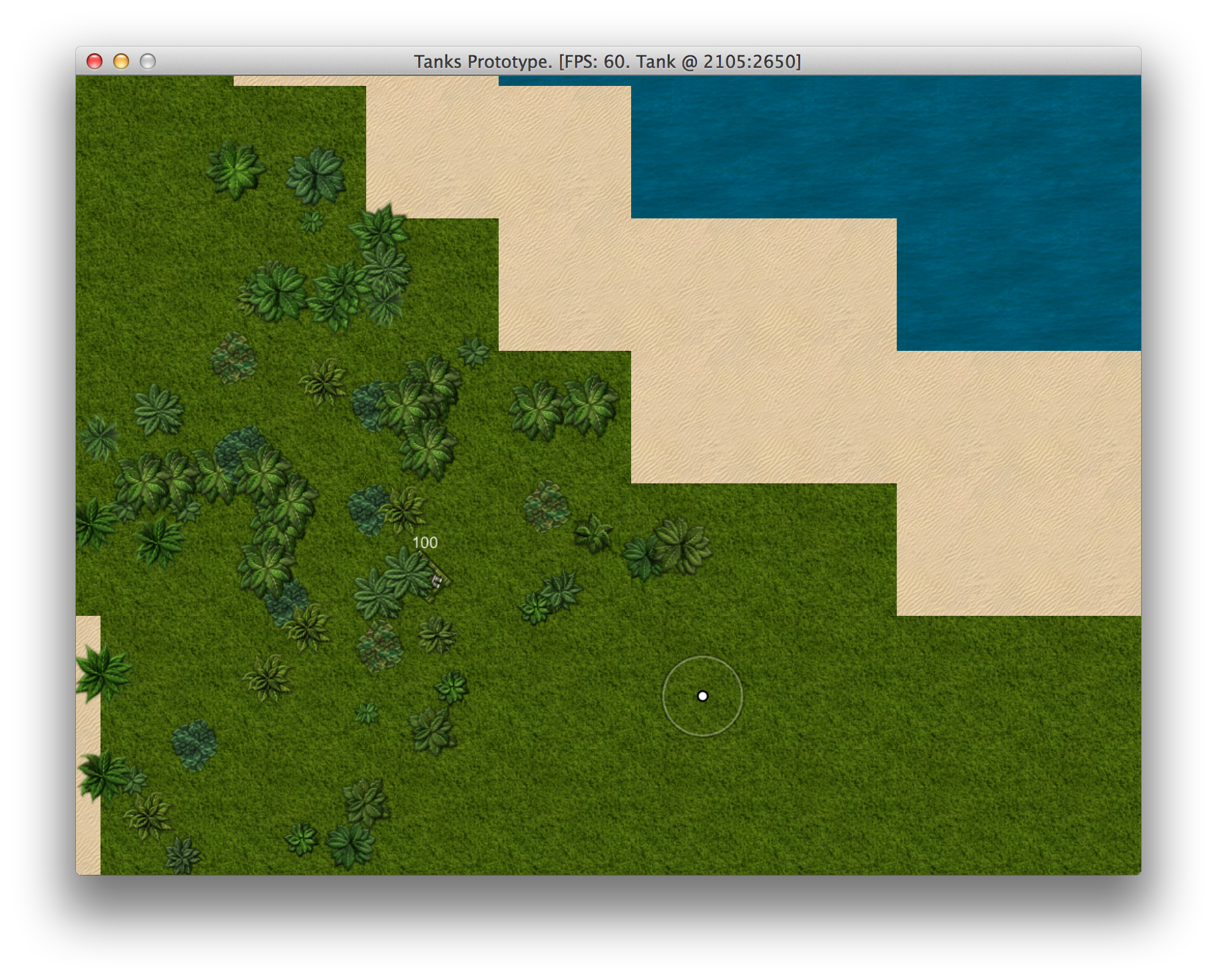
Hiding among procedurally generated trees
Generating Random Objects
Trees are great, but we want more detail. Let’s spice things up with explosive boxes and barrels.
They will be using the same class with single sprite sheet, so while the sprite will be chosen
randomly, behavior will be the same. This new class will be called Box:
09-polishing/entities/box.rb
 1 class Box < GameObject
 2   attr_reader :x, :y, :health, :graphics, :angle
 3
 4   def initialize(object_pool, x, y)
 5     super(object_pool)
 6     @x, @y = x, y
 7     @graphics = BoxGraphics.new(self)
 8     @health = Health.new(self, object_pool, 10, true)
 9     @angle = rand(-15..15)
10   end
11
12   def on_collision(object)
13     return unless object.physics.speed > 1.0
14     @x, @y = Utils.point_at_distance(@x, @y, object.direction, 2)
15     @box = nil
16   end
17
18   def box
19     return @box if @box
20     w = @graphics.width / 2
21     h = @graphics.height / 2
22     # Bounding box adjusted to trim shadows
23     @box = [x - w + 4,     y - h + 8,
24             x + w , y - h + 8,
25             x + w , y + h,
26             x - w + 4,     y + h]
27     @box = Utils.rotate(@angle, @x, @y, *@box)
28   end
29 end
It will be generated with slight random angle, to preserve realistic shadows but give an impression
of chaotic placement. Tanks will also be able to push boxes a little on collision, but only when
going fast enough. Health component is the same one that Tree has, but initialized with less
health and explosive flag is true, so the box will blow up after one hit and deal extra damage to
the surroundings.
BoxGraphics is nothing fancy, it just loads random sprite upon initialization:
09-polishing/entities/components/box_graphics.rb
 1 class BoxGraphics < Component
 2   def initialize(object)
 3     super(object)
 4     load_sprite
 5   end
 6
 7   def draw(viewport)
 8     @box.draw_rot(x, y, 0, object.angle)
 9     Utils.mark_corners(object.box) if $debug
10   end
11
12   def height
13     @box.height
14   end
15
16   def width
17     @box.width
18   end
19
20   private
21
22   def load_sprite
23     frame = boxes.frame_list.sample
24     @box = boxes.frame(frame)
25   end
26
27   def center_x
28     @center_x ||= x - width / 2
29   end
30
31   def center_y
32     @center_y ||= y - height / 2
33   end
34
35   def boxes
36     @@boxes ||= Gosu::TexturePacker.load_json($window,
37       Utils.media_path('boxes_barrels.json'))
38   end
39 end
Time to generate boxes in our Map. It will be similar to trees, but we won’t need Perlin noise,
since there will be way fewer boxes than trees, so we don’t need to form patterns. All we need to
do is to check if we’re not generating box on water.
class Map
  # ...
  def initialize(object_pool)
    # ...
    generate_boxes
  end
  # ...
  def generate_boxes
    boxes = 0
    target_boxes = rand(10..30)
    while boxes < target_boxes do
      x = rand(0..MAP_WIDTH * TILE_SIZE)
      y = rand(0..MAP_HEIGHT * TILE_SIZE)
      if tile_at(x, y) != @water
        Box.new(@object_pool, x, y)
        boxes += 1
      end
    end
  end
  # ...
end
Now give it a go. Beautiful, isn’t it?
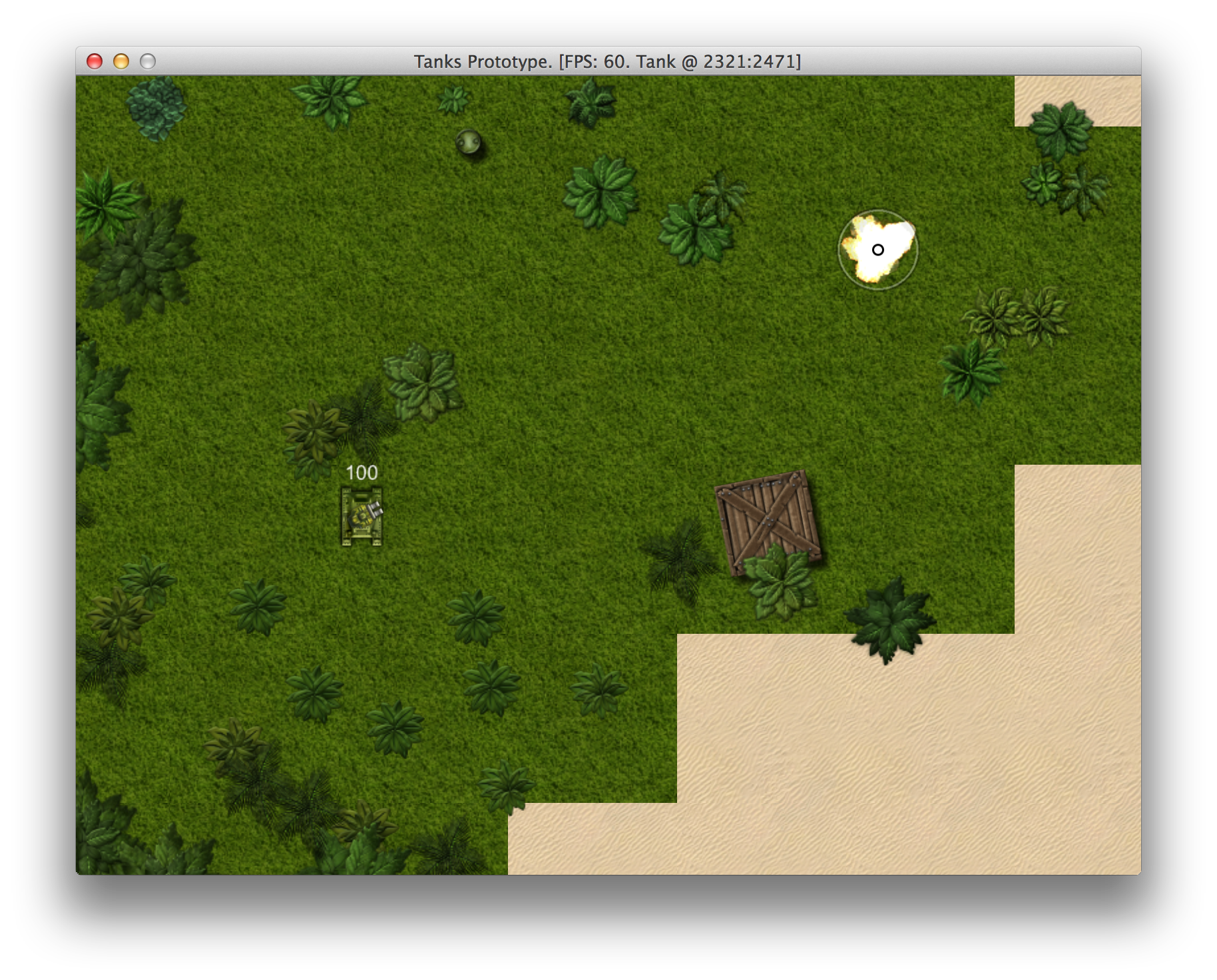
Boxes and barrels in the jungle
Implementing A Radar
With all the visual noise it is getting increasingly difficult to see enemy tanks. That’s why we
will implement a Radar to help ourselves.
09-polishing/entities/radar.rb
 1 class Radar
 2   UPDATE_FREQUENCY = 1000
 3   WIDTH = 150
 4   HEIGHT = 100
 5   PADDING = 10
 6   # Black with 33% transparency
 7   BACKGROUND = Gosu::Color.new(255 * 0.33, 0, 0, 0)
 8   attr_accessor :target
 9
10   def initialize(object_pool, target)
11     @object_pool = object_pool
12     @target = target
13     @last_update = 0
14   end
15
16   def update
17     if Gosu.milliseconds - @last_update > UPDATE_FREQUENCY
18       @nearby = nil
19     end
20     @nearby ||= @object_pool.nearby(@target, 2000).select do |o|
21       o.class == Tank && !o.health.dead?
22     end
23   end
24
25   def draw
26     x1, x2, y1, y2 = radar_coords
27     $window.draw_quad(
28       x1, y1, BACKGROUND,
29       x2, y1, BACKGROUND,
30       x2, y2, BACKGROUND,
31       x1, y2, BACKGROUND,
32       200)
33     draw_tank(@target, Gosu::Color::GREEN)
34     @nearby && @nearby.each do |t|
35       draw_tank(t, Gosu::Color::RED)
36     end
37   end
38
39   private
40
41   def draw_tank(tank, color)
42     x1, x2, y1, y2 = radar_coords
43     tx = x1 + WIDTH / 2 + (tank.x - @target.x) / 20
44     ty = y1 + HEIGHT / 2 +  (tank.y - @target.y) / 20
45     if (x1..x2).include?(tx) && (y1..y2).include?(ty)
46       $window.draw_quad(
47         tx - 2, ty - 2, color,
48         tx + 2, ty - 2, color,
49         tx + 2, ty + 2, color,
50         tx - 2, ty + 2, color,
51         300)
52     end
53   end
54
55   def radar_coords
56     x1 = $window.width - WIDTH - PADDING
57     x2 = $window.width - PADDING
58     y1 = $window.height - HEIGHT - PADDING
59     y2 = $window.height - PADDING
60     [x1, x2, y1, y2]
61   end
62 end
Radar, like Camera, also has a target. It uses ObjectPool to query nearby objects and filters
out instances of alive Tank. Then it draws a transparent black background and small dots for each
tank, green for target, red for the rest.
To avoid querying ObjectPool too often, Radar updates itself only once every second.
It is initialized, updated and drawn in PlayState, right after Camera:
class PlayState < GameState
  # ...
  def initialize
    # ...
    @camera.target = @tank
    @radar = Radar.new(@object_pool, @tank)
    # ...
  end
  # ...
  def update
    # ...
    @camera.update
    @radar.update
    # ...
  end
  # ...
  def draw
    # ...
    @camera.draw_crosshair
    @radar.draw
  end
  # ...
end
Time to enjoy the results.
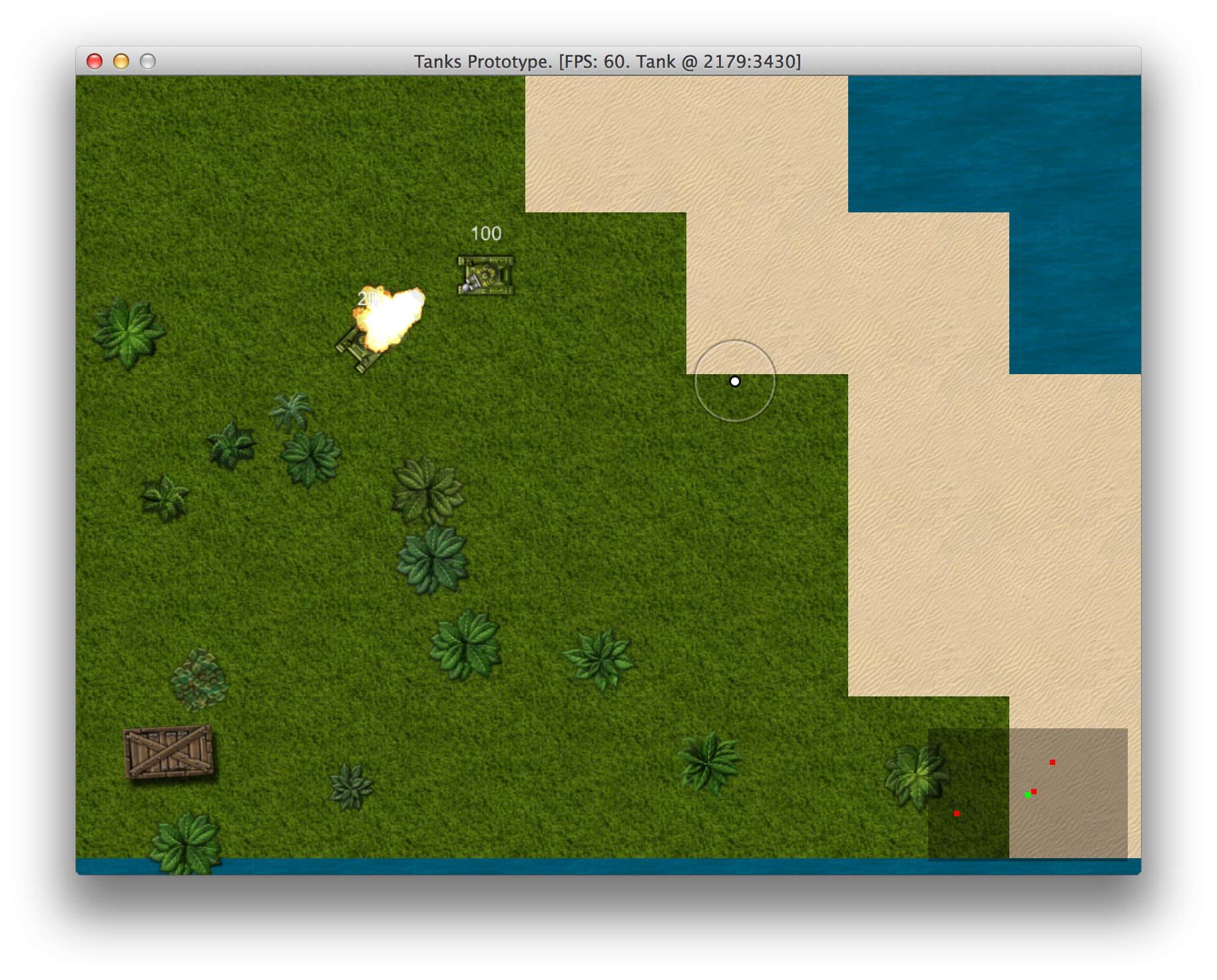
Radar in action
Dynamic Sound Volume And Panning
We have improved the visuals, but sound is still terrible. Like some superhero, you can hear everything that happens in the map, and it can drive you insane. We will fix that in a moment.
The idea is to make everything that happens further away from camera target sound less loud, until the sound fades away completely. To make player’s experience more immersive, we will also take advantage of stereo speakers - sounds should appear to be coming from the right direction.
Unfortunately,
Gosu::Sample#play_pan
does not work as one would expect it to. If you play the sample with just a little panning, it
completely cuts off the opposite channel, meaning that if you play a sample with pan level of 0.1
(10% to the right), you would expect to hear something in left speaker as well. The actual behavior
is that sound plays through the right speaker pretty loudly, and if you increase pan level to, say,
0.7, you will hear the sound through right speaker again, but it will be way more silent.
To implement realistic stereo sounds that come through both speakers when panned, we need to play
two samples with opposite pan level. After some experimenting, I discovered that fiddling with
pan level makes things sound weird, while playing with volume produces softer, more subtle
effect. This is what I ended up having:
09-polishing/misc/stereo_sample.rb
 1 class StereoSample
 2   @@all_instances = []
 3
 4   def self.register_instances(instances)
 5     @@all_instances << instances
 6   end
 7
 8   def self.cleanup
 9     @@all_instances.each do |instances|
10       instances.each do |key, instance|
11         unless instance.playing? || instance.paused?
12           instances.delete(key)
13         end
14       end
15     end
16   end
17
18   def initialize(window, sound_l, sound_r = sound_l)
19     @sound_l = Gosu::Sample.new(window, sound_l)
20     # Use same sample in mono -> stereo
21     if sound_l == sound_r
22       @sound_r = @sound_l
23     else
24       @sound_r = Gosu::Sample.new(window, sound_r)
25     end
26     @instances = {}
27     self.class.register_instances(@instances)
28   end
29
30   def paused?(id = :default)
31     i = @instances["#{id}_l"]
32     i && i.paused?
33   end
34
35   def playing?(id = :default)
36     i = @instances["#{id}_l"]
37     i && i.playing?
38   end
39
40   def stopped?(id = :default)
41     @instances["#{id}_l"].nil?
42   end
43
44   def play(id = :default, pan = 0,
45            volume = 1, speed = 1, looping = false)
46     @instances["#{id}_l"] = @sound_l.play_pan(
47       -0.2, 0, speed, looping)
48     @instances["#{id}_r"] = @sound_r.play_pan(
49       0.2, 0, speed, looping)
50     volume_and_pan(id, volume, pan)
51   end
52
53   def pause(id = :default)
54     @instances["#{id}_l"].pause
55     @instances["#{id}_r"].pause
56   end
57
58   def resume(id = :default)
59     @instances["#{id}_l"].resume
60     @instances["#{id}_r"].resume
61   end
62
63   def stop
64     @instances.delete("#{id}_l").stop
65     @instances.delete("#{id}_r").stop
66   end
67
68   def volume_and_pan(id, volume, pan)
69     if pan > 0
70       pan_l = 1 - pan * 2
71       pan_r = 1
72     else
73       pan_l = 1
74       pan_r = 1 + pan * 2
75     end
76     pan_l *= volume
77     pan_r *= volume
78     @instances["#{id}_l"].volume = [pan_l, 0.05].max
79     @instances["#{id}_r"].volume = [pan_r, 0.05].max
80   end
81 end
StereoSample manages stereo playback of sample instances, and to avoid memory leaks, it has
cleanup that scans all sample instances and removes samples that have finished playing. For this
removal to work, we need to place a call to StereoSample.cleanup inside PlayState#update
method.
To determine correct pan and volume, we will create some helper methods in Utils module:
module Utils
  HEARING_DISTANCE = 1000.0
  # ...
  def self.volume(object, camera)
    return 1 if object == camera.target
    distance = Utils.distance_between(
      camera.target.x, camera.target.y,
      object.x, object.y)
    distance = [(HEARING_DISTANCE - distance), 0].max
    distance / HEARING_DISTANCE
  end

  def self.pan(object, camera)
    return 0 if object == camera.target
    pan = object.x - camera.target.x
    sig = pan > 0 ? 1 : -1
    pan = (pan % HEARING_DISTANCE) / HEARING_DISTANCE
    if sig > 0
      pan
    else
      -1 + pan
    end
  end

  def self.volume_and_pan(object, camera)
    [volume(object, camera), pan(object, camera)]
  end
end
Apparently, having access to Camera is necessary for calculating sound volume and pan, so we will
add attr_accessor :camera to ObjectPool class and assign it in PlayState constructor. You may
wonder why we didn’t use Camera#target right away. The answer is that camera can change it’s
target. E.g. when your tank dies, new instance will be generated when you respawn, so if all other
objects would still have the reference to your old tank, guess what you would hear?
Remastered TankSounds component is probably the most elaborate example of how StereoSample should be used:
09-polishing/entities/components/tank_sounds.rb
 1 class TankSounds < Component
 2   def initialize(object, object_pool)
 3     super(object)
 4     @object_pool = object_pool
 5   end
 6
 7   def update
 8     id = object.object_id
 9     if object.physics.moving?
10       move_volume = Utils.volume(
11         object, @object_pool.camera)
12       pan = Utils.pan(object, @object_pool.camera)
13       if driving_sound.paused?(id)
14         driving_sound.resume(id)
15       elsif driving_sound.stopped?(id)
16         driving_sound.play(id, pan, 0.5, 1, true)
17       end
18       driving_sound.volume_and_pan(id, move_volume * 0.5, pan)
19     else
20       if driving_sound.playing?(id)
21         driving_sound.pause(id)
22       end
23     end
24   end
25
26   def collide
27     vol, pan = Utils.volume_and_pan(
28       object, @object_pool.camera)
29     crash_sound.play(self.object_id, pan, vol, 1, false)
30   end
31
32   private
33
34   def driving_sound
35     @@driving_sound ||= StereoSample.new(
36       $window, Utils.media_path('tank_driving.mp3'))
37   end
38
39   def crash_sound
40     @@crash_sound ||= StereoSample.new(
41       $window, Utils.media_path('metal_interaction2.wav'))
42   end
43 end
And this is how static ExplosionSounds looks like:
09-polishing/entities/components/explosion_sounds.rb
 1 class ExplosionSounds
 2   class << self
 3     def play(object, camera)
 4       volume, pan = Utils.volume_and_pan(object, camera)
 5       sound.play(object.object_id, pan, volume)
 6     end
 7
 8     private
 9
10     def sound
11       @@sound ||= StereoSample.new(
12         $window, Utils.media_path('explosion.mp3'))
13     end
14   end
15 end
After wiring everything so that sound components have access to ObjectPool, the rest is
straightforward.
Giving Enemies Identity
Wouldn’t it be great if you could tell yourself apart from the enemies. Moreover, enemies could have names, so you would know which one is more aggressive or have, you know, personal issues with someone.
To do that we need to ask the player to input a nickname, and choose some funny names for each enemy AI. Here is a nice list we will grab: http://www.paulandstorm.com/wha/clown-names/
We first compile everything into a text filed called names.txt, that looks like this:
media/names.txt
Strippy
Boffo
Buffo
Drips
...
Now we need a class to parse the list and give out random names from it. We also want to limit name length to something that displays nicely.
09-polishing/misc/names.rb
 1 class Names
 2   def initialize(file)
 3     @names = File.read(file).split("\n").reject do |n|
 4       n.size > 12
 5     end
 6   end
 7
 8   def random
 9     name = @names.sample
10     @names.delete(name)
11     name
12   end
13 end
Then we need to place those names somewhere. We could assign them to tanks, but think ahead - if
our player and AI enemies will respawn, we should give names to inputs, because Tank is
replaceable, driver is not. Well, it is, but let’s not get too deep into it.
For now we just add name parameter to PlayerInput and AiInput initializers, save it in @name
instance variable, and then add draw(viewport) method to make it render below the tank:
# 09-polishing/entities/components/player_input.rb
class PlayerInput < Component
  # Dark green
  NAME_COLOR = Gosu::Color.argb(0xee084408)

  def initialize(name, camera)
    super(nil)
    @name = name
    @camera = camera
  end
  # ...
  def draw(viewport)
    @name_image ||= Gosu::Image.from_text(
      $window, @name, Gosu.default_font_name, 20)
    @name_image.draw(
      x - @name_image.width / 2 - 1,
      y + object.graphics.height / 2, 100,
      1, 1, Gosu::Color::WHITE)
    @name_image.draw(
      x - @name_image.width / 2,
      y + object.graphics.height / 2, 100,
      1, 1, NAME_COLOR)
  end
  # ...
end

# 09-polishing/entities/components/ai_input.rb
class AiInput < Component
  # Dark red
  NAME_COLOR = Gosu::Color.argb(0xeeb10000)

  def initialize(name, object_pool)
    super(nil)
    @object_pool = object_pool
    @name = name
    @last_update = Gosu.milliseconds
  end
  # ...
  def draw(viewport)
    @motion.draw(viewport)
    @gun.draw(viewport)
    @name_image ||= Gosu::Image.from_text(
      $window, @name, Gosu.default_font_name, 20)
    @name_image.draw(
      x - @name_image.width / 2 - 1,
      y + object.graphics.height / 2, 100,
      1, 1, Gosu::Color::WHITE)
    @name_image.draw(
      x - @name_image.width / 2,
      y + object.graphics.height / 2, 100,
      1, 1, NAME_COLOR)
  end
  # ...
end
We can see that generic Input class can be easily extracted, but let’s follow the
Rule of three and
not do premature refactoring.
Instead, run the game and enjoy dying from a bunch of mad clowns.
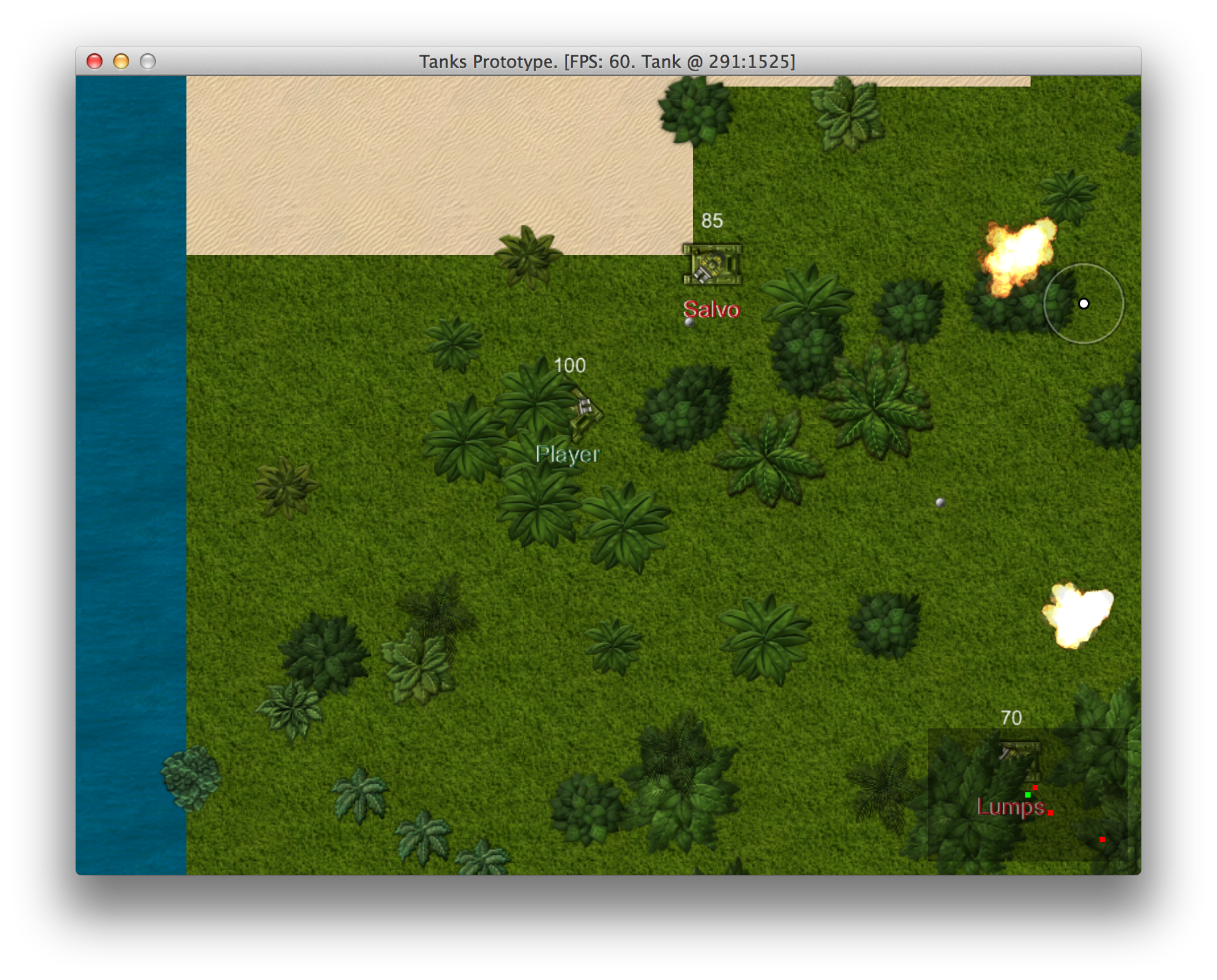
Identity makes a difference
Respawning Tanks And Removing Dead Ones
To implement respawning we could use Map#find_spawn_point every time we wanted to respawn, but it
may get slow, because it brute forces the map for random spots that are not water. We don’t want
our game to start freezing when tanks are respawning, so we will change how tank spawning works.
Instead of looking for a new respawn point all the time, we will pre-generate several of them for
reuse.
class Map
  # ...
  def spawn_points(max)
    @spawn_points = (0..max).map do
      find_spawn_point
    end
    @spawn_points_pointer = 0
  end

  def spawn_point
    @spawn_points[(@spawn_points_pointer += 1) % @spawn_points.size]
  end
  # ...
end
Here we have spawn_points method that prepares a number of spawn points and stores them in
@spawn_points instance variable, and spawn_point method that cycles through all @spawn_points
and returns them one by one. find_spawn_point can now become private.
We will use Map#spawn_points when initializing PlayState and pass ObjectPool to PlayerInput
(AiInput already has it), so that we will be able to call @object_pool.map.spawn_point when needed.
class PlayState < GameState
  # ...
  def initialize
    # ...
    @map = Map.new(@object_pool)
    @map.spawn_points(15)
    @tank = Tank.new(@object_pool,
      PlayerInput.new('Player', @camera, @object_pool))
    # ...
    10.times do |i|
      Tank.new(@object_pool, AiInput.new(
        @names.random, @object_pool))
    end
  end
  # ...
end
When tank dies, we want it to stay dead for 5 seconds and then respawn in one of our predefined
spawn points. We will achieve that by adding respawn method and calling it in PlayerInput#update and
AiInput#update if tank is dead.
# 09-polishing/entities/components/player_input.rb
class PlayerInput < Component
  # ...
  def update
    return respawn if object.health.dead?
    # ...
  end
  # ...
  private

  def respawn
    if object.health.should_respawn?
      object.health.restore
      object.x, object.y = @object_pool.map.spawn_point
      @camera.x, @camera.y = x, y
      PlayerSounds.respawn(object, @camera)
    end
  end
  # ...
end

# 09-polishing/entities/components/ai_input.rb
class AiInput < Component
  # ...
  def update
    return respawn if object.health.dead?
    # ...
  end
  # ...
  private

  def respawn
    if object.health.should_respawn?
      object.health.restore
      object.x, object.y = @object_pool.map.spawn_point
      PlayerSounds.respawn(object, @object_pool.camera)
    end
  end
end
We need some changes in TankHealth class too:
class TankHealth < Health
  RESPAWN_DELAY = 5000
  # ...
  def should_respawn?
    Gosu.milliseconds - @death_time > RESPAWN_DELAY
  end
  # ...
  def after_death
    @death_time = Gosu.milliseconds
    # ...
  end
end

class Health < Component
  # ...
  def restore
    @health = @initial_health
    @health_updated = true
  end
  # ...
end
It shouldn’t be hard to put everything together and enjoy the never ending gameplay.
You may have noticed that we also added a sound that will be played when player respawns. A nice “whoosh”.
09-polishing/entities/components/player_sounds.rb
 1 class PlayerSounds
 2   class << self
 3     def respawn(object, camera)
 4       volume, pan = Utils.volume_and_pan(object, camera)
 5       respawn_sound.play(object.object_id, pan, volume * 0.5)
 6     end
 7
 8     private
 9
10     def respawn_sound
11       @@respawn ||= StereoSample.new(
12         $window, Utils.media_path('respawn.wav'))
13     end
14   end
15 end
Displaying Explosion Damage Trails
When something blows up, you expect it to leave a trail, right? In our case explosions disappear as
if nothing has ever happened, and we just can’t leave it like this. Let’s introduce Damage game
object
that will be responsible for displaying explosion residue on sand and grass:
09-polishing/entities/damage.rb
 1 class Damage < GameObject
 2   MAX_INSTANCES = 100
 3   attr_accessor :x, :y
 4   @@instances = []
 5
 6   def initialize(object_pool, x, y)
 7     super(object_pool)
 8     DamageGraphics.new(self)
 9     @x, @y = x, y
10     track(self)
11   end
12
13   def effect?
14     true
15   end
16
17   private
18
19   def track(instance)
20     if @@instances.size < MAX_INSTANCES
21       @@instances << instance
22     else
23       out = @@instances.shift
24       out.mark_for_removal
25       @@instances << instance
26     end
27   end
28 end
Damage tracks it’s instances and starts removing old ones when MAX_INSTANCES are reached.
Without this optimization, the game would get increasingly slower every time somebody shoots.
We have also added a new game object trait - effect? returns true on Damage and Explosion,
false on Tank, Tree, Box and Bullet. That way we can filter out effects when querying
ObjectPool#nearby for collisions or enemies.
09-polishing/entities/object_pool.rb
 1 class ObjectPool
 2   attr_accessor :objects, :map, :camera
 3
 4   def initialize
 5     @objects = []
 6   end
 7
 8   def nearby(object, max_distance)
 9     non_effects.select do |obj|
10       obj != object &&
11         (obj.x - object.x).abs < max_distance &&
12         (obj.y - object.y).abs < max_distance &&
13         Utils.distance_between(
14           obj.x, obj.y, object.x, object.y) < max_distance
15     end
16   end
17
18   def non_effects
19     @objects.reject(&:effect?)
20   end
21 end
When it comes to rendering graphics, to make an impression of randomness, we will cycle through several different damage images and draw them rotated:
09-polishing/entities/components/damage_graphics.rb
 1 class DamageGraphics < Component
 2   def initialize(object_pool)
 3     super
 4     @image = images.sample
 5     @angle = rand(0..360)
 6   end
 7
 8   def draw(viewport)
 9     @image.draw_rot(x, y, 0, @angle)
10   end
11
12   private
13
14   def images
15     @@images ||= (1..4).map do |i|
16       Gosu::Image.new($window,
17         Utils.media_path("damage#{i}.png"), false)
18     end
19   end
20 end
Explosion will be responsible for creating Damage instances on solid ground, just before
explosion animation starts:
class Explosion < GameObject
  def initialize(object_pool, x, y)
    # ...
    if @object_pool.map.can_move_to?(x, y)
      Damage.new(@object_pool, @x, @y)
    end
    # ...
  end
  # ...
end
And this is how the result looks like:
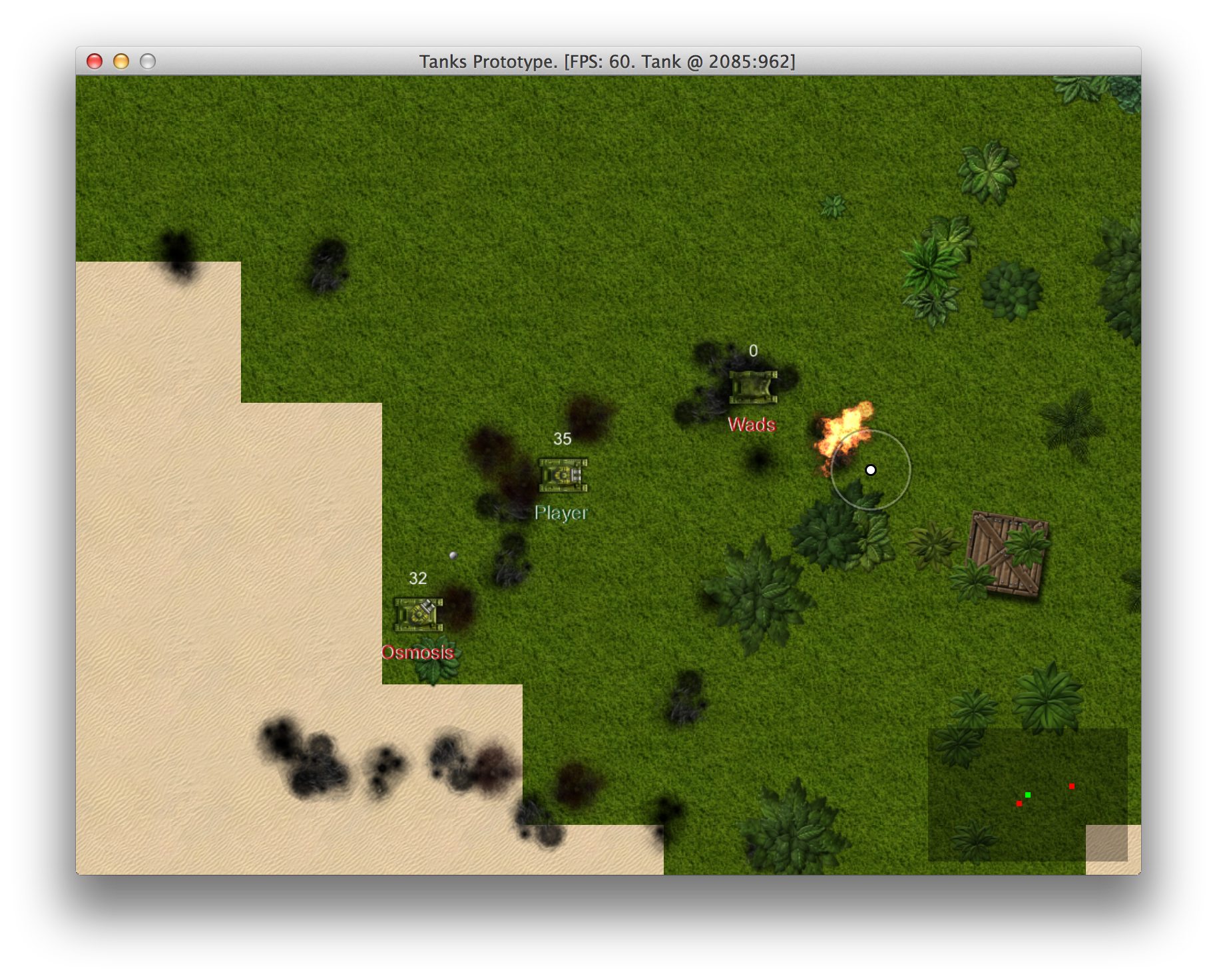
Damaged battlefield
Debugging Bullet Physics
When playing the game, there is a feeling that bullets start out slow when fired and gain speed as time goes.
Let’s review BulletPhysics#update and think why this is happening:
class BulletPhysics < Component
  # ...
  def update
    fly_speed = Utils.adjust_speed(object.speed)
    fly_distance = (Gosu.milliseconds - object.fired_at) *
      0.001 * fly_speed / 2
    object.x, object.y = point_at_distance(fly_distance)
    check_hit
    object.explode if arrived?
  end
  # ...
end
Flaw here is very obvious. Gosu.milliseconds - object.fired_at will be increasingly bigger as
time goes, thus increasing fly_distance. The fix is straightforward - we want to calculate
fly_distance using time passed between calls to BulletPhysics#update, like this:
class BulletPhysics < Component
  # ...
  def update
    fly_speed = Utils.adjust_speed(object.speed)
    now = Gosu.milliseconds
    @last_update ||= object.fired_at
    fly_distance = (now - @last_update) * 0.001 * fly_speed
    object.x, object.y = point_at_distance(fly_distance)
    @last_update = now
    check_hit
    object.explode if arrived?
  end
  # ...
end
But if you would run the game now, bullets would fly so slow, that you would feel like Neo in The Matrix. To fix that, we will have to tell our tank to fire bullets a little faster.
class Tank < GameObject
  # ...
  def shoot(target_x, target_y)
    if can_shoot?
      @last_shot = Gosu.milliseconds
      Bullet.new(object_pool, @x, @y, target_x, target_y)
        .fire(self, 1500) # Old value was 100
    end
  end
  # ...
end
Now bullets fly like they are supposed to. I can only wonder why haven’t I noticed this bug in the very beginning.
Making Camera Look Ahead
One of the most annoying things with current state of prototype is that Camera is dragging
behind instead of showing what is in the direction you are moving. To fix the issue, we need to
change the way how Camera moves around. First we need to know where Camera wants to be. We will
use Utils.point_at_distance to choose a spot ahead of the Tank. Then, Camera#update needs to be rewritten, so Camera can dynamically adjust to it’s desired
spot. Here are the changes:
class Camera
  # ...
  def desired_spot
    if @target.physics.moving?
      Utils.point_at_distance(
        @target.x, @target.y,
        @target.direction,
        @target.physics.speed.ceil * 25)
    else
      [@target.x, @target.y]
    end
  end
  # ...
  def update
    des_x, des_y = desired_spot
    shift = Utils.adjust_speed(
      @target.physics.speed).floor + 1
    if @x < des_x
      if des_x - @x < shift
        @x = des_x
      else
        @x += shift
      end
    elsif @x > des_x
      if @x - des_x < shift
        @x = des_x
      else
        @x -= shift
      end
    end
    if @y < des_y
      if des_y - @y < shift
        @y = des_y
      else
        @y += shift
      end
    elsif @y > des_y
      if @y - des_y < shift
        @y = des_y
      else
        @y -= shift
      end
    end
    # ...
  end
  # ...
end
It wouldn’t win code style awards, but it does the job. Game is now much more playable.
Reviewing The Changes
Let’s get back to our list of improvements to see what we have done:
- Enemy tanks do not respawn.
- Random maps are boring and lack detail, could use more tiles or random environment objects.
- Bullets are hard to see on green surface.
- Hard to tell where enemies are coming from, radar would help.
- Sounds play at full volume even when something happens across The whole map.
- My tank should respawn after it’s dead.
- Map boundaries are visible when you come to the edge.
- Both my tank and enemies don’t have any identity. Sometimes hard to distinguish who is who.
- Explosions don’t leave a trace.
- Dead tanks keep piling up and cluttering the map.
- Camera should be scouting ahead of you when you move, not dragging behind.
- Bullets seem to accelerate.
Not bad for a start. This is what we still need to cover in next couple of chapters:
- Enemy tanks shoot at my current location, not at where I will be when bullet hits me.
- Enemy tanks don’t avoid collisions.
- Enemy tank movement patterns need polishing and improvement.
- No idea who has most kills. HUD with score and some state that displays score details would
- Would be great to have random powerups like health, extra damage.
- Motion and firing mechanics seem clumsy. help.
- Tanks could leave trails.
I will add “Optimize ObjectPool performance”, because game starts slowing down when too many
objects are added to the pool, and profiling shows that Array#select, which is the heart of
ObjectPool#nearby, is the main cause. Speed is one of most important features of any game, so
let’s not hesitate to improve it.