Implementing Game Statistics
Games like one we are building are all about competition, and you cannot compete if you don’t know the score. Let us introduce a class that will be responsible for keeping tabs on various statistics of every tank.
12-stats/misc/stats.rb
 1 class Stats
 2   attr_reader :name, :kills, :deaths, :shots, :changed_at
 3   def initialize(name)
 4     @name = name
 5     @kills = @deaths = @shots = @damage = @damage_dealt = 0
 6     changed
 7   end
 8
 9   def add_kill(amount = 1)
10     @kills += amount
11     changed
12   end
13
14   def add_death
15     @deaths += 1
16     changed
17   end
18
19   def add_shot
20     @shots += 1
21     changed
22   end
23
24   def add_damage(amount)
25     @damage += amount
26     changed
27   end
28
29   def damage
30     @damage.round
31   end
32
33   def add_damage_dealt(amount)
34     @damage_dealt += amount
35     changed
36   end
37
38   def damage_dealt
39     @damage_dealt.round
40   end
41
42   def to_s
43     "[kills: #{@kills}, " \
44       "deaths: #{@deaths}, " \
45       "shots: #{@shots}, " \
46       "damage: #{damage}, " \
47       "damage_dealt: #{damage_dealt}]"
48   end
49
50   private
51
52   def changed
53     @changed_at = Gosu.milliseconds
54   end
55 end
While building the HUD, we established that Stats should belong to Tank#input, because it
defines who is controlling the tank. So, every instance of PlayerInput and AiInput has to have
it’s own Stats:
# 12-stats/entities/components/player_input.rb
class PlayerInput < Component
  # ...
  attr_reader :stats

  def initialize(name, camera, object_pool)
    # ...
    @stats = Stats.new(name)
  end
  # ...
  def on_damage(amount)
    @stats.add_damage(amount)
  end
  # ...
end

# 12-stats/entities/components/ai_input.rb
class AiInput < Component
  # ...
  attr_reader :stats

  def initialize(name, object_pool)
    # ...
    @stats = Stats.new(name)
  end

  def on_damage(amount)
    # ...
    @stats.add_damage(amount)
  end
end
That itch to extract a base class from PlayerInput and AiInput is getting stronger, but we will
have to resist the urge, for now.
Tracking Kills, Deaths and Damage
To begin tracking kills, we need to know whom does every bullet belong to. Bullet already has
source attribute, which contains the tank that fired it, there will be no trouble to find out who
was the shooter when bullet gets a direct hit. But how about explosions? Bullets that hit the
ground nearby a tank deals indirect damage from the explosion.
Solution is simple, we need to pass the source of the Bullet to the Explosion when it’s being
initialized.
class Bullet < GameObject
  # ...
  def explode
    Explosion.new(object_pool, @x, @y, @source)
    # ...
  end
  # ...
end
Making Damage Personal
Now that we have the source of every Bullet and Explosion they trigger, we can start passing
the cause of damage to Health#inflict_damage and incrementing the appropriate stats.
# 12-stats/entities/components/health.rb
class Health < Component
  # ...
  def inflict_damage(amount, cause)
    if @health > 0
      @health_updated = true
      if object.respond_to?(:input)
        object.input.stats.add_damage(amount)
        # Don't count damage to trees and boxes
        if cause.respond_to?(:input) && cause != object
          cause.input.stats.add_damage_dealt(amount)
        end
      end
      @health = [@health - amount.to_i, 0].max
      after_death(cause) if dead?
    end
  end
  # ...
end

# 12-stats/entities/components/tank_health.rb
class TankHealth < Health
  # ...
  def after_death(cause)
    # ...
    object.input.stats.add_death
    kill = object != cause ? 1 : -1
    cause.input.stats.add_kill(kill)
    # ...
  end
# ...
end
Tracking Damage From Chain Reactions
There is one more way to cause damage. When you shoot a tree, box or barrel, it explodes, probably triggering a chain reaction of explosions around it. If those explosions kill somebody, it would only be fair to account that kill for the tank that triggered this chain reaction.
To solve this, simply pass the cause of death to the Explosion that gets triggered afterwards.
# 12-stats/entities/components/health.rb
class Health < Component
  # ...
  def after_death(cause)
    if @explodes
      Thread.new do
        # ...
        Explosion.new(@object_pool, x, y, cause)
        # ...
      end
      # ...
    end
  end
end

# 12-stats/entities/components/tank_health.rb
class TankHealth < Health
  # ...
  def after_death(cause)
    # ...
    Thread.new do
      # ...
      Explosion.new(@object_pool, x, y, cause)
    end
  end
end
Now every bit of damage gets accounted for.
Displaying Game Score
Having all the data is useless unless we display it somehow. For this, let’s rethink our game
states. Now we have MenuState and PlayState. Both of them can switch one into another. What if
we introduced a PauseState, which would freeze the game and display the list of all tanks along
with their kills. Then MenuState would switch to PlayState, and from PlayState you would be
able to get to PauseState.
Let’s begin by implementing ScoreDisplay, that would print a sorted list of tank kills along with
their names.
12-stats/entities/score_display.rb
 1 class ScoreDisplay
 2   def initialize(object_pool)
 3     tanks = object_pool.objects.select do |o|
 4       o.class == Tank
 5     end
 6     stats = tanks.map(&:input).map(&:stats)
 7     stats.sort! do |stat1, stat2|
 8       stat2.kills <=> stat1.kills
 9     end
10     create_stats_image(stats)
11   end
12
13   def create_stats_image(stats)
14     text = stats.map do |stat|
15       "#{stat.kills}: #{stat.name} "
16     end.join("\n")
17     @stats_image = Gosu::Image.from_text(
18       $window, text, Utils.main_font, 30)
19   end
20
21   def draw
22     @stats_image.draw(
23       $window.width / 2 - @stats_image.width / 2,
24       $window.height / 4 + 30,
25       1000)
26   end
27 end
We will have to initialize ScoreDisplay every time when we want to show the updated score. Time
to create the PauseState that would show the score.
12-stats/game_states/pause_state.rb
 1 require 'singleton'
 2 class PauseState < GameState
 3   include Singleton
 4   attr_accessor :play_state
 5
 6   def initialize
 7     @message = Gosu::Image.from_text(
 8       $window, "Game Paused",
 9       Utils.title_font, 60)
10   end
11
12   def enter
13     music.play(true)
14     music.volume = 1
15     @score_display = ScoreDisplay.new(@play_state.object_pool)
16     @mouse_coords = [$window.mouse_x, $window.mouse_y]
17   end
18
19   def leave
20     music.volume = 0
21     music.stop
22     $window.mouse_x, $window.mouse_y = @mouse_coords
23   end
24
25   def music
26     @@music ||= Gosu::Song.new(
27       $window, Utils.media_path('menu_music.mp3'))
28   end
29
30   def draw
31     @play_state.draw
32     @message.draw(
33       $window.width / 2 - @message.width / 2,
34       $window.height / 4 - @message.height,
35       1000)
36     @score_display.draw
37   end
38
39   def button_down(id)
40     $window.close if id == Gosu::KbQ
41     if id == Gosu::KbC && @play_state
42       GameState.switch(@play_state)
43     end
44     if id == Gosu::KbEscape
45       GameState.switch(@play_state)
46     end
47   end
48 end
You will notice that PauseState invokes PlayState#draw, but without PlayState#update this
will be a still image. We make sure we hide the crosshair and restore previous mouse location when
resuming play state. That way player would not be able to cheat by pausing the game, targeting the
tank while nothing moves and then unpausing ready to deal damage. Our HUD had attr_accessor
:active exactly for this reason, but we need to switch it on and off in PlayState#enter and
PlayState#leave.
class PlayState < GameState
  # ...
  def button_down(id)
    # ...
    if id == Gosu::KbEscape
      pause = PauseState.instance
      pause.play_state = self
      GameState.switch(pause)
    end
    # ...
  end
  # ...
  def leave
    StereoSample.stop_all
    @hud.active = false
  end

  def enter
    @hud.active = true
  end
  # ...
end
Time for a test drive.
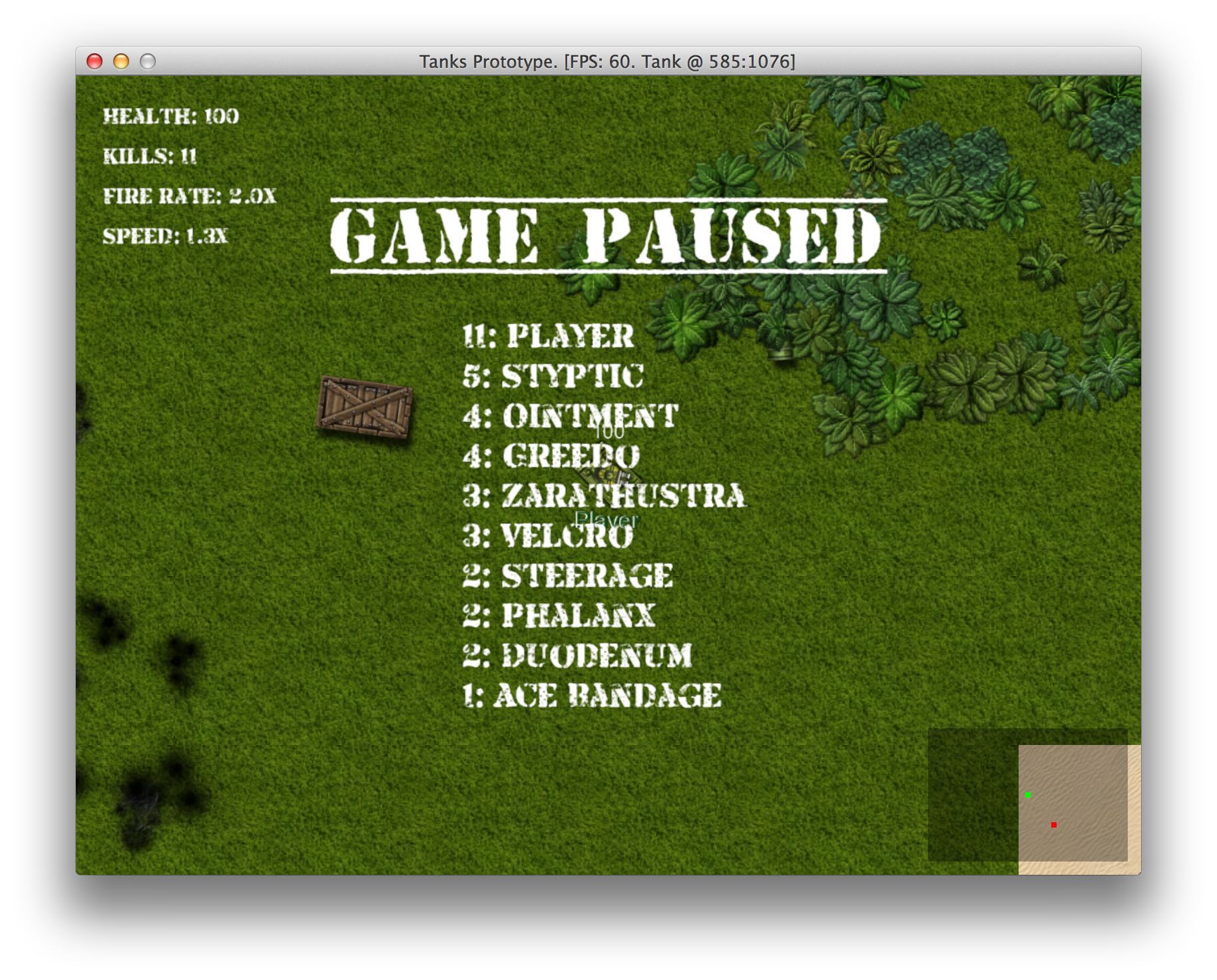
Pausing the game to see the score
For now, scoring most kills is relatively simple. This should change when we will tell enemy AI to collect powerups when appropriate.