Dealing With Thousands Of Game Objects
Gosu is blazing fast when it comes to drawing, but there are more things going on. Namely, we use
ObjectPool#nearby quite often to loop through thousands of objects 60 times per
second to measure distances among them. This slows everything down when object pool grows.
To demonstrate the effect, we will generate 1500 trees, 30 tanks, ~100 boxes and leave 1000 damage trails from explosions. It was enough to drop FPS below 30:
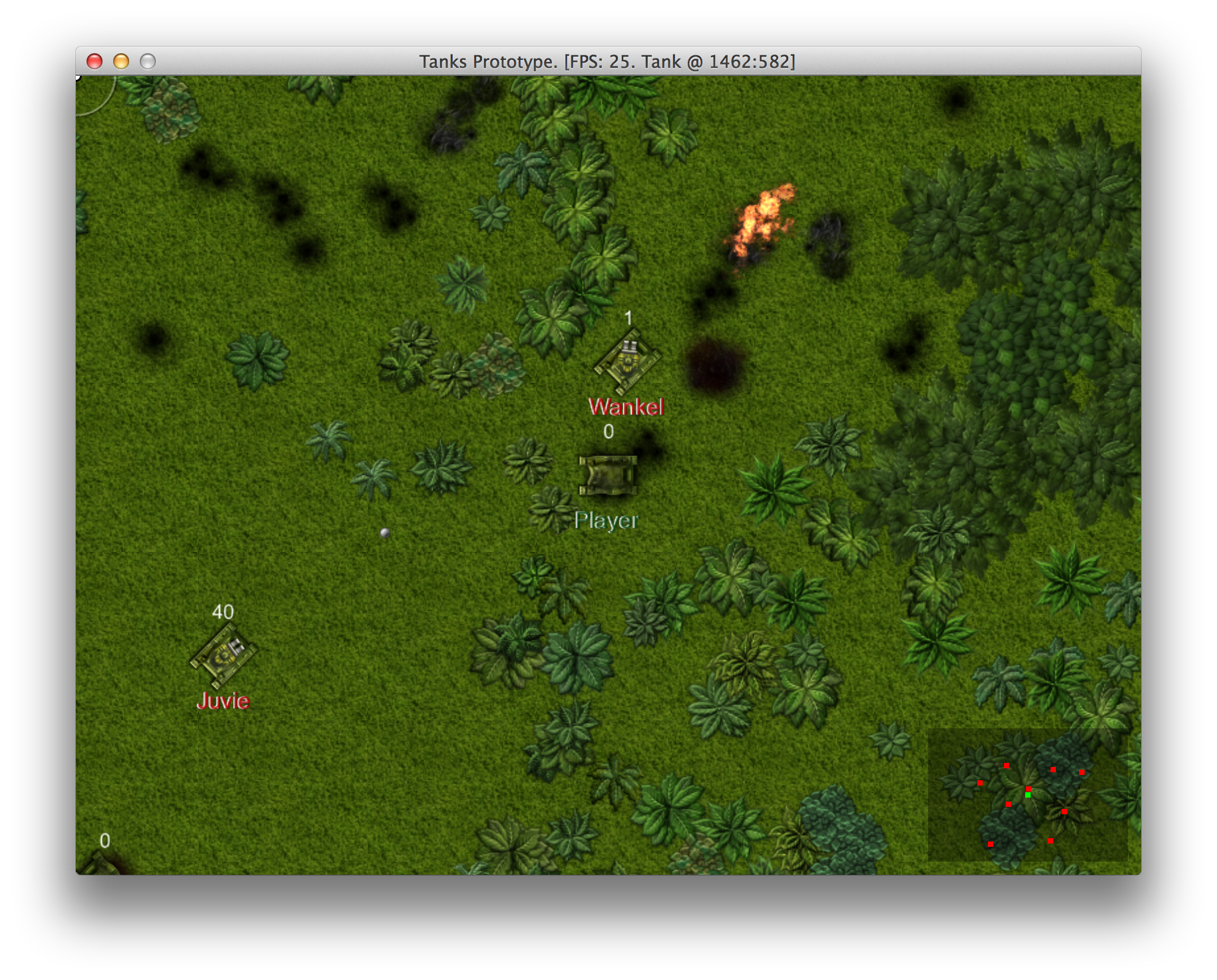
Running slow with thousands of game objects
Spatial Partitioning
There is a solution for this particular problem is “Spatial Partitioning”, and the essence of it is that you have to use a tree-like data structure that divides space into regions, places objects there and lets you query itself in logarithmic time, omitting objects that fall out of query region. Spatial Partitioning is explained well in Game Programming Patterns.
Probably the most appropriate data structure for our 2D game is quadtree. To quote Wikipedia, “quadtrees are most often used to partition a two-dimensional space by recursively subdividing it into four quadrants or regions.” Here is how it looks like:
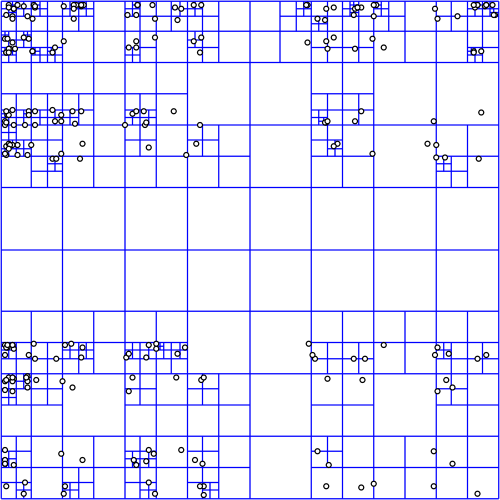
Visual representation of quadtree
Implementing A Quadtree
There are some implementations of quadtree available for Ruby - rquad, rubyquadtree and rubyquad, but it seems easy to implement, so we will build one tailored (read: closely coupled) to our game using the pseudo code from Wikipedia.
Axis Aligned Bounding Box
One of prerequisites of quadtree is Axis aligned bounding box, sometimes referred to as “AABB”. It is simply a box that surrounds the shape but has edges that are in parallel with the axes of underlying coordinate system. The advantage of this box is that it gives a rough estimate where the shape is and is very efficient when it comes to querying if a point is inside or outside it.
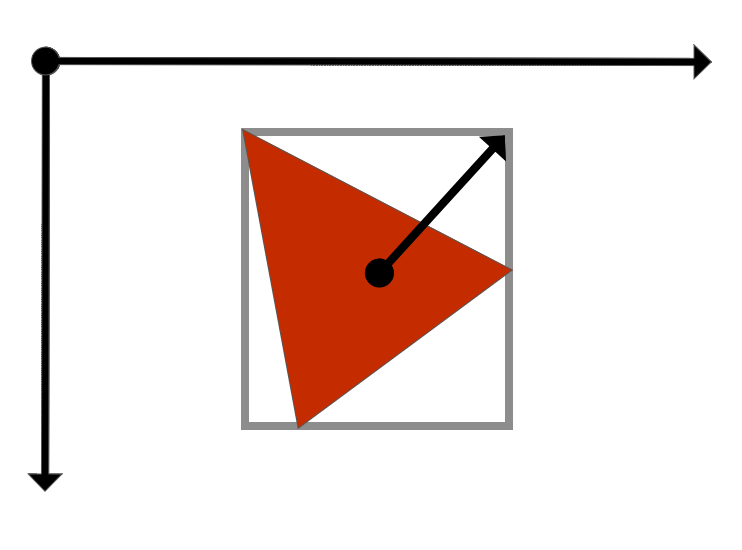
Axis aligned bounding box with center point and half dimension
To define axis aligned bounding box, we need it’s center point and half dimension vector, which points from center point to one of the corners of the box, and two methods, one that tells if AABB contains a point, and one that tells if AABB intersects with another AABB. This is how our implementation looks like:
10-partitioning/misc/axis_aligned_bounding_box.rb
 1 class AxisAlignedBoundingBox
 2   attr_reader :center, :half_dimension
 3   def initialize(center, half_dimension)
 4     @center = center
 5     @half_dimension = half_dimension
 6     @dhx = (@half_dimension[0] - @center[0]).abs
 7     @dhy = (@half_dimension[1] - @center[1]).abs
 8   end
 9
10   def contains?(point)
11     return false unless (@center[0] + @dhx) >= point[0]
12     return false unless (@center[0] - @dhx) <= point[0]
13     return false unless (@center[1] + @dhy) >= point[1]
14     return false unless (@center[1] - @dhy) <= point[1]
15     true
16   end
17
18   def intersects?(other)
19     ocx, ocy = other.center
20     ohx, ohy = other.half_dimension
21     odhx = (ohx - ocx).abs
22     return false unless (@center[0] + @dhx) >= (ocx - odhx)
23     return false unless (@center[0] - @dhx) <= (ocx + odhx)
24     odhy = (ohy - ocy).abs
25     return false unless (@center[1] + @dhy) >= (ocy - odhy)
26     return false unless (@center[1] - @dhy) <= (ocy + odhy)
27     true
28   end
29
30   def to_s
31     "c: #{@center}, h: #{@half_dimension}"
32   end
33 end
If you dig in 10-partitioning/specs, you will find tests for this implementation too.
The math used in AxisAlignedBoundingBox#contains? and AxisAlignedBoundingBox#intersects? is
fairly simple and hopefully very fast, because these methods will be called billions of times
throughout the game.
QuadTree For Game Objects
To implement the glorious QuadTree itself, we need to initialize it with boundary, that is
defined by an instance of AxisAlignedBoundingBox and provide methods for inserting, removing and
querying the tree. Private QuadTree#subdivide method will be called when we try to insert an
object into a tree that has more objects than it’s NODE_CAPACITY.
10-partitioning/misc/quad_tree.rb
 1 class QuadTree
 2   NODE_CAPACITY = 12
 3   attr_accessor :ne, :nw, :se, :sw, :objects
 4
 5   def initialize(boundary)
 6     @boundary = boundary
 7     @objects = []
 8   end
 9
10   def insert(game_object)
11     return false unless @boundary.contains?(
12       game_object.location)
13
14     if @objects.size < NODE_CAPACITY
15       @objects << game_object
16       return true
17     end
18
19     subdivide unless @nw
20
21     return true if @nw.insert(game_object)
22     return true if @ne.insert(game_object)
23     return true if @sw.insert(game_object)
24     return true if @se.insert(game_object)
25
26     # should never happen
27     raise "Failed to insert #{game_object}"
28   end
29
30   def remove(game_object)
31     return false unless @boundary.contains?(
32       game_object.location)
33     if @objects.delete(game_object)
34       return true
35     end
36     return false unless @nw
37     return true if @nw.remove(game_object)
38     return true if @ne.remove(game_object)
39     return true if @sw.remove(game_object)
40     return true if @se.remove(game_object)
41     false
42   end
43
44   def query_range(range)
45     result = []
46     unless @boundary.intersects?(range)
47       return result
48     end
49
50     @objects.each do |o|
51       if range.contains?(o.location)
52         result << o
53       end
54     end
55
56     # Not subdivided
57     return result unless @ne
58
59     result += @nw.query_range(range)
60     result += @ne.query_range(range)
61     result += @sw.query_range(range)
62     result += @se.query_range(range)
63
64     result
65   end
66
67   private
68
69   def subdivide
70     cx, cy = @boundary.center
71     hx, hy = @boundary.half_dimension
72     hhx = (cx - hx).abs / 2.0
73     hhy = (cy - hy).abs / 2.0
74     @nw = QuadTree.new(
75       AxisAlignedBoundingBox.new(
76         [cx - hhx, cy - hhy],
77         [cx, cy]))
78     @ne = QuadTree.new(
79       AxisAlignedBoundingBox.new(
80         [cx + hhx, cy - hhy],
81         [cx, cy]))
82     @sw = QuadTree.new(
83       AxisAlignedBoundingBox.new(
84         [cx - hhx, cy + hhy],
85         [cx, cy]))
86     @se = QuadTree.new(
87       AxisAlignedBoundingBox.new(
88         [cx + hhx, cy + hhy],
89         [cx, cy]))
90   end
91 end
This is a vanilla quadtree that stores instances of GameObject and uses GameObject#location for
indexing objects in space. It also has specs that you can find in code samples.
You can experiment with QuadTree#NODE_CAPACITY, but I found that values between 8 and 16 works
best, so I settled with 12.
Integrating ObjectPool With QuadTree
We have implemented a QuadTree, but it is not yet incorporated into our game. To do that, we will
hook it into ObjectPool and try to keep the old interface intact, so that ObjectPool#nearby
will still work as usual, but will be able to cope with way more objects than before.
10-partitioning/entities/object_pool.rb
 1 class ObjectPool
 2   attr_accessor :map, :camera, :objects
 3
 4   def size
 5     @objects.size
 6   end
 7
 8   def initialize(box)
 9     @tree = QuadTree.new(box)
10     @objects = []
11   end
12
13   def add(object)
14     @objects << object
15     @tree.insert(object)
16   end
17
18   def tree_remove(object)
19     @tree.remove(object)
20   end
21
22   def tree_insert(object)
23     @tree.insert(object)
24   end
25
26   def update_all
27     @objects.map(&:update)
28     @objects.reject! do |o|
29       if o.removable?
30         @tree.remove(o)
31         true
32       end
33     end
34   end
35
36   def nearby(object, max_distance)
37     cx, cy = object.location
38     hx, hy = cx + max_distance, cy + max_distance
39     # Fast, rough results
40     results = @tree.query_range(
41       AxisAlignedBoundingBox.new([cx, cy], [hx, hy]))
42     # Sift through to select fine-grained results
43     results.select do |o|
44       o != object &&
45         Utils.distance_between(
46           o.x, o.y, object.x, object.y) <= max_distance
47     end
48   end
49
50   def query_range(box)
51     @tree.query_range(box)
52   end
53 end
An old fashioned array of all objects is still used, because we still need to loop through
everything and invoke GameObject#update. ObjectPool#query_range was introduced to quickly grab
objects that have to be rendered on screen, and ObjectPool#nearby now queries tree and measures
distances only on rough result set.
This is how we will render things from now on:
class PlayState < GameState
  # ...
  def draw
    cam_x = @camera.x
    cam_y = @camera.y
    off_x =  $window.width / 2 - cam_x
    off_y =  $window.height / 2 - cam_y
    viewport = @camera.viewport
    x1, x2, y1, y2 = viewport
    box = AxisAlignedBoundingBox.new(
      [x1 + (x2 - x1) / 2, y1 + (y2 - y1) / 2],
      [x1 - Map::TILE_SIZE, y1 - Map::TILE_SIZE])
    $window.translate(off_x, off_y) do
      zoom = @camera.zoom
      $window.scale(zoom, zoom, cam_x, cam_y) do
        @map.draw(viewport)
        @object_pool.query_range(box).map do |o|
          o.draw(viewport)
        end
      end
    end
    @camera.draw_crosshair
    @radar.draw
  end
  # ...
end
Moving Objects In QuadTree
There is one more errand we now have to take care of. Everything works fine when things are static,
but when tanks and bullets move, we need to update them in our QuadTree. That’s why ObjectPool
has tree_remove and tree_insert, which are called from GameObject#move. From now on, the only
way to change object’s location will be by using GameObject#move:
class GameObject
  attr_reader :x, :y, :location, :components
  def initialize(object_pool, x, y)
    @x, @y = x, y
    @location = [x, y]
    @components = []
    @object_pool = object_pool
    @object_pool.add(self)
  end

  def move(new_x, new_y)
    return if new_x == @x && new_y == @y
    @object_pool.tree_remove(self)
    @x = new_x
    @y = new_y
    @location = [new_x, new_y]
    @object_pool.tree_insert(self)
  end
  # ...
end
At this point we have to go through all the game objects and change how they initialize their base
class and update x and y coordinates, but we won’t cover that here. If in doubt, refer to code
at 10-partitioning.
Finally, FPS is back to stable 60 and we can focus on gameplay again.
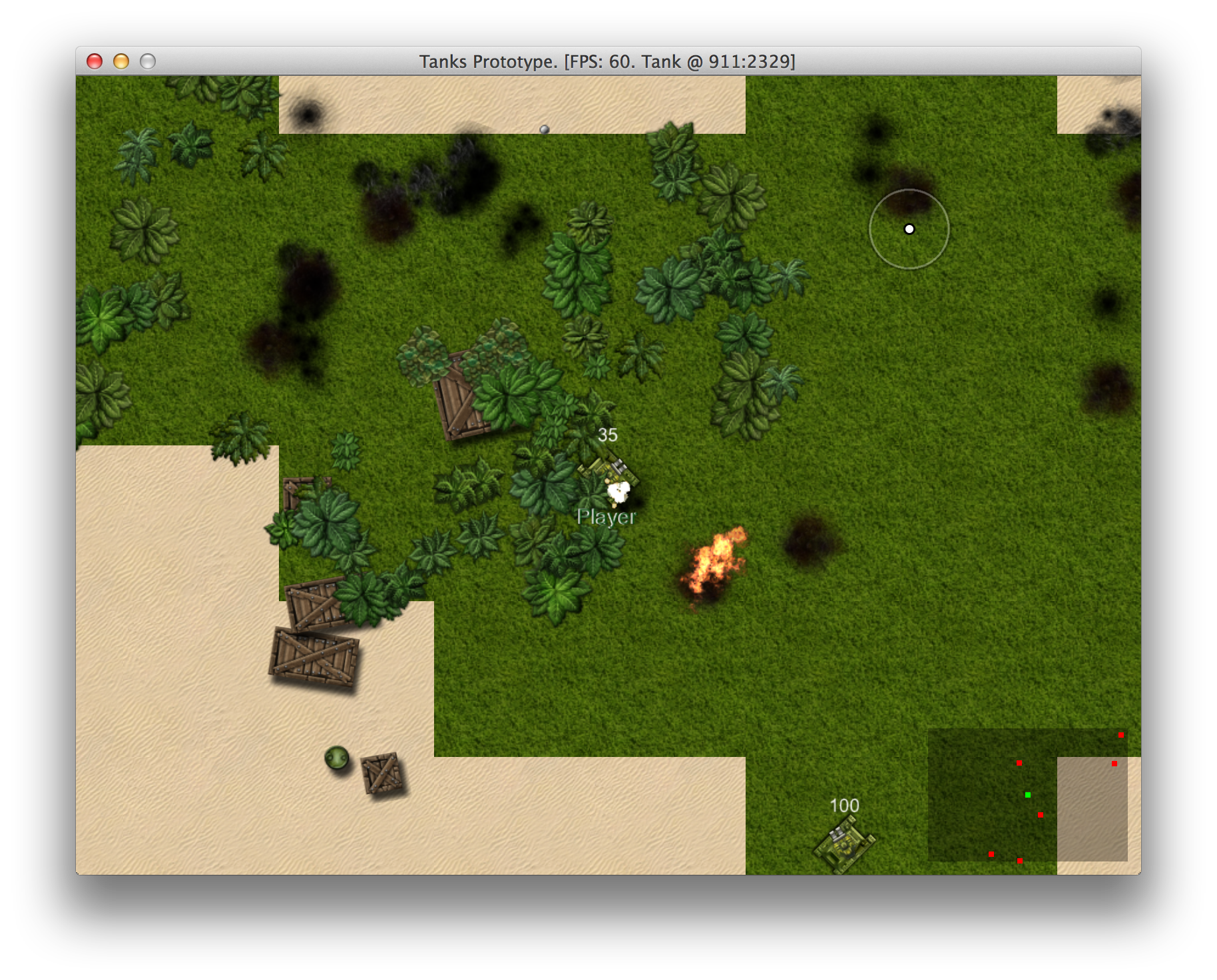
Spatial partitioning saves the day