Ollama Vision: Read Text from Images
The Ollama chapter sends text and gets text. A text model only sees tokens. A photo, a scan, or a chart is a grid of pixels, not tokens, so the same client cannot read it. Newer Ollama builds add that ability. They load vision language models that accept images alongside the prompt, and the API exposes the feature through one extra field: an array of base64-encoded images attached to a chat message. This chapter adds that path in Scala 3 and points it at reading plain text out of an image, the step that feeds a scanner, a RAG pipeline, or a tool that must read a receipt.
All code is in source-code/ollama-vision, a Scala port of the ollama_images example from the Lisp edition of this book.
How a Vision Model Sees
A text LLM works on tokens. Its input is a sequence of integers that index a learned vocabulary, and its output is the next token. An image has no tokens, so a vision model adds two components in front of the language model:
- A vision encoder, usually a Vision Transformer (ViT). It cuts the image into a grid of fixed-size patches, embeds each patch as a vector, and runs those vectors through attention. The output is a sequence of patch embeddings that describes what is where in the image.
- A projector, a small learned network, often one or two linear layers. It maps each patch embedding into the same vector space as the language model’s token embeddings.
The language model then reads the projected patch vectors and the text prompt tokens as one sequence. From its point of view, the image is a run of extra tokens that happen to be continuous vectors rather than vocabulary lookups. Everything after that is ordinary generation: the model attends over image and text together and writes the answer token by token.
This design has two consequences that shape the code. First, an image costs context tokens. A 336 by 336 image splits into hundreds of patches, and each patch becomes a token. A page scan can consume thousands of the model’s context window, which is why a vision prompt holds less text than a text-only prompt. Second, resolution controls detail. Small patches preserve fine print, but they also raise the token count. Vision models that support dynamic resolution, such as the Qwen-VL family, scale the patch grid with the image so a large scan keeps its detail.
The weights that make this work are large, and they are the kind Ollama can run locally. Ollama distributes them quantized, as the previous chapter described, and reports which models accept images. Ask the server directly:
1 ollama show llava
Look for vision in the Capabilities line. A model without it will reject the images field.
What Ollama Expects
The Ollama API has two generation endpoints. /api/generate takes one prompt string, and /api/chat takes a list of messages. Images belong to a message, so vision uses /api/chat. Each message carries an optional images array of base64-encoded image strings:
 1 {
 2   "model": "qwen3-vl:2b",
 3   "stream": false,
 4   "messages": [
 5     {
 6       "role": "user",
 7       "content": "Print out the plain text in this image.",
 8       "images": ["iVBORw0KGgoAAAANSUhEUg..."]
 9     }
10   ]
11 }
Three details matter.
The image is base64, not a URL and not a file path. Ollama runs on your machine and has no access to a remote URL, and the API does not accept a multipart upload. Base64 turns arbitrary bytes into plain ASCII text safe to embed in JSON. It costs size: every three bytes become four characters, so an encoded image is about 33 percent larger than the file. The exact length is 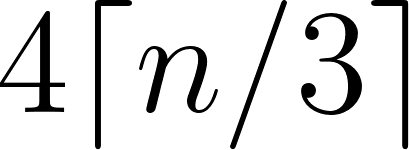 characters for
  input bytes. A 1 MB photo becomes roughly 1.4 MB of JSON.
The images array can hold more than one image. The code takes a list for that reason, so a single call can compare two photos or read a two-page scan.
stream is set to false, as in the text client. Local vision inference is slow, so buffering the whole answer into one JSON object is easier to parse in a batch program.
The Client
The whole client is in ollama-vision/VisionClient.scala:
 1 //> using scala 3.6.4
 2 //> using dep com.lihaoyi::requests:0.9.3
 3 //> using dep com.lihaoyi::ujson:4.4.3
 4 // Copyright 2026 Mark Watson. All rights reserved.
 5
 6 package ollamavision
 7
 8 import java.nio.file.{Files, Paths}
 9 import java.util.Base64
10
11 // Vision calls to local Ollama models. Port of
12 // ollama_images/describe-image.lisp: base64-encode image files,
13 // send them with a prompt to /api/chat, read back the text.
14 object VisionClient:
15   val defaultModel = sys.env.getOrElse("OLLAMA_MODEL", "qwen3-vl:2b")
16   val defaultHost = sys.env.getOrElse("OLLAMA_HOST", "http://localhost:11434/api/chat")
17
18   def encodeImage(path: String): String =
19     val p = Paths.get(path)
20     if !Files.isRegularFile(p) then throw new IllegalArgumentException(s"Image file not found: $path")
21     Base64.getEncoder.encodeToString(Files.readAllBytes(p))
22
23   def chatPayload(model: String, prompt: String, imagesBase64: List[String]): ujson.Value =
24     ujson.Obj(
25       "model" -> model,
26       "stream" -> false,
27       "messages" -> ujson.Arr(
28         ujson.Obj(
29           "role" -> "user",
30           "content" -> prompt,
31           "images" -> ujson.Arr.from(imagesBase64.map(ujson.Str(_)))
32         )
33       )
34     )
35
36   def parseReply(json: String): String =
37     if json == null || json.trim.isEmpty then
38       throw new IllegalArgumentException("Empty response from Ollama, is the server running?")
39     val data = ujson.read(json)
40     data.obj.get("error") match
41       case Some(err) => throw new java.io.IOException(s"Ollama API error: $err")
42       case None => data("message")("content").str
43
44   def imageToText(
45       paths: List[String],
46       prompt: String,
47       model: String = defaultModel,
48       host: String = defaultHost
49   ): String =
50     val encoded = paths.map(encodeImage)
51     val response = requests.post(host,
52       headers = Map("Content-Type" -> "application/json"),
53       data = chatPayload(model, prompt, encoded).render(),
54       readTimeout = 180000)
55     if response.statusCode != 200 then
56       throw new java.io.IOException(s"Ollama vision failed (HTTP ${response.statusCode}).")
57     parseReply(response.text())
58
59   def describeImageSimple(path: String): String =
60     imageToText(List(path), "What is in this image?")
Walk through it top to bottom.
encodeImage reads a file and returns its base64 text. It first checks Files.isRegularFile, so a typo in the path fails at once with a clear message instead of deep inside the HTTP call. Files.readAllBytes loads the whole file into memory, which is fine for a single image and is the reason the function does not stream. Base64 encoding is pure CPU and needs no server, so the tests can check it offline.
chatPayload builds the request body with ujson. The nested structure mirrors the API: an object with model, stream, and messages, where messages is an array holding one user message. That message has role, content, and images. ujson.Arr.from(imagesBase64.map(ujson.Str(_))) turns the Scala List[String] into a JSON array of strings. Building the payload as data, then calling .render() once, keeps the JSON well formed and lets a test inspect the structure before any network call.
parseReply handles the response. It first guards against an empty body, which is what you get when nothing listens on the port, and raises a message that names the likely cause. It then parses the JSON. Ollama reports failures in an error field, so the function checks for it and raises an IOException carrying the server’s text. Only when neither problem appears does it read data("message")("content").str, the assistant’s text. Lifting the error field matters: without it, a failed call would surface later as a confusing missing key.
imageToText ties the pieces together. It encodes every path, posts the payload to /api/chat with a JSON content type and a 180 second read timeout, checks for HTTP 200, and parses the reply. The long timeout covers the first call, when Ollama loads a multi-gigabyte model from disk before it produces a token, and the slower per-token rate of local vision inference.
describeImageSimple is a one line convenience wrapper that asks “What is in this image?”. It shows that the prompt is a normal argument, not something fixed in the client.
Both defaultModel and defaultHost read environment variables, OLLAMA_MODEL and OLLAMA_HOST, and fall back to qwen3-vl:2b and http://localhost:11434/api/chat. Reading configuration from the environment keeps local paths and model choices out of the source and lets a script switch models without a recompile.
Request and Response in Full
Seeing both JSON shapes makes the parsing code obvious. The request for one image is the object above. The successful response is a single JSON object because stream is false:
 1 {
 2   "model": "qwen3-vl:2b",
 3   "created_at": "2026-01-14T10:22:41.511Z",
 4   "message": {
 5     "role": "assistant",
 6     "content": "INVOICE\nAcme Widgets Ltd.\nDate: 2026-01-14\n3 x Widget  45.00\nTotal  45.00"
 7   },
 8   "done": true,
 9   "total_duration": 5191566416,
10   "load_duration": 2154458,
11   "prompt_eval_count": 1043,
12   "eval_count": 42,
13   "eval_duration": 9000000000
14 }
parseReply reads message.content and ignores the rest. The statistics are still useful: prompt_eval_count counts the tokens in the prompt including the image patches, eval_count counts the tokens generated, and total_duration is in nanoseconds. Comparing prompt_eval_count across images of different sizes shows the token cost of resolution. A failure looks different:
1 { "error": "model \"not-a-model\" not found, try pulling it first" }
The error branch in parseReply turns that into an exception with the server’s message intact.
The Demo
ollama-vision/Main.scala has two jobs: print the request shape so a reader can see it, and make a live call when an image path is provided:
 1 //> using scala 3.6.4
 2 // Copyright 2026 Mark Watson. All rights reserved.
 3
 4 package ollamavision
 5
 6 @main def visionDemo(): Unit =
 7   println("Payload shape for one image plus prompt:")
 8   println(VisionClient.chatPayload("qwen3-vl:2b", "Print the plain text in this image.", List("<base64-bytes>")).render().take(200))
 9   val args = sys.env.get("VISION_IMAGE")
10   args match
11     case Some(path) =>
12       println("\n--- live call ---")
13       try println(VisionClient.imageToText(List(path), "Print out the plain text in this image."))
14       catch case e: Exception => println(s"[live call failed] ${e.getMessage}")
15     case None =>
16       println("\nSet VISION_IMAGE=/path/to/pic.png to run a live call against local Ollama.")
The demo always prints the payload for one image. It then reads VISION_IMAGE. When the variable is set, it calls imageToText with the prompt “Print out the plain text in this image.” and prints the result. When the variable is absent, it prints a hint instead. The try/catch around the live call keeps a missing server from crashing the demo, which is the same pattern the RAG chapter uses.
Running the Demo
Pull a vision model once, make sure the server is running, then run the demo:
1 ollama pull qwen3-vl:2b
2 ollama serve
3 cd source-code/ollama-vision
4 scala-cli run . --main-class ollamavision.visionDemo
Without VISION_IMAGE, the output shows only the payload:
1 Payload shape for one image plus prompt:
2 {"model":"qwen3-vl:2b","stream":false,"messages":[{"role":"user","content":"Print the plain text in this image.","images":["<base64-bytes>"]}]}
3
4 Set VISION_IMAGE=/path/to/pic.png to run a live call against local Ollama.
Point it at a photo of a receipt and run again:
1 VISION_IMAGE=/path/to/receipt.png scala-cli run . --main-class ollamavision.visionDemo
Now the live branch runs:
1 Payload shape for one image plus prompt:
2 {"model":"qwen3-vl:2b","stream":false,"messages":[{"role":"user","content":"Print the plain text in this image.","images":["<base64-bytes>"]}]}
3
4 --- live call ---
5 INVOICE
6 Acme Widgets Ltd.
7 Date: 2026-01-14
8 3 x Widget  45.00
9 Total  45.00
The exact text depends on the model and the image, but the shape is the point: the program reads pixels from a file and prints characters that were never in the file as text.
Interpreting the Output
The printed string is the model’s transcription, not a byte-for-byte copy. The model infers characters from pixels rather than copying bytes, so it can drop a faint digit, swap a similar character such as 0 and O, or reformat spacing and columns. That is acceptable when the text feeds a search index, where small errors still retrieve the right passage, and risky when it feeds a ledger, where one wrong digit matters. The later RAG chapter can ingest this text directly, because the client returns a plain String and makes no assumptions about its use.
The first call is slow. Ollama must load the model into memory, run the vision encoder over the patches, and then generate the text. Later calls reuse the loaded model and return faster until keep_alive, five minutes by default, unloads it. If a call seems to hang, check ollama ps in another terminal to see whether the model is loaded and using the GPU.
Prompt choice changes the output as much as the model does. A terse instruction such as “Print out the plain text in this image” returns the text and little else, which is what a downstream pipeline wants. A chatty instruction such as “Describe this image in detail” returns prose that mixes the text with commentary, which pollutes any chunk that contains it. Match the prompt to the use.
Offline Tests
ollama-vision/VisionTest.scala checks every pure function with no server:
 1 //> using scala 3.6.4
 2 // Copyright 2026 Mark Watson. All rights reserved.
 3
 4 package ollamavision
 5
 6 import java.nio.file.Files
 7 import java.util.Base64
 8
 9 // Offline checks. Run with: scala-cli run . --main-class ollamavision.visionTest
10 @main def visionTest(): Unit =
11   // A 1x1 red PNG as base64: decode it to a temp file for encode tests.
12   val tinyPngBase64 =
13     "iVBORw0KGgoAAAANSUhEUgAAAAEAAAABCAYAAAAfFcSJAAAADUlEQVR42mP8z8BQDwAEhQGAhKmMIQAAAABJRU5ErkJggg=="
14   val img = Files.createTempFile("vision-test", ".png")
15   Files.write(img, Base64.getDecoder.decode(tinyPngBase64))
16
17   // encodeImage round trips the bytes and rejects missing files.
18   assert(VisionClient.encodeImage(img.toString) == tinyPngBase64, "base64 round trip")
19   try { VisionClient.encodeImage(img.toString + ".missing"); assert(false, "missing image must raise") }
20   catch case _: IllegalArgumentException => ()
21
22   // Payload carries model, prompt, and the images array.
23   val payload = VisionClient.chatPayload("m", "read this", List("AAA", "BBB"))
24   assert(payload("model").str == "m", "model field")
25   assert(payload("messages")(0)("content").str == "read this", "prompt field")
26   assert(payload("messages")(0)("images").arr.map(_.str).toList == List("AAA", "BBB"), "images field")
27   assert(payload("stream").bool == false, "stream must be false")
28
29   // Parser reads message content and surfaces problems.
30   val ok = """{"message":{"role":"assistant","content":"A red dot."}}"""
31   assert(VisionClient.parseReply(ok) == "A red dot.", "content parse")
32   try { VisionClient.parseReply(""); assert(false, "empty reply must raise") }
33   catch case _: IllegalArgumentException => ()
34   try { VisionClient.parseReply("""{"error":"model not found"}"""); assert(false, "error reply must raise") }
35   catch case _: java.io.IOException => ()
36
37   println("All vision tests passed.")
The test starts from a 1x1 red PNG stored as a base64 literal. It decodes that string to a temp file, then encodes the file again and asserts the result equals the original. That round trip proves encodeImage reads and encodes the right bytes. A second call with a missing path must raise IllegalArgumentException.
The payload test builds a request for two images and checks each field: the model name, the prompt in messages(0).content, the two strings in the images array, and stream equal to false. It inspects the parsed structure rather than a rendered string, so the test survives whitespace changes.
The parser test feeds a known success object and checks the content. It then feeds an empty string and an error object, and requires IllegalArgumentException and IOException respectively. Those two cases cover the failure modes the client must report.
Run the checks with:
1 scala-cli run . --main-class ollamavision.visionTest
A passing run ends with:
1 All vision tests passed.
Practical Limits
Three limits are worth knowing before you build on this client.
Context cost. Image patches consume context tokens. A model with an 8K context may have room for only a few hundred words of text once a page scan is attached. Send the smallest image that keeps the text legible, and crop to the region you need when you can.
Base64 overhead. Encoding inflates the request by about a third and the whole image sits in memory. For a folder of scans, encode and send one at a time rather than building a list of hundreds.
No OCR guarantee. A vision model is not a text recognition engine. It is a language model that reads pixels, so it can produce a plausible value for a smudged field. When correctness matters, keep the original image and verify the extracted values against it.
Wrap Up
This chapter added images to the local Ollama client with one extra field. The pieces are:
encodeImageturns a file into the base64 text the API expects.chatPayloadnests that text in a user message on/api/chat.parseReplyreadsmessage.contentand surfaces the server’serrorfield.imageToTextposts the request and returns the transcription.visionDemoprints the payload and runs a live call whenVISION_IMAGEis set.visionTestchecks the encoding, the payload, and both error paths offline.
A vision model is a text model plus a vision encoder and a projector, so the image arrives as extra tokens and generation proceeds as usual. That is why the client change is so small and why the output is ordinary text the rest of the book can consume.
Optional Practice Problems
Batch a directory. Add a
describeDirectory(dir: String): List[(String, String)]that finds every.pngand.jpgfile in a directory and returns each file name with its transcription. ReuseimageToTextand skip files that fail.Report the cost. Add a function that returns the token counts from the response. Parse
prompt_eval_countandeval_countfrom the JSON, and print them next to the answer so you can see how many tokens the image consumed. Run it on the same text at two resolutions.Cap the request size. Before encoding, reject files larger than a configurable byte limit with a clear message. Add a test that a small file passes and a synthetic large file raises.
Extract structured fields. Change the prompt to ask for JSON with
vendor,date, andtotal, and setformattojsonin the payload. Parse the result into a Scala case class. Discuss where a wrong field would hurt and how you would verify it.Compare two images. Use the multi-image support to send two receipts in one call and ask the model to list the differences. Explain why the model can compare them in a single pass.
Add a model check. Call
/api/showbefore the first vision request and raise a clear error when the chosen model does not list thevisioncapability. Cache the result so the check runs once.