Interactive Web Widgets with Laminar
So far each example runs on the shell. At times you want a page: sliders that retune a model, boxes that filter docs, bars that move with the numbers. This chapter builds two such widgets with Laminar on Scala.js, compiled with plain Scala CLI. No sbt project, no Node, no npm, no bundler. Readers write Scala, package one JS file, and open it in a browser.
All code is in source-code/laminar-web-app.
Why Laminar Fits This Book
Laminar skips the virtual DOM. UI state lives in Airstream observables: Var holds a value you can set, Signal reads values that shift over time, and binders like <-- and --> wire signals to the page. That shape will feel known if you read the search or agent chapters: state flows one way, and each view reads only what it shows. Three sliders drive one posterior number. One text box drives one list. No callbacks to untangle.
Two pinned deps carry the stack: Laminar 17.2.1 for widgets plus Airstream, and scalajs-dom 2.8.1 for dom.document. Both live in project.scala, the one place directives sit:
1 //> using scala 3.6.4
2 //> using platform scala-js
3 //> using dep com.raquo::laminar::17.2.1
4 //> using dep org.scala-js::scalajs-dom::2.8.1
The entry point mounts both widgets under #app on page load. The linked main.js auto-runs this @main, so index.html needs only a div plus a script tag:
 1 @main def webApp(): Unit =
 2   val container = dom.document.querySelector("#app")
 3   require(container != null, "Missing <div id=\"app\"> in index.html.")
 4   render(
 5     container,
 6     div(
 7       cls := "page",
 8       h1("Scala AI Book: interactive widgets"),
 9       p("Two small Laminar widgets. Bayes meets the probability chapter, search meets the RAG chapter."),
10       BayesCalc.widget,
11       DocFilter.widget
12     )
13   )
1 <div id="app"></div>
2 <script src="main.js"></script>
Widget One: Bayes Sliders
BayesCalc ports the probability chapter math to sliders. Base rate, sensitivity, and false positive rate each get a Var[Double]. The three signals join with combineWith into one posterior, which feeds both the readout text and the bar width:
1 private val priorVar = Var(0.001) // P(disease), the base rate
2 private val sensVar = Var(0.99)   // P(positive | disease)
3 private val fprVar = Var(0.05)    // P(positive | healthy)
4
5 private val posterior: Signal[Double] =
6   priorVar.signal.combineWith(sensVar.signal, fprVar.signal).map { case (prev, sens, fpr) =>
7     val pPositive = sens * prev + fpr * (1.0 - prev)
8     if pPositive == 0.0 then 0.0 else sens * prev / pPositive
9   }
Each slider is a range input locked to its var through a controlled block. Locking matters: with it the slider is the sole truth for its value, and user drags plus signal writes never fight:
 1 input(
 2   typ := "range",
 3   minAttr := "0",
 4   maxAttr := max.toString,
 5   stepAttr := step.toString,
 6   controlled(
 7     value <-- v.signal.map(_.toString),
 8     onInput.mapToValue.map(_.toDoubleOption.getOrElse(0.0)) --> v.writer
 9   )
10 ),
11 span(cls := "slider-value", child.text <-- v.signal.map(x => f"$x%.4f"))
The bar is one div whose width binds to the same signal, so text and bar can never drift apart:
1 div(cls := "bar-track", div(cls := "bar-fill", width <-- posterior.map(p => s"${p * 100}%")))
Widget Two: Doc Search
DocFilter holds five doc lines and a query string. Each keystroke maps the query to a match list, and the split binder keys rows by text so Laminar keeps, drops, or adds only changed rows:
 1 private val query = Var("")
 2
 3 private val matches: Signal[List[String]] =
 4   query.signal.map { q =>
 5     val t = q.trim.toLowerCase
 6     if t.isEmpty then docs else docs.filter(_.toLowerCase.contains(t))
 7   }
 8
 9 input(
10   typ := "text",
11   placeholder := "Type to filter...",
12   controlled(value <-- query.signal, onInput.mapToValue --> query.writer)
13 ),
14 p(child.text <-- matches.map(ms => s"${ms.size} of ${docs.size} docs match.")),
15 ul(children <-- matches.split(identity)((_, doc, _) => li(doc)))
The count line reads the same signal as the rows, so it always agrees with what the list shows.
What the Reader Sees
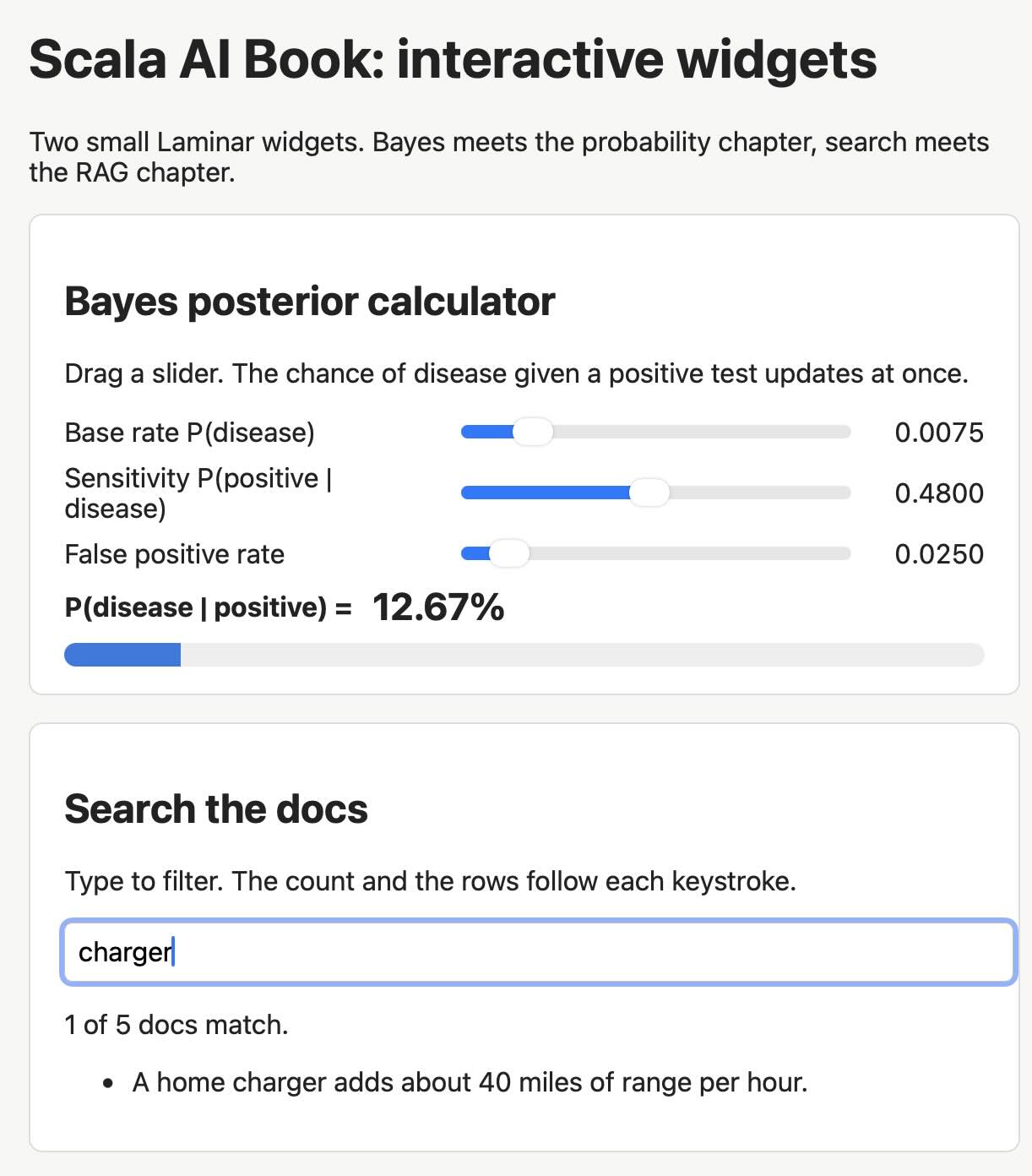
Open the page and the Bayes card shows the book values: base rate 0.0010, sensitivity 0.9900, false positive rate 0.0500, and a readout of 1.94% with a short bar. Drag the base rate slider right and the readout plus bar climb at once, no button in between. That 1.94% is the same number the probability chapter test pins, so the widget links straight back to tested math.
In the search card the box starts empty with 5 of 5 docs match. below it. Typing solar narrows the list to two rows (the panel line and the grid battery line) and the count flips to 2 of 5 docs match. Typing battery leaves one row, since only the used pack line holds that exact string. Clearing the box restores all five. Each keystroke re-runs the same matches signal, which is why count and rows never disagree.
Build and Open
Package with Scala CLI, serve the dir over http (plain file open starves some browsers of script rights), and load the page:
1 cd source-code/laminar-web-app
2 scala-cli --power package . --js -o main.js -f
3 python3 -m http.server 8000
Open http://localhost:8000/index.html. Check the wiring with scala-cli compile . --js, which needs no browser. When a widget outgrows this shape, move the same sources to an sbt plus Vite setup; the Laminar code stays put.