4 Working Out the 35 Glaze Recipes
In our examples we will use the “0.7 Limestone Set” presented earlier. The “starting point glaze” for this stoneware set, Glaze C, is:
70% Potash Feldspar 30% Whiting.
Having chosen Glaze C, the recipes for all the other 34 glazes fall into place automatically, because in the standard grid method, the amounts of kaolin and silica in all 35 glazes remain at predetermined values. [For example Glaze A (Glaze No.1) always has 40% of kaolin and zero silica (quartz or flint) in the recipe.]
So having chosen our starting point we need to be able to work out the recipes of the other 34 glazes. There are several easy ways to do this:
- Access the “Calculations Page” at the following web site: http://ian.currie.to/index.html
- Look them up from a set of tables in the back of this book.
- Use the Recipe Grid Table and work out the flux material breakup (if using more than one flux) by simple percentage maths.
- Use Glaze Calculation Software
1. Using the Calculations Page at the web site.
This is the easiest method of getting a printout of all 35 glazes for a set, assuming one is able to access the web page.
Go to the web site: http://ian.currie.to/index.html and click on “Calculations Page” in the Index. Read the instructions there; a summary is given here.
Towards the bottom of the Calculations Page in the row called “1 Name”, insert the words “K Feldspar” under “Flux 1” and “Whiting” under “Flux 2”. Then go to the next line, called “2 Amount” and type “70” under “Flux 1” and “30” under “Flux 2”.
[If we decide the set is to consist of base glazes (with no colouring oxides or opacifiers in the recipes) then rows 3 and 4 are left blank.]
It should look like this after entering the data:
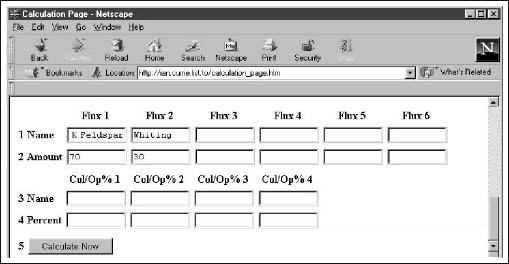
Row “2 Amount”
When reading the instructions at the Calculation Page note the restriction against using decimals in the input figures in Row “2 Amount”. This is simply a limitation of the computer code that calculates the table. If any of our input figures were to have, say, one decimal place, then we should multiply all base glaze figures by 10 before inputting; the input figures here do not have to be expressed as percentages. What matters is that the relative proportions are correct. In the case of the 0.7 limestone set, we could input “7” under “Flux 1” and “3” under “Flux 2” and we would get the same correct list of 35 glaze recipes.
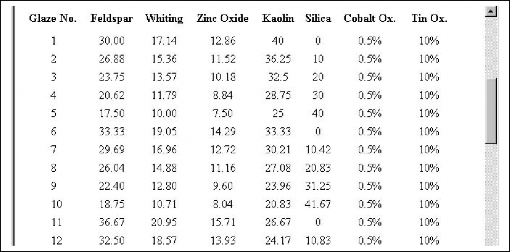
Click on the “Calculate Now” button at row 5 and after a while a new page will appear showing all 35 glaze recipes. The first 12 are shown here:
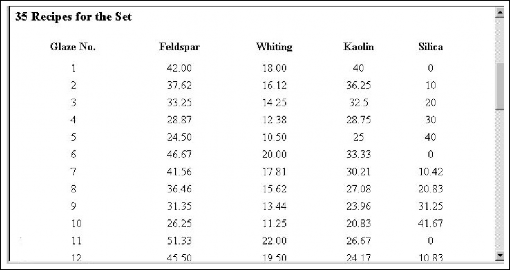
At the bottom there are batch recipes for the four “Corner Glazes”. These are the four glazes used for producing the whole set using the volumetric blending technique. The default batch size is 300 as we use 300 grams of glaze for each corner glaze to produce enough to blend up 48ml each of the 35 glazes. If necessary alter the default and click “Recalculate”.
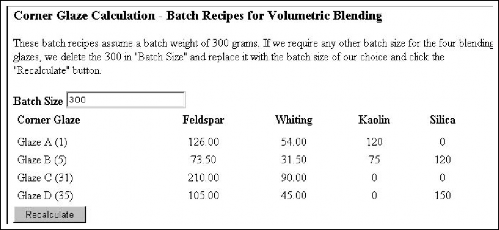
Dealing with Decimals in Row “2 Amount”, and Entering Colourants and opacifiers:
Decimals: If the recipe for Glaze C were: 3.5 Feldspar, 2 Whiting, 1.5 Zinc oxide, we would multiply the numbers by 10 to eliminate the decimals. See the entries in Row “2 Amount” below.
Colourants and Opacifiers: If we are adding colourants or opacifiers to the set, we enter the names into Row “3 Name” and the % addition into Row “4 Percent”. For example, if we want 0.5% addition, we type in 0.5 (don’t include the “%” sign). There is no restriction with entering decimals in Row 4.
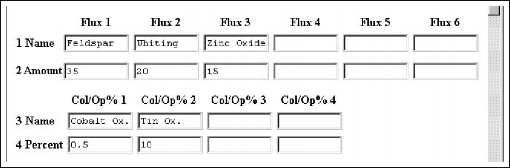
Part of the resulting printout is shown below:
2. Using the Flux Breakup Tables
The Recipe Table opposite is the same data as originally presented in the Standard Recipe Grid (but shown here to two decimal places accuracy). There is only one column for total flux materials. It is unusual for a set to contain only one flux material so we need to be able to calculate the flux material breakup. The method once again hinges on Glaze C (No. 31). For the tables to work, Glaze C must be expressed as % figures. In other words the base glaze must add up to 100. The standard grid method defines Glaze C (our starting point) as consisting of 100% flux materials. In the Recipe Table on the opposite page you can see that Total Flux Materials for Glaze C is 100%:
| Glaze No. | Total Flux Materials | Kaolin | Silica |
| 31 (C) | 100.00 | 0.00 | 0.00 |
In the following set, we have chosen Glaze C to have 2 flux materials (in bold):
| Glaze No. | Feldspar | Whiting | Kaolin | Silica |
| 31 (C) | 70 | 30 | 0.00 | 0.00 |
These percentages, 70 and 30, tell us which columns to look up in the Flux Breakup Tables in the Appendix. (Don’t try to understand this at this stage. Trust me!!) They indicate we should use the 70% column for feldspar and the 30% column for whiting. Repeating: Glaze C base glaze must be expressed in % figures for the tables to work!
The Recipe Table
| Glaze No. | Total Flux Materials | Kaolin | Silica |
|---|---|---|---|
| 1 (A) | 60.00 | 40.00 | 0.00 |
| 2 | 53.75 | 36.25 | 10.00 |
| 3 | 47.50 | 32.50 | 20.00 |
| 4 | 41.25 | 28.75 | 30.00 |
| 5 (B) | 35.00 | 25.00 | 40.00 |
| 6 | 66.67 | 33.33 | 0.00 |
| 7 | 59.38 | 30.21 | 10.42 |
| 8 | 52.08 | 27.08 | 20.83 |
| 9 | 44.79 | 23.96 | 31.25 |
| 10 | 37.50 | 20.83 | 41.67 |
| 11 | 73.33 | 26.67 | 0.00 |
| 12 | 65.00 | 24.17 | 10.83 |
| 13 | 56.67 | 21.67 | 21.67 |
| 14 | 48.33 | 19.17 | 32.50 |
| 15 | 40.00 | 16.67 | 43.33 |
| 16 | 80.00 | 20.00 | 0.00 |
| 17 | 70.63 | 18.13 | 11.25 |
| 18 | 61.25 | 16.25 | 22.50 |
| 19 | 51.88 | 14.38 | 33.75 |
| 20 | 42.50 | 12.50 | 45.00 |
| 21 | 86.67 | 13.33 | 0.00 |
| 22 | 76.25 | 12.08 | 11.67 |
| 23 | 65.83 | 10.83 | 23.33 |
| 24 | 55.42 | 9.58 | 35.00 |
| 25 | 45.00 | 8.33 | 46.67 |
| 26 | 93.33 | 6.67 | 0.00 |
| 27 | 81.88 | 6.04 | 12.08 |
| 28 | 70.42 | 5.42 | 24.17 |
| 29 | 58.96 | 4.79 | 36.25 |
| 30 | 47.50 | 4.17 | 48.33 |
| 31 (C) | 100.00 | 0.00 | 0.00 |
| 32 | 87.50 | 0.00 | 12.50 |
| 33 | 75.00 | 0.00 | 25.00 |
| 34 | 62.50 | 0.00 | 37.50 |
| 35 (D) | 50.00 | 0.00 | 50.00 |
Reading off a Single Glaze:
As an example, let’s take Glaze No. 28 - so far what we have from the Recipe Table is:
| Glaze No. | Total Flux Materials | Kaolin | Silica |
|---|---|---|---|
| 28 | 70.42 | 5.42 | 24.17 |
We already have here the figures for kaolin and silica; we just have to work out the breakup of flux materials for this glaze.
We use the Flux Breakup Tables in the back of the book…
Feldspar%: We go to the 70% column in the Flux Breakup Tables and read off the % figure for Glaze No. 28….. = 49.29%
Whiting%: we go to the 30% column in the Flux Breakup Tables and read off the % figure for Glaze No. 28….. = 21.13%
Double Check: Add the two together to make sure they equal the 70.42 (Total Flux Materials for Glaze 28)….. 49.29% + 21.13% = 70.42%
Compiling a Full Set of 35 Recipes:
The easiest way to understand the use of the flux breakup tables is to prepare a full table of 35 recipes for a set.
One advantage of setting out the 35 glazes in a table (rather than the grid format) is that we can easily use a photocopier
to prepare a list of all the glazes in the set. We can simply photocopy the 70% column (and call it Feldspar), and
the 30% column (and call it Whiting). Then copy the Kaolin and Silica columns from the Recipe Table, cut them out and
paste them all down to give a set as follows:
Cut and Paste a Table of Recipes for a Set Glaze C: 70%Feldspar + 30% Whiting
| 70% | 30% | |||
|---|---|---|---|---|
| Glaze No. | Feldspar | Whiting | Kaolin | Silica |
| 1 (A) | 42.00 | 18.00 | 40.00 | 0.00 |
| 2 | 37.63 | 16.13 | 36.25 | 10.00 |
| 3 | 33.25 | 14.25 | 32.50 | 20.00 |
| 4 | 28.88 | 12.38 | 28.75 | 30.00 |
| 5 (B) | 24.50 | 10.50 | 25.00 | 40.00 |
| 6 | 46.67 | 20.00 | 33.33 | 0.00 |
| 7 | 41.56 | 17.81 | 30.21 | 10.42 |
| 8 | 36.46 | 15.63 | 27.08 | 20.83 |
| 9 | 31.35 | 13.44 | 23.96 | 31.25 |
| 10 | 26.25 | 11.25 | 20.83 | 41.67 |
| 11 | 51.33 | 22.00 | 26.67 | 0.00 |
| 12 | 45.50 | 19.50 | 24.17 | 10.83 |
| 13 | 39.67 | 17.00 | 21.67 | 21.67 |
| 14 | 33.83 | 14.50 | 19.17 | 32.50 |
| 15 | 28.00 | 12.00 | 16.67 | 43.33 |
| 16 | 56.00 | 24.00 | 20.00 | 0.00 |
| 17 | 49.44 | 21.19 | 18.13 | 11.25 |
| 18 | 42.88 | 18.38 | 16.25 | 22.50 |
| 19 | 36.31 | 15.56 | 14.38 | 33.75 |
| 20 | 29.75 | 12.75 | 12.50 | 45.00 |
| 21 | 60.67 | 26.00 | 13.33 | 0.00 |
| 22 | 53.38 | 22.88 | 12.08 | 11.67 |
| 23 | 46.08 | 19.75 | 10.83 | 23.33 |
| 24 | 38.79 | 16.63 | 9.58 | 35.00 |
| 25 | 31.50 | 13.50 | 8.33 | 46.67 |
| 26 | 65.33 | 28.00 | 6.67 | 0.00 |
| 27 | 57.31 | 24.56 | 6.04 | 12.08 |
| 28 | 49.29 | 21.13 | 5.42 | 24.17 |
| 29 | 41.27 | 17.69 | 4.79 | 36.25 |
| 30 | 33.25 | 14.25 | 4.17 | 48.33 |
| 31 (C) | 70.00 | 30.00 | 0.00 | 0.00 |
| 32 | 61.25 | 26.25 | 0.00 | 12.50 |
| 33 | 52.50 | 22.50 | 0.00 | 25.00 |
| 34 | 43.75 | 18.75 | 0.00 | 37.50 |
| 35 (D) | 35.00 | 15.00 | 0.00 | 50.00 |
3. Using the Recipe Grid Diagram.
A simple calculation can work out the flux breakup from the Recipe Grid diagram shown on Page 32.
Worked example for Glaze No. 19:
The recipe is reproduced here, and it contains a total of 52% combined flux materials (“Fl.Mtl.”). The key to the breakup is Glaze 31 (Glaze C). We know the breakup there because we decided that ourselves. Remember that “choosing Glaze C” is the first decision we have to make when designing a standard grid experiment. Again we will use the 0.7 Limestone Set where Glaze C is:
70% Feldspar
30% Whiting
So the proportions of the two fluxes are 70 of feldspar to 30 of whiting. This proportion remains the same across the set of 35 glazes, so it can be used to work out the breakup of the 52% combined flux materials in Glaze No. 19.
Feldspar in Glaze 19…
= 52% X 70%
= 0.52 X 70%
= 36.4% Feldspar
Whiting in Glaze 19…
= 52% X 30%
= 0.52 X 30%
= 15.6% Whiting
Double-check the calculation by adding the two percentages to make sure they equal the original combined flux material % for Glaze 19:
36.4% + 15.6% = 52%
4. Glaze Calculation Software
The grid method outlined in this book is now widely recognized and is included in several glaze-calculation software packages. Both those listed below provide the ability to calculate the 35 recipes from Glaze C.
Matrix Glaze Calculation Software:
“Matrix is a glaze calculation software package available for both PC and Macintosh computers. The application was developed at the School of Art, Otago Polytechnic, Dunedin New Zealand, and has many unique, user-friendly features. Both versions have the capacity to generate line, triaxial and biaxial (and quadraxial) blends producing a worksheet which enables the mixing of the blends using volumetric techniques as described in Ian Currie’s approach to glaze research. Blends can be designed from unity formulae or from recipes and can be created in a variety of sample sizes. In the PC version you can automatically generate a Standard Recipe Grid after entering and saving on disc the original base glaze.”*
Matrix is the product of Lawrence Ewing
21 Slant St, Careys Bay, Dunedin,
NEW ZEALAND
lewing@clear.net.nz
Extensive and detailed information about Matrix may be viewed on line at
http://www.Matrix2000.co.nz
This site also contains an online interactive instructional package on glaze chemistry called GlazeTeach and has tutorials to help new users of Matrix.
Matrix is supplied to PC owners on a CD which includes GlazeTeach and Matrix Tutorials.
Glaze Chem
*“GlazeChem is a general-purpose glaze database and calculation program for P.C’s . It includes Currie recipe blending among its many glaze testing and mixing options. Starting from any glaze, you can generate a set of glazes based on his recipe-grid method with only a few mouse clicks.
GlazeChem includes features for modifying Currie’s “standard” recipe-grid method - more or less grid points, different clay/silica proportions in the corners, and your choice of materials along each axis. The program also includes graphing features that (for example) let you plot your original glaze against the grid glazes on a graph of Al2O3 vs. SiO2.”*
It is a shareware program available from the author Robert J. Wilt. It may be downloaded from the following Web site http://www.dinoclay.com/