The while statement (loop)
Lesson content
- What is the while statement - declaration and elements
- Nesting statements within a while loop
- The break, return, and continue statements
- Alternative writing of the while loop
- Infinite while loop
- Un-executable while loop
- When to use a while loop and when to use a for loop, alternative writing of the while loop as a for loop and vice versa
- Most common errors
What is the while statement - declaration and elements
It has already been said that looping statements are used in situations where it is necessary to execute a command (or more) multiple times. The for loop is most useful in situations where, at the start of the loop, the number of iterations is known in advance.
For example, if you need to print the numbers from 1 to 100 on the screen, you know that this can be done in 100 iterations, printing one number per iteration. Even if the number of iterations depends on some parameter or variable, it will still be known when the loop starts. However, there are situations where it is not known in advance how many iterations will be executed. In such cases, using a loop counter doesn’t make sense, since the exit condition from the loop doesn’t depend on the counter’s value but on some other condition.
The while statement was created precisely to be used in such cases – when the number of iterations is not known in advance. The declaration of a while loop is done as follows:
1 while (some condition) command_p;
The declaration starts with the reserved word while, followed by the loop condition (a logical expression) inside parentheses. After the loop condition, the command (or multiple commands) that need to be repeated multiple times is written (command_p).
The while loop repeats the execution of the command (command_p) as long as the condition in the parentheses holds true. Unlike the for loop, the while loop does not have a loop counter (iteration counter). The exit from the loop does not depend on the counter’s value, but happens when the condition no longer holds true. This condition is a regular logical expression and is formed in the same way as any condition in the if statement (using logical operators, comparison operators, and their combinations).
When the loop is triggered, the sequence of command executions and condition checks is as follows:
-
START OF LOOP
-
The condition is checked (condition holds true)
-
1ST ITERATION
- execute command_p
-
-
The condition is checked (condition holds true)
-
2ND ITERATION
- execute command_p
-
-
The condition is checked (condition holds true)
- 3RD ITERATION
- execute command_p etc.
- The condition is checked (condition does NOT hold true - the loop ends)
-
- END OF LOOP
It is important to note that, as with the for loop, the condition is checked before each iteration, meaning that the iteration will be executed if the condition holds true.
Like with the for loop, if it is necessary to repeat multiple commands in a loop, they must be enclosed in a block using curly braces:
1 while (some condition) {
2   command_p_1;
3   command_p_2;
4
5   command_p_n;
6 }
Example 1
Create a class called NumberPower that has:
- A static method greaterThan1000 that takes a positive integer a as a parameter and multiplies it by itself until it becomes greater than 1000. This method essentially calculates the smallest power of a that is greater than 1000. The result of this multiplication should be printed on the screen.
 1     class NumberPower {
 2
 3         static void greaterThan1000(int a){
 4             int result = 1;
 5
 6             while (result <= 1000) result = result * a;
 7
 8             System.out.println(result);
 9         }
10     }
Create a class TestNumberPower that in the main method checks which is the smallest power of the number 2 that is greater than 1000.
1 class TestNumberPower {
2
3     public static void main(String[] args) {
4         // Should print 1024 (two on the power of ten)
5         NumberPower.greaterThan1000(2);
6     }
7 }
The while loop in the greaterThan1000 method is set so that the number is multiplied by itself until the result is greater than 1000. The moment the result exceeds 1000, the loop terminates, and the result is printed on the screen. The steps of the method and loop iterations when a is passed as the number 2 are as follows:
int result = 1; (declaring variable result and assigning the value 1)
-
START OF LOOP
-
result < 1000? (1 < 1000 - condition holds true)
-
1ST ITERATION
- result = result * a (result = 1 * 2 = 2 - the variable is multiplied by a, i.e., 2)
-
-
result < 1000? (2 < 1000 - condition holds true)
-
2ND ITERATION
- result = result * a (result = 2 * 2 = 4 - the variable is multiplied by a, i.e., 2)
-
-
result < 1000? (4 < 1000 - condition holds true)
-
3RD ITERATION
- result = result * a (result = 4 * 2 = 8 - the variable is multiplied by a, i.e., 2)
-
-
result < 1000? (8 < 1000 - condition holds true)
-
4TH ITERATION
- result = result * a (result = 8 * 2 = 16 - the variable is multiplied by a, i.e., 2)
-
-
result < 1000? (16 < 1000 - condition holds true)
-
5TH ITERATION
- result = result * a (result = 16 * 2 = 32 - the variable is multiplied by a, i.e., 2)
-
-
result < 1000? (32 < 1000 - condition holds true)
-
6TH ITERATION
- result = result * a (result = 32 * 2 = 64 - the variable is multiplied by a, i.e., 2)
-
-
result < 1000? (64 < 1000 - condition holds true)
-
7TH ITERATION
- result = result * a (result = 64 * 2 = 128 - the variable is multiplied by a, i.e., 2)
-
-
result < 1000? (128 < 1000 - condition holds true)
-
8TH ITERATION
- result = result * a (result = 128 * 2 = 256 - the variable is multiplied by a, i.e., 2)
-
-
result < 1000? (256 < 1000 - condition holds true)
-
9TH ITERATION
- result = result * a (result = 256 * 2 = 512 - the variable is multiplied by a, i.e., 2)
-
-
result < 1000? (512 < 1000 - condition holds true)
-
10TH ITERATION
- result = result * a (result = 512 * 2 = 1024 - the variable is multiplied by a, i.e., 2)
-
- result < 1000? (1024 > 1000 - condition IS NOT true, loop ends)
-
END OF LOOP
System.out.println(result); (the value of result, i.e., 1024, is printed)
In the same example, it is also clear that care must be taken when writing the exit condition for the loop. If the number 1 is passed as an argument to the method, the while loop will become an infinite loop. This is because multiplying by 1 will always give the same result and will not increase (1^n = 1), so it will always be less than 1000 no matter how many iterations are executed.
Nesting statements within a while loop
Just like if, switch, and for statements, the while statement can also be combined (nested) with all other control flow statements. Therefore, it is possible that within the block of a while loop, there is an if or switch statement, and vice versa — there could be a nested while (or another) loop within the block of if or switch commands. This nesting of statements can even go as far as having a while statement containing another for statement or any other type of loop.
If there is a nested if statement within a while loop, it usually looks like this:
1 while (loop condition)
2   if (if statement condition)
3     statement_p1;
4   else
5     statement_p2;
Effectively, this means that for each iteration of the while loop, the if statement will execute once. The condition of the if statement will be evaluated, and either statement_p1 or statement_p2 will be executed depending on whether the condition is met (the “YES” branch) or not (the “NO” branch), as shown in the following listing. Of course, it is entirely possible that in some iterations, the if condition will be true, and in others, it will not. Furthermore, it is important to note that the condition of the while loop and the condition of the if statement are not connected.
-
START OF LOOP
-
The loop condition is checked (condition holds true)
- 1st ITERATION
- The if condition is checked, and:
- statement_p1 is executed if the condition is true (the “YES” branch)
- statement_p2 is executed if the condition is false (the “NO” branch)
-
The loop condition is checked again (condition holds true)
- 2nd ITERATION
- The if condition is checked, and:
- statement_p1 is executed if the condition is true (the “YES” branch)
- statement_p2 is executed if the condition is false (the “NO” branch)
- The loop continues
- The loop condition is checked (condition no longer holds true, loop terminates)
-
- END OF LOOP
If a loop is nested within another loop (or more than one), this is referred to as “double”, “triple”, or “multiple” loops. If a while loop is nested inside another while loop, we have a double while loop. The first loop is called the “outer” while loop, and the second, nested loop is called the “inner” while loop. For example:
1 while (condition 1)
2   while (condition 2) statement_p;
The conditions of the outer loop (condition 1) and the inner loop (condition 2) do not have to be connected — they are usually independent.
Example 2
Create a class SavingsCalculator that contains:
- A static method calculateDoublingTime that takes the amount of money invested in savings and the interest rate as parameters (e.g., 9.5%) given by the bank annually. The method calculates and prints the amount of savings, increased by the given interest, after each invested year, until the invested funds are doubled. The basic assumption is that the amount from the previous year, along with the interest for that year, will be reinvested in the next year, so that “compound interest” applies.
- A static method calculateDoublingTimeWithTax, which works the same as the previous method, but reduces the interest rate by 0.5% (extra tax) every time the savings amount exceeds 100,000. Again, the “compound interest” principle is applied.
 1     class SavingsCalculator {
 2
 3         static void calculateDoublingTime(double amount, double interest) {
 4             double savings = amount;
 5
 6             while ( savings < 2 * amount) {
 7                 savings = savings * (100 + interest) / 100;
 8                 System.out.println(savings);
 9             }
10         }
11
12         static void calculateDoublingTimeWithTax(double amount,
13          double interest) {
14             double savings = amount;
15
16             while ( savings < 2 * amount) {
17                 if (savings < 100000)
18                     savings = savings * (100 + interest) / 100;
19                 else
20                     savings = savings * (100 + interest - 0.5) / 100;
21
22                 System.out.println(savings);
23             }
24         }
25     }
Create a class TestSavingsCalculator that checks how many years it takes to double the invested funds of 80,000 dollars with an interest rate of 9.5%, in both cases: without extra tax and with extra tax.
 1 class TestSavingsCalculator {
 2
 3     public static void main(String[] args) {
 4         System.out.println("Calculation of savings without extra tax");
 5         SavingsCalculator.calculateDoublingTime(80000, 9.5);
 6
 7         System.out.println("Calculation of savings with extra tax");
 8         SavingsCalculator.calculateDoublingTimeWithTax(80000, 9.5);
 9     }
10 }
From the code of the method calculateDoublingTime, we can see the application of the while loop when the exact number of iterations is not known in advance. The time it takes to double the money depends on the interest rate, and it is not possible to know exactly how many years of investment are required. In other words, there is no point in introducing a loop counter (like in a for loop), but reinvestment occurs until the condition — doubling the initial amount of money — is met. In the code, the condition is as follows:
1 while (savings < 2 * amount)
In each iteration, the savings are increased by the interest, and the increased sum is then printed to the screen:
1 savings = savings * (100 + interest) / 100;
2 System.out.println(savings);
Nesting the if statement within the while loop can be seen in the method calculateDoublingTimeWithTax, which also calculates the time to double the money like the first method, but applies different formulas based on the amount of money being invested. If the current investment amount is less than 100,000, the formula without extra tax is applied, with the full interest rate. If not, the formula with extra tax is used, where the interest rate is reduced by 0.5%.
1 if (savings < 100000)
2   savings = savings * (100 + interest) / 100;
3 else
4   savings = savings * (100 + interest - 0.5) / 100;
It is important to note that the loop condition remains the same throughout (savings < 2 * amount) and is not connected to the if condition (savings < 100000).
When the code is run in the main method, the difference in savings due to the extra tax can be seen. The first three years of savings give the same amounts: 87,600.0, 95,922.0, and 105,034.59 respectively, while in the following years, the difference due to the extra tax reduction becomes visible. Thus, at the end of the eighth year, the result is 165,349.5207161583 if there is no extra tax, or 161,608.73626709997 if there is.
The break, return, and continue statements
The usual way to exit a while loop is for the condition checked before each iteration to no longer hold true. Since the while loop does not have a counter, the loop condition typically refers to something else: an event that needs to happen (e.g., the end of a sentence, end of a file, exceeding a certain value at some point, etc.).
However, the return, break, and continue statements work the same way in all loops in Java, including while loops, and they can be used to exit the loop, exit the method, or skip an iteration.
The details of how these three statements work can be read in the lesson on for statements. Their effects in the context of loops (all types of loops, not just for loops) are summarized in the following table:
| Statement | Effect on Loop Execution |
|---|---|
| continue | Skips only the current iteration; the loop and method continue |
| break | Breaks the loop; the method continues |
| return | Breaks everything: both the loop and the entire method |
Alternative writing of the while loop
Just like with the if statement, it is possible to write an alternative version of any while loop. This is usually done by slightly changing the loop’s condition.
For example, assuming the variables sum and result are integer variables, instead of writing “sum <= 10”, you could write “sum < 11” (the last allowed value will still be 10). Or, instead of writing “result > 0”, you could write “result >= 1”, and so on.
Additionally, it is possible to perform a “negation of a negation (double negation)” of the logical expression representing the loop condition, similar to writing an alternative version of the if statement. For example, instead of:
1 while (sum <= 10)
You could write:
1 while ( !(sum > 10) )
Example 3
Create a class NumberPowerA that represents an alternative version of the NumberPower class:
- A static method greaterThan1000A that performs the same task as the greaterThan1000 method, but with a while loop written alternatively by slightly changing the loop condition.
- A static method greaterThan1000AA that performs the same task as the greaterThan1000 method, but with a while loop written alternatively by applying double negation to the loop condition.
 1     class NumberPowerA {
 2
 3         static void greaterThan1000A(int a){
 4             int result = 1;
 5
 6             // Instead of result <= 1000, we can write
 7             // result <1001 but only because the result
 8             // is an integer variable
 9             while (result < 1001) result = result * a;
10
11             System.out.println(result);
12         }
13
14         static void greaterThan1000AA(int a){
15             int result = 1;
16
17             // instead of result <= 1000, we can write
18             // !(result > 1000) as a double negation of
19             // the original condition
20             while ( !(result > 1000) ) result = result * a;
21
22             System.out.println(result);
23         }
24     }
Create a class TestNumberPowerA that, in the main method, checks the smallest power of the number 2 that is greater than 1000 by calling both alternative methods: greaterThan1000A and greaterThan1000AA.
 1 class TestNumberPowerA {
 2
 3     public static void main(String[] args) {
 4         // Should print 1024 (two on the power of ten)
 5         NumberPowerA.greaterThan1000A(2);
 6
 7         // Should print 1024 (two on the power of ten)
 8         NumberPowerA.greaterThan1000AA(2);
 9     }
10 }
In the method greaterThan1000A, a slight change in the condition of the while loop is applied to create the alternative loop. Instead of “result <= 1000”, it is written as “result < 1001”. Everything else is identical to the original method.
In the method greaterThan1000AA, double negation of the while loop condition is applied to create the alternative loop. Instead of “result <= 1000”, it is written as “!(result > 1000)”. This means the loop will execute until the result exceeds 1000, which is simply another way of expressing that the loop should run while the result is less than or equal to 1000.
Infinite while loop
All the theoretical details about infinite and un-executable loops can be found in the lesson on the for statement. Here is a brief reminder, as well as the specifics of infinite and un-executable while loops.
Neither an infinite nor an un-executable loop represents a syntax error, but rather an error during the program’s execution, meaning the execution does not proceed normally.
To recap, an infinite loop is a loop that never (by itself) stops executing. It has an infinite number of iterations, and it usually requires an external intervention or command to stop the program, as it will never terminate on its own—it lacks normal execution. If this is not done, it is possible that the computer will slow down and block its operation because all memory and/or processing resources are consumed by the (infinite) execution of this loop.
Stopping the execution of an infinite loop is ESSENTIAL, and this can be done using the shortcut Ctrl+F2, or by pressing one of the two red squares: in the execution window (bottom left) or at the top right above the code editor (Figure 30).
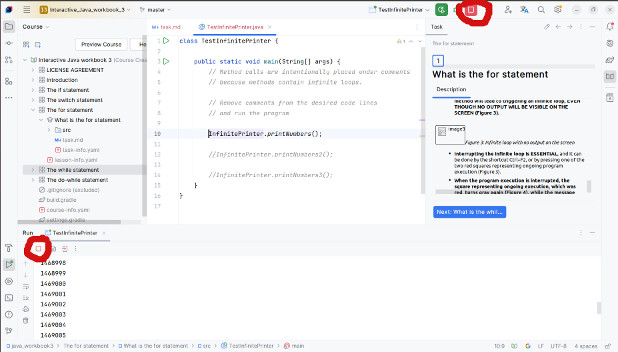
The only reason for having an infinite while loop is that the loop condition is always true. This can happen for two reasons:
- The loop condition is an always satisfied logical expression (a tautology). In this case, the logical statement itself does not depend on the values of the variables.
- Or, the values of the variables involved in the condition change in such a way that the condition always holds true (for example, if the value of a variable involved in the condition does not change, the condition will always hold true, and so on).
Example 4
Create a class InfinitePrinter that contains:
- A static method printMessage that uses an infinite while loop to print a message entered as a parameter an infinite number of times. The infinite loop should be created by ensuring the loop condition is always true, but variables will not participate in its formation.
- A static method printMessageA that uses an infinite while loop to print a message entered as a parameter an infinite number of times. The infinite loop should be created by ensuring the loop condition is always true, and variables will participate in forming the condition.
- A static method printPower that receives two positive integers x and y as parameters. The method uses an infinite while loop to multiply the number x by itself (raising x to a power) until it becomes greater than y. After each multiplication, the intermediate result should be printed on the screen.
- A static method printPowerA that receives two positive integers x and y as parameters. The method multiplies the number x by itself until it exceeds y. After each multiplication, the intermediate result should be printed on the screen. When calling the method, pass the number 1 as parameter x to effectively create an infinite loop.
 1     class InfinitePrinter {
 2
 3         static void printMessage(String message){
 4             while (true)
 5                 System.out.println(message);
 6         }
 7
 8         static void printMessageA(String message){
 9             while (message == null || message != null)
10                 System.out.println(message);
11         }
12
13         static void printPower(int x, int y){
14             int result = 1;
15
16             while (result < y || result >= y){
17                 result = result * x;
18                 System.out.println(result);
19             }
20         }
21
22         static void printPowerA(int x, int y){
23             int result = 1;
24
25             while (result < y){
26                 result = result * x;
27                 System.out.println(result);
28             }
29         }
30     }
Create a class TestInfinitePrinter that, in the main method, calls the methods of the InfinitePrinter class and tests their behavior.
 1 class TestInfinitePrinter {
 2
 3     public static void main(String[] args) {
 4         // Method calls are intentionally placed under comments
 5         // because methods contain infinite loops.
 6
 7         // Remove comments from the desired code lines
 8         // and run program
 9
10         //InfinitePrinter.printMessage("Good morning");
11
12         //InfinitePrinter.printMessageA("Good morning");
13
14         //InfinitePrinter.printPower(3, 3000);
15
16         //An infinite loop can be achieved here by
17         // providing 1 as the first argument - each
18         // power of 1 is always 1.
19         //InfinitePrinter.printPowerA(1, 23);
20     }
21 }
WARNING - READ THIS BEFORE RUNNING THE EXAMPLES
- In the main method of the TestInfinitePrinter class, the calls to the methods of the InfinitePrinter class are commented out to prevent accidentally triggering their execution.
- When these calls are uncommented, running the main method will cause an infinite loop within these methods and lead to SLOWING DOWN OR BLOCKING THE WORKING ENVIRONMENT OR COMPUTER.
- It is NECESSARY to stop the execution of the infinite loop, which can be done by using the shortcut Ctrl+F2, or by pressing one of the two red squares: in the execution window (bottom left) or at the top right above the code editor (Figure 30).
In the method printMessage, you can see the simplest way to create an infinite while loop — by setting the logical value true as the loop condition. The condition does not depend on the values of the variables because they are not referenced in the condition.
In the method printMessageA, you can see another way to create an infinite while loop — by forming a condition that is always true (a tautology). Specifically, the condition checks whether the message is equal to null or not equal to null. One of these will always be true, so the entire condition will always hold (due to the or operator). Technically, the variable message is referenced in the condition, but the truth of the condition does not depend on its value.
In the method printPower, the while loop condition is also a tautology, but it is achieved by referencing numerical variables. The condition “result < y || result >= y” always holds true because, no matter the values of result and y, one will always be smaller than the other or greater than or equal to the other.
The method printPowerA does not technically have an infinite loop, except in special cases. This happens when the values of the input parameters cause the loop condition to always hold true. If the number 1 is entered as the first parameter (x), an infinite loop will occur. The reason is that the power of the number 1 is always 1, so the condition “result < y” will never be violated and will always hold true.
Un-executable while Loop
As previously mentioned, an un-executable loop is the “opposite” of an infinite loop because it always stops before executing its first iteration or during the first iteration.
The most common reasons for an un-executable while loop are:
- The loop condition is an unsatisfiable logical expression (contradiction).
- The initial values of the variables involved in the loop condition are such that the condition is false from the start.
- Or, the loop immediately breaks during the first iteration due to a wrong break or return command.
- Or, as a special case of the previous situation, an if statement nested within the loop contains both branches that use the break or return command.
Unlike the infinite loop, once an un-executable loop is started, there is no need to manually stop the program.
Example 5
Create the class UnexecutablePrinter so that it has:
- A static method printMessage that uses an un-executable while loop to print a message entered as a parameter. Create an un-executable loop by making the loop condition always unsatisfiable (contradiction), and the variables will participate in forming the condition.
- A static method printPower that receives two positive integers, x and y, as parameters. The method uses an un-executable while loop to multiply x by itself (raise x to a power) until it exceeds y. After each multiplication, the intermediate result is printed on the screen. The un-executable loop is created by making the condition unsatisfiable (contradiction).
- A static method printPowerA that receives two positive integers, x and y, as parameters. The method uses an un-executable while loop to multiply x by itself until it exceeds y. After each multiplication, the intermediate result is printed on the screen. The un-executable loop is created by making the loop condition practically unsatisfiable (contradiction) due to the expected values of the parameters and variables in the method.
- A static method calculateDoubleSavings that receives two parameters: the amount of money invested in savings and the interest rate (e.g., 9.5%) given by the bank for savings on an annual basis. The method calculates and prints the amount of savings increased by the given interest after each invested year, until the investment doubles. The method returns the last increased value of the savings that exceeded twice the initial amount. The basic assumption is that the previous year’s amount, together with the interest for that year, will be reinvested in the next year, so “compound interest” will be calculated.
 1     class UnexecutablePrinter {
 2
 3         static void printMessage(String message){
 4             while (message == null && message != null)
 5                 System.out.println(message);
 6         }
 7
 8         static void printPower(int x, int y){
 9             int result = 1;
10
11             while (result < y && result >= y){
12                 result = result * x;
13                 System.out.println(result);
14             }
15         }
16
17         static void printPowerA(int x, int y){
18             int result = 1;
19
20             while (result > y){
21                 result = result * x;
22                 System.out.println(result);
23             }
24         }
25
26         static double calculateDoubleSavings(double amount, double interest) {
27             double savings = amount;
28
29             while ( savings < 2 * amount) {
30                 savings = savings * (100 + interest) / 100;
31                 System.out.println(savings);
32                 return savings;
33             }
34
35             return savings;
36         }
37     }
Create the class TestUnexecutablePrinter that, in the main method, calls the methods of the UnexecutablePrinter class and tests their behavior.
 1 class TestUnexecutablePrinter {
 2
 3     public static void main(String[] args) {
 4         UnexecutablePrinter.printMessage("Good morning");
 5
 6         UnexecutablePrinter.printPower(3, 3000);
 7
 8         UnexecutablePrinter.printPowerA(3, 23);
 9
10         UnexecutablePrinter.calculateDoubleSavings(80000, 9.5);
11     }
12 }
In the method printMessage, an unsatisfiable condition is created, so the while loop will never execute. The condition “message == null && message != null” is unsatisfiable because the variable message cannot simultaneously be null and not null. Interestingly, it is not possible to write the value false as a while loop condition (“while (false)”) in the same way that true can be used. Writing false as the condition would be interpreted as a syntax error.
In the method printPower, an unsatisfiable condition “result < y && result >= y” is created because any two values of the variables result and y cannot simultaneously be both smaller and greater than or equal to each other.
The while loop condition in the method printPowerA is not (technically) unsatisfiable, but it is practically unsatisfiable according to the expected values of the variables result and y. Since y is a positive number and result has an initial value of 1, the condition “result > y” is almost certainly not satisfied because it reduces to “1 > y”, and y is certainly greater than 1.
Finally, in the method calculateDoubleSavings, an error occurs by returning the value after each year of savings. This causes the loop to break immediately during the first iteration due to the incorrect use of the return command.
When to use a while loop and when to use a for loop, alternative writing of the while loop as a for loop and vice versa
In many programming languages, there is only one statement for looping. In Java, it’s different, as there are for, while, do-while, and for-each loops. Why is this the case, and why were different types of loops introduced when everything can be done using just one?
In short, it’s to allow programmers to write code that is easier to read, understand, and maintain. Programming is almost always done in teams, and it’s very common for a programmer to read and modify code that someone else wrote. Therefore, for greater productivity, it is crucial that the code be written as clearly as possible. Some techniques that support this have already been discussed: code indentation and breaking statements into multiple lines. However, in Java, the approach goes even further, allowing you to use the loop type that results in the most readable source code.
In Java, every for loop can be alternatively written as a while or do-while loop, and vice versa. When this code is compiled, it results in similar or identical executable code (machine instructions), so it doesn’t matter (in terms of performance) which loop type is used in the source code. The only important difference is that the code may be more readable if written with a for loop rather than a while loop or vice versa.
The for-each loop is a bit more specific (covered in the lesson on arrays), and while every for-each loop can be written as a for, while, or do-while loop, the reverse isn’t necessarily true.
When should each type of loop be used to make the code more readable?
-
for loop:
- When the number of iterations is known in advance
- When it makes sense to introduce a loop counter (iteration counter)
- When working with arrays (covered in the lesson on arrays)
-
while and do-while loops:
- When the number of iterations is not known in advance (waiting for some condition, e.g., an unknown-length file end signal)
- When introducing a loop counter doesn’t make sense
- When it makes sense to introduce some kind of counter, but it doesn’t count iterations; instead, it acts as an auxiliary counter. This auxiliary counter typically doesn’t participate in the loop condition and often needs to be initialized and used outside the loop.
Example 6
Create a class SavingsCalculator2 with the following methods:
- A static method calculateDoublingTime that takes two parameters: the amount of money to be invested in savings and the interest rate in percentage (e.g., 9.5%) given by the bank for annual savings. The method calculates and prints the amount of savings increased by the given interest after each year until the initial investment is doubled. The main assumption is that the funds from the previous year, together with the interest for that year, will be invested in the next year, and so the “compound interest” is calculated. Implement the method using a while loop.
- A static method calculateDoublingTimeA that is an alternative version of the previous method, implemented using a for loop.
- A static method calculateSavings that takes three parameters: the amount of money to be invested, the interest rate in percentage (e.g., 9.5%), and the number of years for which the money will be saved. The method calculates and prints the amount of savings increased by the given interest after each year until the savings are calculated for all years. The basic assumption is that the funds from the previous year, together with the interest for that year, will be reinvested (“compound interest”). Implement the method using a for loop.
- A static method calculateSavingsA that is an alternative version of the previous method, implemented using a for loop.
- A static method calculateYears that takes the interest rate as a parameter (e.g., 9.5%) and calculates and returns the number of years (an integer) needed for the initial investment to double (i.e., to exceed 200%). For this calculation, the exact amount of money invested is not needed. The basic assumption is that the funds from the previous year, along with the interest for that year, will be invested in the next year, and the “compound interest” will be calculated. Implement this method using a while loop.
- A static method calculateYearsA that is an alternative version of the previous method, implemented using a for loop.
 1     class SavingsCalculator2 {
 2
 3         static void calculateDoublingTime(double amount, double interest) {
 4             double savings = amount;
 5
 6             while ( savings < 2 * amount) {
 7                 savings = savings * (100 + interest) / 100;
 8                 System.out.println(savings);
 9             }
10         }
11
12         static void calculateDoublingTimeA(double amount, double interest) {
13             // First version: for loop without counter
14             // and commands to increase counts.
15             /*
16             double savings = amount;
17
18             for ( ; savings < 2 * amount; ) {
19                 savings = savings * (100 + interest) / 100;
20                 System.out.println(savings);
21             }
22             */
23
24             // Second version: variable savings is inserted artificially
25             // as a loop counter. The condition is the same and the
26             // command for increasing the "counter" is actually a
27             // formula for calculating savings based on annual interest,
28             // with the fact that the print command is located where the
29             // counter increment command should be (because printing is
30             // supposed to happen after the savings calculation).
31             for (double savings = amount; savings < 2 * amount;
32             System.out.println(savings))
33                 savings = savings * (100 + interest) / 100;
34         }
35
36         static void calculateSavings(double amount, double interest,
37          int years) {
38
39             double savings = amount;
40
41             for (int i = 1; i <= years; i++) {
42                 savings = savings * (100 + interest) / 100;
43                 System.out.println(savings);
44             }
45         }
46
47         static void calculateSavingsA(double amount, double interest,
48          int years) {
49
50             double savings = amount;
51             // The loop counter must be declared
52             // as local variable outside the while loop
53             int i = 1;
54
55             // While loop retains the condition, and you must not
56             // forget to increase the counter inside the loop
57             // body (i++).
58             while (i <= years) {
59                 savings = savings * (100 + interest) / 100;
60                 System.out.println(savings);
61                 i++;
62             }
63         }
64
65         static int calculateYears(double interest){
66             double totalPercentage = 100;
67             // Variable years acts as a counter
68             // that does not count the iterations
69             // in a classic sense (does not participate
70             // in the loop condition), but the number
71             // of years that need to pass.
72             int years = 0;
73
74             while (totalPercentage < 200){
75                 totalPercentage = totalPercentage * (100+ interest)/100;
76                 years++;
77             }
78
79             return years;
80         }
81
82         static int calculateYearsA(double interest){
83             // The years variable is not a loop
84             // counter in a classic sense, but more
85             // as auxiliary counter.
86             int years = 0;
87
88             for (double totalPercentage = 100; totalPercentage < 200; years++)
89                 totalPercentage = totalPercentage * (100+ interest)/100;
90
91             return years;
92         }
93     }
Create a class TestSavingsCalculator2 to test:
- How many years it takes for an investment of 80,000 dollars to double if the interest rate is 9.5%, with savings printed at the end of each year.
- How much money will be accumulated after 10 years with the same initial investment and interest rate.
- How many years it will take for the initial investment to double at 9.5% interest.
 1     class TestSavingsCalculator2 {
 2
 3         public static void main(String[] args) {
 4             System.out.println("Calculation for doubling of money");
 5             SavingsCalculator2.calculateDoublingTime(80000, 9.5);
 6             SavingsCalculator2.calculateDoublingTimeA(80000, 9.5);
 7
 8
 9             System.out.println("Calculation of savings after 10 years");
10             SavingsCalculator2.calculateSavings(80000, 9.5, 10);
11             SavingsCalculator2.calculateSavingsA(80000, 9.5, 10);
12
13             System.out.println("The number of years for doubling");
14             System.out.println(SavingsCalculator2.calculateYears(9.5));
15             System.out.println(SavingsCalculator2.calculateYearsA(9.5));
16         }
17     }
In the calculateDoublingTime method, the while loop is used correctly because the number of years required to double the investment is not known in advance. A loop counter is not introduced because there is little point in counting iterations — iterations continue until the doubling condition is met.
Therefore, using a for loop in the calculateDoublingTimeA method results in less readable code. In the first version (which is commented out), the for loop is, more or less, converted into a while loop by removing the initialization of the counter (the first statement in parentheses) and the counter increment (the third statement in parentheses), leaving only the loop condition and two semicolons around it.
The second, more compact version of the for loop in this method is even less readable. Specifically, the loop counter is artificially introduced using the variable savings. The loop condition remains the same, but instead of a counter increment, there is a print statement. The formula for calculating interest (and incrementing the loop counter savings) is inside the for loop. This arrangement is very unusual and unexpected, which makes the code harder to understand on first reading and more difficult to modify and maintain.
In the calculateSavings method, a for loop is used correctly because the number of years for investment is known in advance — the number of years is passed as a parameter. The loop counter iterates exactly the specified number of years, and the interest is calculated the corresponding number of times.
Thus, using a while loop in the calculateSavingsA method is not the best choice because:
- the loop counter must be introduced as a separate variable outside the loop (remaining visible outside the loop)
- you must not forget to increment the counter at the end of each iteration (a common mistake in this case)
- the code becomes less readable as it is written on more lines.
The calculateYears method uses a while loop because a counter (the years variable) is introduced, which is not a classic loop counter. Although the number of years of savings will match the number of iterations, this counter does not participate in the loop condition (the doubling amount), so it can be called an auxiliary counter. This is a borderline situation where a for loop version can be almost equally readable.
The calculateYearsA method uses a for loop that calls the years variable but also serves as an auxiliary counter (it is not a classic iteration counter). The totalPercentage variable more closely resembles a loop counter because it participates in the loop condition and is initialized within the loop — however, the years variable is called in the counter increment statement, and totalPercentage is incremented within the body of the for loop. This is also an unexpected arrangement of statements within the for loop, reducing the readability of the code.
Most common errors
Some of the most common syntax errors related to writing a while loop are:
- Writing an expression as the condition of the while loop, but that expression is not a logical expression, e.g.:
1 while (result % 1000) result = result * x;
Instead (correctly):
1 while (result <= 1000) result = result * x;
- Writing the logical value false as the condition of the while loop, e.g.:
1 while (false) result = result * x;
or
1 while (!true) result = result * x;
Instead (correctly):
1 while (result <= 1000) result = result * x;
Other common mistakes that are not syntax errors but affect the program’s behavior include:
- Writing an infinite loop that never stops executing, e.g.:
 1     static void printMessage(String message){
 2       while (true)
 3         System.out.println(message);
 4     }
 5
 6     static void printMessageA(String message){
 7       while (message == null || message != null)
 8         System.out.println(message);
 9     }
10
11     static void printPower(int x, int y){
12       int result = 1;
13
14       while (result < y || result >= y){
15           result = result * x;
16           System.out.println(result);
17       }
18     }
Instead (correctly) - only the third method is valid, as the first two are just demonstrations of an infinite loop:
1     static void printPower(int x, int y){
2       int result = 1;
3
4       while (result < y){
5           result = result * x;
6           System.out.println(result);
7       }
8     }
- Writing a loop that is never satisfied and never performs any iterations or always breaks in the first iteration, e.g.:
 1     static void printMessage(String message){
 2       while (message == null && message != null)
 3           System.out.println(message);
 4     }
 5
 6     static void printPower(int x, int y){
 7       int result = 1;
 8
 9       while (result < y && result >= y){
10           result = result * x;
11           System.out.println(result);
12       }
13     }
14
15     static void printPowerA(int x, int y){
16       int result = 1;
17
18       while (result > y){
19           result = result * x;
20           System.out.println(result);
21       }
22     }
23
24     static double calculateDoubleSavings(double amount, double interest) {
25       double savings = amount;
26
27       while ( savings < 2 * amount ) {
28           savings = stsavings * (100 + interest) / 100;
29           System.out.println(savings);
30           return savings;
31       }
32
33       return savings;
34     }
Instead (correctly) - only the third and fourth methods are valid, as the first two are just demonstrations of an unsatisfiable loop:
 1     static void printPower(int x, int y){
 2       int result = 1;
 3
 4       while (result < y){
 5           result = result * x;
 6           System.out.println(result);
 7       }
 8     }
 9
10     static double calculateDoubleSavings(double amount, double interest) {
11       double savings = amount;
12
13       while ( savings < 2 * amount ) {
14           savings = savings * (100 + interest) / 100;
15           System.out.println(savings);
16       }
17
18       return savings;
19     }
- Forgetting to create a block of statements in the while loop when there are multiple statements inside. This will cause only the first statement to repeat during iterations, and all subsequent statements will “fall out” of the loop, e.g.:
1     while ( savings < 2 * amount )
2         savings = savings * (100 + interest) / 100;
3         System.out.println(savings);
Instead (correctly):
1     while ( savings < 2 * amount ) {
2         savings = savings * (100 + interest) / 100;
3         System.out.println(savings);
4       }