The do-while statement (loop)
Lesson content
- What is the do-while statement - declaration and elements
- Nesting statements within the do-while loop -The break, return, and continue statements
- Alternative writing of the do-while loop
- Infinite do-while loop
- Non-executable do-while loop
- When to use for and while, and when to use do-while loop, alternative writing of one type of loop to another type
- Most common errors
What is the do-while statement - declaration and elements
It has already been mentioned that the for loop is most useful in situations when the number of iterations is known before the start of the cycle, and the while statement was created specifically to be applied in situations where the number of iterations is not known in advance.
Likewise, if the condition for a for or while loop is not satisfied at the beginning, before the first iteration, no iteration will be executed and the loop will terminate. This is because the condition is checked before every iteration, before any commands in the loop are executed.
However, in some situations, it is necessary to ensure that at least one iteration of the loop is always executed. This is achieved by using the do-while loop. The declaration of the do-while loop is as follows:
1 do
2     command_p;
3 while (...condition...);
The do-while loop has almost the same syntax as the while loop. One could even say that the do-while loop was created as a modification of the while loop. Both loops are executed as long as the loop condition (the logical expression in parentheses) is true. The difference between these two loops is that in the do-while loop, the condition is checked at the end of the iteration, not at the beginning. The effect is that at least one iteration will always be executed even if the condition is false.
When the loop starts, the sequence of command execution and condition checks is as follows:
-
START OF LOOP
-
1st ITERATION
- command_p is executed
- the condition is checked (condition is true)
-
2nd ITERATION
- command_p is executed
- the condition is checked (condition is true)
-
3rd ITERATION
- command_p is executed
- the condition is checked (condition is true) …
-
LAST ITERATION
- command_p is executed
- the condition is checked (condition is false - loop breaks)
-
- END OF LOOP
As with other loops, if multiple commands need to be repeated cyclically, they must be enclosed in a block of commands using curly braces.
1 do {
2    command_p_1;
3    command_p_2;
4    ...
5    command_p_n;
6 } while (...condition...);
Example 1
Create a class SurePrinting which has:
- A static method print that takes a message and an integer n as parameters. The method should print the message on the screen n times. The message should be printed at least once, even if the input number n is zero or less than zero.
- A static method printA that does exactly the same thing as print, but using a for loop.
- A static method printAA that does exactly the same thing as print, but using a while loop.
 1     class SurePrinting {
 2
 3         static void print(String message, int n){
 4             int counter = 1;
 5
 6             // There will be at least one iteration
 7             // because the condition is checked after
 8             // printing on the screen.
 9             do {
10                 System.out.println(message);
11                 counter++;
12             } while (counter <= n);
13         }
14
15         static void printA(String message, int n){
16             // The message must be printed outside the
17             // loop in order to print at least once
18             System.out.println(message);
19
20             // The loop counter starts from 2 and not from 1
21             // because we have already printed the message once
22             for (int i = 2; i <= n; i++)
23                 System.out.println(message);
24         }
25
26         static void printAA(String message, int n){
27             // The message must be printed outside the
28             // loop in order to print at least once
29             System.out.println(message);
30
31             // The loop counter starts from 2 and not from 1
32             // because we have already printed the message once
33             int counter = 2;
34
35             while (counter <= n) {
36                 System.out.println(message);
37                 counter++;
38             }
39         }
40     }
Create a class TestSurePrinting which calls the methods of the SurePrinting class to print the message “Good morning” 5 times and “Good night” -5 (minus five) times.
 1 class TestSurePrinting {
 2
 3     public static void main(String[] args) {
 4         // The message will be printed 5 times
 5         SurePrinting.print("Good morning", 5);
 6
 7         // The message will be printed once
 8         SurePrinting.print("Good night", -5);
 9     }
10 }
From the first call to the print method, you can see that the do-while loop works normally with a later introduced counter, and that the loop condition is checked at the end of the iteration. The message “Good morning” is printed five times on the screen.
However, the real function of the do-while statement is seen in the second call to the print method, where the number -5 is passed as the number of iterations for printing the message “Good night”. One iteration will be executed even though the loop condition (counter <= n, i.e., 1 <= -5) is false. Of course, when writing the condition, care should be taken that the counter is checked after being incremented, i.e., after the iteration has been executed.
In the printA and printAA methods, you can see how the same result is achieved using for and while loops. In both cases, the first print of the message must be done outside the loop to ensure the message is printed. If the entered number n is zero or less, it will be the only time the message is printed. At the same time, the remaining number of iterations must be adjusted, so in both cases, the loop counter will start from 2, not from 1, because the first print has already been done outside the loop.
Nesting statements within the do-while loop
Like IF, SWITCH, while, and for statements, the do-while statement can also be combined (nested) with all other flow control statements.
The principles for doing this have been explained in previous lessons (for and while loops), so they will not be repeated here.
The break, return, and continue statements
The usual way to exit the do-while loop is to make the condition that is checked after each iteration no longer valid. Since neither the do-while loop (nor the while loop) has a counter, the loop condition usually refers to something else: some event that should happen (e.g., end of a sentence, end of a file, exceeding a certain value at some point, etc.).
However, the return, break, and continue statements work in the same way for all loops in Java, including the do-while loop, and can be used to interrupt the loop, exit the method, or skip an iteration.
Details about how these three statements work can be found in the lesson on the for statement, and their effects in the context of their impact on loop execution (all types of loops, not just the for loop) are summarized in the following table.
| Statement | Effect on Loop Execution |
|---|---|
| continue | Only the current iteration is interrupted, the loop and method continue |
| break | The loop is interrupted, the method continues |
| return | Everything is interrupted: both the loop and the method |
Alternative writing of the do-while Loop
Since it is very similar to the while loop, the do-while loop can also be written alternately using the same changes in the code. Here is a brief overview, and for details, refer to the lesson on the while statement.
First, this is usually done by writing the loop condition in a slightly different way.
For example, assuming that res and sum are integer variables, instead of sum <= 10, it can be written as sum < 11 (the last allowed value will still be 10). Or instead of res > 0, it can be written as res >= 1, and so on.
Additionally, it is possible to apply a “negation of negation (double negation)” to the logical expression representing the loop condition, similar to writing an alternative version of the if statement. For example, instead of:
1 do
2   command_p;
3 while (sum <= 10);
It can be written as:
1 do
2   command_p;
3 while (!(sum > 10));
Infinite do-while loop
All theoretical details about infinite and un-executable loops can be read in the lesson on the for statement. Here, we provide a quick reminder, as well as the specifics of infinite and un-executable do-while loops.
Neither the infinite nor the un-executable loop represents a syntax error, but rather an error in the execution of the program, i.e., when the execution is not normal.
As a reminder, an infinite loop is a loop that never (on its own) stops executing. It has an infinite number of iterations and usually requires external intervention or command to stop execution, since it will never stop on its own – there’s no normal termination. If this isn’t done, it is possible for the computer to slow down or block operations because all memory and/or processor resources are consumed by the (infinite) execution of this loop.
Interrupting the execution of an infinite loop is NECESSARY, and it is done via the shortcut Ctrl+F2, or by pressing one of the two red squares: in the execution window (bottom left) or at the top-right above the code editor (Figure 31).
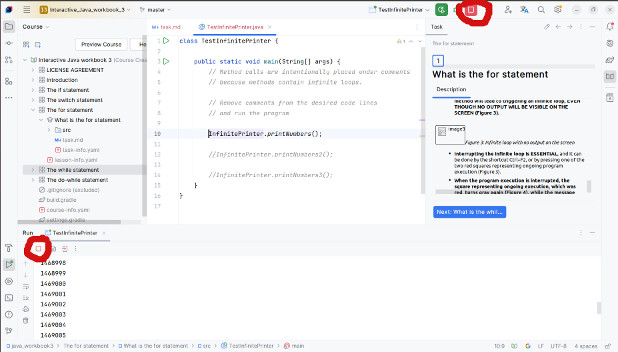
The only reason for an infinite do-while loop is that the loop condition is always satisfied – and this is identical to the while statement. Here is a brief overview, and for details, refer to the lesson on the while statement.
An infinite do-while loop can be created in two ways:
- The loop condition is an always satisfied logical expression (tautology). In this case, the logical expression itself doesn’t depend on the values of variables.
- Or, the values of the variables involved in the condition are changed in such a way that the condition always holds true (for example, if the value of a variable involved in the condition doesn’t change, the condition will always hold true, and so on).
Un-executable do-while loop
As already mentioned, an un-executable loop is the “opposite” of an infinite loop because it always terminates before it executes the first iteration or during the first iteration. Unlike for and while loops, an un-executable do-while loop always executes the first iteration.
The most common reasons for an un-executable do-while loop are:
- The loop condition is an unsatisfiable logical expression (contradiction).
- The values of the variables involved in the loop condition are such that the condition does not hold true at the beginning.
- Or the loop is immediately interrupted during the first iteration by an incorrect use of the break or return command.
- Or, as a special case of the previous situation, an if statement nested within the loop has both branches written in such a way that both use the break or return command.
Unlike the infinite loop, after the execution of an un-executable loop, manual interruption of the program is not required.
When to use for and while loops vs. do-while loop, alternative writing of one type of loop using another
In Java, there are for, while, do-while, and for-each loops with the goal of allowing programmers to write code that is easier to read, understand, and maintain.
As already stated, in Java, each loop can be alternately written as another type of loop. When the code for the loop is compiled, the result is similar or identical executable code (machine instructions), so the only important difference is that the source code might be more readable if it is written using one type of loop rather than another.
Which loop should be used to make the code more readable?
-
for loop:
- When the number of iterations is known in advance.
- When it makes sense to introduce a loop counter (iteration counter).
- When working with arrays (covered in the lesson on arrays).
-
while and do-while loops:
- When the number of iterations is not known in advance (waiting for a certain condition, e.g., signal for the end of an unknown-length file).
- When there is no need to introduce a loop counter (iteration counter).
- When a counter is needed, but it does not count loop iterations, but something else, like an auxiliary counter. This auxiliary counter often does not participate in the loop condition, and it is often necessary to initialize and use it outside the loop.
-
do-while loop additionally:
- When it is necessary to ensure that at least one iteration of the loop is always executed.
Most common errors
Some of the most common syntax errors when writing the do-while statement are almost identical to those in the while statement:
- Writing an expression as the condition of the do-while loop that is not a logical expression, e.g.:
1     do
2        res = res * a;
3     while (res % 1000);
Instead of (correct):
1     do
2        res = res * a;
3     while (res <= 1000);
- Writing the logical value false as the condition of the do-while loop, e.g.:
1     do
2        res = res * a;
3     while (false);
or
1     do
2        res = res * a;
3     while (!true);
Instead of (correct):
1     do
2        res = res * a;
3     while (res <= 1000);
- Forgetting to create a block of statements in the do-while loop if it contains more than one statement:
1     do
2           savings = savings * (100 + interest) / 100;
3           System.out.println(savings);
4     while (savings < 2 * amount);
Instead of (correct):
1     do {
2           savings = savings * (100 + interest) / 100;
3           System.out.println(savings);
4     } while (savings < 2 * amount);
Other common mistakes that are not syntax errors, but affect the program’s operation:
- Writing an infinite loop that never stops executing, e.g.:
 1     static void printMessage(String message){
 2       do
 3           System.out.println(message);
 4       while (true);
 5     }
 6
 7     static void printMessageA(String message){
 8       do
 9           System.out.println(message);
10       while (message == null || message != null);
11     }
12
13     static void printPower(int a, int b){
14       int res = 1;
15
16       do {
17           res = res * a;
18           System.out.println(res);
19       } while (res < b || res >= b);
20     }
Instead of (correct) - only the third method since the first two are only demonstrations of an infinite loop:
1     static void printPower(int a, int b){
2       int res = 1;
3
4       do {
5           res = res * a;
6           System.out.println(res);
7       } while (res < b);
8     }
- Writing an un-executable do-while loop that executes only the first iteration or is always interrupted during the first iteration, e.g.:
 1     static void printMessage(String message){
 2       do
 3           System.out.println(message);
 4       while (message == null && message != null);
 5     }
 6
 7     static void printPower(int a, int b){
 8       int res = 1;
 9
10       do {
11           res = res * a;
12           System.out.println(res);
13       } while (res < b && res >= b);
14     }
15
16     static void printPowerA(int a, int b){
17       int res = 1;
18
19       do {
20           res = res * a;
21           System.out.println(res);
22       } while (res > b);
23     }
24
25     static double calculateDoubleAmount(double amount, double interest) {
26       double savings = amount;
27
28       do {
29           savings = savings * (100 + interest) / 100;
30           System.out.println(savings);
31           return savings;
32       } while (savings < 2 * amount);
33
34       return savings;
35     }
Instead of (correct) - only the third and fourth methods because the first two are only demonstrations of an un-executable loop:
 1     static void printPower(int a, int b){
 2       int res = 1;
 3
 4       do {
 5           res = res * a;
 6           System.out.println(res);
 7       } while (res < b);
 8     }
 9
10     static double calculateDoubleAmount(double amount, double interest) {
11       double savings = amount;
12
13       do {
14           savings = savings * (100 + interest) / 100;
15           System.out.println(savings);
16       } while (savings < 2 * amount);
17
18       return savings;
19     }