Arrays - introduction
Lesson content
- What is an array - declaration, initialization, and capacity
- Accessing array elements via indices
- Most common errors
What is an array - declaration, initialization, and capacity
Each variable represents some identifier (name, letter, expression, etc.) that is linked to a certain value, and that value can change. In Java, variables are declared by specifying the type of the variable (int, boolean, double, etc.) and then the name of the variable. For each value that needs to be stored somewhere, it’s sufficient to define one variable.
But what happens when multiple values need to be stored - for example, 50 integers? One solution is to declare 50 integer variables and assign a value to each of them. However, this solution is not practical (what if there are 1000 integers) and cannot be applied if the number of variables needed is not known in advance.
The proper solution for such situations is arrays. Technically speaking, arrays are variables that can store multiple values at once. Theoretically, arrays represent a type of (linear) data structure where the elements (usually) have the same type and there is some order, so it is known which element comes before which other element and which comes after. This chapter covers only one-dimensional arrays whose elements are of simple types (e.g., int, double, char, boolean), while one-dimensional arrays of objects and lists are covered in later chapters. Multidimensional arrays (so-called matrices) and other data structures (e.g., sets, maps, trees) are not covered in this collection.
The declaration of an array is done as follows:
1 data_type[] variable_name;
The declaration is almost identical to that of a regular variable; the only addition is the square brackets that come after the data type ([]). As mentioned, arrays can store multiple values at once. These values are called array elements. All elements of an array are always of the same type (e.g., an array of integers).
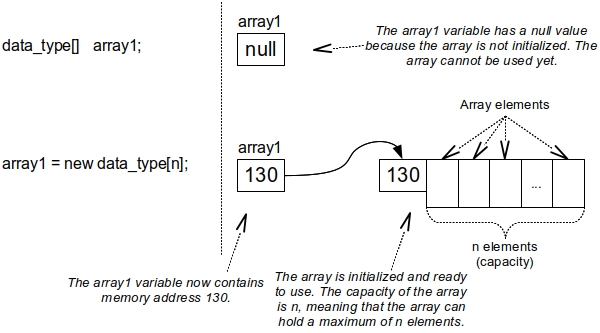
For an array to be used, it must first be initialized. Before that, the variable representing the array has null as its initial value - just like any variable that represents an object of some class (Figure 32). Initialization is done as follows:
1 variable_name = new data_type[size];
What does initialization actually do? The variable that represents the array is not the array itself but a reference to the array (a pointer). Initialization allocates (provides and occupies) computer memory for the array, and only then can the array be used. The number inside the parentheses (size) must be a non-negative integer. It represents the capacity of the array, i.e., how many elements the array can hold at most. For example, an array of integers with a capacity of 100 can hold 100 integers. Once set, the capacity of an array remains fixed, and it cannot be increased or decreased (Figure 32).
An array can be reinitialized, but its elements will be erased. During initialization, the array’s elements will receive initial values depending on their type (e.g., an array of integers will have all zeros).
Accessing array elements via indices
The variable representing the array has only one name but refers to multiple elements. The question arises: how do we access individual elements of the array?
It has already been stated that arrays are ordered linear structures, meaning that the order of their elements is known – which element comes first, and which element follows. To achieve this, it has been established that each element of the array has its index.
The index of an element is an integer representing its position in the array. The index values of array elements start from zero, not one. So, for example, the index of the first element of an array with a capacity of 10 is always zero, and the last one is 9 (Figure 33).
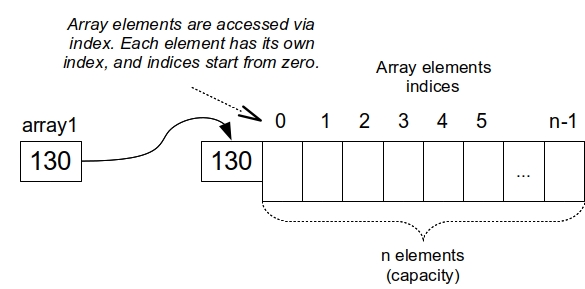
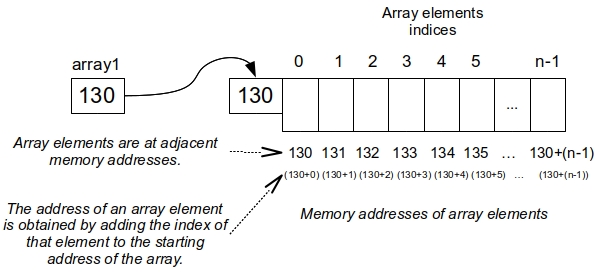
Why do indices start from zero and not one, and what is the technical reason for this? In Figure 33, it can be seen that the memory address of the array is 130 (this is just an example; the actual address can be any other, depending on which part of the memory is free at the moment of initialization). Array elements are placed at consecutive memory addresses. This means that the first element of the array is exactly at address 130, the second element at address 131, the third at address 132, and so on (Figure 34). In other words, the exact memory address of an array element can be obtained by adding the index of that element to the starting address of the array.
The first element of the array has an index of zero, so its address is 130 + 0 = 130. The second element has an index of 1, so its address is 130 + 1 = 131, and so on. This is a simplified explanation and holds true assuming that each array element occupies one memory unit.
If that’s not the case, then the address of the array elements is calculated as: start address of the array + index * number of memory units (for one array element). In this case, if the start address of the array is 130, and each element occupies two memory units, the exact memory address of the first element will be 130 (still), the second element (index 1) will be at 130 + 1x2 = 132, the third element (index 2) will be at 130 + 2x2 = 134, the fourth (index 3) will be at 130 + 3*2 = 136, and so on.
Accessing individual array elements using their index is done as follows:
1 variable_name[index]
If it’s necessary to get the array’s capacity (e.g., to check if the array is large enough), it is done by calling the length attribute like this:
1 variable_name.length
Example 1
Suppose you need to declare an array of real numbers. The example code is found in the class ArrayDemo, and for simplicity, everything is contained in the main method of this class.
 1     class ArrayDemo {
 2
 3         public static void main(String[] args) {
 4             //Declaration of an array with real numbers as elements
 5             double[] array_d;
 6
 7             //Initialization of the array to a capacity of 10 elements
 8             array_d = new double[10];
 9
10             //Assignment of value 5.6 to the first array element (index 0)
11             array_d[0] = 5.6;
12
13             //Assignment of value 0.7 to the third array element (index 2)
14             array_d[2] = 0.7;
15
16             //Assignment of value 3.3 to the last array element.
17             // The index is 9, since the capacity is 10 and indexes
18             // start at 0.
19             //Alternatively, we could have written
20             // array_d[array_d.length-1] = 3.3;
21             array_d[9] = 3.3;
22
23             //Printing all elements of the array on the screen
24             System.out.println(array_d[0]);
25             System.out.println(array_d[1]);
26             System.out.println(array_d[2]);
27             System.out.println(array_d[3]);
28             System.out.println(array_d[4]);
29             System.out.println(array_d[5]);
30             System.out.println(array_d[6]);
31             System.out.println(array_d[7]);
32             System.out.println(array_d[8]);
33             System.out.println(array_d[9]);
34         }
35     }
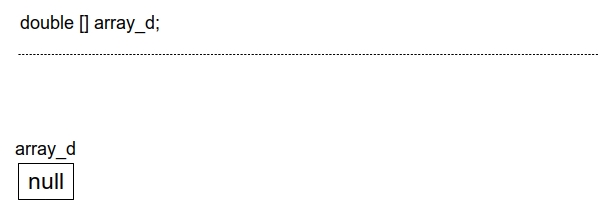
The corresponding commands and their effects in the computer’s memory are shown in the following images, with the first image representing the declaration of this array (Figure 35).
Next, suppose you need to initialize the array so that its maximum capacity is 10 elements (Figure 36). Since this is an array of real numbers, the initial value of each array element will be zero, i.e., 0.0.

Finally, suppose you need to assign a value of 5.6 to the first element of the array, 0.7 to the third element, and 3.3 to the last one (Figure 37).
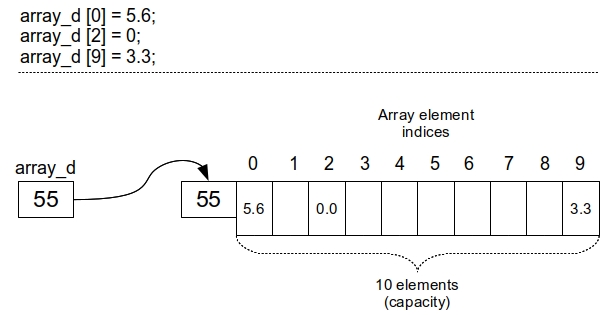
When assigning a value to the last element of the array, it can be written as in the example, but it is more common to use the length attribute (which contains the capacity or length of the array) to get the index of the last element, i.e., length - 1 (if the array capacity is 20, the index of the last element is 20-1=19, so the indices range from 0 to 19). Therefore, in the example, it could also be written like this:
1 array_d[array_d.length-1] = 3.3;
Moreover, in the example code, the values of all the array elements are printed on the screen. A separate command is used for each array element, which is not recommended, but it is acceptable because the array has a small number of elements. However, in situations where the array has more elements, it is recommended to use loops to perform operations on multiple array elements at once — including printing the values of the elements on the screen.
In the Java programming language, there is another, faster way to simultaneously initialize an array and assign values to the array elements.
1 variable_name = {value_1, value_2, … , value_n};
This initialization method is somewhat limited to specific situations. It can only be used when:
- It is known in advance what values need to be assigned to the array
- The capacity of the array needs to be exactly the number of values entered.
Example 2
Create a class ArrayInitializationDemo which has:
- An attribute integerArray representing an array of integers. Initialize the array so that its capacity is 8 elements.
- An attribute doubleArray representing an array of real numbers. Initialize the array so that its capacity is 10 elements.
- An attribute charArray representing an array of characters. Initialize the array so that its capacity is 5 elements.
- An attribute booleanArray representing an array of boolean values. Initialize the array so that its capacity is 7 elements.
- An attribute integerArray2 representing an array that contains four integers: 1, 55, -3, 12. Use fast array initialization.
- An attribute doubleArray2 representing an array that contains three real numbers: 0.33, -45.01, 22.1. Use fast array initialization.
- An attribute charArray2 representing an array that contains three characters: A, G, C. Use fast array initialization.
- An attribute booleanArray2 representing an array that contains five boolean values: true, false, true, true, false. Use fast array initialization.
 1     class ArrayInitializationDemo {
 2
 3         int[] integerArray = new int[8];
 4
 5         double[] doubleArray = new double[10];
 6
 7         char[] charArray = new char[5];
 8
 9         boolean[] booleanArray = new boolean[7];
10
11         int[] integerArray2 = {1, 55, -3, 12};
12
13         double[] doubleArray2 = {0.33, -45.01, 22.1};
14
15         char[] charArray2 = {'A', 'G', 'C'};
16
17         boolean[] booleanArray2 = {true, false, true, true, false};
18     }
Create a class TestArrayInitializationDemo that in the main method creates an object of the class ArrayInitializationDemo and prints on the screen:
- The first element of the array integerArray.
- The last element of the array doubleArray.
- The third element of the array integerArray2.
- The capacity of the array charArray.
- The capacity of the array booleanArray.
- The last element of the array charArray2. Use the length attribute.
- The last element of the array booleanArray2. Use the length attribute.
 1     class TestArrayInitializationDemo {
 2
 3         public static void main(String[] args) {
 4             ArrayInitializationDemo aid = new ArrayInitializationDemo();
 5
 6             System.out.println(aid.integerArray[0]);
 7
 8             System.out.println(aid.doubleArray[9]);
 9
10             System.out.println(aid.integerArray2[2]);
11
12             System.out.println(aid.charArray.length);
13
14             System.out.println(aid.booleanArray.length);
15
16             System.out.println(aid.charArray2[aid.charArray2.length - 1]);
17
18             System.out.println(aid.booleanArray2[aid.booleanArray2.length - 1]);
19         }
20     }
From the code, it can be seen that the variable integerArray is initialized with a capacity of 8, and the array elements are given their initial values for int, i.e., all are zeros. Similarly, for the variables doubleArray, charArray, and booleanArray, their capacities are 10, 5, and 7, respectively. Additionally, the initial values of the array elements have not been changed.
From the example, it can also be seen how the fast initialization of the array looks with simultaneous assignment of values to the elements. The variable integerArray is initialized with a capacity of four. The value of the first element of this array is 1, the second is 55, the third is -3, and the fourth is 12.
The variable doubleArray is initialized with a capacity of three, the value of the first element is 0.33, the second is -45.01, and the third is 22.1.
The variable charArray is also initialized with a capacity of three, the value of the first element is the character A, the second is G, and the third is C.
Finally, the variable booleanArray is initialized with a capacity of five, the value of the first element is true, the second is false, the third is true, the fourth is true, and the fifth is false.
From the TestArrayInitializationDemo class, it can be seen that, as usual, it is first necessary to initialize an object of the class ArrayInitializationDemo to use it. At the same time, the arrays that are given as attributes in that class will be initialized.
Accessing array elements is done via the object name (“aid”), the array name (since each array is given as an attribute of the class), and specifying the element index. For the first element of the array integerArray, the expression is as follows.
1 aid.integerArray[0]
To print the capacity of the array, the length attribute was used. Although the capacities of the arrays charArray (5) and booleanArray (7) were already known in advance, so these two numbers could have been directly printed (“System.out.println(5);” and “System.out.println(7);”), this is not always the case, so the length attribute was used.
1 System.out.println(aid.charArray.length);
2
3 System.out.println(aid.booleanArray.length);
In addition, the length attribute was used in the last two prints to access the array length and, by subtracting one, get the index of the last array element.
1 aid.charArray2[aid.charArray2.length - 1]
2
3 aid.booleanArray2[aid.booleanArray2.length - 1]
From the previous examples, it can be seen how to access individual elements of an array. However, what should be done if you need to execute commands on multiple elements of the array at once? For example, to print the values of all elements of the array on the screen, or to multiply all numbers in the array by two, etc. In such cases, specifying individual commands is not a good solution, as in the case of printing an array with 100 elements, where you would need to specify the command “System.out.println” a hundred times and repeat the call for each individual element.
To solve this, in practice, arrays are often used in combination with loops, most commonly with FOR or FOR-EACH loops. If it’s a FOR loop, the loop counter is used to simulate the index of the array elements. The loop counter is set to zero (since array indices start at zero), and the loop runs until the counter reaches the maximum index value.
Example 3
Create a class MonthlyProfits which has:
- An attribute profits which represents an array of 12 real numbers. Each element of the array represents the profit for a specific month (January, February, …, December).
- A parameterless constructor that initializes the profits array with a capacity of 12.
- A method enterProfit which takes a real number (representing the profit) and an integer (representing the month’s number, from 1 for January to 12 for December). The method enters the given profit value into the array element representing that specific month.
- A method print that prints the profits for all months to the screen.
- A method sum that sums the profits for all 12 months and prints the total annual profit on the screen.
 1     class MonthlyProfits {
 2
 3         // The array does not have to be initialized
 4         // immediately upon declaration
 5         double[] profits;
 6
 7         //Here, the array initialization is in the constructor
 8         MonthlyProfits(){
 9             profits = new double[12];
10         }
11
12         void enterProfit(double profit, int month){
13             // Here [month-1] is used, not [month] because
14             // array indices start from zero, so index
15             // for January is 0, although it is the first
16             // month (1) and index for December is 11 though
17             // it is the twelfth month.
18             profits[month -1] = profit;
19         }
20
21         void print(){
22             // Passing through the array is done by
23             // making the loop counter take values from
24             // 0 to length-1, following array element index values
25             for(int i = 0; i < profits.length; i++)
26                 System.out.println(profits[i]);
27         }
28
29         void sum(){
30             // Helper variable to which
31             // monthly profits will be added
32             //one at a time.
33             double totalProfit = 0;
34
35             // Passing through the array and adding each
36             // monthly profit to the sum - totalProfit
37             for(int i = 0; i < profits.length; i++)
38                 totalProfit = totalProfit + profits[i];
39
40             System.out.println("Total profit is: " + totalProfit);
41         }
42     }
Create a class TestMonthlyProfits which, in the main method, creates an object of the MonthlyProfits class, enters a profit of 122.33 for February and 255.44 for May, prints all the monthly profits, and then prints the total annual profit.
 1     class TestMonthlyProfits {
 2
 3         public static void main(String[] args) {
 4             MonthlyProfits mp = new MonthlyProfits();
 5
 6             mp.enterProfit(122.33, 2);
 7
 8             mp.enterProfit(255.44, 5);
 9
10             mp.print();
11
12             mp.sum();
13         }
14     }
From the code, it’s clear that the profits attribute represents an array of real numbers, which is not initialized immediately upon declaration. This is a common situation – the array might be initialized later in the code rather than immediately. Specifically, the class constructor contains the code to initialize the array to the appropriate capacity, i.e., 12 (one array element for each month of the year).
The enterProfit method receives the profit amount and the number of the month it applies to. The method directly enters the profit into the array element corresponding to that month. It’s important to note that month numbers range from 1 to 12, while array indices range from 0 to 11 (0 for January, 1 for February, …, 11 for December). Because of this, the month number is decreased by one to obtain the corresponding array index:
1 profits[month - 1] = profit;
The print method uses a for loop to print all array elements to the screen. The loop counter “i” is intentionally set to iterate the same way as array indices. Thus, in each iteration, a different element of the array is accessed by using the loop counter value as index. The counter starts at 0 (since array indices start at 0) and increments by one in each iteration. The loop continues as long as the counter is less than the array’s length (profits.length). This makes sense because in the last iteration, the counter will have the value length - 1, which is the index of the last array element (length is 12, so length - 1 is 11).
In each iteration of the loop, one array element is printed – specifically, the element at the index equal to the loop counter for that iteration (profits[i]). So, in the first iteration, “i” is 0 and profits[0] is printed, which is the first array element. In the second iteration, “i” is 1 and profits[1] is printed (the second element), and so on. In the last iteration, “i” will be capacity - 1 and the last array element will be printed.
Finally, in the sum method, you can see how the array elements are added together. A for loop is used again, with a loop counter ranging from 0 to array length minus 1. A helper variable totalProfit is introduced to which each monthly profit is added during the loop iterations. The initial value of this variable is zero since 0 is the neutral element for addition. When the loop completes, all monthly profits will have been summed, and the result will be stored in totalProfit, which is then printed to the screen. In this example, only profits for February (122.33) and May (255.44) are non-zero, so the total annual profit will be 377.77.
The array used in the previous example is always filled to its maximum capacity. What does this mean? The array has twelve elements, and all elements are always used (each one represents monthly profit for one month of the year). However, there are situations where the array is not used to full capacity.
An example of this is an array of grades from an exam in a certain subject – we may know how many students applied for the exam, but not all of them will show up.
In such cases, entering a new value into the array requires finding a “free spot”, i.e., an array element that hasn’t been assigned a value yet. Naturally, it’s possible the search might reveal that there are no free spots left, but we only know that after the entire array has been checked.
Also, when printing values to the screen, we must not print “free spots” – array elements that haven’t been assigned a value.
Example 4
Create a class ExamGrades which has:
- An attribute examName which represents the name of the exam the grades relate to.
- An attribute grades which represents student grades for that exam. Grades are integers in the range of 5 to 10.
- A constructor which receives the number of students who applied for the exam and initializes the capacity of the grades array to that number.
- A method enterGrade which takes a grade and inserts it into the first available spot in the array.
- A method print that prints all data about the exam grades: the exam name and all the grades.
- A method printPassRate that counts and prints the number of students who passed the exam (received a grade higher than 5).
 1     class ExamGrades {
 2
 3         String examName;
 4
 5         int[] grades;
 6
 7         ExamGrades(int totalStudents){
 8             grades = new int[totalStudents];
 9         }
10
11         void enterGrade(int grade){
12             // The method searches for a "free spot"
13             // in the array (its value is 0) so if
14             // it is found, a new grade is entered
15             // and the entire method is terminated (return)
16             for (int i = 0; i < grades.length; i++)
17                 if (grades[i] == 0){
18                     grades[i] = grade;
19                     return;
20                 }
21
22             // If a "free spot" cannot be found, the
23             // for loop stops, but the method continues to
24             // execute this print command that prints that
25             // the array is full.
26             System.out.println("No more space in the array for new grades");
27         }
28
29         void print(){
30             System.out.println("Exam name: " + examName);
31
32             System.out.println("Grades: ");
33             // All elements from the array are printed
34             // except the ones that are 0. Zeros represent "free
35             // spots" i.e. array elements in which the grade is
36             // not yet entered so they don't need to be printed.
37             for(int i = 0; i < grades.length; i++)
38                 if (grades[i] != 0)
39                     System.out.println(grades[i]);
40         }
41
42         void printPassRate(){
43             // Helper variable that serves as counter for
44             // students who have passed the exam. The
45             // initial value is 0.
46             int passed = 0;
47
48             // Passes through all array elements and checks if
49             // the current array element (grade)is greater than 5.
50             // If it is, the number of students who have passed
51             // the exam increases by one.
52             for(int i = 0; i < grades.length; i++)
53                 if (grades[i] > 5)
54                     passed++;
55
56             System.out.println("The number of students that have passed is: " + passed);
57         }
58     }
Create a class TestExamGrades which, in the main method, creates an object of the ExamGrades class with 12 students that have applied for that exam, and:
- Enters the exam name “Java programming”.
- Enters the grades: 5, 10, 10, 7, and 8 (not all students have shown up for the exam).
- Prints exam name and grades to the screen.
- Prints the exam pass rate (i.e., how many students passed the exam).
 1     class TestExamGrades {
 2
 3         public static void main(String[] args) {
 4             ExamGrades eg = new ExamGrades(12);
 5
 6             eg.examName = "Java programming";
 7
 8             eg.enterGrade(5);
 9             eg.enterGrade(10);
10             eg.enterGrade(10);
11             eg.enterGrade(7);
12             eg.enterGrade(8);
13
14             eg.print();
15
16             eg.printPassRate();
17         }
18     }
The grades attribute, which holds the student grades, is declared without initialization. This is because the number of students who will apply for the exam isn’t known in advance, and it can vary – so it doesn’t make sense to use a fixed value. This problem is solved using a parameterized constructor. The constructor receives the number of applied students (required capacity) and initializes the array to that size, allowing it to be initialized to any capacity as needed.
The enterGrade method loops through the array and looks for a “free spot” to insert the new grade. A “free spot” here is any element with a value of 0 (which is the default value for integer arrays) since a valid grade is in the range 5–10. Technically, a for loop is used, and within it, an if statement checks whether the current array element is 0 (grades[i] == 0). If such an element is found, the method inserts the new grade there and exits with a return statement. If no element with value 0 is found, the for loop terminates (just the loop), and the next command is executed - which prints a message that there are no available spots.
The print method displays the exam name and all grades. It ensures that only non-zero elements are printed (i.e., only grades that have been entered). Again, a for loop with an if condition is used to check if the value is not zero. If not zero, the value is printed. Without this check, all elements would be printed – even the ones with value 0 (which do not represent actual grades).
In the printPassRate method, a variable “passed” is introduced to count how many students passed the exam. It starts at 0 and increases by one each time a grade greater than 5 is found. A for loop with an if statement checks whether each array element is greater than 5. If yes, the variable passed increments. At the end of the loop, the variable passed contains the total number of students who passed the exam, and it is printed. Elements with value 0 are naturally skipped, as they don’t satisfy the condition - they are not greater than five.
In situations where an array is not filled to full capacity, it is possible to simplify insertion, printing, and other operations by introducing a helper variable that acts as a counter of elements in the array. This counter tracks how many elements are actually filled, not the total capacity. Of course, this counter needs to be updated whenever an element is added or removed. A useful assumption is that the array is filled from the beginning onward, so the counter can also be used to locate the next “free spot” i.e. its index.
This concept is explained in the next example.
Example 5
Create a class ExamGrades2 as an alternative to the class ExamGrades from the previous example. The class ExamGrades2 should include:
- An attribute examName which represents the name of the exam the grades relate to.
- An attribute grades which represents student grades for that exam. Grades are integers in the range of 5 to 10.
- An attribute counter that keeps track of the number of grades entered into the array. Its initial value is 0.
- A constructor which receives the number of students who applied for the exam and initializes the capacity of the grades array to that number.
- A method enterGrade which takes a grade and inserts it into the first available spot in the array.
- A method print that prints the exam name and all the grades.
- A method printPassRate that counts and prints the number of students who passed the exam (received a grade higher than 5).
 1     class ExamGrades2 {
 2
 3         String examName;
 4
 5         int[] grades;
 6
 7         int counter = 0;
 8
 9         ExamGrades2(int totalStudents){
10             grades = new int[totalStudents];
11         }
12
13         void enterGrade(int grade){
14             // if the counter is less than the capacity
15             // of the array, there are free spots available
16             if (counter < grades.length) {
17                 // The variable counter represents
18                 // current number of grades in the array
19                 // but also represents the index of the first
20                 // free spot (element) in the array.
21                 grades[counter] = grade;
22
23                 // The new element is added to the array
24                 // so it is necessary to take increase the counter
25                 // by one.
26                 counter++;
27             }
28             else
29                 System.out.println("No more space in the array for new grades");
30         }
31
32         void print(){
33             // The for loop counter goes from zero
34             // up to the number of entered grades
35             // (counter) rather than capacity (length)
36             // because the array is not filled to the end.
37             for(int i = 0; i< counter; i++)
38                 System.out.println(grades[i]);
39         }
40
41         void printPassedRate(){
42             int passed = 0;
43
44             // The for loop counter goes from zero
45             // up to the number of entered grades
46             // (counter) rather than capacity (length)
47             // because the array is not filled to the end.
48             for(int i = 0; i < counter; i++)
49                 if (grades[i] > 5)
50                     passed++;
51
52             System.out.println("The number of students that have passed is: " + passed);
53         }
54     }
Create a class TestExamGrades2. In the main method, create an object of the class ExamGrades2 for which 12 students applied, and:
- Enters the exam name “Java programming”.
- Enters the grades: 5, 10, 10, 7, and 8 (not all students have shown up for the exam).
- Prints all exam data to the screen.
- Prints the exam pass rate (i.e., how many students passed the exam).
 1     class TestExamGrades2 {
 2
 3         public static void main(String[] args) {
 4             ExamGrades2 eg = new ExamGrades2(12);
 5
 6             eg.examName = "Java programming";
 7
 8             eg.enterGrade(5);
 9             eg.enterGrade(10);
10             eg.enterGrade(10);
11             eg.enterGrade(7);
12             eg.enterGrade(8);
13
14             eg.print();
15
16             eg.printPassedRate();
17         }
18     }
You can see that the attributes grades, examName, and the constructor are identical to those in the previous example (the ExamGrades class). Even the declarations of the methods enterGrade and print are the same.
The differences arise due to the introduction of the counter, which keeps track of how many grades have actually been entered into the array.
The enterGrade method no longer requires a for loop with a nested if statement to find the first “free spot” (i.e., an element with value 0). Assuming the counter is up-to-date, and that grades are added from the start of the array toward the end, then the value of the counter also represents the index of the first free spot in the array.
If no grades have been entered, the counter is 0, and the first grade goes into index 0. After each new grade, the counter is incremented. Thus, instead of using a loop, the method now only needs a single if statement:
1 if (counter < grades.length) {
2     grades[counter] = grade;
3     counter++;
4 } else {
5     System.out.println("No more space in the array for new grades");
6 }
The print method is also simpler because it doesn’t need a nested if statement to skip elements with value 0 (“free spots”). Since grades are added sequentially from the beginning, and we have the counter showing how many grades were entered, we can just print elements from index 0 to counter - 1. Elements beyond that index haven’t been filled (they would still be 0), so they are not printed.
The printPassRate method is not much simpler than in the ExamGrades2 class, since we still need to check each entered grade to see if it’s greater than 5. However, it performs slightly better because it only checks grades up to counter (the number of actual entries), rather than the entire array length.
Most common errors
Some of the most common syntax errors when working with arrays are:
- Forgetting to use square brackets when declaring an array and then trying to initialize it:
1 int array = new int[10];
Instead of (correct):
1 int[] array = new int[10];
or (also correct):
1 int array[] = new int[10];
- Forgetting to specify the array’s capacity in square brackets during initialization:
1 int[] array = new int[];
Instead of (correct):
1 int[] array = new int[10];
- Failing to initialize the array, then trying to access its elements within the same block of code. (If it’s not in the same block, you’ll get a runtime error, not a syntax error):
1     int[] array;
2
3     array[0] = 3;
Instead of (correct):
1     int[] array = new int[5];
2
3     array[0] = 3;
- Using regular parentheses instead of square brackets when declaring or initializing an array:
1     int[] array = new int(10);
2     int() array = new int[10];
Instead of (correct):
1 int[] array = new int[10];
- Using regular parentheses instead of square brackets when accessing array elements by index:
1 array(10) = 5;
Instead of (correct):
1 array[10] = 5;
- Initializing an array with a different type than declared:
1 int[] array = new double[10];
Instead of (correct):
1 int[] array = new int[10];
Other common mistakes that aren’t syntax errors, but still affect program behavior:
- Initializing an array with a negative size:
1 int[] array = new int[-10];
Instead of (correct):
1 int[] array = new int[10];
- Initializing an array with size zero (allowed but creates an empty array), then trying to access its elements:
1     int[] array = new int[0];
2
3     array[0] = 3;
Instead of (correct):
1     int[] array = new int[10];
2
3     array[0] = 3;
- Declaring an array but forgetting to initialize it before accessing elements (if initialization and access are in different blocks, it’s a runtime error):
1     class Example {
2         static int[] array;
3
4         public static void main(String[] args) {
5             array[0] = 3;
6         }
7     }
Instead of (correct):
1     class Example {
2         static int[] array = new int[5];
3
4         public static void main(String[] args) {
5             array[0] = 3;
6         }
7     }
- Creating a new local variable with the same name as an array field, instead of initializing the existing field. In the following code, a new local array dailyTemperatures is mistakenly declared and initialized, even though it has the same name as the class attribute:
1     class SeaTemperatures {
2         double[] dailyTemperatures;
3
4         SeaTemperatures() {
5             double[] dailyTemperatures = new double[366];  // New local variable
6         }
7     }
Instead of (correct):
1     class SeaTemperatures {
2         double[] dailyTemperatures;
3
4         SeaTemperatures() {
5             dailyTemperatures = new double[366];  // Refers to the class attribute
6         }
7     }
- Accessing array elements using invalid index values — either negative index or index out of bounds (greater than length - 1):
1     int[] array = new int[10];
2
3     array[-5] = 3;   // Negative index
4     array[10] = 3;   // Index out of bounds (valid: 0 to 9)
Instead of (correct):
1     int[] array = new int[10];
2
3     array[5] = 3;
4     array[9] = 3;