The for statement (loop)
Lesson content
- What is the for statement - declaration and elements
- Loop counter
- Nesting statements within the for loop
- The break, return, and continue statements in loops
- Alternative writing of the for loop
- Infinite loop and how to stop it
- Un-executable loop
- Most common errors
What is the for statement - declaration and elements
Controlling the flow of program execution also involves resolving situations where it is necessary to repeat one or more commands multiple times. In these cases, looping commands are used. These commands are also called loops. One type of loop is the for loop. The declaration of the for loop is made as follows:
1 for (initial_command; condition; increment_command)
2   command_to_execute;
The declaration starts with the reserved word “for”, followed by parentheses containing two commands and a condition:
- The first command in the parentheses (initial_command) is executed only once at the beginning. This is usually the command that introduces a variable representing the loop counter.
- The condition (condition) is a logical expression that is checked before executing each iteration (cycle). If the condition is true, the loop will continue with another iteration. If it is false, the loop stops. This condition often checks the value of the loop counter to control the number of iterations (repetitions).
- The last command in the parentheses (increment_command) is executed at the end of each iteration. Typically, this command increases or decreases the value of the loop counter at the end of each iteration.
After the parentheses, there is a command to be executed multiple times (command_to_execute). This command is executed once per iteration. When the loop starts, the sequence of command execution and condition checking is as follows:
-
START OF LOOP
- Execute initial_command
-
Check condition (condition is true)
-
1st ITERATION
- Execute command_to_execute
- Execute increment_command
-
-
Check condition (condition is true)
-
2nd ITERATION
- Execute command_to_execute
- Execute increment_command
-
-
Check condition (condition is true)
-
3rd ITERATION
- Execute command_to_execute
- Execute increment_command …
-
- Check condition (condition is false - loop terminates)
- END OF LOOP
If multiple commands need to be repeated in a loop, they should be enclosed in a block of commands using curly braces:
1  for (initial_command; condition; increment_command) {
2    command_to_execute_1;
3    command_to_execute_2;
4    ...
5    command_to_execute_n;
6  }
Example 1
Create a class Printer that has a static method printFiveTimes that prints the message “Good day” five times on the screen.
1 class Printer {
2
3     static void printFiveTimes(){
4         for (int i=1; i<=5; i++)
5             System.out.println("Good day");
6     }
7 }
Create a class TestPrinter that calls the method from the Printer class from its main method. Run the main method and check the program execution.
1 class TestPrinter {
2
3     public static void main(String[] args) {
4         Printer.printFiveTimes();
5     }
6 }
The printFiveTimes method could also be implemented by writing the System.out.println command five times in a row, but that would not be practical.
1 static void printFiveTimes(){
2   System.out.println("Good day");
3   System.out.println("Good day");
4   System.out.println("Good day");
5   System.out.println("Good day");
6   System.out.println("Good day");
7 }
First, the number of System.out.println commands would need to be changed each time the required number of prints changes. If the number of required prints increased to one hundred or a thousand, this approach would not be practically feasible.
Second, what if multiple commands need to be repeated? This would mean that the entire block of commands would need to be written multiple times inside the method body, making the code bulky, hard to read, and very difficult to maintain.
Therefore, the for loop is used. In this case, a loop counter - variable “i” (short for “iterator”, though any name can be used) is created and initialized with the value 1.
Before each iteration, it is checked whether “i” is less than or equal to 5. If true, the iteration is executed - the message “Good day” is printed on the screen. Then “i” is incremented by 1 (i++). This continues until “i” reaches the value 6, at which point the loop terminates.
The expression “i++” is the shortest form of the command “i = i + 1” (it is shorter than the equivalent “i += 1”). The “++” operator is the increment operator that increases the current value of the variable by one. This shorthand is common in for loops, as is the use of the decrement operator “—” when the counter needs to be decreased at the end of the loop.
Here is a brief description of what happens when the loop is executed:
-
START OF LOOP
- int i = 1; (declares the loop counter “i” and sets it to 1)
-
i<=5 ? (1<=5 - condition is true)
-
1st ITERATION (i = 1)
- System.out.println(“Good Day”);
- i++; (i = 2 - variable incremented by 1)
-
-
i<=5 ? (2<=5 - condition is true)
-
2nd ITERATION (i = 2)
- System.out.println(“Good Day”);
- i++; (i = 3 - variable incremented by 1)
-
-
i<=5 ? (3<=5 - condition is true)
-
3rd ITERATION (i = 3)
- System.out.println(“Good Day”);
- i++; (i = 4 - variable incremented by 1)
-
-
i<=5 ? (4<=5 - condition is true) 4th ITERATION (i = 4)
- System.out.println(“Good Day”);
- i++; (i = 5 - variable incremented by 1)
-
i<=5 ? (5<=5 - condition is true) 5th ITERATION (i = 5)
- System.out.println(“Good Day”);
- i++; (i = 6 - variable incremented by 1)
- i<=5 ? (6>5 - condition is false, loop terminates)
- END OF LOOP
The loop counter (“i”) is, therefore, used to ensure that the for loop executes a specific number of iterations (in the previous example, five iterations). It is common practice to declare the cycle counter and assign it an initial value in the first statement within the for loop parentheses.
The condition for exiting the loop is when the counter reaches a certain value, and the third command inside the parentheses changes the current value of the counter (in the previous example, by incrementing it by one). Since this third command is executed at the end of each iteration, the counter gets a new value, which is passed to the next iteration.
When the loop counter is declared within the first command in the for loop parentheses, it is a local variable “visible” only within the for loop, meaning it cannot be used or called outside it. On the other hand, it is quite common for the loop counter to be used within the commands that need to be repeated inside the for loop, not just for controlling the number of iterations.
Example 2
Create a class Printer2 so that it includes the following:
- A static method printNTimes that takes a message (String) and a positive integer n as parameters. This method prints the entered message n times on the screen.
- A static method print0To30 that prints the numbers from 0 to 30 on the screen.
- A static method print30To0 that prints the numbers from 30 to 0 on the screen in reverse order (30, 29, 28, 27, …, 2, 1, 0).
 1     class Printer2 {
 2
 3         static void printNTimes(String message, int n){
 4             for (int i=1; i<=n; i++)
 5                 System.out.println(message);
 6         }
 7
 8         static void print0To30(){
 9             for (int i=0; i<=30; i++)
10                 System.out.println(i);
11         }
12
13         static void print30To0(){
14             for (int i=30; i>=0; i--)
15                 System.out.println(i);
16         }
17     }
Create a class TestPrinter2 that calls all the methods of the Printer class from its main method. Be sure to run the main method and check the program’s behavior.
 1 class TestPrinter2 {
 2
 3     public static void main(String[] args) {
 4         Printer2.printNTimes("Hello", 2);
 5
 6         Printer2.print0To30();
 7
 8         Printer2.print30To0();
 9     }
10 }
In the method printNTimes, the parameter n is used to control the loop’s exit condition. This parameter controls the number of loop iterations. For example, if 5 is entered as the value of n, the loop will perform 5 iterations (the message will be printed 5 times on the screen), and if 10 is entered, it will perform 10 iterations.
The method print0To30 prints all integers from this range to the screen. The simplest solution is to set the loop counter to take values from 0 to 30, printing the current counter value for each iteration. In this case, the loop counter is used to control both the number of iterations and the repeated statement within the loop (printing on the screen).
The counter starts at zero. In the first iteration, the current value of the counter (zero) is printed, and the counter is incremented by 1. In the second iteration, the current value of the counter (now one) is printed, and the counter is incremented by 1. In the third iteration, the current value (two) is printed, the counter is incremented, and so on. In the last iteration, the counter reaches 30, which is printed (because 30<=30, the condition holds). When the counter is incremented to 31, the condition no longer holds (31>30), and the loop stops. The total number of iterations is 31 because the counter starts at zero.
The method print30To0 shows that the loop counter can be decremented after each iteration if needed (i—). This, of course, requires that both the starting value of the counter and the loop exit condition be written differently.
Specifically, the starting value of the counter is 30. The loop will run as long as the counter is greater than or equal to zero (i>=0). This works perfectly, as the counter will decrease in each iteration (first 30, then 29, then 28, and so on). In the last iteration, the counter will have the value zero, then be decremented to -1, at which point the for loop will terminate (the counter is no longer greater than or equal to zero). The current value of the counter is printed in each iteration, which is what is requested for this method — printing the numbers 30, 29, 28, …, 2, 1, 0.
Nesting statements within for loops
A for statement can be combined (nested) with any other program flow control statements. So, it’s possible for an if or switch statement to be inside the block of a for loop, or vice versa — where a for (or another) loop is nested inside the block of an if or switch statement. This nesting can also occur in a way that a for statement contains another for loop or some other cycle.
When an if statement is nested inside a for loop, it usually looks like this:
1 for(int i = 1; i <= 5; i++)
2   if (some condition)
3     statement_p1;
4   else
5     statement_p2;
Effectively, this means that in each iteration of the for loop, the if statement will execute once and check the condition, executing statement_p1 if the condition is true (YES branch) or statement_p2 if the condition is false (NO branch), as shown in the following listing. Of course, it’s quite possible that in some iterations, the if condition will be true, and in others, it won’t. Also, it’s important to note that the condition in the for loop and the condition in the if statement are independent and refer to different things (controlling the number of iterations vs. checking some logical condition for branching).
-
START OF LOOP
int i = 1; (declares the loop counter “i” and sets it to 1)
i<=5 ? (1<=5 - loop condition is true)
1st ITERATION (i = 1)
Checks the condition of the if statement and executes
statement_p1 if the condition is true (YES branch)
statement_p2 if the condition is false (NO branch)
i++; (i = 2 - variable is incremented by 1)
-
i<=5 ? (2<=5 - loop condition is true)
-
2nd ITERATION (i = 2)
- Checks the condition of the if statement and executes
- statement_p1 if the condition is true (YES branch)
- statement_p2 if the condition is false (NO branch)
- i++; (i = 3 - variable is incremented by 1)
-
-
i<=5 ? (3<=5 - loop condition is true)
-
3rd ITERATION (i = 3)
- Checks the condition of the if statement and executes
- statement_p1 if the condition is true (YES branch)
- statement_p2 if the condition is false (NO branch)
- i++; (i = 4 - variable is incremented by 1)
-
-
i<=5 ? (4<=5 - loop condition is true)
-
4th ITERATION (i = 4)
- Checks the condition of the if statement and executes
- statement_p1 if the condition is true (YES branch)
- statement_p2 if the condition is false (NO branch)
- i++; (i = 5 - variable is incremented by 1)
-
-
i<=5 ? (5<=5 - loop condition is true)
-
5th ITERATION (i = 5)
- Checks the condition of the if statement and executes
- statement_p1 if the condition is true (YES branch)
- statement_p2 if the condition is false (NO branch)
- i++; (i = 6 - variable is incremented by 1)
-
i<=5 ? (6>5 - loop condition is false, loop breaks)
- END OF LOOP
If a loop is nested within another loop (or multiple loops), we have “double”, “triple”, or “multiple” loops. If one for loop is nested within another, we get a double for loop (this is the most common case).
The first of these two loops is called the “outer” for loop, and the second loop, which is nested inside the first, is called the “inner” for loop. For example:
1 for (int i = 1; i<=3; i++)
2     for(int j = 1; j<=2; j++) statement_p;
First, it should be noted that each loop has a separate counter with a different name. The outer loop has counter “i”, while the inner loop has counter “j”. The outer loop will have 3 iterations (i goes from 1 to 3), and the inner loop will have 2 iterations (j goes from 1 to 2).
What’s important is that in each iteration of the outer loop, the entire inner loop executes (all of its iterations). So, in the first iteration of the outer loop, both iterations of the inner loop execute. In the second iteration of the outer loop, both iterations of the inner loop execute again, and so on, as shown in the following listing:
-
START OF OUTER LOOP
int i = 1; (declares the loop counter “i” and sets it to 1)
-
i<=3 ? (1<=3 - outer loop condition is true)
1st ITERATION (i = 1)
START OF INNER LOOP
int j = 1; (declares the loop counter “j” and sets it to 1)
j<=2 ? (1<=2 - inner loop condition is true)
1st ITERATION (j = 1)
statement_p;
j++; (j = 2 - variable is incremented by 1)
j<=2 ? (2<=2 - inner loop condition is true)
2nd ITERATION (j = 2)
statement_p;
j++; (j = 3 - variable is incremented by 1)
j<=2 ? (3>2 - inner loop condition is false, loop breaks)
END OF INNER LOOP
i++; (i = 2 - variable is incremented by 1)
-
i<=3 ? (2<=3 - outer loop condition is true)
2nd ITERATION (i = 2)
START OF INNER LOOP
int j = 1; (declares the loop counter “j” and sets it to 1)
j<=2 ? (1<=2 - inner loop condition is true)
1st ITERATION (j = 1)
statement_p;
j++; (j = 2 - variable is incremented by 1)
j<=2 ? (2<=2 - inner loop condition is true)
2nd ITERATION (j = 2)
statement_p;
j++; (j = 3 - variable is incremented by 1)
j<=2 ? (3>2 - inner loop condition is false, loop breaks)
END OF INNER LOOP
i++; (i = 3 - variable is incremented by 1)
-
i<=3 ? (3<=3 - outer loop condition is true)
3rd ITERATION (i = 3)
START OF INNER LOOP
int j = 1; (declares the loop counter “j” and sets it to 1)
j<=2 ? (1<=2 - inner loop condition is true)
1st ITERATION (j = 1)
statement_p;
j++; (j = 2 - variable is incremented by 1)
j<=2 ? (2<=2 - inner loop condition is true)
2nd ITERATION (j = 2)
statement_p;
j++; (j = 3 - variable is incremented by 1)
j<=2 ? (3>2 - inner loop condition is false, loop breaks)
END OF INNER LOOP
i++; (i = 4 - variable is incremented by 1)
i<=3 ? (4>3 - outer loop condition is false, loop breaks)
- END OF OUTER LOOP
Example 3
Create a class ComplexPrinter that contains:
- A static method printEven1To25 that prints all even numbers between 1 and 25 on the screen.
- A static method printMatrix that prints a 6x4 matrix where all elements are equal to 1, in a format where each row’s elements are printed in a single line:
1     1111
2     1111
3     1111
4     1111
5     1111
6     1111
Create a class TestComplexPrinter that calls the methods from the ComplexPrinter class in its main method and verifies their operation.
 1     class ComplexPrinter {
 2
 3         static  void printEven1To25(){
 4             // This for statement contains a nested
 5             // if statement checking in every iteration if
 6             // the current value of the counter "i" is an even
 7             // number and prints it on the screen if it is
 8             for(int i = 1; i<=25; i++)
 9                 if (i%2 == 0)
10                     System.out.println(i);
11         }
12
13         static void printMatrix(){
14             // The for the statement has another for
15             // statement nested. The "inner" for statement prints
16             // all elements (number 1) in one line on the screen
17             // (one row with four elements, i.e. 1111).
18             // The "outer" for statement provides repetition of
19             // this "row" printing 6 times.
20             for (int i = 1; i<=6; i++){
21                 for(int j = 1; j<=4; j++) System.out.print(1);
22                 // This command does not belong to the "inner"
23                 // for loop and is just used to move printing
24                 // to the next line on the screen.
25                 System.out.println();
26             }
27         }
28     }
1     class TestComplexPrinter {
2
3         public static void main(String[] args) {
4             ComplexPrinter.printEven1To25();
5             ComplexPrinter.printMatrix();
6         }
7     }
The method printEven1To25 contains a for loop with a nested if statement. In each iteration, it checks whether the current counter value (variable “i”) is even, and if so, it prints it on the screen. Since the counter takes values from 1 to 25, the effect is that all even numbers in that range will be printed, as requested. In the first iteration, the counter has a value of 1, which is an odd number, so the if condition is not met, and nothing will be printed. In the second iteration, the counter has the value 2 (an even number), so the if condition is met, and the number 2 will be printed, and so on.
The method printMatrix contains an outer for loop and a nested inner for loop. First, it is important to note that each loop has a counter with a different name. The outer loop uses the counter “i,” while the inner loop uses the counter “j.”
If the entire printout is considered as a matrix (see below), the counter of the outer loop “i” represents the rows (6 rows), while the counter of the inner loop “j” represents the columns of the matrix (4 columns).
 1           j
 2
 3         1234
 4         ----
 5     1|  1111
 6     2|  1111
 7 i   3|  1111
 8     4|  1111
 9     5|  1111
10     6|  1111
The inner loop prints the elements of one row of the matrix (four ones i.e. 1111). Since these elements need to be printed on the same line on the screen, the “print” statement is used, not “println.” The “System.out.println” statement following the inner loop does not belong to the inner loop, and it is used to move to the next line after printing the elements of one row of the matrix.
The outer loop ensures the printing of elements for all six rows, so this loop repeats the entire process of printing one row (the inner for loop and the command to move to the next row) six times.
The loop counter does not have to necessarily increment or decrement by one at the end of each iteration. In fact, it is allowed to write any arithmetic expression in the third part of this for loop. The counter can be incremented/decremented by more than one, multiplied, divided, etc.
Example 4
Create a class ComplexPrinterA that contains:
- A static method printEven1To25 that prints all even numbers between 1 and 25 on the screen. However, the if statement should not be used; instead, the counter should be incremented by more than one.
 1     class ComplexPrinterA {
 2
 3         static  void printEven1To25(){
 4             // The loop counter now starts at 2 (even number)
 5             // and increases by 2 after each iteration
 6             // so every subsequent value of this counter
 7             // is also an even number (4,6,8...), and an if
 8             // command to check for evenness is not required.
 9             for(int i = 2; i<=25; i = i + 2)
10                 System.out.println(i);
11         }
12     }
The method uses only a for loop, where the counter starts at 2 (an even number, “int i = 2”), and increments by 2 at the end of each iteration (“i = i + 2”, or more concisely “i += 2”). Consequently, each subsequent counter value is also even (2, 4, 6, 8, … 24), so no if condition for checking evenness is required.
In the previous examples, for loops were used to print certain values on the screen (messages, numbers), but this is not their only use. Loops (including for loops) are most often used for working with arrays or lists of data (which are covered in later chapters) or in some situations when it is necessary to perform calculations in multiple steps.
Example 5
Create a class ComplexCalculator that contains:
- A static method sum1To10 that calculates and returns the sum of numbers from 1 to 10.
- A static method multiply1To10 that calculates and returns the product of numbers from 1 to 10.
- A static method sum1ToN that takes an integer n as a parameter and calculates and returns the sum of natural numbers from 1 to n.
- A static method multiply1ToN that takes an integer n as a parameter and calculates and returns the product of natural numbers from 1 to n.
-
A static method calculateSavings that takes the following parameters: invested money (amount in dollars, e.g., 2200.53), annual interest rate (percentage, e.g., 3.5%), and the number of years the money is invested in the bank.
- This method calculates and returns the final amount of money after the given number of years of investment, with interest compounded annually (interest on interest). For example:
| Year | Invested amount | Interest | Final amount (invested + interest) |
|---|---|---|---|
| 1. | 1000 USD | 10% | 1000 + 100 = 1100 USD |
| 2. | 1100 USD | 10% | 1100 + 110 = 1210 USD |
| 3. | 1210 USD | 10% | 1210 + 121 = 1331 USD |
| 4. | … | … | … |
- A static method calculateSavingsValidation that works the same as the previous method, but first checks whether all parameters are greater than zero. If they are, it performs the calculation and returns the result. If not, it prints the word “Error” on the screen and returns -1.
 1     class ComplexCalculator {
 2
 3         static int sum1To10(){
 4             int sum = 0;
 5
 6             for (int i=1; i<=10; i++)
 7                 sum = sum + i;
 8
 9             return sum;
10
11             // Instead of a for loop, this could also be used
12             // because only numbers from 1 to 10 are summed.
13             //return 1+2+3+4+5+6+7+8+9+10;
14         }
15
16         static int multiply1To10(){
17             int product = 1;
18
19             for (int i=1; i<=10; i++)
20                 product = product * i;
21
22             return product;
23
24             // Instead of a for loop, this could also be used
25             // because only numbers from 1 to 10 are summed.
26             //return 1*2*3*4*5*6*7*8*9*10;
27         }
28
29         static int sum1ToN(int n){
30             int sum = 0;
31
32             for (int i=1; i<=n; i++)
33                 sum = sum + i;
34
35             return sum;
36         }
37
38         static int multiply1ToN(int n){
39             int product = 1;
40
41             for (int i=1; i<=n; i++)
42                 product = product * i;
43
44             return product;
45         }
46
47         static double calculateSavings(double moneyInvested, double interest,
48                  int years){
49
50             double savings = moneyInvested;
51
52             for (int i = 1; i<= years; i++)
53                 savings = savings + savings * (interest /100);
54
55             return savings;
56         }
57
58         static double calculateSavingsValidation(double moneyInvested,
59             double interest, int years){
60
61             //Here, a for statement is nested inside an if statement
62             if (moneyInvested > 0 && interest > 0 && years > 0) {
63                 double suma = moneyInvested;
64
65                 for (int i = 1; i <= years; i++)
66                     suma = suma + suma * (interest / 100);
67
68                 return suma;
69             }
70             else{
71                 System.out.println("Error");
72                 return -1;
73             }
74         }
75     }
Create a class TestComplexCalculator that in its main method calls the methods from the ComplexCalculator class and prints the results of those methods on the screen: the sum of numbers from 1 to 10, the product of numbers from 1 to 10, the sum of numbers from 1 to 6, the product of numbers from 1 to 5, and the final amount if 1000 dinars were invested with 10% interest for 3 years.
 1 class TestComplexCalculator {
 2
 3     public static void main(String[] args) {
 4         System.out.println(ComplexCalculator.sum1To10());
 5
 6         System.out.println(ComplexCalculator.multiply1To10());
 7
 8         System.out.println(ComplexCalculator.sum1ToN(6));
 9
10         System.out.println(ComplexCalculator.multiply1ToN(5));
11
12         System.out.println(
13             ComplexCalculator.calculateSavings(1000, 10, 3));
14
15         System.out.println(
16             ComplexCalculator.calculateSavingsValidation(-1000, 10, 3));
17     }
18 }
The method sum1To10 shows how multiple arithmetic operations can be performed in steps using a for loop. Instead of summing all ten numbers at once (“return 1+2+3+4+5+6+7+8+9+10;”), a loop is created where these numbers are gradually added to a sum — one number per iteration.
A helper variable sum is initialized with a value of 0 (the neutral value for addition and subtraction).
1 int sum = 0;
The loop counter is set to take values from 1 to 10, and in each iteration, the current value of the counter is added to the sum.
1 for (int i = 1; i <= 10; i++)
2   sum = sum + i;
This effectively means that in the first iteration (“i” is 1), the number 1 is added to the initial sum (sum = 0 + 1 = 1). In the next iteration (“i” is 2), the sum from the previous iteration (1) is increased by 2 (sum = 1 + 2 = 3), and so on. In the final iteration, the value of the sum will be the sum of numbers 1 to 9 plus 10. The loop ends and the sum is returned.
1 return sum;
As noted, since these are integers from 1 to 10, it could have been done in a single line of code without the for loop by summing all ten numbers at once:
1 return 1 + 2 + 3 + 4 + 5 + 6 + 7 + 8 + 9 + 10;
Similarly, the solution for the multiply1To10 method multiplies the numbers from 1 to 10 and returns the result.
The first difference is that the helper variable product is not initialized to zero (0), but to 1. This is because multiplying by zero always results in zero, and 1 is the neutral value for multiplication and division.
1 int product = 1;
Moreover, the loop counter also runs from 1 to 10, but in each iteration, the product variable is multiplied by the current counter value.
1 for (int i = 1; i <= 10; i++)
2   product = product * i;
This means that in the first iteration (“i” is 1), the initial product is multiplied by 1 (product = 1 * 1 = 1). In the next iteration (“i” is 2), the existing product (1) is multiplied by 2 (product = 1 * 2 = 2), and so on. In the last iteration, the product will be the multiplication of all the numbers from 1 to 9, and it will be multiplied by 10. After the loop ends, the product is returned.
1 return product;
Since these are integers from 1 to 10, it could have been done in one line of code without the for loop by multiplying all ten numbers at once:
1 return 1 * 2 * 3 * 4 * 5 * 6 * 7 * 8 * 9 * 10;
From these two methods, you can see how for loops are used for multiple arithmetic operations, but both solutions could also have been done without the for loop — just in one line of code. For methods sum1ToN and multiply1ToN, loop usage is mandatory to obtain the solution.
The method sum1ToN contains almost identical logic as the sum1To10 method, except the loop counter takes values from 1 to n (the entered number n) instead of 1 to 10. Everything else is exactly the same.
It is not possible to write a one-line solution here by directly summing the numbers as in sum1To10 because the final number n is passed as a method parameter - it is not known at the time the code is being written, and it is expected to change with each method call.
The method multiply1ToN also contains almost identical logic as multiply1To10, except the loop counter takes values from 1 to n (the entered number n) instead of 1 to 10. Everything else is the same.
Similarly, it is not possible to write a one-line solution here by directly multiplying the numbers as in multiply1To10 because the final number n is passed as a method parameter.
The method calculateSavings shows a real-life example of using a for loop to calculate the amount of savings after multiple years of “compound interest” investment (interest on interest).
The helper variable savings is initialized with the invested money as the starting value. If, for example, 1000 dollars were invested, this is the initial value of the savings variable.
1 double savings = moneyInvested;
The for loop is set to have as many iterations as there are years of savings, i.e., the number of times interest is added to the previous savings. In each iteration, the current value of savings is increased by the amount of interest.
1 for (int i = 1; i <= years; i++)
2   savings = savings + savings * (interest / 100);
This means that in the first iteration (“i” is 1), the initial sum (invested money) is increased by the interest for the first year. In the next iteration (“i” is 2), the current savings (which has increased by the interest from the first iteration) is again increased by the interest, which is calculated based on the increased savings, and so on.
By transferring the increased savings from iteration to iteration and adding the interest to these increased savings, the method simulates the compounding interest. When the interest for the last year is added, the loop ends and the method returns the total savings (the value of the savings variable).
1 return savings;
Finally, the calculateSavingsValidation method contains a for loop that is nested within an if statement. First, the entered parameter values are checked (whether they are greater than zero), and only then is the calculation performed. If any of the values are not greater than zero, the method prints “Error” on the screen and returns -1. This is an example of logical control, as well as the “reverse” situation where a for loop is nested within an if statement.
The break, return, and continue statements in loops
The usual way to exit a for loop is for the condition checked before each iteration to no longer be valid.
However, it is possible to exit the for loop in another way, by using the break command during an iteration’s execution. This means that if the break command is executed in any iteration of the for loop, the loop is immediately interrupted.
A third way to break the for loop comes from the characteristics of the return command. Regardless of whether the method containing the for loop returns a value or not, the loop can be interrupted by calling the return command (also during an iteration’s execution). The side effect is that this also interrupts the execution of the entire method.
Just like with if and switch commands, break and return have the same effect on loops. While and do-while loops can also be interrupted using break and return commands.
In Java, there is also a command that ensures that the current iteration is interrupted but the loop continues to execute. This is the continue command. When executed, all commands that should still be executed in that iteration, which are written “below” this command in the same block, are skipped, and the counter is incremented, the loop condition is checked, and the next iteration begins. The only command that is executed regularly is the third command in the parentheses of the for loop, which increases or decreases the counter value.
The effects of the continue, break, and return commands in the context of their impact on the execution of loops (all types of loops, not just the for loop) are summarized in the following table:
| Command | Effect on loop execution |
|---|---|
| continue | Only the current iteration is interrupted, the loop and method continue |
| break | The loop is interrupted, the method continues |
| return | Everything is interrupted: both the loop and the entire method |
Example 6
Create the class ComplexPrinter2 with the following methods:
- A static method printMinDivisible12And15And9 that prints the smallest number in the range from 10 to 1000 divisible by 12, 15, and 9 simultaneously.
- A static method returnMinDivisible12And15And9 that returns the smallest number in the range from 10 to 1000 divisible by 12, 15, and 9 simultaneously.
- A static method print1To100Without7 that prints numbers from 1 to 100, but skips all numbers divisible by 7.
 1     class ComplexPrinter2 {
 2
 3         static void printMinDivisible12And15And9(){
 4             for(int i = 10; i<=1000;i++)
 5                 if ( (i%12 == 0) && (i%15 == 0) && (i%9 == 0)){
 6                     System.out.println(i);
 7                     break;
 8                 }
 9         }
10
11         static int returnMinDivisible12And15And9(){
12             for(int i = 10; i<=1000;i++)
13                 if ((i%12 == 0) && (i%15 == 0) && (i%9 == 0))
14                     return i;
15
16             return 0;
17         }
18
19         static void print1To100Without7(){
20             for (int i = 1; i <= 100; i++){
21                 if (i % 7 == 0)
22                     continue;
23                 System.out.println(i);
24             }
25         }
26
27     }
Create the class TestComplexPrinter2 that calls all methods of the ComplexPrinter2 class in the main method.
 1 class TestComplexPrinter2 {
 2
 3     public static void main(String[] args) {
 4         ComplexPrinter2.printMinDivisible12And15And9();
 5
 6         System.out.println(
 7             ComplexPrinter2.returnMinDivisible12And15And9());
 8
 9         ComplexPrinter2.print1To100Without7();
10     }
11 }
The first method loops through the numbers from 10 to 1000 using a for loop. This loop has a nested if statement that checks whether the current counter value is divisible by 12, 15, and 9 simultaneously. If it is not, the loop proceeds to the next iteration. However, when a number that is divisible by 12, 15, and 9 is found, it is printed to the screen, and the “break” command is executed, which stops the for loop. If the “break” command were not written, the for loop would continue and print all numbers in the range from 10 to 1000 that are divisible by 12, 15, and 9 simultaneously (not just the smallest such number).
The second method is almost identical to the first, except that as soon as a number divisible by 12, 15, and 9 is found, it is returned using the “return” command. This command stops the execution of both the for loop and the entire method.
In the print1To100Without7 method, the continue command is demonstrated. A nested if command checks whether the number is divisible by 7, and if it is, the continue command is executed. This effectively means that the iteration is interrupted at that point — but only the iteration, not the entire for loop (break) or the entire method (return). Specifically, this interruption means that the command to print the counter is not executed, but the counter is incremented, and the for loop continues. Thus, when the counter reaches 7, the iteration is interrupted, and the number is not printed, even though all numbers from 1 to 6 are printed. The printing continues with 8, 9, and so on. Similarly, the number 14 will be skipped.
Alternative writing of the for loop
As with the if statement, it is possible to write an alternative version of any for loop. This is usually done by:
- Changing just the loop condition slightly.
- Changing the starting value of the counter and the condition.
- Changing the direction of the counter’s movement, the starting value, and the condition.
The simplest way is to write a slightly different
loop condition. For example, instead of “i<=10”,
you can write i<11 (the last allowed counter value
will still be 10). Or instead of “i>0”, you can write “i>=1”,
and so on.
Additionally, if the counter is set to take values from 1 to 10, it is possible to change the starting value of the counter and the condition so that the counter still increments on each iteration but moves from 0 to 9 (with 0 representing one iteration), or from 5 to 15, or from -10 to -1, and so on. The important thing is that the difference between the starting and ending values represents the same number of iterations (in this case, 10).
It is also possible to change the direction of the counter, the starting value, and the condition, so that instead of incrementing from 1 to 10, the counter decrements from 10 to 1, or from 9 to 0, from -5 to -15, and so on. The difference between the starting and ending values still represents the same number of iterations (10).
In the last two cases, if the counter is used in any of the statements within the loop, it is necessary to modify those statements according to the counter’s movement.
Example 7
Create the class Printer2A based on the class Printer2:
- A static method printNTimes that takes a message (String) and a positive integer N as parameters. This method prints the entered message N times on the screen.
- A static method print0To30 that prints the numbers from 0 to 30 on the screen.
- A static method print30To0 that prints the numbers from 30 to 0 in reverse order (30, 29, 28, 27, …, 2, 1, 0).
 1     class Printer2A {
 2
 3         static void printNTimes(String message, int n){
 4             // Instead of the original for loop...
 5             // for (int i=1; i<=n; i++)
 6             //    System.out.println(message);
 7
 8             // An alternative loop with a slightly
 9             // different condition can be used, the
10             // counter still going from 1 to n.
11             // Instead of i<=n, we can write i<n+1.
12             // for (int i=1; i<n+1; i++)
13             //    System.out.println(message);
14
15             // The counter can go from 0 to n-1 instead,
16             // keeping the total number of iterations the same (n)
17             for (int i=0; i<n; i++)
18                 System.out.println(message);
19
20             //The counter can go from n to 1 (decreasing
21             // in each iteration instead), while keeping
22             // the total number of iterations the same (n)
23             // for (int i=n; i>=1; i--)
24             //    System.out.println(message);
25         }
26
27         static void print0To30(){
28             //Instead of the original for loop...
29             //for (int i=0; i<=30; i++)
30             //    System.out.println(i);
31
32             // An alternative loop with a slightly
33             // different condition can be used, the
34             // counter still going from 0 to 30.
35             // Instead of i<=30, we can write i<31.
36             // for (int i=0; i<31; i++)
37             //    System.out.println(i);
38
39             // The counter can go from 1 to 31
40             // (the condition being i<32 or alternatively <= 31)
41             // but then "i-1" needs to be printed and not just "i"
42             for (int i=1; i<32; i++)
43                 System.out.println(i-1);
44
45             //The counter can go from 30 to 0 (decreasing
46             // in each iteration instead), but then 30-i
47             // needs to be printed and not just i because
48             // (30-30=0, 30-29=1,..., 30-0=30)
49             // for (int i=30; i>=0; i--)
50             //    System.out.println(30-i);
51         }
52
53         static void print30To0(){
54             // Instead of the original for loop...
55             // for (int i=30; i>=0; i--)
56             //    System.out.println(i);
57
58             //A loop with a slightly different
59             //condition can be written, so instead
60             //of i>=0,we can write i>-1
61             // for (int i=30; i>-1; i--)
62             //    System.out.println(i);
63
64             // The loop counter may go from 35 to 5
65             // but then we need to print i-5 because
66             // (35-5=30, 34-5=29,..., 5-5=0)
67             // for (int i=35; i>=5; i--)
68             //  System.out.println(i-5);
69
70
71             // The loop counter may go from 0 to 30,
72             // but then we need to print (30-i) and not
73             // only i because (30-0=30, 30-1=29,..., 30-30=0)
74             for (int i=0; i<=30; i++)
75                 System.out.println(30-i);
76         }
77     }
Create the class TestPrinter2A that calls all methods of the Printer2A class.
 1 class TestPrinter2A {
 2
 3     public static void main(String[] args) {
 4         Printer2A.printNTimes("Hello", 2);
 5
 6         Printer2A.print0To30();
 7
 8         Printer2A.print30To0();
 9     }
10 }
In the printNTimes method, the original and three alternative versions of the starting for loop are given. All alternatives are commented out except one.
First, a slightly different
loop condition (i<n+1 instead of i<=n) is written, without
changing other elements (the counter still goes from 1 to n).
Then, with a change to the starting value and condition so that the counter moves from 0 to n-1.
Finally, with a change in the direction of the counter’s movement, starting value, and condition, where the counter moves from n to 1, decreasing by 1 after each iteration. This method does not use the counter in the loop’s print statement, so no additional modifications to this statement are needed.
In the print0To30 method, a similar approach is used, but two of the three alternative for loops include changes to the print statement.
The first alternative for loop only contains changes in
the condition, so instead of i<=30, i<31 is used — which
is effectively the same constraint, as we are dealing with
integers and the last allowed value is 30.
In the second alternative for loop, the counter goes from 1 to 31 (instead of 0 to 30), so since we need to print numbers from 0 to 30 on the screen, the print statement receives the counter minus one (“i-1”), not just the counter (“i”). So, instead of 1 (the starting counter value), 0 will be printed (“1-1=0”), instead of 2, 1 will be printed (“2-1=1”), and so on, and instead of 31, 30 will be printed (“31-1=30”).
The third alternative for loop has the counter moving in reverse, with both the condition and the print statement changed. Since the counter moves from 30 to 0, and we need to print numbers from 0 to 30, in each step, the value printed will be “30 - counter”, not the counter itself. So, when the counter is 30, 0 will be printed (“30-30=0”), when the counter is 29, 1 will be printed (“30-29=1”), and so on, until finally, when the counter is 0, 30 will be printed (“30-0=30”).
Similar to the previous methods, the print30To0 method also includes the original and three alternative for loops.
Infinite loop and how to stop it
Cyclic algorithmic structures introduce two potential errors in program execution: infinite loop and un-executable loop. Neither of these errors is a syntax error (the code can be compiled and run), but they cause improper execution of the program.
Normal program execution implies that when the program is started, its commands are executed sequentially (or according to the algorithmic structures it contains), and the program finishes when the last command is executed.
An infinite loop is one that never (by itself) stops executing. It has an infinite number of iterations, and it usually requires external intervention or a command to stop because it will not stop on its own — there is no normal execution. If not stopped, it can slow down the computer and block work because all memory and/or processor resources are consumed by (infinite) execution of this loop.
The most common reasons for an infinite loop are:
-The loop condition forms a logically always true expression (tautology).
- The loop counter does not change at all (so the condition remains true forever).
- Or the counter’s value changes in a way that the condition is always satisfied (for example, it both increases and decreases during the same iteration).
Example 8
Create a class InfinitePrinter with the following methods:
- A static method printNumbers that uses an infinite for loop to print numbers starting from 1. Create an infinite loop where the loop condition is always satisfied.
- A static method printNumbers2 that uses an infinite for loop to print the number 1 an infinite number of times. Create an infinite loop where the counter value remains constant (does not change), and the loop condition is always satisfied due to that.
- A static method printNumbers3 that uses an infinite for loop to print the number 1 an infinite number of times. Create an infinite loop where the counter value both increases and decreases within the same iteration, effectively keeping the counter value constant.
 1     class InfinitePrinter {
 2
 3         static void printNumbers(){
 4             // The condition of the loop is always satisfied (tautology)
 5             for (int i=1; i>1 || i<=1;i++)
 6                 System.out.println(i);
 7         }
 8
 9         static void printNumbers2(){
10             // The loop counter value does not change
11             // (i=1 instead of i++)
12             for (int i=1; i<10 ; i = 1)
13                 System.out.println(i);
14         }
15
16         static void printNumbers3(){
17             // The value of the loop counter increases and
18             // decreases by one during the same iteration - so
19             // it actually always remains 1
20             for (int i=1; i<10 ; i++) {
21                 System.out.println(i);
22                 i--;
23             }
24         }
25     }
Create a class TestInfinitePrinter that calls the methods of the InfinitePrinter class from its main method and tests their behavior.
 1 class TestInfinitePrinter {
 2
 3     public static void main(String[] args) {
 4         // Method calls are intentionally placed under comments
 5         // because methods contain infinite loops.
 6
 7         // Remove comments from the desired code lines
 8         // and run the program
 9
10         //InfinitePrinter.printNumbers();
11
12         //InfinitePrinter.printNumbers2();
13
14         //InfinitePrinter.printNumbers3();
15     }
16 }
WARNING - READ THIS BEFORE RUNNING THE EXAMPLES
- In the main method of the TestInfinitePrinter class, calls to the methods of the TInfinitePrinter class are commented out to prevent accidental execution.
- When these calls are uncommented, running the main method will lead to triggering an infinite loop within these methods and to SLOWING DOWN OR BLOCKING THE WORKING ENVIRONMENT OR COMPUTER.
- Interrupting the infinite loop is ESSENTIAL, and it can be done using the shortcut Ctrl+F2 or by pressing one of the two red squares: in the execution window (bottom left) or in the top right above the code editor (Figure 26).
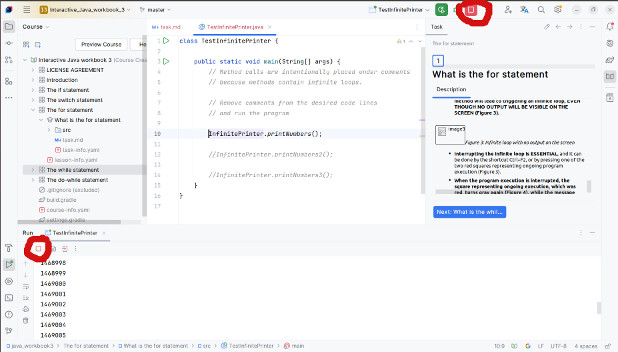
- When the program execution is interrupted, the square representing ongoing execution, which was red, turns gray again (Figure 27), while the message “Process finished with exit code 130” is displayed on the screen (“exit code” that does not have a value of 0 means a manual or unexpected program interruption). In contrast, a normally executed program will show the message “Process finished with exit code 0” (“exit code 0” means the program finished normally).
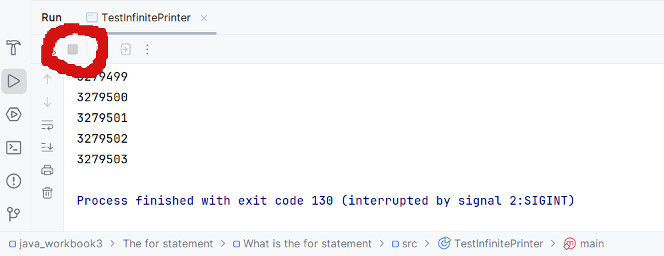
In the printNumbers method, we can see the first example of an infinite for loop. Infinite execution is achieved by the loop condition (“i>1 || i<=1”) always being true, for any number. Specifically, any number will be either greater than 1 or smaller or equal to 1. Since the loop counter starts at 1 and increases after each iteration, the effect of this method’s execution will be printing numbers starting from 1. In the image (Figure 26), the effect of this method’s execution is shown, specifically the printing on the screen. At the moment of execution shown in the image, the last printed number was 1469005, but the program continued working and printing the next numbers. Before stopping the program, the last printed number was 3279503 (Figure 27).
In the printNumbers2 method, the infinite for loop is achieved by the counter value never changing. Instead of the incrementing command (“i++”), the loop assigns the counter value back to 1 (“i=1”). Since the counter is always 1, the condition is always satisfied (“i < 10”), so it leads to an infinite number of iterations. Here, the condition is written correctly — it is not a logically always true expression. Unlike the previous method, this one will always print the number 1 on the screen, not a growing sequence of numbers.
In the printNumbers3 method, the infinite for loop is achieved by both decreasing (“i—”) and increasing (“i++”) the counter’s value during the same iteration. Effectively, this means that the counter value will remain 1 at the start of each iteration, and this method will also always print the number 1 on the screen.
The previous examples of infinite loops are noticeable by the effect because, during execution, we see that something is continuously printed on the screen, and the program runs non-stop. A worse situation occurs when the method containing the infinite loop does not print anything on the screen. In that case, we can only deduce that the program is still running based on the appearance of the execution window (the square for execution is red, not gray). The program can still be interrupted the same way:
- Using the shortcut Ctrl+F2;
-
Or by pressing one of the two red squares (Figure 26):
- In the execution window (bottom left)
- Or at the top right above the code editor
Example 9
Create a class InfiniteLoop with the following method:
- A static method infiniteLooping that contains an infinite for loop but does not print anything on the screen.
1     class InfiniteLoop {
2
3         static void loopInfinitely(){
4             for(int i=1; i<10;i=0){
5             }
6         }
7     }
Create a class TestInfiniteLoop that calls the infiniteLooping method and tests its behavior.
 1 class TestInfiniteLoop {
 2
 3     public static void main(String[] args) {
 4         // The method call is intentionally placed under comments
 5         // because this method contains an infinite loop.
 6
 7         // Remove comments from the following code line
 8         // and run the program
 9
10         //InfiniteLoop.loopInfinitely();
11     }
12 }
WARNING - READ THIS BEFORE RUNNING THE EXAMPLES
In the main method of the TestInfiniteLoop class, the call to the InfiniteLoop class method is commented out to prevent accidental execution.
When this call is uncommented, running the main method will lead to triggering an infinite loop, EVEN THOUGH NO OUTPUT WILL BE VISIBLE ON THE SCREEN (Figure 28).
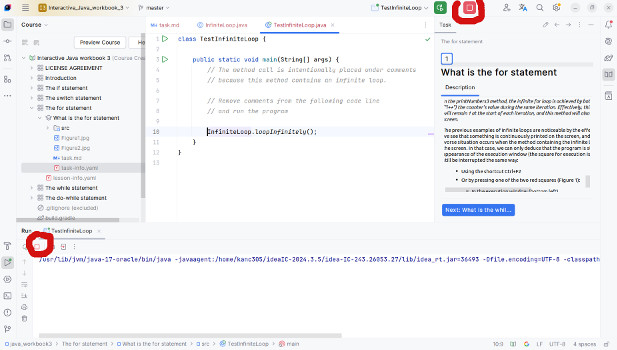
Interrupting the infinite loop is ESSENTIAL, and it can be done by the shortcut Ctrl+F2, or by pressing one of the two red squares representing ongoing program execution (Figure 28).
When the program execution is interrupted, the square representing ongoing execution, which was red, turns gray again (Figure 29), while the message “Process finished with exit code 130 (interrupted by signal 2:SIGINT)” is displayed on the screen (“exit code” that is not 0 means a manual or unexpected program interruption).
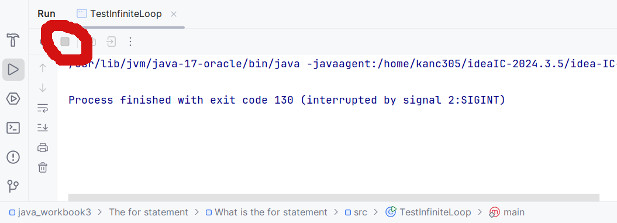
As already mentioned, running this method seemingly does not lead to an infinite loop. However, it does. This method simply does not print anything on the screen (the for loop’s statement block is empty), but it executes infinitely. The only true indicator is the fact that the square representing ongoing program execution remains red (Figure 28) because the program does not stop executing.
Un-executable Loop
Un-executable loop is, in a way, the opposite of an infinite loop. An un-executable loop always stops before it executes the first iteration or during the first iteration, so it seems as if that part of the program was never even started.
An un-executable loop does not represent a syntax error but an error during program execution, meaning the program does not run as expected.
The most common reasons for encountering an un-executable loop are:
- The loop condition is an unsatisfiable logical expression (contradiction).
- The initial value of the counter does not satisfy the condition at the start.
- Or the loop is immediately stopped during the first iteration, by improperly using the break or return statement.
- Or, as a special case of the previous situation, an if statement nested in the loop has both branches written with a break or return statement.
Unlike the infinite loop, after starting the un-executable loop, manual intervention to stop the program is not needed.
Example 10
Create a class UnexecutableLoop so that it has:
- A static method print1To30 that should print the numbers from 1 to 30 on the screen, but due to an un-executable for loop, it doesn’t print anything on the screen. Set the loop condition to be an unsatisfiable logical expression.
- A static method print1To30A that should print the numbers from 1 to 30 on the screen, but due to an un-executable for loop, it doesn’t print anything on the screen. Set the initial counter value so that it doesn’t satisfy the loop condition.
- A static method print1To30AA that should print the numbers from 1 to 30 on the screen, but the un-executable for loop always breaks during the first iteration. Use the break statement to break the loop.
- A static method print1To30AAA that should print the numbers from 1 to 30 on the screen, but the un-executable for loop always breaks during the first iteration. Use the return statement to break the loop.
- A static method checkNumbers that takes two integer parameters a and b, and checks if there is at least one number divisible by 11 in the range from a to b (inclusive). If such a number exists, the method returns true, otherwise it returns false. Make the method so that due to the un-executable for loop, it always breaks during the first iteration. Use a nested if statement in which both branches use the return statement to break the for loop.
 1     class UnexecutableLoop {
 2
 3         static void print1To30(){
 4             // The condition is unsatisfiable (contradiction)
 5             // No number is smaller and larger than 30 at the same time
 6             for(int i=1; i<30 && i>30; i++)
 7                 System.out.println(i);
 8         }
 9
10         static void print1To30A(){
11             // The condition is that the loop counter is
12             // greater than 30 and its initial value is 1
13             for(int i=1; i>30; i++)
14                 System.out.println(i);
15         }
16
17         static void print1To30AA(){
18             // After printing number 1 in the first iteration,
19             // the break command stops the loop
20             for(int i=1; i<30; i++) {
21                 System.out.println(i);
22                 break;
23             }
24         }
25
26         static void print1To30AAA(){
27             // After printing number 1 in the first iteration,
28             // the return command terminates the method
29             for(int i=1; i<30; i++) {
30                 System.out.println(i);
31                 return;
32             }
33         }
34
35         static boolean checkNumbers(int a, int b){
36             for (int i=a; i<=b; i++)
37                 if (i%11 == 0)
38                     return true;
39                 else
40                     return false;
41
42             return false;
43         }
44     }
Create a class TestUnexecutableLoop that from the main method calls the methods of the UnexecutableLoop class and verifies their operation.
 1 class TestUnexecutableLoop {
 2
 3     public static void main(String[] args) {
 4         UnexecutableLoop.print1To30();
 5
 6         UnexecutableLoop.print1To30A();
 7
 8         UnexecutableLoop.print1To30AA();
 9
10         UnexecutableLoop.print1To30AAA();
11
12         System.out.println(UnexecutableLoop.checkNumbers(3,14));
13     }
14 }
In the print1To30 method, the loop condition is written as an unsatisfiable logical expression (contradiction). Specifically, no number can be both greater and smaller than 30 at the same time. This means the loop condition will never be satisfied, so no iteration will occur.
In the print1To30A method, the initial value of the loop counter is 1, and the loop condition is that the counter must be greater than 30 (i > 30). This means the loop condition is not satisfied immediately, so the first iteration will not be executed.
In the print1To30AA and print1To30AAA methods, the break or return statement is used within the for loop command block. Effectively, this means that in the first iteration, the number 1 will be printed, and then it will immediately move to the next statement (the break or return) that will break the loop (and the return will also terminate the method). Both loops will always stop during the first iteration and will never proceed to the next iteration.
The checkNumbers method contains a very common but specific un-executable loop caused by a nested if statement with both branches containing break or return statements. This case needs to be explained in detail.
If we have a for loop with a nested if statement that has both branches, this means that in every iteration one of those two branches will be executed (depending on whether the if statement condition is satisfied or not in that iteration). If each of these branches contains a return or break statement, that means when one of them is executed, the loop (command break) or the entire method (command return) will stop. All considered, in the first iteration of the for loop, no matter which branch of the if statement is executed, the loop or the method will be stopped.
In the specific example of the checkNumbers method, the for loop begins by initializing the counter to the value of parameter a (“int i = a”). Let’s say the loop condition is satisfied (i.e., “a <= b”), and the first iteration begins. The if statement then checks if the loop counter “i” is divisible by 11. If it is, it goes to the “YES” branch, the method returns true, and immediately stops (which is fine, since we found a number divisible by 11 and don’t need to search further). However, if the number is not divisible by 11, it goes to the “NO” branch and immediately returns false and stops. It does not proceed to the next iteration, and the next numbers are not checked for divisibility by 11, because the return statement has already returned false and stopped both the loop and the method.
So what is the purpose of the last statement (return false;) in the method? It ensures that the method will return a value if the for loop doesn’t execute at all. For example, if the value of parameter b is less than the value of parameter a. What would the correctly written checkNumbers method look like? It would be sufficient to remove the “NO” branch (else) from the if statement:
1 static boolean checkNumbers(int a, int b) {
2     for (int i = a; i <= b; i++)
3         if (i % 11 == 0)
4             return true;
5
6     return false;
7 }
Written this way, the method will check all numbers in the for loop from a to b, and will return true if it finds a number divisible by 11. If no number divisible by 11 is found in the range from a to b, the for loop will finish iterating, and it will proceed to the next statement in the method, which is the return statement returning false. So, only when all numbers in the range from a to b are checked, and no number divisible by 11 is found, will the method exit the loop and return false.
Most common errors
Some of the most common syntax errors related to writing for loops are:
- Using the loop counter outside the for loop when it is declared inside the for loop, where it is only visible, for example:
1     for (int i = 1; i < 10; i++)
2         System.out.println(i);
3
4     // This statement is outside the for loop
5     System.out.println("The next number is " + (i + 1));
Instead (correctly), if the counter needs to be used outside the for loop, it should be declared outside the for loop:
1     // The counter is declared OUTSIDE the for loop
2     int i;
3
4     // The counter is only assigned a value inside the for loop
5     for (i = 1; i < 10; i++)
6         System.out.println(i);
7
8     // Afterward, the counter is available outside the loop
9     System.out.println("The next number is " + (i + 1));
- Separating the three statements within the for loop parentheses using a comma (,), instead of a semicolon (;), for example:
1     for (int i = 1, i < 10, i++)
2         System.out.println(i);
Instead (correctly):
1     for (int i = 1; i < 10; i++)
2         System.out.println(i);
- Writing an expression as the condition for a for loop when that expression is not a logical expression, for example:
1     for (int i = 1; i % 10; i++)
2         System.out.println(i);
Instead (correctly):
1     for (int i = 1; i <= 10; i++)
2         System.out.println(i);
- If a method returns a value, and the return statement exists only inside the for loop, forgetting to place another return statement outside the for loop to return something if the loop does not execute.
1     static int find(int a, int b) {
2         for (int i = a; i <= b; i++)
3             if (i % 7 == 0)
4                 return i;
5     }
Instead (correctly):
1     static int find(int a, int b) {
2         for (int i = a; i <= b; i++)
3             if (i % 7 == 0)
4                 return i;
5
6         return -1;
7     }
Other common mistakes that are not syntax errors, but affect the program’s execution, include:
- Writing an infinite loop that never stops executing, for example:
 1     static void printNumbers() {
 2         // The loop condition is always satisfied (tautology)
 3         for (int i = 1; i > 1 || i <= 1; i++)
 4             System.out.println(i);
 5     }
 6
 7     static void printNumbers2() {
 8         // The counter's value doesn't change
 9         // (i = 1) instead of (i++)
10         for (int i = 1; i < 10; i = 1)
11             System.out.println(i);
12     }
13
14     static void printNumbers3() {
15         // The counter is increased and decreased by one
16         // during the same iteration – so it always remains 1
17         for (int i = 1; i < 10; i++) {
18             System.out.println(i);
19             i--;
20         }
21     }
Instead (correctly):
 1     static void printNumbers() {
 2         for (int i = 1; i <= 100; i++)
 3             System.out.println(i);
 4     }
 5
 6     static void printNumbers2() {
 7         for (int i = 1; i < 10; i++)
 8             System.out.println(i);
 9     }
10
11     static void printNumbers3() {
12         for (int i = 1; i < 10; i++) {
13             System.out.println(i);
14         }
15     }
- Writing an un-executable loop that never executes any iteration or always stops during the first iteration, for example:
 1     static void print1To30() {
 2         // The condition is unsatisfiable (contradiction)
 3         // no number can be both less and greater than 30
 4         for (int i = 1; i < 30 && i > 30; i++)
 5             System.out.println(i);
 6     }
 7
 8     static void print1To30A() {
 9         // The condition is that the counter is greater than 30
10         // but it starts at 1
11         for (int i = 1; i > 30; i++)
12             System.out.println(i);
13     }
14
15     static void print1To30AA() {
16         // After printing number 1, the break
17         // statement breaks the loop
18         for (int i = 1; i < 30; i++) {
19             System.out.println(i);
20             break;
21         }
22     }
23
24     static void print1To30AAA() {
25         // After printing number 1, the return
26         // statement breaks the method
27         for (int i = 1; i < 30; i++) {
28             System.out.println(i);
29             return;
30         }
31     }
32
33     static boolean checkNumbers(int a, int b) {
34         for (int i = a; i <= b; i++)
35             if (i % 11 == 0)
36                 return true;
37             else
38                 return false;
39
40         return false;
41     }
Instead (correctly):
 1     static void print1To30() {
 2         for (int i = 1; i <= 30; i++)
 3             System.out.println(i);
 4     }
 5
 6     static void print1To30A() {
 7         for (int i = 1; i <= 30; i++)
 8             System.out.println(i);
 9     }
10
11     static void print1To30AA() {
12         for (int i = 1; i <= 30; i++) {
13             System.out.println(i);
14         }
15     }
16
17     static void print1To30AAA() {
18         for (int i = 1; i <= 30; i++) {
19             System.out.println(i);
20         }
21     }
22
23     static boolean checkNumbers(int a, int b) {
24         for (int i = a; i <= b; i++)
25             if (i % 11 == 0)
26                 return true;
27
28         return false;
29     }
- Forgetting to create a block of statements within the for loop if there are multiple statements in it. This will cause only the first statement to execute during the iterations, while all the others “fall out” of the loop, for example:
1     for (int i = 1; i < 10; i++)
2         System.out.println(i);
3         System.out.println("The next number is");
Instead (correctly):
1     for (int i = 1; i < 10; i++) {
2         System.out.println(i);
3         System.out.println("The next number is");
4     }