The Command Line
Script Name Abbreviation
During Gr8Conf 2012 Europe I discovered Grails supports script name abbreviation. This means we don’t have to type a complete script name, but only enough to make the script identifiable by Grails. It is inspired by Gradle’s task name abbreviation feature. For example if we want to invoke the help script we only have to type the letter h. Or to invoke run-app we type rA. Notice we use uppercase characters for the letters after a hyphen in a script name. To invoke create-tag-lib we can type cTL.
If Grails cannot find a unique script name for the abbreviation we use we get a list of possible script names. We select the correct one to invoke the script. For example in the following output we see the options Grails shows when we type gen as a script name abbreviation:
$ grails gen
| Script 'Gen' not found, did you mean:
1) GenerateAll
2) GenerateViews
3) GenerateController
4) InstallDependency
5) DependencyReport
> Please make a selection or enter Q to quit:
This feature also works for script that we create ourselves or are added by plugins. For example if we create a script GrailsGoodness with the following content:
includeTargets << grailsScript("_GrailsInit")
target(main: "Demonstrate script name abbreviation") {
println "Showing script name abbreviation in Grails"
}
setDefaultTarget(main)
On the command-line or at the Grails prompt we can now use gG as a script name abbreviation and Grails will invoke the GrailsGoodness script:
$ grails gG
| Environment set to development....
Showing script name abbreviation in Grails
Code written with Grails 2.04.
Original blog post written on June 14, 2012.
Shortcut to Open Test Reports in Interactive Console
We can use the open command in the interactive console in Grails to open files. For example to edit the default layout view we can typ in the console:
grails> open grails-app/views/layouts/main.gsp
The application associated with GSP files starts and opens the file main.gsp.
So normally we have to pass actual filename with the complete path to the open command to open them. But Grails provides two shortcuts: test-report and dep-report. To see the output of our tests we can simply type open test-report:
grails> test-app
| Compiling 38 source files
| Tests PASSED - view reports in target/test-reports
grails> open test-report
Grails now opens the file target/test-reports/html/index.html.
The dep-report shortcut open the dependency report after we have run the dependency-report command:
grails> dependency-report
| Dependency report output to [/Users/mrhaki/samples/iconsole/target/dependency-report/index.html]
grails> open dep-report
Code written with Grails 2.0.
Original blog post written on March 08, 2012.
Run Gradle Tasks In Grails Interactive Mode
To start Grails in interactive mode we simply type grails on the command line. This starts Grails and we get an environment to run Grails commands like compile and run-app. Since Grails 3 the underlying build system has changed from Gant to Gradle. We can invoke Gradle tasks in interactive mode with the gradle command. Just like we would use Gradle from the command line we can run the same tasks, but this time when Grails is in interactive mode. Grails will use the Gradle version that belongs to the current Grails version.
We even get TAB completion for Gradle tasks.
In the next example we start Grails in interactive mode and run the Gradle task components:
$ grails
| Enter a command name to run. Use TAB for completion:
grails> gradle components
:components
------------------------------------------------------------
Root project
------------------------------------------------------------
No components defined for this project.
Additional source sets
----------------------
Java source 'main:java'
src/main/java
JVM resources 'main:resources'
src/main/resources
grails-app/views
grails-app/i18n
grails-app/conf
Java source 'test:java'
src/test/java
JVM resources 'test:resources'
src/test/resources
Java source 'integrationTest:java'
src/integrationTest/java
JVM resources 'integrationTest:resources'
src/integrationTest/resources
Additional binaries
-------------------
Classes 'integrationTest'
build using task: :integrationTestClasses
platform: java8
tool chain: JDK 8 (1.8)
classes dir: build/classes/integrationTest
resources dir: build/resources/integrationTest
Classes 'main'
build using task: :classes
platform: java8
tool chain: JDK 8 (1.8)
classes dir: build/classes/main
resources dir: build/resources/main
Classes 'test'
build using task: :testClasses
platform: java8
tool chain: JDK 8 (1.8)
classes dir: build/classes/test
resources dir: build/resources/test
Note: currently not all plugins register their components, so some components may not be visible here.
BUILD SUCCESSFUL
Total time: 0.506 secs
Next we invoke gradle compile followed by TAB. We get all the Gradle tasks that start with compile:
grails> gradle compile<TAB>
compileGroovy compileGroovyPages
compileIntegrationTestGroovy compileIntegrationTestJava
compileJava compileTestGroovy
compileTestJava compileWebappGroovyPages
grails>
Written with Grails 3.0.8.
Original blog post written on September 28, 2015.
See Information About Plugins
In Grails we can use the list-plugins command to get a list of all available plugins. The list returns only the plugins that are available for the Grails version we are using. So if we invoke this command in Grails 3 we get a different list than a Grails 2.x version. To get more detailed information, like website, source code URL and dependency definition we use the plugin-info command.
Let’s run the plugin-list command for Grails 3:
grails> list-plugins
| Available Plugins
* airbrake-grails
* ajax-tags
* asset-pipeline
* audit-logging
* aws-sdk
* cache
* cache-ehcache
* cache-headers
* cassandra
* clojure
* csv
* database-migration
* export
* facebook-sdk
* feature-switch
* feeds
* fields
* geb
* gorm-envers
* grails-console
* grails-hibernate-filter
* grails-http-builder-helper
* grails-json-apis
* grails-redis
* grails-spring-websocket
* greenmail
* grooscript
* gscripting
* hibernate
* jasypt-encryption
* jms
* joda-time
* json-annotations-marshaller
* mail
* mongodb
* newrelic
* oauth
* quartz
* quartz-monitor
* rateable
* recaptcha
* rendering
* request-tracelog
* scaffolding
* segment
* sentry
* simple-spring-security
* spring-security-acl
* spring-security-appinfo
* spring-security-core
* taggable
* views-gradle
* views-json
* views-markup
* wkhtmltopdf
If we want more information about the spring-security-core plugin we invoke the following command:
grails> plugin-inf spring-security-core
| Plugin Info: spring-security-core
| Latest Version: 3.0.0.M1
| All Versions: 3.0.0.M1
| Title: Spring Security Core Plugin
Spring Security Core plugin
* License: APACHE
* Documentation: http://grails-plugins.github.io/grails-spring-security-core/
* Issue Tracker: https://github.com/grails-plugins/grails-spring-security-core/issues
* Source: https://github.com/grails-plugins/grails-spring-security-core
* Definition:
dependencies {
compile "org.grails.plugins:spring-security-core:3.0.0.M1"
}
If we would invoke the command in for example Grails 2.5.1 we get different results:
grails> list-plugins
Plugins available in the grailsCentral repository are listed below:
-------------------------------------------------------------
DjangoTemplates Plugin<> --
None <> --
acegi <0.5.3.2> -- Acegi Plugin
active-link <1.0> -- Active Link Tag Plugin
activemq <0.5> -- Grails ActiveMQ Plugin
activiti <5.12.1> -- Grails Activiti Plugin - Enabled Activiti BPM Suite support f\
or Grails
activiti-shiro <0.1.1> -- This plugin integrates Shiro Security to Activiti.
activiti-spring-security<0.5.0> -- Activiti Spring Security Integration
acts-as-taggable <> --
address <0.2> -- Grails Address Plugin
address-lookup-zpfour<0.1.2> -- Address Lookup via ZP4
admin-interface <0.7.1> -- Grails Admin Interface
adminlte-ui <0.1.0> -- AdminLTE UI Plugin
airbrake <0.9.4> -- Airbrake Plugin
ajax-proxy <0.1.1> -- Ajax Proxy Plugin
ajax-uploader <1.1> -- Ajax Uploader Plugin
ajaxanywhere <1.0> -- AjaxAnywhere Grails Plugin
ajaxdependancyselection<0.45-SNAPSHOT4> -- Ajax Dependancy Selection Plugin
ajaxflow <0.2.4> -- This plugin enables Ajaxified Webflows
akismet <0.2> -- Akismet Anti-Spam Plugin
akka <2.2.4.1> -- Akka Integration
alfresco <0.4> -- Alfresco DMS Integration
...
Plug-ins you currently have installed are listed below:
-------------------------------------------------------------
asset-pipeline 2.2.3 -- Asset Pipeline Plugin
cache 1.1.8 -- Cache Plugin
database-migration 1.4.0 -- Grails Database Migration Plugin
hibernate4 4.3.10 -- Hibernate 4 for Grails
jquery 1.11.1 -- jQuery for Grails
scaffolding 2.1.2 -- Grails Scaffolding Plugin
tomcat 7.0.55.3 -- Apache Tomcat plugin for Grails
webxml 1.4.1 -- WebXmlConfig
To find more info about plugin type 'grails plugin-info [NAME]'
To install type 'grails install-plugin [NAME] [VERSION]'
For further info visit http://grails.org/Plugins
grails> plugin-info spring-security-core
--------------------------------------------------------------------------
Information about Grails plugin
--------------------------------------------------------------------------
Name: spring-security-core | Latest release: 2.0-RC5
--------------------------------------------------------------------------
Spring Security Core Plugin
--------------------------------------------------------------------------
Author: Burt Beckwith
--------------------------------------------------------------------------
Author's e-mail: burt@burtbeckwith.com
--------------------------------------------------------------------------
Find more info here: http://grails-plugins.github.io/grails-spring-security-core/
--------------------------------------------------------------------------
Spring Security Core plugin
Dependency Definition
--------------------------------------------------------------------------
:spring-security-core:2.0-RC5
To get info about specific release of plugin 'grails plugin-info [NAME] [VERSION]'
To get list of all plugins type 'grails list-plugins'
For further info visit http://grails.org/plugins
In Grails versions before Grails 3 we also have the command list-plugin-updates. This command will display if there are any version updates for the plugins installed in our application:
grails> list-plugin-updates
Plugins with available updates are listed below:
-------------------------------------------------------------
<plugin> <current> <available>
tomcat 7.0.55.3 8.0.22
hibernate4 4.3.10 4.3.8.2-SNAPSHOT
database-migration 1.4.0 1.4.2-SNAPSHOT
cache 1.1.8 1.1.9-SNAPSHOT
asset-pipeline 2.2.3 2.5.1
Written with Grails 3.0.7.
Original blog post written on September 22, 2015.
Get List Of Application Profiles
Grails 3 introduced the concept of application profiles to Grails. A profile contains the application structure, dependencies, commands and more to configure Grails for a specific type of application. The profiles are stored on the Grails Profile repository on Github. We can go there and see which profiles are available, but it is much easier to use the list-profiles command. With this command we get an overview of all the available profiles we can use to create a new application or plugin.
The list-profiles task is only available when we are outside a Grails application directory. So just like the create-app and create-plugin we can run list-profiles from a non-Grails project directory.
$ grails list-profiles
| Available Profiles
--------------------
* base - The base profile extended by other profiles
* plugin - Profile for plugins designed to work across all profiles
* web - Profile for Web applications
* web-api - Profile for Web API applications
* web-micro - Profile for creating Micro Service applications run as Groovy scripts
* web-plugin - Profile for Plugins designed for Web applications
$
Once we know which profile we want to use we can use the name as value for the --profile option with the create-app command:
$ grails create-app sample-micro --profile=web-micro
| Application created at /Users/mrhaki/Projects/mrhaki.com/blog/posts/samples/grails3/sample-micro
$
Written with Grails 3.0.8.
Original blog post written on September 28, 2015.
Getting More Information About A Profile
Since Grails 3.1 we can use the profile-info command to get more information about a profile. We see which commands are added to our project by the profile and which features can be chosen when we create a new application with the profile.
Suppose we want to know more about the rest-api profile then we invoke the profile-info command:
$ grails profile-info rest-api
Profile: rest-api
--------------------
Profile for Web API applications
Provided Commands:
--------------------
* create-controller - Creates a controller
* create-domain-resource - Creates a domain class that represents a resource
* create-functional-test - Creates an functional test
* create-integration-test - Creates an integration test
* create-interceptor - Creates an interceptor
* create-restful-controller - Creates a REST controller
* help - Prints help information for a specific command
* open - Opens a file in the project
* gradle - Allows running of Gradle tasks
* clean - Cleans a Grails application's compiled sources
* compile - Compiles a Grails application
* create-domain-class - Creates a Domain Class
* create-service - Creates a Service
* create-unit-test - Creates a unit test
* dependency-report - Prints out the Grails application's dependencies
* install - Installs a Grails application or plugin into the local Maven cache
* assemble - Creates a JAR or WAR archive for production deployment
* bug-report - Creates a zip file that can be attached to issue reports for the current project
* console - Runs the Grails interactive console
* create-script - Creates a Grails script
* list-plugins - Lists available plugins from the Plugin Repository
* plugin-info - Prints information about the given plugin
* run-app - Runs a Grails application
* shell - Runs the Grails interactive shell
* stats - Prints statistics about the project
* stop-app - Stops the running Grails application
* test-app - Runs the applications tests
* generate-all - Generates a controller that performs REST operations
* generate-controller - Generates a controller that performs REST operations
* generate-functional-test - Generates a functional test for a controller that performs REST operations
* generate-unit-test - Generates a unit test for a controller that performs REST operations
* generate-views - Generates a controller that performs REST operations
Provided Features:
--------------------
* asset-pipeline - Adds Asset Pipeline to a Grails project
* hibernate - Adds GORM for Hibernate to the project
* json-views - Adds support for JSON Views to the project
* markup-views - Adds support for Markup Views to the project
* mongodb - Adds GORM for MongoDB to the project
* neo4j - Adds GORM for Neo4j to the project
* security - Adds Spring Security REST to the project
$
Written with Grails 3.1.
Original blog post written on January 29, 2016.
Using Features When Creating An Application
With the release of Grails 3.1 we can use features, defined in a profile, when we create a new application. Features will add certain dependencies to our Grails project, so we can start quickly. To see which features are available we use the profile-info command. This command lists available features for an application. We can choose the features we want to be included and pass them via the --features command line option of the create-app command.
When we look at the features available for the rest-api profile we see the following list:
$ grails profile-info rest-api
...
Provided Features:
--------------------
* asset-pipeline - Adds Asset Pipeline to a Grails project
* hibernate - Adds GORM for Hibernate to the project
* json-views - Adds support for JSON Views to the project
* markup-views - Adds support for Markup Views to the project
* mongodb - Adds GORM for MongoDB to the project
* neo4j - Adds GORM for Neo4j to the project
* security - Adds Spring Security REST to the project
$
Let’s create a new Grails application with the rest-api profile and use the mongodb, json-views and security features:
$ grails create-app --profile=rest-api --features=mongodb,json-views,security api
| Application created at /Users/mrhaki/Projects/mrhaki.com/blog/posts/samples/grails31/api
$
When we look at the contents of the generated build.gradle we can see dependencies for the features we have selected:
// File: build.gradle
buildscript {
ext {
grailsVersion = project.grailsVersion
}
repositories {
mavenLocal()
maven { url "https://repo.grails.org/grails/core" }
}
dependencies {
classpath "org.grails:grails-gradle-plugin:$grailsVersion"
classpath "org.grails.plugins:views-gradle:1.0.0"
}
}
version "0.1"
group "api"
apply plugin:"eclipse"
apply plugin:"idea"
apply plugin:"org.grails.grails-web"
apply plugin:"org.grails.plugins.views-json"
ext {
grailsVersion = project.grailsVersion
gradleWrapperVersion = project.gradleWrapperVersion
}
repositories {
mavenLocal()
maven { url "https://repo.grails.org/grails/core" }
}
dependencyManagement {
imports {
mavenBom "org.grails:grails-bom:$grailsVersion"
}
applyMavenExclusions false
}
dependencies {
compile "org.springframework.boot:spring-boot-starter-logging"
compile "org.springframework.boot:spring-boot-autoconfigure"
compile "org.grails:grails-core"
compile "org.springframework.boot:spring-boot-starter-actuator"
compile "org.springframework.boot:spring-boot-starter-tomcat"
compile "org.grails:grails-plugin-url-mappings"
compile "org.grails:grails-plugin-rest"
compile "org.grails:grails-plugin-codecs"
compile "org.grails:grails-plugin-interceptors"
compile "org.grails:grails-plugin-services"
compile "org.grails:grails-plugin-datasource"
compile "org.grails:grails-plugin-databinding"
compile "org.grails:grails-plugin-async"
compile "org.grails:grails-web-boot"
compile "org.grails:grails-logging"
compile "org.grails.plugins:cache"
compile "org.grails.plugins:views-json"
compile "org.grails.plugins:mongodb"
compile "org.grails:grails-plugin-gsp"
compile "org.grails.plugins:spring-security-rest:2.0.0.M1"
console "org.grails:grails-console"
profile "org.grails.profiles:rest-api:3.1.0"
testCompile "org.grails:grails-plugin-testing"
testCompile "org.grails.plugins:geb"
testCompile "org.grails:grails-datastore-rest-client"
testRuntime "org.seleniumhq.selenium:selenium-htmlunit-driver:2.47.1"
testRuntime "net.sourceforge.htmlunit:htmlunit:2.18"
}
task wrapper(type: Wrapper) {
gradleVersion = gradleWrapperVersion
}
Written with Grails 3.1.
Original blog post written on January 29, 2016.
Create Report of URL Mappings
Since Grails 2.3 we can use the url-mappings-report command to get a nice report of the URL mappings we have defined in our application. Also implicit mappings created for example by using the resources attribute on a mapping definition are shown in the report. This report is very useful to see which URLs are exposed by your application and how they map to controllers.
Suppose we have the following grails-app/conf/UrlMappings.groovy with a couple of mappings:
// File: grails-app/conf/UrlMappings.groovy
class UrlMappings {
static mappings = {
// Map to HTTP methods.
"/upload"(controller: 'upload') {
action = [POST: 'file']
}
// RESTful API.
"/api/users"(resources: 'user')
// Default mapping.
"/$controller/$action?/$id?(.${format})?"()
// Main index.
"/"(view: "/index")
// Error mappings.
"500"(controller: 'error')
"404"(controller: 'error', action: 'notFound')
}
}
When we run the following command $ grails url-mappings-report we get the following output:
| URL Mappings Configured for Application
| ---------------------------------------
Dynamic Mappings
| * | /${controller}/${action}?/\
${id}?(.${format)? | Action: (default action) |
| * | / | View: /index |
Controller: dbdoc
| * | /dbdoc/${section}?/${filename}?/${table}?/\
${column}? | Action: (default action) |
Controller: error
| * | ERROR: 500 | Action: (default action) |
| * | ERROR: 404 | Action: notFound |
Controller: upload
| * | /upload | Action: {POST=file} |
Controller: user
| GET | /api/users | Action: index |
| GET | /api/users/create | Action: create |
| POST | /api/users | Action: save |
| GET | /api/users/${id} | Action: show |
| GET | /api/users/${id}/edit | Action: edit |
| PUT | /api/users/${id} | Action: update |
| DELETE | /api/users/${id} | Action: delete |
Notice also mappings added by plugins like the mappings to dbdoc controller are shown.
Code written with Grails 2.3.
Original blog post written on November 18, 2013.
Compiling GSP from the Command-Line
Normally Groovy Server Pages (GSP) are compiled to class files when we create a WAR file of our application. If we want to compile the GSP without creating a WAR file we use the command-line argument ---gsp. Grails will compile the source code of our application and also the Groovy Server Pages. This way we can detect for examples faulty import statements in the GSP source code.
$ grails compile ---gsp
...
| Compiling 12 GSP files for package [sampleGrails]
...
Code written with Grails 2.2.2.
Original blog post written on June 03, 2013.
Profile Script Tasks
If we want to know how long the execution of a Grails task takes we can enable profiling. If we enable profiling we can see for example how long it takes to compile the source code. We can enable the profiling information by setting the system property grails.script.profile with the value true.
$ grails -Dgrails.script.profile=true compile
Another way to enable profiling of the Grails tasks is to set the property grails.script.file with the value true in grails-app/conf/BuildConfig.groovy.
// File: grails-app/conf/BuildConfig.groovy
...
grails.script.profile=true
...
If we run a Grails script and profiling is enabled we see the information in the console output:
$ grails -Dgrails.script.profile=true compile
Welcome to Grails 1.3.7 - http://grails.org/
Licensed under Apache Standard License 2.0
Grails home is set to: /opt/local/grails/current
Base Directory: /Users/mrhaki/Projects/sample
Resolving dependencies...
Dependencies resolved in 3113ms.
Running script /opt/local/grails/current/scripts/Compile.groovy
Environment set to development
Profiling [Compiling sources to location [/Users/mrhaki/.grails/1.3.7/projects/sample/plugin-classes]]\
start
Profiling [Compiling sources to location [/Users/mrhaki/.grails/1.3.7/projects/sample/plugin-classes]]\
finish. Took 2319 ms
Profiling [Compiling sources to location [target/classes]] start
Profiling [Compiling sources to location [target/classes]] finish. Took 317 ms
Code written with Grails 1.3.7.
Original blog post written on February 23, 2011.
No More Questions
Sometimes when we run Grails commands we get asked questions via user prompts. For example if we invoke $ grails create-domain-class Simple we get a message that it is good practice to use package names and the question “Do you want to continue? (y,n)”. We need to answer this question to continue, but what if we are not able to answer the question, for example if the script is run on a continuous integration server? We pass the argument --non-interactive to the grails command and now we don’t get a question and the script continues by using the default value for the answer. So in our example we can run $ grails create-domain-class Simple --non-interactive.
Written with Grails 1.2.
Original blog post written on March 12, 2010.
Create New Application without Wrapper
Since the latest Grails versions a Grails wrapper is automatically created when we execute the create-app command. If we don’t want the wrapper to be created we can use the command argument --skip-wrapper. If later we changed our mind and want the Grails wrapper we can simply run the wrapper command from our Grails application directory.
Let’s run the create-app command with the --skip-wrapper argument. If we check the contents of the created directory we see that the wrapper files are not created:
$ grails create-app --skip-wrapper sample
$ cd sample
$ ls
application.properties lib src web-app
grails-app scripts test
$
Written with Grails 2.4.4.
Original blog post written on November 25, 2014.
Enable Hot Reloading For Non-Development Environments
If we run our Grails 3 application in development mode our classes and GSP’s are automatically recompiled if we change the source file. We change our source code, refresh the web browser and see the results of our new code. If we run our application with another environment, like production or a custom environment, then the reloading of classes is disabled. But sometimes we have a different environment, but still want to have hot reloading of our classes and GSP’s. To enable this we must use the Java system property grails.reload.enabled and reconfigure the Gradle bootRun task to pass this system property.
Let’s change our Gradle build file and pass the Java system property grails.reload.enabled to the bootRun task if it is set. We use the constant Environment.RELOAD_ENABLED to reference the Java system property.
// File: build.gradle
import grails.util.Environment
...
bootRun {
final Boolean reloadEnabled =
Boolean.valueOf(
System.properties[Environment.RELOAD_ENABLED])
if (reloadEnabled) {
systemProperty Environment.RELOAD_ENABLED, reloadEnabled
}
}
...
Suppose we have extra Grails environment with the name custom. We can still have hot reloading if we use the following command:
$ grails -Dgrails.env=custom -Dgrails.reload.enabled=true run-app
...
Or we use the Gradle bootRun task:
$ gradle -Dgrails.env=custom -Dgrails.reload.enabled=true bootRun
...
Written with Grials 3.0.9.
Original blog post written on November 20, 2015.
Generate ANT Build Script
In versions of Grails before version 1.2 we got an ANT script with Ivy support when we created a new application. With Grails 1.2 we don’t get the ANT script anymore automatically. But we can still generate the build file and Ivy configuration files, but we have to use a separate command: integrateWith. The complete command is:
$ grails integrateWith --ant
Code written with Grails 1.2.
Original blog post written on March 19, 2010.
Generate Default .gitignore Or .hgignore File
We can use the integrateWith command with Grails to generate for example IDE project files and build system files. We specify via an extra argument the type of files to be generated. We can use this command also to create a .gitignore file with some default settings for files to be ignored in Grails projects.
$ grails integrate-with --git
In the root of our project we have now have a .gitignore file with the following contents:
*.iws
*Db.properties
*Db.script
.settings
stacktrace.log
/*.zip
/plugin.xml
/*.log
/*DB.*
/cobertura.ser
.DS_Store
/target/
/out/
/web-app/plugins
/web-app/WEB-INF/classes
/.link_to_grails_plugins/
/target-eclipse/
If we would use Mercurial then we can generate a .hgignore file with the argument --hg:
$ grails integrate-with --hg
The .hgignore file has the following contents:
syntax: glob
*.iws
*Db.properties
*Db.script
.settings
stacktrace.log
*.zip
plugin.xml
*.log
*DB.*
cobertura.ser
.DS_Store
target/
out/
web-app/plugins
web-app/WEB-INF/classes
Samples written with Grails 2.3.7.
Original blog post written on April 16, 2014.
Extending IntegrateWith Command
We can extend the integrate-with command in Grails to generate files for a custom IDE or build system. We must add a _Events.groovy file to our Grails projects and then write an implementation for the eventIntegrateWithStart event. Inside the event we must define a new closure with our code to generate files. The name of the closure must have the following pattern: binding.integrate_CustomIdentifier_. The value for CustomIdentifier can be used as an argument for the integrate-with command.
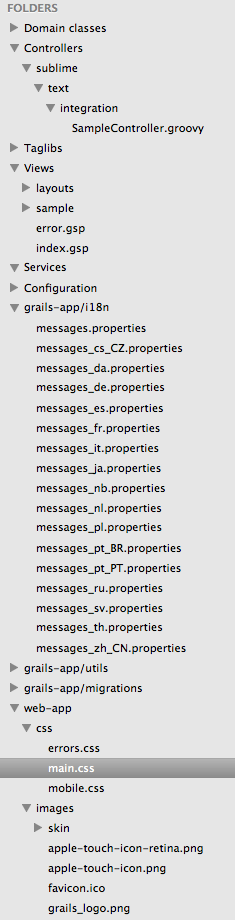
Suppose we want to extend integrate-with to generate a simple Sublime Text project file. First we create a template Sublime Text project file where we define folders for a Grails application. We create the folder src/ide-support/sublimetext and add the file grailsProject.sublimetext-project with the following contents:
{
"folders": [
{
"name": "Domain classes",
"path": "grails-app/domain"
},
{
"name": "Controllers",
"path": "grails-app/controllers"
},
{
"name": "Taglibs",
"path": "grails-app/taglib"
},
{
"name": "Views",
"path": "grails-app/views"
},
{
"name": "Services",
"path": "grails-app/services"
},
{
"name": "Configuration",
"path": "grails-app/conf"
},
{
"name": "grails-app/i18n",
"path": "grails-app/i18n"
},
{
"name": "grails-app/utils",
"path": "grails-app/utils"
},
{
"name": "grails-app/migrations",
"path": "grails-app/migrations"
},
{
"name": "web-app",
"path": "web-app"
},
{
"name": "Scripts",
"path": "scripts"
},
{
"name": "Sources:groovy",
"path": "src/groovy"
},
{
"name": "Sources:java",
"path": "src/java"
},
{
"name": "Tests:integration",
"path": "test/integration"
},
{
"name": "Tests:unit",
"path": "test/unit"
},
{
"name": "All files",
"follow_symlinks": true,
"path": "."
}
]
}
Next we create the file scripts/_Events.groovy:
includeTargets << grailsScript("_GrailsInit")
eventIntegrateWithStart = {
// Usage: integrate-with --sublimeText
binding.integrateSublimeText = {
// Copy template file.
ant.copy(todir: basedir) {
fileset(dir: "src/ide-support/sublimetext/")
}
// Move template file to real project file with name of Grails application.
ant.move(file: "$basedir/grailsProject.sublime-project",
tofile: "$basedir/${grailsAppName}.sublime-project",
overwrite: true)
grailsConsole.updateStatus "Created SublimeText project file"
}
}
We are done and can now run the integrate-with command with the new argument sublimeText:
$ grails integrate-with --sublimeText
| Created SublimeText project file.
$
If we open the project in Sublime Text we see our folder structure for a Grails application:
Code written with Grails 2.3.7.
Original blog post written on April 16, 2014.
Using Wrapper for Running Grails Commands Without Grails Installation
Since Grails 2.1 we can create a Grails wrapper. The wrapper allows developer to run Grails commands in a project without installing Grails first. The wrapper concept is also available in other projects from the Groovy ecosystem like Gradle or Griffon. A wrapper is a shell script for Windows, OSX or Linux named grailsw.bat or grailsw and a couple of JAR files to automatically download a specific version of Grails. We can check in the shell scripts and supporting files into a version control system and make it part of the project. Developers working on the project simply check out the code and execute the shell script. If there is no Grails installation available then it will be downloaded.
To create the shell scripts and supporting files someone on the project must run the wrapper command for the first time. This developer must have a valid Grails installation. The files that are generated can then be added to version control and from then one developers can use the grailsw or grailsw.bat shell scripts.
$ grails wrapper
| Wrapper installed successfully
$
In the root of the project we have two new files grailsw and grailsw.bat. Windows users can uss grailsw.bat and on other operating systems we use grailsw. Also a new directory wrapper is created with three files:
grails-wrapper-runtime-2.2.0.jar
grails-wrapper.properties
springloaded-core-1.1.1.jar
When we run the grailsw or grailsw.bat scripts for the first time we see how Grails is downloaded and installed into the $USER_HOME/.grails/wrapper directory. The following output shows that the file is downloaded and extracted when we didn’t run the grailsw script before:
$ ./grailsw --version
Downloading http://dist.springframework.org.s3.amazonaws.com/release/GRAILS/grails-2.2.0.zip to /Users\
/mrhaki/.grails/wrapper/grails-2.2.0-download.zip
.....................................................................................
................................................................
Extracting /Users/mrhaki/.grails/wrapper/grails-2.2.0-download.zip to /Users/mrhaki/.grails/wrapper/2.\
2.0
Grails version: 2.2.0
When we want to use a new version of Grails one of the developers needs to run to run $ grails upgrade followed by $ grails wrapper with the new Grails version. Notice this developer needs to have a locally installed Grails installation of the version we want to create a wrapper for. The newly generated files can be checked in to version control and all developers on the project will have the new Grails version when they run the grails or grailsw.bat shell scripts.
$ ./grailsw --version
Downloading http://dist.springframework.org.s3.amazonaws.com/release/GRAILS/grails-2.2.1.zip to /Users\
/mrhaki/.grails/wrapper/grails-2.2.1-download.zip
.....................................................................................
...
................................................................
Extracting /Users/mrhaki/.grails/wrapper/grails-2.2.1-download.zip to /Users/mrhaki/.grails/wrapper/2.\
2.1
Grails version: 2.2.1
We can change the download location of Grails to for example a company intranet URL. In the wrapper/ directory we see the file grails-wrapper.properties. The file has one property wrapper.dist.url, which by default refers to http://dist.springframework.org.s3.amazonaws.com/release/GRAILS/. We can change this to another URL, add the change to version control so other developers will get the change automatically. And when the grailsw shell script is executed the download location will be another URL. To set a different download URL when generating the wrapper we can use the command-line option –distributionUrl:
$ grails wrapper --distributionUrl=http://company.intranet/downloads/grails-releases/
If we don’t like the default name for the directory to store the supporting files we can use the command-line option –wrapperDir. The files are then stored in the given directory and the grailsw and grailsw.bat shell scripts will contain the given directory name.
Written with Grails 2.2.0 and 2.2.1
Original blog post written on March 29, 2013.
Cleaning Up
When we use for example the compile or war command Grails will create files and stores them by default in the project’s working directory. The location of the project working directory can be customized in our grails-app/conf/BuildConfig.groovy configuration file. We remove the generated files with the Grails clean command. This command will remove all compiled class files, the WAR file, cached scripts and test reports. But this doesn’t remove all files in the project working directory. For example plugins or a temporary web.xml file, which are stored in the project working directory are not removed. We must use the clean-all command to also remove those files from the project working directory completely.
Let’s take a look at the default settings in our grails-app/conf/BuildConfig.groovy configuration file when we create a new Grails application:
// File: grails-app/conf/BuildConfig.groovy
...
grails.project.class.dir = "target/classes"
grails.project.test.class.dir = "target/test-classes"
grails.project.test.reports.dir = "target/test-reports"
grails.project.work.dir = "target/work"
...
After we run the war command we see the following contents in our target directory:
$ grails war
| Compiling 10 source files
| Compiling 142 source files
| Done creating WAR target/cleanCmd-0.1.war
$ ls target/
classes cleanCmd-0.1.war stacktrace.log work
Let’s first run the clean command and check the contents of the target directory again:
$ grails clean
| Application cleaned.
$ ls target/
stacktrace.log work
Notice the target/work directory still exists. We now run clean-all and examine the contents of the target directory:
$ grails clean-all
| Application cleaned.
$ ls target/
stacktrace.log
Now the work directory is removed as well.
We can also write our own scripts to for example only remove the generated WAR file with a clean command. With the following script we add the command clean-war to our application, which will delete the generated WAR file from our project:
// File: scripts/CleanWar.groovy
includeTargets << grailsScript("_GrailsClean")
setDefaultTarget("cleanWarFile")
We can use the targets cleanCompiledSources, cleanTestReports and cleanWarFile in our own scripts.
Code written with Grails 2.3.5
Original blog post written on February 03, 2014.
Using Aliases as Command Shortcuts
In Grails we can add aliases for standard Grails commands with the alias command. For example we want to use another name for a command or combine a command with arguments to a single alias. With the following command we create a start-app alias for the standard run-app command:
$ grails alias start-app run-app
Alias start-app with value run-app configured
$
Now we can invoke $ grails start-app as an alternative for run-app. All aliases are stored in the file userHome/.grails/.aliases. This means the aliases we create are available for all Grails versions and applications of the current user. It is also good to notice than command arguments that start with - or -- are not saved as part of an alias. But for example the unit: argument for test-app can be part of an alias:
$ grails alias unitTest test-app unit:
Alias unitTest with value test-app unit: configured
$
We can even specify test class patterns to be part of the alias. We then invoke the new alias with extra arguments -echoOut and -echoErr:
$ grails alias test-controllers test-app unit: *Controller
Alias test-controllers with value test-app unit: *Controller configured
$ grails test-controllers -echoOut -echoErr
...
$
To delete an alias we can remove it from the file userHome/.grails/.aliases or use $ grails alias --delete=_alias_.
We can see which aliases are defined with the --list argument:
$ grails alias --list
test-controllers = test-app unit: *Controller
start-app = run-app
unitTest = test-app unit:
$
Code written with Grails 2.3.8.
Original blog post written on May 01, 2014.
Run Groovy Scripts in Grails Context
We can use the run-script command to run Groovy scripts within the context of a Grails application. We can pass one or more Groovy scripts as argument to the run-script command. The Grails environment will be configured and we can access the Spring application context, domain classes, Grails services and more. Basically everything we can do in the Grails console or shell can be saved as a Groovy script and run with the run-script command.
The following Groovy script shows some stats for a Grails application:
// File: src/scripts/appstatus.groovy
import grails.util.Environment
import static grails.util.Metadata.current as metaInfo
header 'Application Status'
row 'App version', metaInfo['app.version']
row 'Grails version', metaInfo['app.grails.version']
row 'Groovy version', GroovySystem.version
row 'JVM version', System.getProperty('java.version')
row 'Reloading active', Environment.reloadingAgentEnabled
row 'Controllers', grailsApplication.controllerClasses.size()
row 'Domains', grailsApplication.domainClasses.size()
row 'Services', grailsApplication.serviceClasses.size()
row 'Tag Libraries', grailsApplication.tagLibClasses.size()
println()
header 'Installed Plugins'
ctx.getBean('pluginManager').allPlugins.each { plugin ->
row plugin.name, plugin.version
}
void row(final String label, final value) {
println label.padRight(18) + ' : ' + value.toString().padLeft(8)
}
void header(final String title) {
final int length = 29
println '-' * length
println title.center(length)
println '-' * length
}
We can invoke the script with the following command:
$ grails run-script src/scripts/appstatus.groovy
| Running script src/scripts/appstatus.groovy ...
-----------------------------
Application Status
-----------------------------
App version : 0.1
Grails version : 2.4.0
Groovy version : 2.3.1
JVM version : 1.7.0_51
Reloading active : false
Controllers : 2
Domains : 0
Services : 3
Tag Libraries : 15
-----------------------------
Installed Plugins
-----------------------------
i18n : 2.4.0
logging : 2.4.0
dataBinding : 2.4.0
restResponder : 2.4.0
core : 2.4.0
codecs : 2.4.0
urlMappings : 2.4.0
jquery : 1.11.1
databaseMigration : 1.4.0
assetPipeline : 1.8.7
webxml : 1.4.1
tomcat : 7.0.53
controllers : 2.4.0
filters : 2.4.0
servlets : 2.4.0
mimeTypes : 2.4.0
dataSource : 2.4.0
groovyPages : 2.4.0
domainClass : 2.4.0
controllersAsync : 2.4.0
converters : 2.4.0
scaffolding : 2.1.0
hibernate4 : 4.3.5.3
validation : 2.4.0
services : 2.4.0
cache : 1.1.6
| Script src/scripts/appstatus.groovy complete!
$
Code written with Grails 2.4.0.
Original blog post written on May 22, 2014.
Add More Paths to the Stats Report
If we invoke $ grails stats for our Grails project we get to see the number of files and lines of code (LOC) for several Grails artifacts. For example we can see how many controllers, services and taglibs are in our project and how many lines of code is written for each.
+----------------------+-------+-------+
| Name | Files | LOC |
+----------------------+-------+-------+
| Controllers | 1 | 89 |
| Domain Classes | 1 | 5 |
| Jobs | 1 | 6 |
| Unit Tests | 3 | 36 |
| Scripts | 1 | 4 |
+----------------------+-------+-------+
| Totals | 7 | 140 |
+----------------------+-------+-------+
We can add new source directories to the report. When the stats report is generated the StatsStart event is triggered. The default list of paths is passed as the argument of the event. We can subscribe to this event in our own Grails application. Because we get the list of paths as an argument, we can define our own path info and add it to the list. We add the paths grails-app/conf and grails-app/utils to be included in the stats report.
// File: scripts/_Events.groovy
eventStatsStart = { pathInfo ->
def confPathInfo = [name: "Configuration Files", path: "^grails-app.conf",
filetype: [".groovy"]]
def utilPathInfo = [name: "Utils", path: "^grails-app.utils",
filetype: [".groovy"]]
pathInfo << confPathInfo << utilPathInfo
}
Now we can run the stats command again and we see the new paths in our report:
+----------------------+-------+-------+
| Name | Files | LOC |
+----------------------+-------+-------+
| Controllers | 1 | 89 |
| Domain Classes | 1 | 5 |
| Jobs | 1 | 6 |
| Unit Tests | 3 | 36 |
| Scripts | 1 | 5 |
| Configuration Files | 7 | 87 |
| Utils | 1 | 5 |
+----------------------+-------+-------+
| Totals | 15 | 233 |
+----------------------+-------+-------+
Code written with Grails 1.3.7.
Original blog post written on February 19, 2011.
Access Configuration in Grails Scripts
We can create our own scripts in Grails that can be executed from the command-line. To access values from the properties we have defined in grails-app/conf/Config.groovy we must start with adding the following line to the top of our script:
includeTargets << grailsScript('_GrailsPackage')
With this include we get access to the checkConfig task.
Next we must execute this task after the compile task to get a config variable in our script. The script variable config contains the values of our configuration defined in the Grails configuration files.
The following script contains some sample configuration properties for different environments.
// File: grails-app/conf/Config.groovy
...
blog.sample = 'Blog sample'
environments {
development {
blog.sample = 'Value for development'
}
}
...
Let’s create a new script Sample.groovy with the following command: $ grails create-script sample. We open the file and add:
// File: scripts/Sample.groovy
includeTargets << grailsScript('_GrailsPackage')
target('sample': 'Show usage of configuration information in Grails scripts.') {
depends(compile, createConfig)
println 'Sample = ' + config.blog.sample
}
setDefaultTarget 'sample'
If we execute our task with $ grails sample we get the following output:
Sample = Value for development
And if we run $ grails test sample we get:
Sample = Blog Sample
The original source for this information is Grails mailing list.
Code written with Grails 1.3.7.
Original blog post written on March 28, 2011.
Simple Script to Create WAR Files for Each Environment
We can create a new WAR file with the following Grails command:
$ grails test war dist/test.war
This will make a new WAR file in the dist directory with the name test.war. We use the test environment for the settings.
With the following Groovy script we create a WAR file in the dist for each environment. We use application.properties to get the application name and version and use it to create the WAR filename.
// File: createwar.groovy
// Run with: $ groovy createwar.groovy
def ant = new AntBuilder()
// Read properties.
ant.property file: 'application.properties'
def appVersion = ant.project.properties.'app.version'
def appName = ant.project.properties.'app.name'
def envs = ['dev', 'test', 'prod', 'testserver1', 'testserver2']
envs.each { env ->
def grailsEnv = env
ant.exec(executable: 'grails') {
arg(value: "-Dgrails.env=${grailsEnv}")
arg(value: 'war')
arg(value: "dist/${appName}-${appVersion}-${grailsEnv}.war")
}
}
Code written with Grails 1.2.
Original blog post written on January 24, 2010.