Testing
See Test Output on the Command Line
As from Grails 1.2 we can see the output from test scripts directly on the console. We must use the arguments -echoOut and -echoErr when we run the tests.
Code written with Grails 1.2.1.
Original blog post written on March 16, 2010.
Invoking a Single Test Method
When we use $ grails test-app to test our code all tests are run. We can specify a single test class as an argument for the test-app script. So for example if we have a HelloWorldControllerTests class we use the following command $ grails test-app HelloWorldController. Grails supports wildcards for defining the test class, so we can also use $ grails test-app Hello* for example.
But we can even specify the method in our HelloWorldControllerTests class we want to be tested. If the test class has the method testSayHello() we use the following command $ grails test-app HelloWorldController.sayHello and only the testSayHello().
Code written with Grails 1.2.
Original blog post written on April 15, 2010.
Cleaning Before Running Tests
If we want to first clean our Grails project before we are running our test code we can pass the -clean argument. This way all source files will be recompiled so the tests are started from a clean slate.
Code written with Grails 1.2.
Original blog post written on April 21, 2010.
Rerun the Latest Failed Test
We can test our Grails application with $ grails test-app. But if one or more test fail we can easily rerun only the failed tests with the following command:
Code written with Grails 1.2.
Original blog post written on January 21, 2010.
Running Tests Continuously
When we write software it is good practice to also write tests. Either before writing actual code or after, we still need to write tests. In Grails we can use the test-app command to execute our tests. If we specify the extra option -continuous Grails will monitor the file system for changes in class files and automatically compiles the code and executes the tests again. This way we only have to start this command once and start writing our code with tests. If we save our files, our code gets compiled and tested automatically. We can see the output in the generated HTML report or on the console.
Suppose we have our Grails interactive shell open and we type the following command:
Written with Grails 3.1.6.
Original blog post written on May 12, 2016.
Testing for Chain Result in Controller
Testing a controller in Grails in easy with the ControllerUnitTestCase. If we extend our test class from the ControllerUnitTestCase we get a lot of extra functionality to write our tests. For example the controller is extended with a parameters map so we can set parameter values in our test case. Suppose we the following controller and want to test it:
By extending the ControllerUnitTestCase the mockController(SimpleController) method is invoked. This will add (among other things) the map chainArgs to the controller. The map is filled with the attributes of our chain() method. And we can use this map in our test to check for correct results:
Code written with Grails 1.2.2.
Original blog post written on May 02, 2010.
Checking Results from Forward Action in Controller Unit Tests
In Grails we can write unit tests for controllers. We can check for example the results from a redirect() or render() method. To check the result from a forward() action we can use the forwardedUrl property of the mock response object. The format of the URL is very basic and has the following form: /grails/(controller)/(action).dispatch?(queryParameters). So we get the servlet representation of a Grails controller request. We can use this format to check if our forward() method is correct in the unit test.
First we create a simple controller with a index() action which invokes the forward() method with a action and parameters:
Now we write a test (with Spock of course) to check the values from the forward() method in the mock response. The following specification contains code to parse the forwardedUrl property. We get the /controller/action as String and the parameters as Map object. Using Groovy syntax we can check for the values with forwardedUrl and forwardedParams:
Code written with Grails 2.2.2 and Spock 0.7-groovy-2.0
Original blog post written on May 16, 2013.
Using Codecs in Test Classes
When we run Grails a lot of metaClass information is added to the classes of our application. This also include the support for encoding and decoding String values. For example in our Grails application we can use "<b>Grails</b>".encodeAsHTML() and we get "<b>Grails</b>". But if we want to use the encodeAsHTML() method in our class we get an exception, because the method is not available. To make a Grails encoder/decoder available in our test class we must use the loadCodec() method. See the following example:
Code written with Grails 1.2.2.
Original blog post written on May 07, 2010.
Unit Testing Render Templates from Controller
In a previous blog post we learned how we can unit test a template or view independently. But what if we want to unit test a controller that uses the render() method and a template with the template key instead of a view? Normally the view and model are stored in the modelAndView property of the response. We can even use shortcuts in our test code like view and model to check the result. But a render() method invocation with a template key will simply execute the template (also in test code) and the result is put in the response. With the text property of the response we can check the result.
In the following sample controller we use the header template and pass a username model property to render output.
With this Spock specification we test the index() action:
Suppose we don’t want to test the output of the actual template, but we only want to check in our test code that the correct template name is used and the model is correct. We can use the groovyPages or views properties in our test code to assign mock implementation for templates. The groovyPages or views are added by the ControllerUnitTestMixin class, which is done automatically if we use the @TestFor() annotation. The properties are maps where the keys are template locations and the values are strings with mock implementations for the template. For example the template location for our header template is /sample/_header.gsp. We can assign a mock String implementation with the following statement: views['/sample/_header.gsp'] = 'mock implementation'
We can rewrite the Spock specification and now use mock implementations for the header template. We can even use the model in our mock implementation, so we can check if our model is send correctly to the template.
Code written with Grails 2.2.4
Original blog post written on September 12, 2013.
Testing Views and Templates
Grails has great support for testing. We can unit test controllers, taglibs, services and much more. One of the things we can unit test are views and templates. Suppose we have a view or template with some (hopefully simple) logic (a view/template should not contain complex logic), for example an if-else statement to display some content conditionally. We can write a test in Grails to see if the logic is correctly implemented.
Let’s first create a template in our Grails application:
The template checks if there is a username attribute and shows the value is there is, otherwise a simple “Welcome” message is shown.
We can test this with the following Spock specification. We use Spock for writing the test, because it makes writing tests so much easier and more fun! We must make sure we use the GroovyPageUnitTestMixin, because this will add a render() method to our tests. The render() method accepts a Map arguments where we can set the template or view and optionally the model with attributes.
Let’s also write a simple Grails view GSP, which shows a list of items if items are set or otherwise show a message using the <g:message/> tag.
The following specification will check the output dependent on if there are elements in the model attribute items. Because we use GroovyPageUnitTestMixin we have access to a messageSource object where we can define values for keys that are used by the <g:message/> tag.
Code written with Grails 2.2.1
Original blog post written on May 13, 2013.
Passing Objects to Attributes of Tags in Unit Tests
Unit testing tag libraries in Grails is easy. We can use the applyTemplate() method to execute a tag and check the output. We pass the HTML string representing the tag to applyTemplate() as we would use it in a GSP. Attribute values of a tag can be String values, but also any other type. To pass other types in our test as attribute values we must add an extra argument to applyTemplate(). The argument is a Map with model values which are used to pass as value to the tag library attributes.
Let’s see this in action with an example. First we create a tag library with a tag that will show the value of the title property of a Book instance. The Book instance is passed to the tag as attribute value for the attribute book:
We can test this tag with the following Spock specification. Notice we use the applyTemplate() method and pass an instance of Book using a Map as the second argument:
Code written with Grails 2.2.2 and Spock 0.7-groovy-2.0.
Original blog post written on May 14, 2013.
Set Request Locale in Unit Tests
There is really no excuse to not write unit tests in Grails. The support for writing tests is excellent, also for testing code that has to deal with the locale set in a user’s request. For example we could have a controller or taglib that needs to access the locale. In a unit test we can invoke the addPreferredLocale() method on the mocked request object and assign a locale. The code under test uses the custom locale we set via this method.
In the following controller we create a NumberFormat object based on the locale in the request.
If we write a unit test we must use the method addPreferredLocale() to simulate the locale set in the request. In the following unit test (written with Spock) we use this method to invoke the index() action of the SampleController:
Code written with Grails 2.2.4
Original blog post written on August 19, 2013.
Using MetaClass with Testing
We can use the metaClass property of classes to define behavior we want to use in our tests. But if we do, the change is not only for the duration of a test method, but for the entire test run. This is because we make a change at class level and other tests that use the class will get the new added behavior. To limit our change to a test method we first use the registerMetaClass() method. Grails will remove our added behavior automatically after the test method is finished.
Let’s see this with an example. We have a domain class User which uses the Searchable plugin. This plugin will add a search() and we want to use in our test case.
Code written with Grails 1.2.1.
Original blog post written on March 15, 2010.
Mocking the Configuration in Unit Tests
When we write a unit test for our Grails service and in the service we use ConfigurationHolder.config to get the Grails configuration we get null for the config object when we run the unit test. Which is fine for a unit test, because we want to provide values for the configuration in our test. This is easy to do: we use the mockConfig method to set configuration values for the unit test. The method accepts a String that is a configuration script.
Code written with Grails 1.1.2.
Original blog post written on December 01, 2009.
Use Random Server Port In Integration Tests
Because Grails 3 is based on Spring Boot we can use a lot of the functionality of Spring Boot in our Grails applications. For example we can start Grails 3 with a random available port number, which is useful in integration testing scenario’s. To use a random port we must set the application property server.port to the value 0. If we want to use the random port number in our code we can access it via the @Value annotation with the expression ${local.server.port}.
Let’s create a very simple controller with a corresponding integration test. The controller is called Sample:
We write a Spock integration test that will start Grails and we use the HTTP Requests library to access the /sample endpoint of our application.
Finally we add the server.port to the application configuration:
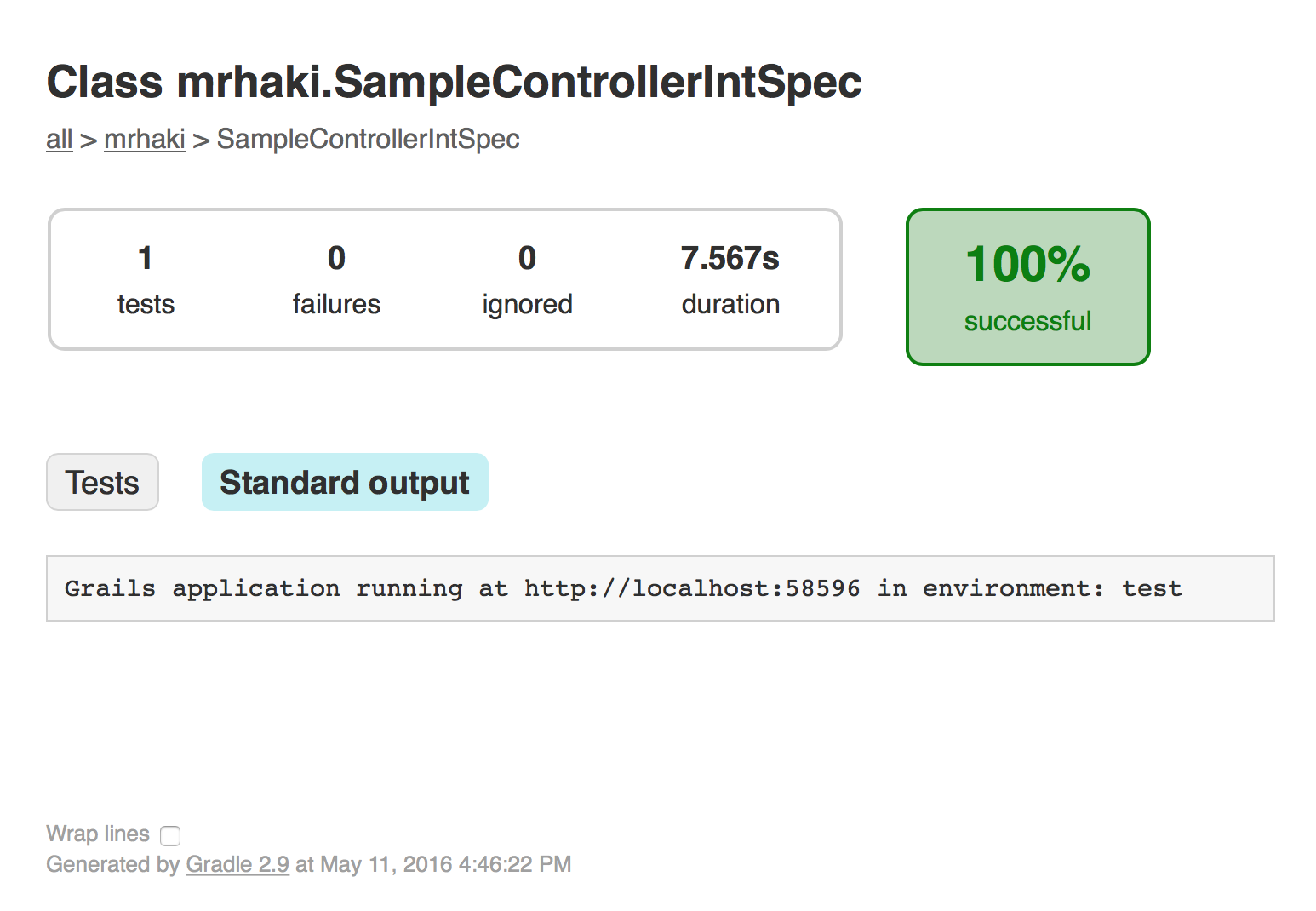
Let’s run the integration test: $ grails test-app mrhaki.SampleControllerIntSpec -integration. When we open the test report and look at the standard output we can see that a random port is used:
Written with Grails 3.1.6.
Original blog post written on May 11, 2016.