What do we need to get started?
Let’s be honest with each other. D3 is not the simplest way to draw a graph.
However, that doesn’t mean that it’s beyond those with a little computer savy and a willingness to experiment. Remember failure is your friend (I am fairly sure that I am also related by blood). Just learn from your mistakes and it’ll all work out.
So, here in no particular order is a list of good things to know. None of which are essential, but any one (or more) of which will make your life slightly easier.
- HyperText Markup Language (HTML)
- JavaScript
- Cascading Style Sheets (CSS)
- Web Servers
- PHP
HTML
This stands for HyperText Markup Language and is the stuff that web pages are made of. Check out the definition and other information on Wikipedia for a great overview. Just remember that all you’re going to use HTML for is to hold the code that you will use to present your information. This will be as a .html (or .htm) file and they can be pretty simple (we’ll look at some in a moment).
JavaScript
JavaScript is what’s called a ‘scripting language’. It is the code that will be contained inside the HTML file that will make D3 do all its fanciness. In fact, D3 is a JavaScript Library, it’s the native language for using D3.
Knowing a little bit about this would be really good, but to be perfectly honest, I didn’t know anything about it before I started. I read a book along the way (JavaScript: The Missing Manual from O’Reilly) and that helped with context, but the examples that are available for D3 graphics are understandable, and with a bit of trial and error, you can figure out what’s going on.
In fact, most of what this collection of information’s about is providing examples and explanations for the JavaScript components of D3.
Cascading Style Sheets (CSS)
Cascading Style Sheets (everyone tends to call them ‘Style Sheets’ or ‘CSS’) is a language used to describe the formatting (or “look and feel”) of a document written in a markup language. The job of CSS is to make the presentation of the components you will draw with D3 simpler by assigning specific styles to specific objects. One of the cool things about CSS is that it is an enormously flexible and efficient method for making everything on the screen look more consistent and when you want to change the format of something you can just change the CSS component and the whole look and feel of your graphics will change.
Web Servers
Web servers can go one of two ways. If you have access to a web server and know where to put the files so that you can access them with your browser, you’re in a good place. If you’re not quite sure, read on…
A web server will allow you to access your HTML files and will provide the structure that allows it to be displayed on a web browser. There are some simple instructions on the main D3 wiki page for setting up a local server. Or you might have access to a remote one and be able to upload your files. However, for a little more functionality and a whole lot of ease of use, I can thoroughly recommend WampServer (WAMP) as a free and simple way to set up a local web server that includes PHP and a MySQL database (more on those later). Go to the WampServer web page (http://www.wampserver.com/en/) and see if it suits you.
Throughout this document I will be describing the files and how they’re laid out in a way that has suited my efforts while using WAMP, but they will work equally well on a remote server. I will explain a little more about how I arrange the files later in the ‘Getting D3’ section.

There are other options of course. You could host code on GitHub and present the resulting graphics on bl.ocks.org. This is a great way to make sure that your code is available for peer review and sharing with the wider community.
One such alternative option that I have recently started playing with is Plunker (http://plnkr.co/) This is a lightweight collaborative online editing tool. It’s so cool I wrote a special section for it which you can find later in this document. This is definitely worth trying if you want to use something simple without a great deal of overhead. If you like what you see, perhaps consider an alternative that provides a greater degree of capability if you go on to greater d3.js things.
PHP
PHP is a scripting language for the web. That is to say that it is a programming language which is executed when you load web pages and it helps web pages do dynamic things.
You might think that this sounds familiar and that JavaScript does the same thing. But not quite.
JavaScript is designed so that it travels with the web page when it is downloaded by a browser (the client). However, PHP is executed remotely on the server that supplies the web page. This might sound a bit redundant, but it’s a big deal. This means that the PHP which is executed doesn’t form part of the web page, but it can form the web page. The implication here is that the web page you are viewing can be altered by the PHP code that runs on a remote server. This is the dynamic aspect of it.
In practice, PHP could be analogous to the glue that binds web pages together. Allowing different portions of the web page to respond to directions from the end user.
It is widely recognised not only as a relatively simple language to learn, but also as a fairly powerful one. At the same time it comes into criticism for being somewhat fragmented and sometimes contradictory or confusing. But in spite of any perceived shortcomings, it is a very widely used and implemented language and one for which there is no obvious better option.
Other Useful Stuff
Text Editor
A good text editor for writing up your code will be a real boost. Don’t make the fatal mistake of using an office word processor or similar. THEY WILL DOOM YOU TO A LIFE OF MISERY. They add in crazy stuff that you can’t even see and never save the files in a way that can be used properly.
Preferably, you should get an editor that will provide some assistance in the form of syntax highlighting which is where the editor knows what language you are writing in (JavaScript for example) and highlights the text in a way that helps you read it. For example, it will change text that might appear as this;
Into something like this;
// Get the data
d3.tsv("data/data.tsv", function(error, data) {
data.forEach(function(d) {
    d.date = parseDate(d.date);
    d.close = +d.close;
});
Infinitely easier to use. Trust me.
There are plenty of editors that will do the trick. I have a preference for Geany, mainly because it’s what I started with and it grew on me :-).
Getting D3
Luckily this is pretty easy and could go one of two ways.
Host d3.js locally
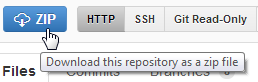
Go to the D3 repository on github and download the entire repository by clicking on the ‘ZIP’ button.
What you do with it from here depends on how you’re hosting your graphs. If you’re working on them on your local PC, then you will want to have the d3.js file in the path that can be seen by the browser. Again, I would recommend WAMP (a local web server) to access your files locally. If you’re using WAMP, then you just have to make sure that it knows to use a directory that will contain the d3 directory and you will be away.
Use a remote CDN to always use the latest version of d3.js
The alternative to downloading d3.js and using it locally is to always retrieve it from an online source. For d3.js this could be done via having the following line in our JavaScript; <script src="https://d3js.org/d3.v4.min.js"></script>. This method has the advantage of always using the latest version of D3 and is especially useful if your visualisations are hosted somewhere like bl.ocks.org.
Potential directory structure
The following image is intended to provide a very crude overview of how we can set up the directories for our web server.
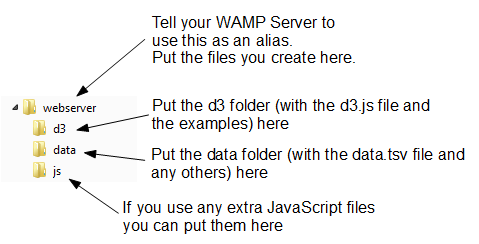
- webserver: Use this as our ‘base’ directory where you put our files that we create. That way when we open our browser we point to this directory and it allows us to access the files like a normal web site.
- d3: This would be our unzipped d3 directory. It contains all the examples and more importantly the d3.v4.js file that we need to get things going. To do this we would include a line like the following;
<script type="text/javascript" src="d3/d3.v4.js"></script>
This tells our browser that from the file it is running (one of the html graph files) if it goes into the ‘d3’ folder it will find the d3.v4.js file that it can load.
- data: I use this directory to hold any data files that I would use for processing. For example, you will see the following line in the code examples that follow
d3.csv("data/data.csv", function(error, data) {. Again, that’s telling the browser to go into the ‘data’ directory and to load the ‘data.csv’ file. - js: Often we will find that we will want to include other JavaScript libraries to load. This is a good place to put them.
Where to get information on d3.js
D3 has made huge advances in providing an extensible and practical framework for manipulating data as web objects. At the same time there has been significant increase in information available for people to use it. The following is a far from exhaustive list of sources, but from my own experience it represents a useful subset of knowledge.
d3js.org
d3js.org would be the first port of call for people wanting to know something about d3.js.
From the overview on the main page you can access a dizzying array of examples that have been provided by the founder of d3 (Mike Bostock) and a host of additional developers, artists, coders and anyone who has something to add to the sum knowledge of cool things that can be done with D3.
There is a link to a documentation page that serves as a portal to the ever important API reference, contributed tutorials and other valuable links (some of which I will mention in paragraphs ahead).
The last major link is to the Github repository where you can download d3.js itself.
It is difficult to overstate the volume of available information that can be accessed from d3js.org. It stands alone as the one location that anyone interested in D3 should visit.
Google Groups
There is a Google Group dedicated to discussions on d3.js.
In theory this forum is for discussions on topics including visualization design, API design, requesting new features, etc. With a specific direction made in the main header that “If you want help using D3, please use the d3.js tag on Stack Overflow!”.
In practice however, it would appear that a sizeable proportion of the posts there are technical assistance requests of one type or another. Having said that this means that if you’re having a problem, there could already be a solution posted there. However, if at all possible the intention is certainly that people use Stack Overflow, so this should be the first port of call for those types of inquiry.
So, by all means add this group as a favourite and this will provide you with the opportunity to receive emailed summaries of postings or just an opportunity to easily browse recent goings-on.
Stack Overflow
Stack Overflow is a question and answer site whose stated desire is “to build a library of detailed answers to every question about programming”. Ambitious. So how are they doing? Actually really well. Stack overflow is a fantastic place to get help and information. It’s also a great place to help people out if you have some knowledge on a topic.
They have a funny scheme for rewarding users that encourages providing good answers based on readers voting. It’s a great example of gamification working well. If you want to know a little more about how it works, check out this page; http://stackoverflow.com/about.
They have a d3.js tag (http://stackoverflow.com/questions/tagged/d3.js) and like Google Groups there is a running list of different topics that are an excellent source of information.
Github
Github is predominantly a code repository and version control site. It is highly regarded for its technical acumen and provides a fantastic service that is broadly used for many purposes. Not the least of which is hosting the code (and the wiki) for d3.js.
Whilst not strictly a site that specialises in providing a Q & A function, there is a significant number of repositories which mention d3.js. With the help from an astute search phrase, there is potentially a solution to be found there.
The other associated feature of Github is Gist. Gist is a pastebin service (a place where you can copy and past code) that can provide a ‘wiki like’ feature for individual repositories and web pages that can be edited through a Git repository. Gist plays a role in providing the hub for the bl.ocks.org example hosting service set up by Mike Bostock.
For a new user, Github / Gist can be slightly daunting. It’s an area where you will get most value by understanding something about the services before you start using them. This is certainly true if you want to make use of its incredible features that are available for hosting code. However, if you want to browse other peoples code it’s an easier introduction. Have a look through what’s available and if you feel so inclined, I recommend that you learn enough to use their service. It’s time well spent.
bl.ocks.org
bl.ocks.org is a viewer for code examples which are hosted on Gist. You are able to load your code into Gist, and then from bl.ocks.org you can view them.
This is a really great way for people to provide examples of their work and there are many who do. However, it’s slightly tricky to know what is there. There is a project that will help with searching the bl.ocks for key words. This is an immensely valuable service that should be a highlight for someone wanting inspiration or assistance.
I would describe the process of getting your own code hosted and displaying as something that will be slightly challenging for people who are not familiar with Github / Gist, but again, in terms of visibility of the code and providing an external hosting solution, it is excellent and well worth the time to get to grips with.
Twitter provides a great alerting service to inform a large disparate group of people about stuff.
It’s certainly a great way to keep in touch on an hour by hour basis with people who are involved with d3.js and this can be accomplished in a couple of ways. First, find as many people from the various D3 sites around the web who you consider to be influential in areas you want to follow (different aspects such as development, practical output, educational (etc) and follow them. Even better, I found it useful to find a small subset who I considered to be influential people and I noted who they followed. It’s a bit ‘stalky’ if you’re unfamiliar with it, but the end result should be a useful collection of people with something useful to say.
Books
The following books are referenced on the D3 wiki;
- Getting Started with D3: Mike Dewar, O’Reilly Media, June 2012
- Interactive Data Visualization for the Web: Scott Murray, O’Reilly Media, November 2012
- Data Visualization with d3.js: Swizec Teller, Packt Publishing, October 2013
- Data Visualization with D3.js Cookbook: Nick Qi Zhu, Packt Publishing, October 2013
- Mastering D3.js: Pablo Navarro Castillo, Packt Publishing, August 2014
- D3.js in Action: Elijah Meeks, Manning Publications, 2014
- Learning D3.js Mapping: Thomas Newton, Oscar Villarreal, Packt Publishing, 2014
- Visual Storytelling with D3: Ritchie King, Addison-Wesley, 2014
- D3 on AngularJS: Ari Lerner + Victor Powell, Leanpub, 2014
Of course, there is also the original paper that launched D3 D3: Data-Driven Documents by Michael Bostock, Vadim Ogievetsky and Jeffrey Heer (IEEE Trans. Visualization & Comp. Graphics (Proc. InfoVis), 2011)