OpenAI API
The OpenAI API serves as the primary gateway for developers to harness the groundbreaking capabilities of OpenAI’s suite of artificial intelligence models, most notably the influential Generative Pre-trained Transformer (GPT) series. Since the release of GPT-3, and continuing with more advanced successors like GPT-4, this API has fundamentally reshaped the landscape of software development by making sophisticated natural language understanding, generation, and reasoning accessible as a programmable service. It allows developers to integrate functionalities such as text summarization, language translation, code generation, sentiment analysis, and conversational AI into their applications through simple HTTP requests. By abstracting away the immense complexity of training and hosting these massive models, the OpenAI API has catalyzed a wave of innovation, empowering everyone from individual hobbyists to large enterprises to build intelligent applications that can write, read, and comprehend human language with unprecedented fluency and coherence.
Here you will learn how to send prompts to the OpenAI GPT AI models. For information on creating effective prompts please read my blog article Notes on effectively using AI.
Example Code
This next program in file gerbil_scheme_book/source_code/openai/openai.ss provides another practical example of interfacing with a modern web API from Gerbil Scheme. We will define a function, openai, that acts as a simple client for the OpenAI Chat Completions API. This function takes a user’s prompt as its primary argument and includes optional keyword arguments to specify the AI model and a system-prompt to set the context for the conversation. Before making the request, it securely retrieves the necessary API key from an environment variable, a best practice that avoids hard-coding sensitive credentials. The core logic involves constructing a proper JSON payload containing the model and messages, setting the required HTTP headers for authorization and content type, and then sending this data via an HTTP POST request. Finally, it parses the JSON response from the OpenAI servers to extract and return the generated text content from the AI model, while also including basic error handling for failed requests.
 1 (import :std/net/request
 2         :std/text/json)
 3
 4 (export openai)
 5
 6 (def (openai prompt
 7              model: (model "gpt-5-mini")
 8              system-prompt: (system-prompt "You are a helpful assistant."))
 9      (let ((api-key (get-environment-variable "OPENAI_API_KEY")))
10     (unless api-key
11       (error "OPENAI_API_KEY environment variable not set."))
12
13     (let* ((headers `(("Content-Type". "application/json")
14                       ("Authorization". ,(string-append "Bearer " api-key))))
15            (body-data
16             (list->hash-table
17              `(("model". ,model)
18                ("messages". ,(list
19                               (list->hash-table `(("role". "system") ("content". ,system-prompt)))
20                               (list->hash-table `(("role". "user") ("content". ,prompt))))))))
21            (body-string (json-object->string body-data))
22            (endpoint "https://api.openai.com/v1/chat/completions"))
23
24       (let ((response (http-post endpoint headers: headers data: body-string)))
25         (if (= (request-status response) 200)
26             (let* ((response-json (request-json response))
27                    (choices (hash-ref response-json 'choices))
28                    (first-choice (and (pair? choices) (car choices)))
29                    (message (hash-ref first-choice 'message))
30                    (content (hash-ref message 'content)))
31               content)
32             (error "OpenAI API request failed"
33                    status: (request-status response)
34                    body: (request-text response)))))))
35
36 ;; (openai "why is the sky blue? be very concise")
The implementation begins by importing the necessary standard libraries for handling HTTP requests (:std/net/request) and JSON data manipulation (:std/text/json). Inside the openai function, a let* block is used to sequentially bind variables for the request. It first constructs the HTTP headers and the request body, which is a hash-table representing the JSON structure required by the OpenAI API, including the model name and a list of messages for the “system” and “user” roles. This hash-table is then serialized into a JSON string. The http-post procedure is called with the API endpoint, headers, and the serialized data to perform the web request.
Upon receiving a response, the code demonstrates robust handling of the result. It first checks if the HTTP status code is 200, indicating success. If the request was successful, it parses the JSON text from the response body back into a hash-table. It then carefully navigates the nested structure of this response data using a chain of hash-ref and car calls to drill down through the choices array and message object to finally extract the desired content string. If the HTTP request failed, the else branch is triggered, raising an error with the status code and the response body, which provides valuable debugging information to the user.
Example Output
In the following example I run the Gerbil Scheme interpreter, loading the file “openai.ss”, and then entering an interactive REPL:
 1 $ gxi -L openai.ss -
 2 > (openai "why is the sky blue? be very concise")
 3 "Because air molecules scatter shorter (blue) wavelengths of sunlight (Rayleigh scattering) more than longer wavelengths, so blue light is sent in all directions and fills the sky."
 4 > (openai "list 3 things that the language Gerbil Scheme is most used for. Be concise.")
 5 "- Writing high-performance native-code programs and command-line tools (runs on Gambit)\n- Rapid prototyping and DSLs using its powerful macro/metaprogramming facilities\n- Building concurrent and networked services (sockets, lightweight threads) and small web apps"
 6 > (displayln (openai "list 3 things that the language Gerbil Scheme is most used for. Be concise."))
 7 - Language-oriented programming and DSLs (heavy macro/metaprogramming support).
 8 - Server-side and networked applications/web services (runs on fast Gambit runtime).
 9 - Scripting, rapid prototyping and systems-level code using Gambit’s FFI and concurrency.
10 >
Notice that I repeated the second example, displaying the string response in a more readable format. As we also see in this example, Large Language Models will in general produce different output when called with the same prompt.
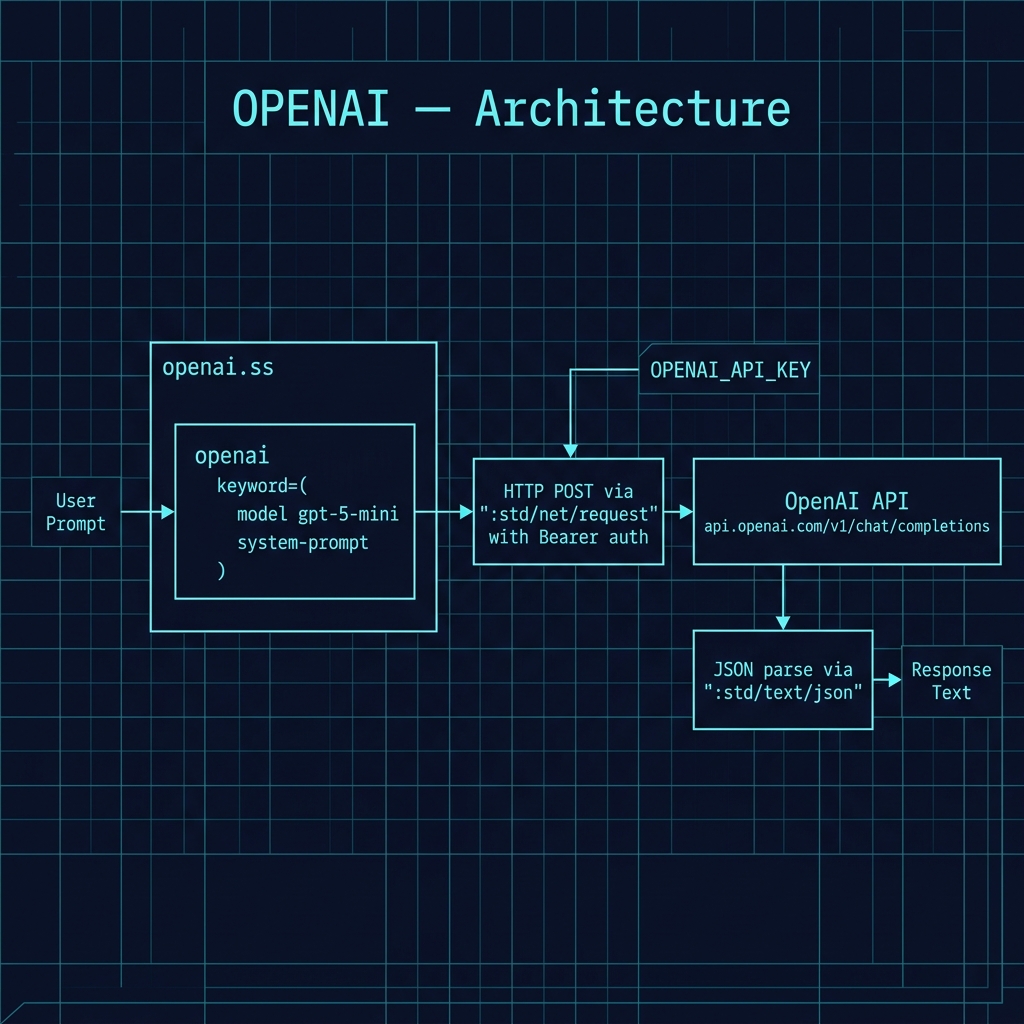
The following architecture diagram illustrates the structure of this example, showing how the Gerbil Scheme client authenticates with the OpenAI API via Bearer token, sends a chat completion request, and navigates the nested JSON response to extract the generated content.
Sometimes we might want the output in a specific format, like JSON:
1 $ gxi -L openai.ss -
2 > (displayln (openai "Be concise in your thinking and only provide one correct answer, no need to think about different correct answers for the problem: Sally is 77, Bill is 32, and Alex is 44 years old. Pairwise, what are their age differences? Print results in JSON format."))
3 {"Sally-Bill":45,"Sally-Alex":33,"Bill-Alex":12}
4 >
This example is not good enough! When you use LLMs in your applications it is better to one-shot prompt with the exact output format you need in your application. Here is an example prompt:
 1 You are an information extraction system.
 2 Extract all people’s **full names** and **email addresses** from the following text.
 3 If no names or emails are present, return an empty list.
 4
 5 Return the result strictly in this JSON format:
 6
 7 {
 8   "contacts": [
 9     {
10       "name": "<full name as written in text>",
11       "email": "<email address>"
12     }
13   ]
14 }
15
16 Text:
17 "Hi, I’m Alice Johnson, please email me at alice.j@example.com.
18 Also, you can reach Bob Smith via bob.smith42@gmail.com."
Let’s run this one-shot prompt in a Gerbil Scheme REPL:
 1 $ gxi -L openai.ss -
 2 > (def prompt #<<EOF
 3 You are an information extraction system.
 4 Extract all people’s **full names** and **email addresses** from the following text.
 5 If no names or emails are present, return an empty list.
 6
 7 Return the result strictly in this JSON format:
 8
 9 {
10   "contacts": [
11     {
12       "name": "<full name as written in text>",
13       "email": "<email address>"
14     }
15   ]
16 }
17
18 Text:
19 "Hi, I’m Alice Johnson, please email me at alice.j@example.com.
20 Also, you can reach Bob Smith via bob.smith42@gmail.com."
21 EOF
22 )
23 > (displayln (openai prompt))
24 {
25   "contacts": [
26     {
27       "name": "Alice Johnson",
28       "email": "alice.j@example.com"
29     },
30     {
31       "name": "Bob Smith",
32       "email": "bob.smith42@gmail.com"
33     }
34   ]
35 }
36 >
Optional Practice Problems
- Structured JSON Output: Extend
openai.ssto pass aresponse_formatconfiguration with a JSON schema in the API request, ensuring that the model returns valid, structured JSON matching your target format. - Multi-turn Chat Client: Modify
openai.ssso that it accepts a list of past message hash tables instead of a single prompt, allowing it to maintain state in a multi-turn conversation. - Vision/Image Analysis: Add support for analyzing images by encoding a local image file to a base64 string and formatting the prompt payload with a
type: "image_url"structure.