Google Gemini API
The Google Gemini API provides developers with access to Google’s state-of-the-art family of Gemini Large Language Models (LLMs), representing a significant leap forward in multimodal artificial intelligence. Unlike earlier models that primarily processed text, the Gemini series—comprising models like the highly capable Gemini Ultra, the versatile Gemini Pro, and the efficient Gemini Nano—was designed from the ground up to seamlessly understand, operate across, and combine different types of information, including text, code, images, audio, and video. This native multimodality allows for the development of sophisticated applications that can reason about complex inputs, such as analyzing the steps in a video, interpreting charts and diagrams within a document, or generating creative text based on a visual prompt. The API offers a streamlined and powerful interface, enabling developers to integrate these advanced reasoning and generation capabilities into their own software, pushing the boundaries of what’s possible in domains ranging from data analysis and content creation to building the next generation of intelligent, context-aware user experiences.
Here you will learn how to send prompts to the Google Gemini AI models. For information on creating effective prompts please read my blog article Notes on effectively using AI.
Example Code
In this section, we’ll explore a practical example of interacting with a modern web API by building a client for Google’s Gemini Large Language Model. The following program defines a function named gemini that takes a text prompt and returns the model’s generated response. This involves several common tasks in modern software development: retrieving sensitive information like an API key from environment variables, dynamically constructing a JSON payload according to the API’s specification, setting the correct HTTP headers for authentication and content type, and executing an HTTP POST request. Upon receiving a successful response, the code demonstrates how to parse the returned JSON data to extract the specific piece of information we need—the generated text from a complex, nested data structure. This serves as a simple example for making outbound web requests and handling the data interchange that is central to working with external services.
 1 (import :std/net/request
 2         :std/text/json)
 3
 4 (export gemini)
 5
 6 (def (pprint-hashtable ht)
 7   "Prints a hash table with line breaks and indentation."
 8   (hash-map (lambda (k v) (displayln "key: " k " value: " v)) ht))
 9
10 (def (gemini
11       prompt
12       model: (model "gemini-2.5-flash")
13       system-prompt: (system-prompt "You are a helpful assistant."))
14   (let ((api-key (get-environment-variable "GOOGLE_API_KEY")))
15     (unless api-key
16       (error "GEMINI_API_KEY environment variable not set."))
17
18     (let* ((headers `(("Content-Type". "application/json")
19                          ("x-goog-api-key". ,api-key)))
20            (body-data
21             (list->hash-table
22              `(("contents". ,(list
23                               (list->hash-table
24                                `(("role". "user")
25                                  ("parts". ,(list (list->hash-table `(("text". ,prompt))))))))))))
26            (body-string (json-object->string body-data))
27            (endpoint (string-append "https://generativelanguage.googleapis.com/v1beta/models/"
28                                     model ":generateContent?key=" api-key)))
29       (let ((response (http-post endpoint headers: headers data: body-string)))
30         (displayln response)
31         (if (= (request-status response) 200)
32           (let* ((response-json (request-json response))
33                  (candidate (car (hash-ref response-json 'candidates)))
34                  (content (hash-ref candidate 'content))
35                  (p1 (car (hash-ref content 'parts))))
36             (hash-ref p1 'text)))))))
37
38 ;;  (gemini "why is the sky blue? be very concise")
The core logic resides within the gemini function, which uses a series of let* bindings to sequentially construct the components of the API request. First, it defines the necessary HTTP headers, including the API key. Next, it builds the body-data as a nested hash table, precisely matching the structure required by the Gemini API, before serializing it into a JSON string using json-object->string. Finally, the full endpoint URL is assembled by concatenating the base URL with the specific model being used. The actual network communication is handled by the http-post function, which sends all the prepared information to the Google servers.
Once the http-post call returns, the program immediately checks the response status. If the request was successful (status code 200), it proceeds to parse the data; otherwise, nothing is returned. The parsing logic is a chain of data extraction operations on the JSON response, which is first converted into a Gerbil Scheme hash table. Using a combination of hash-ref to access values by their keys (like ’candidates and ’content) and the function car to access the first element of a list, the code navigates the nested data structure to isolate the desired text content. This sequence elegantly demonstrates how Gerbil Scheme’s standard library functions for handling lists and hash tables can be composed to efficiently process structured data from external APIs.
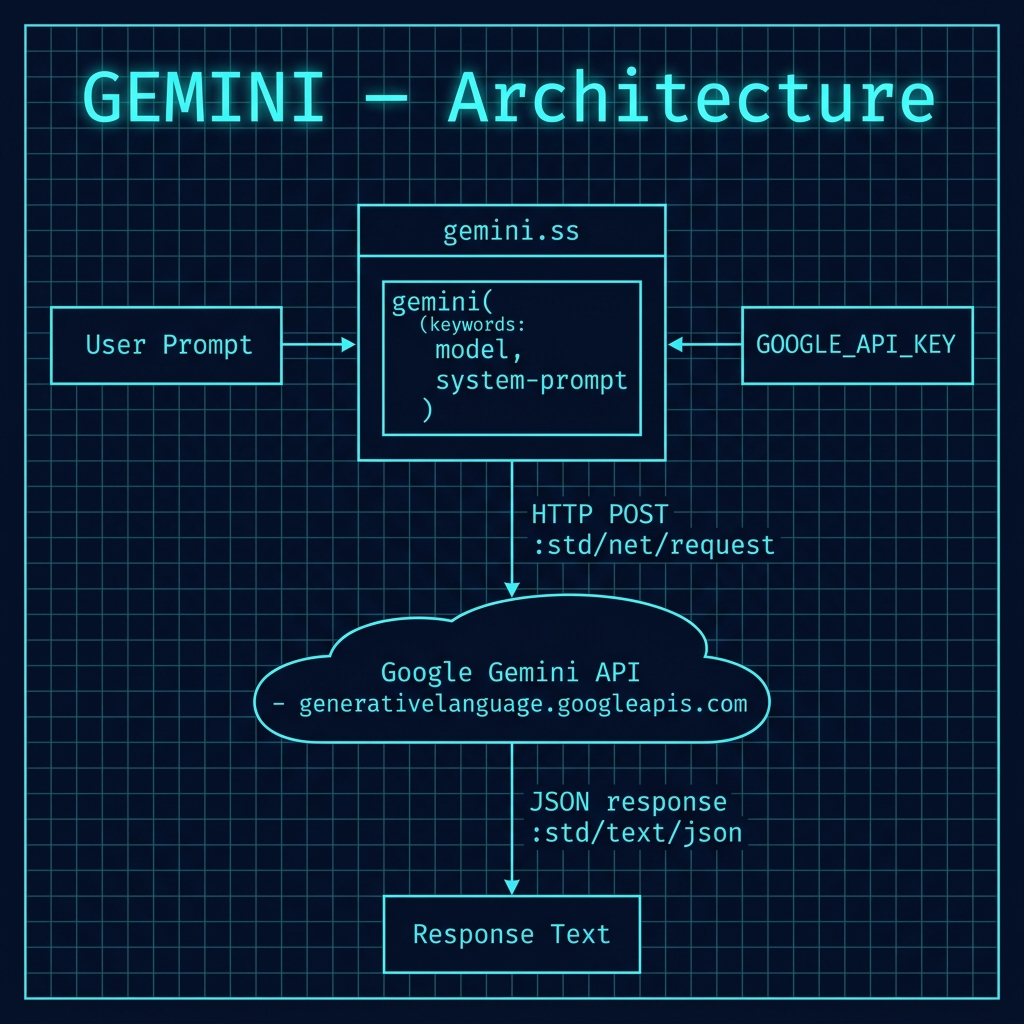
The following architecture diagram shows the overall structure of this example, illustrating how the Gerbil Scheme client constructs an HTTP request, communicates with the Google Gemini API endpoint, and parses the JSON response to extract the generated text.
Example Output
Change directory to source-code/gemini an run:
 1 $ gxi -L gemini.ss -
 2 > (gemini "why is the sky blue? be very concise")
 3 "Earth's atmosphere scatters blue light more than other colors."
 4
 5 > (gemini "Sally is 77, Bill is 32, and Alex is 44 years old. Pairwise, what are their age differences? Print results in JSON format. Be concise and only provide a correct answer, no need to think about different correct answers.")
 6 "```json\n{\n  \"Sally_Bill\": 45,\n  \"Sally_Alex\": 33,\n  \"Bill_Alex\": 12\n}\n```"
 7
 8 > (gemini "Sally is 77, Bill is 32, and Alex is 44 years old. Pairwise, what are their age differences? Print results in JSON format. Be concise and only provide a correct answer, no need to think about different correct answers. Only return the JSON text, don't add markdown like ```json")
 9 "{\"Sally_Bill\": 45, \"Sally_Alex\": 33, \"Bill_Alex\": 12}"
10
11 > (displayln (gemini "Sally is 77, Bill is 32, and Alex is 44 years old. Pairwise, what are their age differences? Print results in JSON format. Be concise and only provide a correct answer, no need to think about different correct answers. Only return the JSON text, don't add markdown like ```json"))
12 {"Sally_Bill": 45, "Sally_Alex": 33, "Bill_Alex": 12}
Notice how Gemini initially returned the JSON results in Markdown format and I modified the prompt to get the output format I wanted. Another good technique is to give LLMs an example of the output format you want in the prompt.
Optional Practice Problems
- Streaming Responses: Modify
gemini.ssto parse and display streaming responses from the Gemini API instead of waiting for the full response to complete. - System Instruction Payload: The parameter
system-promptingemini.ssis defined but not actually sent to the API. Update the request body structure to properly pass the system instructions according to Google Gemini’s API payload specification. - Robust Error Handling: Implement exponential backoff retry logic to handle rate limit (HTTP 429) errors gracefully.