Complete FFI Example: C Language Wrapper for Rasqal SPARQL Library and Sord RDF Datastore Library
The example for this chapter is a complete, self-contained bridge between Gerbil Scheme and a well-established C RDF toolchain. It demonstrates how to load RDF data into an in-memory store and execute SPARQL queries from Gerbil via a Foreign Function Interface (FFI). Under the hood it uses Serd and Sord to parse and hold triples, and Rasqal/Raptor to prepare, execute, and serialize SPARQL results. The project ships with both a small C demo CLI to test the C language part of this project and a Gerbil-based client, making it easy to explore end-to-end from raw data files to query results printed on the console.
The core is a compact C wrapper that exposes four functions: initialize the store with a data file (rdf_init), run a SPARQL query and get results as a string (rdf_query_copy), and clean up (rdf_free). Data is parsed with Serd and stored in Sord’s in-memory model; queries are executed with Rasqal, and results are serialized to TSV by Raptor with the column header removed for line-per-row output. On the Gerbil side, rdfwrap.ss defines the FFI bindings and test.ss provides a simple CLI program, illustrating a clean pattern for calling native libraries from Gerbil without excess machinery.
Using the project is straightforward. After installing the required libraries (Homebrew recipes are listed in the README for macOS and there is a separate Linux Makefile for Linux users), make produces a shared library, a C demo (DEMO_rdfwrap), and a Gerbil executable (TEST_client). You can point either binary at a small example dataset (TTL or NT representations are included) and supply a SPARQL SELECT query to print results. The Gerbil client supports sensible defaults, inline queries, and reading queries from files via the @file convention, making it convenient for quick experiments, regression checks, or embedding SPARQL query capabilities into larger Gerbil programs.
This example application aims to be an educational, practical starting point rather than a full-featured RDF database because data is stored strictly in memory. It focuses on clarity and minimal surface area: a tiny C API, a thin FFI layer, and a simple CLI that you can adapt. From here, natural extensions include loading multiple graphs, supporting additional RDF syntaxes, handling named graphs/datasets, improving error reporting, and streaming or structuring results beyond TSV. If you’re learning Gerbil FFI, integrating SPARQL into Scheme, or want a small reference for wiring C libraries into a Lisp workflow, the example in this chapter provides a concise, working template.
Library Selection
Here we will be using Sord which is very lightweight C library for storing RDF triples in memory.
Limitation: Sord itself is just a data store. It does not have a built-in SPARQL engine. However, it’s designed to be used with other libraries, and we will pair it with Rasqal (from the Redland RDF suite) to add SPARQL query capability.
Rasqal is a SPARQL query library. It can parse a SPARQL query and execute it against a graph datastore like Sord or Redland project’s librdf. We could have used librdf with Rasqal in our implementation but I felt that it is a better example wrapping libraries from different projects.
Overview of the Project Structure and Build System
This project is in the directory gerbil_scheme_book/source_code/SparqlRdfStore and contains a sub-directory C-source for our implementation of a C language wrapper for the Sord and Rasqal libraries. The top level project direcory contains Gerbil Scheme source files, example RDF data files, and a file containing a test SPARQL query:
1 $ pwd
2 ~/Users/markw/~GITHUB/gerbil_scheme_book/source_code/SparqlRdfStore
3 $ ls -R
4 C-source    data.nt     Makefile    q.sparql    README.md
5 data.n3     data.ttl    mini.nt     rdfwrap.ss  test.ss
6
7 ./C-source:
8 wrapper.c
The following Makefile builds the project for macOS:
  1 # Makefile — DEMO binary + FFI library + Gerbil client
  2
  3 # ---- Prefixes (override on CLI if needed) ----
  4 SORD_PREFIX    ?= /opt/homebrew/opt/sord
  5 SERD_PREFIX    ?= /opt/homebrew/opt/serd
  6 RASQAL_PREFIX  ?= /opt/homebrew/opt/rasqal
  7 RAPTOR_PREFIX  ?= /opt/homebrew/opt/raptor
  8 LIBXML2_PREFIX ?= /opt/homebrew/opt/libxml2
  9 OPENSSL_PREFIX ?= /opt/homebrew/opt/openssl@3
 10
 11 # ---- Tools ----
 12 CC         ?= cc
 13 PKG_CONFIG ?= pkg-config
 14 GXC        ?= gxc
 15
 16 # ---- Sources / Outputs ----
 17 SRC_C      := C-source/wrapper.c
 18 OBJ_C      := $(SRC_C:.c=.o)
 19 OBJ_PIC    := C-source/wrapper.pic.o
 20
 21 DEMO_BIN   := DEMO_rdfwrap
 22 SHLIB      := libRDFWrap.dylib       # macOS
 23 GERBIL_EXE := TEST_client
 24 GERBIL_SRC := test.ss
 25
 26 # ---- Try pkg-config first (brings transitive libs) ----
 27 HAVE_PKGCFG := $(shell $(PKG_CONFIG) --exists sord-0 serd-0 rasqal raptor2 && echo yes || echo no)
 28 PKG_CFLAGS  := $(if $(filter yes,$(HAVE_PKGCFG)),$(shell $(PKG_CONFIG) --cflags sord-0 serd-0 rasqal raptor2))
 29 PKG_LDLIBS  := $(if $(filter yes,$(HAVE_PKGCFG)),$(shell $(PKG_CONFIG) --libs   sord-0 serd-0 rasqal raptor2))
 30
 31 # ---- Fallback include/lib flags ----
 32 FALLBACK_CFLAGS := \
 33   -I$(SORD_PREFIX)/include/sord-0 \
 34   -I$(SERD_PREFIX)/include/serd-0 \
 35   -I$(RASQAL_PREFIX)/include \
 36   -I$(RAPTOR_PREFIX)/include/raptor2 \
 37   -I$(LIBXML2_PREFIX)/include/libxml2
 38
 39 # Core libs if pkg-config is unavailable
 40 FALLBACK_LDLIBS := \
 41   -L$(SORD_PREFIX)/lib   -lsord-0 \
 42   -L$(SERD_PREFIX)/lib   -lserd-0 \
 43   -L$(RASQAL_PREFIX)/lib -lrasqal \
 44   -L$(RAPTOR_PREFIX)/lib -lraptor2 \
 45   -L$(LIBXML2_PREFIX)/lib -lxml2 \
 46
 47 # Extra libs sometimes needed by transitive deps or gerbil toolchain
 48 EXTRA_LDLIBS := \
 49   -L$(OPENSSL_PREFIX)/lib -lssl -lcrypto \
 50   -liconv -lz -lm
 51
 52 # ---- Final flags ----
 53 CFLAGS  ?= -Wall -O2
 54 CFLAGS  += $(if $(PKG_CFLAGS),$(PKG_CFLAGS),$(FALLBACK_CFLAGS))
 55
 56 LDLIBS  += $(if $(PKG_LDLIBS),$(PKG_LDLIBS),$(FALLBACK_LDLIBS)) $(EXTRA_LDLIBS)
 57 LDFLAGS +=
 58
 59 # For the shared lib on macOS
 60 DYNLIB_LDFLAGS := -dynamiclib -install_name @rpath/$(SHLIB)
 61
 62 # Gerbil compile/link flags
 63 GERBIL_CFLAGS := $(CFLAGS)
 64 GERBIL_LDOPTS := $(LDLIBS) -L. -lRDFWrap -Wl,-rpath,@loader_path
 65 # Where gxc writes intermediate artifacts; keep it inside workspace
 66 GERBIL_OUT_DIR ?= .gerbil_build
 67
 68 # ---- Default target ----
 69 all: $(DEMO_BIN) $(SHLIB) $(GERBIL_EXE)
 70
 71 # ---- Demo binary (with small CLI main) ----
 72 $(DEMO_BIN): $(OBJ_C)
 73     $(CC) -o $@ $^ $(LDFLAGS) $(LDLIBS)
 74
 75 # Build normal object for the demo; define RDF_DEMO_MAIN to enable main()
 76 C-source/wrapper.o: C-source/wrapper.c
 77     $(CC) $(CFLAGS) -DRDF_DEMO_MAIN -c -o $@ $<
 78
 79 # ---- Shared library for Gerbil FFI ----
 80 $(SHLIB): $(OBJ_PIC)
 81     $(CC) $(DYNLIB_LDFLAGS) -o $@ $^ $(LDFLAGS) $(LDLIBS)
 82
 83 # PIC object for dynamic library
 84 C-source/wrapper.pic.o: C-source/wrapper.c
 85     $(CC) $(CFLAGS) -fPIC -c -o $@ $<
 86
 87 # ---- Gerbil client (assumes test.ss is valid and calls FFI) ----
 88 $(GERBIL_EXE): $(GERBIL_SRC) rdfwrap.ss $(SHLIB)
 89     $(GXC) -d $(GERBIL_OUT_DIR) -cc-options "$(GERBIL_CFLAGS)" -ld-options "$(GERBIL_LDOPTS)" -exe -o $@ rdfwrap.ss $(GERBIL_SRC)
 90
 91 # ---- Utilities ----
 92 clean:
 93     rm -f $(OBJ_C) $(OBJ_PIC) $(DEMO_BIN) $(SHLIB) $(GERBIL_EXE)
 94     rm -rf $(GERBIL_OUT_DIR)
 95     rm -rf test DEMO_rdfwrap TEST_client libRDFWrap.dylib .gerbil_build
 96
 97 print-flags:
 98     @echo "HAVE_PKGCFG = $(HAVE_PKGCFG)"
 99     @echo "CFLAGS      = $(CFLAGS)"
100     @echo "LDFLAGS     = $(LDFLAGS)"
101     @echo "LDLIBS      = $(LDLIBS)"
102     @echo "GERBIL_CFLAGS = $(GERBIL_CFLAGS)"
103     @echo "GERBIL_LDOPTS = $(GERBIL_LDOPTS)"
104
105 .PHONY: all clean print-flags
Alternatively, you can run make -f Makefile.linux to build for Linux:
 1 # Makefile for Ubuntu Linux — DEMO binary + FFI library + Gerbil client
 2
 3 # ---- Tools ----
 4 CC         ?= cc
 5 PKG_CONFIG ?= pkg-config
 6 GXC        ?= gxc
 7
 8 # ---- Sources / Outputs ----
 9 SRC_C      := C-source/wrapper.c
10 OBJ_C      := $(SRC_C:.c=.o)
11 OBJ_PIC    := C-source/wrapper.pic.o
12
13 DEMO_BIN   := DEMO_rdfwrap
14 SHLIB      := libRDFWrap.so          # Linux shared library
15 GERBIL_EXE := TEST_client
16 GERBIL_SRC := test.ss
17
18 # ---- Library Flags (using pkg-config) ----
19 # Use pkg-config to get compiler and linker flags for dependencies.
20 # This is the standard way on Linux and avoids hardcoded paths.
21 PKG_CFLAGS := $(shell $(PKG_CONFIG) --cflags sord-0 serd-0 rasqal raptor2)
22 PKG_LDLIBS := $(shell $(PKG_CONFIG) --libs   sord-0 serd-0 rasqal raptor2)
23
24 # Extra libs sometimes needed by transitive deps or gerbil toolchain
25 EXTRA_LDLIBS := -lssl -lcrypto -lz -lm
26
27 # ---- Final flags ----
28 CFLAGS  ?= -Wall -O2
29 CFLAGS  += $(PKG_CFLAGS)
30
31 LDLIBS  += $(PKG_LDLIBS) $(EXTRA_LDLIBS)
32 LDFLAGS +=
33
34 # Linker flags for the shared library on Linux
35 DYNLIB_LDFLAGS := -shared -Wl,-soname,$(SHLIB)
36
37 # Gerbil compile/link flags
38 GERBIL_CFLAGS := $(CFLAGS)
39 # Use $$ORIGIN for the rpath on Linux. This tells the executable to look for
40 # the shared library in its own directory. The '$$' escapes the '$' for Make.
41 GERBIL_LDOPTS := -L$(CURDIR) -lRDFWrap $(LDLIBS) -Wl,-rpath,'$$ORIGIN'
42
43 # Where gxc writes intermediate artifacts; keep it inside workspace
44 GERBIL_OUT_DIR ?= .gerbil_build
45
46 # ---- Default target ----
47 all: $(DEMO_BIN) $(SHLIB) $(GERBIL_EXE)
48
49 # ---- Demo binary (with small CLI main) ----
50 $(DEMO_BIN): $(OBJ_C)
51     $(CC) -o $@ $^ $(LDFLAGS) $(LDLIBS)
52
53 # Build normal object for the demo; define RDF_DEMO_MAIN to enable main()
54 C-source/wrapper.o: C-source/wrapper.c
55     $(CC) $(CFLAGS) -DRDF_DEMO_MAIN -c -o $@ $<
56
57 # ---- Shared library for Gerbil FFI ----
58 $(SHLIB): $(OBJ_PIC)
59     $(CC) $(DYNLIB_LDFLAGS) -o $@ $^ $(LDFLAGS) $(LDLIBS)
60
61 # PIC object for dynamic library
62 C-source/wrapper.pic.o: C-source/wrapper.c
63     $(CC) $(CFLAGS) -fPIC -c -o $@ $<
64
65 # ---- Gerbil client (assumes test.ss is valid and calls FFI) ----
66 $(GERBIL_EXE): $(GERBIL_SRC) rdfwrap.ss $(SHLIB)
67     $(GXC) -d $(GERBIL_OUT_DIR) -cc-options "$(GERBIL_CFLAGS)" -ld-options "$(GERBIL_LDOPTS)" -exe -o $@ rdfwrap.ss $(GERBIL_SRC)
68
69 # ---- Utilities ----
70 clean:
71     rm -f $(OBJ_C) $(OBJ_PIC) $(DEMO_BIN) $(SHLIB) $(GERBIL_EXE)
72     rm -rf $(GERBIL_OUT_DIR)
73
74 print-flags:
75     @echo "CFLAGS        = $(CFLAGS)"
76     @echo "LDFLAGS       = $(LDFLAGS)"
77     @echo "LDLIBS        = $(LDLIBS)"
78     @echo "GERBIL_CFLAGS = $(GERBIL_CFLAGS)"
79     @echo "GERBIL_LDOPTS = $(GERBIL_LDOPTS)"
80
81 .PHONY: all clean print-flags
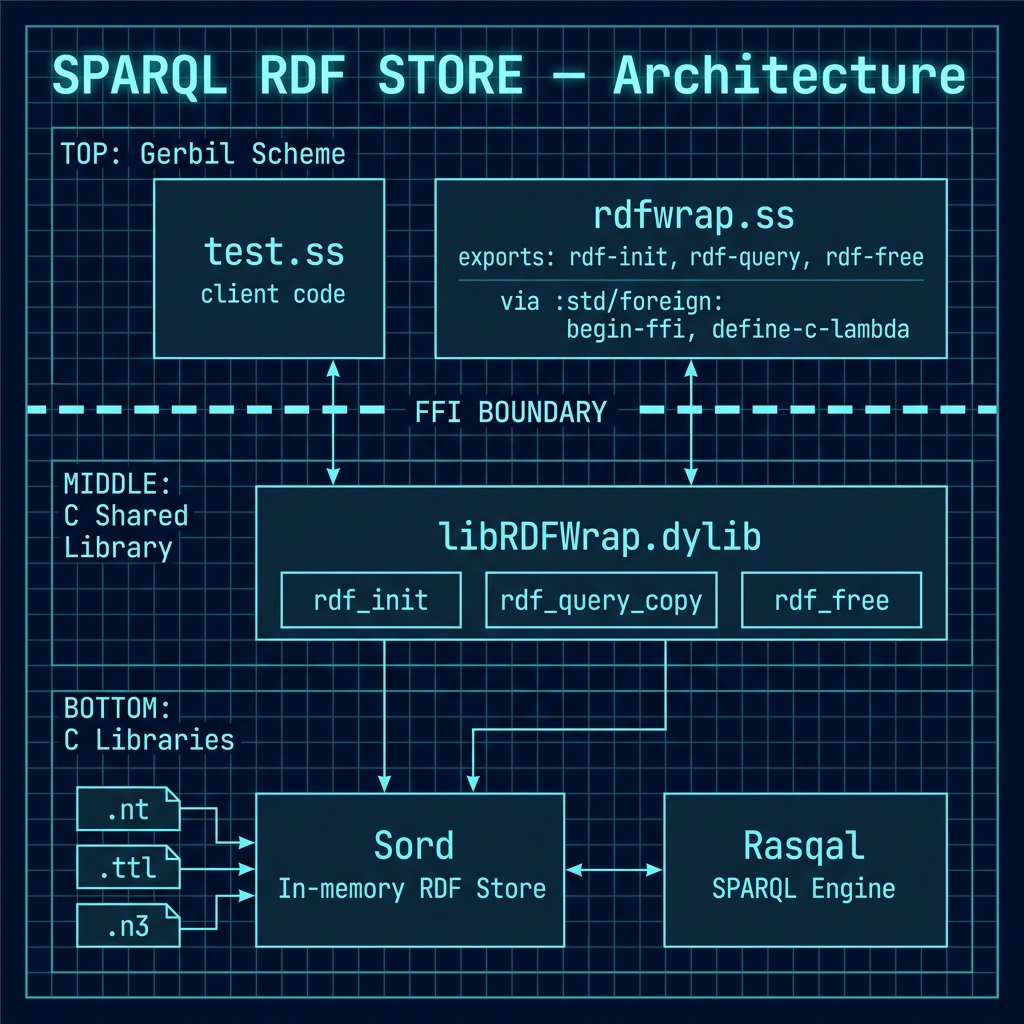
The following architecture diagram provides an overview of the complete FFI pipeline, showing how the Gerbil Scheme client calls through the FFI shim into the C wrapper library, which in turn uses Serd/Sord for RDF storage and Rasqal/Raptor for SPARQL query execution and result serialization.
Implementation of the C Language Wrapper
Here we write a wrapper that will later be called from Gerbil Scheme code.
The following listing shows the wrapper C-source/wrapper.c. This C wrapper provides a simplified, high-level interface for handling RDF data by leveraging the combined power of the serd, sord, rasqal, and raptor2 libraries. The primary goal of this wrapper is to abstract away the complexities of library initialization, data parsing, query execution, and results serialization. It exposes a minimal API for loading an RDF graph from a Turtle file and executing SPARQL queries against it, returning the results in a straightforward, easy-to-parse string format. This makes it an ideal solution for applications that need to embed RDF query functionality without managing the intricate details of the underlying RDF processing stack.
  1 // C-source/wrapper.c
  2 #define _GNU_SOURCE
  3 #include <stdio.h>
  4 #include <stdlib.h>
  5 #include <string.h>
  6 #include <stdbool.h>
  7
  8 #include <serd/serd.h>
  9 #include <sord/sord.h>
 10 #include <rasqal.h>
 11 #include <raptor2.h>
 12
 13 static SordWorld *g_world = NULL;
 14 static SordModel *g_model = NULL;
 15 static SerdEnv   *g_env   = NULL;
 16 static char      *g_data_path = NULL;
 17
 18 /* ---------- Load RDF into Sord via Serd ---------- */
 19 static int load_turtle_into_sord(const char *path){
 20   SerdURI base_uri = SERD_URI_NULL;
 21   SerdNode base = serd_node_new_file_uri((const uint8_t*)path, NULL, &base_uri, true);
 22   g_env = serd_env_new(&base);
 23   SerdReader *reader = sord_new_reader(g_model, g_env, SERD_TURTLE, NULL);
 24   if(!reader){ serd_node_free(&base); return -1; }
 25   SerdStatus st = serd_reader_read_file(reader, (const uint8_t*)path);
 26   serd_reader_free(reader);
 27   serd_node_free(&base);
 28   return st ? -1 : 0;
 29 }
 30
 31 /* ---------- Public API ---------- */
 32 int rdf_init(const char *n3_path){
 33   g_world = sord_world_new();
 34   unsigned idx = SORD_SPO|SORD_OPS|SORD_PSO;
 35   g_model = sord_new(g_world, idx, false);
 36   if(load_turtle_into_sord(n3_path)) return -1;
 37   free(g_data_path);
 38   g_data_path = strdup(n3_path);
 39   return 0;
 40 }
 41
 42 char* rdf_query(const char *sparql){
 43   if(!g_data_path) return NULL;
 44   rasqal_world *rw = rasqal_new_world(); if(!rw) return NULL;
 45   if(rasqal_world_open(rw)){ rasqal_free_world(rw); return NULL; }
 46
 47   rasqal_query *q = rasqal_new_query(rw, "sparql", NULL);
 48   if(!q){ rasqal_free_world(rw); return NULL; }
 49   if(rasqal_query_prepare(q, (const unsigned char*)sparql, NULL)){
 50     rasqal_free_query(q); rasqal_free_world(rw); return NULL;
 51   }
 52
 53   raptor_world *rapw = rasqal_world_get_raptor(rw);
 54   raptor_uri *file_uri = raptor_new_uri_from_uri_or_file_string(rapw, NULL, (const unsigned char*)g_data_path);
 55   if(!file_uri){ rasqal_free_query(q); rasqal_free_world(rw); return NULL; }
 56
 57   rasqal_data_graph *dg = rasqal_new_data_graph_from_uri(rw, file_uri, NULL, RASQAL_DATA_GRAPH_BACKGROUND, NULL, NULL, NULL);
 58   if(!dg){ raptor_free_uri(file_uri); rasqal_free_query(q); rasqal_free_world(rw); return NULL; }
 59   if(rasqal_query_add_data_graph(q, dg)){
 60     rasqal_free_data_graph(dg); raptor_free_uri(file_uri);
 61     rasqal_free_query(q); rasqal_free_world(rw); return NULL;
 62   }
 63
 64   rasqal_query_results *res = rasqal_query_execute(q);
 65   if(!res){ rasqal_free_query(q); rasqal_free_world(rw); return NULL; }
 66
 67   /* Serialize results as TSV to a malloc'd string */
 68 char *buf = NULL; size_t buflen = 0;
 69 raptor_iostream *ios = raptor_new_iostream_to_string(rapw, (void**)&buf, &buflen, malloc);
 70 if(!ios){ rasqal_free_query_results(res); rasqal_free_query(q); rasqal_free_world(rw); return NULL; }
 71
 72 /* One call handles SELECT/ASK/DESCRIBE/CONSTRUCT */
 73 if(rasqal_query_results_write(ios, res, "tsv", NULL, NULL, NULL) != 0){
 74   raptor_free_iostream(ios);
 75   if(buf) free(buf);
 76   rasqal_free_query_results(res); rasqal_free_query(q); rasqal_free_world(rw);
 77   return NULL;
 78 }
 79 raptor_free_iostream(ios);
 80
 81 /* Optional: drop TSV header line so output is exactly one line per row */
 82 if(buf){
 83   char *nl = strchr(buf, '\n');
 84   if(nl && nl[1]) {
 85     char *body = strdup(nl+1);
 86     free(buf);
 87     buf = body;
 88   }
 89 }
 90
 91 rasqal_free_query_results(res);
 92 rasqal_free_query(q);
 93 rasqal_free_world(rw);
 94 return buf;
 95 }
 96
 97 void rdf_free(void){
 98   if(g_env) serd_env_free(g_env);
 99   if(g_model) sord_free(g_model);
100   if(g_world) sord_world_free(g_world);
101   g_env=NULL; g_model=NULL; g_world=NULL;
102   free(g_data_path); g_data_path=NULL;
103 }
104
105 char* rdf_query_copy(const char *sparql){
106   char *s = rdf_query(sparql);
107   if (!s) return NULL;
108   size_t n = strlen(s);
109   char *out = (char*)malloc(n+1);
110   if (!out){ free(s); return NULL; }
111   memcpy(out, s, n+1);
112   free(s);
113   return out;
114 }
115
116 /* Optional: tiny demo main if you want a CLI.
117    Compile by adding -DRDF_DEMO_MAIN to CFLAGS, then:
118    ./rdfwrap news.n3 'SELECT ?s ?p ?o WHERE { ?s ?p ?o } LIMIT 3'
119 */
120 #ifdef RDF_DEMO_MAIN
121 int main(int argc, char** argv){
122   if(argc < 3){ fprintf(stderr,"usage: %s <data.ttl> <sparql>\n", argv[0]); return 1; }
123   if(rdf_init(argv[1])){ fprintf(stderr,"failed to load %s\n", argv[1]); return 2; }
124   char* s = rdf_query(argv[2]);
125   if(!s){ fprintf(stderr,"query failed\n"); rdf_free(); return 3; }
126   fputs(s, stdout); free(s);
127   rdf_free(); return 0;
128 }
129 #endif
The core functionality begins with initialization and data loading, handled by the rdf_init() function. This function sets up the necessary in-memory storage by creating a SordWorld and a SordModel, which serve as the container for the RDF graph. It then calls the internal helper function load_turtle_into_sord() that uses the serd parser to efficiently read and load the triples from a specified Turtle (.ttl) file into the sord model. This process establishes the in-memory database that all subsequent queries will be executed against. The path to the data file is stored globally for later use by the query engine.
Once the data is loaded, the rdf_query() function provides the mechanism for executing SPARQL queries. It orchestrates the rasqal query engine to parse and prepare the SPARQL query string. The function then uses the raptor2 library to create a URI reference to the original data file and associates it with the query as a data graph. After executing the query, rasqal and raptor work together to serialize the query results into a Tab-Separated Values (TSV) formatted string. As a final convenience, the code processes this string to remove the header row, ensuring that the returned buffer contains only the result data, with each row representing a solution.
Finally, the wrapper provides essential memory management and utility functions. The rdf_free() function is responsible for cleanly deallocating all resources, including the sord world and model, the serd environment, and any other globally allocated memory, preventing memory leaks. The rdf_query_copy() function is a simple convenience utility that executes a query via rdf_query() and returns a new, separately allocated copy of the result string, which can be useful for certain memory management patterns. The code also includes an optional main function, enabled by the RDF_DEMO_MAIN macro, which demonstrates the wrapper’s usage and allows it to function as a standalone command-line tool for quick testing.
A Gerbil Scheme Shim to Call The C Language Wrapper Code
The shim code is n the source file rdfwrap.ss:
 1 ;; rdfwrap.ss — minimal FFI for libRDFWrap.dylib using :std/foreign
 2 (import :std/foreign)
 3 (export rdf-init rdf-query rdf-free)
 4
 5 ;; Wrap FFI forms in begin-ffi so helper macros are available and exports are set
 6 (begin-ffi (rdf-init rdf-query rdf-free)
 7   ;; Declare the C functions provided by libRDFWrap.dylib
 8   (c-declare "
 9     #include <stdlib.h>
10     int   rdf_init(const char*);
11     char* rdf_query_copy(const char*);
12     void  rdf_free(void);
13   ")
14
15   ;; FFI bindings
16   (define-c-lambda rdf-init  (char-string) int         "rdf_init")
17   (define-c-lambda rdf-query (char-string) char-string "rdf_query_copy")
18   (define-c-lambda rdf-free  ()            void        "rdf_free"))
This Scheme source file serves as a crucial Foreign Function Interface (FFI) shim, creating a bridge between the high-level Scheme environment and the low-level C functions compiled into the libRDFWrap.dylib shared library. Its purpose is to “wrap” the C functions, making them directly callable from Scheme code as if they were native procedures. By handling the data type conversions and function call mechanics, this shim abstracts away the complexity of interoperating between the two languages, providing a clean and idiomatic Scheme API for the underlying RDF processing engine.
The entire FFI definition is encapsulated within a (begin-ffi …) block, which sets up the necessary context for interfacing with foreign code. Inside this block, the first step is the c-declare form. This form contains a string of C code that declares the function prototypes for the C library’s public API. By providing the signatures for rdf_init, rdf_query_copy, and rdf_free, it informs the Scheme FFI about the exact names, argument types, and return types of the C functions it needs to connect with. This declaration acts as a contract, ensuring that the Scheme bindings will match the expectations of the compiled C library.
Following the declaration, the script defines the actual Scheme procedures using define-c-lambda. Each of these forms creates a direct binding from a new Scheme function to a C function. For instance, (define-c-lambda rdf-init …) creates a Scheme function named rdf-init that calls the C function of the same name. This form also specifies the marshalling of data types between the two environments, such as converting a Scheme string to a C char-string (const char*).
Notably, the Scheme function rdf-query is explicitly mapped to the C function rdf_query_copy. This is a deliberate design choice to simplify memory management. The rdf_query_copy function in C returns a distinct, newly allocated copy of the result string. This prevents the Scheme garbage collector from trying to manage memory that was allocated by the C library’s malloc, avoiding potential conflicts and memory corruption. The final binding for rdf-free provides a way to call the C cleanup function, ensuring that all resources allocated by the C library are properly released.
Gerbil Scheme Main Program for this Example
The main test program is in the file test.ss:
 1 (import "rdfwrap" :std/srfi/13)
 2 (export main)
 3
 4 (define default-query "SELECT ?s ?p ?o WHERE { ?s ?p ?o }")
 5
 6 (define (usage name)
 7   (display "Usage: ") (display name) (display " [data-file [query]]\n")
 8   (display "  data-file: RDF file (ttl/n3/nt). Default: mini.nt\n")
 9   (display "  query    : SPARQL SELECT query or @file to read from file. Default: ")
10   (display default-query) (newline))
11
12 (define (main . args)
13   (let* ((prog (car (command-line)))
14          (path (if (pair? args) (car args) "mini.nt"))
15          (rawq (if (and (pair? args) (pair? (cdr args))) (cadr args) default-query))
16          (query (if (string-prefix? "@" rawq)
17                      (let ((f (substring rawq 1 (string-length rawq))))
18                        (call-with-input-file f
19                          (lambda (p)
20                            (let loop ((acc '()))
21                              (let ((ch (read-char p)))
22                                (if (eof-object? ch)
23                                    (list->string (reverse acc))
24                                    (loop (cons ch acc))))))))
25                      rawq)))
26     (when (or (string=? path "-h") (string=? path "--help"))
27       (usage prog)
28       (exit 0))
29     (unless (zero? (rdf-init path)) (error "rdf-init failed" path))
30     (let ((out (rdf-query query)))
31       (when out (display out)))
32     (rdf-free)
33     (exit 0)))
This Scheme script provides a user-friendly command-line interface (CLI) for the underlying C-based RDF wrapper. It acts as a high-level controller, responsible for parsing user input, managing file operations, and invoking the core RDF processing functions exposed by the C library. The script allows a user to specify an RDF data file and a SPARQL query directly on the command line or from a file. By handling argument parsing and I/O, it simplifies the process of interacting with the RDF engine, making it accessible and easy to use for quick queries and testing without needing to write and compile C code.
The script’s main function serves as the primary entry point and is responsible for processing command-line arguments. It intelligently determines the RDF data file path and the SPARQL query string from the arguments provided by the user. If the user omits these arguments, the script falls back to sensible defaults: “mini.nt” for the data file and a simple SELECT query to fetch all triples. Furthermore, it includes a basic help mechanism, displaying a usage message if the user provides “-h” or “—help” as an argument, guiding them on the correct command structure.
A key feature of the script is its ability to read the SPARQL query from two different sources. By default, it treats the command-line argument as the query string itself. However, if the query argument is prefixed with an “@” symbol (e.g., @myquery.sparql), the script interprets the rest of the string as a filename. It then proceeds to open and read the entire contents of that file, loading it into memory as the query to be executed. This flexibility allows users to easily run complex, multi-line queries that would be cumbersome to type directly into the terminal.
After parsing the inputs, the script interfaces directly with the C wrapper’s functions. It first calls rdf-init to load the specified RDF data file into the in-memory model. If initialization is successful, it passes the prepared SPARQL query to the rdf-query function, which executes the query and returns the results as a single string. The script then prints this result string to standard output. Finally, to ensure proper resource management and prevent memory leaks, it calls rdf-free to clean up the C library’s allocated resources before the program terminates.
Example Output
Test the C library code:
 1 $ ./DEMO_rdfwrap mini.nt "SELECT ?s ?p ?o WHERE { ?s ?p ?o }"
 2 <http://example.org/article1>   <http://purl.org/dc/elements/1.1/title> "AI Breakthrough Announced"
 3 <http://example.org/article1>   <http://purl.org/dc/elements/1.1/creator>   <http://example.org/alice>
 4 <http://example.org/alice>  <http://xmlns.com/foaf/0.1/name>    "Alice Smith"
 5
 6 $ ./DEMO_rdfwrap data.ttl "SELECT ?s ?p ?o WHERE { ?s ?p ?o }"
 7 <http://example.org/article1>   <http://purl.org/dc/elements/1.1/title> "AI Breakthrough Announced"
 8 <http://example.org/article1>   <http://purl.org/dc/elements/1.1/creator>   <http://example.org/alice>
 9 <http://example.org/article1>   <http://purl.org/dc/elements/1.1/date>  "2025-08-27"
10 <http://example.org/article2>   <http://purl.org/dc/elements/1.1/title> "Local Team Wins Championship"
11 <http://example.org/article2>   <http://purl.org/dc/elements/1.1/creator>   <http://example.org/bob>
12 <http://example.org/alice>  <http://xmlns.com/foaf/0.1/name>    "Alice Smith"
13 <http://example.org/bob>    <http://xmlns.com/foaf/0.1/name>    "Bob Jones"
Test the Gerbil Scheme client code:
 1 # Usage: ./TEST_client [data-file [query]]
 2 # Defaults to data-file=mini.nt and a simple SELECT * pattern
 3 # You can load the query from a file by prefixing with '@' (e.g., @query.sparql)
 4 $ ./TEST_client
 5 <http://example.org/article1>   <http://purl.org/dc/elements/1.1/title> "AI Breakthrough Announced"
 6 <http://example.org/article1>   <http://purl.org/dc/elements/1.1/creator>   <http://example.org/alice>
 7 <http://example.org/alice>  <http://xmlns.com/foaf/0.1/name>    "Alice Smith"
 8
 9 # Specify a data file and a custom query
10 $ ./TEST_client data.ttl "SELECT ?s WHERE { ?s ?p ?o } LIMIT 5"
11 <http://example.org/article1>
12 <http://example.org/article2>
13 <http://example.org/alice>
14 <http://example.org/bob>
15
16 # Or read the query from a file
17 $ cat > q.sparql <<'Q'
18 SELECT ?s WHERE { ?s ?p ?o } LIMIT 3
19 Q
20 $ ./TEST_client data.ttl @q.sparql
21 <http://example.org/article1>
22 <http://example.org/article2>
23 <http://example.org/alice>
Optional Practice Problems
- Structured JSON Output: Extend the FFI bindings in
rdfwrap.ssto retrieve SPARQL results in JSON format instead of a tab-separated raw string, and write a Scheme parser for it. - Parameterized Query C Wrapper: Modify the underlying C wrapper library in the
C-source/directory to support parameter binding for SPARQL queries, preventing SPARQL injection risks. - Automated Resource Manager: Create a high-level Scheme wrapper macro
with-rdf-storethat automatically initializes the RDF database from a given file, executes a block of queries, and guarantees thatrdf-freeis called even in the event of Scheme exceptions.