Inexpensive and Fast LLM Inference Using the Groq Service
Dear reader, are you excited about integrating LLMs into your applications but you want to minimize costs?
Groq is rapidly making a name for itself in the AI community as a cloud-based large language model (LLM) inference provider, distinguished by its revolutionary hardware and remarkably low-cost, high-speed performance. At the heart of Groq’s impressive capabilities lies its custom-designed Language Processing Unit (LPU), a departure from the conventional GPUs that have long dominated the AI hardware landscape. Unlike GPUs, which are general-purpose processors, the LPU is an application-specific integrated circuit (ASIC) meticulously engineered for the singular task of executing LLM inference. This specialization allows for a deterministic and streamlined computational process, eliminating many of the bottlenecks inherent in more versatile hardware. The LPU’s architecture prioritizes memory bandwidth and minimizes latency, enabling it to process and generate text at a blistering pace, often an order of magnitude faster than its GPU counterparts. This focus on inference, the process of using a trained model to make predictions, positions Groq as a compelling solution for real-time applications where speed is paramount.
The practical implications of Groq’s technological innovation are multifaceted, offering a potent combination of affordability, speed, and a diverse selection of open-source models. The efficiency of the LPU translates directly into a more cost-effective pricing structure for users, with a pay-as-you-go model based on the number of tokens processed. This transparent and often significantly cheaper pricing democratizes access to powerful AI, enabling developers and businesses of all sizes to leverage state-of-the-art models without prohibitive upfront costs. The platform’s raw speed is a game-changer, facilitating near-instantaneous responses that are crucial for interactive applications like chatbots, content generation tools, and real-time data analysis. Furthermore, Groq’s commitment to the open-source community is evident in its extensive library of available models, including popular choices like Meta’s Llama series, Mistral’s Mixtral, and Google’s Gemma. This wide array of options provides users with the flexibility to select the model that best suits their specific needs, all while benefiting from the unparalleled inference speeds and economic advantages offered by Groq’s unique hardware.
Here you will learn how to send prompts to the Groq LMS inference service. For information on creating effective prompts please read my blog article Notes on effectively using AI.
Structure of Project and Build Instructions
This project is stored in the directory gerbil_scheme_book/source_code/groq_llm_inference. There is one common utility file groq_inference.ss and currently two very short example scripts that use this utility:
- kimi2.ss - Uses Moonshot AI’s Kimi2 model (MOE 1 trillion paramters, with 32B active).
- gpt-oss-120b.ss - Uses OpenAI’s open source model gpt-oss-120b.
Both of these models are practical models that are excellent for data manipulation, coding, and general purpose use.
It’s important to note that both models leverage a Mixture of Experts (MoE) architecture. This is a significant departure from traditional “dense” transformer models where every parameter is activated for every input token. In an MoE model, a “router” network selectively activates a small subset of “expert” sub-networks for each token, allowing for a massive total parameter count while keeping the computational cost for inference relatively low. The comparison, therefore, is between two different implementations and philosophies of the MoE approach.
Here is the project Makefile:
1 compile: groq_inference.ss
2     gxc groq_inference.ss
3
4 kimi2: compile
5     gxi -l kimi2.ss -
6
7 gpt-oss-120b: compile
8     gxi -l gpt-oss-120b.ss -
Kimi2 (Moonshot AI)
Features:
- Architecture: A very large-scale Mixture of Experts (MoE) model.
- Parameters: It has a staggering 1 trillion total parameters. For any given token during inference, it activates approximately 32 billion of these parameters. This represents a very sparse activation (around 3.2%).
- Specialization: Kimi2 is highly optimized for agentic capabilities, meaning it excels at using tools, reasoning through multi-step problems, and advanced code synthesis.
- Training Innovation: It was trained using a novel optimizer called MuonClip, designed to ensure stability during large-scale MoE training runs, which have historically been prone to instability.
- Context Window: It supports a large context window of up to 128,000 tokens, making it suitable for tasks involving long documents or extensive codebases.
- Licensing: While the model weights are publicly available (“open-weight”), its specific licensing and training data details are proprietary to Moonshot AI.
gpt-oss-120b (OpenAI)
Features:
- Architecture: Also a Mixture of Experts (MoE) model, but at a smaller scale than Kimi2.
- Parameters: It has a total of 117 billion parameters, with a much smaller active set of around 5.1 billion parameters per token. This results in a similarly sparse activation (around 4.4%).
- Efficiency and Accessibility: A primary feature is its optimization for efficient deployment. It’s designed to run on a single 80 GB GPU (like an H100), making it significantly more accessible for researchers and smaller organizations.
- Focus: Like Kimi2, it is designed for high-reasoning, agentic tasks, and general-purpose use.
- Licensing: It is a true open-source model, released under the permissive Apache 2.0 license. This allows for broad use, modification, and redistribution.
- Training: It was trained using a combination of reinforcement learning and distillation techniques from OpenAI’s more advanced proprietary models.
Comparison and Use Cases
| Feature | Kimi2 (Moonshot AI) | gpt-oss-120b (OpenAI) |
|---|---|---|
| Architecture | Massive-scale Mixture of Experts (MoE) | Efficient Mixture of Experts (MoE) |
| Total Parameters | ~1 Trillion | ~117 Billion |
| Active Parameters | ~32 Billion | ~5.1 Billion |
| Primary Goal | Pushing the upper limits of performance and scale. | Balancing high performance with deployment efficiency. |
| Hardware Target | Large-scale, high-end compute clusters. | Single high-end GPU (e.g., H100). |
| Licensing | Open-Weight (proprietary) | Open-Source (Apache 2.0) |
| Key Differentiator | Sheer scale; novel MuonClip optimizer. | Accessibility, efficiency, and permissive open license. |
groq_inference.ss Utility
Here we construct a practical, reusable Gerbil Scheme function for interacting with the Groq API, a service renowned for its high-speed large language model inference. The function, named groq_inference, encapsulates the entire process of making a call to Groq’s OpenAI-compatible chat completions endpoint. It demonstrates essential real-world programming patterns, such as making authenticated HTTP POST requests, dynamically building a complex JSON payload from Scheme data structures, and securely managing credentials using environment variables. This example not only provides a useful utility for integrating AI into your applications but also serves as an excellent case study in using Gerbil’s standard libraries for networking (:std/net/request) and data interchange (:std/text/json), complete with robust error handling for both network issues and malformed API responses.
 1 (import :std/net/request
 2         :std/text/json)
 3
 4 (export groq_inference)
 5
 6 ;; Generic Groq chat completion helper
 7 ;; Usage: (groq_inference model prompt [system-prompt: "..."])
 8 (def (groq_inference
 9       model prompt
10       system-prompt: (system-prompt "You are a helpful assistant."))
11   (let ((api-key (get-environment-variable "GROQ_API_KEY")))
12     (unless api-key
13       (error "GROQ_API_KEY environment variable not set."))
14
15     (let* ((headers `(("Content-Type" . "application/json")
16                       ("Authorization" . ,(string-append "Bearer " api-key))))
17            (body-data
18             (list->hash-table
19              `(("model" . ,model)
20                ("messages"
21                 .
22                 ,(list
23                   (list->hash-table `(("role" . "system") ("content" . ,system-prompt)))
24                   (list->hash-table `(("role" . "user") ("content" . ,prompt))))))))
25            (body-string (json-object->string body-data))
26            (endpoint "https://api.groq.com/openai/v1/chat/completions"))
27
28       (let ((response (http-post endpoint headers: headers data: body-string)))
29         (if (= (request-status response) 200)
30           (let* ((response-json (request-json response))
31                  (choices (hash-ref response-json 'choices))
32                  (first-choice (and (pair? choices) (car choices)))
33                  (message (and first-choice (hash-ref first-choice 'message)))
34                  (content (and message (hash-ref message 'content))))
35             (or content (error "Groq response missing content")))
36           (error "Groq API request failed"
37             status: (request-status response)
38             body: (request-text response)))))))
The implementation begins by defining the groq_inference function, which accepts a model and a prompt, along with an optional keyword argument for a system message. Its first action is a crucial security and configuration check: it attempts to fetch the GROQ_API_KEY from the environment variables, raising an immediate error if it’s not found. The core of the function then uses a let* block to sequentially build the components of the HTTP request. It constructs the authorization headers and then assembles the JSON body using a combination of quasiquotation and the list->hash-table procedure to create the nested structure required by the API. This body is then serialized into a JSON string, and finally, the http-post function is called with the endpoint, headers, and data to execute the network request.
Upon receiving a response, the function demonstrates robust result processing and error handling. It first checks if the HTTP status code is 200 (OK), indicating a successful request. If it is, a series of let* bindings are used to safely parse the JSON response and navigate the nested data structure to extract the final content string from response[‘choices’][0][‘message’][‘content’], with checks at each step to prevent errors on an unexpected response format. If the content is successfully extracted, it is returned as the result of the function. However, if the HTTP status is anything other than 200, the function enters its error-handling branch, raising a descriptive error that includes the failing status code and the raw text body of the response, providing valuable debugging information to the caller.
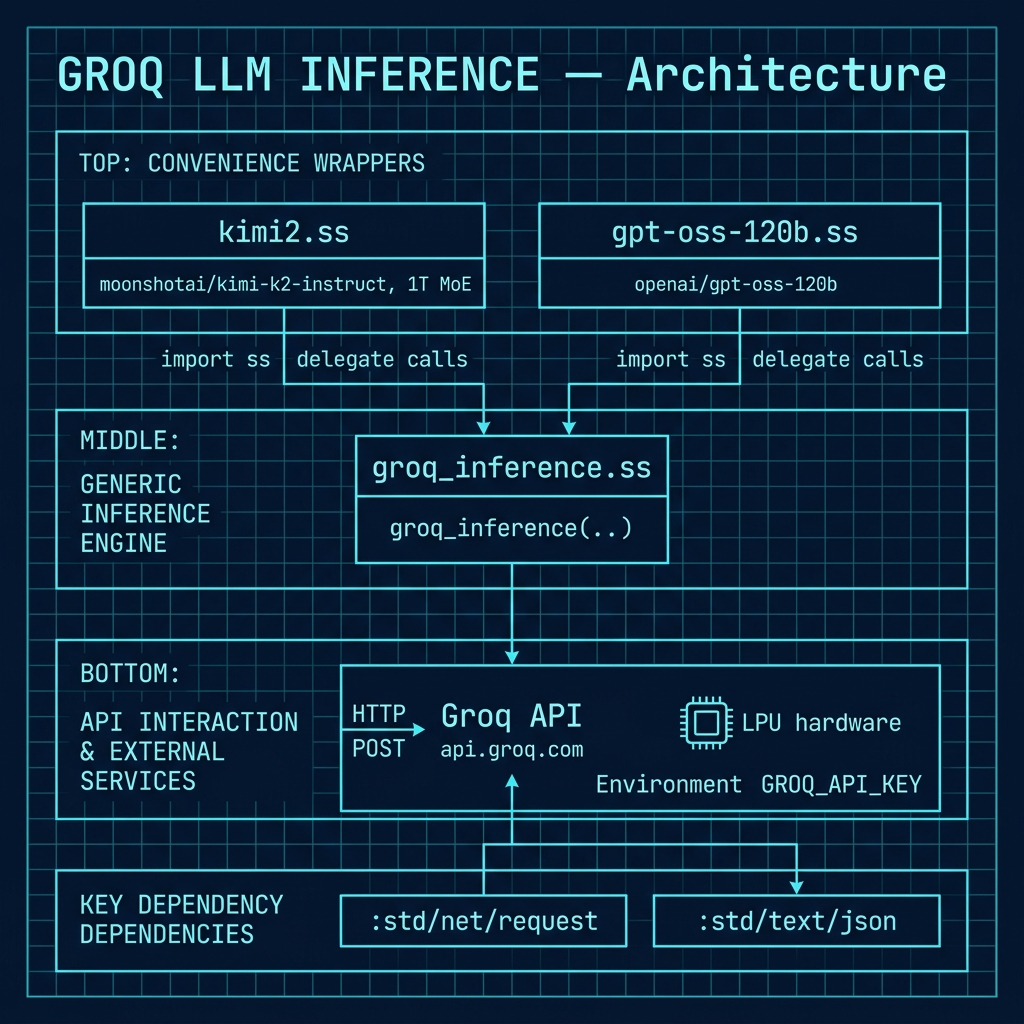
The following architecture diagram shows the overall structure of the Groq inference project, illustrating how the common groq_inference utility communicates with the Groq API and how the individual model wrapper scripts (kimi2.ss and gpt-oss-120b.ss) delegate to it.
Example scripts: kimi2.ss and gpt-oss-120b.ss
These two scripts are simple enough to just list without comment:
kimi2.ss
 1 (import :groq/groq_inference)
 2
 3 ;; Use Moonshot AI's best kimi2 model (MOE: 1 triliion parameters, 32B resident).
 4
 5 ; Export the `kimi2` procedure from this module
 6 (export kimi2)
 7
 8 (def (kimi2 prompt
 9             model: (model "moonshotai/kimi-k2-instruct")
10             system-prompt: (system-prompt "You are a helpful assistant."))
11   (groq_inference model prompt system-prompt: system-prompt))
12
13 ;; (kimi2 "why is the sky blue? be very concise")
gpt-oss-120b.ss
 1 (import :groq/groq_inference)
 2
 3 ;; Use OpenAI's open source model gpt-oss-120b
 4
 5 ; Export the `gpt-oss-120b` procedure from this module
 6 (export gpt-oss-120b)
 7
 8 (def (gpt-oss-120b
 9       prompt
10       model: (model "openai/gpt-oss-120b")
11       system-prompt: (system-prompt "You are a helpful assistant."))
12   (groq_inference model prompt system-prompt: system-prompt))
13
14 ;; (gpt-oss-120b "why is the sky blue? be very concise")
Running the kimi2 example:
Note, the utility must be comiled one time: gxc groq_inference.ss. The compiled library by default will be in the directory ~/.gerbil/lib/groq/ because we set this project’s module name to groq in the file gerbil.pkg.
 1  $ gxi -l kimi2.ss
 2 > (displayln (kimi2 "explain concisely what evidence there is for 'dark matter' in the universe, and counter arguments. Be concise!"))
 3 Evidence for dark matter
 4 • Galaxy rotation curves: outer stars orbit too fast for visible mass alone.
 5 • Gravitational lensing: mass maps exceed baryonic matter.
 6 • Cosmic Microwave Background: tiny temperature ripples fit models with ~5× more dark than baryonic matter.
 7 • Structure formation: simulations need unseen matter to match today’s galaxy distribution.
 8 • Bullet Cluster: collision separated hot gas (baryons) from dominant mass peak, consistent with collisionless dark matter.
 9
10 Counter-arguments / alternatives
11 • Modified Newtonian Dynamics (MOND): tweaks gravity law to explain rotation curves without extra mass.
12 • Modified gravity theories (TeVeS, f(R), emergent gravity) reproduce lensing and CMB with no dark particles.
13 • Claims of inconsistent lensing signals or tidal dwarf galaxies without dark matter challenge universality.
14 >
Running the gpt-oss-120b example:
1 $ gxi -l gpt-oss-120b.ss
2 > (displayln (gpt-oss-120b "write a recursive Haskell function 'factorial'. Only show the code."))
3 ``haskell
4 factorial :: Integer -> Integer
5 factorial 0 = 1
6 factorial n = n * factorial (n - 1)
 1 ## Optional Practice Problems
 2
 3 1. **Hyperparameter Configuration**: Modify the function `groq_inference` in `groq_inference.ss` to accept optional keyword arguments for `temperature`, `max_tokens`, and `top_p` to control generation randomness and length.
 4 2. **Model Wrappers**: Create a new wrapper file, similar to `kimi2.ss`, for another popular open model hosted on Groq, such as `llama3-70b-8192` or `mixtral-8x7b-32768`.
 5 3. **Fallback Client**: Implement a fallback mechanism inside `groq_inference` that automatically retries the query using a faster, smaller model (e.g., `llama3-8b`) if the initial request to a large model fails or times out.
 6
 7 # Wikidata API Using SPARQL Queries
 8
 9 Wikidata is a free, collaborative, and multilingual knowledge base that functions as the central structured data repository for the Wikimedia ecosystem, including projects like Wikipedia, Wikivoyage, and Wiktionary. Launched in 2012, its mission is to create a common source of open data that can be used by anyone, anywhere. Unlike Wikipedia, which contains prose articles, Wikidata stores information in a machine-readable format structured around items (representing any concept or object), which are described by properties (like "population" or "author") and corresponding values. For example, the item for "Earth" has a property "instance of" with the value "planet". This structured approach allows for data consistency across hundreds of language editions of Wikipedia and enables powerful, complex queries through its SPARQL endpoint. By providing a centralized, queryable, and interlinked database of facts, Wikidata not only supports Wikimedia projects but also serves as a crucial resource for researchers, developers, and applications worldwide that require reliable and openly licensed structured information.
10
11
12 ## Example Code
13
14 This code in file **wikidata.ss** provides a client for interacting with the Wikidata Query Service, a powerful public SPARQL endpoint for accessing the vast, collaboratively edited knowledge base of Wikidata. The code encapsulates the entire process of querying this service, starting with a raw SPARQL query string. It properly formats the request by URL-encoding the query, constructs the full request URL, and sets the appropriate HTTP headers, including the Accept header for the SPARQL JSON results format and a User-Agent header, which is a requirement for responsible API usage. Upon receiving a response, the module parses the JSON data and then transforms the verbose, nested structure of the standard SPARQL results format into a more convenient and idiomatic Gerbil Scheme data structure—either a list of hash tables or a list of association lists. The file also includes several example functions that demonstrate how to query for specific facts, such as Grace Hopper's birth date, and how to perform more complex, multi-stage queries, like first finding the unique identifiers for entities like Bill Gates and Microsoft and then discovering the relationships that connect them within the knowledge graph.
15
16 {lang="scheme", linenos=off}
;; File: wikidata.ss (import :std/net/request :std/text/json :std/net/uri) ; For URL encoding (import :std/format)
(export query-wikidata query-wikidata/alist query-dbpedia alist-ref test1 test1-ua test2 test2-ua)
;; Helper to process the SPARQL JSON results format (def (process-sparql-results json-data) (let* ((results (hash-ref json-data ’results)) (bindings (hash-ref results ’bindings))) (map (lambda (binding) (let ((result-hash (make-hash-table))) (hash-for-each (lambda (var-name value-obj) (hash-put! result-hash (if (symbol? var-name) var-name (string->symbol var-name)) (hash-ref value-obj ’value))) binding) result-hash)) bindings)))
;; Convenience: look up a key in an alist. Accepts symbol or string keys. ;; Usage: (alist-ref ’var row [default]) (def (alist-ref key row . default) (let* ((sym (if (symbol? key) key (string->symbol key))) (p (assq sym row))) (if p (cdr p) (if (pair? default) (car default) #f))))
;; Same as above but returns an alist per row: ((var . value) …) (def (process-sparql-results-alist json-data) (let* ((results (hash-ref json-data ’results)) (bindings (hash-ref results ’bindings))) (map (lambda (binding) (let ((row ’())) (hash-for-each (lambda (var-name value-obj) (let* ((sym (if (symbol? var-name) var-name (string->symbol var-name))) (val (hash-ref value-obj ’value))) (set! row (cons (cons sym val) row)))) binding) (reverse row))) bindings)))
;; Query the Wikidata Query Service (WDQS) ;; - Uses GET with URL-encoded query and JSON format ;; - Sends a User-Agent per WDQS guidelines; callers can override (def (query-wikidata sparql-query . opts) (let* ((endpoint “https://query.wikidata.org/sparql”) (encoded-query (uri-encode sparql-query)) (request-url (string-append endpoint “?query=” encoded-query “&format=json”)) (user-agent (if (pair? opts) (car opts) “gerbil-wikidata/0.1 (+https://example.org; contact@example.org)”)) (headers `((“Accept” . “application/sparql-results+json”) (“User-Agent” . ,user-agent)))) (let ((response (http-get request-url headers: headers))) (if (= (request-status response) 200) (let ((response-json (request-json response))) (process-sparql-results response-json)) (error “SPARQL query failed” status: (request-status response) body: (request-text response))))))
;; Alist variant returning rows as association lists (def (query-wikidata/alist sparql-query . opts) (let* ((endpoint “https://query.wikidata.org/sparql”) (encoded-query (uri-encode sparql-query)) (request-url (string-append endpoint “?query=” encoded-query “&format=json”)) (user-agent (if (pair? opts) (car opts) “gerbil-wikidata/0.1 (+https://example.org; contact@example.org)”)) (headers `((“Accept” . “application/sparql-results+json”) (“User-Agent” . ,user-agent)))) (let ((response (http-get request-url headers: headers))) (if (= (request-status response) 200) (let ((response-json (request-json response))) (process-sparql-results-alist response-json)) (error “SPARQL query failed” status: (request-status response) body: (request-text response))))))
;; Backward-compatibility alias for previous DBPedia function name (def (query-dbpedia . args) (apply query-wikidata args))
;; Example Usage: fetch birth date and birthplace label for Grace Hopper (def (test2) (let ((query (string-append “PREFIX wd: http://www.wikidata.org/entity/\n” “PREFIX wdt: http://www.wikidata.org/prop/direct/\n” “PREFIX wikibase: http://wikiba.se/ontology#\n” “PREFIX bd: http://www.bigdata.com/rdf#\n” “SELECT ?birthDate ?birthPlaceLabel WHERE {\n” “ wd:Q7249 wdt:P569 ?birthDate .\n“ “ wd:Q7249 wdt:P19 ?birthPlace .\n“ “ SERVICE wikibase:label \n“ “}”))) (let ((results (query-wikidata/alist query))) (for-each (lambda (result) (display (format “Birth Date: ~a\n” (alist-ref ’birthDate result))) (display (format “Birth Place: ~a\n\n” (alist-ref ’birthPlaceLabel result)))) results))))
;; Test1: find URIs for Bill Gates and Microsoft; then list relationships (def (test1) (let* ((find-uris (string-append “PREFIX wd: http://www.wikidata.org/entity/\n” “PREFIX wdt: http://www.wikidata.org/prop/direct/\n” “PREFIX rdfs: http://www.w3.org/2000/01/rdf-schema#\n” “SELECT ?bill ?microsoft WHERE {\n” “ ?bill rdfs:label "Bill Gates"@en .\n“ “ ?bill wdt:P31 wd:Q5 .\n“ “ ?microsoft rdfs:label "Microsoft"@en .\n“ ;; Ensure we pick the company entity “ ?microsoft wdt:P31/wdt:P279* wd:Q4830453 .\n“ “} LIMIT 1”)) (rows (query-wikidata/alist find-uris))) (if (null? rows) (display “No URIs found for Bill Gates/Microsoft.\n”) (let* ((row (car rows)) (bill (alist-ref ’bill row)) (microsoft (alist-ref ’microsoft row)) (rel-query (string-append “PREFIX wikibase: http://wikiba.se/ontology#\n” “PREFIX bd: http://www.bigdata.com/rdf#\n” “SELECT ?prop ?propLabel ?dir WHERE {\n” “ VALUES (?bill ?microsoft) { (<“ bill “> <” microsoft “>) }\n” “ ?wdprop wikibase:directClaim ?prop .\n“ “ { BIND("Bill->Microsoft" AS ?dir) ?bill ?prop ?microsoft . }\n“ “ UNION\n“ “ { BIND("Microsoft->Bill" AS ?dir) ?microsoft ?prop ?bill . }\n“ “ SERVICE wikibase:label \n“ “}\n” “ORDER BY ?propLabel”)) (rels (query-wikidata/alist rel-query))) (display (format “Bill Gates URI: ~a\n” bill)) (display (format “Microsoft URI: ~a\n” microsoft)) (if (null? rels) (display “No direct relationships found.\n”) (for-each (lambda (r) (display (format “~a: ~a\n” (alist-ref ’dir r) (or (alist-ref ’propLabel r) (alist-ref ’prop r))))) rels))))))
;; Test1 with User-Agent from env var WDQS_UA (def (test1-ua) (let* ((ua (or (getenv “WDQS_UA”) “YourApp/1.0 (https://your.site; you@site)”)) (find-uris (string-append “PREFIX wd: http://www.wikidata.org/entity/\n” “PREFIX wdt: http://www.wikidata.org/prop/direct/\n” “PREFIX rdfs: http://www.w3.org/2000/01/rdf-schema#\n” “SELECT ?bill ?microsoft WHERE {\n” “ ?bill rdfs:label "Bill Gates"@en .\n“ “ ?bill wdt:P31 wd:Q5 .\n“ “ ?microsoft rdfs:label "Microsoft"@en .\n“ “ ?microsoft wdt:P31/wdt:P279* wd:Q4830453 .\n“ “} LIMIT 1”)) (rows (query-wikidata/alist find-uris ua))) (if (null? rows) (display “No URIs found for Bill Gates/Microsoft.\n”) (let* ((row (car rows)) (bill (alist-ref ’bill row)) (microsoft (alist-ref ’microsoft row)) (rel-query (string-append “PREFIX wikibase: http://wikiba.se/ontology#\n” “PREFIX bd: http://www.bigdata.com/rdf#\n” “SELECT ?prop ?propLabel ?dir WHERE {\n” “ VALUES (?bill ?microsoft) { (<“ bill “> <” microsoft “>) }\n” “ ?wdprop wikibase:directClaim ?prop .\n“ “ { BIND("Bill->Microsoft" AS ?dir) ?bill ?prop ?microsoft . }\n“ “ UNION\n“ “ { BIND("Microsoft->Bill" AS ?dir) ?microsoft ?prop ?bill . }\n“ “ SERVICE wikibase:label \n“ “}\n” “ORDER BY ?propLabel”)) (rels (query-wikidata/alist rel-query ua))) (display (format “Bill Gates URI: ~a\n” bill)) (display (format “Microsoft URI: ~a\n” microsoft)) (if (null? rels) (display “No direct relationships found.\n”) (for-each (lambda (r) (display (format “~a: ~a\n” (alist-ref ’dir r) (or (alist-ref ’propLabel r) (alist-ref ’prop r))))) rels))))))
;; Example Usage with User-Agent from env var WDQS_UA (def (test2-ua) (let* ((ua (or (getenv “WDQS_UA”) “YourApp/1.0 (https://your.site; you@site)”)) (query (string-append “PREFIX wd: http://www.wikidata.org/entity/\n” “PREFIX wdt: http://www.wikidata.org/prop/direct/\n” “PREFIX wikibase: http://wikiba.se/ontology#\n” “PREFIX bd: http://www.bigdata.com/rdf#\n” “SELECT ?birthDate ?birthPlaceLabel WHERE {\n” “ wd:Q7249 wdt:P569 ?birthDate .\n“ “ wd:Q7249 wdt:P19 ?birthPlace .\n“ “ SERVICE wikibase:label \n“ “}”))) (let ((results (query-wikidata/alist query ua))) (for-each (lambda (result) (display (format “Birth Date: ~a\n” (alist-ref ’birthDate result))) (display (format “Birth Place: ~a\n\n” (alist-ref ’birthPlaceLabel result)))) results))))
1 The core of this example is built around the **query-wikidata** and **query-wikidata/alist** functions. These procedures handle the low-level details of HTTP communication with the Wikidata SPARQL endpoint. They take a SPARQL query string, URI-encode it, and embed it into a GET request URL. They set a User-Agent string, a best practice that helps service operators identify the source of traffic; the functions allow this header to be overridden via an optional argument. After a successful request, the real data processing begins. The raw JSON response from a SPARQL endpoint is deeply nested, with each result variable wrapped in an object containing its type and value. The helper functions **process-sparql-results** and **process-sparql-results-alist** traverse this structure to extract the essential value of each binding, returning a clean list of results where each result is either a hash table or an association list mapping variable names (as symbols) to their values.
2
3 The included test functions, **test1** and **test2**, serve as practical examples of this code's capabilities. The **test2** function is a straightforward lookup, retrieving the birth date and birthplace for a specific Wikidata entity (Grace Hopper, wd:Q7249). In contrast, **test1** demonstrates a more powerful, dynamic pattern. It first runs a query to find the URIs for "Bill Gates" and "Microsoft" based on their English labels and types (human and business, respectively). It then uses these dynamically discovered URIs to construct a second query that finds all direct properties linking the two entities. This two-step approach is a common and robust method for interacting with linked data systems. Furthermore, the test1-ua and test2-ua variants illustrate how to provide a custom User-Agent string, for instance by reading it from an environment variable, showcasing the flexibility of the primary query functions.
4
5 The following architecture diagram provides an overview of the Wikidata client's structure, showing how SPARQL queries are URL-encoded, sent as HTTP GET requests to the Wikidata Query Service endpoint, and how the JSON results are parsed and transformed into idiomatic Gerbil Scheme data structures.
6
7 {width: "80%"}
8 
9
10 ## Example Output
11
12 We use a Makefile target to start a Gerbil Scheme REPL with the example code loaded:
13
14 Here is the Makefile:
15
16 ```makefile
17 $ cat Makefile
18 run:
19 gxi -L wikidata.ss -
20
21 test:
22 gxi -L wikidata.ss -e "(test2)"
23
24 run-agent:
25 WDQS_UA="$${WDQS_UA:-YourApp/1.0 (https://your.site; you@site)}" gxi -L wikidata.ss -e "(test2-ua)"
26
27 test1:
28 gxi -L wikidata.ss -e "(test1)"
29
30 run-agent1:
31 WDQS_UA="$${WDQS_UA:-YourApp/1.0 (https://your.site; you@site)}" gxi -L wikidata.ss -e "(test1-ua)"
And sample output:
 1  $ make run-agent1
 2 WDQS_UA="${WDQS_UA:-YourApp/1.0 (https://your.site; you@site)}" gxi -L wikidata.ss -e "(test1-ua)"
 3 Bill Gates URI: http://www.wikidata.org/entity/Q5284
 4 Microsoft URI: http://www.wikidata.org/entity/Q2283
 5 Microsoft->Bill: http://www.wikidata.org/prop/direct/P112
 6 Bill->Microsoft: http://www.wikidata.org/prop/direct/P1830
 7 $ make
 8 gxi -L wikidata.ss -
 9 > (test1)
10 Bill Gates URI: http://www.wikidata.org/entity/Q5284
11 Microsoft URI: http://www.wikidata.org/entity/Q2283
12 Microsoft->Bill: http://www.wikidata.org/prop/direct/P112
13 Bill->Microsoft: http://www.wikidata.org/prop/direct/P1830
14 > (test2)
15 Birth Date: 1862-02-14T00:00:00Z
16 Birth Place: Venice
Optional Practice Problems
- Large City Query: Write a SPARQL query using
query-wikidata/alistto find all cities with a population greater than 1 million, and print their names and populations in descending order. - In-Memory Cache: Implement an in-memory query cache that maps SPARQL query strings to their parsed JSON results, avoiding redundant API calls for duplicate requests.
- URI Parser Helper: Implement a helper function
extract-entity-idthat extracts the alphanumeric entity identifier (such as"Q7249") from a full Wikidata entity URI (like"http://www.wikidata.org/entity/Q7249").