Ollama
Ollama is a powerful and user-friendly tool designed to simplify the process of running large language models (LLMs) locally on personal hardware. In a landscape often dominated by cloud-based APIs, Ollama democratizes access to advanced AI by providing a simple command-line interface that bundles model weights, configurations, and a tailored execution environment into a single, easy-to-install package. It allows developers, researchers, and enthusiasts to download and interact with a wide range of popular open-source models, such as Llama 3, Mistral, and Phi-3, with just a single command. Beyond its interactive chat functionality, Ollama also exposes a local REST API, enabling the seamless integration of these locally-run models into custom applications without the latency, cost, or privacy concerns associated with remote services. This focus on accessibility and local deployment makes it an indispensable tool for offline development, rapid prototyping, and leveraging the power of modern LLMs while maintaining full control over data and infrastructure.
Example Code
This next program in file gerbil_scheme_book/source_code/ollama/ollama.ss provides a practical demonstration of network programming and data handling in Gerbil Scheme by creating a simple client for the Ollama API. Ollama is a fantastic tool that allows you to run powerful large language models, like Llama 3, Mistral, and Gemma, directly on your own machine. Our ollama function will encapsulate the entire process of communicating with a locally running Ollama instance. It will take a text prompt as input, construct the necessary JSON payload specifying the model and prompt, send it to the Ollama server’s /api/generate endpoint via an HTTP POST request, and then carefully parse the server’s JSON response. The goal is to extract and return only the generated text, while also including basic error handling to gracefully manage any non-successful API responses, making for a robust and reusable utility.
 1 (import :std/net/request :std/text/json)
 2 (export ollama)
 3
 4 (def (ollama prompt
 5              model: (model "gemma3:latest")) ;; "gpt-oss:20b")) ;; "qwen3:0.6b"))
 6   (let* ((endpoint "http://localhost:11434/api/generate")
 7          (headers '(("Content-Type". "application/json")))
 8          (body-data
 9            (list->hash-table
10              `(("model". ,model) ("prompt". ,prompt) ("stream". #f))))
11          (body-string (json-object->string body-data)))
12
13     (let ((response (http-post endpoint headers: headers data: body-string)))
14       (if (= (request-status response) 200)
15           (let* ((response-json (request-json response)))
16             ;;(displayln (hash-keys response-json))
17             (hash-ref response-json 'response))
18           (error "Ollama API request failed"
19                  status: (request-status response)
20                  body: (request-text response))))))
21
22 ;;  (ollama "why is the sky blue? Be very concise.")
The ollama function begins by using a let* block to define the necessary components for the API request: the server endpoint, the required HTTP headers, and the request body-data. The body is first constructed as a Gerbil hash-table, which is the natural way to represent a JSON object, and then serialized into a JSON string using json-object->string. Note that the “stream” parameter is explicitly set to #f to ensure we receive the complete response at once rather than as a series of events. The core of the function is the http-post call, which performs the actual network request.
After the request is made, the code immediately checks the status of the response. A status code of 200 indicates success, prompting the code to parse the JSON body using request-json and extract the generated text from the ’response field of the resulting hash-table. If the request fails for any reason, a descriptive error is raised, including the HTTP status and response body, which is crucial for debugging. The function’s design, with its optional model: keyword argument, makes it trivial to switch between different models you have downloaded through Ollama, providing a flexible interface for interacting with local large language models.
Install Ollama and Pull a Model to Experiment With
Linux Installation
Open your terminal and run the following command to download and execute the installation script:
1 curl -fsSL https://ollama.com/install.sh | sh
macOS Installation
- Download the Ollama application from the official website: [https://ollama.com/download}(https://ollama.com/download).
- Unzip the downloaded file.
- Move the Ollama.app file to your /Applications folder.
- Run the application. An Ollama icon will appear in the menu bar.
This will also install the ollama command line program.
Pulling the Model
After installing Ollama on either Linux or macOS, open your terminal and run the following command to download the gemma3:latest model:
1 ollama pull gemma3:latest
After this is complete, you can run the local API service using:
1 $ ollama serve
2 time=2025-08-26T16:05:50.161-07:00 level=INFO source=routes.go:1318 msg="server config" env="map[HTTPS_PROXY: HTTP_PROXY: NO_PROXY: OLLAMA_CONTEXT_LENGTH:4096 OLLAMA_DEBUG:INFO OLLAMA_FLASH_ATTENTION:false OLLAMA_GPU_OVERHEAD:0 OLLAMA_HOST:http://127.0.0.1:11434 OLLAMA_KEEP_ALIVE:5m0s OLLAMA_KV_CACHE_TYPE: OLLAMA_LLM_LIBRARY: OLLAMA_LOAD_TIMEOUT:5m0s OLLAMA_MAX_LOADED_MODELS:0 OLLAMA_MAX_QUEUE:512 OLLAMA_MODELS:/Users/markw/.ollama/models OLLAMA_MULTIUSER_CACHE:false OLLAMA_NEW_ENGINE:false OLLAMA_NEW_ESTIMATES:false OLLAMA_NOHISTORY:false OLLAMA_NOPRUNE:false OLLAMA_NUM_PARALLEL:1 OLLAMA_ORIGINS:[http://localhost https://localhost http://localhost:* https://localhost:* http://127.0.0.1
Example Output
You need to have Ollama installed on your system and you should pull the model you want to experiment with.
 1 $ gxi -L ollama.ss -
 2 > (ollama "why is the sky blue? Be very concise.")
 3 "The sky is blue due to a phenomenon called **Rayleigh scattering**. Shorter wavelengths of light (like blue) are scattered more by the Earth's atmosphere, making the sky appear blue to our eyes."
 4
 5 > (ollama "write a bash script to rename all files with extension **.JPG** to **.jpg**. Just output the bash script and nothing else.")
 6 "```bash\n#!/bin/bash\n\nfind . -name \"*.JPG\" -print0 | while IFS= read -r -d $'\\0' file; do\n  new_name=$(echo \"$file\" | sed 's/\\.JPG/.jpg/')\n  mv \"$file\" \"$new_name\"\ndone\n```\n"
 7
 8 > (displayln (ollama "write a bash script to rename all files with extension **.JPG** to **.jpg**. Just output the bash script and nothing else."))
 9 ``bash
10 #!/bin/bash
11
12 find . -name "*.JPG" -print0 | while IFS= read -r -d $'\0' file; do
13   new_name=$(echo "$file" | sed 's/\.JPG/\.jpg/')
14   mv "$file" "$new_name"
15 done
16 ``
17 >
A few comments: In the second example I added “Just output the bash script and nothing else.” to the end of the prompt. Without this, the model will generate a 100 lines of design notes, instructions how to make the bash script executable, etc. I didn’t want that, just the bash script.
In the third example, I used the same prompt but used displayln to print the result in a more useful format.
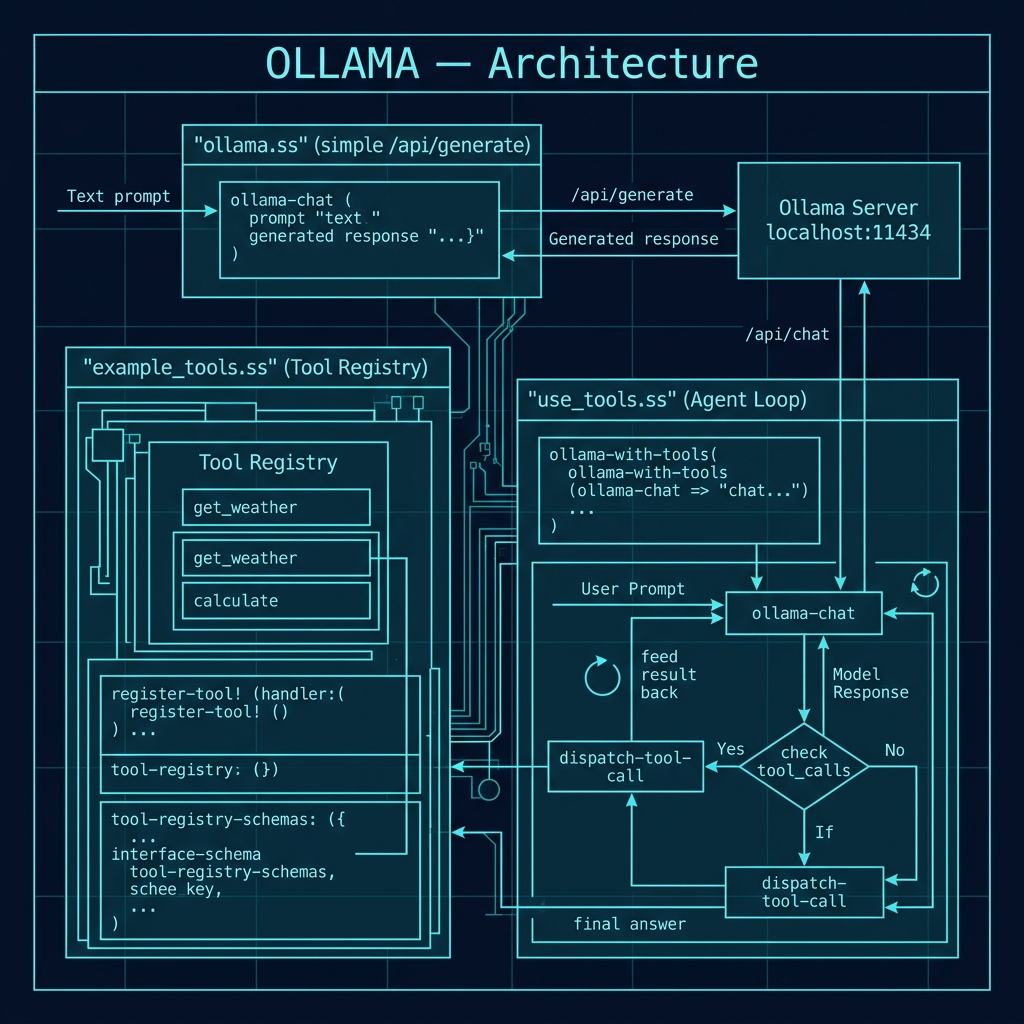
The following architecture diagram provides an overview of how the Ollama client interacts with the locally running Ollama server, showing the flow from prompt construction through the HTTP POST request to the /api/generate endpoint and the JSON response parsing.
Tool/Function Calling with Ollama
Modern LLMs can do more than generate text — they can also decide to call functions. Tool calling (sometimes called function calling) allows a model to inspect a set of tool descriptions you provide, and when appropriate, respond with a structured request to invoke one of those tools rather than producing a plain text answer. Your application then executes the tool, feeds the result back to the model, and the model incorporates that real-world data into its final answer. This creates a powerful agent loop: the model reasons about what information it needs, your code fetches it, and the model synthesizes a response.
Ollama supports tool calling through its /api/chat endpoint (the /api/generate endpoint used in the previous section does not support tools). We will split the implementation across two files: example_tools.ss defines the tool registry and example handlers, while use_tools.ss implements the chat client and agent loop.
Defining Tools: example_tools.ss
The file gerbil_scheme_book/source_code/ollama/example_tools.ss establishes a small framework for defining tools that an LLM can call. Each tool has four properties: a name (the identifier the model uses), a description (so the model understands when to use it), a JSON-schema-style parameter specification, and a handler — a Gerbil procedure that actually performs the work and returns a string result.
 1 (import :std/text/json)
 2 (export make-tool-registry
 3         register-tool!
 4         tool-registry-lookup
 5         tool-registry-schemas
 6         get-weather-handler
 7         calculate-handler
 8         default-tool-registry)
 9
10 ;;; Tool registry — a hash table mapping tool name -> tool record
11
12 (def (make-tool-registry)
13   "Create an empty tool registry (hash table)."
14   (make-hash-table))
15
16 (def (register-tool! registry name description parameters handler)
17   "Register a tool in the registry.
18    NAME: string — the function name the LLM will use.
19    DESCRIPTION: string — human-readable description.
20    PARAMETERS: hash table — JSON-schema-style parameter spec.
21    HANDLER: procedure — (lambda (args-hash) ...) -> string."
22   (hash-put! registry name
23     (list->hash-table
24       `(("name" . ,name)
25         ("description" . ,description)
26         ("parameters" . ,parameters)
27         ("handler" . ,handler)))))
28
29 (def (tool-registry-lookup registry name)
30   "Look up a tool record by name.  Returns #f if not found."
31   (hash-get registry name))
32
33 (def (tool-registry-schemas registry . tool-names)
34   "Return a list of tool schemas (suitable for the Ollama API 'tools' field).
35    If TOOL-NAMES is empty, return schemas for all registered tools.
36    Each schema is a hash table with 'type' and 'function' keys."
37   (let ((names (if (null? tool-names)
38                    (hash-keys registry)
39                    tool-names)))
40     (map (lambda (n)
41            (let ((tool (tool-registry-lookup registry n)))
42              (when tool
43                (list->hash-table
44                  `(("type" . "function")
45                    ("function" .
46                     ,(list->hash-table
47                        `(("name" . ,(hash-ref tool "name"))
48                          ("description" . ,(hash-ref tool "description"))
49                          ("parameters" . ,(hash-ref tool "parameters"))))))))))
50          names)))
The registry is simply a hash table keyed by tool name. The function register-tool! stores each tool’s metadata and handler together, and tool-registry-schemas produces the list of JSON-compatible schema objects that will be sent to the Ollama API in the tools field of each request.
Next we define two example tool handlers and register them into a default-tool-registry that is ready to use:
 1 ;;; Example tool handlers
 2
 3 (def (get-weather-handler args)
 4   "Handler for the get_weather tool.
 5    ARGS is a hash table; expects key 'location'."
 6   (let ((location (or (hash-get args 'location) "Unknown")))
 7     (string-append "Weather in " (if (string? location) location "Unknown")
 8                    ": Sunny, 72°F")))
 9
10 (def (calculate-handler args)
11   "Handler for the calculate tool.
12    ARGS is a hash table; expects key 'expression'."
13   (let ((expression (hash-get args 'expression)))
14     (if expression
15         (with-catch
16           (lambda (e) (string-append "Error calculating: "
17                         (with-output-to-string
18                           (lambda () (display-exception e)))))
19           (lambda ()
20             (let ((result (eval (read (open-input-string expression)))))
21               (string-append "Result: " (number->string result)))))
22         "No expression provided")))
23
24 ;;; Pre-built default registry with get_weather and calculate
25
26 (def default-tool-registry
27   (let ((reg (make-tool-registry)))
28
29     ;; get_weather
30     (register-tool! reg
31       "get_weather"
32       "Get current weather for a location"
33       (list->hash-table
34         `(("type" . "object")
35           ("properties" .
36            ,(list->hash-table
37               `(("location" .
38                  ,(list->hash-table
39                     `(("type" . "string")
40                       ("description" . "The city name")))))))
41           ("required" . ("location"))))
42       get-weather-handler)
43
44     ;; calculate
45     (register-tool! reg
46       "calculate"
47       "Perform a mathematical calculation"
48       (list->hash-table
49         `(("type" . "object")
50           ("properties" .
51            ,(list->hash-table
52               `(("expression" .
53                  ,(list->hash-table
54                     `(("type" . "string")
55                       ("description" . "Math expression like (+ 2 2)")))))))
56           ("required" . ("expression"))))
57       calculate-handler)
58
59     reg))
The get-weather-handler is intentionally simple — it always returns “Sunny, 72°F” — since its purpose is to demonstrate the tool-calling protocol rather than integrate with a real weather API. The calculate-handler is more interesting: it reads a Scheme expression from the string the model provides, evaluates it with eval, and returns the result. The with-catch form ensures that malformed expressions produce a friendly error message rather than crashing the program.
Each tool is registered with a JSON-schema describing its parameters. This schema is what the model reads to understand what arguments the tool expects. When you build your own tools, you will follow the same pattern: write a handler function, describe its parameters as a JSON-schema hash table, and call register-tool!.
The Agent Loop: use_tools.ss
The file gerbil_scheme_book/source_code/ollama/use_tools.ss builds on the tool registry to implement a complete tool-calling client. It uses Ollama’s /api/chat endpoint, which supports the OpenAI-compatible chat completions format including a tools field. The key difference from our simple ollama function is that instead of sending a single prompt and returning the response, we run a loop: send the prompt with tool schemas, check whether the model wants to call a tool, execute the tool if so, feed the result back, and repeat until the model returns a plain text answer.
 1 (import :std/net/request
 2         :std/text/json
 3         "example_tools")
 4
 5 (export ollama-with-tools
 6         ollama-chat)
 7
 8 (def *tool-model* "qwen3:1.7b")   ;; good small model for tool calling
 9
10 (def (ollama-chat messages
11                   tools: (tools #f)
12                   model: (model *tool-model*))
13   "Send a chat request to Ollama's /api/chat endpoint.
14    MESSAGES: list of hash tables, each with 'role' and 'content' keys.
15    TOOLS: optional list of tool schemas.
16    MODEL: model name string.
17    Returns the parsed JSON response as a hash table."
18   (let* ((endpoint "http://localhost:11434/api/chat")
19          (headers '(("Content-Type" . "application/json")))
20          (body-data
21            (list->hash-table
22              (append
23                `(("model" . ,model)
24                  ("stream" . #f)
25                  ("messages" . ,messages))
26                (if tools `(("tools" . ,tools)) '()))))
27          (body-string (json-object->string body-data)))
28     (let ((response (http-post endpoint headers: headers data: body-string)))
29       (if (= (request-status response) 200)
30           (request-json response)
31           (error "Ollama chat API request failed"
32                  status: (request-status response)
33                  body: (request-text response))))))
The ollama-chat function is a lower-level building block: it takes a list of message hash tables (each with “role” and “content” keys), an optional list of tool schemas, and a model name. It constructs the JSON payload, sends it to /api/chat, and returns the parsed response. Notice how the tools field is only included when tool schemas are provided — this means ollama-chat can also be used for plain chat completions without tools.
 1 (def (dispatch-tool-call registry tool-call)
 2   "Execute a single tool call using handlers from REGISTRY.
 3    TOOL-CALL is a hash table with 'function' containing 'name'
 4    and 'arguments'. Returns the result string."
 5   (let* ((func-info (hash-ref tool-call 'function))
 6          (name (hash-ref func-info 'name))
 7          (args (hash-ref func-info 'arguments))
 8          (tool-record (tool-registry-lookup registry name)))
 9     (displayln "  [tool-call] " name " args: " args)
10     (if tool-record
11         (let ((handler (hash-ref tool-record "handler")))
12           (handler args))
13         (string-append "Unknown tool: " (if (string? name) name "")))))
The dispatch-tool-call function bridges the model’s structured tool-call response and our registered handlers. When Ollama returns a tool call, the response contains a hash table with a “function” key holding the function name and an “arguments” hash table. We look up the name in our registry, retrieve the handler, and call it with the arguments.
 1 (def (ollama-with-tools prompt registry
 2                         model: (model *tool-model*)
 3                         max-rounds: (max-rounds 5))
 4   "Send PROMPT to Ollama with tool calling support.
 5    Runs an agent loop: if the model requests tool calls, executes
 6    them and feeds results back until the model returns a final text
 7    answer or MAX-ROUNDS is exhausted.
 8
 9    REGISTRY is a tool registry (from make-tool-registry / default-tool-registry).
10    Returns the final response text as a string."
11   (let* ((tool-schemas (tool-registry-schemas registry))
12          (messages
13            (list
14              (list->hash-table
15                `(("role" . "user")
16                  ("content" . ,prompt))))))
17     (let loop ((round 0)
18                (msgs messages))
19       (when (>= round max-rounds)
20         (error "Tool-calling loop exceeded max rounds" max-rounds))
21
22       (displayln "\n--- Round " round " ---")
23       (let* ((response (ollama-chat msgs tools: tool-schemas model: model))
24              (message (hash-ref response 'message))
25              (content (hash-get message 'content))
26              (tool-calls (hash-get message 'tool_calls)))
27
28         (cond
29           ;; Model requested tool calls — execute them and loop
30           ((and tool-calls (pair? tool-calls))
31            (displayln "Model requested " (length tool-calls) " tool call(s).")
32
33            ;; Append the assistant's message (with tool_calls) to history
34            (let ((msgs-with-assistant (append msgs (list message))))
35
36              ;; Execute each tool call and append results
37              (let tc-loop ((remaining tool-calls)
38                            (acc msgs-with-assistant))
39                (if (null? remaining)
40                    (loop (+ round 1) acc)
41                    (let* ((tc (car remaining))
42                           (result (dispatch-tool-call registry tc))
43                           (name (hash-ref (hash-ref tc 'function) 'name)))
44                      (displayln "  [result] " name " => " result)
45                      (tc-loop (cdr remaining)
46                               (append acc
47                                 (list
48                                   (list->hash-table
49                                     `(("role" . "tool")
50                                       ("content" . ,result)))))))))))
51
52           ;; No tool calls — return the final text content
53           (else
54            (displayln "Final answer received.")
55            (or content "No response content")))))))
The ollama-with-tools function is the main entry point. It accepts a prompt string, a tool registry, an optional model name, and a max-rounds safety limit. The function uses a named let loop to implement the agent cycle:
- It sends the current message history (with tool schemas) to ollama-chat.
- It inspects the model’s response for tool_calls. If present, it executes each tool call via dispatch-tool-call, appends both the assistant’s message and the tool results to the conversation history, and loops back to step 1.
- If no tool calls are requested, the model has produced its final answer, which is returned as a string.
The inner tc-loop handles the case where the model requests multiple tool calls in a single response, processing each one sequentially and accumulating the results into the message history.
Tool Calling Example Output
To test tool calling, you need to pull a model that supports it. The qwen3:1.7b model works well:
1 ollama pull qwen3:1.7b
Then start a REPL session:
 1 $ gxi
 2 > (import "example_tools" "use_tools")
 3 > (ollama-with-tools "What's the weather like in Paris?" default-tool-registry)
 4
 5 --- Round 0 ---
 6 Model requested 1 tool call(s).
 7   [tool-call] get_weather args: #<table>
 8   [result] get_weather => Weather in Paris: Sunny, 72°F
 9
10 --- Round 1 ---
11 Final answer received.
12 "The weather in Paris is currently sunny with a temperature of 72°F."
In this example the model recognized that it needed weather data, emitted a structured tool call with {"name": "get_weather", "arguments": {"location": "Paris"}}, our handler returned the canned weather string, and in the second round the model composed a natural language answer incorporating the tool result.
You can also test the calculate tool:
 1 > (ollama-with-tools "What is 42 * 17?" default-tool-registry)
 2
 3 --- Round 0 ---
 4 Model requested 1 tool call(s).
 5   [tool-call] calculate args: #<table>
 6   [result] calculate => Result: 714
 7
 8 --- Round 1 ---
 9 Final answer received.
10 "42 multiplied by 17 equals 714."
Building Your Own Tools
To add a new tool, follow three steps:
- Write a handler — a procedure that takes a hash table of arguments and returns a string:
1 (def (my-lookup-handler args)
2   (let ((query (or (hash-get args 'query) "")))
3     (string-append "Result for: " query)))
- Register it in a registry with a JSON-schema describing its parameters:
 1 (register-tool! my-registry
 2   "my_lookup"
 3   "Look up information about a topic"
 4   (list->hash-table
 5     `(("type" . "object")
 6       ("properties" .
 7        ,(list->hash-table
 8           `(("query" .
 9              ,(list->hash-table
10                 `(("type" . "string")
11                   ("description" . "The search query")))))))
12       ("required" . ("query"))))
13   my-lookup-handler)
- Call ollama-with-tools with your registry:
1 (ollama-with-tools "Look up information about Gerbil Scheme"
2                    my-registry)
The model will read the tool descriptions you provide and decide when to use them based on the user’s prompt. Good tool descriptions are important — they help the model understand when a tool is appropriate and what arguments to pass.
Optional Practice Problems
- Conversational History: Extend
ollama.ssto use the/api/chatendpoint and support maintaining a conversation history list instead of a single static prompt. - Real-time Utility Tool: Implement and register a new tool in
use_tools.ssthat retrieves the current system time or evaluates simple mathematical expressions from the command line. - HTTP Client Timeout: Add a connection/request timeout configuration to the HTTP client inside
ollama.ssto prevent the client from hanging if the local Ollama server is overloaded.