Code for Natural Language Processing (NLP)
Before the field of deep learning revolutionized the field of NLP, I created a commercial NLP product Knowledge Books Systems NLP that I first implemented in Common Lisp, then in Ruby, and then in Gambit Scheme. Because of the processing speed of my library, I still feel that it is a useful code because it processes text efficiently performing:
- Part of speech tagging
- Key phrase extraction
- Categorizes text
A more modern approach to writing code for Natural Language Processing involves applying computational techniques to analyze, understand, and generate human language, bridging the gap between human communication and computer interpretation. The field heavily relies on machine learning, predominantly using languages like Python due to its extensive ecosystem of specialized libraries such as NLTK (Natural Language Toolkit), spaCy, and Hugging Face’s transformers. These tools provide the building blocks for implementing a wide array of NLP tasks, from foundational steps like tokenization (splitting text into words or sentences) and part-of-speech tagging to more complex applications like sentiment analysis, named entity recognition (identifying people and places), machine translation, and text summarization. At its core, coding for NLP is about converting unstructured text into a structured data format that machine learning models can process, and then using those models to derive meaningful insights, power conversational agents, or generate new, coherent text, thereby enabling software to interact with the world in a more human-like manner.
macOS Specific Build Notes
On some macOS systems, you might run into link compatibility problems. I assume that macOS and Linux using readers followed the installation instructions in the Preface. I had a few Gerbil vs. OpenSSL issues on macOS that I fixed using:
1 export MACOSX_DEPLOYMENT_TARGET=15.0
As a result of this configuration problem, the make test target or the NLP example runs an interpreter target, bypassing any potential link problems.
1 make test
2 cat .gerbil/test-output.json | jq
I recommend that you start running this example interpretively using make test before compiling this example using make.
Structure of Project and Build Instructions
The project directory gerbil_scheme_book/source_code/NLP contains hand written NLP utilities, the sub-directory generated-code contains classification and linguistic data as literal data embedded directly in Scheme source code. These files were auto-generated by Ruby utilities I wrote in 2005. The sub-directory data contains additional linguistic data files.
The Makefile provides a standard set of targets for common development tasks. A key feature of this setup is the use of a project-local build environment. All Gerbil build artifacts, compiled modules, and package dependencies are installed into a .gerbil directory within the project root, rather than the user’s global ~/.gerbil directory.
This is achieved by temporarily setting the HOME environment variable to the current directory for all Gerbil compiler (gxc) and interpreter (gxi) commands:
1 HOME=$(CURDIR) gxi ...
This approach ensures that the project is self-contained and builds are reproducible, without interfering with your global Gerbil installation.
 1 all: build
 2
 3 build:
 4     # Redirect HOME so gxpkg installs into project-local .gerbil
 5     HOME=$(CURDIR) gxi build.ss
 6
 7 .PHONY: test test-fast
 8
 9 test: compile-mods
10     @echo "Running smoke test (gxi) on climate_g8.txt..."
11     @mkdir -p .gerbil
12     @rm -rf .gerbil/test-output.json
13     @HOME=$(CURDIR) gxi nlp.ss -- -i data/testdata/climate_g8.txt -o .gerbil/test-output.json
14     @echo "Wrote .gerbil/test-output.json"
15     @/bin/echo -n "Preview: " && head -c 300 .gerbil/test-output.json || true
16
17 # Interpreter-based run; useful if static exe build is problematic
18 test-fast: compile-mods
19     @echo "Running interpreter smoke test (gxi) on climate_g8.txt..."
20     @mkdir -p .gerbil
21     @HOME=$(CURDIR) gxi nlp.ss -- -i data/testdata/climate_g8.txt -o .gerbil/test-output.json
22     @echo "Wrote .gerbil/test-output.json"
23     @/bin/echo -n "Preview: " && head -c 300 .gerbil/test-output.json || true
24
25
26 clean:
27     @echo "Cleaning project build artifacts..."
28     @rm -rf .gerbil
29     @rm -f kbtm nlp a.out
30     @find . -maxdepth 1 -type f \( -name "*.o*" -o -name "*.ssxi" -o -name "*.ssi" \) -delete
31 .PHONY: compile-mods
32 compile-mods:
33     @echo "Compiling modules with gxc into project-local .gerbil..."
34     @HOME=$(CURDIR) gxc utils.ss fasttag.ss category.ss proper-names.ss \
35       data/stop-words.ss generated-code/lexdata.ss generated-code/cat-data-tables.ss \
36       main.ss nlp.ss
The build.ss script is expected to contain the primary compilation and linking logic to produce the final executable(s).
make test
This target runs a smoke test on the application. It first ensures all modules are compiled (by depending on compile-mods), then executes nlp.ss with a predefined test data file (climate_g8.txt). The output is written to .gerbil/test-output.json, and a 300-byte preview of the output is printed to the console:
1   test: compile-mods
2       @HOME=$(CURDIR) gxi nlp.ss -- -i data/testdata/climate_g8.txt -o .gerbil/test-output.json
make test-fast
This target is a variation of test that also runs the interpreter-based smoke test. The primary purpose is to provide a quick feedback loop during development, bypassing any potentially slow static executable linking steps that might be part of the main build target.
make compile-mods
This is a utility target that pre-compiles all core Scheme source files (.ss) into the project-local .gerbil directory using the Gerbil compiler (gxc). The test and test-fast targets depend on this to ensure modules are up-to-date before running the test application. This separation speeds up subsequent runs, as modules are not recompiled unnecessarily.
Top Level Project Code
nlp.ss
This program serves as the main command-line interface for our NLP text analysis library. Its primary responsibility is to orchestrate the text processing workflow by parsing command-line arguments, invoking the core analysis engine, and serializing the results into a structured JSON format. The utility is designed to read the path to a source text file and a destination output file from the user. After processing the input file with the process-file function from the underlying library, it constructs a JSON object containing extracted data such as significant words, tags, key phrases, and scored categories. To accomplish this without external dependencies, the program includes a minimal, custom-built set of functions for escaping special characters and writing JSON-compliant strings and arrays, demonstrating fundamental principles of data serialization, file I/O, and application entry point logic in a functional programming context.
 1 (import :kbtm/main)
 2
 3 (export main)
 4
 5 ;; minimal JSON writer for our specific output
 6 (define (json-escape s)
 7   (list->string
 8    (apply append
 9           (map (lambda (ch)
10                  (cond
11                   ((char=? ch #\") '(#\\ #\"))
12                   ((char=? ch #\\) '(#\\ #\\))
13                   ((char=? ch #\newline) '(#\\ #\n))
14                   (else (list ch))))
15                (string->list s)))))
16
17 (define (write-json-string s)
18   (display "\"")
19   (display (json-escape s))
20   (display "\""))
21
22 (define (write-json-string-list lst)
23   (display "[")
24   (let loop ((xs lst) (first #t))
25     (if (pair? xs)
26         (begin
27           (if (not first) (display ","))
28           (write-json-string (car xs))
29           (loop (cdr xs) #f))))
30   (display "]"))
31
32 (define (write-json-categories cats)
33   ;; cats: list of ((name score) ...)
34   (display "[")
35   (let loop ((xs cats) (first #t))
36     (if (pair? xs)
37         (let* ((pair (car xs))
38                (name (car pair))
39                (score (cadr pair)))
40           (if (not first) (display ","))
41           (display "[")
42           (write-json-string name)
43           (display ",")
44           (display score)
45           (display "]")
46           (loop (cdr xs) #f))))
47   (display "]"))
48
49 (define (json-write ret)
50   ;; ret is a table with fixed keys
51   (display "{")
52   (display "\"words\":")
53   (write-json-string-list (table-ref ret "words" '()))
54   (display ",\"tags\":")
55   (write-json-string-list (table-ref ret "tags" '()))
56   (display ",\"key-phrases\":")
57   (write-json-string-list (table-ref ret "key-phrases" '()))
58   (display ",\"categories\":")
59   (write-json-categories (table-ref ret "categories" '()))
60   (display "}") )
61
62 (define (print-help)
63   (display "KBtextmaster (native) command line arguments:")
64   (newline)
65   (display "   -h              -- to print help message")
66   (newline)
67   (display "   -i <file name>  -- to define the input file name")
68   (newline)
69   (display "   -o <file name>  -- to specify the output file name")
70   (newline))
71
72
73 (define (main . argv)
74   (let* ((args (command-line))
75          (in-file (member "-i" args))
76          (out-file (member "-o" args))
77          (ret (make-table)))
78     (when (member "-h" args)
79       (print-help))
80     (set! in-file (and in-file (cadr in-file)))
81     (set! out-file (and out-file (cadr out-file)))
82     (if (and in-file out-file)
83         (let ((resp (process-file in-file)))
84           (with-output-to-file
85               (list path: out-file create: #t)
86             (lambda ()
87               (table-set! ret "words" (vector->list (car resp)))
88               (table-set! ret "tags" (vector->list (cadr resp)))
89               (table-set! ret "key-phrases" (caddr resp))
90               (table-set! ret "categories" (cadddr resp))
91               ;; TBD: implement summary words, proper name list, and place name list
92
93               (json-write ret))))
94         (print-help))
95     0))
96
97 ;; (process-file "data/testdata/climate_g8.txt")
The program’s logic is centered in the main function, which acts as the application controller. It begins by parsing the program’s command-line arguments, using the member procedure to check for the presence of -i (input file), -o (output file), and -h (help) flags. The control flow is straightforward: if the help flag is present or if the required file arguments are missing, a help message is displayed. Otherwise, the core logic proceeds within a with-output-to-file block, which ensures that the output is correctly directed to the user-specified file. Inside this block, the external process-file function is called, and its returned data structures are placed into a hash table, which is then passed to our custom JSON writer.
A notable feature of this code is its self-contained approach to JSON serialization. Instead of relying on a third-party library, we build the JSON output manually through a series of specialized helper functions. The json-escape function handles the critical task of properly escaping special characters within strings to ensure the output is valid. Building on this, procedures like write-json-string-list and write-json-categories use a common Scheme pattern, the named let loop, to iterate over lists and recursively construct the JSON array syntax, carefully managing the placement of commas between elements. The final json-write function assembles the complete JSON object by explicitly printing the keys and calling the appropriate helper for each value, providing a clear and direct implementation of a data serialization routine.
Other Source Files
We will not discuss the following code files:
- fasttag.ss - part of speech tagger.
- place-names.ss - identify place names in text.
- summarize.ss - summarize text.
- utils.ss - misc. utility functions.
- category.ss - classifies (or categorizes) text.
- key-phrases.ss - extracts key phrases from text.
- main.ss - main, or top level, interface functions.
- proper-names.ss - identify proper names in text.
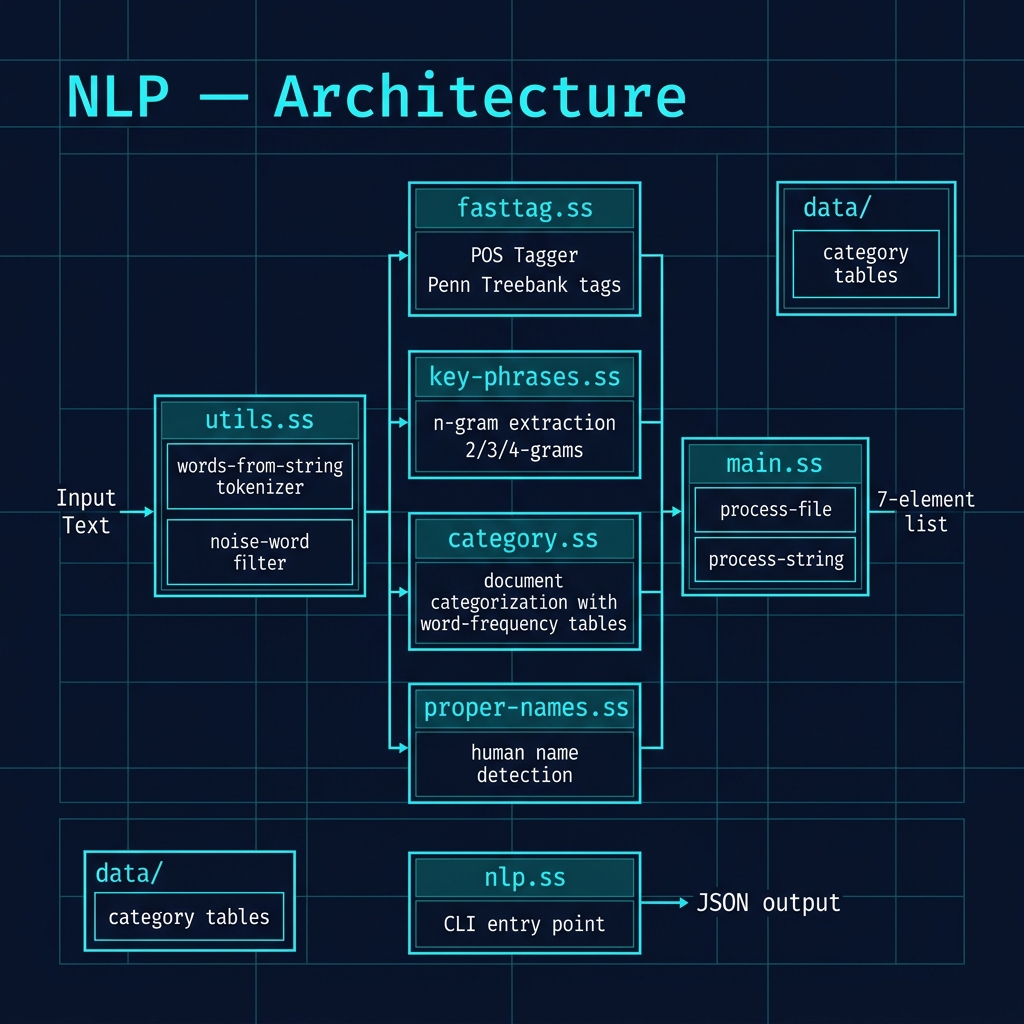
The following architecture diagram illustrates the structure of the NLP project, showing how the various modules — tokenization, part-of-speech tagging, categorization, key phrase extraction, and name recognition — are composed into the processing pipeline exposed by the main.ss entry point.
Test Run:
On some systems, you might run into link compatibility probelems. I did on macOS when I brew installed Gerbil Scheme and later brew updated openssl to a newer version.
As a result of this configuration problem, the make test target runs an interpretter target, bypassing any potential link problems.
1 make test
2 cat .gerbil/test-output.json | jq
Building and Running the Command Line Tool
 1 $ make
 2 $ .gerbil/bin/nlp -i data/testdata/climate_g8.txt -o output.json
 3 $ cat output.json | jq
 4
 5   ... lots of output not shown...
 6     "VBD",
 7     "CD"
 8   ],
 9   "key-phrases": [
10     "clean energy",
11     "developing countries"
12   ],
13   "categories": [
14     [
15       "news_economy.txt",
16       136750
17     ],
18     [
19       "news_war.txt",
20       117290
21     ]
22   ]
23 }
Optional Practice Problems
- Place Name Extraction: The
place-listreturned inmain.ssis currently hardcoded as empty (place-list '()). Extend the NLP toolkit to load a simple list of countries and cities (a gazetteer) and identify place name mentions in text. - Flexible N-Gram Filter: Modify the n-gram generator in
main.ssto generate 5-grams and filter out any n-grams containing punctuation or special symbols. - TF-IDF Calculation: Write a Scheme function that takes a list of processed document strings and computes the Term Frequency-Inverse Document Frequency (TF-IDF) score for all non-noise words across the corpus.