Using the Google Gemini, OpenAI, Anthropic, Mistral, and Local Large Language Model APIs in Racket
Large Language Models (LLMs) have supercharged AI capabilities, affected the job market for many knowledge work careers, and placed huge demands on electrical power infrastructure.
In the development of practical AI systems, LLMs like those provided by OpenAI, Google, Anthropic, Mistral, and Hugging Face have emerged as pivotal tools for numerous applications including natural language processing, generation, and understanding. These models, powered by deep learning architectures, encapsulate a wealth of knowledge and computational capabilities. As a Racket Scheme enthusiast embarking on the journey of intertwining the elegance of Racket with the power of these modern language models, you are opening a gateway to a realm of possibilities that we begin to explore here after covering background material in the next session.
The Cambrian Explosion in Language Technology: A Historical Trajectory
The sudden and widespread emergence of LLMs in the early 2020s represents a watershed moment in the history of computing, a technological inflection point with profound implications for science, industry, and society.
Yet, this apparent revolution was not a singular event but the culmination of a multi-decade research trajectory.
After using simpler neural networks in the 1980s (I personally used neural models in engineering projects such as a classifier for a bomb detector my company designed and built for the FAA), the next major evolution in language modeling was precipitated by the deep learning revolution that swept through computer vision around 2012. The success of deep neural networks in image classification inspired researchers to adapt these architectures for language tasks. A pivotal innovation from this period was the development of word embeddings, most famously Word2Vec by Tomas Mikolov at Google in 2013. Instead of treating words as discrete symbols, word embeddings represent them as dense vectors in a continuous, high-dimensional semantic space. In this space, geometric relationships between vectors correspond to semantic relationships between words, enabling algebraic operations like the canonical example:

This was a crucial step towards models that could capture the meaning and relationships of words, rather than just their statistical co-occurrence (i.e., which words often appear together in text). Much of my paid work in the 1980s involved applications of neural networks but I mostly moved on to other technologies until the deep learning revolution in 2012 and after personal experiments with word embeddings and later sentence and paragraph embeddings I went all-in on deep learning leading to managing a deep learning team at Capital One.
To process sequences of these word vectors, we turned to Recurrent Neural Networks (RNNs). An RNN processes a sequence one element at a time, maintaining an internal “hidden state” that acts as a memory, theoretically allowing information from earlier in the sequence to influence the processing of later elements. This architecture seemed a natural fit for language. However, in practice, standard RNNs were plagued by the vanishing gradient problem and inability to handle long sequences or characters in text, effectively preventing the model from learning dependencies between words that were far apart. A key breakthrough that temporarily surmounted this challenge was the Long Short-Term Memory (LSTM) network.
The Transformer Inflection Point: “Attention Is All You Need”
Despite the success of LSTMs, a fundamental architectural bottleneck remained. Both RNNs and LSTMs are inherently sequential processors; they must compute the hidden state for token  before they can compute it for token
 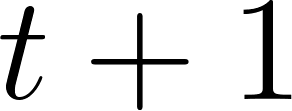 . This sequential dependency made it impossible to fully parallelize the computation across the tokens in a sequence, creating a significant performance barrier on modern hardware like GPUs. solution arrived in 2017 with a landmark paper from researchers at Google titled “Attention Is All You Need”. The paper introduced the Transformer architecture, which dispensed with recurrence entirely and relied instead on a mechanism called “self-attention.” The attention mechanism, first developed by Bahdanau et al. in 2014 for machine translation, allows a model to dynamically weigh the importance of different parts of the input sequence when producing an output.
Commercial and Open Weight LLMs
The commercial APIs from OpenAI, Google, Anthropic, and Mistral serve as gateways to some of the most advanced language models available today. By accessing these APIs, developers can harness the power of these models for a variety of applications.
OpenAI provides an API for developers to access models like GPT-5. The OpenAI API provides endpoints for different types of interactions, be it text completion, translation, or semantic search among others.
Google Gemini provides fast and capable models such as gemini-flash-latest and gemini-2.5-flash-lite, accessible through both Google’s native API (with Google Search grounding) and an OpenAI-compatible endpoint.
Anthropic focuses on building steerable and interpretable models like the Claude family (e.g. claude-sonnet-4-6), offering native tool use and search capabilities through its Messages API.
Mistral AI provides efficient open-weight and hosted models such as mistral-small and mistral-embed.
What if you want the total control of running open LLMs on your own computers? The company Hugging Face maintains a huge repository of pre-trained models. Some of these models are licensed for research only but many are licensed (e.g., using Apache 2) for commercial use. You can easily run models locally on your laptop using tools like llama.cpp or Ollama.
Introduction to the Applications of LLMs
The utility of LLMs extends across a broad spectrum of applications including text generation, translation, summarization, question answering, semantic search, and autonomous agents with tool calling. However, with great power comes great responsibility. The deployment of LLMs raises imperative considerations regarding ethics, bias, and the potential for misuse. Moreover, the black-box nature of these models presents challenges in interpretability and control, which are active areas of research. I recommend reading material at Center for Humane Technology for issues of the safe use of AI. You might also be interested in my book Safe For Humans AI: A “humans-first” approach to designing and building AI systems (free to read online).
A Uniform API for LLMs in Racket: llmapis.rkt
In early experiments with LLM APIs, developers typically wrote custom HTTP clients for each provider: one function for OpenAI, another for Anthropic, another for Google Gemini, and separate routines for local Ollama or llama.cpp instances. Each provider exposed slightly different endpoint paths, authentication headers, request payloads, parameter names (max_tokens vs max_completion_tokens), and JSON schemas for tool calling.
Switching an application from OpenAI to Gemini or to a local model required changing function names, restructuring request payloads, and rewriting error handling. Furthermore, manipulating JSON strings manually in Scheme code is tedious and error-prone.
To eliminate this friction, the source-code/llmapis/ directory contains a uniform API in llmapis.rkt. Modeled on the Common Lisp litelm library, llmapis.rkt establishes a single, idiomatic Racket entry point for all LLM providers:
- Uniform Addressing: Models are addressed with a
"provider/model-name"string (for example"openai/gpt-5-mini","gemini/gemini-flash-latest","ollama/qwen3:1.7b","mistral/mistral-small","deepseek/deepseek-chat", or"anthropic/claude-sonnet-4-6"). - No JSON in User Code: Messages, options, and tool definitions use Racket lists, keywords, and transparent structs. The uniform API handles all wire-format translation behind the scenes.
- Racket Functions as Tools: Tools are ordinary Racket functions taking an argument hash. You wrap them with
make-llm-tool, pass them to the model, and the library translates them to the provider’s tool schema. - Automated Agentic Loop:
llm-chat-with-toolsruns the complete request/execute/reply conversation loop automatically until the model produces a final text response. - Pluggable Providers: Standard providers are pre-configured, and new OpenAI-compatible providers (such as Groq, Together AI, or OpenRouter) can be registered at runtime with
define-provider. - Structured Error Hierarchy: HTTP failures map to an exception hierarchy (
exn:fail:llm:authentication,exn:fail:llm:rate-limit,exn:fail:llm:not-found,exn:fail:llm:context-window,exn:fail:llm:api), complete with automatic parameter fallbacks (e.g. retrying withmax_completion_tokenson newer OpenAI models).
Quick Start with the Uniform API
Using llmapis.rkt is straightforward. Here are common patterns:
 1 #lang racket
 2
 3 (require "llmapis.rkt")
 4
 5 ;; 1. One-shot question answering (returns a plain string)
 6 (displayln (llm-ask "openai/gpt-5-mini" "What is the capital of France?"))
 7 (displayln (llm-ask "gemini/gemini-flash-latest" "What is 2 + 2?"))
 8
 9 ;; Local models require no API keys:
10 (displayln (llm-ask "ollama/qwen3:1.7b" "What is recursion in Scheme?"))
11 (displayln (llm-ask "llama-local/local-model" "What is 2 + 2?"))
12
13 ;; 2. Full chat completion (returns an llm-response struct)
14 (define resp
15   (llm-completion "openai/gpt-5-mini"
16                   #:messages '(("system" "You are a concise programming tutor.")
17                                ("user" "Explain tail recursion in two sentences."))))
18
19 (printf "Answer: ~a\n" (llm-response-content resp))
20 (printf "Tokens: ~a\n" (llm-response-usage resp))
21
22 ;; 3. Vector embeddings across providers
23 (define emb
24   (llm-embedding "openai/text-embedding-ada-002" "Practical Artificial Intelligence"))
25 (printf "Embedding dimension: ~a\n" (length (first emb)))
26
27 ;; 4. Tools as first-class Racket functions
28 (define (get-weather args)
29   (format "sunny and 22C in ~a" (hash-ref args 'location "nowhere")))
30
31 (define weather-tool
32   (make-llm-tool "get_weather"
33                  "Get the current weather for a location"
34                  '(("location" "string" "City name, e.g. Paris"))
35                  get-weather))
36
37 ;; Automated request/execute/reply tool loop:
38 (define agent-resp
39   (llm-chat-with-tools "openai/gpt-5-mini"
40                        "What is the weather in Paris?"
41                        (list weather-tool)))
42
43 (displayln (llm-response-content agent-resp))
44
45 ;; 5. Dynamically register any OpenAI-compatible provider at runtime
46 (define-provider 'groq "https://api.groq.com/openai/v1"
47   #:env-keys '("GROQ_API_KEY"))
Model Routing and Provider Registry
The model string prefix routes each request to its provider. The provider table maintains base URLs, authentication environment variables, and the transport kind:
| Provider | Model Prefix | Environment Variable(s) | Base URL | Kind |
|---|---|---|---|---|
| OpenAI | openai/ |
OPENAI_API_KEY, OPENAI_KEY
|
https://api.openai.com/v1 |
openai-compatible |
| Google Gemini | gemini/ |
GEMINI_API_KEY, GOOGLE_API_KEY
|
https://generativelanguage.googleapis.com/v1beta/openai |
openai-compatible |
| Mistral AI | mistral/ |
MISTRAL_API_KEY |
https://api.mistral.ai/v1 |
openai-compatible |
| DeepSeek | deepseek/ |
DEEPSEEK_API_KEY |
https://api.deepseek.com/v1 |
openai-compatible |
| Fireworks AI | fireworks-ai/ |
FIREWORKS_API_KEY |
https://api.fireworks.ai/inference/v1 |
openai-compatible |
| Ollama (local) | ollama/ |
(none needed) | http://localhost:11434/v1 |
openai-compatible |
| Anthropic | anthropic/ |
ANTHROPIC_API_KEY |
https://api.anthropic.com/v1 |
anthropic |
| llama.cpp (local) | llama-local/ |
(none needed) | http://localhost:8080 |
llama-cpp |
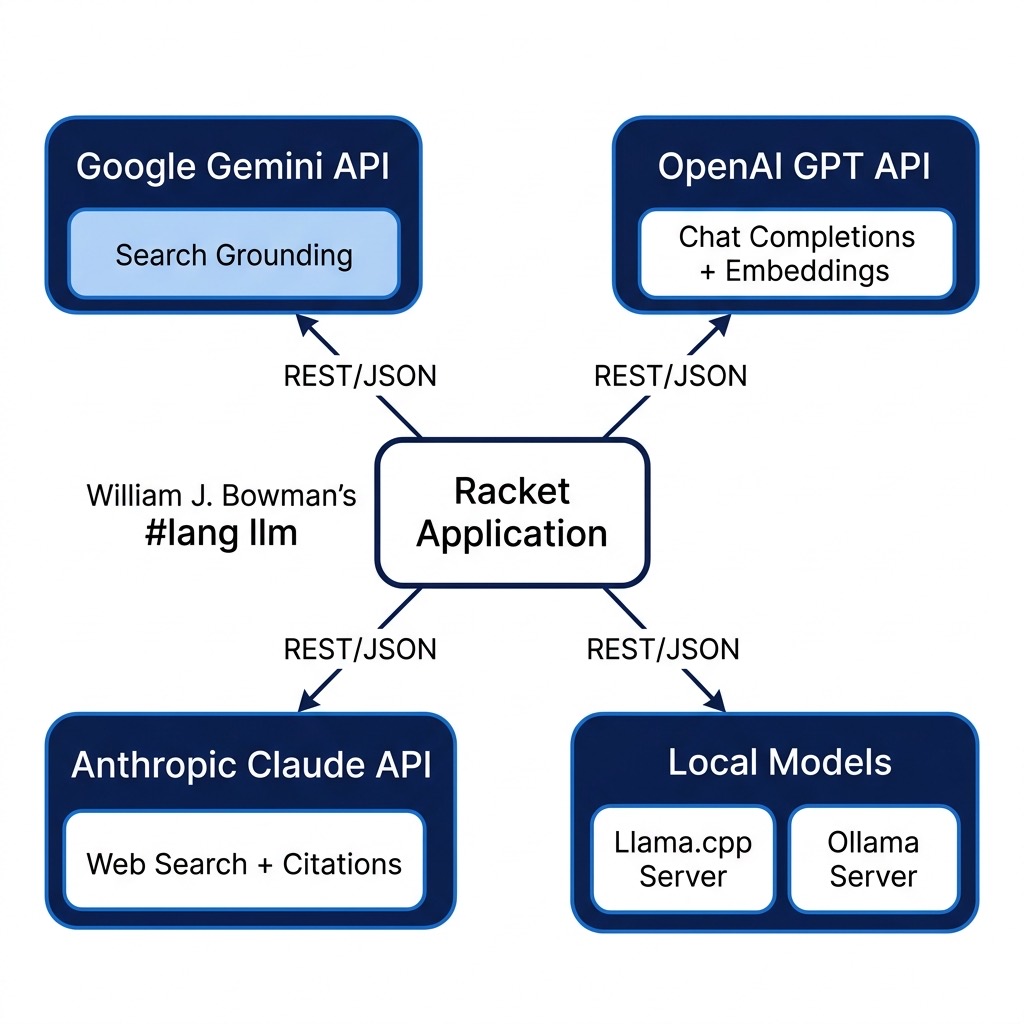
Notice that Google Gemini is reached via its OpenAI-compatible endpoint (/v1beta/openai), and Ollama is reached via its OpenAI-compatible /v1 endpoint. This allows six different cloud and local backends to share a single, battle-tested transport path. Anthropic uses its native Messages API adapter, and local llama.cpp uses its native /completion endpoint.
Model names can contain slashes (for example, "fireworks-ai/accounts/fireworks/models/deepseek-v3"). The routing parser splits on the first slash:
 1 (define (parse-model model #:provider [provider #f])
 2   (cond [provider
 3          (values (find-provider provider) model)]
 4         [(and (string? model)
 5               (regexp-match #rx"^([^/]+)/(.+)$" model))
 6          => (lambda (m)
 7               (values (find-provider (string->symbol (cadr m)))
 8                       (caddr m)))]
 9         [else
10          (llm-error "Model ~s must be of the form \"provider/model-name\"" model)]))
You can also pass #:api-key or #:api-base to any uniform API call to override defaults per invocation.
Messages and Roles
Messages are represented as transparent llm-message structs:
1 (struct llm-message (role content tool-calls tool-call-id name) #:transparent)
The uniform API accepts multiple convenient representations and normalizes them with normalize-messages:
- A plain string:
"What is 2+2?"is treated as a user message. - A 2-element list:
'(system "You are a helpful assistant")or'("user" "Hello"). - Keyword options:
'(assistant #f #:tool-calls (...))or'(tool "Result text" #:tool-call-id "call_123"). - Helper constructors:
llm-user-message,llm-system-message,llm-assistant-message, andllm-tool-message.
When targeting OpenAI-compatible providers, llm-translate-messages formats messages as JSON objects. When targeting Anthropic, llm-translate-messages-anthropic extracts top-level system prompts and converts assistant tool calls and user tool results into Anthropic content blocks (tool_use and tool_result), merging consecutive same-role messages as required by the Anthropic API.
First-Class Racket Tools
Tools in llmapis.rkt are defined directly as Racket functions that accept a single hash table of arguments (with symbol keys) and return a value:
1 (struct llm-param (name type description required? enum) #:transparent)
2 (struct llm-tool (name description parameters proc) #:transparent)
3
4 (define (make-llm-tool name description params proc)
5   (define n (if (symbol? name) (symbol->string name) name))
6   (llm-tool n description (map parse-param-spec params) proc))
Each parameter in params is specified as:
1 (list param-name type-string description-string [#:required bool] [#:enum list])
Parameters are required by default. For example:
1 (define (add-numbers args)
2   (+ (hash-ref args 'a 0) (hash-ref args 'b 0)))
3
4 (define add-tool
5   (make-llm-tool "add_numbers"
6                  "Add two numbers together"
7                  '((a "number" "First addend")
8                    (b "number" "Second addend"))
9                  add-numbers))
From this definition, llm-translate-tools generates standard JSON Schema objects for OpenAI-compatible endpoints, and llm-translate-tools-anthropic generates Anthropic tool schemas.
When the model decides to invoke a tool, llm-completion returns an llm-response containing a list of llm-tool-call structs. The tool calls can then be safely dispatched using execute-tool-calls:
 1 (define (execute-tool-calls tools tool-calls)
 2   (define registry
 3     (if (hash? tools)
 4         tools
 5         (for/hash ([t (in-list (normalize-tools tools))])
 6           (values (llm-tool-name t) t))))
 7   (for/list ([call (in-list tool-calls)])
 8     (define id (llm-tool-call-id call))
 9     (define name (llm-tool-call-name call))
10     (define tool (hash-ref registry name #f))
11     (define args (llm-tool-call-arguments call))
12     (define result
13       (cond [(not tool)
14              (format "Error: unknown tool: ~a" name)]
15             [(and (llm-tool-call-arguments-raw call)
16                   (not (hash? (string->jsexpr-safe
17                                (llm-tool-call-arguments-raw call)))))
18              (format "Error: invalid JSON arguments for tool '~a'. Received: ~a"
19                      name (llm-tool-call-arguments-raw call))]
20             [else
21              (define missing
22                (for/list ([p (in-list (llm-tool-parameters tool))]
23                           #:when (and (llm-param-required? p)
24                                       (not (hash-has-key?
25                                             args
26                                             (string->symbol
27                                              (llm-param-name p))))))
28                  (llm-param-name p)))
29              (cond [(pair? missing)
30                      (format "Error: tool '~a' missing required argument(s): ~a"
31                              name (string-join missing ", "))]
32                    [else
33                     (with-handlers
34                         ([exn:fail?
35                           (lambda (e)
36                             (format "Error: tool '~a' raised: ~a"
37                                     name (exn-message e)))])
38                       (define v ((llm-tool-proc tool) args))
39                       (cond [(void? v) ""]
40                             [(string? v) v]
41                             [else (format "~a" v)]))])]))
42     (llm-tool-result id name result)))
Notice the defensive design: if the model calls an unknown tool, omits a required argument, passes invalid JSON, or the Racket tool handler throws an exception, execute-tool-calls converts the failure into an "Error: ..." feedback string for the model rather than raising an unhandled exception in your program. The model can then inspect the error message and correct its call on the next turn.
The Agentic Tool Loop
The function llm-chat-with-tools orchestrates the complete interaction loop between the model and Racket tools:
 1 (define (llm-chat-with-tools model messages tools
 2                              #:max-iterations [max-iterations 10]
 3                              #:tool-choice [tool-choice 'auto]
 4                              #:temperature [temperature #f]
 5                              #:max-tokens [max-tokens #f]
 6                              #:top-p [top-p #f]
 7                              #:system [system #f]
 8                              #:provider [provider #f]
 9                              #:api-key [api-key #f]
10                              #:api-base [api-base #f])
11   (let loop ([msgs (normalize-messages messages)]
12              [fuel max-iterations])
13     (define resp
14       (llm-completion model
15                       #:messages msgs
16                       #:tools tools
17                       #:tool-choice tool-choice
18                       #:temperature temperature
19                       #:max-tokens max-tokens
20                       #:top-p top-p
21                       #:system system
22                       #:provider provider
23                       #:api-key api-key
24                       #:api-base api-base))
25     (define calls (llm-response-tool-calls resp))
26     (if (or (null? calls) (<= fuel 1))
27         resp
28         (let ([results (execute-tool-calls tools calls)])
29           (loop (append msgs
30                         (cons (llm-assistant-message resp)
31                               (map llm-tool-message results)))
32                 (sub1 fuel))))))
If you prefer manual control (for instance, to log intermediate turns or ask the user for approval before running a destructive tool), you can perform each step yourself using llm-completion, execute-tool-calls, llm-assistant-message, and llm-tool-message:
 1 ;; Step 1: Initial call with available tools
 2 (define step1
 3   (llm-completion "openai/gpt-5-mini"
 4                   #:messages "What is the weather in Paris?"
 5                   #:tools (list weather-tool)))
 6
 7 ;; Step 2: Execute tool calls requested by the model
 8 (define results (execute-tool-calls (list weather-tool)
 9                                    (llm-response-tool-calls step1)))
10
11 ;; Step 3: Feed assistant call and tool results back for the final answer
12 (define step2
13   (llm-completion "openai/gpt-5-mini"
14                   #:messages (list (llm-user-message "What is the weather in Paris?")
15                                    (llm-assistant-message step1)
16                                    (llm-tool-message (first results)))
17                   #:tools (list weather-tool)))
18
19 (displayln (llm-response-content step2))
Error Handling Hierarchy and Automatic Fallbacks
Errors are modeled after a clear hierarchy rooted at exn:fail:llm:
1 exn:fail:llm
2 └── exn:fail:llm:api  (fields: status body)
3     ├── exn:fail:llm:authentication      (HTTP 401, 403)
4     ├── exn:fail:llm:rate-limit          (HTTP 429)
5     ├── exn:fail:llm:not-found           (HTTP 404)
6     └── exn:fail:llm:context-window      (HTTP 400 mentioning "context")
This lets application code handle specific conditions cleanly with Racket’s with-handlers:
1 (with-handlers ([exn:fail:llm:rate-limit?
2                  (lambda (e) (displayln "Hit rate limit, backing off..."))]
3                 [exn:fail:llm:authentication?
4                  (lambda (e) (displayln "Invalid API key!"))]
5                 [exn:fail:llm:api?
6                  (lambda (e) (printf "API failed with status ~a\n" (exn:fail:llm:api-status e)))])
7   (llm-ask "openai/gpt-5-mini" "Hello"))
In addition, newer OpenAI models reject the historical max_tokens field with an HTTP 400 error requiring max_completion_tokens. llmapis.rkt catches this automatically via openai-max-tokens-fallback? and transparently retries the request once with max_completion_tokens.
Dedicated Provider Modules and Proprietary Features
While llmapis.rkt handles general chat completions, function/tool calling, and text embeddings uniformly across all providers, certain cloud providers offer specialized features that fall outside standard chat endpoints.
The llmapis/ directory therefore preserves dedicated per-provider modules for these specialized extras:
gemini.rkt: Google Gemini with Google Search grounding and URL citation extraction.anthropic.rkt: Anthropic Claude with native web search beta and citations.openai.rkt: Direct OpenAI chat and embeddings.mistral.rkt: Direct Mistral AI chat and embeddings.llama_local.rkt: Local llama.cpp server client.ollama_ai_local.rkt: Local Ollama client.main.rkt: Local package export.
Let us examine these modules.
Google Gemini with Search Grounding (gemini.rkt)
Google’s Gemini models support search grounding, allowing the model to query Google Search in real time and return authoritative web citations alongside its answer. This is vital when building applications that require up-to-the-minute information rather than static training data.
The module gemini.rkt interacts with the native Google Generative Language API endpoint (models/{model}:generateContent):
 1 #lang racket
 2
 3 ;;; Copyright (C) 2026 Mark Watson <markw@markwatson.com>
 4 ;;; Apache 2 License
 5
 6 (require net/http-easy)
 7 (require json)
 8
 9 (provide generate
10          generate-with-search
11          generate-with-search-and-citations)
12
13 (define *gemini-model* "gemini-flash-latest")
14 (define *gemini-max-tokens* 8192)
15
16 (define *google-api-key*
17   (or (getenv "GOOGLE_API_KEY")
18       (error "GOOGLE_API_KEY environment variable is not set")))
19
20 (define *base-url*
21   "https://generativelanguage.googleapis.com/v1beta/models")
22
23 (define (auth-proc uri headers params)
24   (values
25    (hash-set* headers
26               'x-goog-api-key *google-api-key*
27               'content-type "application/json")
28    params))
29
30 (define (call-generate-content model data)
31   (let ((url (string-append *base-url* "/" model ":generateContent")))
32     (response-json
33      (post url
34            #:auth auth-proc
35            #:json data))))
36
37 (define (extract-text response)
38   "Extract text from a generateContent API response."
39   (when (hash-has-key? response 'error)
40     (error "Gemini API error" (hash-ref response 'error)))
41   (let* ((candidates (hash-ref response 'candidates '()))
42          (first-cand (if (null? candidates) (hash) (car candidates)))
43          (content (hash-ref first-cand 'content (hash)))
44          (parts (hash-ref content 'parts '()))
45          (first-part (if (null? parts) (hash) (car parts))))
46     (hash-ref first-part 'text "No response")))
47
48 (define (generate prompt [model *gemini-model*])
49   (let* ((data (hash 'contents
50                      (list (hash 'parts
51                                   (list (hash 'text prompt))))))
52          (r (call-generate-content model data)))
53     (extract-text r)))
54
55 (define (generate-with-search prompt [model *gemini-model*])
56   (let* ((data (hash 'contents
57                      (list (hash 'parts
58                                   (list (hash 'text prompt))))
59                      'tools (list (hash 'googleSearch (hash)))))
60          (r (call-generate-content model data)))
61     (extract-text r)))
62
63 (define (generate-with-search-and-citations prompt [model *gemini-model*])
64   (let* ((data (hash 'contents
65                      (list (hash 'parts
66                                   (list (hash 'text prompt))))
67                      'tools (list (hash 'googleSearch (hash)))))
68          (r (call-generate-content model data))
69          (text (extract-text r))
70          (candidates (hash-ref r 'candidates '()))
71          (first-cand (if (null? candidates) (hash) (car candidates)))
72          (grounding (hash-ref first-cand 'groundingMetadata (hash)))
73          (grounding-chunks (hash-ref grounding 'groundingChunks '()))
74          (citations
75           (for/list ([chunk grounding-chunks])
76             (let ((web (hash-ref chunk 'web (hash))))
77               (cons (hash-ref web 'title "")
78                     (hash-ref web 'uri ""))))))
79     (values text citations)))
In generate-with-search-and-citations, we supply 'tools (list (hash 'googleSearch (hash))). Gemini executes web queries and includes a groundingMetadata structure containing groundingChunks. The function returns both the generated markdown text and a list of (title . url) pairs:
1 > (require "gemini.rkt")
2 > (let-values ([(text citations) (generate-with-search-and-citations "Latest AI news")])
3     (displayln text)
4     (displayln citations))
5 Here is a summary of the latest AI developments...
6 (("TechCrunch: AI models update" . "https://techcrunch.com/...")
7  ("Arxiv: Attention mechanisms" . "https://arxiv.org/..."))
Anthropic Claude with Web Search (anthropic.rkt)
Anthropic provides the Messages API at https://api.anthropic.com/v1/messages. In addition to standard generation, anthropic.rkt demonstrates Anthropic’s web search capability:
 1 #lang racket
 2
 3 ;;; Copyright (C) 2026 Mark Watson <markw@markwatson.com>
 4 ;;; Apache 2 License
 5
 6 (require net/http-easy)
 7 (require json)
 8
 9 (provide generate
10          question-anthropic-with-search
11          question-anthropic-with-search-and-citations)
12
13 (define *claude-endpoint* "https://api.anthropic.com/v1/messages")
14 (define *claude-model* "claude-sonnet-4-6")
15 (define *claude-max-tokens* 1000)
16
17 (define (make-auth-proc [extra-headers '()])
18   (lambda (uri headers params)
19     (values
20      (apply hash-set* headers
21             (append (list 'x-api-key (getenv "ANTHROPIC_API_KEY")
22                           'anthropic-version "2023-06-01"
23                           'content-type "application/json")
24                     extra-headers))
25      params)))
26
27 (define (call-claude data [extra-headers '()])
28   (response-json
29    (post *claude-endpoint*
30          #:auth (make-auth-proc extra-headers)
31          #:json data)))
32
33 (define (generate prompt max-tokens)
34   (let* ((data (hash 'model *claude-model*
35                      'max_tokens max-tokens
36                      'messages (list (hash 'role "user" 'content prompt))))
37          (r (call-claude data))
38          (content (hash-ref r 'content '()))
39          (first-block (if (null? content) (hash) (car content))))
40     (hash-ref first-block 'text "No response")))
41
42 (define (question-anthropic-with-search prompt)
43   (let* ((data (hash 'model *claude-model*
44                      'max_tokens *claude-max-tokens*
45                      'messages (list (hash 'role "user" 'content prompt))
46                      'tools (list (hash 'type "web_search_20250305" 'name "web_search"))))
47          (r (call-claude data (list 'anthropic-beta "web-search-2025-03-05")))
48          (content (hash-ref r 'content '()))
49          (text-blocks (filter (lambda (b) (equal? (hash-ref b 'type "") "text")) content))
50          (last-block (and (pair? text-blocks) (last text-blocks))))
51     (if last-block
52         (hash-ref last-block 'text "No response content")
53         "No response content")))
54
55 (define (question-anthropic-with-search-and-citations prompt)
56   (let* ((data (hash 'model *claude-model*
57                      'max_tokens *claude-max-tokens*
58                      'messages (list (hash 'role "user" 'content prompt))
59                      'tools (list (hash 'type "web_search_20250305" 'name "web_search"))))
60          (r (call-claude data (list 'anthropic-beta "web-search-2025-03-05")))
61          (content (hash-ref r 'content '()))
62          (text-blocks (filter (lambda (b) (equal? (hash-ref b 'type "") "text")) content))
63          (last-block (and (pair? text-blocks) (last text-blocks)))
64          (text (if last-block (hash-ref last-block 'text "No response content") "No response content"))
65          (result-blocks (filter (lambda (b) (equal? (hash-ref b 'type "") "web_search_tool_result")) content))
66          (citations (for*/list ([block result-blocks]
67                                 [result (hash-ref block 'content '())]
68                                 #:when (equal? (hash-ref result 'type "") "web_search_result"))
69                       (cons (hash-ref result 'title "") (hash-ref result 'url "")))))
70     (values text citations)))
Testing Anthropic in the Racket REPL:
1 > (require "anthropic.rkt")
2 > (generate "What is the capital of France?" 50)
3 "The capital of France is Paris."
Direct OpenAI API (openai.rkt)
For developers wishing to inspect the raw wire communication with OpenAI, openai.rkt demonstrates direct POST requests using net/http-easy:
 1 #lang racket
 2
 3 (require net/http-easy)
 4 (require racket/set)
 5 (require racket/pretty)
 6
 7 (provide question-openai completion-openai embeddings-openai)
 8
 9 (define (helper-openai prefix prompt)
10   (let* ((prompt-data
11           (string-join
12            (list
13             (string-append
14              "{\"messages\": [ {\"role\": \"user\","
15              " \"content\": \"" prefix ": "
16              prompt
17              "\"}], \"model\": \"gpt-5-mini\"}"))))
18          (auth (lambda (uri headers params)
19                  (values
20                   (hash-set*
21                    headers
22                    'authorization
23                    (string-join
24                     (list
25                      "Bearer "
26                      (getenv "OPENAI_API_KEY")))
27                    'content-type "application/json")
28                   params)))
29          (p
30           (post
31            "https://api.openai.com/v1/chat/completions"
32            #:auth auth
33            #:data prompt-data))
34          (r (response-json p)))
35     (hash-ref
36      (hash-ref (first (hash-ref r 'choices)) 'message)
37      'content)))
38
39 (define (question-openai prompt)
40   (helper-openai "Answer the question: " prompt))
41
42 (define (completion-openai prompt)
43   (helper-openai "Continue writing from the following text: " prompt))
44
45 (define (embeddings-openai text)
46   (let* ((prompt-data
47           (string-join
48            (list
49             (string-append
50              "{\"input\": \"" text "\","
51              " \"model\": \"text-embedding-ada-002\"}"))))
52          (auth (lambda (uri headers params)
53                  (values
54                   (hash-set*
55                    headers
56                    'authorization
57                    (string-join
58                     (list
59                      "Bearer "
60                      (getenv "OPENAI_API_KEY")))
61                    'content-type "application/json")
62                   params)))
63          (p
64           (post
65            "https://api.openai.com/v1/embeddings"
66            #:auth auth
67            #:data prompt-data))
68          (r (response-json p)))
69     (hash-ref
70      (first (hash-ref r 'data))
71      'embedding)))
Direct Mistral AI API (mistral.rkt)
Mistral provides hosted European models via an OpenAI-compatible API at https://api.mistral.ai/v1:
 1 #lang racket
 2
 3 (require net/http-easy)
 4 (require racket/set)
 5
 6 (provide question-mistral completion-mistral embeddings-mistral)
 7
 8 (define (question-mistral prompt)
 9   (let* ((prompt-data
10           (string-join
11            (list
12             (string-append
13              "{\"messages\": [ {\"role\": \"user\","
14              " \"content\": \"Answer the question: "
15              prompt
16              "\"}], \"model\": \"mistral-small\"}"))))
17          (auth (lambda (uri headers params)
18                  (values
19                   (hash-set*
20                    headers
21                    'authorization
22                    (string-join
23                     (list
24                      "Bearer "
25                      (getenv "MISTRAL_API_KEY")))
26                    'content-type "application/json")
27                   params)))
28          (p
29           (post
30            "https://api.mistral.ai/v1/chat/completions"
31            #:auth auth
32            #:data prompt-data))
33          (r (response-json p)))
34     (hash-ref
35      (hash-ref (first (hash-ref r 'choices)) 'message)
36      'content)))
37
38 (define (completion-mistral prompt)
39   (question-mistral
40    (string-append "Continue writing from the following text: " prompt)))
41
42 (define (embeddings-mistral text)
43   (let* ((prompt-data
44           (string-join
45            (list
46             (string-append
47              "{\"input\": [\"" text "\"],"
48              " \"model\": \"mistral-embed\"}"))))
49          (auth (lambda (uri headers params)
50                  (values
51                   (hash-set*
52                    headers
53                    'authorization
54                    (string-join
55                     (list
56                      "Bearer "
57                      (getenv "MISTRAL_API_KEY")))
58                    'content-type "application/json")
59                   params)))
60          (p
61           (post
62            "https://api.mistral.ai/v1/embeddings"
63            #:auth auth
64            #:data prompt-data))
65          (r (response-json p)))
66     (hash-ref
67      (first (hash-ref r 'data))
68      'embedding)))
Running Local Models: llama.cpp (llama_local.rkt)
Running models locally gives you complete privacy, zero API costs, and offline execution. The llama.cpp project provides an efficient C++ inference engine that runs quantized GGUF models on CPUs and Apple Silicon GPUs.
To build and run the server:
1 git clone https://github.com/ggerganov/llama.cpp.git
2 cd llama.cpp && make
3 mkdir models
4 # Download a GGUF model into models/
5 ./llama-server -m models/your-model.gguf --port 8080 -c 2048
The file llama_local.rkt interfaces with llama-server’s /completion endpoint:
 1 #lang racket
 2
 3 (require net/http-easy)
 4 (require racket/set)
 5
 6 (provide question-llama-local completion-llama-local)
 7
 8 (define (helper prompt)
 9   (let* ((prompt-data
10           (string-join
11            (list
12             (string-append
13              "{\"prompt\": \""
14              prompt
15              "\", \"n_predict\": 256, \"top_k\": 1}"))))
16          (p
17           (post
18            "http://localhost:8080/completion"
19            #:data prompt-data))
20          (r (response-json p)))
21     (hash-ref r 'content)))
22
23 (define (question-llama-local question)
24   (helper (string-append "Answer: " question)))
25
26 (define (completion-llama-local prompt)
27   (helper (string-append "Continue writing from the following text: " prompt)))
Running Local Models: Ollama (ollama_ai_local.rkt)
Ollama is an easy way to run local open-weight models on macOS, Linux, and Windows. Once installed, pull a model from the terminal:
1 ollama run mistral
2 # or a compact model:
3 ollama run qwen3:1.7b
Ollama automatically starts a background HTTP service on port 11434. The file ollama_ai_local.rkt interfaces with Ollama’s native /api/generate and /api/embeddings routes:
 1 #lang racket
 2
 3 (require net/http-easy)
 4 (require racket/set)
 5
 6 (provide question-ollama-ai-local completion-ollama-ai-local embeddings-ollama)
 7
 8 (define (helper prompt . model-name)
 9   (let* ((model (if (null? model-name) "mistral" (first (first model-name))))
10          (prompt-data
11           (string-join
12            (list
13             (string-append
14              "{\"prompt\": \""
15              prompt
16              "\", \"model\": \"" model "\", \"stream\": false}"))))
17          (p
18           (post
19            "http://localhost:11434/api/generate"
20            #:data prompt-data))
21          (r (response-json p)))
22     (hash-ref r 'response)))
23
24 (define (question-ollama-ai-local question . model-name)
25   (helper (string-append "Answer: " question) model-name))
26
27 (define (completion-ollama-ai-local prompt . model-name)
28   (helper (string-append "Continue writing from the following text: " prompt)
29           model-name))
30
31 (define (embeddings-ollama text)
32   (let* ((prompt-data
33           (string-join
34            (list
35             (string-append
36              "{\"prompt\": \"" text "\","
37              " \"model\": \"mistral\"}"))))
38          (p
39           (post
40            "http://localhost:11434/api/embeddings"
41            #:data prompt-data))
42          (r (response-json p)))
43     (hash-ref r 'embedding)))
The Re-export Module (main.rkt)
The file main.rkt bundles the legacy provider exports into a single module:
 1 #lang racket/base
 2
 3 (require "anthropic.rkt")
 4 (require "llama_local.rkt")
 5 (require "ollama_ai_local.rkt")
 6 (require "openai.rkt")
 7
 8 (provide question-anthropic-with-search question-anthropic-with-search-and-citations)
 9 (provide question-llama-local completion-llama-local embeddings-ollama)
10 (provide question-ollama-ai-local completion-ollama-ai-local)
11 (provide question-openai completion-openai embeddings-openai)
Architecture and File Organization
The source-code/llmapis/ directory is structured as follows:
| File | Contents |
|---|---|
llmapis.rkt |
Uniform API: provider routing, message normalization, Racket-function tools, chat completion, embeddings, and agentic loop. |
gemini.rkt |
Direct Google Gemini client: Google Search grounding and URL citation extraction via generateContent. |
anthropic.rkt |
Direct Anthropic client: native Messages API with web search beta and citations. |
openai.rkt |
Direct OpenAI client: chat completion and text embeddings. |
mistral.rkt |
Direct Mistral AI client: chat completion and text embeddings. |
ollama_ai_local.rkt |
Direct Ollama client: local text generation and embeddings. |
llama_local.rkt |
Direct llama.cpp client: local text completion. |
main.rkt |
Package entry point re-exporting per-provider modules. |
test.rkt |
Smoke test and live demonstration of the uniform API. |
The following diagram illustrates the architecture of the uniform API and its provider adapters:
Installing as a Local Package
You can install llmapis as a linked local Racket package so other projects in the book (such as embeddingsdb, RAG, and pdf_chat) can require it directly via (require llmapis):
1 cd source-code/llmapis
2 raco pkg remove llmapis               # if previously installed
3 raco pkg install --scope user
When you edit code in llmapis/, compile the updated files in place:
1 raco make main.rkt llmapis.rkt
Examples Using William J. Bowman’s Racket Language LLM
Since I wrote my initial LLM client libraries, William J. Bowman wrote an interesting new Racket language extension (#lang llm) that can be used interactively in DrRacket or imported as a library in standard #lang racket programs.
The examples are located in Racket-AI-book/source-code/racket_llm_language:
test_lang_mode_llm_openai.rkt- uses#lang llmtest_llm_openai.rkt- uses#lang rackettest_llm_ollama.rkt- uses#lang racket
The documentation for Bowman’s LLM language is available at https://docs.racket-lang.org/llm/index.html and on GitHub at https://github.com/wilbowma/llm-lang.
Interactive #lang llm Example
In test_lang_mode_llm_openai.rkt, Racket expressions are escaped with @, and plain text is treated directly as a prompt sent to the LLM:
1 #lang llm
2
3 @(require llm/openai/gpt4o-mini)
4
5 What is 13 + 7?
Evaluating this in a DrRacket buffer produces:
1 Welcome to DrRacket, version 8.12 [cs].
2 Language: llm, with debugging; memory limit: 128 MB.
3 13 + 7 equals 20.
4 > What is 66 + 2?
5 66 + 2 equals 68.
6 > What is the radius of the moon?
7 The average radius of the Moon is approximately 1,737.4 kilometers (about 1,079.6 miles).
8 >
Using the LLM Language as a Library
To use Bowman’s package as a library inside standard #lang racket programs, install the package:
1 raco pkg install llm
Here is test_llm_openai.rkt:
1 #lang racket
2
3 (require llm/openai/gpt4o-mini)
4
5 (gpt4o-mini-send-prompt! "What is 13 + 7?" '())
And for a local model running on Ollama, here is test_llm_ollama.rkt:
1 #lang racket
2
3 (require llm/ollama/phi3)
4
5 (phi3-send-prompt! "What is 13 + 7? Be concise." '())
Output:
1 Welcome to DrRacket, version 8.12 [cs].
2 Language: racket, with debugging; memory limit: 128 MB.
3 "20."
4 > (phi3-send-prompt! "Mary is 37 years old, Bill is 28, and Sam is 52. List the pairwise age differences. Be concise." '())
5 "- Mary vs Bill: 9 years (37 - 28)\n\n- Mary vs Sam: 15 years (37 - 52)\n\n- Bill vs Sam: 24 years (52 - 28)"
Bowman’s package is a great fit for quick interactive prompt engineering in DrRacket. For building production systems, vector stores, semantic search, and autonomous tool-calling agents, the uniform API in llmapis.rkt provides the necessary programmatic control, multi-provider routing, and tool integration.
Optional Practice Problems
- Streaming API Responses: The current HTTP requests in
llmapis.rktblock until the complete JSON response is received. Using the streaming response features ofnet/http-easy, write an alternative completion procedurellm-completion-streamthat accepts a callback procedure(lambda (chunk-text) ...)and streams tokens to the console as they arrive from the provider. - Multi-turn Conversation History in the REPL: Using
llmapis.rktand thellm-messagestruct, implement an interactive terminal REPL function(interactive-chat model)that accumulates conversation turns across prompts. Verify that the model remembers information stated earlier in the conversation. - Register a Custom Provider: Use
define-providerto register another OpenAI-compatible provider (e.g. Groq, Together AI, or OpenRouter) with its base URL and API key environment variable. Define a custom Racket tool (such as a calculator or directory listing tool) usingmake-llm-tool, and invokellm-chat-with-toolsusing your newly registered provider. - Tool Call Auditing and Approval Gate: Modify the manual tool loop pattern shown in this chapter to prompt the user in the terminal
(y/n)before executing any tool whose name begins with"danger_". If the user declines, supply an appropriate"User denied tool execution"result string to the model.