Implementing a Simple RDF Datastore With Partial SPARQL Support in Racket
This chapter explains a Racket implementation of a simple RDF (Resource Description Framework) datastore with partial SPARQL (SPARQL Protocol and RDF Query Language) support. We’ll cover the core RDF data structures, query parsing and execution, helper functions, and the main function with example queries. The file rdf_sparql.rkt can be found online at https://github.com/mark-watson/Racket-AI-book/source-code/simple_RDF_SPARQL.
RDF reduces all knowledge to one shape, the triple: subject, predicate, object. “John is 30 years old” and “John likes pizza” both fit the same mold. That uniformity is the point. Once everything is a triple, one tiny query language can ask questions about any domain without a custom schema or a custom query layer for each new kind of fact. Real knowledge graph systems such as DBpedia and Wikidata store billions of triples; the ideas in this chapter are the same ideas, scaled down until every line fits in your head.
A note on scope: this engine implements the SPARQL subset made of SELECT, a WHERE clause, and triple patterns joined on shared variables. It does not implement IRIs, URIs, typed literals, OPTIONAL, UNION, or the HTTP protocol. What you get instead is a complete, readable implementation of the heart of every triple store: pattern matching with joins.
Before looking at the code we look at sample use and output. The function main demonstrates the usage of the RDF datastore and SPARQL query execution:
 1 (define (main)
 2   (set! rdf-store '())
 3
 4   (add-triple "John" "age" "30")
 5   (add-triple "John" "likes" "pizza")
 6   (add-triple "Mary" "age" "25")
 7   (add-triple "Mary" "likes" "sushi")
 8   (add-triple "Bob" "age" "35")
 9   (add-triple "Bob" "likes" "burger")
10
11   (print-all-triples)
12
13   (define (print-query-results query-string)
14     (printf "Query: ~a\n" query-string)
15     (let ([results (execute-sparql-query query-string)])
16       (printf "Final Results:\n")
17       (if (null? results)
18           (printf "  No results\n")
19           (for ([result results])
20             (printf "  ~a\n"
21                     (string-join
22                      (map (lambda (pair)
23                             (format "~a: ~a" (car pair) (cdr pair)))
24                            result)
25                      ", "))))
26       (printf "\n")))
27
28   (print-query-results "select * where { ?name age ?age . ?name likes ?food }")
29   (print-query-results "select ?s ?o where { ?s likes ?o }")
30   (print-query-results "select * where { ?name age ?age . ?name likes pizza }"))
31
32 ;; Run the demo when this file is the main program:
33 (module+ main
34   (main))
This function main:
- Initializes the RDF store with sample data.
- Prints all triples in the datastore.
- Defines a
print-query-resultsfunction to execute and display query results. -
Executes three example SPARQL queries:
- Query all name-age-food combinations.
- Query all subject-object pairs for the “likes” predicate.
- Query all people who like pizza and their ages.
Function main generates this output:
 1 All triples in the datastore:
 2 Bob likes burger
 3 Bob age 35
 4 Mary likes sushi
 5 Mary age 25
 6 John likes pizza
 7 John age 30
 8
 9 Query: select * where { ?name age ?age . ?name likes ?food }
10 Final Results:
11   ?age: 35, ?name: Bob, ?food: burger
12   ?age: 25, ?name: Mary, ?food: sushi
13   ?age: 30, ?name: John, ?food: pizza
14
15 Query: select ?s ?o where { ?s likes ?o }
16 Final Results:
17   ?s: Bob, ?o: burger
18   ?s: Mary, ?o: sushi
19   ?s: John, ?o: pizza
20
21 Query: select * where { ?name age ?age . ?name likes pizza }
22 Final Results:
23   ?age: 30, ?name: John
Look at the first query output for a moment, because it contains the single most important idea in this chapter. The pattern ?name age ?age . ?name likes ?food mentions ?name twice. The query engine only returns rows where both patterns agree on the value of ?name: we never see “Bob, 35, sushi” because no triple says Bob likes sushi. Matching two patterns on a shared variable is a join, and joins are what turn a bag of loose facts into a graph you can navigate. The engine below is, at heart, three things: a tokenizer, a pattern matcher over one triple pattern, and a loop that joins bindings across patterns.
The file doubles as a library. The (module+ main ...) wrapper at the bottom runs the demo only when you execute racket rdf_sparql.rkt directly; when another module requires the file, only the definitions load. That is what lets the extensions and test suite later in this chapter reuse the engine without copying it.
1. Core RDF Data Structures and Basic Operations
There are two parts to this example in file rdf_sparql.rkt: a simple unindexed RDF datastore and a partial SPARQL query implementation that supports compound where clause matches like: select * where { ?name age ?age . ?name likes pizza }.
1.1 RDF Triple Structure
The foundation of our RDF datastore is the triple structure:
1 (struct triple (subject predicate object) #:transparent)
This structure represents an RDF triple, consisting of a subject, predicate, and object. The #:transparent keyword makes the structure’s fields accessible for easier debugging and printing.
1.2 RDF Datastore
The RDF datastore is implemented as a simple list:
1 (define rdf-store '())
1.3 Basic Operations
Two fundamental operations are defined for the datastore:
- Adding a triple:
1 (define (add-triple subject predicate object)
2   (set! rdf-store (cons (triple subject predicate object) rdf-store)))
- Removing a triple:
1 (define (remove-triple subject predicate object)
2   (set! rdf-store
3         (filter (lambda (t)
4                   (not (and (equal? (triple-subject t) subject)
5                             (equal? (triple-predicate t) predicate)
6                             (equal? (triple-object t) object))))
7                 rdf-store)))
2. Query Parsing and Execution
2.1 SPARQL Query Structure
A simple SPARQL query is represented by the sparql-query structure:
1 (struct sparql-query (select-vars where-patterns) #:transparent)
2.2 Query Parsing
First, we need to split the query string into tokens, ignoring the curly braces { and }. We define a helper split-string:
1 (define (split-string string [delimiter " "])
2   (string-split string delimiter))
The parse-where-patterns helper parses the WHERE patterns, separating them by periods:
 1 (define (parse-where-patterns where-clause)
 2   (let loop ([tokens where-clause]
 3              [current-pattern '()]
 4              [patterns '()])
 5     (cond
 6       [(null? tokens)
 7        (if (null? current-pattern)
 8            (reverse patterns)
 9            (reverse (cons (reverse current-pattern) patterns)))]
10       [(string=? (car tokens) ".")
11        (loop (cdr tokens)
12              '()
13              (if (null? current-pattern)
14                  patterns
15                  (cons (reverse current-pattern) patterns)))]
16       [else
17        (loop (cdr tokens)
18              (cons (car tokens) current-pattern)
19              patterns)])))
The main parse-sparql-query function takes a query string and converts it into a sparql-query structure:
 1 (define (parse-sparql-query query-string)
 2   (define tokens (filter (lambda (token) (not (member token '("{" "}") string=?)))
 3                          (split-string query-string)))
 4   (define select-index (index-of tokens "select" string-ci=?))
 5   (define where-index (index-of tokens "where" string-ci=?))
 6   (define (sublist lst start end)
 7     (take (drop lst start) (- end start)))
 8   (define select-vars (sublist tokens (add1 select-index) where-index))
 9   (define where-clause (drop tokens (add1 where-index)))
10   (define where-patterns (parse-where-patterns where-clause))
11   (sparql-query select-vars where-patterns))
2.3 Query Execution
Query execution works recursively. execute-where-patterns initiates execution by finding bindings for the first pattern in the WHERE clause. Subsequent patterns are matched using execute-where-patterns-with-bindings, combining existing variable bindings with new ones:
 1 ;; Execute WHERE patterns with bindings
 2 (define (execute-where-patterns-with-bindings patterns bindings)
 3   (if (null? patterns)
 4       (list bindings)
 5       (let* ([pattern (first patterns)]
 6              [remaining-patterns (rest patterns)]
 7              [bound-pattern (apply-bindings pattern bindings)]
 8              [matching-triples (apply query-triples bound-pattern)])
 9         (let ([new-bindings (map (lambda (t)
10                                    (merge-bindings bindings (triple-to-binding t pattern)))
11                                  matching-triples)])
12           (if (null? remaining-patterns)
13               new-bindings
14               (append-map (lambda (binding)
15                             (execute-where-patterns-with-bindings remaining-patterns binding))
16                           new-bindings))))))
17
18 (define (execute-where-patterns patterns)
19   (if (null? patterns)
20       (list '())
21       (let* ([pattern (first patterns)]
22              [remaining-patterns (rest patterns)]
23              [matching-triples (apply query-triples pattern)])
24         (let ([bindings (map (lambda (t) (triple-to-binding t pattern)) matching-triples)])
25           (if (null? remaining-patterns)
26               bindings
27               (append-map (lambda (binding)
28                             (let ([results (execute-where-patterns-with-bindings remaining-patterns binding)])
29                               (map (lambda (result)
30                                      (merge-bindings binding result))
31                                    results)))
32                           bindings))))))
The main query execution function is execute-sparql-query:
1 (define (execute-sparql-query query-string)
2   (let* ([query (parse-sparql-query query-string)]
3          [where-patterns (sparql-query-where-patterns query)]
4          [select-vars (sparql-query-select-vars query)]
5          [results (execute-where-patterns where-patterns)]
6          [projected-results (project-results results select-vars)])
7     projected-results))
This function parses the query, executes the WHERE patterns, and projects the results based on the SELECT variables.
3. Helper Functions and Utilities
Several helper functions are implemented to support query execution:
variable?: Checks if a string is a SPARQL variable (starts with ‘?’).triple-to-binding: Converts a triple to a binding based on a pattern.query-triples: Filters triples based on a given pattern.apply-bindings: Applies bindings to a pattern.merge-bindings: Merges two sets of bindings.project-results: Projects the final results based on the SELECT variables.remove-duplicate-bindings: Removes duplicate bindings for the same variable.print-all-triples: Prints all triples in the store.
 1 (define (variable? str)
 2   (and (string? str) (> (string-length str) 0) (char=? (string-ref str 0) #\?)))
 3
 4 (define (triple-to-binding t [pattern #f])
 5   (define binding '())
 6   (when (and pattern (variable? (first pattern)))
 7     (set! binding (cons (cons (first pattern) (triple-subject t)) binding)))
 8   (when (and pattern (variable? (second pattern)))
 9     (set! binding (cons (cons (second pattern) (triple-predicate t)) binding)))
10   (when (and pattern (variable? (third pattern)))
11     (set! binding (cons (cons (third pattern) (triple-object t)) binding)))
12   binding)
13
14 (define (query-triples subject predicate object)
15   (filter
16    (lambda (t)
17     (and
18       (or (not subject) (variable? subject) (equal? (triple-subject t) subject))
19       (or (not predicate) (variable? predicate)
20           (equal? (triple-predicate t) predicate))
21       (or (not object) (variable? object) (equal? (triple-object t) object))))
22    rdf-store))
23
24 (define (apply-bindings pattern bindings)
25   (map (lambda (item)
26          (if (variable? item)
27              (or (dict-ref bindings item #f) item)
28              item))
29        pattern))
30
31 (define (merge-bindings binding1 binding2)
32   (append binding1 binding2))
33
34 (define (project-results results select-vars)
35   (if (equal? select-vars '("*"))
36       (map remove-duplicate-bindings results)
37       (map (lambda (result)
38              (remove-duplicate-bindings
39               (map (lambda (var)
40                      (cons var (dict-ref result var #f)))
41                    select-vars)))
42            results)))
43
44 (define (remove-duplicate-bindings bindings)
45   (remove-duplicates bindings #:key car))
46
47 (define (print-all-triples)
48   (printf "All triples in the datastore:\n")
49   (for ([t rdf-store])
50     (printf "~a ~a ~a\n"
51             (triple-subject t)
52             (triple-predicate t)
53             (triple-object t)))
54   (printf "\n"))
4. How a Join Actually Runs, Step by Step
The query engine deserves one slow walk-through, because the two functions execute-where-patterns and execute-where-patterns-with-bindings are the whole engine, and everything else is plumbing. Take this query against the demo data:
1 select * where { ?name age ?age . ?name likes pizza }
A binding is an association list pairing variable names with values. Every row of a result is one binding list.
Step 1: match the first pattern. execute-where-patterns takes the first pattern ("?name" "age" "?age") and hands it to query-triples, which scans the store and keeps triples whose predicate is age. Three triples match. triple-to-binding turns each match into a binding list:
1 (((?age . "35") (?name . "Bob"))
2  ((?age . "25") (?name . "Mary"))
3  ((?age . "30") (?name . "John")))
Step 2: extend each binding through the remaining patterns. For each of those three rows, execute-where-patterns-with-bindings takes the second pattern ("?name" "likes" "pizza") and calls apply-bindings to substitute what is already known. For Bob’s row, ?name is bound to "Bob", so the pattern becomes the concrete ("Bob" "likes" "pizza"). query-triples scans the store for that exact triple and finds nothing, because Bob likes burger. Bob’s row dies here, and that is a join working as intended: binding lists with no extension are simply dropped.
For John’s row, the bound pattern is ("John" "likes" "pizza"), which does exist in the store. triple-to-binding produces one new binding (nothing new, in fact: every variable in the second pattern was already bound or is a literal), and merge-bindings appends it to John’s existing row. John’s row survives and moves on.
Step 3: project. project-results receives the surviving binding lists and either keeps every variable (for select *) or keeps only the variables named in select, dropping duplicates with remove-duplicate-bindings.
The shape to notice is the classic generate-and-test loop written functionally. Each remaining pattern maps over the list of partial rows, and append-map concatenates the per-row results into one flat list. An empty pattern list returns (list bindings), the base case that says “this row matched everything.” A pattern with no matching triples returns an empty list, which append-map silently absorbs. No exceptions, no special cases: failed branches just vanish.
This is also why the engine is a teaching tool rather than a database. Every pattern match is a full scan of rdf-store, so a query with three patterns over a million triples scans three million triples. A production triple store indexes on subject, predicate, and object so a bound pattern like ("John" "likes" "pizza") is a single hash lookup. The join algorithm would be identical; only the index changes.
The Library Interface
The provide block at the top of rdf_sparql.rkt exports the full engine so other modules can build on it:
 1 (provide (struct-out triple)
 2          (struct-out sparql-query)
 3          rdf-store
 4          set-rdf-store!
 5          add-triple
 6          remove-triple
 7          variable?
 8          triple-to-binding
 9          query-triples
10          print-all-triples
11          apply-bindings
12          merge-bindings
13          parse-where-patterns
14          parse-sparql-query
15          project-results
16          remove-duplicate-bindings
17          execute-where-patterns
18          execute-sparql-query)
The rest of this chapter uses exactly these exports, nothing more, which is a good sign that the interface is complete.
5. Saving and Loading Triples: N-Triples Persistence
An in-memory store forgets everything when the process exits. The file rdf_extended.rkt, also in the simple_RDF_SPARQL directory, fixes that with the simplest serialization RDF has: N-Triples, one triple per line, subject and predicate and object separated by spaces, each line ending with a period. A line of our store on disk looks like:
1 "John" "likes" "pizza" .
The extended module requires the original engine and builds on it:
 1 #lang racket
 2
 3 ;;; Copyright (C) 2026 Mark Watson <markw@markwatson.com>
 4 ;;; Apache 2 License
 5 ;;;
 6 ;;; Extensions to the simple RDF datastore in rdf_sparql.rkt:
 7 ;;;
 8 ;;;   - N-Triples persistence: save and load a store as plain text
 9 ;;;   - FILTER support: filter query results with Racket predicates
10 ;;;   - A larger example dataset: a small family/food knowledge graph
11 ;;;
12 ;;; Run the demo:  racket rdf_extended.rkt
13 ;;; Run tests:     raco test tests.rkt
14
15 (require "rdf_sparql.rkt")
16
17 (provide triples->ntriples-string
18          save-store
19          load-store
20          execute-sparql-query-filtered
21          comparison->predicate
22          populate-demo-store
23          print-bindings)
24
25 ;;; -----------------------------------------------------------------------------
26 ;;; N-Triples Persistence
27 ;;;
28 ;;; N-Triples is the simplest RDF serialization: one triple per line,
29 ;;; subject predicate object, ending with a period. Our version keeps
30 ;;; every node as a quoted string, which is enough for this datastore.
31
32 (define (triple->ntriple-line t)
33   (format "\"~a\" \"~a\" \"~a\" ."
34           (triple-subject t)
35           (triple-predicate t)
36           (triple-object t)))
37
38 (define (triples->ntriples-string triples)
39   (string-join (map triple->ntriple-line triples) "\n" #:after-last "\n"))
40
41 (define (save-store [path "store.nt"])
42   "Save the current rdf-store to PATH in N-Triples format."
43   (call-with-output-file path
44     (lambda (out) (display (triples->ntriples-string rdf-store) out))
45     #:exists 'replace))
46
47 (define ntriple-line-rx
48   (pregexp "^\"([^\"]*)\"\\s+\"([^\"]*)\"\\s+\"([^\"]*)\"\\s*\\.\\s*$"))
49
50 (define (parse-ntriple-line line)
51   "Parse one N-Triples line into a triple, or #f for blank/comment lines."
52   (let ([m (regexp-match ntriple-line-rx line)])
53     (and m (triple (second m) (third m) (fourth m)))))
54
55 (define (load-store path)
56   "Load triples from PATH (N-Triples format) into rdf-store.
57    Returns the number of triples loaded."
58   (set-rdf-store! '())
59   (for ([line (file->lines path)])
60     (let ([t (parse-ntriple-line line)])
61       (when t
62         (set-rdf-store! (cons t rdf-store)))))
63   (length rdf-store))
The writer is three lines: format each triple, join with newlines, and write. The reader is the part worth reading slowly. The regexp captures three quoted strings, and anything that does not match returns #f, which load-store skips. Blank lines and trailing junk therefore never crash a load; worst case they are silently ignored, which is what you want when a file has been hand-edited.
A Larger Demo Dataset
Six triples cannot show off joins, so rdf_extended.rkt defines a small knowledge graph of five people, their ages, foods they like, and a knows relation among them:
 1 (define demo-triples
 2   '(("John" "age" "30")
 3     ("John" "likes" "pizza")
 4     ("John" "knows" "Mary")
 5     ("John" "knows" "Bob")
 6     ("Mary" "age" "25")
 7     ("Mary" "likes" "sushi")
 8     ("Mary" "knows" "Alice")
 9     ("Bob" "age" "35")
10     ("Bob" "likes" "burger")
11     ("Bob" "knows" "Mary")
12     ("Alice" "age" "41")
13     ("Alice" "likes" "sushi")
14     ("Alice" "knows" "John")
15     ("Carol" "age" "17")
16     ("Carol" "likes" "pizza")
17     ("Carol" "knows" "John")))
18
19 (define (populate-demo-store)
20   (set-rdf-store! '())
21   (for ([row demo-triples])
22     (apply add-triple row)))
The knows relation turns the store from a table into a graph, and graph queries are where triple stores shine. “What foods do the friends of my friends like?” is one query:
1 select ?person ?friend ?food where { ?person knows ?friend . ?friend likes ?food }
Run it and the engine chains both patterns through the shared variable ?friend:
1 Query: people and the foods liked by someone they know
2        (two-hop join over knows and likes)
3   ?person: Carol, ?friend: John, ?food: pizza
4   ?person: Alice, ?friend: John, ?food: pizza
5   ?person: Bob, ?friend: Mary, ?food: sushi
6   ?person: Mary, ?friend: Alice, ?food: sushi
7   ?person: John, ?friend: Bob, ?food: burger
8   ?person: John, ?friend: Mary, ?food: sushi
Each row is a path of length two through the graph. Adding a third pattern such as ?friend age ?age would extend every row again, and rows whose friend has no age triple would drop out. Multi-hop path queries in SQL need self-joins with aliases; here they are one line.
6. Adding FILTER to the Engine
Real SPARQL puts FILTER(?age > 30) inside the WHERE clause. Our parser splits patterns on periods and would choke on that syntax, so rdf_extended.rkt takes a simpler route that keeps the engine untouched: run the query as usual, then filter the resulting binding lists with an ordinary Racket predicate:
 1 ;;; -----------------------------------------------------------------------------
 2 ;;; FILTER Support
 3 ;;;
 4 ;;; Real SPARQL has FILTER(expr) inside WHERE. We add a simple post-query
 5 ;;; form: execute the query as usual, then keep only result rows where the
 6 ;;; predicate applied to the variable bindings returns true.
 7
 8 (define (comparison->predicate op column threshold)
 9   "Build a predicate on bindings comparing the value bound to COLUMN
10    (parsed as a number) with THRESHOLD using OP (<, >, <=, >=, =)."
11   (define cmp
12     (match op
13       ["<" <] [">" >] ["<=" <=] [">=" >=] ["=" =]
14       [_ (error (format "unknown comparison operator: ~a" op))]))
15   (lambda (bindings)
16     (let ([raw (dict-ref bindings column #f)])
17       (and raw
18            (let ([n (string->number raw)])
19              (and n (cmp n threshold)))))))
20
21 (define (execute-sparql-query-filtered query-string keep?)
22   "Execute QUERY-STRING and keep only result rows for which KEEP?,
23    a predicate on a binding list, returns true."
24   (filter keep? (execute-sparql-query query-string)))
Filtering after the query is less efficient than filtering inside it, since the engine materializes every result row first. For a teaching engine the trade is fine: comparison->predicate gets clear behavior for free. "25" converts to a number and can be compared; "Mary" converts to #f through string->number and the row is dropped rather than crashing; a missing binding is dropped the same way. A filter can never break the engine.
One subtlety you will hit if you write filters yourself: the projection in a query controls what the filter can see. A query of select ?name where { ?name age ?age } projects only ?name, so the returned rows contain no ?age key for a filter to test. Project the columns you filter on, as the demos do, or move filtering into the pattern loop itself, which is one of the practice problems.
Here is the full demo run of rdf_extended.rkt, showing the friends-of-friends query, a filtered query, and a save/clear/reload round trip:
 1 $ racket rdf_extended.rkt
 2 All triples in the datastore:
 3 Carol knows John
 4 Carol likes pizza
 5 Carol age 17
 6 Alice knows John
 7 Alice likes sushi
 8 Alice age 41
 9 Bob knows Mary
10 Bob likes burger
11 Bob age 35
12 Mary knows Alice
13 Mary likes sushi
14 Mary age 25
15 John knows Bob
16 John knows Mary
17 John likes pizza
18 John age 30
19
20 Query: people and the foods liked by someone they know
21        (two-hop join over knows and likes)
22   ?person: Carol, ?friend: John, ?food: pizza
23   ?person: Alice, ?friend: John, ?food: pizza
24   ?person: Bob, ?friend: Mary, ?food: sushi
25   ?person: Mary, ?friend: Alice, ?food: sushi
26   ?person: John, ?friend: Bob, ?food: burger
27   ?person: John, ?friend: Mary, ?food: sushi
28
29 Query with FILTER: friends older than 30 and what they like
30   ?person: Mary, ?friend: Alice, ?age: 41, ?food: sushi
31   ?person: John, ?friend: Bob, ?age: 35, ?food: burger
32
33 Saved and cleared the store; it now holds 0 triples.
34 Reloaded 16 triples from store.nt.
35
36 Query after reload: everyone who likes sushi
37   ?name: Mary
38   ?name: Alice
The filtered query keeps only Alice (age 41) and Bob (age 35) from the six friend rows. The persistence round trip proves the reload by re-asking a question whose answer survives an empty store only if the load worked.
7. Testing the Engine
The query engine is pure functions over a global list, which makes it easy to test thoroughly. The file tests.rkt in the same directory uses the built-in rackunit library and exercises each layer: store mutation, the tokenizer, single-pattern matches, joins, binding helpers, persistence, and filters:
  1 #lang racket
  2
  3 ;;; Copyright (C) 2026 Mark Watson <markw@markwatson.com>
  4 ;;; Apache 2 License
  5 ;;;
  6 ;;; Tests for rdf_sparql.rkt and rdf_extended.rkt
  7
  8 (require rackunit)
  9 (require "rdf_sparql.rkt")
 10 (require "rdf_extended.rkt")
 11
 12 ;;; -----------------------------------------------------------------------------
 13 ;;; Store operations
 14
 15 (test-case "add and remove triples"
 16   (set-rdf-store! '())
 17   (add-triple "John" "likes" "pizza")
 18   (add-triple "Mary" "likes" "sushi")
 19   (check-equal? (length rdf-store) 2)
 20   (remove-triple "John" "likes" "pizza")
 21   (check-equal? (length rdf-store) 1)
 22   (check-equal? (triple-object (car rdf-store)) "sushi"))
 23
 24 ;;; -----------------------------------------------------------------------------
 25 ;;; Parser
 26
 27 (test-case "variables are detected"
 28   (check-true (variable? "?name"))
 29   (check-false (variable? "name"))
 30   (check-false (variable? ""))
 31   (check-false (variable? 42)))
 32
 33 (test-case "where patterns split on periods"
 34   (check-equal?
 35    (parse-where-patterns '("?name" "age" "?age" "." "?name" "likes" "?food"))
 36    '(("?name" "age" "?age") ("?name" "likes" "?food")))
 37   ;; trailing period and empty patterns are both fine
 38   (check-equal?
 39    (parse-where-patterns '("?s" "likes" "?o" "."))
 40    '(("?s" "likes" "?o"))))
 41
 42 (test-case "parse a full query"
 43   (define q (parse-sparql-query "select ?s ?o where { ?s likes ?o }"))
 44   (check-equal? (sparql-query-select-vars q) '("?s" "?o"))
 45   (check-equal? (sparql-query-where-patterns q) '(("?s" "likes" "?o")))
 46   ;; keywords are case-insensitive
 47   (define q2 (parse-sparql-query "SELECT * WHERE { ?s likes ?o }"))
 48   (check-equal? (sparql-query-select-vars q2) '("*")))
 49
 50 ;;; -----------------------------------------------------------------------------
 51 ;;; Query execution
 52
 53 (define (setup-food-store)
 54   (set-rdf-store! '())
 55   (add-triple "John" "age" "30")
 56   (add-triple "John" "likes" "pizza")
 57   (add-triple "Mary" "age" "25")
 58   (add-triple "Mary" "likes" "sushi")
 59   (add-triple "Bob" "age" "35")
 60   (add-triple "Bob" "likes" "burger"))
 61
 62 (test-case "single pattern query"
 63   (setup-food-store)
 64   (define results (execute-sparql-query "select ?s ?o where { ?s likes ?o }"))
 65   (check-equal? (length results) 3))
 66
 67 (test-case "join on shared variable"
 68   (setup-food-store)
 69   (define results
 70     (execute-sparql-query
 71      "select ?name where { ?name age ?age . ?name likes pizza }"))
 72   (check-equal? (length results) 1)
 73   (check-equal? (dict-ref (car results) "?name") "John"))
 74
 75 (test-case "query with no matches returns empty list, not an error"
 76   (setup-food-store)
 77   (check-equal? (execute-sparql-query "select ?s where { ?s dislikes ?o }")
 78                 '()))
 79
 80 (test-case "literal in subject position"
 81   (setup-food-store)
 82   (define results
 83     (execute-sparql-query "select ?p ?o where { Bob ?p ?o }"))
 84   (check-equal? (length results) 2))
 85
 86 (test-case "select * keeps all bound variables"
 87   (setup-food-store)
 88   (define results
 89     (execute-sparql-query "select * where { ?name age ?age }"))
 90   (check-equal? (length results) 3)
 91   (for ([row results])
 92     (check-equal? (length row) 2)))
 93
 94 ;;; -----------------------------------------------------------------------------
 95 ;;; Bindings helpers
 96
 97 (test-case "apply-bindings substitutes known variables"
 98   (check-equal? (apply-bindings '("?s" "likes" "?o")
 99                                 '(("?s" . "John")))
100                 '("John" "likes" "?o")))
101
102 (test-case "triple-to-binding only binds variables"
103   (define t (triple "John" "likes" "pizza"))
104   (check-equal? (triple-to-binding t '("?s" "likes" "?o"))
105                 '(("?o" . "pizza") ("?s" . "John")))
106   (check-equal? (triple-to-binding t '("?s" "likes" "pizza"))
107                 '(("?s" . "John"))))
108
109 ;;; -----------------------------------------------------------------------------
110 ;;; N-Triples persistence
111
112 (define test-file "test-store.nt")
113
114 (test-case "N-Triples round trip"
115   (setup-food-store)
116   (save-store test-file)
117   (define saved-lines (file->lines test-file))
118   (check-equal? (length saved-lines) 6)
119   ;; every line is subject predicate object period
120   (check-true
121    (andmap (lambda (line)
122              (regexp-match? #px"^\"[^\"]*\" \"[^\"]*\" \"[^\"]*\" \\.$" line))
123            saved-lines))
124   (set-rdf-store! '())
125   (check-equal? (length rdf-store) 0)
126   (check-equal? (load-store test-file) 6)
127   ;; same query as before the save gives the same answer
128   (define results
129     (execute-sparql-query "select ?name where { ?name likes sushi }"))
130   (check-equal? (length results) 1)
131   (check-equal? (dict-ref (car results) "?name") "Mary"))
132
133 (test-case "bad lines are skipped, not fatal"
134   (call-with-output-file test-file
135     (lambda (out)
136       (displayln "\"a\" \"b\" \"c\" ." out)
137       (displayln "" out)
138       (displayln "this is not a triple" out)
139       (displayln "\"d\" \"e\" \"f\" ." out))
140     #:exists 'replace)
141   (check-equal? (load-store test-file) 2))
142
143 (when (file-exists? test-file) (delete-file test-file))
144
145 ;;; -----------------------------------------------------------------------------
146 ;;; FILTER support
147
148 (test-case "numeric comparisons"
149   (define older-than-30 (comparison->predicate ">" "?age" 30))
150   (check-true (older-than-30 '(("?age" . "41"))))
151   (check-false (older-than-30 '(("?age" . "25"))))
152   (check-false (older-than-30 '(("?age" . "not-a-number"))))
153   (check-false (older-than-30 '(("?other" . "41")))))
154
155 (test-case "filtered query keeps only matching rows"
156   (populate-demo-store)
157   (define results
158     (execute-sparql-query-filtered
159      "select ?name ?age where { ?name age ?age }"
160      (comparison->predicate ">=" "?age" 30)))
161   (define names (sort (map (lambda (r) (dict-ref r "?name")) results)
162                       string<?))
163   (check-equal? names '("Alice" "Bob" "John")))
164
165 (displayln "\nAll tests passed.")
Run the suite with raco test:
1 $ raco test tests.rkt
2 raco test: "tests.rkt"
3
4 All tests passed.
5 15 tests passed
Two tests here carry most of the weight. The “query with no matches” test pins the most important contract of the engine: a query that matches nothing returns the empty list and never raises, which is how multi-pattern joins silently drop dead branches. The “bad lines are skipped” test does the same for the loader, guaranteeing a hand-edited file cannot bring down a query session.
Running the tests also caught a real design trap while this chapter was being written. The first version of the filtered-query test selected only ?name and then tried to filter on ?age, and got every row wrong because projection had already discarded the ages. If you extend this engine and your filters suddenly match nothing, check your select list first.
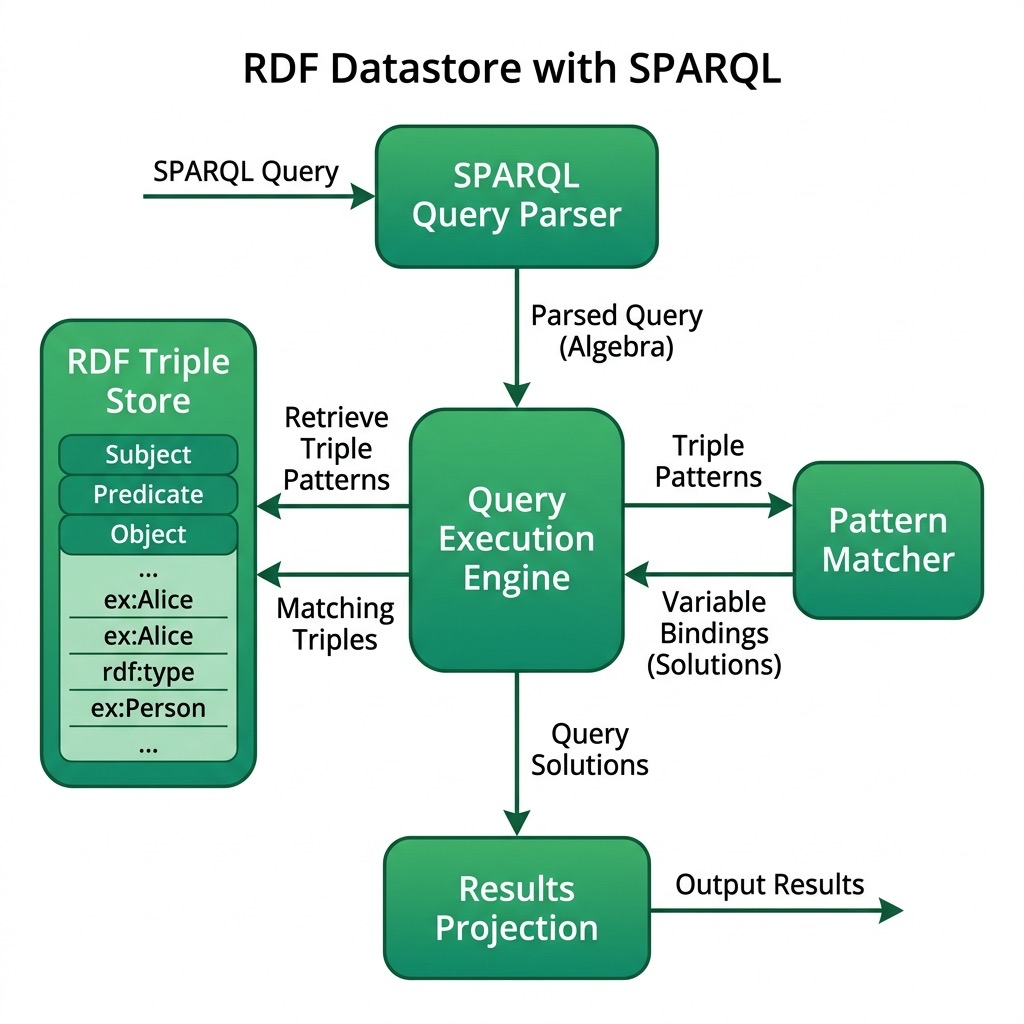
The following diagram shows the high-level architecture of the RDF datastore and SPARQL query engine implemented in this chapter:
Conclusion
This implementation provides a basic framework for an RDF datastore with partial SPARQL support in Racket. While it lacks many features of a full-fledged RDF database and SPARQL engine, it demonstrates the core concepts: triples as a universal data shape, pattern matching as query, shared variables as joins, and N-Triples as a human-readable file format. The extended module adds persistence and result filtering, and the test suite pins the contracts that make the engine safe to build on. From here, every missing feature, such as indexes, OPTIONAL, UNION, or remote endpoints, is an increment, not a rewrite.
Optional Practice Problems
- Index the Store: Replace the
rdf-storelist scan inquery-tripleswith three hash tables indexed by subject, predicate, and object. When a pattern has a bound subject, predicate, or object, use the corresponding index instead of scanning. Timeselect * where { ?name age ?age . ?name likes ?food }over 100,000 generated triples before and after your change. - Parse FILTER Inside WHERE: Extend
parse-sparql-queryso a pattern list can end with the tokensFILTER ( ?age > 30 ), and extend the execution loop to apply the comparison at that point. This is the version of filtering that prunes rows early instead of after projection. - Support for UNION Queries: Modify
execute-where-patternsto handle basicUNIONblocks, allowing a query to match one of multiple sub-patterns and merge their resulting bindings. - DISTINCT and ORDER BY: Add support for
select distinct ?name ...and a trailingorder by ?age, soselect distinct ?food where { ?who likes ?food } order by ?foodlists each food once, sorted. - Typed Literals: Our N-Triples writer stores
"30"as a string, so age comparisons must callstring->numberon every row. Extend the store to keep a typed value alongside each object (integer, string), read and write real N-Triples typed literals like"30"^^<http://www.w3.org/2001/XMLSchema#integer>, and makecomparison->predicateskip the conversion for integer-typed values. - A mini Wikidata: Download a small N-Triples extract from a public source (or export one from a SPARQL endpoint), load it with
load-store, and write three interesting queries against it. Which parts of the loaded data did our limited parser have to discard, and why?