Knowledge Graph Navigator
The Knowledge Graph Navigator (which I will often refer to as KGN) is a tool for processing a set of entity names and automatically exploring the public Knowledge Graph DBPedia using SPARQL queries. I started to write KGN for my own use to automate some things I used to do manually when exploring Knowledge Graphs, and later thought that KGN might be also useful for educational purposes. KGN shows the user the auto-generated SPARQL queries so hopefully the user will learn by seeing examples. KGN uses the SPARQL queries.
I cover SPARQL and linked data/knowledge Graphs is previous books I have written and while I give you a brief background here, I ask interested users to look at either for more details:
- The chapter Knowledge Graph Navigator in my book Loving Common Lisp, or the Savvy Programmer’s Secret Weapon
- The chapters Background Material for the Semantic Web and Knowledge Graphs, Knowledge Graph Navigator in my book Practical Artificial Intelligence Programming With Clojure
We use the Natural Language Processing (NLP) library from the last chapter to find human and place names in input text and then construct SPARQL queries to access data from DBPedia.
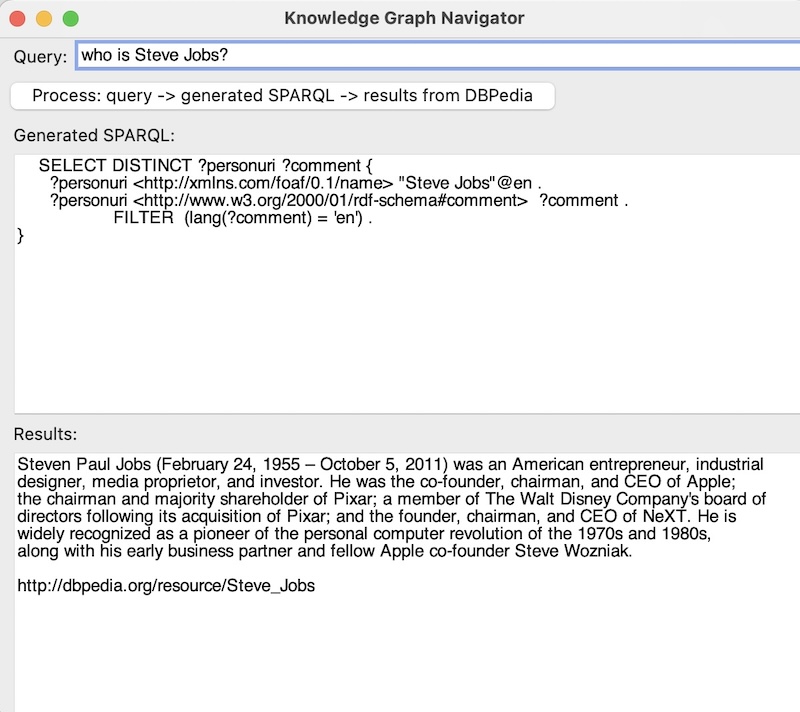
The KGN application is still a work in progress so please check for updates to this live eBook. The following screenshots show the current version of the application:
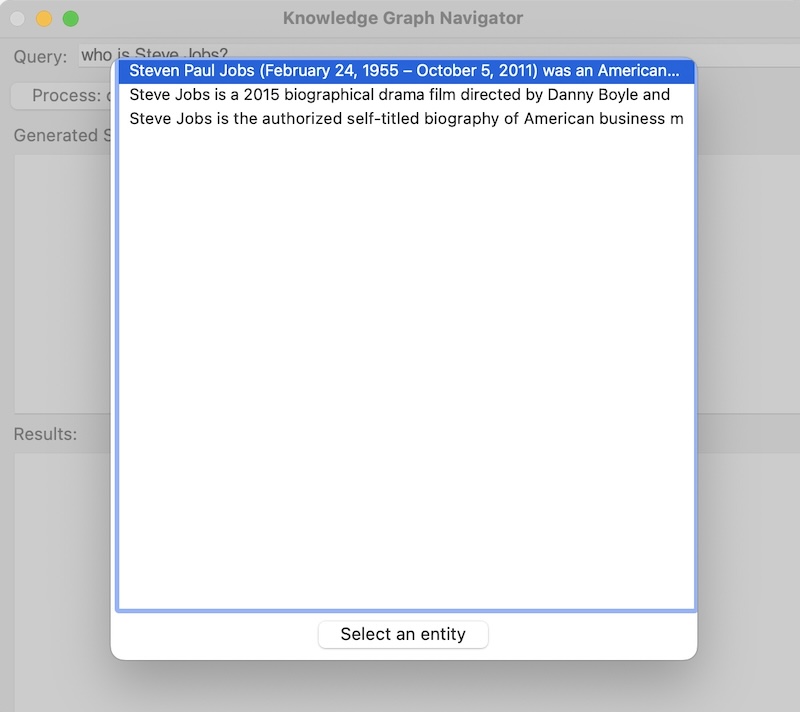
I have implemented parts of KGN in several languages: Common Lisp, Java, Clojure, Racket Scheme, Swift, Python, and Hy. The most full featured version of KGN, including a full user interface, is featured in my book Loving Common Lisp, or the Savvy Programmer’s Secret Weapon that you can read free online. That version performs more speculative SPARQL queries to find information compared to the example here that I designed for ease of understanding, and modification. I am not covering the basics of RDF data and SPARQL queries here. While I provide sufficient background material to understand the code, please read the relevant chapters in my Common Lisp book for more background material.
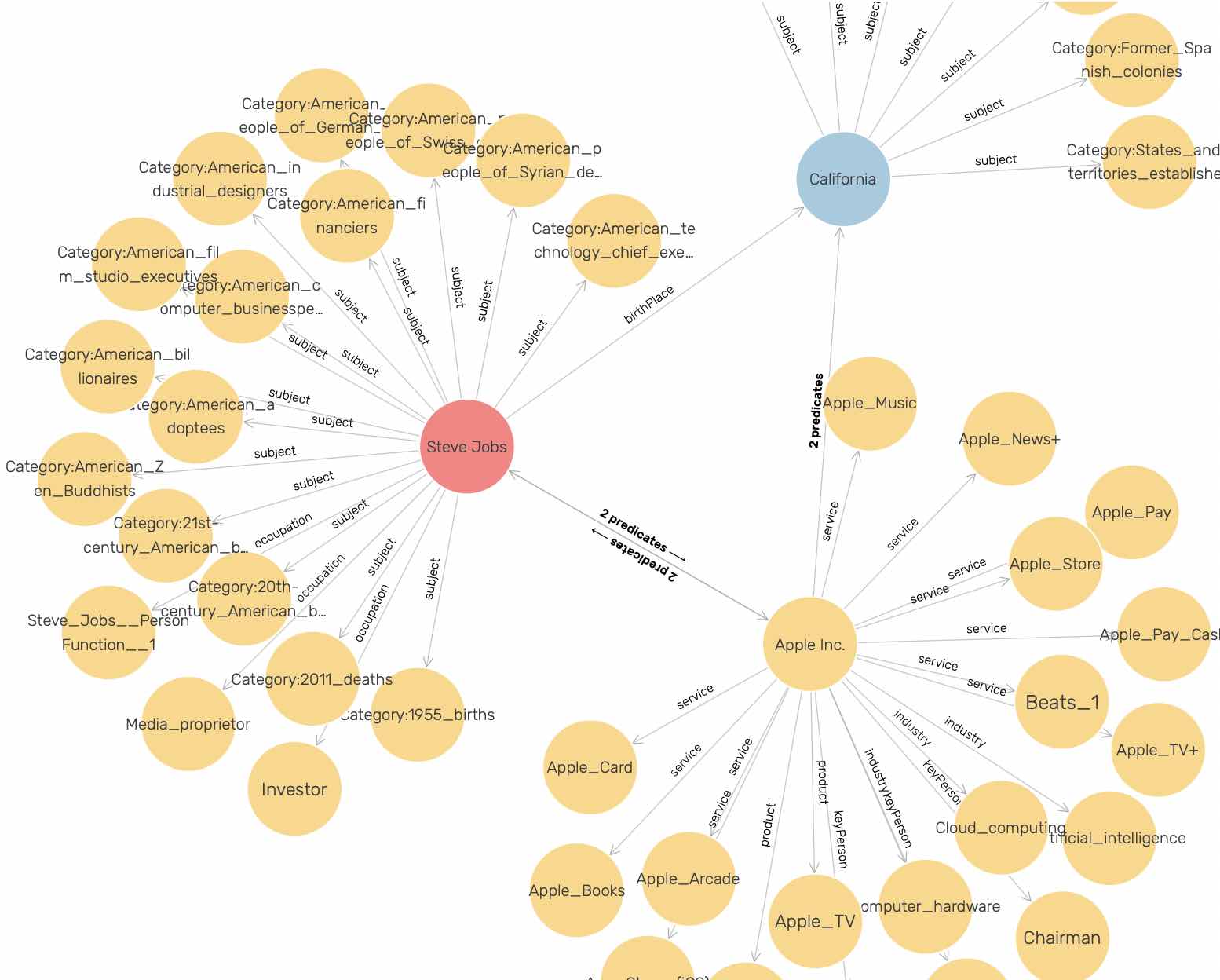
We will be running an example using data containing three person entities, one company entity, and one place entity. The following figure shows a very small part of the DBPedia Knowledge Graph that is centered around these entities. The data for this figure was collected by an example Knowledge Graph Creator from my Common Lisp book:
I chose to use DBPedia instead of WikiData for this example because DBPedia URIs are human readable. The following URIs represent the concept of a person. The semantic meanings of DBPedia and FOAF (friend of a friend) URIs are self-evident to a human reader while the WikiData URI is not:
1 http://www.wikidata.org/entity/Q215627
2 http://dbpedia.org/ontology/Person
3 http://xmlns.com/foaf/0.1/name
I frequently use WikiData in my work and WikiData is one of the most useful public knowledge bases. I have both DBPedia and WikiData SPARQL endpoints in the example code that we will look at later, with the WikiData endpoint comment out. You can try manually querying WikiData at the WikiData SPARQL endpoint. For example, you might explore the WikiData URI for the person concept using:
1 select ?p ?o where {
2  <http://www.wikidata.org/entity/Q215627> ?p ?o .
3 } limit 10
For the rest of this chapter we will just use DBPedia or data copied from DBPedia.
After looking at an interactive session using the example program for this chapter we will look at the implementation.
Entity Types Handled by KGN
To keep this example simple we handle just two entity types:
- People
- Places
The Common Lisp version of KGN also searches for relationships between entities. This search process consists of generating a series of SPARQL queries and calling the DBPedia SPARQL endpoint. I may add this feature to the Racket version of KGN in the future.
KGN Implementation
The example application works processing a list or Person, Place, and Organization names. We generate SPARQL queries to DBPedia to find information about the entities and relationships between them.
We are using two libraries developed for this book that can be found in the directories Racket-AI-book/source-code/sparql and Racket-AI-book/source-code/nlp to supply support for SPARQL queries and natural language processing.
SPARQL Client Library
We already looked at code examples for making simple SPARQL queries in the chapter Datastores and here we continue with more examples that we need to the KGN application.
The following listing shows Racket-AI-book/source-code/sparql/sparql.rkt where we implement several functions for interacting with DBPedia’s SPARQL endpoint. There are two functions sparql-dbpedia-for-person and sparql-dbpedia-person-uri crafted for constructing SPARQL queries. The function sparql-dbpedia-for-person takes a person URI and formulates a query to fetch associated website links and comments, limiting the results to four. On the other hand, the function sparql-dbpedia-person-uri takes a person name and builds a query to obtain the person’s URI and comments from DBpedia. Both functions utilize string manipulation to embed the input parameters into the SPARQL query strings. There are similar functions for places.
Another function sparql-query->hash executes SPARQL queries against the DBPedia endpoint. It takes a SPARQL query string as an argument, sends an HTTP request to the DBpedia SPARQL endpoint, and expects a JSON response. The call/input-url function is used to send the request, with uri-encode ensuring the query string is URL-encoded. The response is read from the port, converted to a JSON expression using the function string->jsexpr, and is expected to be in a hash form which is returned by this function.
Lastly, there are two functions json->listvals and gd for processing the JSON response from DBPedia. The function json->listvals extracts the variable bindings from the SPARQL result and organizes them into lists. The function gd further processes these lists based on the number of variables in the query result, creating lists of lists which represent the variable bindings in a structured way. The sparql-dbpedia function serves as an interface to these functionalities, taking a SPARQL query string, executing the query via sparql-query->hash, and processing the results through gd to provide a structured output. This arrangement encapsulates the process of querying DBPedia and formatting the results, making it convenient for further use within a Racket program.
We already saw most of the following code listing in the previous chapter Datastores. The following listings in this chapter will be updated in future versions of this live eBook when I finish writing the KGN application.
Part of solving this problem is constructing SPARQL queries as strings. We will look in some detail at one utility function sparql-dbpedia-for-person that constructs a SPARQL query string for fetching data from DBpedia about a specific person. The function takes one parameter, person-uri, which is expected to be the URI of a person in the DBpedia dataset. The query string is built by appending strings, including the dynamic insertion of the person-uri parameter value. Here’s a breakdown of how the code works:
Function Definition: The function
sparql-dbpedia-for-personis defined with one parameter,person-uri. This parameter is used to dynamically insert the person’s URI into the SPARQL query.String Appending (
@string-append): The@string-appendconstruct (which seems like a custom or pseudo-syntax, as the standard Scheme function for string concatenation isstring-appendwithout the@) is used to concatenate multiple strings to form the complete SPARQL query. This includes static parts of the query as well as dynamic parts where theperson-uriis inserted.-
SPARQL Query Construction: The function constructs a SPARQL query with the following key components:
- SELECT Clause: This part of the query specifies what information to return. It uses
GROUP_CONCATto aggregate multiple?websitevalues into a single string, separated by” | “, and also selects the?commentvariable. -
OPTIONAL Clauses: Two OPTIONAL blocks are included:
- The first block attempts to fetch English comments (
?comment) associated with the person, filtering to ensure the language of the comment is English (lang(?comment) = ‘en’). - The second block fetches external links (
?website) associated with the person but filters out any URLs containing “dbpedia” (case-insensitive), to likely avoid self-references within DBpedia.
- Dynamic URI Insertion: The
@person-uriplaceholder is replaced with the actualperson-uripassed to the function. This dynamically targets the SPARQL query at a specific DBpedia resource. - LIMIT Clause: The query is limited to return at most 4 results with
LIMIT 4.
Usage of
@person-uriPlaceholder: The code shows@person-uriplaceholders within the query string, indicating where theperson-uriparameter’s value should be inserted. However, the mechanism for replacing these placeholders with the actual URI value is not explicitly shown in the snippet. Typically, this would involve string replacement functionality, ensuring the final query string includes the specific URI of the person of interest.
In summary, the sparql-dbpedia-for-person function dynamically constructs a SPARQL query to fetch English comments and external links (excluding DBpedia links) for a given person from DBpedia, with the results limited to a maximum of 4 entries. The use of string concatenation (or a pseudo-syntax resembling @string-append) allows for the dynamic insertion of the person’s URI into the query.
 1 #lang at-exp racket
 2
 3 (provide sparql-dbpedia-person-uri)
 4 (provide sparql-query->hash)
 5 (provide json->listvals)
 6 (provide sparql-dbpedia)
 7
 8 (require net/url)
 9 (require net/uri-codec)
10 (require json)
11 (require racket/pretty)
12
13 (define (sparql-dbpedia-for-person person-uri)
14   @string-append{
15      SELECT
16       (GROUP_CONCAT(DISTINCT ?website; SEPARATOR="  |  ")
17                                    AS ?website) ?comment {
18       OPTIONAL {
19         { @person-uri <http://www.w3.org/2000/01/rdf-schema#comment> ?comment . FILTER (lang(?comment) = 'en') }
20         UNION
21         { @person-uri <http://dbpedia.org/ontology/description> ?comment . FILTER (lang(?comment) = 'en') }
22       } .
23       OPTIONAL {
24         @person-uri
25         <http://dbpedia.org/ontology/wikiPageExternalLink>
26         ?website
27          . FILTER( !regex(str(?website), "dbpedia", "i"))
28       }
29      } LIMIT 4})
30
31 (define (sparql-dbpedia-person-uri person-name)
32   @string-append{
33     SELECT DISTINCT ?personuri ?comment {
34       ?personuri
35         <http://xmlns.com/foaf/0.1/name>
36         "@person-name"@"@"en .
37       {
38         ?personuri <http://www.w3.org/2000/01/rdf-schema#comment> ?comment .
39         FILTER (lang(?comment) = 'en')
40       } UNION {
41         ?personuri <http://dbpedia.org/ontology/description> ?comment .
42         FILTER (lang(?comment) = 'en')
43       }
44 }})
45
46
47 (define (sparql-query->hash query)
48   (call/input-url
49    (string->url
50     (string-append
51      "https://dbpedia.org/sparql?query="
52      (uri-encode query)))
53    get-pure-port
54    (lambda (port)
55      (string->jsexpr (port->string port)))
56    '("Accept: application/json")))
57
58 (define (json->listvals a-hash)
59   (let* ([head (hash-ref a-hash 'head (hash))]
60          [vars (hash-ref head 'vars '())]
61          [results (hash-ref a-hash 'results (hash))]
62          [bindings (hash-ref results 'bindings '())])
63     (for/list ([var vars])
64       (for/list ([bc bindings])
65         (let* ([var-sym (string->symbol var)]
66                [var-info (hash-ref bc var-sym (hash))]
67                [a-value (hash-ref var-info 'value "")])
68           (list var a-value))))))
69
70 (define (gd data)
71   (let ([jd (json->listvals data)])
72     (define gg1 (lambda (x) (map list (car x))))
73     (define gg2 (lambda (x) (map list (car x) (cadr x))))
74     (define gg3 (lambda (x) (map list (car x) (cadr x) (caddr x))))
75     (define gg4 (lambda (x) (map list (car x) (cadr x) (caddr x) (cadddr x))))
76     (case (length jd)
77       [(1) (gg1 jd)]
78       [(2) (gg2 jd)]
79       [(3) (gg3 jd)]
80       [(4) (gg4 jd)]
81       [else (error "sparql queries with 1 to 4 vars")])))
82
83 (define sparql-dbpedia
84   (lambda (sparql)
85     (gd (sparql-query->hash sparql)))
The function gd converts JSON data to Scheme nested lists and then extracts the values for up to four variables.
NLP Library
We implemented a library in the chapter Natural Language Processing that we use here.
Please make sure you have read that chapter before the following sections.
Implementation of KGN Application Code
The file Racket-AI-book/source-code/kgn/main.rkt contains library boilerplate and the file Racket-AI-book/source-code/kgn/kgn.rkt the application code. The provided Racket scheme code is structured for interacting with the DBPedia SPARQL endpoint to retrieve information about persons or places based on a user’s string query. The code is organized into several defined functions aimed at handling different steps of the process:
Query Parsing and Entity Recognition:
The parse-query function takes a string query-str and tokenizes it into a list of words after replacing certain characters (like “.” and “?”). It then checks for keywords like “who” or “where” to infer the type of query - person or place. Using find-human-names and find-place-names (defined in the earlier section on SPARQL), it extracts the entity names from the tokens. Depending on the type of query and the entities found, it returns a list indicating the type and name of the entity, or unknown if no relevant entities are identified.
SPARQL Query Construction and Execution:
The functions get-person-results and get-place-results take a name string, construct a SPARQL query to get information about the entity from DBPedia, execute the query, and process the results. They utilize the sparql-dbpedia-person-uri, sparql-query->hash, and json->listvals functions that we listed previously to construct the query, execute it, and convert the returned JSON data to a list, respectively.
Query Interface:
The ui-query-helper function acts as the top-level utility for processing a string query to generate a SPARQL query, execute it, and return the results. It first calls parse-query to understand the type of query and the entity in question. Depending on whether the query is about a person or a place, it invokes get-person-results or get-place-results, respectively, to get the relevant information from DBPedia. It then returns a list containing the SPARQL query and the results, or #f if the query type is unknown.
This code structure facilitates the breakdown of a user’s natural language query into actionable SPARQL queries to retrieve and present information about identified entities from a structured data source like DBPedia.
 1 (require racket/pretty)
 2 (require nlp)
 3
 4 (provide get-person-results)
 5 (provide ui-query-helper)
 6
 7 (require "sparql-utils.rkt")
 8
 9 (define (get-person-results person-name-string)
10   (let ((person-uri (sparql-dbpedia-person-uri person-name-string)))
11     (let* ((hash-data (sparql-query->hash person-uri)))
12       (list
13        person-uri
14        (extract-name-uri-and-comment
15         (first (json->listvals hash-data)) (second (json->listvals hash-data)))))))
16
17
18 (define (get-place-results place-name-string)
19   (let ((place-uri (sparql-dbpedia-place-uri place-name-string)))
20     (let* ((hash-data (sparql-query->hash place-uri)))
21       (list
22        place-uri
23        (extract-name-uri-and-comment
24         (first (json->listvals hash-data)) (second (json->listvals hash-data)))))))
25
26
27 (define (parse-query query-str)
28   (let ((cleaned-query-tokens
29          (string-split (string-replace  (string-replace query-str "." " ") "?" " "))))
30     (printf "\n+ + + cleaned-query-tokens:~a\n" cleaned-query-tokens)
31     (if (member "who" cleaned-query-tokens)
32         (let ((person-names (find-human-names (list->vector cleaned-query-tokens) '())))
33           (printf "\n+ + person-names= ~a\n" person-names)
34           (if (> (length person-names) 0)
35               (list 'person (first person-names))   ;; for now, return the first name found
36               #f))
37         (if (member "where" cleaned-query-tokens)
38             (let ((place-names (find-place-names (list->vector cleaned-query-tokens) '())))
39               (printf "\n+ + place-names= ~a\n" place-names)
40               (if (> (length place-names) 0)
41                   (list 'place (first place-names))   ;; for now, return the first place name found
42                   (list 'unknown query-str)))
43             (list 'unknown query-str))))) ;; no person or place name match so just return original query
44
45 (define (ui-query-helper query-str)  ;; top level utility function for string query -> 1) generated sparql 2) query function
46   (display "in ui-query-helper: query-str=") (display query-str)
47   (let* ((parse-results (parse-query query-str))
48          (question-type (first parse-results))
49          (entity-name (second parse-results)))
50     (display (list parse-results question-type entity-name))
51     (if (equal? question-type 'person)
52         (let* ((results2 (get-person-results entity-name))
53                (sparql (car results2))
54                (results (second results2)))
55           (printf "\n++  results: ~a\n" results)
56           (list sparql results))
57         (if (equal? question-type 'place)
58             (let* ((results2 (get-place-results entity-name))
59                    (sparql (car results2))
60                    (results (second results2)))
61               (list sparql results))
62             #f))))
The file Racket-AI-book/source-code/kgn/dialog-utils.rkt contains the user interface specific code for implementing a dialog box.
 1 (require htdp/gui)
 2 (require racket/gui/base)
 3 (require racket/pretty)
 4 (provide make-selection-functions)
 5
 6 (define (make-selection-functions parent-frame title)
 7   (let* ((dialog
 8           (new dialog%
 9                [label title]
10                [parent parent-frame]
11                [width 440]
12                [height 480]))
13          (close-callback
14           (lambda (button event)
15             (send dialog show #f)))
16          (entity-chooser-dialog-list-box
17           (new list-box%
18                [label ""]
19                [choices (list "aaaa" "bbbb")]
20                [parent dialog]
21                [callback (lambda (click event)
22                            (if (equal? (send event get-event-type) 'list-box-dclick)
23                                (close-callback click event)
24                                #f))]))
25          (quit-button
26           (new button% [parent dialog]
27              [label "Select an entity"]
28              [callback  close-callback]))
29          (set-new-items-and-show-dialog
30           (lambda (a-list)
31             (send entity-chooser-dialog-list-box set-selection 0)
32             (send entity-chooser-dialog-list-box set a-list)
33             (send dialog show #t)))
34          (get-selection-index (lambda () (first (send entity-chooser-dialog-list-box get-selections)))))
35     (list set-new-items-and-show-dialog get-selection-index)))
The local file sparql-utils.rkt contains additional utility functions for accessing information in DBPedia.
 1 #lang at-exp racket
 2
 3 (provide sparql-dbpedia-for-person
 4          sparql-dbpedia-person-uri
 5          sparql-dbpedia-place-uri
 6          sparql-query->hash
 7          json->listvals
 8          extract-name-uri-and-comment)
 9
10 (require net/url)
11 (require net/uri-codec)
12 (require json)
13 (require racket/pretty)
14
15 (define ps-encoded-by "ps:P702")
16 (define wdt-instance-of "wdt:P31")
17 (define wdt-in-taxon "wdt:P703")
18 (define wd-human "wd:Q15978631")
19 (define wd-mouse "wd:Q83310")
20 (define wd-rat "wd:Q184224")
21 (define wd-gene "wd:Q7187")
22
23 (define (sparql-dbpedia-for-person person-uri)
24   @string-append{
25      SELECT
26       (GROUP_CONCAT(DISTINCT ?website; SEPARATOR="  |  ") AS ?website) ?comment {
27       OPTIONAL {
28         { @person-uri <http://www.w3.org/2000/01/rdf-schema#comment> ?comment . FILTER (lang(?comment) = 'en') }
29         UNION
30         { @person-uri <http://dbpedia.org/ontology/description> ?comment . FILTER (lang(?comment) = 'en') }
31       } .
32       OPTIONAL { @person-uri <http://dbpedia.org/ontology/wikiPageExternalLink> ?website . FILTER( !regex(str(?website), "dbpedia", "i"))} .
33      } LIMIT 4})
34
35 (define (sparql-dbpedia-person-uri person-name)
36   @string-append{
37     SELECT DISTINCT ?personuri ?comment {
38       ?personuri <http://xmlns.com/foaf/0.1/name> "@person-name"@"@"en .
39       {
40         ?personuri <http://www.w3.org/2000/01/rdf-schema#comment> ?comment .
41         FILTER (lang(?comment) = 'en')
42       } UNION {
43         ?personuri <http://dbpedia.org/ontology/description> ?comment .
44         FILTER (lang(?comment) = 'en')
45       }
46 }})
47
48 (define (sparql-dbpedia-place-uri place-name)
49   @string-append{
50     SELECT DISTINCT ?placeuri ?comment {
51       ?placeuri <http://xmlns.com/foaf/0.1/name> "@place-name"@"@"en .
52       {
53         ?placeuri <http://www.w3.org/2000/01/rdf-schema#comment> ?comment .
54         FILTER (lang(?comment) = 'en')
55       } UNION {
56         ?placeuri <http://dbpedia.org/ontology/description> ?comment .
57         FILTER (lang(?comment) = 'en')
58       }
59 }})
60
61 (define (sparql-query->hash query)
62   (call/input-url (string->url (string-append "https://dbpedia.org/sparql?query=" (uri-encode query)))
63                       get-pure-port
64                       (lambda (port)
65                         (string->jsexpr (port->string port)))
66                       '("Accept: application/json")))
67
68 (define (json->listvals a-hash)
69   (let* ([head (hash-ref a-hash 'head (hash))]
70          [vars (hash-ref head 'vars '())]
71          [results (hash-ref a-hash 'results (hash))]
72          [bindings (hash-ref results 'bindings '())])
73     (for/list ([var vars])
74       (for/list ([bc bindings])
75         (let* ([var-sym (string->symbol var)]
76                [var-info (hash-ref bc var-sym (hash))]
77                [a-value (hash-ref var-info 'value "")])
78           (list var a-value))))))
79
80 (define extract-name-uri-and-comment (lambda (l1 l2)
81               (map ;; perform a "zip" action on two lists
82                (lambda (a b)
83                  (list (second a) (second b)))
84                l1 l2)))
The local file kgn.rkt is the main program for this application.
 1 (require htdp/gui)  ;; note: when building executable, choose GRacket, not Racket to get *.app bundle
 2 (require racket/gui/base)
 3 (require racket/match)
 4 (require racket/pretty)
 5 (require scribble/text/wrap)
 6
 7 ;; Sample queries:
 8 ;;   who is Bill Gates
 9 ;;   where is San Francisco
10 ;; (only who/where queries are currently handled)
11
12 ;;(require "utils.rkt")
13 (require nlp)
14 (require "main.rkt")
15 (require "dialog-utils.rkt")
16
17 (define count-substring
18   (compose length regexp-match*))
19
20 (define (short-string s)
21   (if (< (string-length s) 75)
22       s
23       (substring s 0 73)))
24
25 (define dummy (lambda (button event) (display "\ndummy\n"))) ;; this will be redefined after UI objects are created
26
27 (let ((query-callback (lambda (button event) (dummy button event))))
28   (match-let* ([frame (new frame% [label "Knowledge Graph Navigator"]
29                            [height 400] [width 608] [alignment '(left top)])]
30                [(list set-new-items-and-show-dialog get-selection-index) ; returns list of 2 callback functions
31                 (make-selection-functions frame "Test selection list")]
32                [query-field (new text-field%
33                                  [label "  Query:"] [parent frame]
34                                  [callback
35                                   (lambda( k e)
36                                     (if (equal? (send e get-event-type) 'text-field-enter) (query-callback k e) #f))])]
37                [a-container (new pane%
38                                  [parent frame] [alignment '(left top)])]
39                [a-message (new message%
40                                [parent frame] [label "  Generated SPARQL:"])]
41                [sparql-canvas (new text-field%
42                                    (parent frame) (label "")
43                                    [min-width 380] [min-height 200]
44                                    [enabled #f])]
45                [a-message-2 (new message% [parent frame] [label "  Results:"])]
46                [results-canvas (new text-field%
47                                     (parent frame) (label "")
48                                     [min-height 200] [enabled #f])]
49                [a-button (new button% [parent a-container]
50                               [label "Process: query -> generated SPARQL -> results from DBPedia"]
51                               [callback query-callback])])
52     (display "\nbefore setting new query-callback\n")
53     (set!
54      dummy ;; override dummy labmda defined earlier
55      (lambda (button event)
56        (display "\n+ in query-callback\n")
57        (let ((query-helper-results-all (ui-query-helper (send query-field get-value))))
58          (if (equal? query-helper-results-all #f)
59              (let ()
60                (send  sparql-canvas set-value "no generated SPARQL")
61                (send  results-canvas set-value "no results"))
62              (let* ((sparql-results (first query-helper-results-all))
63                     (query-helper-results-uri-and-description (cadr query-helper-results-all))
64                     (uris (map first query-helper-results-uri-and-description))
65                     (query-helper-results (map second query-helper-results-uri-and-description)))
66                (display "\n++ query-helper-results:\n") (display query-helper-results) (display "\n")
67                (if (= (length query-helper-results) 1)
68                    (let ()
69                      (send  sparql-canvas set-value sparql-results)
70                      (send  results-canvas set-value
71                             (string-append (string-join  (wrap-line (first query-helper-results) 95) "\n") "\n\n" (first uris))))
72                    (if (> (length query-helper-results) 1)
73                        (let ()
74                          (set-new-items-and-show-dialog (map short-string query-helper-results))
75                          (set! query-helper-results
76                                (let ((sel-index (get-selection-index)))
77                                  (if (> sel-index -1)
78                                      (list-ref query-helper-results sel-index)
79                                      '(""))))
80                          (set! uris (list-ref uris (get-selection-index)))
81                          (display query-helper-results)
82                          (send  sparql-canvas set-value sparql-results)
83                          (send  results-canvas set-value
84                                 (string-append (string-join  (wrap-line query-helper-results 95) "\n") "\n\n" uris)))
85                        (send  results-canvas set-value (string-append "No results for: " (send query-field get-value))))))))))
86      (send frame show #t)))
The two screen shot figures seen earlier show the GUI application running.
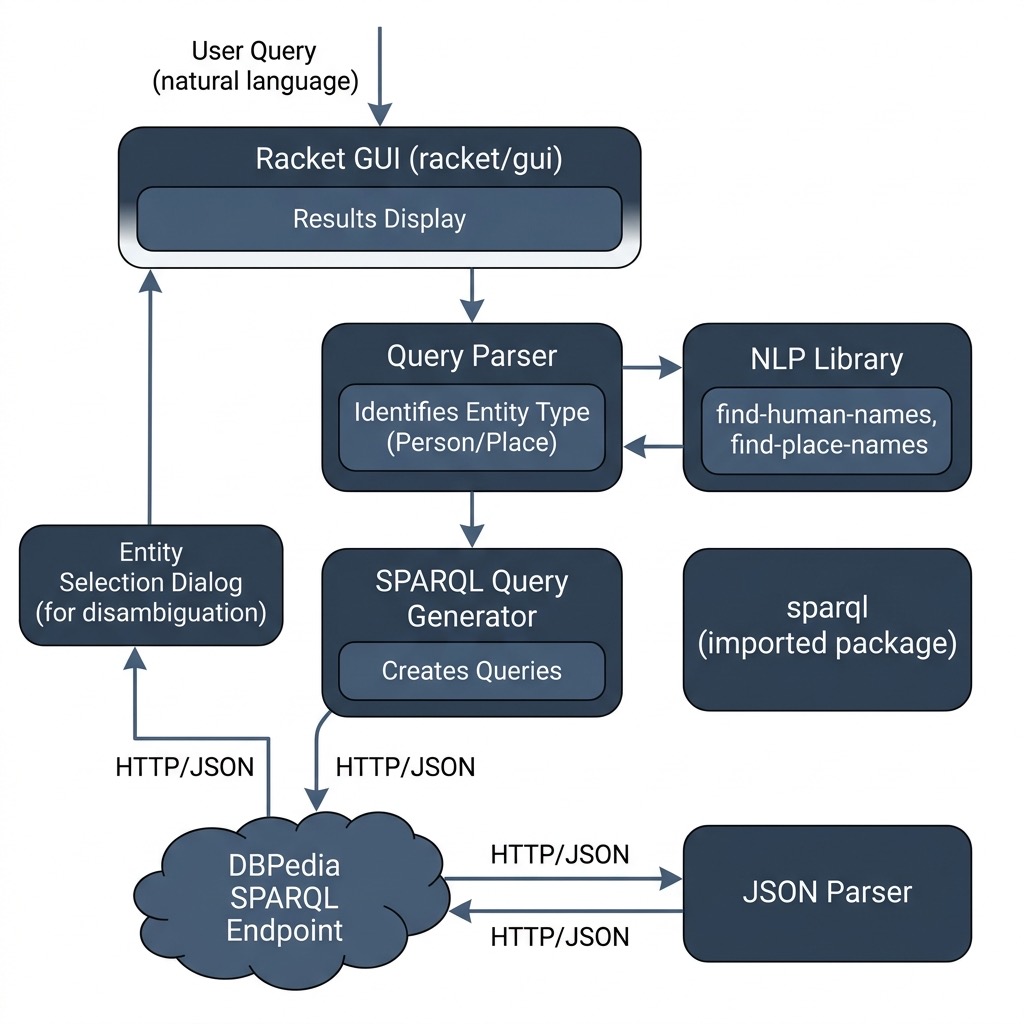
The following diagram shows the high-level architecture of the Knowledge Graph Navigator application developed in this chapter:
Knowledge Graph Navigator Wrap Up
This KGN example was hopefully both interesting to you and simple enough in its implementation to use as a jumping off point for your own projects.
I had the idea for the KGN application because I was spending quite a bit of time manually setting up SPARQL queries for DBPedia (and other public sources like WikiData) and I wanted to experiment with partially automating this process. I have experimented with versions of KGN written in Java, Hy language (Lisp running on Python that I wrote a short book on), Swift, and Common Lisp and all four implementations take different approaches as I experimented with different ideas.
Optional Practice Problems
- Extend templates for Historical Events: The current KGN implementation only recognizes persons and places. Add support to
sparql-utils.rktfor querying historical events (e.g., battles, treaty signings) by crafting a new SPARQL template and corresponding parsing logic. - Add Wikidata Backend: Currently, KGN only queries DBpedia. Implement alternative search functions in
sparql-utils.rkttargeting Wikidata’s SPARQL endpoint, mapping the resulting entities back to the GUI. - Query History in the GUI: Modify the GUI code in
main.rktto include a historical list of past queries in the user interface. Clicking on an item in the history list should automatically reload and execute that query.