Web Scraping
I often write software to automatically collect and use data from the web and other sources. As a practical matter, much of the data that many people use for machine learning comes from either the web or from internal data sources. This section provides some guidance and examples for getting text data from the web.
Before we start a technical discussion about web scraping I want to point out that much of the information on the web is copyright, so first you should read the terms of service for web sites to insure that your use of “scraped” or “spidered” data conforms with the wishes of the persons or organizations who own the content and pay to run scraped web sites.
We start with low-level Racket code examples in the GitHub repository for this book in the directory Racket-AI-book/source-code/misc_code. We will then implement a standalone library in the directory Racket-AI-book/source-code/webscrape.
Getting Started Web Scraping
All of the examples in the section can be found in the Racket code snippet files in the directory Racket-AI-book/source-code/misc_code.
I have edited the output for brevity in the following REPL outoput:
 1 $ racket
 2 Welcome to Racket v8.10 [cs].
 3 > (require net/http-easy)
 4 > (require html-parsing)
 5 > (require net/url xml xml/path)
 6 > (require racket/pretty)
 7 > (define res-stream
 8     (get "https://markwatson.com" #:stream? #t))
 9 > res-stream
10 #<response>
11 > (define lst
12     (html->xexp (response-output res-stream)))
13 > lst
14 '(*TOP*
15   (*DECL* DOCTYPE html)
16   "\n"
17   (html
18    (@ (lang "en-us"))
19    "\n"
20    "  "
21    (head
22     (title
23      "Mark Watson: AI Practitioner and Author of 20+ AI Books | Mark Watson")
24   ...
Different element types are html, head, p, h1, h2, etc. If you are familiar with XPATH operations for XML data, then the function se-path/list will make more sense to your. The function se-path/list takes a list of element types from a list and recursively searches an input s-expression for lists starting with one of the target element types. In the following example we extract all elements of type p:
 1 > (se-path*/list '(p) lst) ;; get text from all p elements
 2 '("My customer list includes: Google, Capital One, Babylist, Olive AI, CompassLabs, \
 3 Mind AI, Disney, SAIC, Americast, PacBell, CastTV, Lutris Technology, Arctan Group, \
 4 Sitescout.com, Embed.ly, and Webmind Corporation."
 5   "I have worked in the fields of general\n"
 6   "   artificial intelligence, machine learning, semantic web and linked data, and\n"
 7   "      natural language processing since 1982."
 8   "My eBooks are available to read for FREE or you can   purchase them at "
 9   (a (@ (href "https://leanpub.com/u/markwatson")) "leanpub")
10   ...
1 > (define lst-p (se-path*/list '(p) lst))
2 > (filter (lambda (s) (string? s)) lst-p) ;; keep only text strings
3 '("My customer list includes: Google, Capital One, Babylist, Olive AI, CompassLabs, \
4 Mind AI, Disney, SAIC, Americast, PacBell, CastTV, Lutris Technology, Arctan Group, \
5 Sitescout.com, Embed.ly, and Webmind Corporation."
 1 #<procedure:string-normalize-spaces>
 2 > (string-normalize-spaces
 3    (string-join
 4     (filter (lambda (s) (string? s)) lst-p)
 5     "\n"))
 6 "My customer list includes: Google, Capital One, Babylist, Olive AI, CompassLabs, Mi\
 7 nd AI, Disney, SAIC, Americast, PacBell, CastTV, Lutris Technology, Arctan Group, Si\
 8 tescout.com, Embed.ly, and Webmind Corporation. I have worked in the fields of gener\
 9 al artificial intelligence, machine learning, semantic web and linked data, and natu\
10 ral language processing since 1982.
11   ...
12 "
Now we will extract HTML anchor links:
 1 > (se-path*/list '(href) lst) ;; get all links from HTML as a lisp
 2 '("/index.css"
 3   "https://mark-watson.blogspot.com"
 4   "#fun"
 5   "#books"
 6   "#opensource"
 7   "https://markwatson.com/privacy.html"
 8   "https://leanpub.com/u/markwatson"
 9   "/nda.txt"
10   "https://mastodon.social/@mark_watson"
11   "https://twitter.com/mark_l_watson"
12   "https://github.com/mark-watson"
13   "https://www.linkedin.com/in/marklwatson/"
14   "https://markwatson.com/index.rdf"
15   "https://www.wikidata.org/wiki/Q18670263"
16  ...
17 )
Implementation of a Racket Web Scraping Library
The web scraping library listed below can be found in the directory Racket-AI-book/manuscript. The following listing of webscrape.rkt should look familiar after reading the code snippets in the last section.
The provided Racket Scheme code defines three functions to interact with and process web resources: web-uri->xexp, web-uri->text, and web-uri->links.
web-uri->xexp:
- Requires three libraries: net/http-easy, html-parsing, and net/url xml xml/path.
- Given a URI (a-uri), it creates a stream (a-stream) using the get function from the net/http-easy library to fetch the contents of the URI.
- Converts the HTML content of the URI to an S-expression (xexp) using the html->xexp function from the html-parsing library.
- Closes the response stream using response-close! and returns the xexp.
web-uri->text:
- Calls web-uri->xexp to convert the URI content to an xexp.
- Utilizes se-path*/list from the xml/path library to extract all paragraph elements (p) from the xexp.
- Filters the paragraph elements to retain only strings (excluding nested tags or other structures).
- Joins these strings with a newline separator, normalizing spaces using string-normalize-spaces from the srfi/13 library.
web-uri->links:
- Similar to web-uri->text, it starts by converting URI content to an xexp.
- Utilizes se-path*/list to extract all href attributes from the xexp.
- Filters these href attributes to retain only those that are external links (those beginning with “http”).
In summary, these functions collectively enable the extraction and processing of HTML content from a specified URI, converting HTML to a more manageable S-expression format, and then extracting text and links as required.
 1 #lang racket
 2
 3 (require net/http-easy)
 4 (require html-parsing)
 5 (require net/url xml xml/path)
 6 (require srfi/13) ;; for strings
 7 (provide web-uri->xexp
 8          web-uri->text
 9          web-uri->links)
10
11 (define (web-uri->xexp a-uri)
12   (let* ((a-stream
13            (get a-uri #:stream? #t))
14          (lst (html->xexp (response-output a-stream))))
15     (response-close! a-stream)
16     lst))
17
18 (define (web-uri->text a-uri)
19   (let* ((a-xexp
20            (web-uri->xexp a-uri))
21          (p-elements (se-path*/list '(p) a-xexp))
22          (lst-strings
23            (filter
24              (lambda (s) (string? s))
25              p-elements)))
26     (string-normalize-spaces
27       (string-join lst-strings "\n"))))
28
29 (define (web-uri->links a-uri)
30   (let* ((a-xexp
31            (web-uri->xexp a-uri)))
32     ;; we want only external links so filter out local links:
33     (filter
34       (lambda (s) (string-prefix? "http" s))
35       (se-path*/list '(href) a-xexp))))
Here are a few examples in a Racket REPL (most output omitted for brevity):
 1 > (web-uri->xexp "https://knowledgebooks.com")
 2 '(*TOP*
 3   (*DECL* DOCTYPE html)
 4   "\n"
 5   (html
 6    "\n"
 7    "\n"
 8    (head
 9     "\n"
10     "    "
11     (title "KnowledgeBooks.com - research on the Knowledge Management, and the Seman\
12 tic Web ")
13     "\n"
14  ...
15
16 > (web-uri->text "https://knowledgebooks.com")
17 "With the experience of working on Machine Learning and Knowledge Graph applications
18  ...
19
20 > (web-uri->links "https://knowledgebooks.com")
21 '("http://markwatson.com"
22   "https://oceanprotocol.com/"
23   "https://commoncrawl.org/"
24   "http://markwatson.com/consulting/"
25   "http://kbsportal.com")
The following diagram shows the high-level architecture of the web scraping library developed in this chapter:
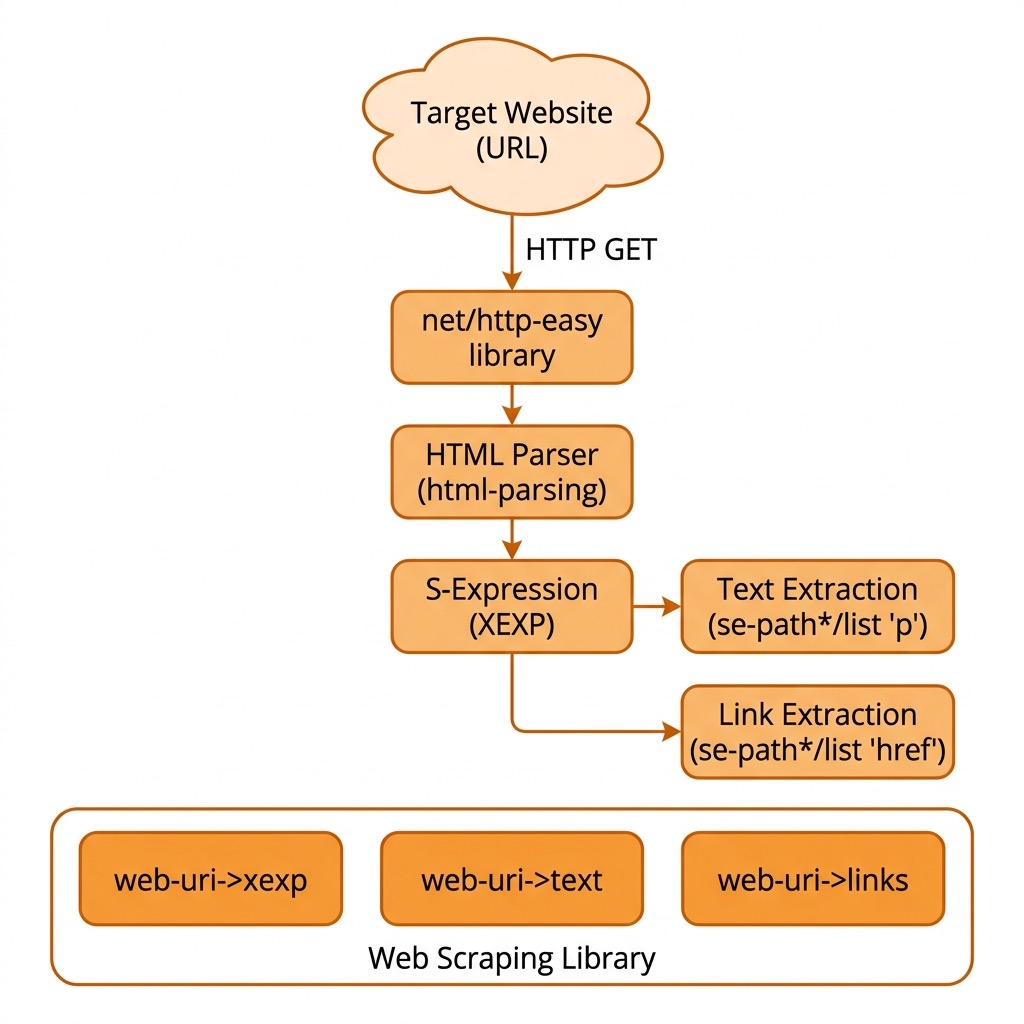
If you want to install this library on your laptop using linking (requiring the library access a link to the source code in the directory Racket-AI-book/source-code/webscrape) run the following in the library source directory Racket-AI-book/source-code/webscrape:
raco pkg install –scope user
Optional Practice Problems
-
Resolve Relative Links: Currently,
web-uri->linksonly keeps links that start with"http". Modify the function to accept the original URI as a base and resolve any relative paths (e.g.,/about.htmlor../contact) into absolute URLs. -
Extract Headings and Lists: The
web-uri->textfunction only retrieves text nested within<p>tags. Extend it to extract text from headers (<h1>to<h6>) and list items (<li>) to get a more complete textual representation of the page. -
Graceful Error and Timeout Handling: Wrap the HTTP
getrequest inwith-handlersto catch connection issues, timeouts, or non-200 HTTP statuses, returning a meaningful error code or an empty xexp instead of crashing the program.