A Quick Racket Tutorial
If you are an experienced Racket developer then feel free to skip this chapter! I wrote this tutorial to cover just the aspects of using Racket that you, dear reader, will need to understand, modify, and generally reuse the example programs in this book.
I assume that you have read the section Racket Essentials in the The Racket Guide written by Matthew Flatt, Robert Bruce Findler, and the PLT group. Here I just cover some basics of getting started so you can enjoy the later code examples without encountering “road blocks.”
Installing Packages
The DrRacket IDE lets you interactively install packages. I prefer using the command line so, for example, I would install SQlite support using:
1 raco pkg install sqlite-table
We can then require the code in this package in our Racket programs:
1 (require sqlite-table)
Note that when the argument to require is a symbol (not a string) then modules are searched and loaded from your system. When the argument is a string like “utils.rkt” that a module is loaded from a file in the current directory.
Installing Local Packages In Place
In a later chapter Natural Language Processing (NLP) we define a fairly complicated local package. This package has one unusual requirement that you may or may not need in your own projects: My NLP library requires static linguistic data files that are stored in the directory Racket-AI-book/source-code/nlp/data. If I am in the directory Racket-AI-book/source-code/nlp working on the Racket code, it is simple enough to just open the files in ./data/….
The default for installing your own Racket packages is to link to the original source directory on your laptop’s file system. Let’s walk through this. First, I will make sure my library code is compiled and then install the code in the current directory:
1 cd Racket-AI-book/source-code/nlp/
2 raco make *.rkt
3 raco pkg install --scope user
Then I can run the racket REPL (or DrRacket) on my laptop and use my NLP package by requiring the code in this package in our Racket programs (shown in a REPL):
 1 > (require nlp)
 2 loading lex-hash......done.
 3 > (parts-of-speech (list->vector '("the" "cat" "ran")))
 4 '#("DT" "NN" "VBD")
 5 > (find-place-names
 6     '#("George" "Bush" "went" "to" "San" "Diego"
 7        "and" "London") '())
 8 '("London" "San Diego")
 9 > (find-place-names
10     '#("George" "Bush" "went" "to" "San" "Diego"
11        "and" "London") '())
12 '("London" "San Diego")
13 >
Mapping Over Lists
We will be using functions that take other functions as arguments. Here we define a function 1+ that has one function argument n and returns n + 1 as the value for a function call:
1 > (range 5)
2 '(0 1 2 3 4)
3 > (define (1+ n) (+ n 1))
4 > (map 1+ (range 5))
5 '(1 2 3 4 5)
6 > (map + (range 5) '(100 101 102 103 104))
7 '(100 102 104 106 108)
8 >
Does the evaluation of the last expression confuse you? Let’s take a closer look:
- The function map is a higher-order function that takes a procedure (in this case, +) and one or more lists as arguments. It applies the procedure to the corresponding elements of the lists and returns a new list containing the results.
- First list argument: (range 5) is evaluated first. The range function generates a sequence of numbers starting from 0 up to (but not including) the given number. So, (range 5) produces the list ‘(0 1 2 3 4).
- Second list argument: ‘(100 101 102 103 104) is a quoted list, meaning it is treated as data and evaluates to itself.
-
Element-wise Application: map then applies the + function to the elements of the two lists in a pairwise fashion:
- (+ 0 100) evaluates to 100
- (+ 1 101) evaluates to 102
- (+ 2 102) evaluates to 104
- (+ 3 103) evaluates to 106
-
(+ 4 104) evaluates to 108
- Final Result: The results of each addition are collected into a new list, producing the final output: ‘(100 102 104 106 108).
Hash Tables
The following listing shows the file misc_code/hash_tests.rkt:
 1 #lang racket
 2
 3 (define h1 (hash "dog" '("friendly" 5) "cat" '("not friendly" 2))) ;; not mutable
 4
 5 (define cat (hash-ref h1 "cat"))
 6
 7 (define h2 (make-hash)) ;; mutable
 8 (hash-set! h2 "snake" '("smooth" 4))
 9
10 ;; make-hash also accepts a second argument that is a list of pairs:
11 (define h3 (make-hash '(("dog" '("friendly" 5)) ("cat" '("not friendly" 2)))))
12 (hash-set! h3 "snake" '("smooth" 4))
13 (hash-set! h3 "cat" '("sometimes likeable" 3)) ;; overwrite key value
14
15 ;; for can be used with hash tables:
16
17 (for ([(k v) h3]) (println '("key:" k "value:" v)))
This Racket code demonstrates the creation and manipulation of hash tables which are data structures that map keys to values. It first shows an immutable hash table h1, created with built-in function hash, where values are retrieved using hash-ref. It then introduces mutable hash tables h2 and h3 we created with make-hash, which can be modified after creation using the built-in function hash-set!. Th* function hash-set! can either add a new key-value pair or overwrite the value of an existing key. Finally, the code uses a for loop to iterate through the key-value pairs of a mutable hash table, printing each one to the console, illustrating a common way to process all entries in the collection.
Here is a lising of the output window after running this file and then manually evaluating h1, h2, and h3 in the REPL (like all listings in this book, I manually edit the output to fit page width):
1 Welcome to DrRacket, version 8.10 [cs]. 2 Language: racket, with debugging; memory limit: 128 MB. 3 '("key:" k "value:" v)
4 '("key:" k "value:" v) 5 '("key:" k "value:" v)
6 > h1
7 '#hash(("cat" . ("not friendly" 2)) ("dog" . ("friendly" 5))) 8 > h2 9 '#hash(("snake" . ("smooth" 4)))
10 > h3
11 '#hash(("cat" . ("sometimes likeable" 3))12 ("dog" . ('("friendly" 5)))13 ("snake" . ("smooth" 4)))14 >
Racket Structure Types
A structure type is like a list that has named list elements. When you define a structure the Racket system writes getter and setter methods to access and change structure attribute values. Racket also generates a constructor function with the structure name. Let’s look at a simple example in a Racket REPL of creating a structure with mutable elements:
 1 > (struct person (name age email) #:mutable)
 2 > (define henry (person "Henry Higgans" 45 "henry@higgans.com"))
 3 > (person-age henry)
 4 45
 5 > (set-person-age! henry 46)
 6 > (person-age henry)
 7 46
 8 > (set-person-email! henry "henryh674373551@gmail.com")
 9 > (person-email henry)
10 "henryh674373551@gmail.com"
11 >
If you don’t add #:mutable to a struct definition, then no set-NAME-ATTRIBUTE! methods are generated. For mutable or immutable struct definitions, accessor functions like person-age and person-email are written for you from a struct definition and take the form NAME-OF-STRUCT-FIELD-NAME.
Racket also supports object oriented programming style classes with methods. I don’t use classes in the book examples so you, dear reader, can read the official Racket documentation on classes if you want to use Racket in a non-functional way.
Simple HTTP GET and POST Operations
We will be using HTTP GET and POST instructions in later chapters for web scraping and accessing remote APIs, such as those for OpenAI GPT-4, Hugging Face, etc. We will see more detail later but for now, you can try a simple example:
 1 #lang racket
 2
 3 (require net/http-easy)
 4 (require html-parsing)
 5 (require net/url xml xml/path)
 6 (require racket/pretty)
 7
 8 (define res-stream
 9   (get "https://markwatson.com" #:stream? #t))
10
11 (define lst
12   (html->xexp (response-output res-stream)))
13
14 (response-close! res-stream)
15
16 (displayln "\nParagraph text:\n")
17
18 (pretty-print (take (se-path*/list '(p) lst) 8))
19
20 (displayln "\nLI text:\n")
21
22 (pretty-print (take (se-path*/list '(li) lst) 8))
This Racket script is a web scraper that fetches the HTML content from markwatson.com. It then parses the raw HTML into a structured S-expression format, which is a data representation native to Lisp-like languages. Using this structured data, the script queries for all paragraph (<p>) and list item (<li>) tags. Finally, it uses pretty-print to display the first eight instances of each tag type it finds, effectively extracting and showing specific content from the web page.
The output is (with most of the output removed for brevity):
 1 Paragraph text:
 2
 3 '("My customer list includes: Google, Capital One, Babylist, Olive AI, CompassLabs, \
 4 Mind AI, Disney, SAIC, Americast, PacBell, CastTV, Lutris Technology, Arctan Group, \
 5 Sitescout.com, Embed.ly, and Webmind Corporation."
 6   "I have worked in the fields of general\n"
 7   "      artificial intelligence, machine learning, semantic web and linked data, an\
 8 d\n"
 9   "      natural language processing since 1982."
10   "My eBooks are available to read for FREE or you can purchase them at "
11   (a (@ (href "https://leanpub.com/u/markwatson")) "leanpub")
12   "."
13   "My standard ")
14
15 LI text:
16
17 '((@ (class "list f4 f3-ns fw4 dib pr3"))
18   "\n"
19   "            "
20   (& nbsp)
21   (& nbsp)
22   (a
23    (@
24     (class "hover-white no-underline white-90")
25     (href "https://mark-watson.blogspot.com")
26     (target "new")
27     (title "Mark's Blog on Blogspot"))
28    "\n"
29    "              Read my Blog\n"
30    "            ")
31   "\n"
32   "          ")
Using Racket ~/.racketrc Initialization File
In my Racket workflow I don’t usually use ~/.racketrc to define initial forms that are automatically loaded when starting the racket command line tool or the DrRacket application. That said I do like to use ~/.racketrc for temporary initialization forms when working on a specific project to increase the velocity of interactive development.
Here is an example use:
1 $ cat ~/.racketrc
2 (define (foo-list x)
3   (list x x x))
4 $ racket
5 Welcome to Racket v8.10 [cs].
6 > (foo-list 3.14159)
7 '(3.14159 3.14159 3.14159)
8 >
If you have local and public libraries you frequently load you can permanently keep require forms for them in ~/.racketrc but that will slightly slow down the startup times of racket and DrRacket.
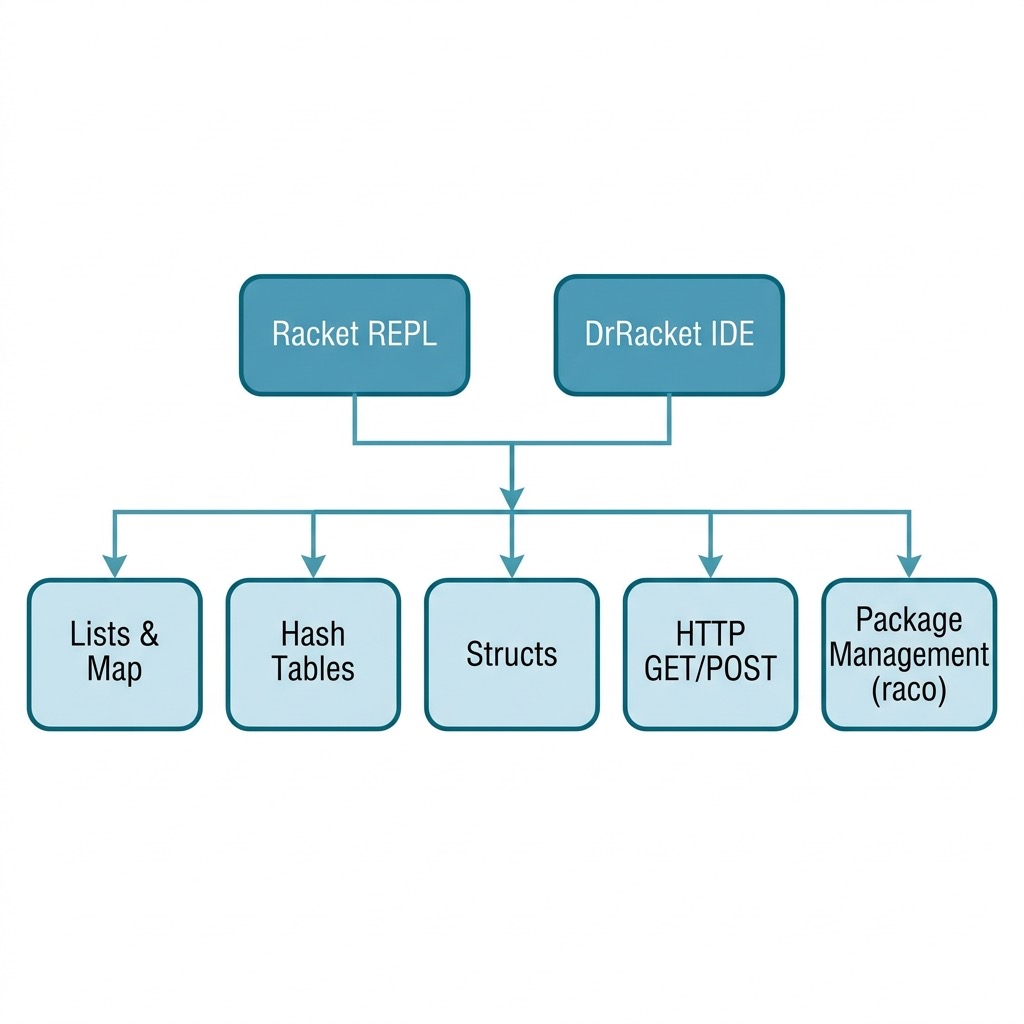
The following diagram shows the key Racket concepts and tools covered in this tutorial chapter:
Tutorial Wrap Up
The rest of this book is comprised of example Racket programs that I have written for my own enjoyment that I hope will also be useful to you, dear reader. Please refer to the https://docs.racket-lang.org/guide/ for more technical detail on effectively using the Racket language and ecosystem.