Datastores
For my personal research projects the only datastores that I often use are the embedded relational database and Resource Description Framework (RDF) datastores that might be local to my laptop or public Knowledge Graphs like DBPedia and WikiData. The use of RDF data and the SPARQL query language is part of the fields of the semantic web and linked data.
Accessing Public RDF Knowledge Graphs - a DBPedia Example
I will not cover RDF data and the SPARQL query language in great detail here. Rather, please reference the following link to read the RDF and SPARQL tutorial data in my Common Lisp book: Loving Common Lisp, or the Savvy Programmer’s Secret Weapon.
In the following Racket code example for accesing data on DBPedia using SPARQL, the primary objective is to interact with DBpedia’s SPARQL endpoint to query information regarding a person based on their name or URI. The code is structured into several functions, each encapsulating a specific aspect of the querying process, thereby promoting modular design and ease of maintenance.
Function Definitions:
-
sparql-dbpedia-for-person: This function takes a
person-urias an argument and constructs a SPARQL query to retrieve the comment and website associated with the person. The@string-appendmacro helps in constructing the SPARQL query string by concatenating the literals and theperson-uriargument. -
sparql-dbpedia-person-uri: Similar to the above function, this function accepts a
person-nameargument and constructs a SPARQL query to fetch the URI and comment of the person from DBpedia. -
sparql-query->hash: This function encapsulates the logic for sending the constructed SPARQL query to the DBpedia endpoint. It takes a
queryargument, encodes it into a URL format, and sends an HTTP request to the DBpedia SPARQL endpoint. The response, expected in JSON format, is then converted to a Racket expression usingstring->jsexpr. - json->listvals: This function is designed to transform the JSON expression obtained from the SPARQL endpoint into a more manageable list of values. It processes the hash data structure, extracting the relevant bindings and converting them into a list format.
-
gd (Data Processing Function): This function processes the data structure obtained from
json->listvals. It defines four inner functionsgg1,gg2,gg3, andgg4, each designed to handle a specific number of variables returned in the SPARQL query result. It uses acasestatement to determine which inner function to call based on the length of the data. -
sparql-dbpedia: This is the entry function which accepts a
sparqlargument, invokessparql-query->hashto execute the SPARQL query, and then callsgdto process the resulting data structure.
Usage Flow:
The typical flow would be to call sparql-dbpedia-person-uri with a person’s name to obtain the person’s URI and comment from DBpedia. Following that, sparql-dbpedia-for-person can be invoked with the obtained URI to fetch more detailed information like websites associated with the person. The results from these queries are then processed through sparql-query->hash, json->listvals, and gd to transform the raw JSON response into a structured list format, making it easier to work with within the Racket environment.
 1 #lang at-exp racket
 2
 3 (provide sparql-dbpedia-person-uri)
 4 (provide sparql-query->hash)
 5 (provide json->listvals)
 6 (provide sparql-dbpedia)
 7
 8 (require net/url)
 9 (require net/uri-codec)
10 (require json)
11 (require racket/pretty)
12
13 (define (sparql-dbpedia-for-person person-uri)
14   @string-append{
15      SELECT
16       (GROUP_CONCAT(DISTINCT ?website; SEPARATOR="  |  ")
17                                    AS ?website) ?comment {
18       OPTIONAL {
19         { @person-uri <http://www.w3.org/2000/01/rdf-schema#comment> ?comment . FILT\
20 ER (lang(?comment) = 'en') }
21         UNION
22         { @person-uri <http://dbpedia.org/ontology/description> ?comment . FILTER (l\
23 ang(?comment) = 'en') }
24       } .
25       OPTIONAL {
26         @person-uri
27         <http://dbpedia.org/ontology/wikiPageExternalLink>
28         ?website
29          . FILTER( !regex(str(?website), "dbpedia", "i"))
30       }
31      } LIMIT 4})
32
33 (define (sparql-dbpedia-person-uri person-name)
34   @string-append{
35     SELECT DISTINCT ?personuri ?comment {
36       ?personuri
37         <http://xmlns.com/foaf/0.1/name>
38         "@person-name"@"@"en .
39       {
40         ?personuri <http://www.w3.org/2000/01/rdf-schema#comment> ?comment .
41         FILTER (lang(?comment) = 'en')
42       } UNION {
43         ?personuri <http://dbpedia.org/ontology/description> ?comment .
44         FILTER (lang(?comment) = 'en')
45       }
46 }})
47
48
49 (define (sparql-query->hash query)
50   (call/input-url
51    (string->url
52     (string-append
53      "https://dbpedia.org/sparql?query="
54      (uri-encode query)))
55    get-pure-port
56    (lambda (port)
57      (string->jsexpr (port->string port)))
58    '("Accept: application/json")))
59
60 (define (json->listvals a-hash)
61   (let* ([head (hash-ref a-hash 'head (hash))]
62          [vars (hash-ref head 'vars '())]
63          [results (hash-ref a-hash 'results (hash))]
64          [bindings (hash-ref results 'bindings '())])
65     (for/list ([var vars])
66       (for/list ([bc bindings])
67         (let* ([var-sym (string->symbol var)]
68                [var-info (hash-ref bc var-sym (hash))]
69                [a-value (hash-ref var-info 'value "")])
70           (list var a-value))))))
71
72 (define (gd data)
73   (let ([jd (json->listvals data)])
74     (define gg1 (lambda (x) (map list (car x))))
75     (define gg2 (lambda (x) (map list (car x) (cadr x))))
76     (define gg3 (lambda (x) (map list (car x) (cadr x) (caddr x))))
77     (define gg4 (lambda (x) (map list (car x) (cadr x) (caddr x) (cadddr x))))
78     (case (length jd)
79       [(1) (gg1 jd)]
80       [(2) (gg2 jd)]
81       [(3) (gg3 jd)]
82       [(4) (gg4 jd)]
83       [else (error "sparql queries with 1 to 4 vars")])))
84
85 (define sparql-dbpedia
86   (lambda (sparql)
87     (gd (sparql-query->hash sparql))))
88
89 ;; (sparql-dbpedia (sparql-dbpedia-person-uri "Steve Jobs"))
Let’s try an example in a Racket REPL:
 1 '((("personuri" "http://dbpedia.org/resource/Steve_Jobs")
 2    ("comment"
 3     "Steven Paul Jobs (February 24, 1955 – October 5, 2011) was an American entrepre\
 4 neur, industrial designer, media proprietor, and investor. He was the co-founder, ch\
 5 airman, and CEO of Apple; the chairman and majority shareholder of Pixar; a member o\
 6 f The Walt Disney Company's board of directors following its acquisition of Pixar; a\
 7 nd the founder, chairman, and CEO of NeXT. He is widely recognized as a pioneer of t\
 8 he personal computer revolution of the 1970s and 1980s, along with his early busines\
 9 s partner and fellow Apple co-founder Steve Wozniak."))
10   (("personuri" "http://dbpedia.org/resource/Steve_Jobs_(film)")
11    ("comment"
12     "Steve Jobs is a 2015 biographical drama film directed by Danny Boyle and writte\
13 n by Aaron Sorkin. A British-American co-production, it was adapted from the 2011 bi\
14 ography by Walter Isaacson and interviews conducted by Sorkin, and covers 14 years (\
15 1984–1998) in the life of Apple Inc. co-founder Steve Jobs. Jobs is portrayed by Mic\
16 hael Fassbender, with Kate Winslet as Joanna Hoffman and Seth Rogen, Katherine Water\
17 ston, Michael Stuhlbarg, and Jeff Daniels in supporting roles."))
18   (("personuri" "http://dbpedia.org/resource/Steve_Jobs_(book)")
19    ("comment"
20     "Steve Jobs is the authorized self-titled biography of American business magnate\
21  and Apple co-founder Steve Jobs. The book was written at the request of Jobs by Wal\
22 ter Isaacson, a former executive at CNN and TIME who has written best-selling biogra\
23 phies of Benjamin Franklin and Albert Einstein. The book was released on October 24,\
24  2011, by Simon & Schuster in the United States, 19 days after Jobs's death. A film \
25 adaptation written by Aaron Sorkin and directed by Danny Boyle, with Michael Fassben\
26 der starring in the title role, was released on October 9, 2015.")))
In practice, I start exploring data on DBPedia using the SPARQL query web app https://dbpedia.org/sparql. I experiment with different SPARQL queries for whatever application I am working on and then embed those queries in my Racket, Common Lisp, Clojure (link to read my Clojure AI book free online), and other programming languages I use.
In addition to using DBPedia I often also use the WikiData public Knowledge Graph and local RDF data stores hosted on my laptop with Apache Jena. I might add examples for these two use cases in future versions of this live eBook.
SQlite
Using SQlite in Racket is simple so we will just look at a single example. We will be using the Racket source file sqlite.rkt in the directory Racket-AI-book/source-code/misc_code for the code snippets in this REPL:
 1 $ racket
 2 Welcome to Racket v8.10 [cs].
 3 > (require db)
 4 > (require sqlite-table)
 5 > (define db-file "test.db")
 6 > (define db (sqlite3-connect #:database db-file #:mode 'create))
 7 > (query-exec db
 8      "create temporary table the_numbers (n integer, d varchar(20))")
 9 > (query-exec db
10      "create  table person (name varchar(30), age integer, email varchar(20))")
11 > (query-exec db
12      "insert into person values ('Mary', 34, 'mary@test.com')")
13 > (query-rows db "select * from person")
14 '(#("Mary" 34 "mary@test.com"))
15 >
Here we see how to interact with a SQLite database using the db and sqlite-table libraries in Racket. The sqlite3-connect function is used to connect to the SQLite database specified by the string value of db-file. The #:mode ‘create keyword argument indicates that a new database should be created if it doesn’t already exist. The database connection object is bound to the identifier db.
The query-exec function call is made to create a permanent table named person with three columns: name of type varchar(30), age of type integer, and email of type varchar(20). The next query-exec function call is made to insert a new row into the person table with the values ‘Mary’, 34, and ‘mary@test.com’. There is a function query that we don’t use here that returns the types of the columns returned by a query. We use the alternative function query-rows that only returns the query results with no type information.
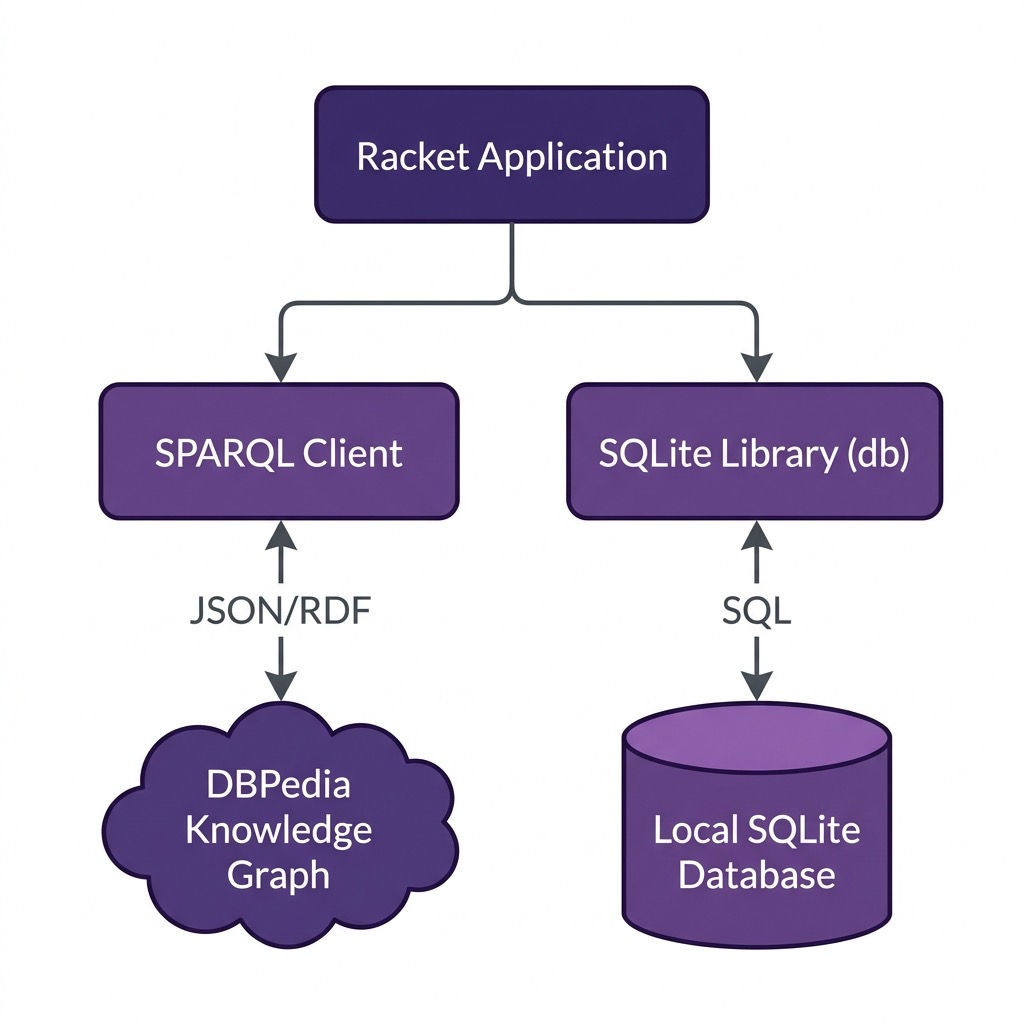
The following diagram shows the high-level architecture of the datastore integrations developed in this chapter:
Optional Practice Problems
- Extend the SQLite Example: Modify the SQLite code to support updating an existing person’s age or email, and writing a query function to retrieve a person by their name.
-
Dynamic SPARQL Variable Handling: The
gdfunction insparql.rktis limited to handling up to 4 return variables. Rewritegdto support an arbitrary number of variables using a general list-zipping function. -
DBpedia Location Search: Write a function
sparql-dbpedia-for-citythat queries DBpedia for a city’s name (e.g., “Paris” or “Tokyo”), returning its URI, country, and population, using SPARQL query templates.